MFP31 - Router Blustream - Free user manual and instructions
Find the device manual for free MFP31 Blustream in PDF.


User questions about MFP31 Blustream
0 question about this device. Answer the ones you know or ask your own.
Ask a new question about this device
Download the instructions for your Router in PDF format for free! Find your manual MFP31 - Blustream and take your electronic device back in hand. On this page are published all the documents necessary for the use of your device. MFP31 by Blustream.
USER MANUAL MFP31 Blustream
text_image
USB-C IN HDMI IN MINI-DP IN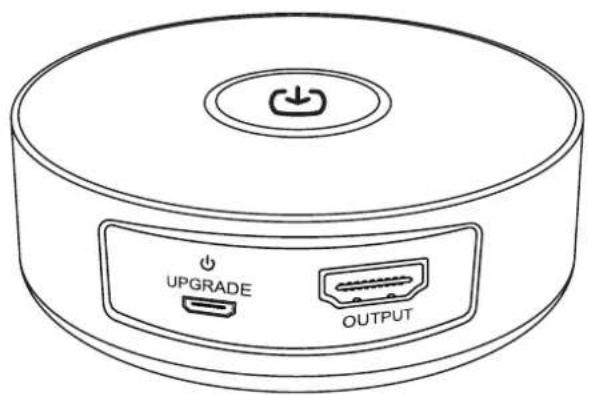
text_image
UPGRADE OUTPUTIntroduction
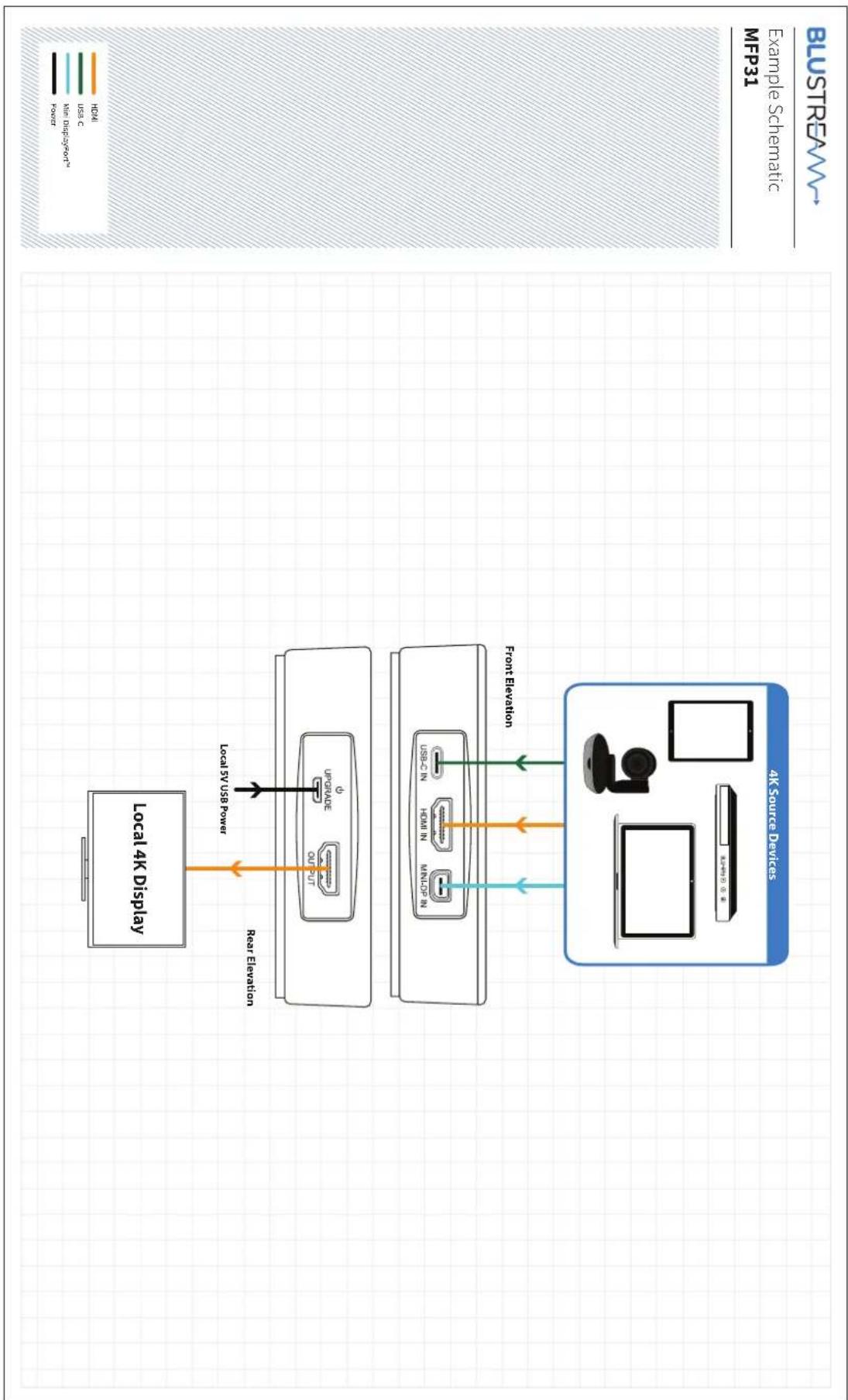
Our MFP31 is a portable multi-format presentation switch, featuring HDMI, Mini DisplayPort™ and USB-C inputs to a single HDMI output, with manual or auto source selection. The MFP31 supports HDMI 2.0 18Gbps specification including pass-through of all formats of HDR and HDMI audio. The MFP31 is an ideal product for your boardroom or huddle-space application.
FEATURES:
- Features 1 x HDMI 2.0, 1 x USB-C and 1 x Mini DisplayPort™ input which can be switched to a single HDMI output
• Supports HDMI 2.0 18Gbps specification including HDR
• Supports resolutions up to 4K UHD 60Hz 4:4:4
• Supports all known HDMI audio formats including Dolby TrueHD, Dolby Atmos, Dolby Digital Plus and DTS-HD Master Audio transmission
• Supports Mini DisplayPort™ up to 4K UHD 60Hz 4:4:4, DP1.2
• Supports USB Type C up to 4K UHD 60Hz 4:4:4, DP1.2
• Supports both manual and automatic source selection - HDCP 2.2 compliant
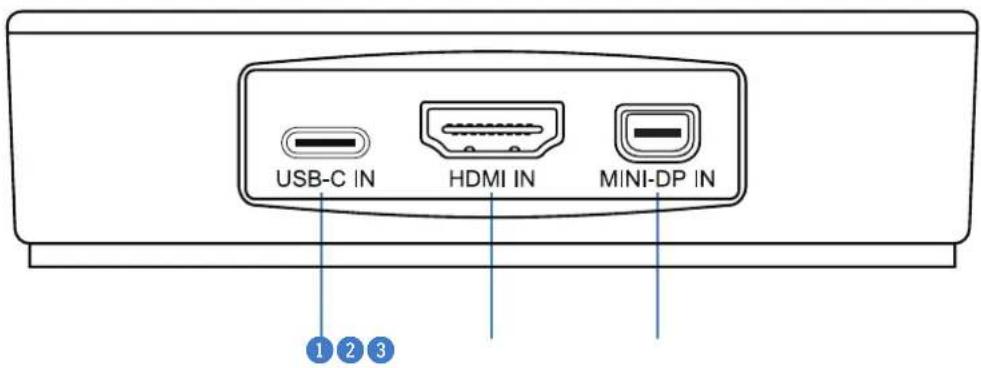
Front Panel Description
text_image
USB-C IN HDMI IN MINI-DP IN 1 2 3USB-C input - connect to a USB-C source device using a cable capable of carrying video
② HDMI 2.0 input - connect to a HDMI source device
3 Mini DisplayPort™ input - connect to a Mini DisplayPort™ source device
Rear Panel Description

text_image
UPGRADE OUTPUT ④ ⑤4 Power / Upgrade port - micro-USB - connect to USB power supply, or PC for firmware upgrade
5 HDMI 2.0 output - connect to display device
Cable Requirements
It is important to carefully consider the cabling requirements for the Blustream MFP31 within your installation.
Distances that video and audio signals can travel will vary depending on the quality and specifications of the cable chosen. It is recommended to use 18Gbps compliant cabling when using the MFP31 to pass UHD video content.
Please Note: charging cables supplied with most UBC-C phones, tablets and laptops are not capable of passing video or audio signals. A cable that is capable of carrying video and audio must be specified. Keep cable distances to a minimum to avoid signal loss, degradation, or handshaking issues.
Input Switching
The MFP31 will auto-switch on connection, or on powering of an already connected source to the unit. Inputs can be manually switched by pressing the source button on the top of the unit. When switching using the manual source selection button, the unit will scroll from the current source to the next available connected source, in the order of the physical input connections:
$$ \text { USB - C } > \text { HDMI } > \text { MINI - DP } > \text { USB - C } > \text { HDMI } \dots $$
The LED ring surrounding the source input button on the top of the unit will be illuminated in blue when connected to a source that is outputting a video / audio stream. When switching, the LED ring will turn red whilst the unit establishes a new connection from the next available source device connected.
To help with identification of the source device or input during switching, the LED ring will blink a number of times to communicate the new source input being passed to the HDMI output:
- 1 Blink - USB-C
- 2 Blinks - HDMI
- 3 Blinks - Mini DisplayPort™
Specifications
• Video Input Connectors: 1 x HDMI Type A, 19-pin, female; 1 x USB-C Type C, female; 1 x Mini DisplayPort™, female
• Video Output Connectors: 1 x HDMI Type A, 19-pin, female
- Local Power Input: 1 x Micro USB, female
• Casing Dimensions (Dia x H): 105mm x 25mm
- Shipping Weight: 0.6kg
• Operating Temperature: 32^ F to 104^ F ( -5^ C to +55^ C)
• Storage Temperature: -4^ F to 140^ F ( -25^ C to +70^ C)
• Power Supply: 5V/1A DC USB
NOTE: Specifications are subject to change without notice. Weights and dimensions are approximate.
Package Contents
MFP31
- 1×MFP31
• 1 x 5V/1A USB Power Supply - 1 x USB to Micro-USB Charging Cable
• 1 x Quick Reference Guide
Acknowledgements
DisplayPort™ and the DisplayPort™ logo are trademarks owned by the Video Electronics Standards Association (VESA®) in the United States and other countries.
flowchart
graph TD
    A["Local 4K Display"] -->|Local 5V USB Power| B["Local 5V USB Power"]
    B -->| rear Elevation| C["Device with 'out' port"]
    B -->| front Elevation| D["Device with 'out' port"]
    C --> E["Device with 'out' port"]
    D --> F["Device with 'out' port"]
    style A fill:#f9f,stroke:#333
    style B fill:#ccf,stroke:#333
    style C fill:#cfc,stroke:#333
    style D fill:#fcc,stroke:#333
    style E fill:#ffc,stroke:#333
    style F fill:#fcc,stroke:#333