PLA88L - Switch Blustream - Free user manual and instructions
Find the device manual for free PLA88L Blustream in PDF.


User questions about PLA88L Blustream
0 question about this device. Answer the ones you know or ask your own.
Ask a new question about this device
Download the instructions for your Switch in PDF format for free! Find your manual PLA88L - Blustream and take your electronic device back in hand. On this page are published all the documents necessary for the use of your device. PLA88L by Blustream.
USER MANUAL PLA88L Blustream
PLATINUM MATRIX SOLUTIONS

text_image
BLUSTREAM~ I/O Port 1 2 3 4 5 6 7 8 9 Link 1 2 3 4 5 6 7 8 I/O Mines Up For Sided Cross EnterPLA88ARC
PLA88L
PLA66ARC
PLA66L
User Manual
Thank you for purchasing this product.
For optimum performance and safety, please read these instructions carefully before connecting, operating or adjusting this product. Please keep this manual for future reference.

Surge protection device recommended
This product contains sensitive electrical components that may be damaged by electrical spikes, surges, electric shock, lightning strikes, etc. Use of surge protection systems is highly recommended in order to protect and extend the life of your equipment.
Safety And Performance Notice
The transmission distances of HDMI over UTP cables are measured using TE CONNECTIVITY 1427071-6
EIA/TIA-568-B termination (T568B) of cables is recommended for optimal performance.
To minimize interference of the un-shielded twisted pairs in the CAT5e/6 cable do not run the HDBaseT / Cat5e/6/6a cabling with or in close parallel proximity to mains power cables.
Do not substitute or use any other power supply other than the enclosed unit, or a Bluestream approved replacement.
Do not disassemble either the Transmitter or Receiver units for any reason. Doing so will void the manufacturer's warranty.
Contents
Introduction 03
Features 03
Panel Descriptions 04
Matrix Cards 05
Matrix Main Com Board 06
Matrix HDBaseT Receiver Options 07
Matrix HDBaseT Transmitter Options 08
EDID Control 09
Infrared (IR) Distribution 10
Infrared (IR) Control 11
Remote Control Description 11
Application Diagram 12
Specifications 13
Package Contents 14
IR Commands 15
RS-232
RS-232 and Telnet Commands 16
Introduction
Our Platinum Range of HDBaseT matrix products offer the very best performance and flexibility for the custom installer. Built on our advanced modular 8x8 chassis, any combination of inputs and outputs can be specified to suit the exact AV distribution needs of the project. Blustream Platinum Matrix include both HDBaseT/HDMI inputs and outputs allowing extension of HDMI signal of up to 100m*. The built-in audio matrix with HDMI/analogue/digital embedding and de-embedding further adds audio distribution capabilities to a feature rich HDMI matrix.
PLATINUM FEATURES:
- 8x HDMI inputs which can be independently routed to 8x HDBaseT/HDMI video outputs (quantity dependent on model)
- 4K video support
• Supports distances of up to 100m* on a single CAT cable - HDBaseT inputs (quantity dependent on model) allowing sources to be located remotely using Blustream HDBaseT transmitters
-
Supports POH (Power Over HDBaseT) to power Blustream transmitters and receivers - no local power supplies required
• LAN serving (Ethernet Switch) with compatible Bluestream receivers -
Integrated audio matrix (24x16 PLA88 models, 18x12 PLA66 models)
• Audio Return Channel (ARC) with compatible Blustream HDBaseT receivers - Analogue audio L/R embedding onto HDMI outputs
- HDMI Audio de-embedding to analogue audio L/R + digital coaxial outputs
- Bi-directional RS-232 and IR from all input and output locations (with compatible Blustream transmitters and receivers)
• Control of Matrix via front panel, IR, RS-232 & TCP/IP
• Advanced EDID management
You can purchase any one of four pre-configured Blustream Platinum Matrix or alternatively specify any combination of inputs and outputs to suit project requirements.
PLA88ARC/PLA66ARC
The PLA88ARC/PLA66ARC are an industry leading 4K 8x8 HDBaseT /HDMI matrix, delivering HDMI, network, Bi-directional IR & RS-232 and PoH (PoE) up to lengths of 100m over a single CAT cable. The PLA88ARC/PLA66ARC feature an embedded audio matrix, simultaneous HDBaseT/HDMI outputs, HDMI audio de-embedding/analogue audio embedding, ARC, RS-232, TCP/IP & IR control and the option of adding Blustream HDBaseT transmitters to integrate remote sources.
PLA88L/PLA66L
Our Platinum Range of HDBaseT matrix products offer the very best in performance and flexibility. The PLA88L/PLA66L are a feature rich 4K 8x8 HDBaseT/HDMI matrix, delivering HDMI, Bi-directional IR and PoH (PoE) up to lengths of 70m over a single CAT cable. The PLA88L/PLA66L also feature an embedded audio matrix, simultaneous HDBaseT/HDMI outputs, HDMI audio de-embedding/analogue audio embedding, RS-232 / IP & IR control and the option of adding Blustream HDBaseT transmitters to integrate remote sources.
Front Panel

text_image
BLUSTREAMV→ 1 2 3 4 5 6 7 8 9 R Power 1 2 3 4 5 6 7 8 All Out Lock 1 2 3 4 5 6 7 8 FTP Select Up Esc Down Enter END 10 11 12 13 14 15 16LCD display – Show the status of input & output selection and EDID info.
2 IR receiver window – Receives IR from a hand held remote control or processor.
3 Power LED indicator - Indicates the power status of the matrix.
4 Power button – Press to toggle power of the matrix on/off
5 HDMI output selection button 1 to 8 – Press to select the output from 1 to 8.
6 All button for HDMI outputs – Press to select all of the outputs from 1 to 8.
7 Menu button – Press to enter EDID setup
8 Up - Press to change up through the adjustable values.
9 ESC - Press to quit EDID set up menu.
10 Lock LED indicator - Indicate the status of the key lock
Lock button – Press to lock the buttons on the front panel (Press and hold for 2 seconds)
12 HDMI input selection button 1 to 8 – Press to select the input from 1 to 8.
13 PTP button-Press to mirror all inputs and outputs (e.g. output 1 to input1, output 2 to input2 and so on).
14 Select – Press to select an EDID parameter to change. Selected segment will blink.
15 Down - Press to change down through the adjustable values
16 Enter – Press to set EDID to specified INPUT or copy EDID from specified OUTPUT to specified INPUT.
Rear Panel
text_image
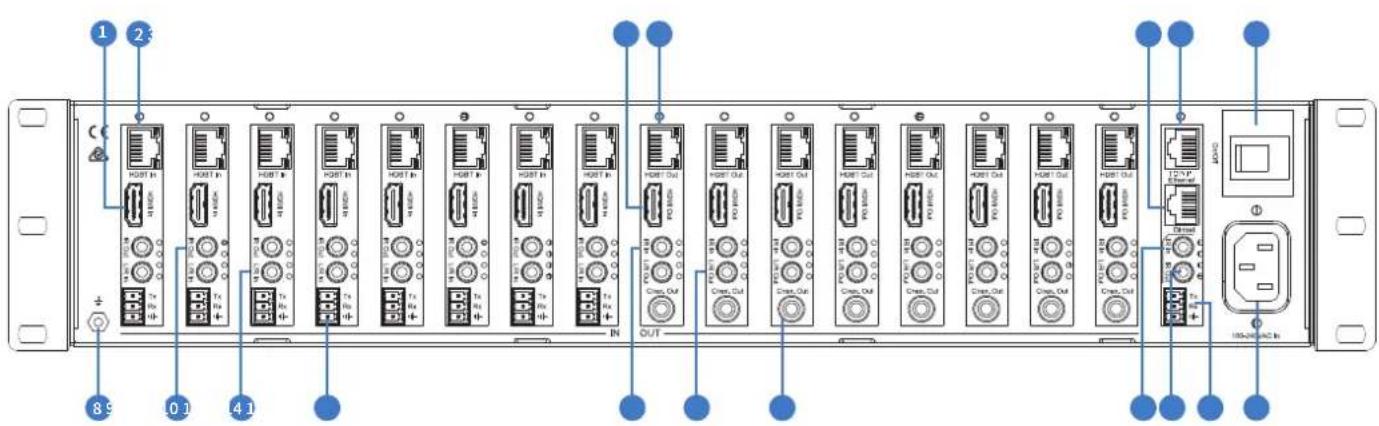
1 2 3 4 5 6 7 8 9 10 11 12 13 14 15 16 17 18 19 20 21 22 23 24 25 26 27 28 29 30 31 32 33 34 35 36 37 38 39 40 41 42 43 44 45 46 47 48 49 50 51 52 53 54 55 56 57 58 59 60 61 62 63 64 65 66 67 68 69 70 71 72 73 74 75 76 77 78 79 80 81 82 83 84 85 86 87 88 89 90 91 92 93 94 95 96 97 98 99 100① HDMI inputs 1 to 8 - Connect HDMI sources
2 HDBT inputs 1 to 8 - Connect remote HDBT transmitter
3 HDMI outputs 1 to 8 - Output for displays.
4 HDBT outputs 1 to 8 – Output for displays.
5 Ethernet-embedded 1x16 Ethernet switch for LAN serving to all connected HDBT transmitters and receivers
6 RJ45 - TCP/IP control
Power switch
8 GND – Ground connection
9 RS232 port – Connect to this port for the control of the matrix from a computer or control processor.
10 L/R stereo inputs 1 to 8 - 3.5mm stereo jack
IR outputs 1 to 8 – 3.5mm mono jack for routed IR emitter outputs for discrete source control.
12 Coaxial Digital outputs 1 to 8 - RCA connector.
⑬ L/R stereo outputs 1 to 8 - 3.5mm stereo jack.
14 IR Inputs 1 to 8 - 3.5mm stereo jack for integration with a control processor.
15 RS232 Port - 1x 3-pin phoenix terminal
16 Global IR Output - 3.5mm mono jack.
Global IR Input - 3.5mm stereo jack.
18 AC power input - 100V-240V input.
Matrix Input Cards
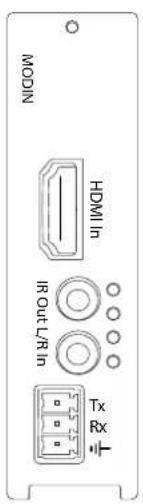
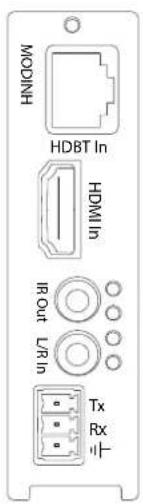
There are two types of input boards that are available to be used with the MOD88 chassis:-
text_image
NICOW HDMI I O C U L R B N Tx RxMODIN
Entry level input board with HDMI connection and Analogue audio input HDMI Input
Analogue Audio L/R 3.5mm Stereo Input RS232 (Phoenix Connector)
IR Output 3.5mm Mono Jack
text_image
MODINH HDBT In HDMI In IR Out L/R In Tx RxMODINH
Premium input board with HDMI and Analogue audio input + additional HDBaseT connection to allow source equipment to be located up to 100m* from the Matrix.
HDBaseT and HDMI inputs are auto signal sensing or can be controlled manually.
HDMI Input
HDBaseT Input (RJ45)
Analogue Audio L/R 3.5mm Stereo Input
RS232 (Phoenix Connector)
IR Output 3.5mm Mono Jack
Matrix Output Cards
There are two types of Output boards that are available to be used with the MOD88 chassis:-

text_image
MODOUTL HDBT Out HDMI Out IR InMODOUTL
Feature rich Video and Audio Output card allowing both HDMI & HDBaseT video play-back concurrently.
Analogue and digital audio can be routed independently of HDMI/HDBaseT outputs. The MODOUTL supports display distances of up to 70m.
HDMI Output
HDBaseT Output (RJ45)
Analogue Audio L/R 3.5mm Stereo Output Coaxial Digital Output (RCA)
Lip-sync Audio Adjustment for Analogue and Digital Audio Outputs
IR Input 3.5mm Mono Jack

text_image
MODOUTARC HDBT Out HDMI Out IR In L/R Out Coax. OutMODOUTARC
Premium Output card with the same features of the MODOUTL but with the additional feature of supporting HDMI ARC (Audio Return Channel). The MODOUTARC also increases display distances up to 100m*
HDMI Output
HDBaseT Output (RJ45)
Analogue Audio L/R 3.5mm Stereo Output
Coaxial Digital Output (RCA)
Support of ARC (Audio Return Channel) from compatible Blustream Receiver
IR Input 3.5mm Mono Jack
Matrix Main Com Board
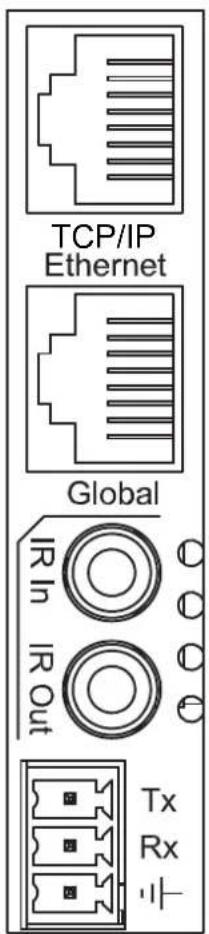
The Matrix main communication board is located on the rear panel and has the following connections:-
text_image
TCP/IP Ethernet Global Rx Rx TxConnections:
A. TCP/IP - For control of Matrix (RJ45 Connector)
B. Ethernet – Matrix includes 1x16 10/100 Ethernet switch (RJ45 Connector)
C. Global IR Input 3.5mm stereo jack
D. Global IR Output 3.5mm mono jack
E. RS232 2-way (Phoenix Connector)
TCP/IP
The Blustream Matrix can be controlled via TCP/IP.
For full list of protocols please see 'Matrix Control Protocols' located at the rear of this manual.
A 'Straight-through' RJ45 patch lead should be used
RS232 2-Way
The Blustream matrix can be controlled via supplied 3-pin Phoenix to 9-pin serial cable
For full list of protocols please see 'Matrix Control Protocols' located at the rear of this manual.
Details of RS232 pin assignment and communication are below:
| MT0808-FAV REMOTE CONTROL CONSOLE | |||
| PIN | Assignment | PIN | Assignment |
| 1 NC | 1 NC | ||
| 2 Tx | 2 Rx | ||
| 3 Rx | 3 Tx | ||
| 4 NC | 4 NC | ||
| 5 GND | 5 GND | ||
| 6 NC | 6 NC | ||
| 7 NC | 7 NC | ||
| 8 NC | 8 NC | ||
| 9 NC | 9 NC | ||
Baud Rate: 57600 bps
Data Bit: 8-bit
Parity: None
Stop Bit: 1-bit
Flow Control: None
Matrix HDBaseT Receiver Options
There are four HDBaseT receiver options that are compatible with the Output cards supplied with the Blustream Matrix:-
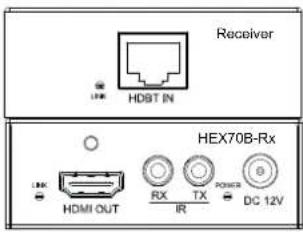
HEX70B-RX
Basic HDBaset Receiver with 2-way IR pass-through. Supports distances up to 70m*. Compatible with all Platinum Blustream Matrix products.
text_image
Receiver HDBT IN HEX70B-Rx HDMI OUT RX TX IR DC 12VHDBaseT input/HDMI output
IR Output 3.5mm mono jack
IR Input 3.5mm stereo jack
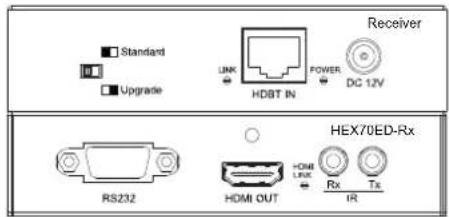
HEX70ED-RX
Mid-Level HDBaseT receiver which has the same features as the HEX70B receiver but with added 2-way RS-232 control. Compatible with all Platinum Blustream Matrix products.
text_image
Standard Upgrade HDBT IN POWER DC 12V Receiver RS232 HEX70ED-Rx HDMI OUT RX Tx IRHDBaseT input/HDMI output
2-way RS232 (9-pin serial)
IR Output 3.5mm mono jack
IR Input 3.5mm stereo jack
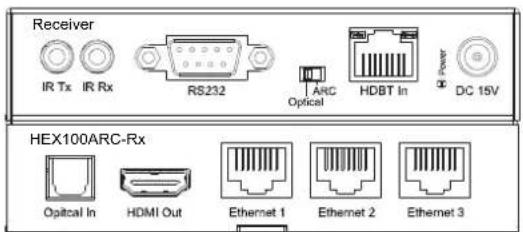
HEX100ARC-RX
Premium HDBaseT receiver which features 2-way IR & RS232, HDMI ARC (when used with associated MODOUTARC Matrix output card) and display distances up to 100m*. Only compatible with PLA88ARC and PLA66ARC Blustream Matrix products.
text_image
Receiver IR Tx IR Rx RS232 ARC Optical HDBT In DC 15V HEX100ARC-Rx Optical In HDMI Out Ethernet 1 Ethernet 2 Ethernet 3HDBaseT input/HDMI Output
Optical Audio input (Toslink)
2-way RS232 (9-pin serial)
IR Output 3.5mm Mono Jack
IR Input 3.5mm Mono Jack
3x 10/100 Ethernet connections (RJ45)
RX70AMP
The RX70AMP is a combination of HDBaseT receiver and Class D digital audio amplifier (30W per channel). The unit has local HDMI and Analogue audio inputs as well as supporting HDMI ARC (audio Return Channel) with compatible products. Should you wish to use alternate power amplification the unit has variable analogue outputs. Control of the unit is possible via front panel or by bi-directional RS232 or IR control. Supports distances up to 70m. Compatible with all Platinum Blustream Matrix products.

text_image
RXTXAMF USB Drive Standard USB USB USB USB USB USB USB USB USB USB USB USB USB USB USB USB USB USB USB USB USB USB USB USB USB USB USB USB USB USB USB USB USB USB USB USB USB USB USB USB USB USB USB USB USB USB USB USB USB USB US1.0000000000000000000000000000000000000000000000000000000000000000000000000000000000000000000000000000HDBaseT input/HDMI output
HDMI Local input for connection of local source
2.1 Stereo audio output @ 30W per channel (capable of drive 4, 6 & 8 Ohm speakers) & analogue Subwoofer output (RCA)
Variable analogue line level outputs (RCA)
Digital Coaxial S/PDIF output
Local analogue L/R audio input 3.5mm Stereo Jack
2-way RS232 (9-pin serial)
IR Output 3.5mm mono Jack
IR Input 3.5mm stereo Jack
Built-in IR receiver on front panel of unit
Matrix HDBaseT Transmitter Options
When it is a requirement that source equipment is to be located away from the central Blustream Matrix there are two Blustream HDBaseT Transmitters that that can be partnered with the MODINH Input board and allow hardware to be located at distances up to 100m ^* ;-
HEX70B-TX
Basic HDBaset Transmitter with 2-way IR pass-through. Supports distances up to 70m.

text_image
Transmitter HDBT OUT HEX70B-Tx HDMI IN RX TX POWER DC 12VHDMI input/HDBaseT output
IR output 3.5mm mono jack
IR input 3.5mm stereo jack
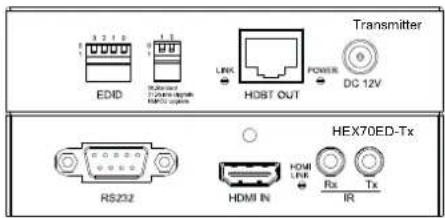
HEX70ED - TX
HDBaseT Transmitter which features 2-way IR & RS232 and distances up to 70m.
text_image
EDID 3 2 1 0 0 1 2 Multi-Channel HDMI outputs LINK HDBT OUT POWER DC 12V Transmitter RS232 HDMI IN RX Tx IR HEX70ED-TxHDBaseT input/HDMI output
2-way RS232 (9-pin serial)
IR output 3.5mm mono jack
IR input 3.5mm stereo jack
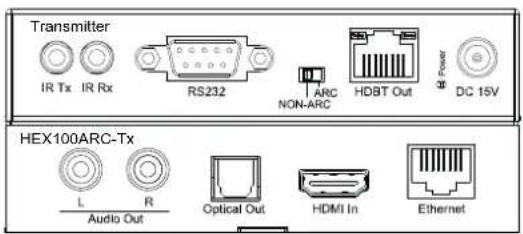
HEX100ARC - TX
Premium HDBaseT Transmitter which features 2-way IR & RS232 and distances up to 100m.
text_image
Transmitter IR Tx IR Rx RS232 ARC NON-ARC HDBT Out Power DC 15V HEX100ARC-Tx L R Audio Out Optical Out HDMI In EthernetHDMI input/HDBaseT output
2-way RS232 (9-pin serial)
IR output 3.5mm mono Jack
IR input 3.5mm stereo jack
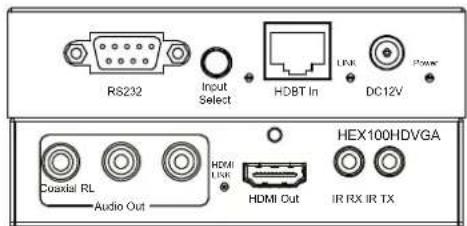
HEX100HDVGA - TX
Premium HDBaseT Transmitter which features selectable HDMI or VGA+ audio inputs and 2-way IR & RS232. Supports distances up to 100m.
text_image
RS232 Input Select HDBT In Link DC12V Power Coaxial RL Audio Out HEX100HDVGA HDMI LNK HDMI Out IR RX IR TXHDMI & VGA+ audio input/ HDBaseT output
2-way RS232 (9-pin serial)
IR output 3.5mm mono jack
IR input 3.5mm stereo jack
EDID Control
EDID (Extended Display Identification Data) is a data structure that is used between a display and a source. This data is used by the source to find out what audio and video resolutions are supported by the display then from this information the source will determine what the best audio and video resolutions need to be outputted.
While the objective of EDID is to make connecting a digital display to a source a simple plug and play procedure issues do arise when multiple displays or video matrix switching is introduced because of the increased number of variables.
By pre-determining the video resolution and audio format of the source and display device you can reduce the time need for EDID hand shaking thus making switching quicker and more reliable. Settings for EDID Video and Audio resolutions can be found on the right.
| 32 | 10 | ||
| Combination of DIP positions | EDID TYPE | ||
| 00 | 00 | Copy EDID from output1 | |
| 00 | 01 | 1080P 2.0CH | |
| 00 | 10 | 1080P 5.1CH | |
| 00 | 11 | 1080P 7.1CH | |
| 01 | 00 | 1080i 2.0CH | |
| 01 | 01 | 1080i 5.1CH | |
| 01 | 10 | 1080i 7.1CH | |
| 01 | 11 | 3D 2.0CH | |
| 10 | 00 | 3D 5.1CH | |
| 10 | 01 | 3D 7.1CH | |
| 10 | 10 | 4K 2.0CH | |
| 10 | 11 | 4K 5.1CH | |
| 11 | 00 | 4K 7.1CH | |
| 11 | 01 | DVI 1280x1024 | |
| 11 | 10 | DVI 1920x1080 | |
| 11 | 11 | DVI 1920x1200 | |
Configuration of Matrix EDID settings can be achieved in one of three ways:-
1 Via Matrix PC Software (See 'Platinum Matrix Software Guide' for further details)
2 Via Matrix Front Panel Buttons
a. Press MENU button
b. Panel will display 'EDID settings. Press SELECT button
c. Select the input you wish to fix the EDID on or select 'All'. Use UP/DOWN buttons to toggle selection and SELECT button to confirm
d. Select video resolution required (4K, 1080p, 3D etc). Use UP/DOWN buttons to toggle selection and SELECT button to confirm
e. Select audio format required (2.0, 5.1, 7.1). Use UP/DOWN buttons to toggle selection and SELECT button to confirm
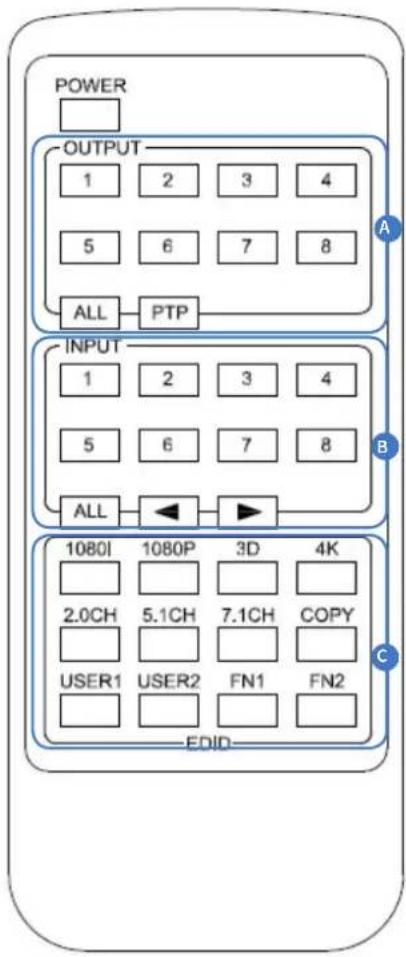
3 Via Supplied Matrix IR Remote Control
a. Fixed EDID to INPUT / ALL INPUTS:
To select video resolution - Press 1080I/1080P/3D/4K
To select Audio resolution - Press 2.0CH/5.1CH/7.1CH
To assign settings to individual input/all inputs – Press INPUT /ALL button in 'ZONE INPUT' area of remote control
b. Copy EDID of any specific OUTPUT to any assigned INPUT or ALL INPUTS:
Press COPY button
Press OUTPUT zone button you wish to copy EDID from
Press INPUT zone button /ALL button to copy EDID to
c. User defined EDID to any INPUT or ALL INPUTS:
Press USER1/USER2 button
Press selected INPUT or ALL button to assign EDID
flowchart
graph TD
    subgraph Power
        A["POWER"] --> B["OUTPUT"]
        B --> C["1"]
        B --> D["2"]
        B --> E["3"]
        B --> F["4"]
        B --> G["5"]
        B --> H["6"]
        B --> I["7"]
        B --> J["8"]
        B --> K["ALL"]
        K --> L["PTP"]
    end
    subgraph INPUT
        M["INPUT"] --> N["1"]
        M --> O["2"]
        M --> P["3"]
        M --> Q["4"]
        M --> R["5"]
        M --> S["6"]
        M --> T["7"]
        M --> U["8"]
        M --> V["ALL"]
        V --> W["◀"]
        W --> X["▶"]
    end
    subgraph EDID
        Y["1080I"] --> Z["1080P"]
        Z --> AA["3D"]
        AA --> AB["4K"]
        Z --> AC["2.0CH"]
        Z --> AD["5.1CH"]
        Z --> AE["7.1CH"]
        Z --> AF["COPY"]
        Z --> AG["USER1"]
        Z --> AH["USER2"]
        Z --> AI["FN1"]
        Z --> AJ["FN2"]
    end
    style Power fill:#f9f,stroke:#333
    style INPUT fill:#ccf,stroke:#333
    style EDID fill:#cfc,stroke:#333
Infrared (IR) Distribution
The Blustream Platinum range of matrix products include multiple options for control and routing of IR. As default setting IR is globally routed meaning that ALL IR inputs are routed to ALL IR outputs on both Matrix and HDBaseT Receivers and Transmitters.
Blustream Infrared products are all 5V and NOT compatible with alternate manufacturers Infrared solutions.
Each Blustream Matrix and HDBaseT receiver is supplied with all necessary IR hardware required and includes:
IR Emitter
Blustream IR Emitter designed for discrete IR control of hardware
text_image
3-IR 3.5-3.5Infrared 3.5mm Pin-Out
IR Emitter - Mono 3.5mm

text_image
Signal GroundIR Receiver
Blustream IR receiver to receive IR signal and pass-through Blustream products

text_image
3-IR 3.5-3.5IR Receiver - Stereo 3.5mm
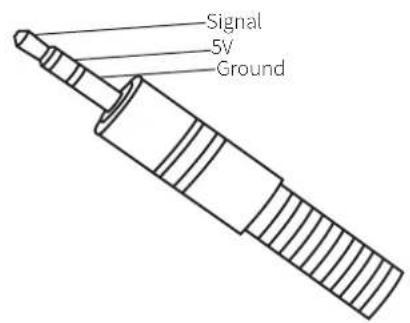
text_image
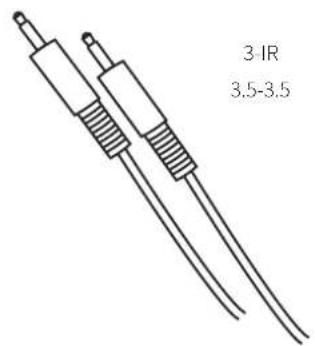
Signal 5V GroundIR Control Cable
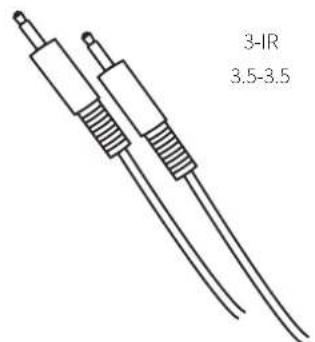
Blustream IR Control cable 3.5mm-3.5mm for linking third party control solutions to Blustream products.
Will work with 12v IR third party products.
Note: Cable is directional as indicated
text_image
3-IR 3.5-3.5Infrared (IR) Control
The Blustream Platinum matrix units are supplied with IR Remote Control for source selection and general setup. As well as controlling matrix solutions using the original Blustream remote the Blustream products can be controlled using the original Infrared RC5 codes shown at the rear of this manual.
Remote Control Description
flowchart
graph TD
    subgraph Power
        A["POWER"] --> B["OUTPUT"]
        B --> C["1"]
        B --> D["2"]
        B --> E["3"]
        B --> F["4"]
        B --> G["5"]
        B --> H["6"]
        B --> I["7"]
        B --> J["8"]
        B --> K["ALL"]
        K --> L["PTP"]
    end

    subgraph INPUT
        M["INPUT"] --> N["1"]
        M --> O["2"]
        M --> P["3"]
        M --> Q["4"]
        M --> R["5"]
        M --> S["6"]
        M --> T["7"]
        M --> U["8"]
        M --> V["ALL"]
        V --> W["◀"]
        W --> X["▶"]
    end

    subgraph EDID
        Y["1080I"] --> Z["1080P"]
        Z --> AA["3D"]
        Z --> AB["4K"]
        Z --> AC["2.0CH"]
        Z --> AD["5.1CH"]
        Z --> AE["7.1CH"]
        Z --> AF["COPY"]
        Z --> AG["USER1"]
        Z --> AH["USER2"]
        Z --> AI["FN1"]
        Z --> AJ["FN2"]
    end
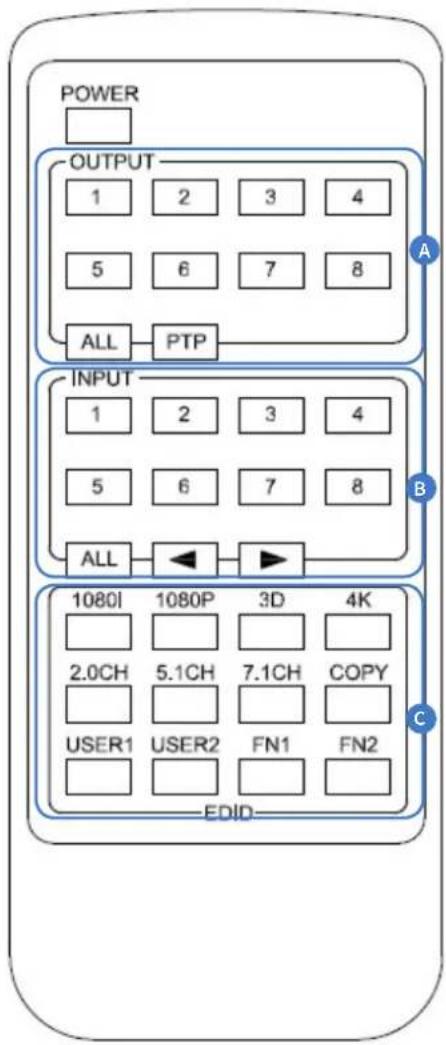
OUTPUT AND INPUT SELECTION
A Select the zone OUTPUT you wish to change the source on (Numbers 1-8 correspond to the zone outputs 1-8).
B Select the source INPUT you wish to change on the selected zone to (Numbers 1-8 corresponds to the source inputs 1-8)
C Press PTP button If you wish to instantly mirror all inputs and outputs (Example - Input 1 to output 1, input 2 to output 2 etc).
EDID Configuration
Fixed EDID to INPUT / ALL INPUTS: To select video resolution - Press 1080I/1080P/3D/4K To select Audio resolution - Press 2.0CH/5.1CH/7.1CH To assign settings to individual input/all inputs - Press INPUT /ALL button in 'ZONE INPUT' area of remote control
Copy EDID of any specific OUTPUT to any assigned INPUT or ALL INPUTS: Press COPY button
Press OUTPUT zone button you wish to copy EDID from Press INPUT zone button /ALL button to copy EDID to
User defined EDID to any INPUT or ALL INPUTS: Press USER1/USER2 button Press selected INPUT or ALL button to assign EDID
flowchart
graph TD
    A["Control Processor"] --> B["Display Unit"]
    B --> C["Home Computer"]
    C --> D["UP To 8 Sources"]
    D --> E["Display Unit"]
    E --> F["Home Computer"]
    F --> G["UP To 100m Max"]
    G --> H["Display Unit"]
    H --> I["Home Computer"]
    I --> J["UP To 8 Sources"]
    J --> K["Display Unit"]
    K --> L["Home Computer"]
    L --> M["UP To 8 Sources"]
    M --> N["Display Unit"]
    N --> O["Home Computer"]
    O --> P["UP To 8 Sources"]
    P --> Q["Display Unit"]
    Q --> R["Home Computer"]
    R --> S["UP To 8 Sources"]
    S --> T["Display Unit"]
    T --> U["Home Computer"]
    U --> V["UP To 8 Sources"]
    V --> W["Display Unit"]
    W --> X["Home Computer"]
    X --> Y["UP To 8 Sources"]
    Y --> Z["Display Unit"]
    Z --> AA["Home Computer"]
    AA --> AB["UP To 8 Sources"]
    AB --> AC["Display Unit"]
    AC --> AD["Home Computer"]
    AD --> AE["UP To 8 Sources"]
    AE --> AF["Display Unit"]
    AF --> AG["Home Computer"]
    AG --> AH["UP To 8 Sources"]
    AH --> AI["Display Unit"]
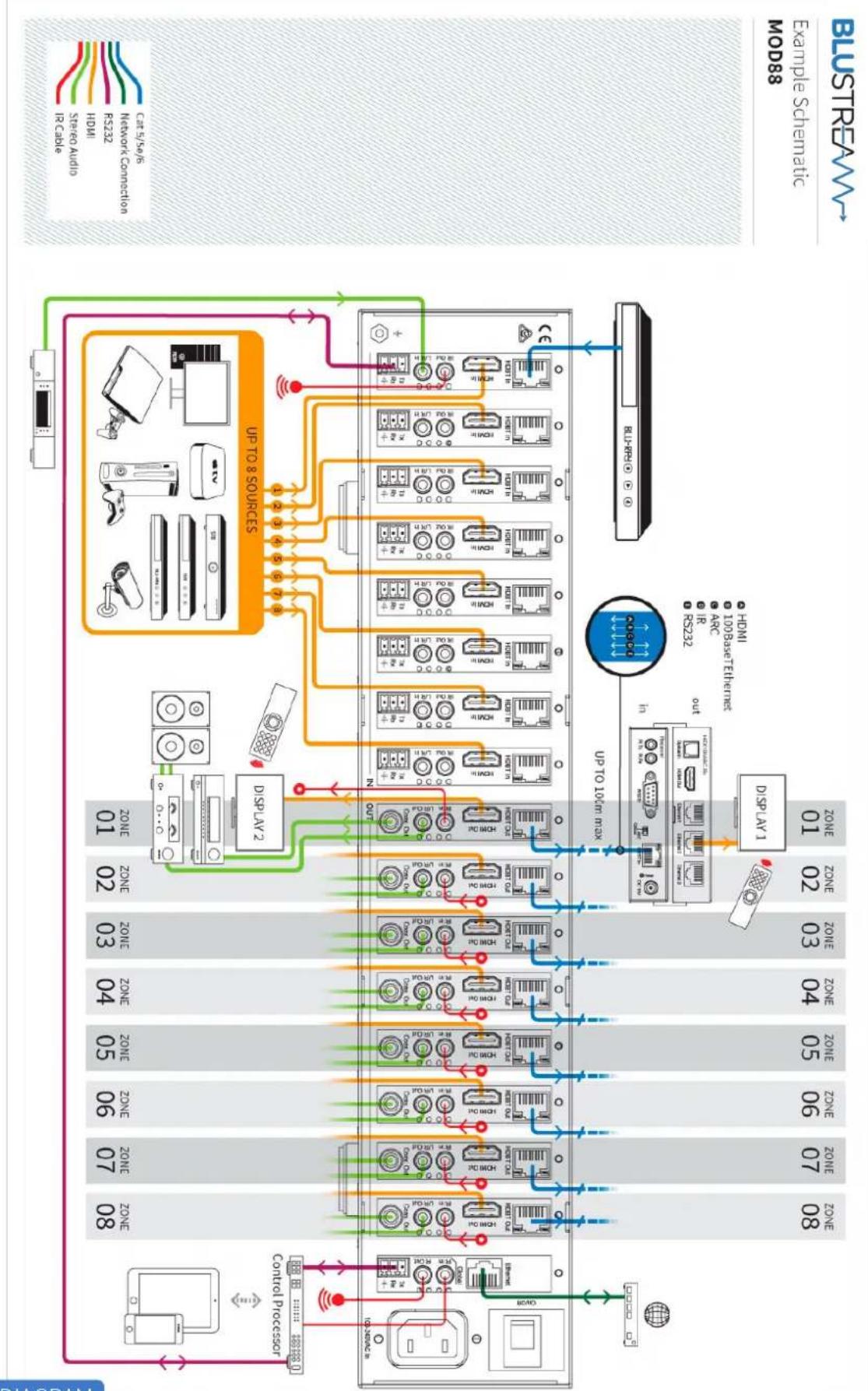
CONNECTION DIAGRAM
Specifications
Bandwidth:
10.2Gbps
Video Input Connections:
8x HDMI Type A, 8x RJ-45 HDBaseT
Video Output Connections
8x HDMI Type A, 8x RJ-45 HDBaseT
Audio Input Connectors:
8x 3.5mm analogue stereo jack
Audio Output Connectors:
8x 3.5mm analogue stereo jack, 8x RCA (SPDIF) digital
Ethernet Input:
1x RJ-45
RS-232 serial port:
9x 3-pin phoenix terminal connector
TCP/IP Control:
1x RJ-45
IR Input ports:
9x 3.5mm stereo jack
IR Output ports:
9x 3.5mm mono jack
Rack-Mountable:
2 U rack height, rack ears included
Casing dimensions (W x H x D):
440mm x 87mm x 361mm, without feet
Dimensions inc. connections (W x H x D):
440mm x 87mm x 369mm, without feet
Shipping Weight:
8.8Kg
Operating Temperature:
32^ to 104^ ( 0^ to 40^)
Storage Temperature :
-4°F to 140°F (-20°C to 60°C)
Power Supply:
100V-240V
NOTE: Specifications are subject to change without notice. Weight details are approximate and will alter per model.
Maintenance
Clean this unit with a soft, dry cloth. Never use alcohol, paint thinner or benzene to clean this unit.
Package Contents:
PLA88L Matrix
- 1x PLA88L
- 1x AC power cable
- 1x Remote control
- 9x IR emitter
- 9x IR receiver
• 9x IR 3.5-3.5mm interface cable - 2x Serial cable – 9-pin DE9 to 3-pin phoenix connector
- 1x Rack mounting kit
PLA88ARC Matrix
- 1x PLA88ARC
- 1x AC power cable
- 1x Remote control
- 9x IR emitter
- 9x IR receiver.
• 9x IR 3.5-3.5mm interface cable - 2x Serial cable – 9-pin DE9 to 3-pin phoenix connector
- 1x Rack mounting kit
PLA66L Matrix
- 1x PLA88L
- 1x AC power cable
- 1x Remote control
- 7x IR emitter
- 7x IR receiver
- 7x IR 3.5-3.5mm Interface cable
- 2x Serial cable – 9-pin DE9 to 3-pin phoenix connector
- 1x Rack mounting kit
PLA66ARC Matrix
- 1x PLA88ARC
- 1x AC power cable
- 1x Remote control
- 7x IR transmitter,
- 7x IR receiver.
- 7x IR 3.5-3.5mm interface cable
- 2x Serial cable – 9-pin DE9 to 3-pin phoenix connector
- 1x Rack mounting kit
Database of IR commands
| Command | NECNEC Codeset: 1898 |
| Power On/Off 14 | |
| Input 1 50 | |
| Input 2 55 | |
| Input 3 48 | |
| Input 4 4A | |
| All On 5E | |
| All Off 06 | |
| Optical On 05 | |
| Optical Off 03 | |
| Coaxial On 47 | |
| Coaxial Off 07 | |
| Analogue On 40 | |
| Analogue Off 02 |
RS232 and Telnet Commands
| NO. COMAND ACTION | ||
| 1 ? Print Help Information | ||
| 2 HELP Print Help Information | ||
| 3 STATUS Print System Status And Port Status | ||
| 4 PON Power On, System Run On Normal State | ||
| 5 POFF | Power Off, System Run On Power Save State | |
| 6 IR ON/OFF Set System IR Control On Or Off | ||
| 7 KEY ON/OFF Set System KEY Control On Or Off | ||
| 8 APM ON/OFF Set Advanced Process Mode On Or Off | ||
| 9 BEEP ON/OFF Set Onboard Beep On Or Off | ||
| 10 | RESET | Reset System To Default Setting (Should Type “Yes” To Confirm, “No” To Discard) |
| 11 | MXIR xx FR yy Output Port IR:xx From Local IR:yy | xx=[00]: All Output IR, [01...08]: Output IR yy=[01...08] Local IR |
| 12 | MXIR GI (+-)xx Global IR_IN Signal To Input/Output IR:xx | xx=[01...08]: Input IR, [09...16]: Local IR xx=[17...24]: Output IR +: Add xx To Current Setting -: Remove xx From Current Setting |
| 13 | MXIR GO (+-)xx Global IR_OUT Signal From Input/Output IR:xx | xx=[01...08]: Input IR, [09...16]: Local IR xx=[17...24]: Output IR, [25]: Global IR In +: Add xx To Current Setting -: Remove xx From Current Setting |
| 14 | MXUART xx TO yy Local UART:xx Con-nect To Input/Output UART:yy | xx=[01...08]: Local UART, [09]: Global UART yy=[00]: Disconnect With Any Uart yy=[01...08]: Input UART, [09...16]: Output UART |
| 15 | MXSTA | Print Matrix IR And UART Connect State |
| 16 | AUD TX xx STE yy | Output Port:xx Audio From Input Port:yy Stereo |
| NO. COMAND ACTION | ||
| 17 | AUD TX xx EXT yy | Output Port:xx Audio From Input Port:yy Extract |
| 18 | AUD TX xx ARC tt | Output Port:xx Audio From Output Port:tt ARC |
| 19 | AUD TX xx FOSTE | Output Port:xx Audio From Select Video Input Stereo |
| 20 | AUD TX xx FOEXT | Output Port:xx Audio From Select Video Extract |
| 21 | AUD TX xx DL ss | Set AUDIO:xx Delay zz ms |
| 22 | AUD STA | Print Input/Output Port Audio Setting State xx=[00]: All Output Audio, [01...08]: Output Audio yy=[01...08]: Input Port Audio tt=[01...08]: Output ARC Audio zz=00 ~ 500ms Delay, 50ms per Step |
| 23 | AUD RX xx BPS | Input Port:xx Bypass Receive HDMI/DVI Signal |
| 24 | AUD RX xx STE | Input Port:xx Insert Stereo To HDMI/DVI Signal |
| 25 | AUD RX xx AUTO | Input Port:xx Insert Stereo To DVI Signal Only xx==[00]: All Input Port, [01...08]: Input Port |
| 26 | IN xx FO yy | INPUT:xx Force Select Source:yy, Stop Auto |
| 27 | IN xx AU yy | INPUT:xx Auto Detect Source, Source:yy High Priority xx=[00]: All INPUT Port, [01...08]: INPUT Port yy=[01]: HDMI, [02]: HDBT |
| 28 | OUT xx ON/OFF | Set OUTPUT:xx On Or Off |
| 29 | OUT xx FR yy | Set OUTPUT:xx From INPUT:yy |
| 30 | OUT xx EH/ET | Set OUTPUT:xx Use HDMI/HDBT EDID xx=[00]: All OUTPUT Port, [01...08]: OUTPUT Port yy=[01...08]: INPUT Port |