OPT41AU - Switch Blustream - Free user manual and instructions
Find the device manual for free OPT41AU Blustream in PDF.


| Product Type | 4-Way Optical Audio Switch with built-in DAC |
| Brand | Blustream |
| Model | OPT41AU |
| Audio Inputs | 4x Optical (Toslink) |
| Audio Outputs | 1x Optical, 1x Coaxial, 1x Analogue L/R (3.5mm stereo jack) |
| Supported Audio Formats | LPCM, DTS, Dolby Digital, Dolby Digital Plus (digital passthrough) |
| Sampling Rates | 32 kHz, 44.1 kHz, 48 kHz, 96 kHz, 192 kHz |
| Bit Depth | Up to 24-bit |
| DAC Conversion | Converts selected optical PCM to analogue L/R |
| Control Methods | Front panel button (Select) and IR remote control |
| Remote Control | Includes IR remote (OPT41-REMOTE) with direct input selection and output On/Off |
| IR Extension | External IR input (3.5mm) for extension with optional Blustream receiver |
| Power Supply | 5V/1A DC adaptor (included) |
| Dimensions (Casing) | 137mm x 24mm x 68mm (W x H x D) |
| Dimensions (with connectors) | 137mm x 24mm x 79mm |
| Shipping Weight | 0.5 kg |
| Operating Temperature | 32°F to 104°F (0°C to 40°C) |
| Storage Temperature | -4°F to 140°F (-20°C to 60°C) |
| Certifications | FCC Class B, ICES-003 |
| Package Contents | 1x OPT41AU, 1x Remote, 1x DC power supply, 1x Mounting kit |
| Maintenance | Clean with soft, dry cloth; do not use alcohol, paint thinner, or benzene |
| Surge Protection | Recommended to protect sensitive electronics |
Frequently Asked Questions - OPT41AU Blustream
User questions about OPT41AU Blustream
0 question about this device. Answer the ones you know or ask your own.
Ask a new question about this device
Download the instructions for your Switch in PDF format for free! Find your manual OPT41AU - Blustream and take your electronic device back in hand. On this page are published all the documents necessary for the use of your device. OPT41AU by Blustream.
USER MANUAL OPT41AU Blustream
Thank you for purchasing this product.
For optimum performance and safety, please read these instructions carefully before connecting, operating or adjusting this product. Please keep this manual for future reference.

Surge protection device recommended
This product contains sensitive electrical components that may be damaged by electrical spikes, surges, electric shock, lightning strikes, etc. Use of surge protection systems is highly recommended in order to protect and extend the life of your equipment.
Contents
Introduction 03
Features 03
Panel Descriptions 04
Specifications 05
Package Contents 05
Maintenance 05
Introduction
Our OPT41AU is an advanced 4-Way optical audio switch, perfect for the integration of multiple audio sources with a soundbar. The OPT41AU also has a built in DAC (Digital to Analogue Audio Converter) and simultaneous digital and analogue stereo audio outputs. The OPT41AU supports 192kHz sample rates and up to 24-bit resolution for enhanced sound reproduction.
FEATURES:
• 4x Optical digital Toslink inputs
• Built-in DAC which converts selected optical PCM audio input to analogue L/R audio output
- Built in digital audio converter which converts selected optical audio input to coaxial digital output
- Outputs optical digital, coaxial digital and analogue L/R outputs at the same time
• Each audio output can be turned On/Off using supplied IR remote control
• Supports sample rates 32 kHz, 44.1 kHz, 48 kHz, 96 kHz and 192 kHz up to 24-bit resolution
• Supports LPCM, DTS, Dolby Digital and Dolby Digital Plus when used as straight digital in/digital out switcher
• Ultra low jitter and high fidelity design
- Input selection button on front panel to toggle between 4x optical audio inputs
- IR receiver on front panel to switch between optical audio inputs and turn On/Off each individual audio output using supplied IR remote control
- External IR input can be used to extend IR with optional Blustream 5v IR receiver/cable
- Small compact size
Front Panel
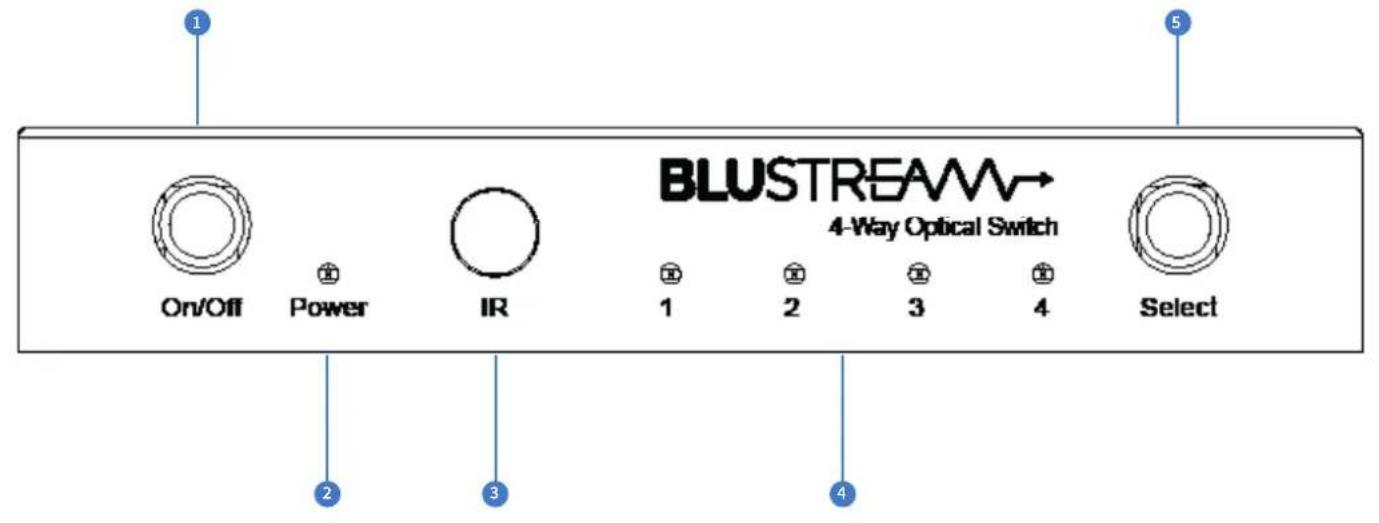
Power On/Off button
2 Power LED indicator – Displays the status of the power of the unit
3 IR receiver window
4 Input LED indicator – Displays the Optical input currently active.
5 Select button – press to toggle between Optical inputs
Back Panel
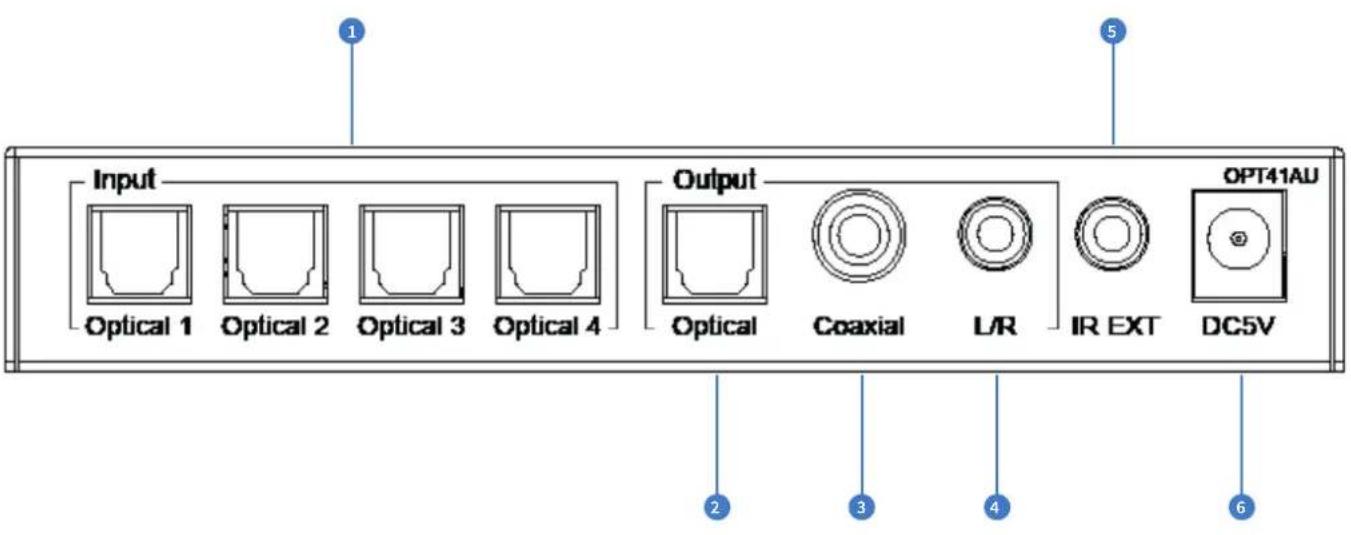
Optical digital inputs x4
2 Optical digital output
3 Coaxial digital output - Converted from selected Optical digital input)
4 Analogue audio Left/Right output (3.5mm stereo jack) – Converted from selected Optical digital input (DAC)
5 External IR input -
6 Power port – Use supplied 5V/1A DC adaptor to power switcher
OPT41AU - Remote Control
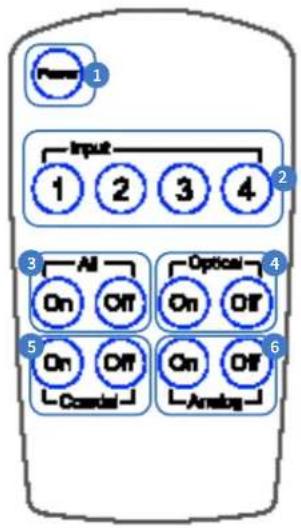
1 Power On/Off button
2 Direct input selection buttons
3 All outputs On/Off (Optical, Coaxial and Analogue)
4 Optical output On/Off
5 Coaxial output On/Off
6 Analogue output On/Off (DAC)
Database of IR commands
| Command | NECNEC Codeset: 1898 |
| Power On/Off 14 | |
| Input 1 50 | |
| Input 2 55 | |
| Input 3 48 | |
| Input 4 4A | |
| All On 5E | |
| All Off 06 | |
| Optical On 05 | |
| Optical Off 03 | |
| Coaxial On 47 | |
| Coaxial Off 07 | |
| Analogue On 40 | |
| Analogue Off 02 |
* Please see Blustream website for full IR database and alternate code formats
Specifications
Audio Input Connectors: 4x SPDIF Optical audio
Output Connectors: 1x SPDIF Optical audio, 1x Coaxial digital & 1x analogue audio L/R (3.5mm stereo Jack)
IR Input Ports: 1x 3.5mm stereo Jack
Casing Dimensions (W x H x D): 137mm x 24mm x 68mm
Dimensions including connections (W x H x D): 137mm x 24mm x 79mm
Shipping Weight: 0.5kg
Operating Temperature: 32°F to 104°F (0°C to 40°C)
Storage Temperature: -4°F to 140°F (-20°C to 60°C)
Power Supply: 5V/1A DC
Package Contents:
- 1xOPT41AU
- 1x OPT41-REMOTE
- 1 x 5V/1A DC power supply
- 1x Mounting kit
Maintenance:
Clean this unit with a soft, dry cloth. Never use alcohol, paint thinner or benzene to clean this unit.
Certifications
FCC NOTICE
This equipment has been tested and found to comply with the limits for a Class B digital device, pursuant to part 15 of the FCC Rules. These limits are designed to provide reasonable protection against harmful interference in a residential installation. This equipment generates, uses, and can radiate radio frequency energy and, if not installed and used in accordance with the instructions, may cause harmful interference to radio communications. However, there is no guarantee that interference will not occur in a particular installation. If this equipment does cause harmful interference to radio or television reception, which can be determined by turning the equipment off and on, the user is encouraged to try to correct the interference by one or more of the following measures:
- Reorient or relocate the receiving antenna.
- Increase the separation between the equipment and receiver.
- Connect the equipment into an outlet on a circuit different from that to which the receiver is connected.
- Consult the dealer or an experienced radio/TV technician for help.
CAUTION - changes or modifications not expressly approved by the party responsible for compliance could void the user's authority to operate the equipment.
CANADA, INDUSTRY CANADA (IC) NOTICES
This Class B digital apparatus complies with Canadian ICES-003.
Operation is subject to the following two conditions: (1) this device may not cause interference, and (2) this device must accept any interference, including interference that may cause undesired operation of the device.
CORRECT DISPOSAL OF THIS PRODUCT
This marking indicates that this product should not be disposed with other household wastes. To prevent possible harm to the environment or human health from uncontrolled waste disposal, recycle it responsibly to promote the sustainable reuse of material resources. To return your used device, please use the return and collection systems or contact the retailer where the product was purchased. They can take this product for environmentally safe recycling.
flowchart
graph TD
    A["Audio System"] --> B["Display"]
    A --> C["Power Source 4 Sources"]
    D["Audio System"] --> E["Display"]
    D --> F["Power Source 4 Sources"]
    G["Audio System"] --> H["Display"]
    G --> I["Power Source 4 Sources"]
    J["Audio System"] --> K["Display"]
    J --> L["Power Source 4 Sources"]
    M["Audio System"] --> N["Display"]
    M --> O["Power Source 4 Sources"]
    P["Audio System"] --> Q["Display"]
    P --> R["Power Source 4 Sources"]
    S["Audio System"] --> T["Display"]
    S --> U["Power Source 4 Sources"]
    V["Audio System"] --> W["Display"]
    V --> X["Power Source 4 Sources"]
    Y["Audio System"] --> Z["Display"]
    Y --> AA["Power Source 4 Sources"]
    AB["Audio System"] --> AC["Display"]
    AB --> AD["Power Source 4 Sources"]
    AE["Audio System"] --> AF["Display"]
    AE --> AG["Power Source 4 Sources"]
    AH["Audio System"] --> AI["Display"]
    AH --> AJ["Power Source 4 Sources"]
    AK["Audio System"] --> AL["Display"]
    AK --> AM["Power Source 4 Sources"]
    AN["Audio System"] --> AO["Display"]
    AN --> AP["Power Source 4 Sources"]
    AQ["Audio System"] --> AR["Display"]
    AQ --> AS["Power Source 4 Sources"]
    AT["Audio System"] --> AU["Display"]
    AT --> AV["Power Source 4 Sources"]
    AW["Audio System"] --> AX["Display"]
    AW --> AY["Power Source 4 Sources"]
    AZ["Audio System"] --> BA["Display"]
    AZ --> BB["Power Source 4 Sources"]
    BC["Audio System"] --> BD["Display"]
    BC --> BE["Power Source 4 Sources"]
    BF["Audio System"] --> BG["Display"]
    BF --> BH["Power Source 4 Sources"]
    BI["Audio System"] --> BJ["Display"]
    BI --> BK["Power Source 4 Sources"]
    BL["Audio System"] --> BM["Display"]
    BL --> BN["Power Source 4 Sources"]
    BO["Audio System"] --> BP["Display"]
    BO --> BQ["Power Source 4 Sources"]
    BR["Audio System"] --> BS["Display"]
    BR --> BT["Power Source 4 Sources"]
    BU["Audio System"] --> BV["Display"]
    BU --> BW["Power Source 4 Sources"]
    BX["Audio System"] --> BY["Display"]
    BX --> BZ["Power Source 4 Sources"]
    CA["Audio System"] --> CB["Display"]
    CA --> CC["Power Source 4 Sources"]
    CD["Audio System"] --> CE["Display"]
    CD --> CF["Power Source 4 Sources"]
    CG["Audio System"] --> CH["Display"]
    CG --> CI["Power Source 4 Sources"]
    CJ["Audio System"] --> CK["Display"]
    CJ --> CL["Power Source 4 Sources"]
    CM["Audio System"] --> CN["Display"]
    CM --> CO["Power Source 4 Sources"]
    CP["Audio System"] --> CQ["Display"]
    CP --> CR["Power Source 4 Sources"]
    CS["Audio System"] --> CT["Display"]
    CS --> CU["Power Source 4 Sources"]
    CV["Audio System"] --> CW["Display"]
    CV --> CX["Power Source 4 Sources"]
Brand : Blustream
Model : OPT41AU
Category : Switch