HEX100ARC-RX - Émetteur-récepteur AV Blustream - Free user manual and instructions
Find the device manual for free HEX100ARC-RX Blustream in PDF.


User questions about HEX100ARC-RX Blustream
0 question about this device. Answer the ones you know or ask your own.
Ask a new question about this device
Download the instructions for your Émetteur-récepteur AV in PDF format for free! Find your manual HEX100ARC-RX - Blustream and take your electronic device back in hand. On this page are published all the documents necessary for the use of your device. HEX100ARC-RX by Blustream.
USER MANUAL HEX100ARC-RX Blustream
text_image
HEX100ARC-RX Optical In HDMI Out Ethernet 1 Ethernet 2 Ethernet 3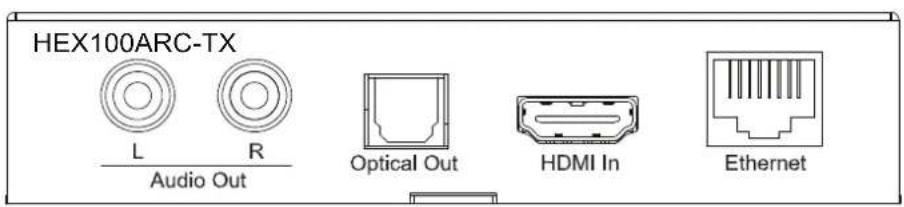
text_image
HEX100ARC-TX L R Audio Out Optical Out HDMI In EthernetHEX100ARC
User Manual
Thank you for purchasing this product.
For optimum performance and safety, please read these instructions carefully before connecting, operating or adjusting this product. Please keep this manual for future reference.

Surge protection device recommended
This product contains sensitive electrical components that may be damaged by electrical spikes, surges, electric shock, lightning strikes, etc. Use of surge protection systems is highly recommended in order to protect and extend the life of your equipment.
Safety And Performance Notice
The transmission distances of HDMI over UTP cables are measured using TE CONNECTIVITY 1427071-6
EIA/TIA-568-B termination (T568B) of cables is recommended for optimal performance.
To minimize interference of the un-shielded twisted pairs in the CAT5e/6 cable do not run the HDBaseT / Cat5e/6/6a cabling with or in close parallel proximity to mains power cables.
Do not substitute or use any other power supply other than the enclosed unit, or a Blustream approved replacement.
Do not disassemble either the Transmitter or Receiver units for any reason. Doing so will void the manufacturer's warranty.
Contents
Introduction 03
Features 03
Panel Descriptions 03/04
Application Diagram 04/05
Specifications 06
Package Contents 06
Maintenance 06
Introduction
Our Platinum Range of HDBaseT™ products offer the very best in performance and flexibility. The HEX100ARC extender set is an industry leading 4K UHD HDBaseT™ solution delivering HDMI, Bi-directional IR and PoH (PoE) up to lengths of 100m over a single CAT cable. The HEX100ARC also provides enhanced features including ARC and Audio breakout, RS-232 pass through, and an integrated 3-way Ethernet switch.
FEATURES:
- Extends HDMI up to a distance of 100m over single CAT cable
• Supports 4K UHD video up to 70m (3840 x 2160 @30Hz 4:4:4, 4096 x 2160 @24Hz 4:4:4, and 4K @60Hz 4:2:0)
• Supports all industry standard video resolutions including VGA-WUXGA and 480i-4K
• Supports 3D signal display
• Supports ARC (Audio Return Channel) from display via HDMI and Optical digital inputs
• Supports audio breakout via analogue L/R audio or optical digital outputs
• Supports all known HDMI audio formats including Dolby TrueHD, Dolby Atmos, Dolby Digital Plus and DTS-HD Master Audio transmission
- Integrated 3-port Ethernet switch (LAN Serving)
• Supports bi-directional RS-232 pass through
• Supports bi-directional IR from all input and output locations
• Supplied with Blustream IR receiver and emitters
- Supports bi-directional PoH (Power over HDBaseT™) to power extenders from either transmitter or receiver end
- HDCP compliant
Note: The POH function is designed for powering compatible transmitter or receiver units of Blustream only. Do not connect any part of this equipment to Power over Ethernet devices. Damage may result.
Panel Description HEXARC100-RX

text_image
HEX100ARC-Rx Optical In HDMI Out Ethernet 1 Ethernet 2 Ethernet 3 121 Optical audio in -TOSLINK audio in, connects to the optical out of the display device
2 HDMI Out – Connect to HDMI input on display device
3 100BaseT Ethernet ports
text_image
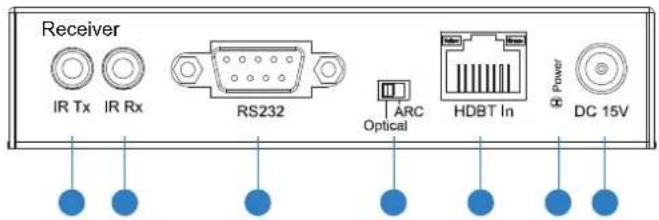
Receiver IR Tx IR Rx RS232 ARC Optical HDBT In Power DC 15V1 IR Tx port - connect to IR emitter. Used to control display device from control processor or IR sensor located at the source end.
2 IR Rx port - connect to IR sensor. Used to control IR controlled source devices at HEX100ARC-Tx end
3 RS232 port – Bi-directional RS232 with HEX100ARC-Tx RS232 port
4 Audio return position switcher - switch between ARC and TOSLINK (optical) modes
5 HDBT in - RJ45 connector, connect to HDbaseT port of HEX100ARC Tx
6 Power LED indicator
7 Power port – can be powered from transmitter by using the power over cable (POH) feature
Panel Description HEXARC100-TX

text_image
HEX100ARC-Tx L Audio Out Optical Out HDMI In Ethernet 11 561 Left channel of L/R - RCA output, extracted from PCM only ARC stream
2 Right channel of L/R – RCA output, extracted from PCM only ARC stream
3 Optical audio out (TOSLINK) - Bit stream audio out
4 HDMI In - Connect to HDMI source device.
5 Ethernet port - Connect to LAN (Network Switch).
text_image
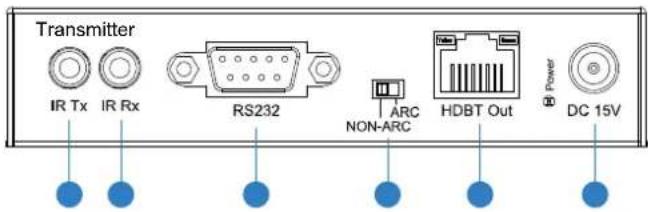
Transmitter IR Tx IR Rx RS232 ARC HDBT Out Power DC 15V1 IR Rx port – transmits IR to HEX100ARC Rx (Tx IR port). Connect IR sensor or control processor to send IR commands to a display
2 RS232 port – Bi-directional RS232 to and from the HEX100ARC-Rx
3 HDBT out – RJ45 connector, connect to HDbaseT in on HEX100ARC-Rx
4 Power port – Use included 15V/2A DC adaptor to power the unit.
5 IR Tx port – connect an IR emitter. Used to control source devices from display end
6 Audio return position switcher – switch between ARC and NON-ARC modes.
7 Power LED indicator

natural_image
A row of evenly spaced light blue diagonal lines on a white background (no text or symbols)CONNECTION DIAGRAM
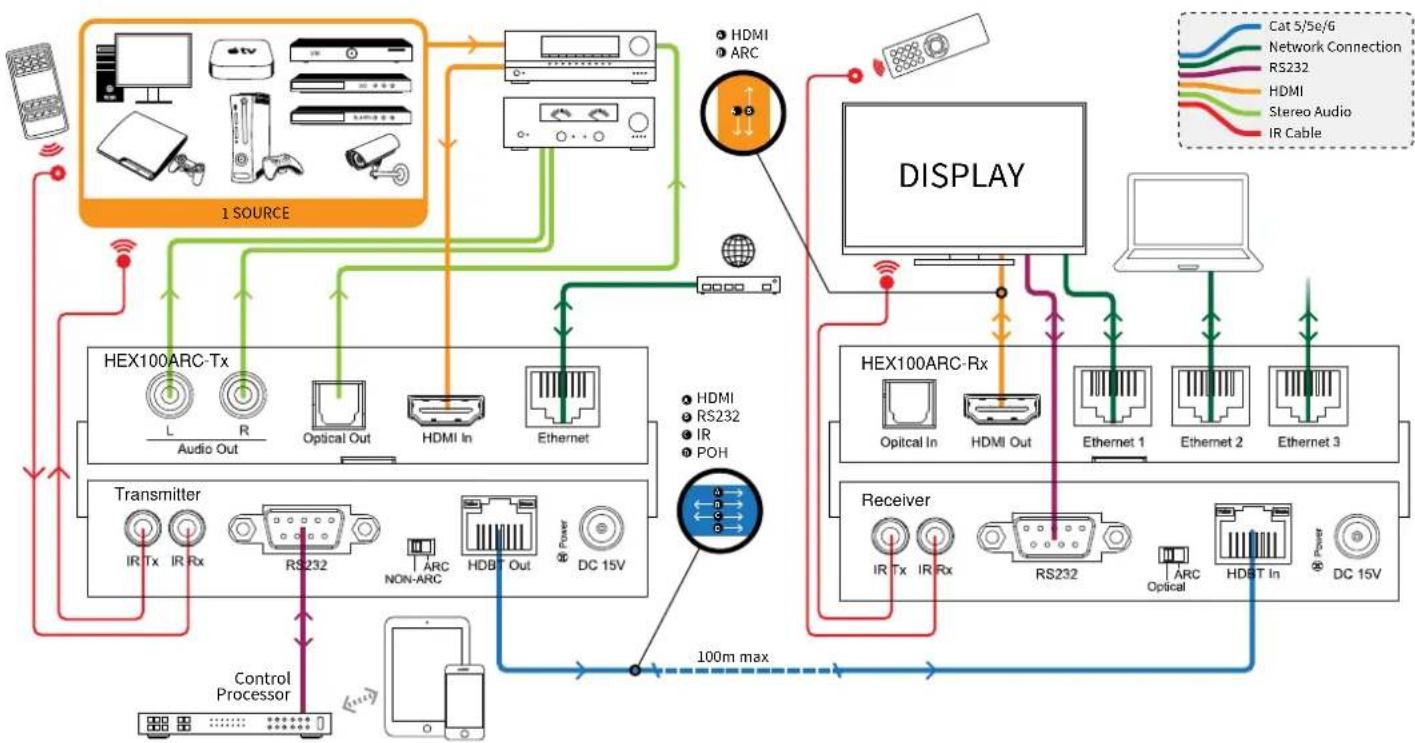
TV AND AVR SUPPORT ARC
HEX100ARC POSITION SWITCHER MODE SELECTION
Transmitter ARC
Receiver ARC

flowchart
graph TD
    A["1 SOURCE"] --> B["TRANSMITTER"]
    B --> C["Control Processor"]
    C --> D["100m max"]
    D --> E["DISPLAY"]
    E --> F["Receiver"]
    F --> G["Display"]
    G --> H["100m max"]
    H --> I["1 SOURCE"]

    subgraph Media Source
        J["Computer"] --> K["Monitor"]
        L["Camera"] --> M["Radio System"]
        N["Camera"] --> O["Radio System"]
        P["Camera"] --> Q["Radio System"]
        R["Camera"] --> S["Radio System"]
        T["Camera"] --> U["Radio System"]
        V["Camera"] --> W["Radio System"]
        X["Camera"] --> Y["Radio System"]
        Z["Camera"] --> AA["Radio System"]
        AB["Camera"] --> AC["Radio System"]
        AD["Camera"] --> AE["Radio System"]
        AF["Camera"] --> AG["Radio System"]
        AH["Camera"] --> AI["Radio System"]
        AJ["Camera"] --> AK["Radio System"]
        AL["Camera"] --> AM["Radio System"]
        AN["Camera"] --> AO["Radio System"]
        AP["Camera"] --> AQ["Radio System"]
        AR["Camera"] --> AS["Radio System"]
        AT["Camera"] --> AU["Radio System"]
        AV["Camera"] --> AW["Radio System"]
        AX["Camera"] --> AY["Radio System"]
        AZ["Camera"] --> BA["Radio System"]
        BB["Camera"] --> BC["Radio System"]
        BD["Camera"] --> BE["Radio System"]
        BF["Camera"] --> BG["Radio System"]
        BH["Camera"] --> BI["Radio System"]
        BJ["Camera"] --> BK["Radio System"]
        BL["Camera"] --> BLA["Radio System"]
        BM["Camera"] --> BN["Radio System"]
        BO["Camera"] --> BP["Radio System"]
        BQ["HDMI In"] --> BR["HDMI Out"]
        BS["HDMI In"] --> BT["HDMI Out"]
        BU["HDMI In"] --> BV["HDMI Out"]
        BW["HDMI In"] --> BX["HDMI Out"]
        BY["HDMI In"] --> BZ["HDMI Out"]
        CA["HDMI In"] --> CB["HDMI Out"]
        CC["HDMI In"] --> CD["HDMI Out"]
        DD["HDMI In"] --> DB["HDMI Out"]
        DC["HDMI In"] --> DB
        DX["HDMI Out"] --> DB
        DB["HDMI Out"] --> DB
    end

    subgraph Control Processor
        E2["L"] --> E3["R"] --> E4["L"] --> E5["Rx"] --> E6["Rx232"] --> E7["NON-ARC"] --> E8["HDBT Out"] --> E9["HDBT Out"]
        E1["Tx"] --> E2["Tx"] --> E3["Tx"] --> E4["Tx"] --> E5["Tx"] --> E6["Tx"] --> E7["Tx"] --> E8["Tx"] --> E9["Tx"] --> E10["Tx"]
    end

    subgraph Control Processor
        F2["PX"] --> F3["PX"] --> F4["PX"] --> F5["PX"] --> F6["PX"] --> F7["PX"] --> F8["PX"] --> F9["PX"] --> F10["PX"]
    end

    subgraph Control Processor
        G2["GND"] --> G3["GND"] --> G4["GND"] --> G5["GND"] --> G6["GND"] --> G7["GND"] --> G8["GND"] --> G9["GND"] --> G10["GND"]
    end

    subgraph Control Processor
        H2["GND"] --> H3["GND"] --> H4["GND"] --> H5["GND"] --> H6["GND"] --> H7["GND"] --> H8["GND"] --> H9["GND"]
    end

    subgraph Control Processor
        I2["GND"] --> I3["GND"] --> I4["GND"] --> I5["GND"] --> I6["GND"] --> I7["GND"] --> I8["GND"] --> I9["GND"]
    end

    subgraph Control Processor
        J2["GND"] --> J3["GND"] --> J4["GND"] --> J5["GND"] --> J6["GND"] --> J7["GND"] --> J8["GND"] --> J9["GND"]
    end

    subgraph Control Processor
        K2["GND"] --> K3["GND"] --> K4["GND"] --> K5["GND"] --> K6["GND"] --> K7["GND"] --> K8["GND"]
    end

    subgraph Control Processor
        L2["GND"] --> L3["GND"] --> L4["GND"] --> L5["GND"] --> L6["GND"] --> L7["GND"]
    end

    subgraph Control Processor
        M2["GND"] --> M3["GND"] --> M4["GND"] --> M5["GND"] --> M6["GND"] --> M7["GND"]
    end

    subgraph Control Processor
        N2["GND"] --> N3["GND"] --> N4["GND"] --> N5["GND"] --> N6["GND"] --> N7["GND"]
    end

    subgraph Control Processor
        O2["GND"] --> O3["GND"] --> O4["GND"] --> O5["GND"] --> O6["GND"] --> O7["GND"]
    end

    subgraph Control Processor
        P2["GND"] --> P3["GND"] --> P4["GND"] --> P5["GND"] --> P6["GND"]
    end

    subgraph Control Processor
        Q2["GND"] --> R2["GND"] --> R3["GND"] --> R4["GND"] --> R5["GND"] --> R6["GND"]
    end

    subgraph Control Processor
        R2G["WTP 100mA Max"]
    end

    subgraph Control Processor
        S2["SAT 100mA Max"]
    end

    subgraph Control Processor
        T2["SAT 100mA Max"]
    end

    subgraph Control Processor
        U2["SAT 100mA Max"]
    end

    subgraph Control Processor
        V2["SAT 100mA Max"]
    end

    subgraph Control Processor
        W2["SAT 100mA Max"]
    end

    subgraph Control Processor
        X2["SAT 100mA Max"]
    end

    subgraph Control Processor
        Y2["SAT 100mA Max"]
    end

    subgraph Control Processor
        Z2["SAT 100mA Max"]
    end

    subgraph Control Processor
        AA2["SAT 100mA Max"]
    end

    subgraph Control Processor
        AB2["SAT 100mA Max"]
    end

    subgraph Control Processor
        AC2["SAT 100mA Max"]
    end

    subgraph Control Processor
        AD2["SAT 100mA Max"]
    end

    subgraph Control Processor
        AE2["SAT 100mA Max"]
    end

    subgraph Control Processor
        AF2["SAT 100mA Max"]
    end

    subgraph Control Processor
        AG2["SAT 100mA Max"]
    end

    subgraph Control Processor
        AH2["SAT 100mA Max"]
    end

    subgraph Control Processor
        AI2["SAT 100mA Max"]
    end

    subgraph Control Processor
        AJ2["SAT 100mA Max"]
    end

    subgraph Control Processor
        AK2["SAT 100mA Max"]
    end

    subgraph Control Processor
        AL2["SAT 100mA Max"]
    end

    subgraph Control Processor
        AM2["SAT 100mA Max"]
    end

    subgraph Control Processor
        AN2["SAT 100mA Max"]
    end

    subgraph Control Processor
        AO2["SAT 100mA Max"]
    end

    subgraph Control Processor
        AP2["SAT 100mA Max"]
    end

    subgraph Control Processor
        AQ2["SAT 100mA Max"]
    end

    subgraph Control Processor
        AR2["SAT 100mA Max"]
    end

    subgraph Control Processor
        AS2["SAT 100mA Max"]
    end

    subgraph Control Processor
        AT2["SAT 100mA Max"]
    end

    subgraph Control Processor
        AU2["SAT 100mA Max"]
    end

    subgraph Control Processor
        AV2["SAT 100mA Max"]
    end

    subgraph Control Processor
        AW2["SAT 100mA Max"]
    end

    subgraph Control Processor
        AX2["SAT 100mA Max"]
    end

    subgraph Control Processor
        AY2["SAT 100mA Max"]
    end

    subgraph Control Processor
        AZ2["SAT 100mA Max"]
    end

    subgraph Control Processor
        BA2["SAT 100mA Max"]
    end

    subgraph Control Processor
        BB2["SAT 100mA Max"]
    end

    subgraph Control Processor
        BC2["SAT 100mA Max"]
    end

    subgraph Control Processor
        DA2["SAT 100mA Max"]
    end

    subgraph Control Processor
        DB2["SAT 100mA Max"]
    end

    subgraph Control Processor
        CE2["SAT 100mA Max"]
    end

    subgraph Control Processor
        CF2["SAT 100mA Max"]
    end

    subgraph Control Processor
        GD2["SAT 100mA Max"]
    end

    subgraph Control Processor
        DH2["SAT 100mA Max"]
    end
CONNECTION DIAGRAM
TV WITH ARC, AVR WITHOUT ARC
| HEX100ARC | POSITION SWITCHER MODE SELECTION |
| Transmitter | NON-ARC |
| Receiver | ARC |
flowchart
graph TD
    A["1 SOURCE"] --> B["Transmitter"]
    B --> C["Transmitter"]
    C --> D["Receiver"]
    D --> E["Display"]
    E --> F["Network Connection"]
    F --> G["Cat 5/5e/6"]
    F --> H["RS232"]
    F --> I["HDMI"]
    F --> J["Stereo Audio"]
    F --> K["IR Cable"]
    B --> L["Control Processor"]
    C --> M["Radio System"]
    D --> N["RF System"]
    E --> O["DC 15V System"]
    B --> P["HDMI In"]
    B --> Q["HDMI Out"]
    B --> R["Ethernet In"]
    B --> S["Ethernet Out"]
    B --> T["ARC Non-ARC"]
    B --> U["ARC Optical"]
    B --> V["ARC HDBT In"]
    B --> W["ARC Power DC 15V"]
    B --> X["HDMI RS232 IR POH"]
    B --> Y["HDMI ARC"]
    style A fill:#f9f,stroke:#333
    style E fill:#ccf,stroke:#333
    style F fill:#cfc,stroke:#333
    style G fill:#fcc,stroke:#333
    style H fill:#fcc,stroke:#333
    style I fill:#fcc,stroke:#333
    style J fill:#fcc,stroke:#333
    style K fill:#fcc,stroke:#333
    style L fill:#ffc,stroke:#333
    style M fill:#ffc,stroke:#333
    style N fill:#ffc,stroke:#333
    style O fill:#ffc,stroke:#333
    style P fill:#ffc,stroke:#333
    style Q fill:#ffc,stroke:#333
    style R fill:#ffc,stroke:#333
    style S fill:#ffc,stroke:#333
    style T fill:#ffc,stroke:#333
    style U fill:#ffc,stroke:#333
    style V fill:#ffc,stroke:#333
CONNECTION DIAgRAM
TV WITHOUT ARC, AVR WITHOUT ARC
| HEX100ARC | POSITION SWITCHER MODE SELECTION |
| Transmitter | NON-ARC |
| Receiver | Optical |

flowchart
graph TD
    A["1 SOURCE"] --> B["TRANSMITTER"]
    B --> C["HEX100ARC-Tx"]
    B --> D["HEX100ARC-Rx"]
    C --> E["Display"]
    D --> E
    E --> F["Receiver"]
    F --> G["Control Processor"]
    G --> H["Smartphone"]
    style A fill:#f9f,stroke:#333
    style B fill:#ccf,stroke:#333
    style C fill:#cfc,stroke:#333
    style D fill:#fcc,stroke:#333
    style E fill:#cff,stroke:#333
    style F fill:#ffc,stroke:#333
    style G fill:#cfc,stroke:#333
    style H fill:#fff,stroke:#333
    subgraph Media Source
        I["Sat"] --> J["Radio"]
        K["Radio"] --> L["Radio"]
        M["Radio"] --> N["Radio"]
        O["Radio"] --> P["Radio"]
        Q["Radio"] --> R["Radio"]
        S["Radio"] --> T["Radio"]
        U["Radio"] --> V["Radio"]
        W["Radio"] --> X["Radio"]
        Y["Radio"] --> Z["Radio"]
        AA["Radio"] --> AB["Radio"]
        AC["Radio"] --> AD["Radio"]
        AE["Radio"] --> AF["Radio"]
        AG["Radio"] --> AH["Radio"]
        AI["Radio"] --> AJ["Radio"]
        AK["Radio"] --> AL["Radio"]
        AM["Radio"] --> AN["Radio"]
        AO["Radio"] --> AP["Radio"]
        AQ["Radio"] --> AR["Radio"]
        AS["Radio"] --> AT["Radio"]
        AU["Radio"] --> AV["Radio"]
        AW["Radio"] --> AX["Radio"]
        AY["Sat"] --> AZ["Radio"]
        BA["Radio"] --> BB["Radio"]
        BC["Radio"] --> BD["Radio"]
        BE["Radio"] --> BF["Radio"]
        BG["Radio"] --> BH["Radio"]
        BI["Radio"] --> BJ["Radio"]
        BK["Radio"] --> BL["Radio"]
        BM["Radio"] --> BN["Radio"]
        BO["Radio"] --> BP["Radio"]
        BQ["HDMI In"] --> BR["HDMI Out"]
        BS["HDMI In"] --> BT["HDMI Out"]
        BU["HDMI In"] --> BV["HDMI Out"]
        BW["HDMI In"] --> BX["HDMI Out"]
        BY["HDMI In"] --> BZ["HDMI Out"]
        CA["HDMI In"] --> CB["HDMI Out"]
        CC["HDMI In"] --> CD["HDMI Out"]
        DD["HDMI In"] --> DP["HDMI Out"]
        EQ["HDMI In"] --> RZ["HDMI Out"]
        SC["HDMI In"] --> TX["HDMI Out"]
        TX["HDMI Out"] --> DU["HDMI Out"]
        DV["HDMI In"] --> DW["HDMI Out"]
        DX["HDMI In"] --> DXH["HDMI Out"]
        DXH["HDMI Out"] --> DXV["HDMI Out"]
        DXV["HDMI Out"] --> DXW["HDMI Out"]
    end
    style Media Source fill:#f9f,stroke:#333
    style Media Source fill:#ccf,stroke:#333
    style Media Source fill:#cfc,stroke:#333
    style Media Source fill:#fcc,stroke:#333
    style Media Source fill:#ffc,stroke:#333
    style Media Source fill:#fcc,stroke:#333
    style Media Source fill:#ffc,stroke:#333
    style Media Source fill:#fcc,stroke:#333
Specifications
HEX100ARC-TX
Video Input Connectors: 1x HDMI Type A, female
Video Output Connectors: 1x HDBaseT™ RJ45 connector
Audio Output Connectors: 2x RCA (L/R), 1x Optical (SPDIF)
Ethernet Port: 1x RJ45 connector
RS-232 Serial Port: 1x DB-9 female
IR Input Ports: 1x 3.5mm stereo jack
IR Output Ports: 1x 3.5mm mono jack
Mounting kit included
Dimensions (WxDxH): 114x135x24mm, without mounting brackets (TX & RX)
Shipping Weight (Kit): 0.8kg
Operating Temperature: 32°F to 104°F (0°C to 40°C)
Storage Temperature: -4°F to 140°F (-20°C to 60°C)
Power Supply: 1x 15V/2A DC, screw type connector
HEX100ARC-RX
Video Input Connectors: 1x HDBaseT™ RJ45 connector
Video Output Connectors: 1x HDMI Type A, female
Audio Input Connectors: 1x Optical (SPDIF)
Ethernet Port: 3x RJ-45 connector
RS-232 Serial Port: 1x DB-9 female
IR Input Ports: 1x 3.5mm stereo jack
IR Output Ports: 1x 3.5mm mono jack
Mounting kit included
Dimensions (WxDxH): 114x135x24mm, without mounting brackets (TX & RX)
Shipping Weight (Kit): 0.8kg
Operating Temperature: 32°F to 104°F (0°C to 40°C)
Storage Temperature: -4°F to 140°F (-20°C to 60°C)
Power Supply: 1x 15V/2A DC, screw type connector
NOTE: Specifications are subject to change without notice. Weight and dimensions are approximate.
Package Contents:
- 1 x HEX100ARC-kit
- 1 x 15V/2A DC power supply
- 1xIR sensor
- 1 x IR emitter
- 1 x mounting kit
- 1x manual
Maintenance
Clean this unit with a soft, dry cloth. Never use alcohol, paint thinner or benzene to clean this unit.