SPA9100B - Radio PHILIPS - Free user manual and instructions
Find the device manual for free SPA9100B PHILIPS in PDF.


User questions about SPA9100B PHILIPS
0 question about this device. Answer the ones you know or ask your own.
Ask a new question about this device
Download the instructions for your Radio in PDF format for free! Find your manual SPA9100B - PHILIPS and take your electronic device back in hand. On this page are published all the documents necessary for the use of your device. SPA9100B by PHILIPS.
USER MANUAL SPA9100B PHILIPS
natural_image
Line drawing of two Philips speakers with sound amplifiers and a handheld device (no text or symbols)User manual
Content
General Information ....3
Safety Instructions
Warnings
Care & Safety Information
Installation
Speaker Placement & Connections ....4
Front Panel Main Unit ....5
Back Panel Main Unit ....5
Remote Control 6
Playing TV Audio ....7
Play from a USB Storage Device ....7
Play From Radio 8
Cordless MIC 8
Playing through Bluetooth 8
Trouble Shooting 9
Specification ....10
Warranty 11
Accessories
Qty.
-
2 RCA to 2 RCA Cable 1
-
Remote Control 1
-
User Manual 1
-
Cordless MIC 1
General Information
Safety Instructions
Please read carefully the Safety Mark on the Back side

This mark is intended to alert the users from the non isolated dangerous voltage within the product that may be of sufficient magnitude to constitute a risk of electric shock to persons

This mark is intended to alert the user for important operating and servicing instruction
Warnings
* Avoid sustained periods on high-volume use, and do not turn the volume to maximum level while using high output signal, such as Mobile Phone or DVD, etc., as this will cause distortion and may damage the loudspeaker cones.
* Please switch off the system from the wall socket, when not in use.
* Please unplug the system from the AC outlet when unused for a long time
* Do not open the cover or back panel to avoid electronic shock or any other accidents. No user-serviceable parts are inside.
* Only for indoor use.
* Plug the system to the AC outlet with the right voltage marked on the back panel of the Speaker System.
Care and safety information
Avoid high temperatures, moisture, water and dust
- Apparatus should not be exposed to dripping or splashing of liquid.
- Do not place any sources of danger on the Tower Speaker (e.g. liquid filled objects, lighted candles).
- Do not install near heat sources.
Do not block any ventilation openings
- Place the apparatus in a location with adequate ventilation to prevent internal heat build up. Allow at least 100cm (4 inches) of free space all around the apparatus for adequate ventilation.
- At high volume the back cover of Tower Speaker becomes hot. Do not touch it.
Care of the cabinet
- Use a soft cloth slightly moistened to clean the cabinet. Do not use a solution containing alcohol, spirits, ammonia or abrasives.
Installation
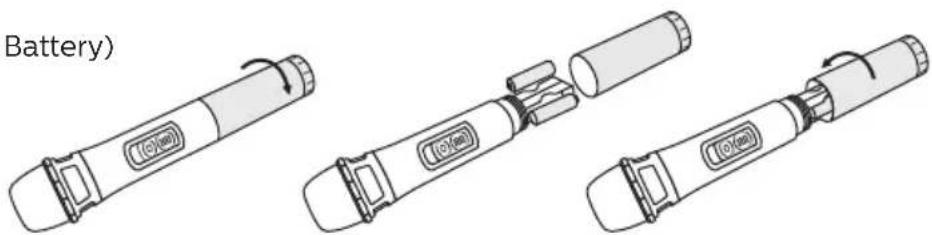
Remote
*(Use AAA X 2 Battery)

text_image
(K 2 Battery)MIC
*(Use AA X 2 Battery)
text_image
Battery)*Battery not provided
Speaker Placement & Connections
(A) Placement

text_image
TV⑧ Connect audio from TV
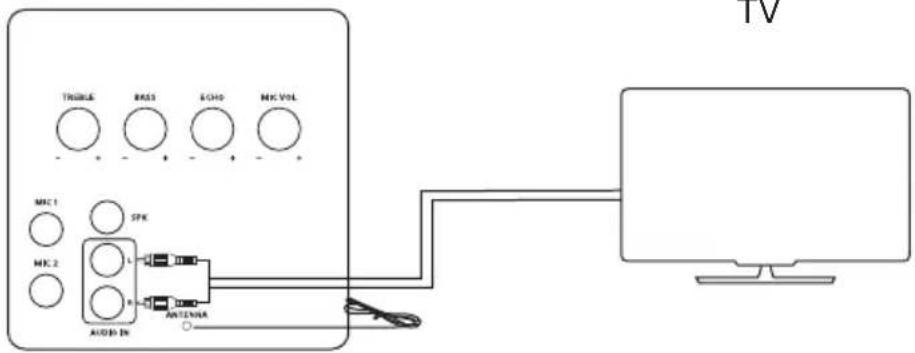
text_image
THOLE RASS ECHO MK VOL MK1 SPK MK 2 AUDIO IN ANTENIA TV© Connect Corded MIC*
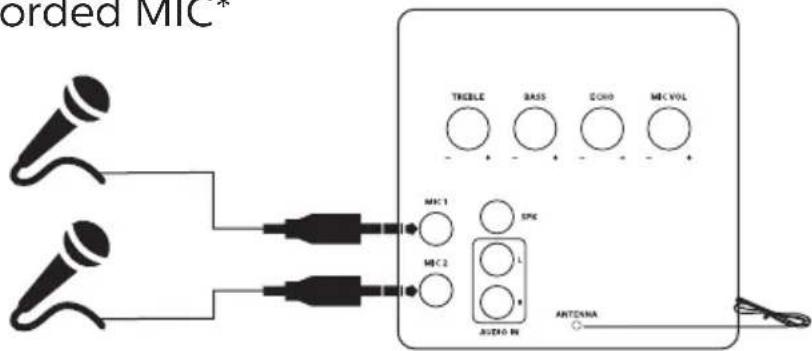
text_image
orded MIC* TREBLE BASS GONO MIC VOL MIC 1 SPC MIC 2 L R AUDIO IN ANTONNA* Corded MIC not included in the accessories
(D) Connect Speakers

text_image
TREBLE BASS ECHO MIC VOL MIC 1 MIC 2 SPR INT ASTRO IN ANTENNAFront Panel Main Unit
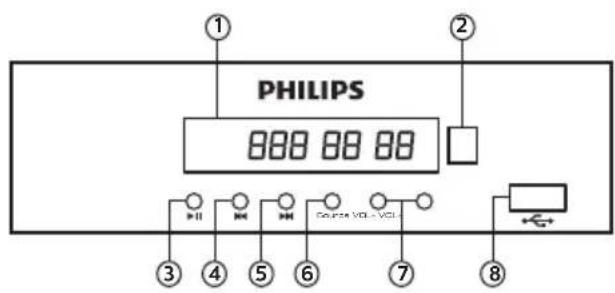
text_image
PHILIPS 800 88 88 ① ② ③ ④ ⑤ ⑥ ⑦ ⑧1. DISPLAY PANEL
Display information of your system
2. SENSOR
Point remote to operate
3. ▶||
(a) Play and Pause in USB/BT
(b) Long press to auto scan in radio mode
(c) Short press to store station manually
4.
(a) Play previous file in USB/BT
(b) Long press song will rewind
(c) Tuning down in radio mode
5.
(a) Play next file in USB/BT
(b) Long press song will fast forward
(c) Tuning up in radio mode
6. SOURCE
To select desired input
USB / FM / AUX IN / BLUETOOTH
7. VOL- VOL+
Adjusts volume of speakers.
8. USB\*
To play through USB drive.
* Available when connected
Back Panel Main Unit
1. TONE
To adjust bass / Treble level.
2. MIC
Insert MIC into MIC jack.
3. MIC VOLUME
To adjust MIC volume.
4. ECHO
To adjust ECHO according to your voice.
5. POWER\*
To ON/OFF system
* The POWER needs to be put in OFF position, when not in use, to save energy.

text_image
TBELE BASS ECHO MCC VOL ① ② MEC 1 SPX MEC 2 AUTO-IN AUXO-IN ③ ④ ① ② ③ ④ ANTenna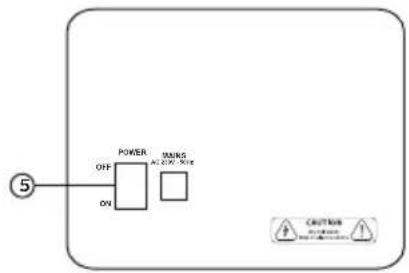
flowchart
graph TD
    A["5"] --> B["POWER"]
    B --> C["ON"]
    B --> D["TRANS/ON/OFF"]
    D --> E["CRUITOR"]
    style A fill:#f9f,stroke:#333
    style B fill:#ccf,stroke:#333
    style C fill:#cfc,stroke:#333
    style D fill:#fcc,stroke:#333
    style E fill:#ffc,stroke:#333
text_image
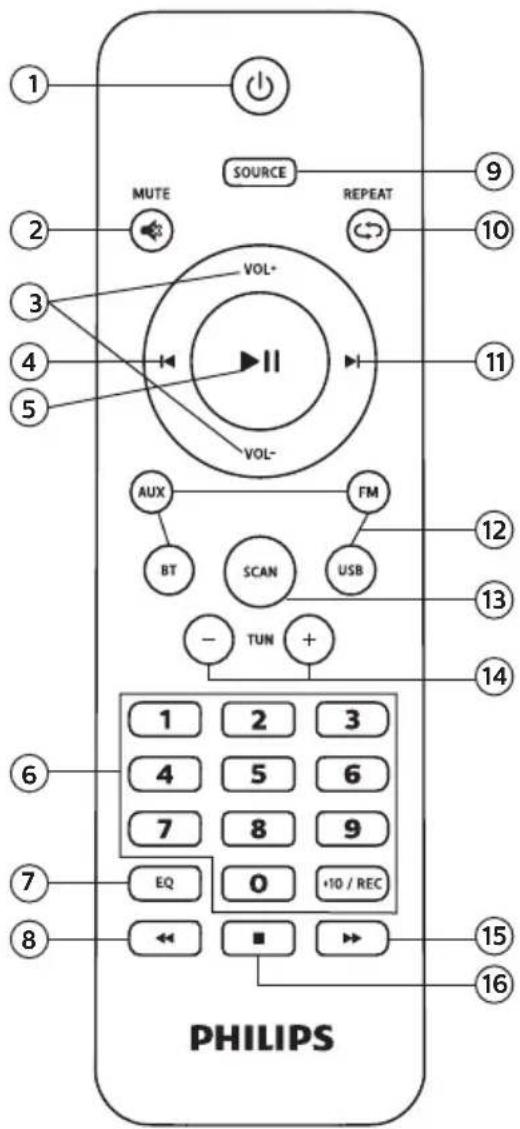
1 MUTE SOURCE REPEAT 9 2 3 4 5 VOL+ VOL- AUX FM BT SCAN USB - TUN + 1 2 3 4 5 6 7 8 9 EQ 0 +10 / REC 8 PHILIPS 15 161. ⏻
Switches system ON or to STANDBY
2. MUTE
Mute or restore volume
3. VOL+ VOL-
Increase or decrease volume
4.
(a) Play previous file in USB
(b) Tuning down in radio mode
5. ▶||
Play and Pause USB / Bluetooth
6. NUMERIC KEYS
Press number key to play directly MP3 files (Eg. To play 57th song press 5 then 7) In radio mode key in station frequency
7. EQ
Select preset sound modes in USB/Bluetooth
8.
To rewind
9. SOURCE
To select desired input USB/FM/AUX IN/BT
10. REPEAT
Repeats a track or the entire USB
11.
(a) Play next file in USB
(b) Tuning up in radio mode
12. SOURCE KEYS
USB* - Switch to USB storage device AUX - Select an audio input FM - Switch to FM radio BT - Play on bluetooth mode
13. SCAN
Auto Scan & store station in memory
14. TUN - /+
Up and Down preset channel on FM mode
15.
To forward
16.
Stop Play in USB mode
* Available when connected Note : Equalizer works in USB & Bluetooth mode only. Recording not works in SPA 9100B
Playing TV Audio
You can enjoy a theatre experience, just attach TV output to your Tower Speaker Audio IN.
-
Select source from you source key on remote.
-
Display shown AUX.
| Button Action | |
| Vol – Volume | Decrease |
| Vol + Volume | Increase |
| Mute To Mute | / Unmute Sound |
Play from a USB Storage Device
The Speaker System is fitted with a USB connector that allows you to listen music.
- Connect the USB storage device to the Tower Speaker.
- It auto shifts to USB mode.
- Display shows USB.
- Then song number & running time will appear on display.
(eg. if you listening sixteenth song 016 00:01 will appear).
- Use number key to select song directly or +10 key.
| Button Action | |
| |◀ ▶| | Select previous or next track |
| ▶|| | Start, pause or resume Play |
| ◀◀ ▶▶ | To rewind and fast forward |
| Numeric Buttons | Select and song to play |
| Repeat Repeat track or the entire USB | |
| EQ Select a predefined sound effect | |
Play from Radio
You can store 40 stations in memory.
- Select FM mode.
- Press ▶I scan key to auto scan & store station in your area.
- You can also store manually.
Tune desired station. Press ▶II scan key on panel, display starts flickers and then display stops flickering the station will be stored.
| Button Action | |
| |◄ ►| | Search for a radio station |
| - TUN + TUN Select | a preset radio station |
| SCAN Press to auto | scan the radio station |
| Numeric Keys Key in | station frequency (i.e. for 104.6 press 1046) |
Note - While autoscan turn off your TV/DVD or other radiation source.
For best reception, while listening to radio, turn off TV/DVD or other radiation source.
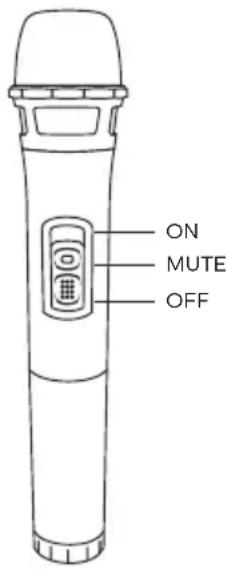
Cordless MIC
- Switch MIC to "ON" Position.
- When switch is turned ON than a blue colour LED glows for 0.5 seconds only. MIC automatically get connected with the Tower Speaker System. Now your MIC is ready for use.
- You can use MIC in all source (USB / BT / AUX / FM) selections.
- Adjust MIC Volume & Echo by rotary control given on back panel of the Tower Speaker.
- Turn switch to 'MUTE' to mute MIC during operation.
- Turn "OFF" MIC switch when not in use.
text_image
ON MUTE OFFPlaying through Bluetooth
You can enjoy music wireless with Bluetooth
- Select source.
- Display shown BLUE (Flashing).
- Pair "your Bluetooth device" with tower speaker system name Philips SPA9100B.
- Display stops flashing, once Bluetooth device is paired.
Now your system is ready to play through Bluetooth. Control all function from your smart phone eg. ◀, ▶I, ▶II
WARNING
Under no circumstances should you try to repair the system yourself, as this will invalidate the warranty. Do not open the system as there is a risk of electric shock. If a fault occurs, first check the points listed below before taking the system for repair.
If you are unable to remedy the problem by following these hints, consult your dealer or PHILIPS for help.
| Problem | Solution |
| No power. Check if the AC power cord is properly inserted into the AC mains socket.No sound or distorted sound. Adjust the volume.Check the speaker connection.Select the correct source to choose the equipment that you want to hear through the System.The remote control does not function Reduce the distance between the remoteProperly. control and the system.Replace the batteries with new ones.Point the remote control directly toward the IR sensor (located on front panel of the Tower).Low hum or buzz sound. Place the product as far away as possible from electrical devices that may be causing interference.Speaker connector not fixed properlyThe content of the USB flash drive The USB flash drive format is not compatiblecannot be read with the system.Drive is formatted with a different file system which is not supported by this unit (e.g. NTFS)Slow operation of the USB Flash Large file size of high memory USB flash drive drive takes longer time to read and playCannot detect USB flash drive Take out USB drive insert it again properly.FM not properly tuned Match with local frequencyFM reception not good While listening radio turn off TV/DVDor other radiation source.While listening radio turn off TV/DVDAntenna wire not attached.MIC not working MIC volume at zero.Replace the batteries with new oneBluetooth Reduce the distance between system and your device.Re-Pair the device. |
| Total System Power 100W RMS | |
| Separation >35db | |
| SNR >60db | |
| Audio Input Socket RCA Type | |
| Audio Output Socket RCA Type | |
| Power Consumption 30W | |
| Frequency Response 40Hz-20Khz | |
| Bluetooth Range Upto 10 mtrs. | |
| MIC Range Upto 35 mtrs. | |
| MIC Frequency 866MHz | |
| Speaker System 2 x 3 Way | |
| Woofer | |
| Size 8" (200mm) | |
| Impedance 4 Ohm | |
| Speaker | |
| Size 4" (100mm) | |
| Impedance 4 Ohm | |
| Tweeter | |
| Size 2 14 " (57mm) | |
| Impedance 6 Ohm | |
| Dimension 165 x 815 x 310 (W X H X D) | |
| Net Weight 23 Kg | |
| USB | |
| Class Support UMS (USB Mass Storage Class) | |
| Capacity | upto 16 GB |
| File Format | MP3 |
Warranty
This Philips Tower Speaker is warranted against any defect due to defective materials or workmanship for 12 months from the date of purchase. In case of a defect during the warranty period, TPV Technology India Pvt. Ltd., an affiliate of MMD Hong Kong Holding Limited. undertake to repair the apparatus FREE OF CHARGE at any of its Authorized Service Center in India.
The warranty is not valid in case:
- Proof of purchase is not accompanied with this warranty card.
- The warranty card is not completed immediately after purchase.
- The apparatus is not used according to this user manual.
- Defects are caused due to improper or reckless use.
- Any repairs are done by unauthorized personnel.
- The serial number is tampered with.
- Defects due to causes beyond control like lightning, abnormal voltage, acts of God or while in transit to the purchaser's residence.
All Consumables and parts susceptible to normal wear and tear are not covered under this warranty.
Model No. ____ Product Sl. No. ____
Invoice Number____ Date of Purchase: DD / MM/ YYYY
Customer's Name and address: ____
PIN

Always there to help you!
Visit us at www.support.philips.com
Helpline: 1800 425 6396
Email: india.callcentre@tpv-tech.com
(10 a.m. to 9 p.m. Mondays to Saturdays
& 10 a.m. to 6 p.m. on Sundays)
Dealer Name & Stamp

Philips and the Phillips Shield Emblie are registered trademarks of Koninklijke Philips N.V. and are used under license. This product has been manufactured by and is sold under the responsibility of MMD Hong Kong Holding Limited, or one of its affiliates, and MMD Hong Kong Holding Limited. Is the warrantor in relation to this product.

