
OR7000 - Radio PHILIPS - Free user manual and instructions
Find the device manual for free OR7000 PHILIPS in PDF.


| Product Type | Radio |
| Brand | Philips |
| Model | OR7000 |
| Dimensions (H x W x D) | 15 x 30 x 20 cm (approx.) |
| Weight | 1.2 kg |
| Power Supply | AC 230V, 50Hz or 6x AA batteries |
| Power Consumption | 8 W |
| Radio Bands | FM, AM |
| Preset Stations | Up to 20 |
| Alarm Function | Yes, with snooze |
| Sleep Timer | Yes |
| Display | LCD with backlight |
| Speaker | Integrated, 3W output |
| Headphone Jack | 3.5 mm |
| Antenna | Built-in FM/AM antenna |
| Clock | Digital, with auto-set via RDS |
| Maintenance | Wipe with dry cloth; avoid liquids |
| Safety | Do not expose to moisture; use provided power adapter |
| Spare Parts | Contact Philips support for replacements |
| Repairability | Repairable by qualified technician |
Frequently Asked Questions - OR7000 PHILIPS
User questions about OR7000 PHILIPS
0 question about this device. Answer the ones you know or ask your own.
Ask a new question about this device
Download the instructions for your Radio in PDF format for free! Find your manual OR7000 - PHILIPS and take your electronic device back in hand. On this page are published all the documents necessary for the use of your device. OR7000 by PHILIPS.
USER MANUAL OR7000 PHILIPS
Register your product and get support at
www.philips.com/welcome
OR7000

User manual
1


2

3


FM/FM MONO/MW/LW/AUX
4





2 sec.






5


POWER VOLUME
SOURCE 2 sec.





Congratulations on your purchase, and welcome to Philips! To fully benefit from the support that Philips offers, register your product at www.philips.com/welcome.
1 Safety
Read and understand all instructions before you use this product. If damage is caused by failure to follow the instructions, the warranty does not apply.
Risk of electric shock or fire!
- Never expose the product and accessories to rain or water. Never place liquid containers, such as vases, near the product. If liquids are spilt on or into the product, disconnect it from the power outlet immediately. Contact Philips Consumer Care to have the product checked before use.
- Never place the product and accessories near naked flames or other heat sources, including direct sunlight.
- Never insert objects into the ventilation slots or other openings on the product.
- Where the mains plug or an appliance coupler is used as the disconnect device, the disconnect device shall remain readily operable.
- Disconnect the product from the power outlet before lightning storms.
- When you disconnect the power cord, always pull the plug, never the cable.
Risk of short circuit or fire!
- Before you connect the product to the power outlet, make sure that the power voltage matches the value printed on the back of the product. Never connect the product to the power outlet if the voltage is different.
- Never expose the product to rain, water, sunshine, or excessive heat.
- Avoid force coming onto power plugs. Loose power plugs can cause arcing or fire.
Risk of injury or damage to the product!
- This product shall not be exposed to dripping or splashing!
- Do not place any sources of danger on this product (e.g. liquid filled objects, lighted candles).
- Never place the product or any objects on power cords or on other electrical equipment.
- If the product is transported in temperatures below 5°C, unpack the product and wait until its temperature matches room temperature before connecting it to the power outlet.
Risk of overheating!
- Never install this product in a confined space. Always leave a space of at least four inches around the product for ventilation.
- Make sure that curtains or other objects never cover the ventilation slots on the product.

Note
- The type plate is located on the back of the product.
2 What's in the box (Fig. 1)
Check and identify the contents of the package:
- Radio 2. AC power cord
- MW/LW antenna 4. FM antenna
- MP3 link cable 6. User manual
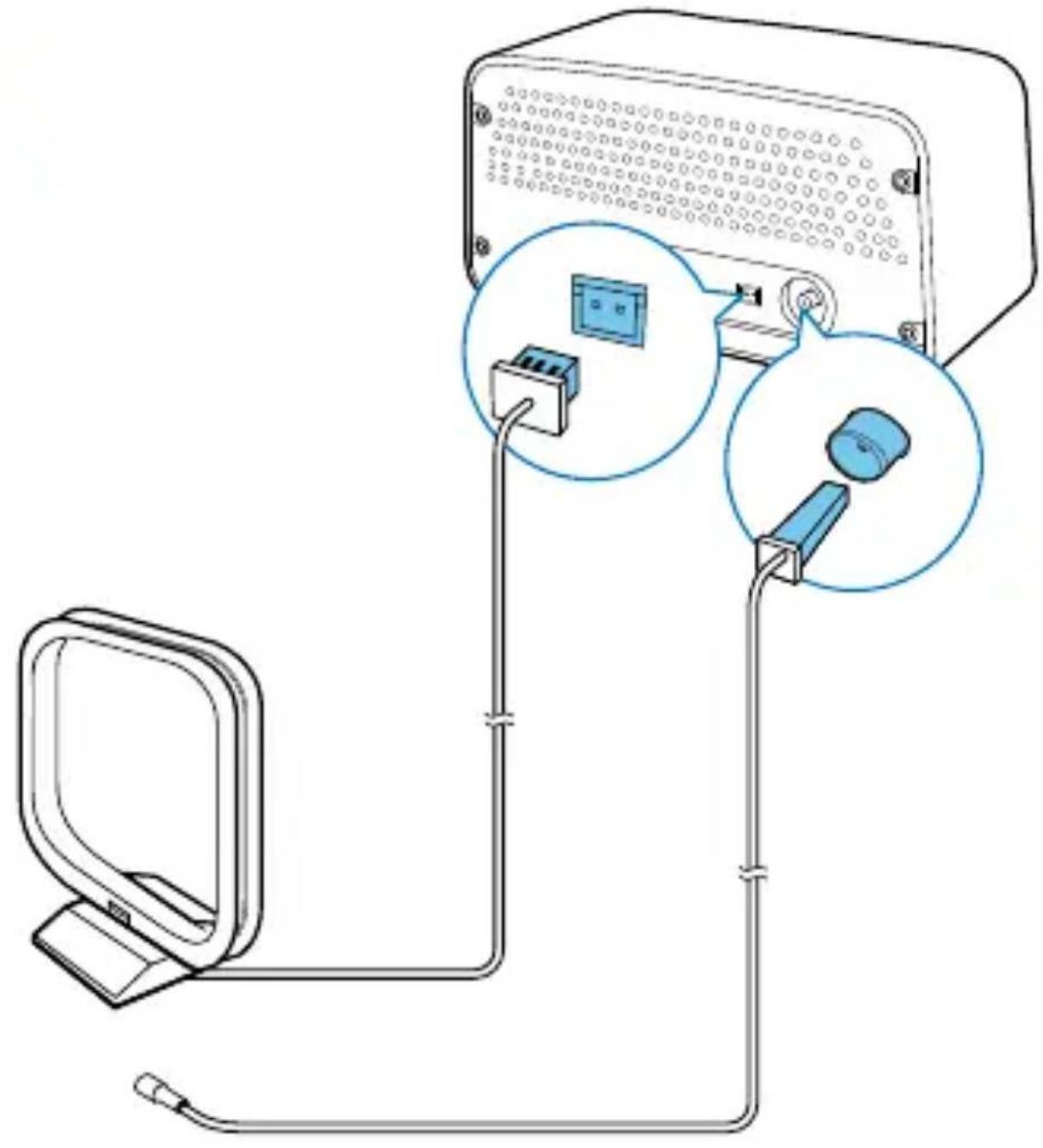
3 Connect antennas (Fig. 2)
4 Connect power (Fig. 3-1)
5 Turn on (Fig. 3-2)
Press the POWER button or turn the SOURCE knob.
→ The product switches to the last selected source.
• To switch the product to standby mode, press the knob again.
POWER VOLUME
6 Set the clock (Fig. 4)
1 In standby mode, press and hold the knob for 2 seconds.
→(12-hour time format) or (24-hour time format) blinks.
2 Turn the PRESET knob to select a time format, and then press the SELECT knob to confirm.
→ Hour digits blink.
3 Turn the PRESET knob to set the hour, and then press the knob to confirm.
SELECT
→ Minute digits blink.
4 Turn the PRESET knob to set the minute.
5 Press the knob to confirm.
7 Listen to radio stations
1 Turn the SOURCE knob to select a band. 2 Search for radio stations automatically or manually.

Note
- For optimal reception, fully extend the antenna and adjust its position, or connect an outdoor antenna.
- You can store up to 20 stations for each band.
Search for a radio station automatically
Turn the knob clockwise or anti-clockwise, and then press the knob in one second.
→ The radio frequency changes until a strong station is detected.
• To stop the search, press the knob again.
Search for a radio station manually
Turn the SEET knob until the frequency of target radio station is displayed.
Store radio stations automatically (Fig. 5)
Press and hold the POWER VOLUME for two seconds to activate the auto search.
→ After the search is complete, the first stored radio station is broadcast.
• To tune to a stored radio station, turn the PRESET knob until its sequence number is displayed.
Program radio stations manually
1 Tune to the target radio station. 2 Press and hold the knob
→ PXX blinks (XX indicates the sequence number).
3 Turn the PRESET knob to select a sequence number. 4 Press the knob to confirm. 5 Repeat steps 1-4 to store more radio stations.
- To overwrite a preset radio station, store another station with its sequence number.
• To tune to a preset radio station, turn the PRESET knob until its sequence number is displayed.
8 Listen to an external device (Fig. 6)
You can also listen to an external audio device, for example, an MP3 player, through this product.
1 Turn the SOURCE knob to switch the product to AUX mode. 2 Connect the MP3 link cable to
- the MP3-LINK socket on the back panel of this product, and • the headphone jack on the external device.
3 Play the external device (refer to its user manual).
9 Adjust the volume
Turn the POWER VOLKNOB.
10 Troubleshooting

Warning
- Never remove the casing of this product.
To keep the warranty valid, never try to repair the product yourself. If you encounter problems when using this product, check the following points before requesting service. If the problem remains unsolved, go to the Philips Web page (www.philips.com/support). When you contact Philips, make sure that the product is nearby and the model number and serial number are available.
No power
• Make sure that the AC power cord is properly connected. • Make sure that there is power at the AC power outlet.
No sound
- Adjust the volume.
- In MP3-Link mode, make sure that the external audio device is not muted.
No response from the product
• Make sure that the power is available. - Turn off the product, and then turn it on again.
Poor radio reception
- Due to the interference from other electrics or building obstacles, the signals become weak. Move the product to a place free of interference.
- Make sure that the antenna is fully extended. Adjust the position of the antenna.
Clock setting is erased.
- Power has been interrupted, or the AC power cord has been disconnected.
- Set the clock again.
11 Product information

Note
• Product information is subject to change without prior notice.
Amplifier
Frequency Response 60 Hz - 16 kHz, ±3 dB
Signal to Noise Ratio > 65 dBA
Aux Input 0.5 V RMS 20 kohm
Tuner
Tuning Range FM: 87.50 - 108.00 MHz;
MW: 522 - 1,710 kHz
LW: 153 - 279 kHz
Tuning grid 50 kHz (FM), 9 kHz (MW),
1 kHz (LW)
Total Harmonic Distortion < 2%
Signal to Noise Ratio > 50 dBA
Number of preset radio stations 20 for each band
Speakers
Speaker Impedance 4 ohm
Speaker Driver 2 X 3" full range
Sensitivity >82 dB/m/W
General information
AC Power Rating 220-240 V~, 50 Hz
Operation Power Consumption 10 W
Dimensions (Main Unit) 325 × 175 × 167 mm
Weight (Main Unit) 3.5 kg
12 Notice
Any changes or modifications made to this device that are not expressly approved by Philips Consumer Lifestyle may void the user's authority to operate the equipment.
Compliance
This product complies with the radio interference requirements of the European Community.
This is CLASS II apparatus with double insulation, and no protective earth provided.


Care of the environment
Your product is designed and manufactured with high quality materials and components, which can be recycled and reused.

When this crossed-out wheeled bin symbol is attached to a product it means that the product is covered by the European Directive 2002/96/EC. Please inform yourself about the local separate collection system for electrical and electronic products.

Please act according to your local rules and do not dispose of your old products with your normal household waste.
Correct disposal of your old product helps to prevent potential negative consequences for the environment and human health.
Environmental information
All unnecessary packaging has been omitted. We have tried to make the packaging easy to separate into three materials: cardboard (box), polystyrene foam (buffer) and polyethylene (bags, protective foam sheet.)
Your system consists of materials which can be recycled and reused if disassembled by a specialized company. Please observe the local regulations regarding the disposal of packaging materials, exhausted batteries and old equipment.
Copyright
Specifications are subject to change without notice. Trademarks are the property of Koninklijke Philips Electronics N.V or their respective owners. Philips reserves the right to change products at any time without being obliged to adjust earlier supplies accordingly.

All registered and unregistered trademarks are property of their respective owners.
All rights reserved.
OR7000_12_UM_V1.0


- SAFETY
- RISK OF ELECTRIC SHOCK OR FIRE
- RISK OF SHORT CIRCUIT OR FIRE
- RISK OF INJURY OR DAMAGE TO THE PRODUCT
- RISK OF OVERHEATING
- NOTE
- WHAT'S IN THE BOX (FIG. 1)
- LISTEN TO RADIO STATIONS
- SEARCH FOR A RADIO STATION AUTOMATICALLY
- SEARCH FOR A RADIO STATION MANUALLY
- STORE RADIO STATIONS AUTOMATICALLY (FIG. 5)
- PROGRAM RADIO STATIONS MANUALLY
- LISTEN TO AN EXTERNAL DEVICE (FIG. 6)
- WARNING
- NO POWER
- NO SOUND
- NO RESPONSE FROM THE PRODUCT
- POOR RADIO RECEPTION
- CLOCK SETTING IS ERASED
- PRODUCT INFORMATION
- AMPLIFIER
- TUNER
- SPEAKERS
- GENERAL INFORMATION
- NOTICE
- COMPLIANCE
- CARE OF THE ENVIRONMENT
- ENVIRONMENTAL INFORMATION
- COPYRIGHT
Brand : PHILIPS
Model : OR7000
Category : Radio