SRC2063WM - Radio PHILIPS - Free user manual and instructions
Find the device manual for free SRC2063WM PHILIPS in PDF.


Pick your language and provide your email: we'll send you a specifically translated version.
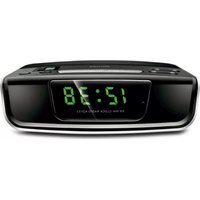
| Product Type | Radio |
| Brand | Philips |
| Model | SRC2063WM |
| Dimensions (Approx.) | 200 x 120 x 80 mm |
| Weight (Approx.) | 0.5 kg |
| Power Supply | AC 230 V ~ 50 Hz or 4 x AA batteries |
| Frequency Range | FM 87.5-108 MHz, AM 530-1600 kHz |
| Preset Stations | 20 (FM) + 20 (AM) |
| Display Type | LCD with backlight |
| Alarm Functions | Dual alarm, snooze, sleep timer |
| Audio Output | Built-in speaker (3 W RMS) |
| Headphone Jack | 3.5 mm |
| Antenna | FM wire, AM internal ferrite |
| Cleaning Instructions | Wipe with a soft, dry cloth. Do not use abrasive cleaners. |
| Safety Precautions | Keep away from water and moisture. Do not open the device. |
| Spare Parts Availability | Contact Philips support for replacement parts. |
| Repairability | User-replaceable batteries; other repairs by qualified personnel. |
| Environmental Information | Compliant with RoHS and WEEE directives. |
Frequently Asked Questions - SRC2063WM PHILIPS
How do I set the alarm on my Philips SRC2063WM?
Press the Alarm button until the alarm icon flashes. Use the tuning knob to set the hour, then press Alarm again to set minutes. Repeat for alarm 2 if needed. Confirm with Enter.
Can I use batteries in the Philips SRC2063WM?
Yes, the radio supports 4 x AA batteries (not included) for portable use. When using batteries, the AC power cord should be disconnected.
How do I tune to FM or AM stations?
Press the Band button to toggle between FM and AM. Rotate the tuning knob to manually scan, or press and hold to auto-scan. Saved presets can be accessed with the Preset button.
What should I do if the radio does not turn on?
Check that the AC power cord is securely connected to a working outlet, or install fresh batteries. If using batteries, ensure correct polarity. If the problem persists, contact Philips support.
How do I save a radio station as a preset?
Tune to the desired station, then press and hold the Preset button for 2 seconds. The preset number will flash; use the tuning knob to select a slot (1-20) and press Preset again to confirm.
Is the display backlight adjustable?
Yes, press the Dim button repeatedly to cycle through brightness levels (high, medium, low, off). The setting is remembered after power-off.
Can I connect headphones to this radio?
Yes, plug any standard 3.5 mm headphones into the headphone jack on the side. The built-in speaker will mute automatically.
How do I set the sleep timer?
Press the Sleep button repeatedly to select a timer from 15 to 120 minutes. The radio will turn off automatically after the set time. To cancel, press Sleep until 'OFF' displays.
What should I do if the radio reception is poor?
For FM, fully extend the wire antenna and reposition it for best reception. For AM, rotate the entire unit as the internal ferrite antenna is directional. Avoid placing the radio near metal objects or electronic devices.
How do I clean the Philips SRC2063WM?
Unplug the radio and remove batteries. Use a soft, dry cloth to wipe the exterior. Do not use any liquid cleaners, abrasives, or solvents. Avoid getting moisture into openings.
User questions about SRC2063WM PHILIPS
0 question about this device. Answer the ones you know or ask your own.
Ask a new question about this device
No questions yet. Be the first to ask one.
Download the instructions for your Radio in PDF format for free! Find your manual SRC2063WM - PHILIPS and take your electronic device back in hand. On this page are published all the documents necessary for the use of your device. SRC2063WM by PHILIPS.
USER MANUAL SRC2063WM PHILIPS

Manual assistant
Powered by Anthropic
Waiting for your message
Product information
Brand : PHILIPS
Model : SRC2063WM
Category : Radio