
AE4800 - Radio PHILIPS - Free user manual and instructions
Find the device manual for free AE4800 PHILIPS in PDF.


Pick your language and provide your email: we'll send you a specifically translated version.
| Product Type | Portable radio |
| Brand | Philips |
| Model | AE4800 |
| Tuning Bands | AM (MW) and FM |
| FM Frequency Range | 87.5 - 108 MHz |
| AM Frequency Range | 530 - 1600 kHz |
| Preset Stations | 20 station presets |
| Display | LCD with backlight |
| Audio Output | Built-in 3.6 cm speaker |
| Headphone Jack | 3.5 mm stereo |
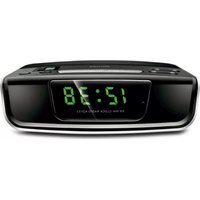
| Clock | Integrated digital clock with alarm |
| Sleep Timer | Yes, adjustable |
| Power Supply | 3 x AA batteries (1.5V) or DC 4.5V input |
| Battery Life | Up to 30 hours at moderate volume |
| Antenna | Built-in ferrite (AM) and telescopic rod (FM) |
| Dimensions (W x H x D) | 216 x 130 x 65 mm |
| Weight | Approx. 400 g without batteries |
| Color | Black with silver accents |
| Repairability | Standard screw assembly, replaceable batteries |
| Cleaning Instructions | Wipe with soft dry cloth |
Frequently Asked Questions - AE4800 PHILIPS
How do I set the clock and alarm on the Philips AE4800?
To set the clock, press and hold the Time button until the hour digits flash, then use the Tuning + and Tuning - buttons to adjust. Press Time again to set minutes. For the alarm, hold Alarm and set the desired time using the same controls. Make sure the radio is powered and the battery backup (if available) is installed to keep the time.
What type of batteries does the AE4800 require?
The AE4800 operates on 3 x AA batteries (LR6 type). Insert them into the compartment on the back, matching the polarity marks. Replace all batteries at the same time for best performance.
Can I use a power adapter with this radio?
Yes, it has a DC input for an AC power adapter (typically 4.5V, 200 mA). Use only the Philips-approved adapter to avoid damage. When the adapter is connected, batteries are not used.
How do I store my favorite radio stations in the presets?
Tune to the desired station, then press and hold one of the preset buttons (1-20) until you hear a beep. The station is saved. To recall, press the preset button briefly. You can store up to 20 stations per band.
Why is the FM reception weak and how can I improve it?
FM reception depends on the telescopic antenna. Extend it fully and adjust its angle for the clearest signal. For AM, the built-in ferrite antenna is directional, so rotate the whole radio. Avoid placing the radio near metal objects or electronic devices.
Can I use headphones to listen to the radio?
Yes, connect 3.5 mm headphones to the headphone jack on the side. The built-in speaker is muted automatically. Use low volume to protect your hearing.
How do I clean and maintain the radio?
Disconnect power and remove batteries before cleaning. Wipe the exterior with a soft dry cloth. Do not use water, solvents, or abrasive cleaners. Keep the device away from dust and moisture.
Does the AE4800 have a sleep timer?
Yes, press the Sleep button repeatedly to select a delay time from 60, 45, 30, or 15 minutes. The radio will turn off automatically after the set period. To cancel, press Sleep until "OFF" appears.
What should I do if the display becomes dim?
Dim display usually indicates low battery. Replace the batteries or connect the AC adapter. If the issue persists, adjust the backlight setting (if available) or check the contrast control.
Is this radio suitable for use outdoors?
Yes, it is a compact portable radio that runs on batteries, making it suitable for outdoor use like camping or picnics. Keep it dry and avoid extreme temperatures. Handle it with care to prevent damage.
User questions about AE4800 PHILIPS
0 question about this device. Answer the ones you know or ask your own.
Ask a new question about this device
No questions yet. Be the first to ask one.
Download the instructions for your Radio in PDF format for free! Find your manual AE4800 - PHILIPS and take your electronic device back in hand. On this page are published all the documents necessary for the use of your device. AE4800 by PHILIPS.
USER MANUAL AE4800 PHILIPS

Manual assistant
Powered by Anthropic
Waiting for your message
Product information
Brand : PHILIPS
Model : AE4800
Category : Radio