ES-1016 - Network switch Edimax - Free user manual and instructions
Find the device manual for free ES-1016 Edimax in PDF.


User questions about ES-1016 Edimax
0 question about this device. Answer the ones you know or ask your own.
Ask a new question about this device
Download the instructions for your Network switch in PDF format for free! Find your manual ES-1016 - Edimax and take your electronic device back in hand. On this page are published all the documents necessary for the use of your device. ES-1016 by Edimax.
USER MANUAL ES-1016 Edimax
Copyright © Edimax Technology Co., Ltd. all rights reserved. No part of this publicaon may be reproduced, transmied, transcribed, stored in a retrieval system, or translated into any language or computer language, in any form or by any means, electronic, mechanical, magnec, opcal, chemical, manual or otherwise, without the prior written permission from Edimax Technology Co., Ltd.
Edimax Technology Co., Ltd. makes no representaons or warranes, either expressed or implied, with respect to the contents hereof and specifically disclaims any warranes, merchantability, or tness for any parcular purpose. Edimax Technology Co., Ltd. reserves the right to revise this publicaon and to make changes from me to me in the contents hereof without the obligaon to nofy any person of such revision or changes.
The product you have purchased and the setup screen may appear slightly dierent from those shown in this QIG. All brand and product names menoned in this manual are trademarks and/or registered trademarks of their respective holders.
Notes and Cauons
FCC Statement
This product has been tested and found to comply with the limits for a Class A digital device pursuant to Part 15 of FCC Rules. These limits are designed to provide reasonable protecon against such interference when operang in a commercial environment. This equipment generates uses and can radiate radio frequency energy, and if not installed and used according to the instrucons, may cause harmful interference to radio communicaons.
Operaon of this equipment in a residential area is likely to cause interference, in which case the user, at his or her own expense will be required to take whatever measures to correct the interference.
CE Mark Warning
This equipment complies with the requirements relang to electromagnec compatibility, EN 55022 class A for ITE, the essenal protecon requirement of Council Directive 2004/108/EC on the approximaon of the laws of the Member States relang to electromagnec compatibility.
PRODUCT INTRODUCTION
Model no.:
ES-1016: 16-Port Fast Ethernet Rack-mount Switch
ES-1024: 24-Port Fast Ethernet Rack-mount Switch
Package Contents
Before you start using this router, please check if there is anything missing in the package, and contact your dealer to claim the missing item(s):
● Fast Ethernet unmanaged Rack-mount switch (1 pcs)
- User manual guide (1 pcs)
● Power cord (1 pcs)
● Rubber feet (4 pcs)
● Rack-mount brackets and screws (1 set)
ES-1016 Key Features
● Complies with 10M BASE-T specicaons of the IEEE802.3 standard
● Complies with 100M BASE-TX speciaons of the IEEE802.3u standard
● Supports full and half duplex for 10/100Mbps
● Provides 256K Bytes packet buer
● Wire-speed packet Itering and forwarding rate
● Provides 8K MAC address Table
- Store-and-forward architecture Iters fragment & CRC error packets
● Supports IEEE 802.3az Energy Eicient Ethernet
● Supports auto MDI/MDI-X crossover detectng and auto correcon
- RoHS compliant
ES-1024 Key Features
● Complies with 10M BASE-T specicaons of the IEEE802.3 standard
● Complies with 100M BASE-TX speciaons of the IEEE802.3u standard
● Supports full and half duplex for 10/100Mbps
● Provides 256K Bytes packet buer
● Wire-speed packet Itering and forwarding rate
● Provides 8K MAC address Table
- Store-and-forward architecture Iters fragment & CRC error packets
● Supports IEEE 802.3az Energy Eicient Ethernet
● Supports auto MDI/MDI-X crossover detectng and auto correcon
- RoHS compliant
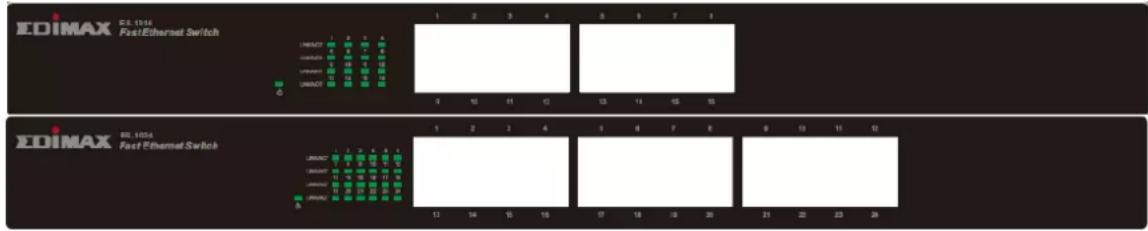
Front Panel
Please refer to the following descripon for the front panel:
text_image
EDIMAX 65.1014 FastEthernet Switch UNIACY 1 2 3 4 5 6 7 8 UNIACY 9 10 11 12 13 14 15 16 UNIACY 10 11 12 13 14 15 16 UNIACY 11 12 13 14 15 16 UNIACY 12 13 14 15 16 UNIACY 13 14 15 16 UNIACY 14 15 16 UNIACY 15 16 17 UNIACY 16 17 UNIACY 17 UNIACY 18 UNIACY 19 UNIACY 20 UNIACY 21 UNIACY 22 UNIACY 23 UNIACY 24 UNIACY 25 UNIACY 26 UNIACY 27 UNIACY 28 UNIACY 29 UNIACY 30 UNIACY 31 UNIACY 32 UNIACY 33 UNIACY 34 UNIACY 35 UNIACY 36 UNIACY 37 UNIACY 38 UNIACY 39 UNIACY 40 UNIACY 41 UNIACY 42 UNIACY 43 UNIACY 44 UNIACY 45 UNIACY 46 UNIACY 47 UNIACY 48 UNIACY 49 UNIACY 50 UNIACY 51 UNIACY 52 UNIACY 53 UNIACY 54 UNIACY 55 UNIACY 56 UNIACY 57 UNIACY 58 UNIACY 59 UNIACY 60 UNIACY 61 UNIACY 62 UNIACY 63 UNIACY 64 UNIACY 65 UNIACY 66 UNIACY 67 UNIACY 68 UNIACY 69 UNIACY 70 UNIACY 71 UNIACY 72 UNIACY 73 UNIACY 74 UNIACY 75 UNIACY 76 UNIACY 77 UNIACY 78 UNIACY 79 UNIACY 80 UNIACY 81 UNIACY 82 UNIACY 83 UNIACY 84 UNIACY 85 UNIACY 86 UNIACY 87 UNIACY 88 UNIACY 89 UNIACY 90 UNIACY 91 UNIACY 92 UNIACY 93 UNIACY 94 UNIACY 95 UNIACY 96 UNIACY 97 UNIACY 98 UNIACY 99 UNIACY 100LED Denion:
| LED Name | Light Status | Descripon |
| PWR | On | Switch on and correctly powered |
| O | Switch not powered or not correctly powered | |
| LNK/ACT | On | The port connected |
| O | The port not connected | |
| Flashing | The port is acvang and transferring /receiving data. |
Back Panel

text_image
Image containing fragmented text and a small icon, likely from a software interface or document header.AC IN : This connects to AC power source. Supported input voltages range from 100 \~ 240V AC at 50 \~ 60Hz.
Power Connector
Plug in the female connector of the provided power cord into this connector, and the male into a power outlet. Supported input voltages range from 100-240V AC, and 50-60 Hz.
PRODUCT INSTALLATION
In the following there are two ways for your installaon. You can select one that suits you.
Desktop Installaon
- Install the switch on a level surface that can support the weight of the unit & the relevant components, and each the rubber feet to the boom. The rubber feet cushion the switch and helps protect the case from scratches.
- Plug the switch to electrical source with the provided power cord.
Rack-Mount Installaon
Rack moung facilitate to an orderly installaon when series of network devices being installed.
- Disconnect all the cables from the switch.
- Place the unit the right way up on a hard, at surface with the front facing you.
- Locate a moung bracket over the moung holes on one side of the unit.
- Insert the screws and fully ghten with a suitable screwdriver.
- Repeat the two previous steps for the other side of the unit.
- Insert the unit into the rack and secure with suitable screws
- Reconnect all the cables.
Concerning about the installaon environment, we strongly recommend:
- The switch is placed with appropriate venlaon environment. A minimum 25 mm space around the unit is recommended.
- The switch and the relevant components are away from sources of electrical noise such as radios, transmiers and broadband amplifiers.
- Avoid from environments beyond recommend moisture.
ΣDIMAX
NETWORKING PEOPLE TOGETHER
Edimax Technology Co., Ltd.
No.3, Wu-Chuan 3rd Road, Wu-Gu, New Taipei City 24891, Taiwan
Edimax Technology Europe B.V.