GS-5208PLG - Network switch Edimax - Free user manual and instructions
Find the device manual for free GS-5208PLG Edimax in PDF.


User questions about GS-5208PLG Edimax
0 question about this device. Answer the ones you know or ask your own.
Ask a new question about this device
Download the instructions for your Network switch in PDF format for free! Find your manual GS-5208PLG - Edimax and take your electronic device back in hand. On this page are published all the documents necessary for the use of your device. GS-5208PLG by Edimax.
USER MANUAL GS-5208PLG Edimax
No. 278, Xinhui 1st Rd., Neihu Dist., Taipei City, Taiwan
Email: support@edimax.com.tw
Edimax Technology Europe B.V.
Fijenhof 2, 5652 AE Eindhoven, The Netherlands
Email: support@edimax.nl
Edimax Computer Company
3444 De La Cruz Blvd., Santa Clara, CA 95054, USA
Live Tech Support: 1(800) 652-6776
Email: support@edimax.com
Chapter 1 Product Informaon .... 3
1-1 Product Overview ....3
1-2 Features....3
1-3 External Component Descripon 4
1-3-1 Front Panel 4
1-3-2 Rear Panel....5
1-4 Package Contents....5
1-5 Rack-mountable Installaon 6
Chapter 2 Connect & Login 7
2-1 Switch to End Node....7
2-2 Login 8
Chapter 3 Switch Conguraon ....10
3-1 System....11
3-1-1 Device Name Setup....12
3-2 Management....13
3-3 Port 15
3-4 VLAN 16
3-4-1 IEEE 802.1Q VLAN....16
3-5 Trunking....18
3-6 QoS....20
3-7 Broadcast Storm Control 22
3-8 Rate Liming 23
3-9 Loop Detect/Prevent....24
3-10 IGMP Snooping....25
3-11 POE....26
3-12 Password 28
3-13 Logout....29
1-1 Product Overview
The Giga Ethernet POE Switch provides a seamless network conncon, with integrated 1000Mbps Gigabit Ethernet, 100Mbps Fast Ethernet and 10Mbps Ethernet network capabilities.
1-2 Features
- IEEE 802.3af/at PoE compliant.
● Eight Gigabit Ethernet ports.
● Up to 30W per port (total power budget: 160W) for powering PoE-enabled devices.
● Auto-detecon of powered devices (PD) and power consumption levels.
● Auto fault-detecon on over/under current & voltage. - Access Control List (ACL) support.
- Switch capacity:20Gbps & Forwarding rate:14.88Mpps.
- IEEE 802.1Q-based VLAN for network segmentation to improve performance and security.
- IEEE 802.1p QoS with 4 priority queues
- IGMP Snooping V1 / V2 / V3 support.
● 4K MAC address table and jumbo frame support up to 9KB.
● 19-inch 1U rack-mount brackets included.
1-3 External Component Descripon
1-3-1 Front Panel
The front panel of the Switch consists of 8 x 10/100/1000Mbps RJ-45 + 2 x SFP ports, and a series of LED indicators as shown as below:
Front Panel

text_image
EDiMAX Pro GS-5208PLG 1 2 3 4 5 6 7 8 PoE/Alert PWR/SYS Reset PoE 1 2 3 4 5 6 7 8 1 2 3 4 5 6 7 8 9 1010/100/1000Mbps RJ-45 ports (1-8):
It is designed to connect to the devices of bandwidth of 10Mbps, 100Mbps or 1000Mbps. Each bandwidth has a corresponding 10/100/1000Mbps LED.
LED indicators:
The LED Indicators will allow you to monitor, diagnose and troubleshoot any potenal problem with the Switch, the conncon(s) or other aached devices.
| Color Status | Descripon | ||
| PWR/SYS | Green | O | Power o or fail |
| On | Power on | ||
| Blinking | System boot-up | ||
| PoE Alert | Green | On | PoE power output over 90% PoE power |
| O | PoE power output under 90% PoE power | ||
| Link/ACT | Green | On | 1000Mbps connected |
| Blinking | Data transming | ||
| Amber | On | 10/100Mbps connected | |
| Blinking | Data transming | ||
| O | Disconnected or fail | ||
| SFP | Green | Green On | 1000FX connected |
| Blinking | Data transming | ||
| O | Disconnected or fail | ||
| PoE | Green | On | PoE power output on |
| O | PoE power output o | ||
1-3-2 Rear Panel
The rear panel of the Switch houses an AC power connector as shown below:
Rear Panel

text_image
AC LINE 100-240 VAC 50/60 HzAC Power Connector:
Power is supplied through an AC power cable. It supports AC 100 - 240V, 50 - 60Hz.
1-4 Package Contents
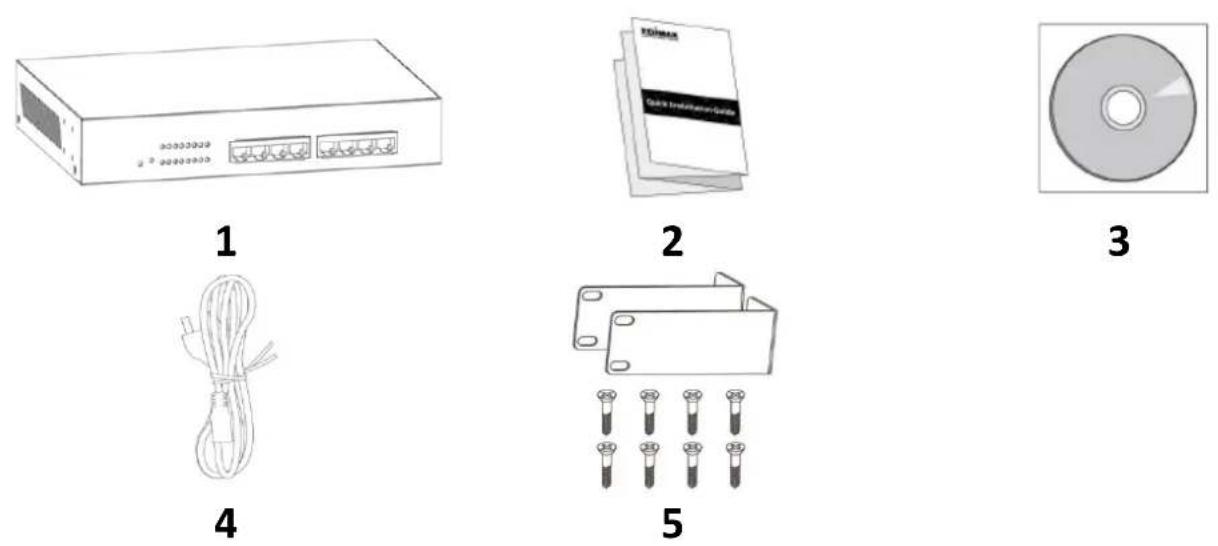
- GS-5208PLG Switch
- Quick Installaon Guide
-
CD
-
Power Cord
- Rack-Mount Kit & Screws
1-5 Rack-mountable Installaon
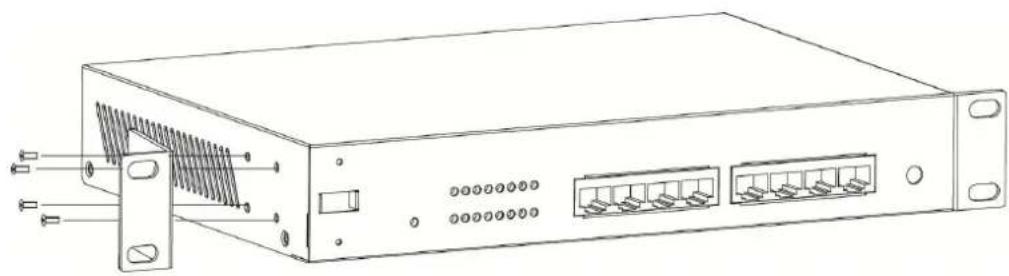
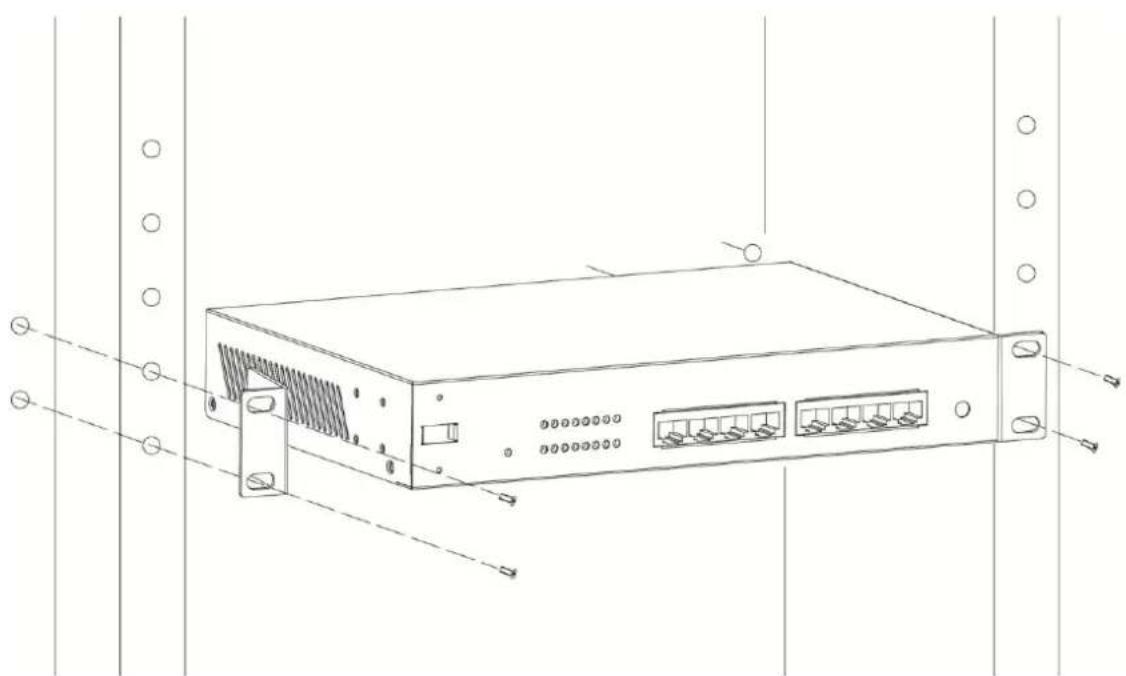
This part describes how to install your Gigabit Ethernet Switch. Please read the following topics and perform the procedures in the order being presented.
a. Aach the moung brackets on the Switch's side panels (one on each side) and secure them with the screws provided.
natural_image
Line drawing of a server rack with ports and connectors (no text or symbols)b. Mount the switch on the equipment rack using the screws provided and ghten them.
natural_image
Line drawing of a server rack unit with ports and connectors (no text or symbols)2-1 Switch to End Node
Use a standard Cat.5/5e Ethernet cable (UTP/STP) to connect the Switch to end nodes as shown below. Switch ports will automatically adjust to the characteriscs (MDI/MDI-X, speed, duplex) of the device to which it is connected to.

natural_image
Line drawing of a network switch device connected to a laptop (no text or symbols present)Please refer to the LED Indicator Specicaon in each port turns on when the link is available.
1-3-1 Front Panel. The LINK/ACT/Speed LEDs for
2-2 Login
Open a web browser and go to the switch's IP address. The default IP address is 192.168.2.2. Your computer's IP address must be in the same subnet as the switch. For the default IP address this is any IP address in the range 192.168.2.x (x = 3 - 254). You can modify the IP address of your computer if you need.
| Parameter | Default Value |
| Default IP address | 192.168.2.1 |
| Default user name | admin |
| Default password | 1234 |
-
Enter the switch's IP address (192.168.2.1) in the URL bar of a web browser. IE 7 or above is recommended.
-
At the following screen login with the default username "admin" and password "1234".

text_image
ESIMAX Pro Model Name GS-5208PLG User Name Password Login3. You will arrive at the switch conguraon window as shown below:
 GS-5208PLG 8-Port Gigabit PoE+ with 2 SFP Slots Web Smart Switch GS-5208PLG 8-Port Gigabit PoE+ with 2 SFP Slots Web Smart Switch | |
| System Management Port VLAN Trunking Mirror QoS Broadcast Storm Control Rate Limiting Loop Detect/Prevent IGMP Snooping PoE Password Logout | System Model Name GS-5208PLG Device Name Smart Switch Firmware Version 1.00.20 Build Date 2017.07.28 MAC Address 00:23:79:00:23:79 IPv4 Address 192.168.2.1 Subnet Mask 255.255.255.0 Gateway 192.168.2.254 Loop Status Normal PoE Status Normal |
| System |
| Management |
| Port |
| VLAN |
| Trunking |
| Mirror |
| QoS |
| Broadcast Storm Control |
| Rate Limiting |
| Loop Detect/Prevent |
| IGMP Snooping |
| PoE |
| Password |
| Logout |
The PoE smart switch soware provides rich layer 2 funconality for switches in your network. This chapter describes how to use the web-based management interface (Web UI) to congregate the switch's features.
| System | This link displays device informaon and allows you to congregate device name and IP. |
| Management | This link allows you to perform funcons such as rmware or conguraon le maintenance, and system reset or reboot. |
| Port | This link allows you to check Link Status, TX/RX counter, Loop Status and Loop Reset. |
| VLAN | This link allows you to congregate port-based or 802.1Q VLAN. |
| Trunking | This link allows you to logically aggregate physical links to form one logical, higher-bandwidth link. |
| QoS | This link allows you to enable Port-Based QoS or IEEE 802.1p QoS |
| Broadcast Storm Control | This link allows you to set up broadcast rate limit on every port. |
| Loop Detect/Prevent | This link allows you to check Loop Detecon and Loop Prevenon |
| IGMP Snooping | This link allows you to congregate IGMP Snooping. |
| PoE | This link allows you to can congregate PoE. |
| Password | This link allows you to change the system login password. |
| Logout | Logout system. |
3-1 System
View device informaon and status such as rmware version number, Device Name, MAC address, IP Address, Loop Status, PoE Status, etc. Use this screen to conjure device name and IPv4 address.
| System | |
| Model Name | GS-5208PLG |
| Device Name | Smart Switch |
| Firmware Version | 1.00.20 |
| Build Date | 2017.07.28 |
| MAC Address | 00:23:79:00:23:79 |
| IPv4 Address | 192.168.2.1 |
| Subnet Mask | 255.255.255.0 |
| Gateway | 192.168.2.254 |
| Loop Status | Normal |
| PoE Status | Normal |
| LABEL | DESCRIPTION |
| Model Name | This eld displays the model of the Switch. |
| Device Name | This eld displays the descripve name of the Switch for idencaon purposes. |
| Firmware Version | This eld displays the version number of the Switch's current rmware. |
| Build Date | This eld displays the date the current rmware was created. |
| MAC Address | This eld refers to the Ethernet MAC (Media Access Control) address of the Switch. |
| IPv4 Address | This eld displays the current IP of the Switch. |
| Subnet Mask | This eld displays the current subnet mask of the Switch. |
| Loop Status | Normal indicates that no loop occurs on any port; Loop is displayed otherwise. |
| PoE Status | Normal indicates that PoE devices are normal; Error is displayed otherwise. |
3-1-1 Device Name Setup
Go to System > Device Name
Click the Device Name to change the name as shown below:

text_image
System Model Name GS-5208PLG Device Name Smart Switch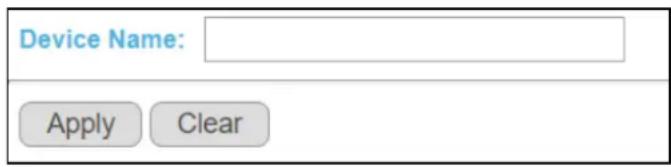
text_image
Device Name: Apply ClearChoose a descripve name for idencaon purposes. The name should be consisted of up to 20 characters; "a-z", "A-Z", "0-9" and hyphen and underscore are allowed.
3-2 Management
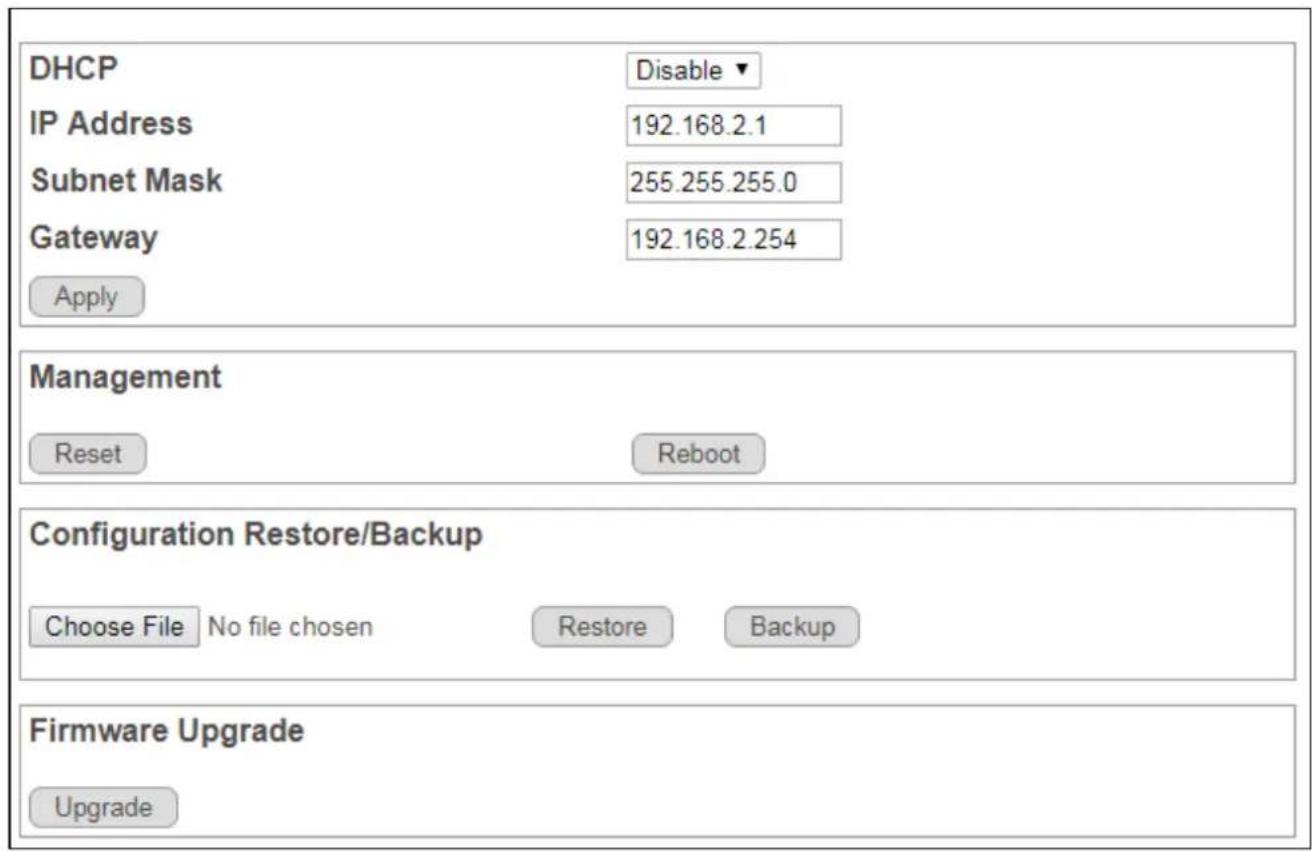
Use this page to manage rmware and your conguraon les. Click Management in the navigaon panel to open the following screen.
text_image
DHCP Disable ▼ IP Address 192.168.2.1 Subnet Mask 255.255.255.0 Gateway 192.168.2.254 Apply Management Reset Reboot Configuration Restore/Backup Choose File No file chosen Restore Backup Firmware Upgrade UpgradeThe Switch needs an IP address for it to be managed over the network. The factory default in-band IP address is 192.168.2.1. The subnet mask species the network number poron of an IP address. The factory default subnet mask is 255.255.255.0.
| LABEL | DESCRIPTION |
| IP Address | Enter the IP address of your Switch in doed decimal notaon for example 192.168.2.1. |
| Subnet Mask | Enter the IP subnet mask of your Switch in doed decimal notaon for example 255.255.255.0. |
| Gateway | Enter the IP address of your Switch in doed decimal notaon for example 192.168.2.1. |
| BUTTON | DESCRIPTION |
| Reset | Click Reset to reset the Switch to its factory default seng. |
| Reboot | Click Reboot to restart the Switch. This will take up to ve seconds and will not aect current conguraon. |
| Backup | Back up your current Switch conguraon to a computer.1. Click Backup, and the Save As screen will be displayed.2. Choose a locaon to save the le. |
| Restore | Restore the Switch to a previously saved conguraon from your computer. Use the Conguraon Restore/Backup screen.1. Click Path to locate the conguraon le you wish to restore2. Select the le and click Restore. |
| Upgrade | To upgrade your Switch’s rmware version.Please make sure you have downloaded (and unzipped) the correct model rmware and rmware version before upgrading.1. Click Path to locate the rmware le you wish to upload to the Switch2. Select the le and click Upgrade.3. Aer rmware upgrade, go to the System screen to verify current rmware version. |
3-3 Port
To view port stascs, click Port in the web conguraon menu.
Port Status
| Port | Link Status | TX | RX |
| 1 | Down | 0 | 0 |
| 2 | Down | 0 | 0 |
| 3 | Down | 0 | 0 |
| 4 | Down | 0 | 0 |
| 5 | Down | 0 | 0 |
| 6 | Down | 0 | 0 |
| 7 | Down | 0 | 0 |
| 8 | 1000 Mbps | 881 | 1503 |
| 9 | Down | 0 | 0 |
| 10 | Down | 0 | 0 |
Clear Counters
| LABEL | DESCRIPTION |
| Port | This idenes the Ethernet port. |
| Link Status | This eld displays the speed (either 10Mbps, 100Mbps or 1000Mbps). “Down” is displayed if the port is not connected to any device. |
| TX | This eld shows the number of transmied bytes on this port. |
| RX | This eld shows the number of received bytes on this port. |
| Loop Status | “Loop” is displayed if the port is loop. |
| Loop Reset | Select the loop port checkbox. ClickApplyto make port link up on this port. |
| Clear Counters | ClickClear Counterto clear stascs for all ports. |
| Apply | If a port is loop, theApplybuon is shown. ClickApplyto clear loop status on this port. |
3-4 VLAN
3-4-1 IEEE 802.1Q VLAN
Go to VLAN > IEEE 802.1Q VLAN
IEEE 802.1Q is a protocol for Ethernet frame carrying VLAN tag. The trac is encapsulated so that a number of logically separate VLANs can be carried by the same physical LAN.
The VLAN ID associates a frame with speciVLAN and provides the informaon that switches need to process the frame across the network. A tagged frame is four bytes longer than an untagged frame and contains two bytes for the TPID (Tag protocol Idener, residing within the type/length le of the Ethernet frame) and two bytes for the TCI (Tag Control Informaon, starng aer the source address eld of the Ethernet frame).
The CFI (Canonical Format Indicator) is a single-bit ag, always set to zero for Ethernet switches. If a frame received at an Ethernet port has a CFI set to 1, then that frame should not be forwarded as it is to an untagged port. The remaining twelve bits dening the VLAN ID are independent of each other. A frame with VID (VLAN Idener) of null (0) is called a priority frame, meaning that only the priority level is significant and the default VID of the ingress priority frames and the value 4095 (FFF) is reserved, so the maximum possible number of VLAN conguraons is 4094.
| TPID | User Priority | CFI | VLAN ID |
| 2 Bytes | 3 Bits | 1 Bit | 12 bits |
Once the VLAN table is congured and maintained in GS-5208PLG, frames will be handled by all operaons of VLAN conguraon. These operaons include the stripping or adding of the IEEE 802.1Q tag.
text_image
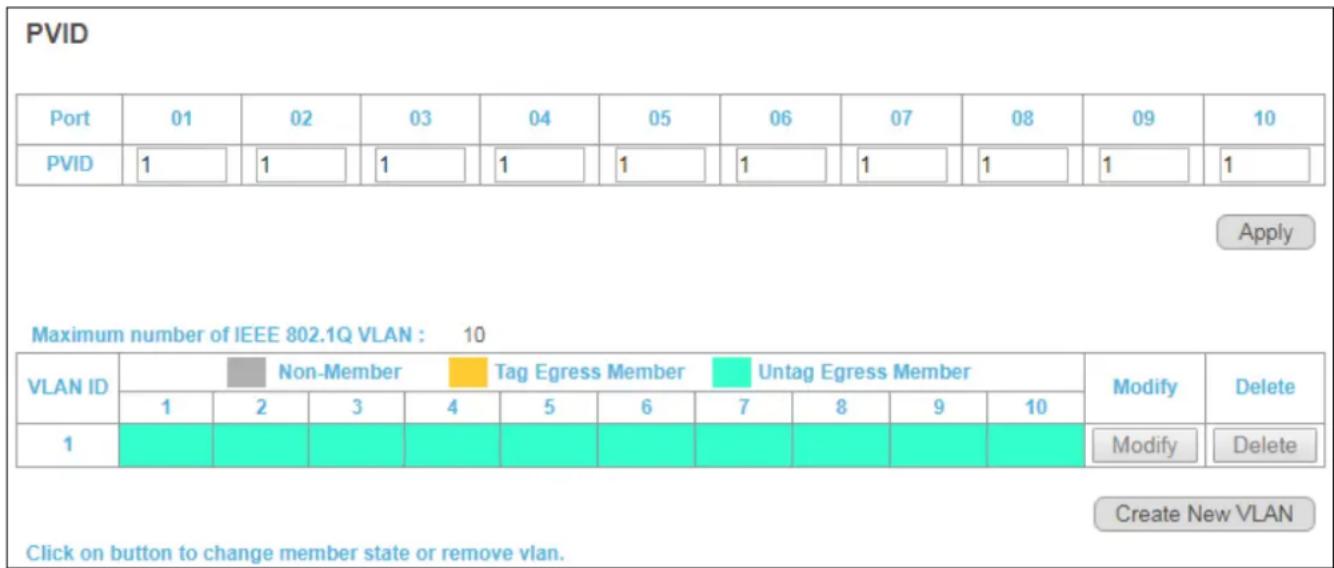
PVID Port 01 02 03 04 05 06 07 08 09 10 PVID 1 1 1 1 1 1 1 1 1 1 1 1 Apply Maximum number of IEEE 802.1Q VLAN : 10 VLAN ID Non-Member Tag Egress Member Untag Egress Member Modify Delete 1 2 3 4 5 6 7 8 9 10 1 Modify Delete Create New VLAN Click on button to change member state or remove vlan.| LABEL | DESCRIPTION |
| Port | This idenes the Ethernet port. |
| PVID | This is the VLAN ID assigned to untagged frames that this port received. |
| Apply | Click Apply to save PVID changes to the non-volale memory |
| Maximum number of IEEE 802.1Q VLAN | The maximum number of IEEE 802.1Q VLAN that can be created. |
| VLAN ID | This is the VLAN idencaon number that was congured in the IEEE 802.1Q VLAN screen. |
| Port Member | This column displays the members that are parcipang in a VLAN. A Non-Member is marked as Gray, a tagged Egress Member is marked as Yellow, and an Untagged Egress Member is marked as Green. |
| Create New VLAN | Click this to go to the VLAN add screen as shown below. |
| Modify | Click this to modify VLAN sengs of a parcular VLAN ID. |
| Delete | Click this to delete the VLAN. |
Click on "Create New VLAN" to go to the VLAN add screen as shown below:
IEEE 802.1Q VLAN

text_image
VLAN ID Non-Member Tag Egress Member Untag Egress Member 01 02 03 04 05 06 07 08 09 10 0 ApplyClick on box to change member state.
If Trunking enable, Please verify VLAN configurations in trunk port.
| LABEL | DESCRIPTION |
| VLAN ID | This is the VLAN idencaon number that was congured in the IEEE 802.1Q VLAN screen. Valid VID ranges from 1-4096. |
| Port Member | Each box displays the parcipang status in the VLAN. A Non-Member is marked as Gray, a tagged Egress Member is marked as Yellow, and an Untagged Egress Member is marked as Green.Click on the box to change its parcipang status. |
| Apply | Click Apply to save your changes. |
3-5 Trunking
Go to Trunking > LACP
Link aggregaon (trunking) is the grouping of physical ports into one logical higher-capacity link. You may want to trunk ports if, for example, it is cheaper to use mulple lower-speed links than to under-ulize a high-speed, but more costly, single-port link.
The Switch supports the link aggregaon IEEE802.3ad standard. This standard describes the Link Aggregaon Control Protocol (LACP), which is a protocol that dynamically creates and manages trunk groups.
When you enable LACP link aggregaon on a port, the port can automacally negotiate with the ports at the remote end of a link to establish trunk groups. LACP also allows port redundancy, that is, if an operational port fails, then one of the “standby” ports become operational without user intervenon. Please note that:
- You must connect all ports point-to-point to the same Ethernet switch and conjure the ports for LACP trunking.
• LACP only works on full-duplex links. - All ports in the same trunk group must have the same media type, speed, duplex mode and ow control sengs.
- Congure trunk groups or LACP before you connect the Ethernet switch to avoid causing network topology loops.
LACP
| LACP Global State | Enable ▼ | Disable ▼ | ||
| Link Aggregation Algorithm | MAC SA & DA ▼ | |||
| Link Group Activity | Active ▼ | Passive ▼ | ||
| Link Group Member | Port 7 | Port 8 | Port 9 | Port 10 |
| Link Disconnected | Link Disconnected | Link Disconnected | Link Disconnected | |
Apply
If Trunking enable, Please verify VLAN configurations in trunk port.
| LABEL | DESCRIPTION |
| LACP Global State | Select Enable or Disable to enable or disable Link Aggregaon Control Protocol |
| Link Aggregaon Algorithm | Select the outgoing trac distribuon type. Packets from the same source and/or to the same desnaon are sent over the same link within the trunk. By default, the Switch uses the MAC SA & DA distribuon type.Select MAC SA to distribute trafc based on the packet's source MAC address.Select MAC DA to distribute trac based on the packet's desnaon MAC address.Select MAC SA & DA to distribute trac based on a combinaon of the packet's source and desnaon MAC addresses. |
| Link Group Acvity | Switch TX LACP control packet Acve or Passive. |
| Link Group Member | The check box of ports would be checked aer the port is added into the Link Group successfully. |
| Apply | Click Apply to save your changes. |
3-6 QoS
GS-5208PLG provide Quality of Service (QoS) feature. Two kinds of QoS mechanism are provided for trac forwarding: port-based QoS and 802.1p QoS. Users can switch to either of them on the Web page.
When Quality of Service (QoS) feature is enabled, trac will be forwarded according to the predened seng of port-based QoS or 802.1p QoS.
If QoS type is set as port-based, the priority is based on the incoming port of the trac. The current queue for each port is congured as below.
| Port | Queue |
| 1 | 0 |
| 2 | 0 |
| 3 | 1 |
| 4 | 1 |
| 5 | 2 |
| 6 | 2 |
| 7 | 3 |
| 8 | 3 |
Click "Port-Based QoS" to go to the page shown below:

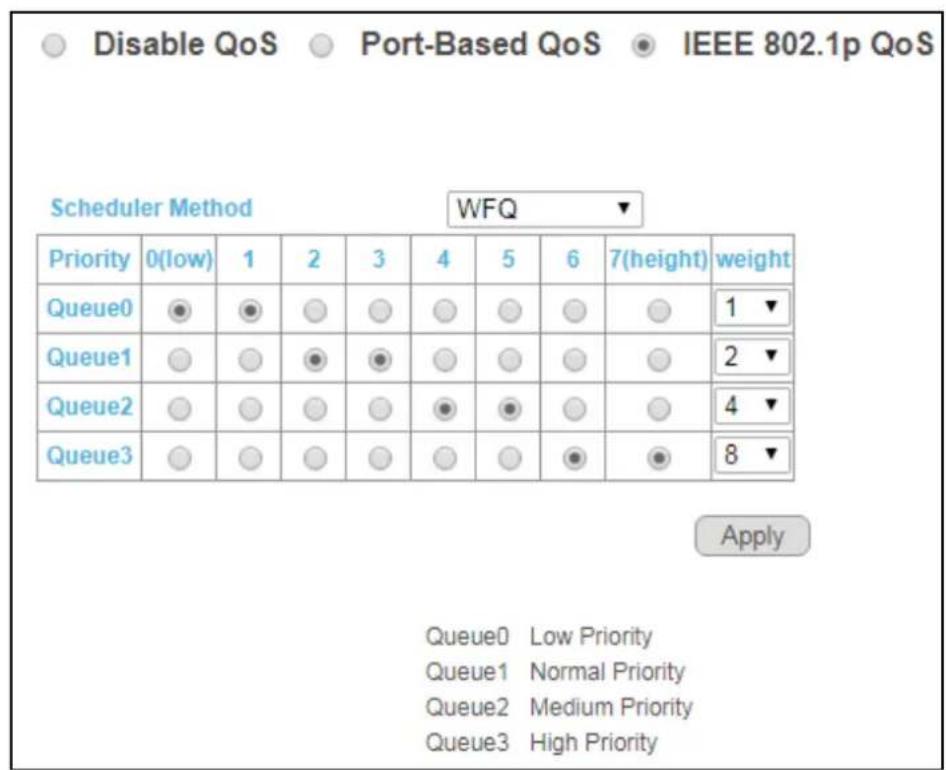
If QoS type is set to 802.1p, the priority is based on the incoming PCP eld of the trac. The current queue for each PCP is congured as below.
| PCP | Queue |
| 0 | 0 |
| 1 | 0 |
| 2 | 1 |
| 3 | 1 |
| 4 | 2 |
| 5 | 2 |
| 6 | 3 |
| 7 | 3 |
Click "IEEE 802.1p QoS" to go to the page shown below:
other
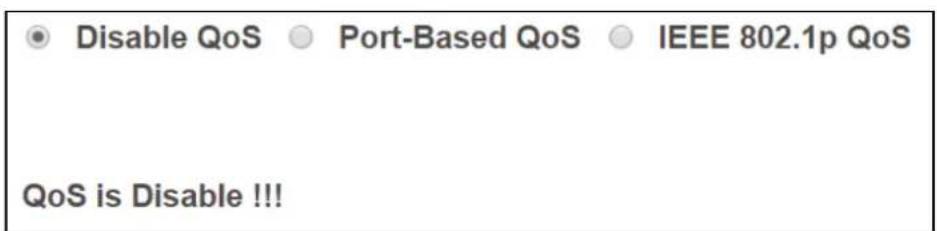
| Priority | 0(low) | 1 | 2 | 3 | 4 | 5 | 6 | 7 (height) | weight | |---|---|---|---|---|---|---|---|---|---| | Queue0 | ● | ● | ○ | ○ | ○ | ○ | ○ | ○ | 1 ▼ | | Queue1 | ○ | ○ | ● | ● | ○ | ○ | ○ | ○ | 2 ▼ | | Queue2 | ○ | ○ | ○ | ○ | ● | ● | ○ | ○ | 4 ▼ | | Queue3 | ○ | ○ | ○ | ○ | ○ | ○ | ● | ● | 8 ▼ | Apply Queue0 Low Priority Queue1 Normal Priority Queue2 Medium Priority Queue3 High PriorityTo disable QoS, click on "Disable QoS".
text_image
Disable QoS Port-Based QoS IEEE 802.1p QoS QoS is Disable !!!3-7 Broadcast Storm Control
A trac storm occurs when packets ood the network ports, creang trac and impacng network performance in a negave way. The broadcast storm control feature prevents network ports from being disrupted by a broadcast, mulcast, or DLF trac storm.

text_image
Broadcast Storm Control Broadcast no limit ▼ Multicast no limit ▼ DLF no limit ▼ ApplySelect a limit in the drop down menus behind the storm control features and click "Apply" to apply the sengs.

text_image
Broadcast Storm Control Broadcast no limit ▼ Multicast no limit DLF 512K/s 1M/s 2M/s 4M/s 8M/s 16M/s 32M/s 64M/s 128M/s 256M/s 512M/s3-8 Rate Liming
GS-5208PLG provides a Rate Control feature. When the Rate Control feature is enabled, GS-5208PLG provides Ingress/Egress trac Rate Control per port for broadcast trac type. Enable this feature to reduce broadcast packets in your network.
| Rate Limiting | |||
| Port | Ingress rate | Egress rate | |
| 1 | no limit | no limit | |
| 2 | no limit | no limit | |
| 3 | no limit | no limit | |
| 4 | no limit | no limit | |
| 5 | no limit | no limit | |
| 6 | no limit | no limit | |
| 7 | no limit | no limit | |
| 8 | no limit | no limit | |
| 9 | no limit | no limit | |
| 10 | no limit | no limit | |
Click on a port number to enter the conguraon page as shown below:
| Port | Ingress rate | Egress rate |
| 1 | no limit▼ | no limit▼ |
| 2 | no limit512K/s1M/s2M/s4M/s8M/s16M/s32M/s64M/s128M/s256M/s512M/s | no limit▼ |
| 3 | no limit▼ | |
| 4 | no limit▼ | |
| 5 | no limit▼ | |
| 6 | no limit▼ | |
| 7 | no limit▼ | |
| 8 | no limit▼ | |
| 9 | no limit▼ | no limit▼ |
| 10 | no limit▼ | no limit▼ |
Click the drop down menus to change the Ingress/Egress rate, and click "Apply" to apply the setng.
3-9 Loop Detect/Prevent
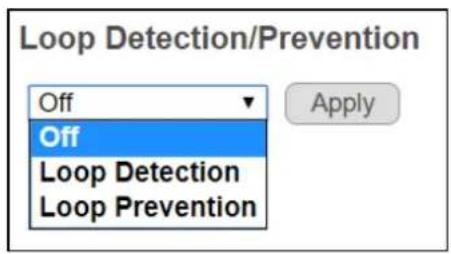
GS-5208PLG provides a Loop Protecon feature for unmanaged environments. Two kinds of mechanism are available in the GS-5208PLG, which are Loop Detecon and Loop Prevenon. Users can choose to enable Loop Detecon or Loop Prevenon.
The Loop Discovery frame uses the system MAC as source address. When the port receives the discovery frame and found that the source MAC is the same as system MAC, loop is determined.
When the Loop Detecon feature is enabled and acvated, the switch generates Broadcom proprietary tag frames (Loop Discovery Frames) at a programmed interval, and when it detects a loop, it gives a loop detected warning with a down port LED indicaon, and the system LED will be blinking. This feature does not repair the loop, but only issues a warning.
The GS-5208PLG also includes a Loop Prevenon feature which can be enabled. When Loop Prevenon is enabled and loop is detected, this feature will disable loop ports and dim the port LED, and the system LED will be blinking.
On the Loop Detect/Prevent page, select either "O", "Loop Detecon" or "Loop Prevenon" and click "Apply" to apply the sengs.
text_image
Loop Detection/Prevention Off Off Loop Detection Loop Prevention Apply3-10 IGMP Snooping
When the IGMP Snooping is enabled, the GS-5208PLG will process IGMP control packets for mulcast trac forwarding. The switch will record informaon of IGMP v2 packets and maintain database for mulcast trac. Mulcast trac will then be forwarded according to the database.
When IGMP Snooping feature is enabled, switch will record informaon of IGMP v3 packets and maintain database for mulcast trac. Then mulcast trac will be forwarded according to the database. In IGMP v3, mulple mulcast group and source IP informaon can be recorded in one IGMP v3 packet, GS-5208PLG will record each mulcast group address and ignore source IP informaon.
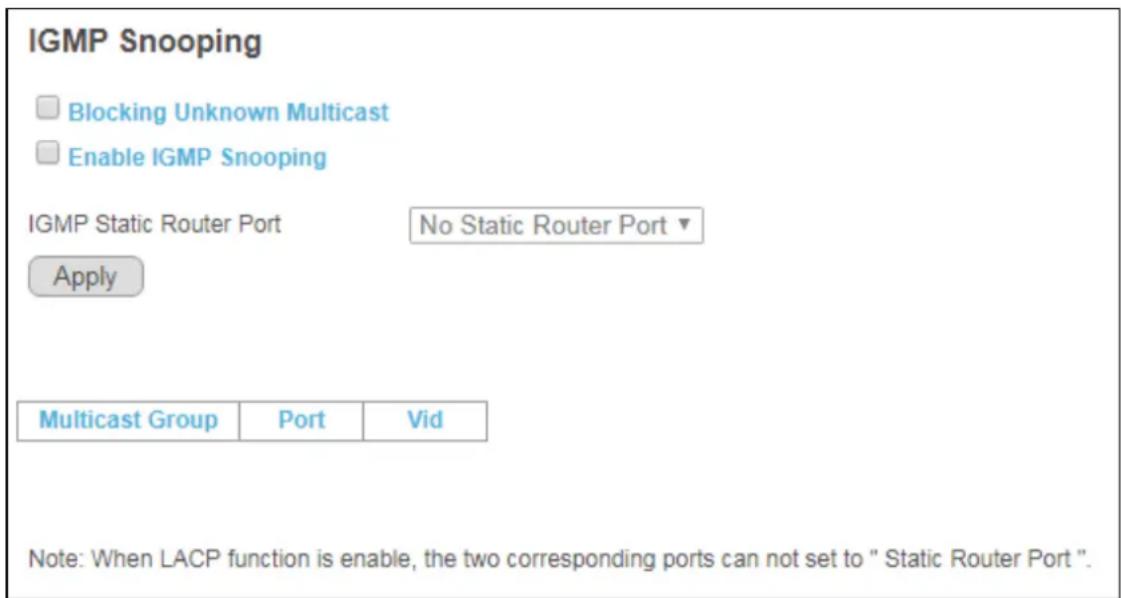
When the IGMP Snooping feature is enabled and IGMP Stac Router Port is set, only this port can be used as a router port, other ports will be as member ports only. In this case, member ports receive query packets will drop the query packets.
text_image
IGMP Snooping Blocking Unknown Multicast Enable IGMP Snooping IGMP Static Router Port No Static Router Port ▼ Apply Multicast Group Port Vid Note: When LACP function is enable, the two corresponding ports can not set to "Static Router Port ".When “Enable IGMP Snooping” is selected, IGMP Stac Router Port can be selected using the drop down menu.
Click "Apply" to apply the sengs.
3-11 POE
The GS-5208PLG provides a Power over Ethernet (PoE) manager feature. The IC of the PoE module is Microsemi PD69104B.
The PoE module manager enables network devices to share power and data over a single cable. The PoE module is employed by both Ethernet switches and Midspans.
The PoE module is a 4 port, mixed-single, high-voltage PoE Manager and supports Semi Auto mode. The PoE module executes all real me funcons as specified in the IEEE 802.3af-2003 (“AF”) and IEEE 802.3at High Power (“AT”) standards.
The PoE module supports detect legacy/pre-standard PD devices. It also provides PD real-me protecon through the following mechanisms: overload, under-load, over-voltage, over-temperature, and short-circuit. The PD69104B can supply voltages between 44V and 57V without additional power supply and has a built-in thermal protecon.
| POE Global Settings | |||
| PSE Total Power | 130W | ||
| PSE MAX LED Power | 120W | ||
| PSE IC MAX Temperature | 150°C | ||
| PSE voltage | 53.4V | ||
| POE Status | |||
| Port | Power Status | Real Current(W) | Real Temperature(°C) |
| 1 | Turned on | 0 | 46 |
| 2 | Turned on | 0 | 46 |
| 3 | Turned on | 0 | 48 |
| 4 | Turned on | 0 | 51 |
| 5 | Turned on | 0 | 47 |
| 6 | Turned on | 0 | 46 |
| 7 | Turned on | 0 | 46 |
| 8 | Turned on | 0 | 46 |
| Turned on:8 Total Power:0 W | |||
Click on a port number and the opons are shown below:
| Port | Power Supply |
| 1 | Turn on ▼ |
| 2 | Turn on ▼ |
| 3 | Turn on ▼ |
| 4 | Turn on ▼ |
| 5 | Turn on ▼ |
| 6 | Turn on ▼ |
| 7 | Turn on ▼ |
| 8 | Turn on ▼ |
Click the drop down menu to select whether to turn on or o PoE funcon.
Click "Apply" to apply the sengs.
3-12 Password
Click "Password" to go to the "Change Password" page.
Enter the relevant informaon as shown below and click "Conrm" to conrm the changes.
Change Password
New User Name:
New Password:
Confirm New Password:
Confirm
Note:
Password can only use "a-z", "A-Z", "0-9" and the length is at least 4, max is 20.
3-13 Logout
If you want to logout of the system, click Logout.
| System |
| Management |
| Port |
| VLAN |
| Trunking |
| Mirror |
| QoS |
| Broadcast Storm Control |
| Rate Limiting |
| Loop Detect/Prevent |
| IGMP Snooping |
| PoE |
| Password |
| Logout |
COPYRIGHT
Copyright © Edimax Technology Co., Ltd. all rights reserved. No part of this publicaon may be reproduced, transmied, transcribed, stored in a retrieval system, or translated into any language or computer language, in any form or by any means, electronic, mechanical, magnec, opcal, chemical, manual or otherwise, without the prior written permission from Edimax Technology Co., Ltd.
Edimax Technology Co., Ltd. makes no representaons or warranes, either expressed or implied, with respect to the contents hereof and specifically disclaims any warranes, merchantability, or tness for any parcular purpose. Any soware described in this manual is sold or licensed as is. Should the programs prove defecve following their purchase, the buyer (and not this company, its distributor, or its dealer) assumes the enre cost of all necessary servicing, repair, and any incidental or consequential damages resulting from any defect in the soware. Edimax Technology Co., Ltd. reserves the right to revise this publicaon and to make changes from me to me in the contents hereof without the obligaon to nofy any person of such revision or changes.
The product you have purchased and the setup screen may appear slightly dierent from those shown in this QIG. The soware and specicaons are subject to change without noce. Please visit our website www.edimax.com for updates. All brand and product names menoned in this manual are trademarks and/or registered trademarks of their respective holders.
Federal Communicaon Commission Interference Statement
This equipment has been tested and found to comply with the limits for a Class A digital device, pursuant to Part 15 of the FCC Rules. These limits are designed to provide reasonable protecon against harmful interference when the equipment is operated in a commercial environment. This equipment generates, uses, and can radiate radio frequency energy and, if not installed and used in accordance with the instrucon manual, may cause harmful interference to radio communicaons. Operaon of this equipment in a residential area is likely to cause harmful interference in which case the user will be required to correct the interference at his own expense.
FCC Radiaon Exposure Statement
This device complies with FCC radiaon exposure limits set forth for an uncontrolled environment and it also complies with Part 15 of the FCC RF Rules. This equipment must be installed and operated in accordance with provided instrucons and the antenna(s) used for this transmier must be installed to provide a separaon distance of at least 20 cm from all persons and must not be co-located or operang in conjuncon with any other antenna or transmier. End-users and installers must be provided with antenna installaon instrucons and consider removing the no-collocaon statement.
This device complies with Part 15 of the FCC Rules. Operaon is subject to the following two conditions:
(1) this device may not cause harmful interference, and
(2) this device must accept any interference received, including interference that may cause undesired operaon.
Cauon!
Any changes or modicaons not expressly approved by the party responsible for compliance could void the user's authority to operate the equipment.
R&TTE Compliance Statement
This equipment complies with all the requirements of DIRECTIVE 2014/30/EU OF THE EUROPEAN PARLIAMENT AND THE COUNCIL of March 9, 1999 on radio equipment and telecommunicaon terminal equipment and the mutual recognition of their conformity (R&TTE). The R&TTE Directive repeals and replaces in the directive 98/13/EEC (Telecommunicaons Terminal Equipment and Satellite Earth Staon Equipment) As of April 8, 2000.
Safety
This equipment is designed with the utmost care for the safety of those who install and use it. However, special attenon must be paid to the dangers of electric shock and stac electricity when working with electrical equipment. All guidelines of this and of the computer manufacture must therefore be allowed at all mes to ensure the safe use of the equipment.
EU Countries Intended for Use
The ETSI version of this device is intended for home and oce use in Austria, Belgium, Bulgaria, Cyprus, Czech, Denmark, Estonia, Finland, France, Germany, Greece, Hungary, Ireland, Italy, Latvia, Lithuania, Luxembourg, Malta, Netherlands, Poland, Portugal, Romania, Slovakia, Slovenia, Spain, Sweden, Turkey, and United Kingdom. The ETSI version of this device is also authorized for use in EFTA member states: Iceland, Liechtenstein, Norway, and Switzerland.
EU Countries Not Intended for Use
None
EU Declaraon of Conformity
English: This equipment is in compliance with the essenal requirements and other relevant provisions of Direcve 2014/30/EU.
WEEE Directive & Product Disposal

At the end of its serviceable life, this product should not be treated as household or general waste. It should be handed over to the applicable collecon point for the recycling of electrical and electronic equipment, or returned to the supplier for disposal.
Declaraon of Conformity
We, Edimax Technology Co., Ltd., declare under our sole responsibility, that the equipment described below complies with the requirements of the European R&TTE directives.
Equipment: PoE Web Smart Switch
Model No.: GS-5208PLG
The following European standards for essenal requirements have been followed:
Direcves 2014/30/EU
EMC : EN 55032:2015 Class A EN 61000-3-2:2014 Class A EN 61000-3-3:2013 EN 55024:2010
Direcves 2014/35/EU
Safety (LVD) : IEC 62368-1:2014 (2nd Edion) and/or EN 62368-1:2014+A11:2017
Edimax Technology Europe B.V.
Fijenhof 2,
5652 AE Eindhoven,
The Netherlands
Printed Name: David Huang
Title: Director
Edimax Technology Europe B.V.
a company of:
Edimax Technology Co., Ltd.
No. 278, Xinhu 1st Rd.,
Neihu Dist., Taipei City,
Taiwan

Date of Signature: Nov., 2020
Signature:

Printed Name: Albert Chang
Title: Director
Edimax Technology Co., Ltd.
Noce According to GNU General Public License Version 2
This product includes soware that is subject to the GNU General Public License version 2. The program is free soware and distributed without any warranty of the author. We oer, valid for at least three years, to give you, for a charge no more than the costs of physically performing source distribuon, a complete machine-readable copy of the corresponding source code.
Version 2, June 1991
Copyright (C) 1989, 1991 Free Soware Foundaon, Inc. 51 Franklin Street, Fih Floor, Boston, MA 02110-1301, USA Everyone is permied to copy and distribute verbam copies of this license document, but changing it is not allowed.
Preamble
The licenses for most soware are designed to take away your freedom to share and change it. By contrast, the GNU General Public License is intended to guarantee your freedom to share and change free soware--to make sure the soware is free for all its users. This General Public License applies to most of the Free Soware Foundation's soware and to any other program whose authors commit to using it. (Some other Free Soware Foundaon soware is covered by the GNU Lesser General Public License instead.) You can apply it to your programs, too.
When we speak of free soware, we are referring to freedom, not price. Our General Public Licenses are designed to make sure that you have the freedom to distribute copies of free soware (and charge for this service if you wish), that you receive source code or can get it if you want it, that you can change the soware or use pieces of it in new free programs; and that you know you can do these things.
To protect your rights, we need to make restricons that forbid anyone to deny you these rights or to ask you to surrender the rights. These restricons translate to certain responsibilities for you if you distribute copies of the soware, or if you modify it.
For example, if you distribute copies of such a program, whether gras or for a fee, you must give the recipients all the rights that you have. You must make sure that they, too, receive or can get the source code. And you must show them these terms so they know their rights.
We protect your rights with two steps: (1) copyright the soware, and (2) oer you this license which gives you legal permission to copy, distribute and/or modify the soware.
Also, for each author's protecon and ours, we want to make certain that everyone understands that there is no warranty for this free soware. If the soware is modified by someone else and passed on, we want its recipients to know that what they have is not the original, so that any problems introduced by others will not react on the original authors' reputaons.
Finally, any free program is threatened constantly by soware patents. We wish to avoid the danger that redistributors of a free program will individually obtain patent licenses, in eect making the program proprietary. To prevent this, we have made it clear that any patent must be licensed for everyone's free use or not licensed at all.
The precise terms and conditions for copying, distribuon and modicaon follow.
TERMS AND CONDITIONS FOR COPYING, DISTRIBUTION AND MODIFICATION
- This License applies to any program or other work which contains a noce placed by the copyright holder saying it may be distributed under the terms of this General Public License. The “Program”, below, refers to any such program or work, and a “work based on the Program” means either the Program or any derivative work under copyright law: that is to say, a work containing the Program or a poron of it, either verbam or with modicaons and/or translated into another language. (Hereinaer, translaon is included without limitaon in the term “modicaon”.) Each licensee is addressed as “you”.
Acvies other than copying, distribuon and modicaon are not covered by this License; they are outside its scope. The act of running the Program is not restricted, and the output from the Program is covered only if its contents constute a work based on the Program (independent of having been made by running the Program). Whether that is true depends on what the Program does.
- You may copy and distribute verbam copies of the Program's source code as you receive it, in any medium, provided that you conspicuously and appropriately publish on each copy an appropriate copyright noce and disclaimer of warranty; keep intact all the noces that refer to this License and to the absence of any warranty; and give any other recipients of the Program a copy of this License along with the Program.
You may charge a fee for the physical act of transferring a copy, and you may at your opon oer warranty protecon in exchange for a fee.
- You may modify your copy or copies of the Program or any poron of it, thus forming a work based on the Program, and copy and distribute such modicaons or work under the terms of Secon 1 above, provided that you also meet all of these conditions:
a) You must cause the modified les to carry prominent noces stang that you changed the les and the date of any change.
b) You must cause any work that you distribute or publish, that in whole or in part contains or is derived from the Program or any part thereof, to be licensed as a whole at no charge to all third pares under the terms of this License.
c) If the modified program normally reads commands interactively when run, you must cause it, when started running for such interactive use in the most ordinary way, to print or display an announcement including an appropriate copyright notice and a notice that there is no warranty (or else, saying that you provide a warranty) and that users may redistribute the program under these conditions, and telling the user how to view a copy of this License. (Excepon: if the Program itself is interactive but does not normally print such an announcement, your work based on the Program is not required to print an announcement.)
These requirements apply to the modified work as a whole. If idenable seconds of that work are not derived from the Program, and can be reasonably considered independent and separate works in themselves, then this License, and its terms, do not apply to those seconds when you distribute them as separate works. But when you distribute the same seconds as part of a whole which is a work based on the Program, the distribution of the whole must be on the terms of this License, whose permissions for other licensees extend to the entire whole, and thus to each and every part regardless of who wrote it.
Thus, it is not the intent of this secon to claim rights or contest your rights to work wrien enrely by you; rather, the intent is to exercise the right to control the distribuon of derivave or collective works based on the Program.
In addition, mere aggregaon of another work not based on the Program with the Program (or with a work based on the Program) on a volume of a storage or distribuon medium does not bring the other work under the scope of this License.
- You may copy and distribute the Program (or a work based on it, under Secon 2) in object code or executable form under the terms of Secons 1 and 2 above provided that you also do one of the following:
a) Accompany it with the complete corresponding machine-readable source code, which must be distributed under the terms of Secons 1 and 2 above on a medium customarily used for soware interchange; or,
b) Accompany it with a wrien oer, valid for at least three years, to give any third party, for a charge no more than your cost of physically performing source distribuon, a complete machine-readable copy of the corresponding source code, to be distributed under the terms of Secons 1 and 2 above on a medium customarily used for soware interchange; or,
c) Accompany it with the informaon you received as to the oer to distribute corresponding source code. (This alternate is allowed only for noncommercial distribuon and only if you received the program in object code or executable form with such an oer, in accord with Subsecon b above.)
The source code for a work means the preferred form of the work for making modicaons to it. For an executable work, complete source code means all the source code for all modules it contains, plus any associated interface denion les, plus the scripts used to control compilaon and installaon of the executable. However, as a special exception, the source code distributed need not include anything that is normally distributed (in either source or binary form) with the major components (compiler, kernel, and so on) of the operang system on which the executable runs, unless that component itself accompanies the executable.
If distribuon of executable or object code is made by oering access to copy from a designated place, then oering equivalent access to copy the source code from the same place counts as distribuon of the source code, even though third pares are not compelled to copy the source along with the object code.
-
You may not copy, modify, sublicense, or distribute the Program except as expressly provided under this License. Any aempt otherwise to copy, modify, sublicense or distribute the Program is void, and will automatically terminate your rights under this License. However, pares who have received copies, or rights, from you under this License will not have their licenses terminated so long as such pares remain in full compliance.
-
You are not required to accept this License, since you have not signed it. However, nothing else grants you permission to modify or distribute the Program or its derivative works. These acons are prohibited by law if you do not accept this License. Therefore, by modifying or distributing the Program (or any work based on the Program), you indicate your acceptance of this License to do so, and all its terms and conditions for copying, distribution or modifying the Program or works based on it.
-
Each me you redistribute the Program (or any work based on the Program), the recipient automatically receives a license from the original licensor to copy, distribute or modify the Program subject to these terms and conditions. You may not impose any further restricons on the recipients' exercise of the rights granted herein. You are not responsible for enforcing compliance by third pares to this License.
-
If, as a consequence of a court judgment or allegaon of patent infringement or for any other reason (not limited to patent issues), condions are imposed on you (whether by court order, agreement or otherwise) that contradict the condions of this License, they do not excuse you from the condions of this License. If you cannot distribute so as to sasfy simultaneously your obligaons under this License and any other pernent obligaons, then as a consequence you may not distribute the Program at all. For example, if a patent license would not permit royalty-free redistribuon of the Program by all those who receive copies directly or indirectly through you, then the only way you could sasfy both it and this License would be to refrain enrely from distribuon of the Program.
If any poron of this secon is held invalid or unenforceable under any parcular circumstance, the balance of the secon is intended to apply and the secon as a whole is intended to apply in other circumstances.
It is not the purpose of this secon to induce you to infringe any patents or other property right claims or to contest validity of any such claims; this secon has the sole purpose of protecng the integrity of the free soware distribuon system, which is implemented by public license pracces. Many people have made generous contribuons to the wide range of soware distributed through that system in reliance on consistent applicaon of that system; it is up to the author/donor to decide if he or she is willing to distribute soware through any other system and a licensee cannot impose that choice.
This secon is intended to make thoroughly clear what is believed to be a consequence of the rest of this License.
-
If the distribuon and/or use of the Program is restricted in certain countries either by patents or by copyrighted interfaces, the original copyright holder who places the Program under this License may add an explicit geographical distribuon limitaon excluding those countries, so that distribuon is permied only in or among countries not thus excluded. In such case, this License incorporates the limitaon as if written in the body of this License.
-
The Free Soware Foundaon may publish revised and/or new versions of the General Public License from me to me. Such new versions will be similar in spirit to the present version, but may dier in detail to address new problems or concerns.
Each version is given a disguishing version number. If the Program species a version number of this License which applies to it and “any later version”, you have the opon of following the terms and condions either of that version or of any later version published by the Free Soware Foundaon. If the Program does not specify a version number of this License, you may choose any version ever published by the Free Soware Foundaon.
- If you wish to incorporate parts of the Program into other free programs whose distribuon conditions are dierent, write to the author to ask for permission. For soware which is copyrighted by the Free Soware Foundation, write to the Free Soware Foundaon; we sometimes make exceptions for this. Our decision will be guided by the two goals of preserving the free status of all derivatives of our free soware and of promong the sharing and reuse of soware generally.
NO WARRANTY
-
BECAUSE THE PROGRAM IS LICENSED FREE OF CHARGE, THERE IS NO WARRANTY FOR THE PROGRAM, TO THE EXTENT PERMITTED BY APPLICABLE LAW. EXCEPT WHEN OTHERWISE STATED IN WRITING THE COPYRIGHT HOLDERS AND/OR OTHER PARTIES PROVIDE THE PROGRAM "AS IS" WITHOUT WARRANTY OF ANY KIND, EITHER EXPRESSED OR IMPLIED, INCLUDING, BUT NOT LIMITED TO, THE IMPLIED WARRANTIES OF MERCHANTABILITY AND FITNESS FOR A PARTICULAR PURPOSE. THE ENTIRE RISK AS TO THE QUALITY AND PERFORMANCE OF THE PROGRAM IS WITH YOU. SHOULD THE PROGRAM PROVE DEFECTIVE, YOU ASSUME THE COST OF ALL NECESSARY SERVICING, REPAIR OR CORRECTION.
-
IN NO EVENT UNLESS REQUIRED BY APPLICABLE LAW OR AGREED TO IN WRITING WILL ANY COPYRIGHT HOLDER, OR ANY OTHER PARTY WHO MAY MODIFY AND/OR REDISTRIBUTE THE PROGRAM AS PERMITTED ABOVE, BE LIABLE TO YOU FOR DAMAGES, INCLUDING ANY GENERAL, SPECIAL, INCIDENTAL OR CONSEQUENTIAL DAMAGES ARISING OUT OF THE USE OR INABILITY TO USE THE PROGRAM (INCLUDING BUT NOT LIMITED TO LOSS OF DATA OR DATA BEING RENDERED INACCURATE OR LOSSES SUSTAINED BY YOU OR THIRD PARTIES OR A FAILURE OF THE PROGRAM TO OPERATE WITH ANY OTHER PROGRAMS), EVEN IF SUCH HOLDER OR OTHER PARTY HAS BEEN ADVISED OF THE POSSIBILITY OF SUCH DAMAGES.