
WGCXS213SNB - Power outlet HAGER - Free user manual and instructions
Find the device manual for free WGCXS213SNB HAGER in PDF.


| Product Type | BS Switched Socket Outlet |
| Brand | Hager |
| Model | WGCXS213SNB |
| Rated Voltage | 250 V~ |
| Frequency | 50/60 Hz |
| Rated Current | 13 A |
| Conductor Cross-Section (Screw Terminals) | Min. 1 x 1.5 mm², Max. 2 x 4 mm² |
| Fixing Holes Distance (Single Socket) | 60.3 mm |
| Compliance Standards | BS 1363-2, SS 145 |
| Installation Type | Flush-mounted in commercial wall boxes |
| Recommended Wall Box Depth | ≥ 35 mm |
| Operating Environment | Indoor, no drip or spray water |
| Care and Cleaning | Wipe with a dry cloth; do not use water or solvents |
| Safety Precautions | Must be installed by qualified electrician. Disconnect power before working. |
| Spare Parts | Contact Hager customer service |
Frequently Asked Questions - WGCXS213SNB HAGER
User questions about WGCXS213SNB HAGER
0 question about this device. Answer the ones you know or ask your own.
Ask a new question about this device
Download the instructions for your Power outlet in PDF format for free! Find your manual WGCXS213SNB - HAGER and take your electronic device back in hand. On this page are published all the documents necessary for the use of your device. WGCXS213SNB by HAGER.
USER MANUAL WGCXS213SNB HAGER
Electrical equipment must only be installed and assembled by a qualified electrician in accordance with the relevant installation standards, regulations, directives and safety and accident prevention directives of the country.
Failure to comply with these installation instructions may result in damage to the device, fire or other hazards.
Function
BS switched sockets for electrical installations in buildings. The socket outlets are compatible with BS 1363-1 plugs.
Correct use
- For the flush-mounted installation in commercial wall boxes (recommended wall box depth ≥ 35 mm).
- Only suitable for use in indoor areas with no drip and no spray water.
Technical data
Rated voltage: 250 V\~
Frequency: 50/60 Hz
Rated current: 13 A
Conductor cross-section of screw terminals: min. 1 x 1.5 mm 2 ... max. 2 x 4 mm 2
Distance of fixing holes (single socket): 60.3 mm
Distance of fixing holes (twin socket): 120.6 mm
Socket compliance: BS 1363-2 and SS 145
Information for electricians Installation and electrical connection
DANGER!
Touching live parts can result in an electric shock.
An electric shock can lead to death.
Disconnect the connecting cables before working on the device and cover all live parts in the area!
Preparing the device for installation
The device is delivered with a transparent dust protection sticker. This sticker must remain on the device during the time of installation.
1A
Hager Muse

■ Hager Muse: Carefully loosen the frame on the notches with a flat-blade screw-driver. Lift up and remove the frame (1A).
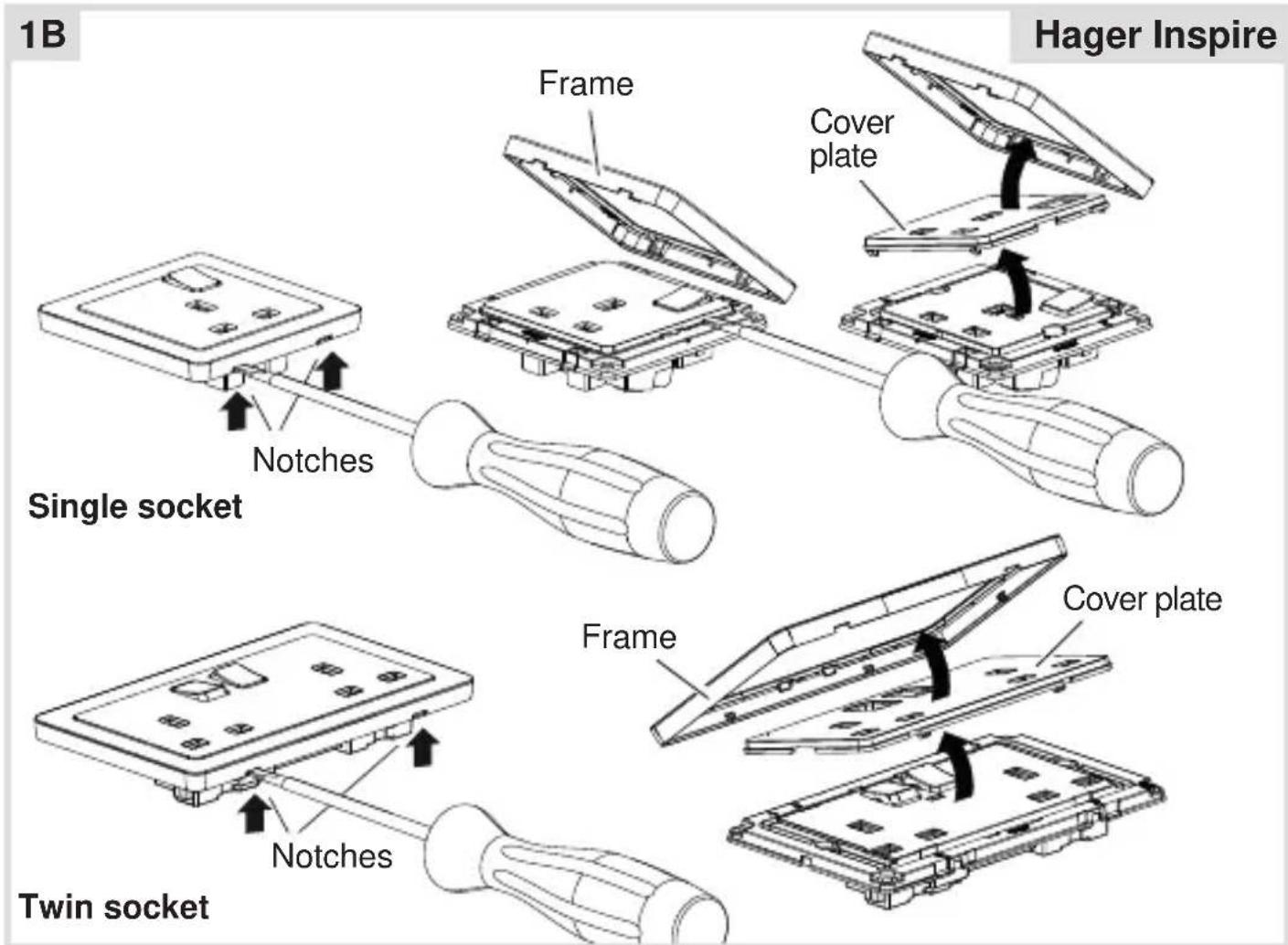
■ Hager Inspire: Carefully loosen the frame on the notches with a flat-blade screw-driver. Lift up and remove the frame (1B).
■ Hager Inspire: Remove the cover plate also with a flat-blade screwdriver (1B).
Connecting the device
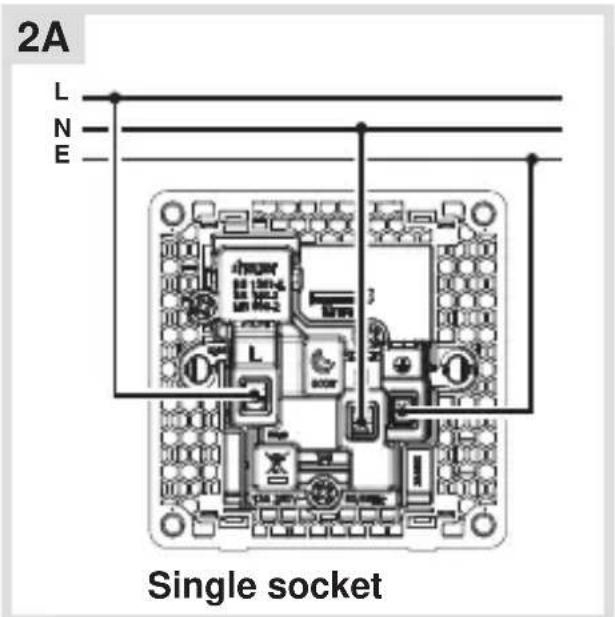
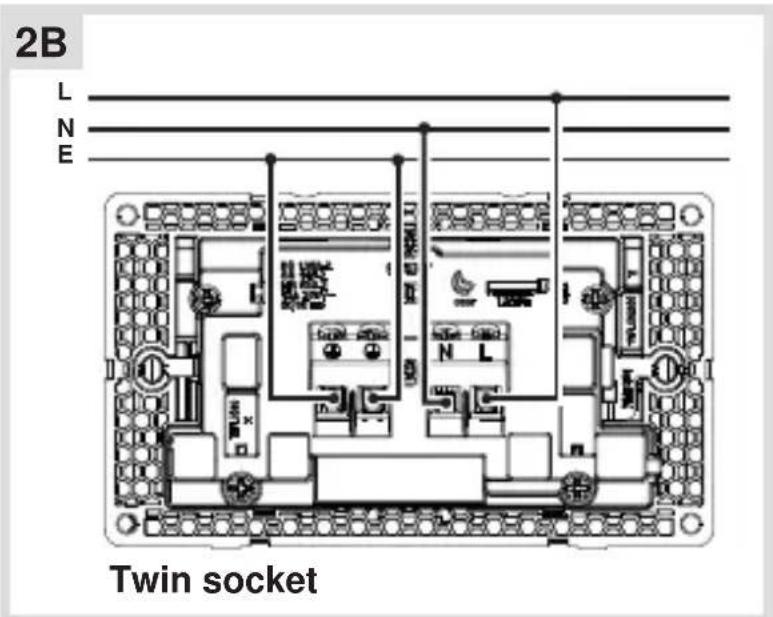
- Strip connection cables approx. 10 ... 12 mm.
■ Wire the device according to the appropriate connection diagram (2A or 2B).
Installing the device into the wall box

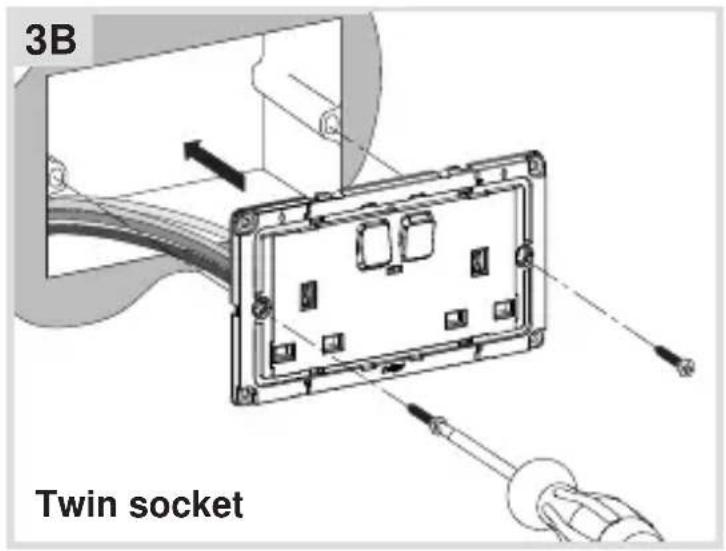
■ After wiring, fix the device with the two screws attached into the wall box (3A or 3B).
Assembling the covers
(for example "13A single switched socket")
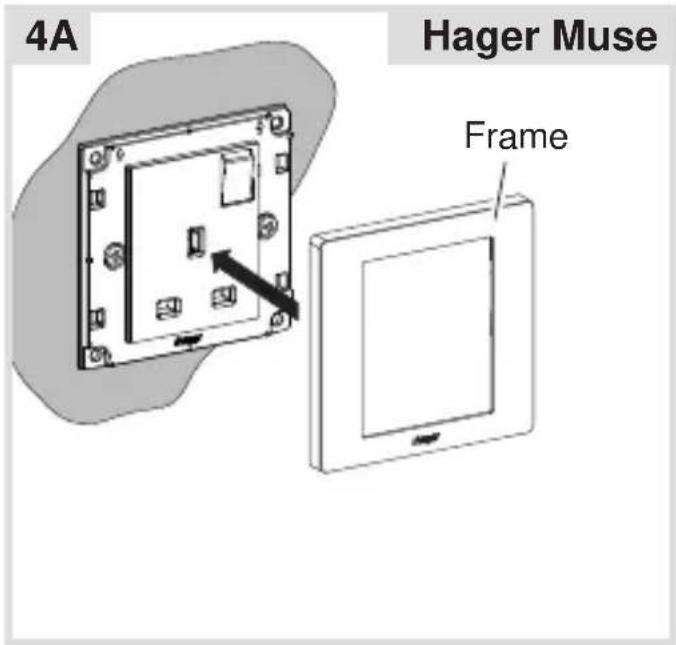

■ Hager Muse: Snap the frame onto the device (4A).
■ Hager Inspire: Place the cover plate in the correct position and fix with frame (4B).
■ Remove the dust protection sticker.



Brand : HAGER
Model : WGCXS213SNB
Category : Power outlet