
WGCXT1TVKB - Power outlet HAGER - Free user manual and instructions
Find the device manual for free WGCXT1TVKB HAGER in PDF.


| Product Type | Power Outlet |
| Brand | Hager |
| Model | WGCXT1TVKB |
| Rated Voltage | 230 V AC |
| Rated Current | 16 A |
| Frequency | 50 Hz |
| Number of Sockets | 1 (single) |
| Protection Class | Class I (with earthing) |
| IP Rating | IP20 (indoor use) |
| Dimensions (H x W x D) | 80 x 80 x 40 mm |
| Weight | Approx. 0.1 kg |
| Material | Thermoplastic |
| Color | White |
| Mounting Type | Flush-mounted |
| Operating Temperature | -5°C to 40°C |
| Certifications | CE, VDE |
| Surge Protection | No |
| USB Charging | No |
| Safety Features | Shutter system for child protection |
| Maintenance | Wipe clean with a dry cloth; do not use abrasive cleaners |
| Spare Parts | Not applicable; integrated unit |
| Repairability | Not user-serviceable; consult a qualified electrician |
Frequently Asked Questions - WGCXT1TVKB HAGER
User questions about WGCXT1TVKB HAGER
0 question about this device. Answer the ones you know or ask your own.
Ask a new question about this device
Download the instructions for your Power outlet in PDF format for free! Find your manual WGCXT1TVKB - HAGER and take your electronic device back in hand. On this page are published all the documents necessary for the use of your device. WGCXT1TVKB by HAGER.
USER MANUAL WGCXT1TVKB HAGER
Electrical equipment must only be installed and assembled by a qualified electrician in accordance with the relevant installation standards, regulations, directives and safety and accident prevention directives of the country.
Failure to comply with these installation instructions may result in damage to the device, fire or other hazards.
Function
The TV outlets are used for supplying digital or analogue TV signals.
| Version Connector Area of application | |
| TV outlet IEC-jack For use as single socket |
Correct use
- For the flush-mounted installation in standard wall boxes (wall box depth ≥ 47 mm).
- Only suitable for use in indoor areas with no drip and no spray water.
Technical data
Frequency range: 5 ... 1000 MHz
Information for electricians Installation and electrical connection
Preparing the device for installation
1A

Hager Muse
Hager Inspire1B

- Carefully loosen the frame on the notches with a flat-blade screwdriver. Lift up and remove the frame (1A/1B).
Hager Inspire: Remove the cover plate also with a flat-blade screwdriver (1B).
Connecting the TV outlet
■ Shorten and route coaxial transmission line in the wall box. When doing so, do not bend coaxial transmission line too far.
2A


- Strip coaxial transmission line and attach supplied F-plug (2A).
2B

natural_image
Technical diagram showing a mechanical assembly with a connector inserted into a housing (no text or symbols visible)2C

natural_image
Diagram of a cable inserted into a square electrical socket with a rotating component (no text or symbols)■ Connect and screw the assembled line to the F-jack on the rear of the TV outlet (2B/2C).
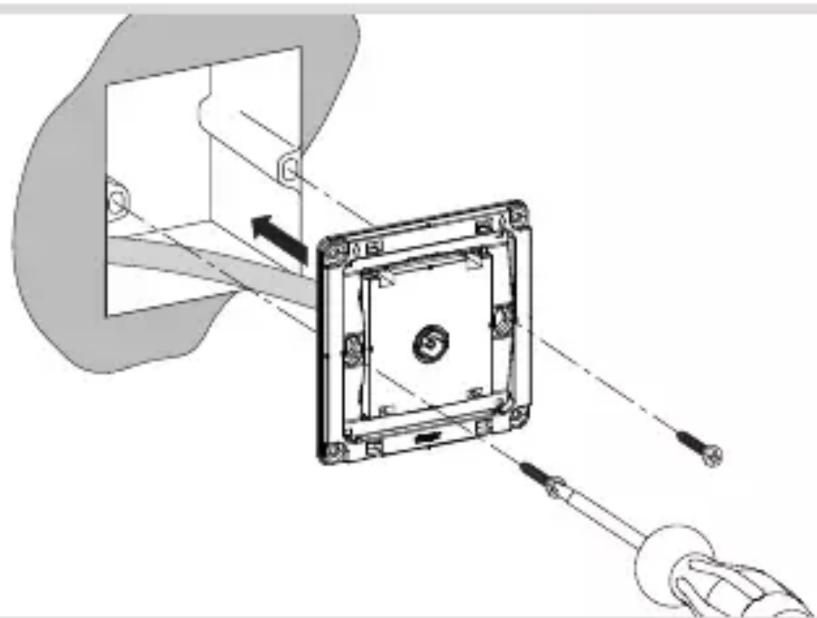
Installing the device into the wall box
3
natural_image
Technical diagram of a mechanical assembly with a square component and tool, showing alignment and assembly lines (no text or symbols)■ After wiring, fix the device with the two screws attached into the wall box (3).
Assembling the covers


■ Hager Muse: Snap the frame onto the device (4A).
Hager Inspire: Place the cover plate in the correct position and fix with frame (4B).
2-5gang frames are available for multiple combinations.



Brand : HAGER
Model : WGCXT1TVKB
Category : Power outlet