G10ST - Grinder HiKOKI - Free user manual and instructions
Find the device manual for free G10ST HiKOKI in PDF.


User questions about G10ST HiKOKI
0 question about this device. Answer the ones you know or ask your own.
Ask a new question about this device
Download the instructions for your Grinder in PDF format for free! Find your manual G10ST - HiKOKI and take your electronic device back in hand. On this page are published all the documents necessary for the use of your device. G10ST by HiKOKI.
USER MANUAL G10ST HiKOKI
HANDLING INSTRUCTIONS
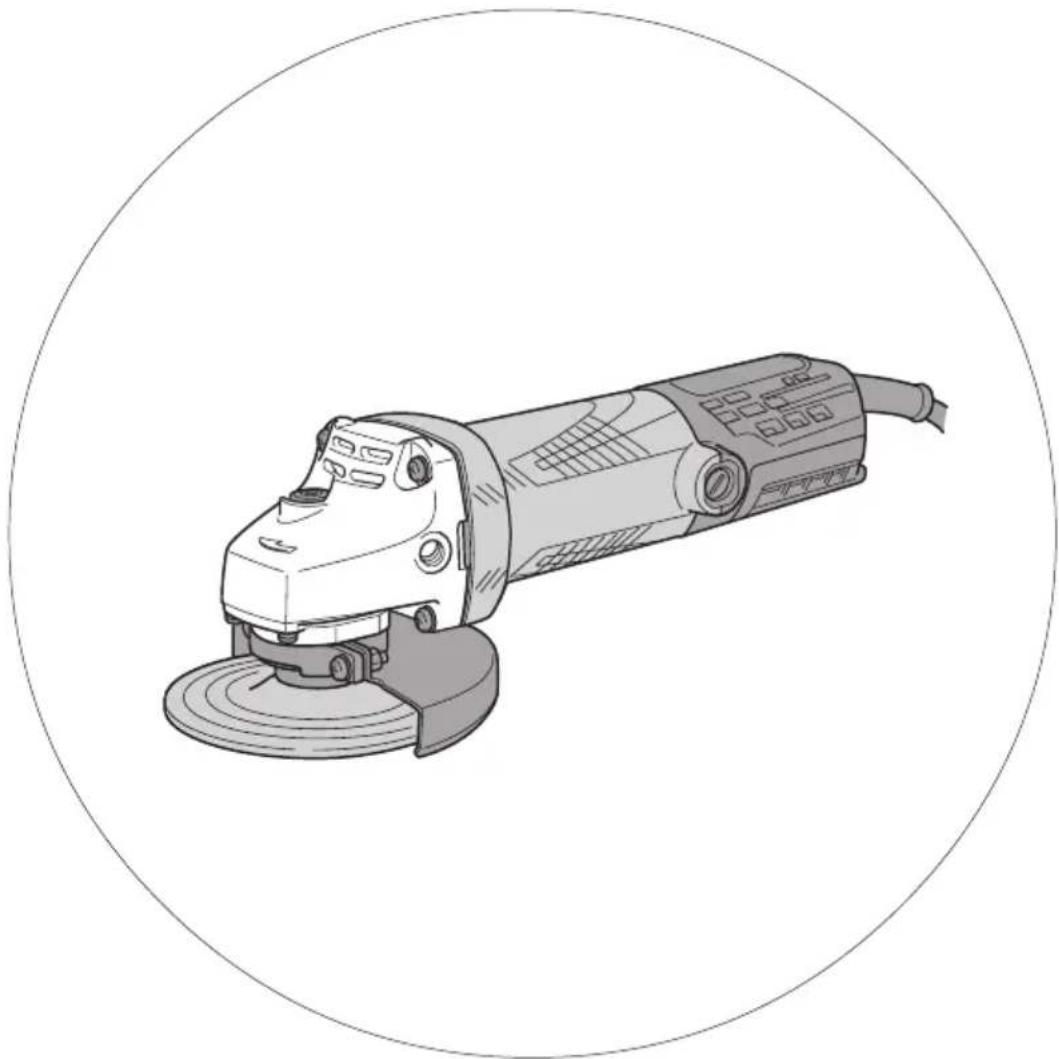
natural_image
Line drawing of a power tool with a circular frame (no text or symbols)1
text_image
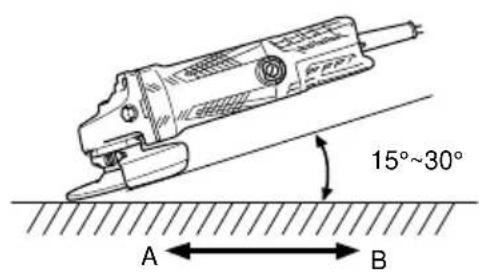
15°~30° A ← B2
text_image
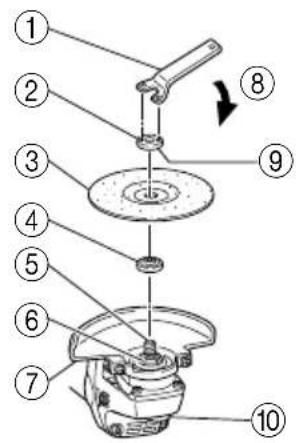
Exploded view diagram of a mechanical assembly with numbered parts and directional arrow indicating motion3

text_image
Exploded view diagram of a mechanical assembly with numbered parts for identification4

text_image
15 21 5mm 12mm 16| 1 | 扳手 | Wrench |
| 2 | 砂轮螺帽 | Wheel nut |
| 3 | 砂轮 | Depressed center wheels |
| 4 | 轮垫圈 | Wheel washer |
| 5 | 主轴 | Spindle |
| 6 | 槽口部分 | Notched part |
| 7 | 砂轮保护装置 | Wheel guard |
| 8 | 紧 | Tighten |
| 9 | 凸面 | Convex side |
| 10 | 锁定销 | Lock pin |
| 11 | 垫片螺帽 | Washer nut |
| 12 | 砂盘 | Sanding disc |
| 13 | 橡胶垫圈 | Rubber pad |
| 14 | 衬垫 | Washer |
| 15 | 磨损极限 | Wear limit |
| 16 | 碳刷号 | No. of carbon brush |
| 标志⚠警告以下显示的是本机器中使用的标志,请确保您在使用前理解它们的含义。 | Symbols⚠ WARNINGThe following show symbols used for the machine. Be sure that you understand their meaning before use. | |
 | 为降低伤害风险,用户必须阅读使用说明书 | To reduce the risk of injury, user must read instruction manual. |
 | 始终戴好护目镜 | Always wear eye protection. |
电动工具通用安全警告
警告!
Read all safety warnings and all instructions.
Failure to follow the warnings and instructions may result in electric shock, fire and/or serious injury.
Save all warnings and instructions for future reference.
The term “power tool” in the warnings refers to your mains-operated (corded) power tool or battery-operated (cordless) power tool.
1) Work area safety
a) Keep work area clean and well lit. Cluttered or dark areas invite accidents.
b) Do not operate power tools in explosive atmospheres, such as in the presence of flammable liquids, gases or dust. Power tools create sparks which may ignite the dust or fumes.
c) Keep children and bystanders away while operating a power tool. Distractions can cause you to lose control.
2) Electrical safety
a) Power tool plugs must match the outlet. Never modify the plug in any way. Do not use any adapter plugs with earthed (grounded) power tools. Unmodified plugs and matching outlets will reduce risk of electric shock.
b) Avoid body contact with earthed or grounded surfaces, such as pipes, radiators, ranges and refrigerators. There is an increased risk of electric shock if your body is earthed or grounded.
c) Do not expose power tools to rain or wet conditions. Water entering a power tool will increase the risk of electric shock.
d) Do not abuse the cord. Never use the cord for carrying, pulling or unplugging the power tool. Keep cord away from heat, oil, sharp edges or moving parts. Damaged or entangled cords increase the risk of electric shock.
e) When operating a power tool outdoors, use an extension cord suitable for outdoor use. Use of a cord suitable for outdoor use reduces the risk of electric shock.
f) If operating a power tool in a damp location is unavoidable, use a residual current device (RCD) protected supply. Use of an RCD reduces the risk of electric shock.
3) Personal safety
a) Stay alert, watch what you are doing and use common sense when operating a power tool. Do not use a power tool while you are tired or under the influence of drugs, alcohol or medication. A moment of inattention while operating power tools may result in serious personal injury.
b) Use personal protective equipment. Always wear eye protection.
Protective equipment such as dust mask, non-skid safety shoes, hard hat, or hearing protection used for appropriate conditions will reduce personal injuries.
c) Prevent unintentional starting. Ensure the switch is in the off-position before connecting to power source and/or battery pack, picking up or carrying the tool.
Carrying power tools with your finger on the switch or energising power tools that have the switch on invites accidents.
d) Remove any adjusting key or wrench before turning the power tool on.
A wrench or a key left attached to a rotating part of the power tool may result in personal injury.
e) Do not overreach. Keep proper footing and balance at all times.
This enables better control of the power tool in unexpected situations.
f) Dress properly. Do not wear loose clothing or jewellery. Keep your hair, clothing and gloves away from moving parts.
Loose clothes, jewellery or long hair can be caught in moving parts.
g) If devices are provided for the connection of dust extraction and collection facilities, ensure these are connected and properly used.
Use of dust collection can reduce dust related hazards.
4) Power tool use and care
a) Do not force the power tool. Use the correct power tool for your application. The correct power tool will do the job better and safer at the rate for which it was designed.
b) Do not use the power tool if the switch does not turn it on and off. Any power tool that cannot be controlled with the switch is dangerous and must be repaired.
c) Disconnect the plug from the power source and/or the battery pack from the power tool before making any adjustments, changing accessories, or storing power tools. Such preventive safety measures reduce the risk of starting the power tool accidentally.
d) Store idle power tools out of the reach of children and do not allow persons unfamiliar with the power tool or these instructions to operate the power tool. Power tools are dangerous in the hands of untrained users.
e) Maintain power tools. Check for misalignment or binding of moving parts, breakage of parts and any other condition that may affect the power tool's operation. If damaged, have the power tool repaired before use. Many accidents are caused by poorly maintained power tools.
f) Keep cutting tools sharp and clean. Properly maintained cutting tools with sharp cutting edges are less likely to bind and are easier to control.
g) Use the power tool, accessories and tool bits etc. in accordance with these instructions, taking into account the working conditions and the work to be performed. Use of the power tool for operations different from those intended could result in a hazardous situation.
5) Service
a) Have your power tool serviced by a qualified repair person using only identical replacement parts.
This will ensure that the safety of the power tool is maintained.
PRECAUTION
Keep children and infirm persons away.
When not in use, tools should be stored out of reach of children and infirm persons.
SAFETY WARNINGS COMMON FOR GRINDING AND SANDING OPERATIONS
a) This power tool is intended to function as a grinder, sander. Read all safety warnings, instructions, illustrations and specifications provided with this power tool.
Failure to follow all instructions listed below may result in electric shock, fire and/or serious injury.
b) Operations such as polishing, wire brushing or abrasive cutting-off are not recommended to be performed with this power tool.
Operations for which the power tool was not designed may create a hazard and cause personal injury.
c) Do not use accessories which are not specifically designed and recommended by the tool manufacturer.
Just because the accessory can be attached to your power tool, it does not assure safe operation.
d) The rated speed of the accessory must be at least equal to the maximum speed marked on the power tool.
Accessories running faster than their rated speed can break and fly apart.
e) The outside diameter and the thickness of your accessory must be within the capacity rating of your power tool.
Incorrectly sized accessories cannot be adequately guarded or controlled.
f) The arbour size of wheels, flanges, backing pads or any other accessory must properly fit the spindle of the power tool.
Accessories with arbour holes that do not match the mounting hardware of the power tool will run out of balance, vibrate excessively and may cause loss of control.
g) Do not use a damaged accessory. Before each use inspect the accessory such as abrasive wheels for chips and cracks, backing pad for cracks, tear or excess wear, wire brush for loose or cracked wires. If power tool or accessory is dropped, inspect for damage or install an undamaged accessory. After inspecting and installing an accessory, position yourself and bystanders away from the plane of the rotating accessory and run the power tool at maximum no-load speed for one minute.
Damaged accessories will normally break apart during this test time.
h) Wear personal protective equipment. Depending on application, use face shield, safety goggles or safety glasses. As appropriate, wear dust mask, hearing protectors, gloves and workshop apron capable of stopping small abrasive or workpiece fragments.
The eye protection must be capable of stopping flying debris generated by various operations. The dust mask or respirator must be capable of filtrating particles generated by your operation. Prolonged exposure to high intensity noise may cause hearing loss.
i) Keep bystanders a safe distance away from work area. Anyone entering the work area must wear personal protective equipment.
Fragments of workpiece or of a broken accessory may fly away and cause injury beyond immediate area of operation.
j) Hold power tool by insulated gripping surfaces only, when performing an operation where the cutting accessory may contact hidden wiring or its own cord.
Cutting accessory contacting a "live" wire may make exposed metal parts of the power tool "live" and shock the operator.
k) Position the cord clear of the spinning accessory. If you lose control, the cord may be cut or snagged and your hand or arm may be pulled into the spinning accessory.
I) Never lay the power tool down until the accessory has come to a complete stop.
The spinning accessory may grab the surface and pull the power tool out of your control.
m) Do not run the power tool while carrying it at your side.
Accidental contact with the spinning accessory could snag your clothing, pulling the accessory into your body.
n) Regularly clean the power tool's air vents.
The motor's fan will draw the dust inside the housing and excessive accumulation of powdered metal may cause electrical hazards.
o) Do not operate the power tool near flammable materials.
Sparks could ignite these materials.
p) Do not use accessories that require liquid coolants.
Using water or other liquid coolants may result in electrocution or shock.
KICKBACK AND RELATED WARNINGS
Kickback is a sudden reaction to a pinched or snagged rotating wheel, backing pad, brush or any other accessory. Pinching or snagging causes rapid stalling of the rotating accessory which in turn causes the uncontrolled power tool to be forced in the direction opposite of the accessory's rotation at the point of the binding.
For example, if an abrasive wheel is snagged or pinched by the workpiece, the edge of the wheel that is entering into the pinch point can dig into the surface of the material causing the wheel to climb out or kick out. The wheel may either jump toward or away from the operator, depending on direction of the wheel's movement at the point of pinching. Abrasive wheels may also break under these conditions.
Kickback is the result of power tool misuse and/or incorrect operating procedures or conditions and can be avoided by taking proper precautions as given below.
a) Maintain a firm grip on the power tool and position your body and arm to allow you to resist kickback forces. Always use auxiliary handle, if provided, for maximum control over kickback or torque reaction during start-up.
The operator can control torque reactions or kickback forces, if proper precautions are taken.
b) Never place your hand near the rotating accessory. Accessory may kickback over your hand.
c) Do not position your body in the area where power tool will move if kickback occurs.
Kickback will propel the tool in direction opposite to the wheel's movement at the point of snagging.
d) Use special care when working corners, sharp edges etc. Avoid bouncing and snagging the accessory. Corners, sharp edges or bouncing have a tendency to snag the rotating accessory and cause loss of control or kickback.
e) Do not attach a saw chain woodcarving blade or toothed saw blade.
Such blades create frequent kickback and loss of control.
SAFETY WARNINGS SPECIFIC FOR GRINDING OPERATION
a) Use only wheel types that are recommended for your power tool and the specific guard designed for the selected wheel.
Wheels for which the power tool was not designed cannot be adequately guarded and are unsafe.
b) The guard must be securely attached to the power tool and positioned for maximum safety, so the least amount of wheel is exposed towards the operator.
The guard helps to protect operator from broken wheel fragments and accidental contact with wheel.
c) Wheels must be used only for recommended applications. For example: do not grind with the side of cut-off wheel.
Abrasive cut-off wheels are intended for peripheral grinding, side forces applied to these wheels may cause them to shatter.
d) Always use undamaged wheel flanges that are of correct size and shape for your selected wheel.
Proper wheel flanges support the wheel thus reducing the possibility of wheel breakage. Flanges for cut-off wheels may be different from grinding wheel flanges.
e) Do not use worn down wheels from larger power tools.
Wheel intended for larger power tool is not suitable for the higher speed of a smaller tool and may burst.
SAFETY WARNINGS SPECIFIC FOR SANDING OPERATIONS
a) Do not use excessively oversized sanding disc paper. Follow manufacturers recommendations, when selecting sanding paper.
Larger sanding paper extending beyond the sanding pad presents laceration hazard and may cause snagging, tearing of the disc or kickback.
PRECAUTIONS ON USING DISC GRINDER
-
Never operate these power tools without Wheel Guards.
-
Use only a depressed center wheel of permissible peripheral speed 72 m/s (4300 m/min) or more.
-
Correct use for safe operation.
-
Mounting the standard depressed center wheel.
-
Have a trial run before grinding commence.
-
Keep away from a revolving depressed center wheel.
-
Pay strict attention to sparks.
-
Do not leave the revolving Grinder unattended on the floor.
-
Follow the procedures of these Handling Instructions on depressed center wheel replacement.
-
Avoid overload operation.
-
Do not push in the lock pin while the spindle is running.
-
Be careful those around one while operating.
SPECIFICATIONS
| Model | G10ST |
| Voltage (by areas)*1 | (110V, 220V, 230V, 240V) ~50/60 Hz |
| Power Input*1 | 720 W |
| Rated Speed | 12,000/min |
| Wheel sizeexternal dia.thicknesshole dia. | Max. Peripheral Speed: 72 m/s (4300 m/min)100 mm4 mm, 6 mm16 mm |
| Weight*2 | 1.5 kg |
* 1 Be sure to check the nameplate on product as it is subject to change by areas.
^*2 Only main body.
STANDARD ACCESSORIES
(1) Depressed center wheel .... 1
(Resinoid Wheel)
external dia. 100 mm
thickness 4 mm
hole dia. 16 mm
(2) Wrench 1
Standard accessories are subject to change without notice.
OPTIONAL ACCESSORIES ..... sold separately
CAUTION:
Always operate the grinder with the wheel guard attached.
1. 100mm Sanding Disc Set
text_image
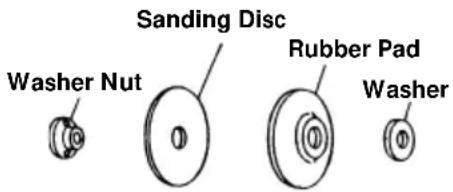
Sanding Disc Washer Nut Rubber Pad WasherIn case when only a relatively small metal surface area is to be polished and it is desired to give it a particularly fine finish, this is used for preliminary polishing of the metal surface before applying point, for removing rust, and for removing point when a new test is to be applied.
There are eleven different kinds of sanding discs, having grains of #16, #20, #24, #30, #36, #40, #50, #60, #80, #100, #120. When placing your order, please specify the grain of the disc desired.
APPLICATIONS
○Removal of casting fin and finishing of various types of steel, bronze and aluminum materials and castings.
○Grinding of welded sections or sections cut by means of a cutting torch.
○Grinding of brick, marble, etc.
PRIOR TO OPERATION
1. Power source
Ensure that the power source to be utilized conforms to the power requirements specified on the product nameplate.
CAUTION:
Do not operate from a direct current power source. Doing so may not only cause damage to the grinder, but may lead to accidents.
2. Power switch
Ensure that the power switch is in the OFF position. If the plug is connected to a receptacle while the power switch is in the ON position, the power tool will start operating immediately, which could cause a serious accident.
Switch position is indicated as I-mark on Tail Cover stands for ON position and O-mark stands for OFF position respectively.
3. Extension cord
When the work area is removed from the power source, use an extension cord of sufficient thickness and rated capacity. The extension cord should be kept as short as practicable.
4. Confirming condition of the environment
Confirm that the work site is placed under appropriate conditions conforming to prescribed precautions.
When grinding a thin steel plate, depending upon the state of the workbench, a loud noise will be created due to resounding noise from the steel plate being ground. To eliminate nuwanted noise in this instance, place a rubber mat beneath the material to be ground.
5. Mounting the wheel guard
Be sure to mount the wheel guard at an angle that will protect the operator's body from injury by a broken wheel piece.
6. Confirm the lock pin
Confirm that the lock pin is disengaged by pushing lock pin two or three times before switching the power tool on.
7. Confirming and mounting the depressed center wheel.
Throughly check that a specified depressed center wheel is free of cracks and splits is mounted.
Confirm that the depressed center wheel is mounted under the specified condition and is firmly clamped. For details, refer to the item “Assembling and Disassembling the depressed center wheel.”
8. Apply a trial run
To start grinding work without checking for possible cracks and splits in the depressed center wheel is very dangerous. Prior to start of grinding, direct the grinder in a direction where no one is present, and apply a trial run without fail to confirm that the grinder displays no abnormalities.
Duration of the trial run is as follows:
When depressed center wheels is replaced 3 minutes or more
When starting daily work..... 1 minute or more
PRACTICAL GRINDER APPLICATIONS
- Since grinding by utilizing only the grinder's own weight is feasible, the grinder should never be pressed forcibly against the plane to be ground. Hold the grinder lightly so that it only slightly contacts the plane to be ground.
Heavy pressure will reduce the revolving speed and such deteriorate the finished surface, and phenomena as overload will lead to burning out of the motor.
-
Do not utilize the grinder entire surface when grinding. Use only its peripheral surface by tilting the wheel at an angle of 15\~30°, as shown in Fig. 1.
-
When a grinder equipped with a new depressed center wheel is pushed forward (direction A), the wheel edge may occasionally cut into the material to be ground. Always pull it backward (direction B) in this instance.
However, once the depressed center wheel angle has been adequately abraded, both forward and backward operations are permissible.
- The provided depressed center wheel (resinoid wheel) is rated as Class A grain and #36 grain size. Accordingly, its range of applications cover a wide variety, proving to be most suitable for heavy grinding of general steel materials. Since the wheel grain size is rather coarse, creating a fine-surfaced finish is very difficult.
In this instance, hold the grinder lightly as through trying to lift it, and apply grinding slowly at a constant low speed. Whereby a fine finish similar to that accomplished with a fine-grain depressed center wheel is obtainable.
5. Switching on the grinder
The switch can be turned ON by turning its lever I-mark side, or turn OFF by turning its lever to the O-mark side.
6. Precaution after use
Do not lay the grinder down immediately after use in a place where there are many shavings and much dirt and dust until it has completely stopped revolving.
CAUTIONS:
○Shock to the main body can be the cause of cracks or splits in the depressed center wheel. Be especially careful to avoid sudden shocks when using the equipment.
If the main unit is accidentally bumped or dropped, make a careful check for cracks or splits on the depressed center wheel before further use.
☐Do not press the lock pin when the equipment is turning. Also, do not turn on the switch when the lock pin is pressed down.
ASSEMBLING AND DISASSEMBLING THE DEPRESSED CENTER WHEEL (Fig. 2)
CAUTION:
Be sure to switch power OFF and disconnect the attachment plug from the power receptacle to avoid serious trouble.
(1) Turn the equipment upsidedown so that the spindle will be facing up.
(2) Mount the wheel washer onto the spindle.
(3) Mount the protuberance of the depressed center wheel onto the wheel washer.
(4) Mount the convex side of the wheel nut onto the depressed center wheel, and screw the wheel nut onto the spindle.
(5) As shown in Fig. 2 push in the lock pin to prevent rotation of the spindle. Then, secure the depressed center wheel by tightening the wheel nut with the wrench.
CAUTION: Confirm that the depressed center wheel is mounted firmly.
Confirm that the lock pin is disengaged by pushing lock pin two or three times before switching the power tool on.
○Disassembling of the depressed center wheel is the reverse of assembling.
HOW TO INSTALL THE OPTIONAL ACCESSORIES
CAUTIONS:
○Be sure to switch power OFF and disconnect the plug from the power receptacle to avoid serious trouble. When utilizing the optional accessories, keep the wheel guard attached and wear protective glasses.
○Do not use the optional accessories which exceed the designated external diameter designated in the paragraph.
1. Mounting the 100mm Sanding Disc. (see Fig. 3) NOTE:
Do not use the wheel washer and wheel nut of the depressed center wheel.
(1) Mount the washer, rubber pad and sanding disc onto the spindle.
(2) Screw from the washer nut onto the spindle.
(3) As shown in Fig. 3, push in the lock pin to prevent rotation of the spindle. Then, secure the sanding disc by tightening the wheel nut with the wrench.
MAINTENANCE AND INSPECTION
1. Inspecting the depressed center wheel
Ensure that the depressed center wheel is free of cracks and surface defects.
Replace the depressed center wheel when it has been worn out to about 60mm in external diameter.
2. Inspecting the mounting screws:
Regularly inspect all mounting screws and ensure that they are properly tightened. Should any of the screws be loose, retighten them immediately. Failure to do so could result in serious hazard.
3. Maintenance of the motor
The motor unit winding is the very “heart” of the power tool. Exercise due care to ensure the winding does not become damaged and/or wet with oil or water.
4. Inspecting the carbon brushes (Fig. 4)
The motor employs carbon brushes which are consumable parts. Since an excessively worn carbon brush can result in motor trouble, replace the carbon brush with a new one having the same carbon brush No. shown in the figure when it becomes worn to or near the “wear limit”. In addition, always keep carbon brushes clean and ensure that they slide freely within the brush holders.
5. Replacing carbon brushes:
Disassemble the brush caps with a slotted-head screwdriver. The carbon brushes can then be easily removed.
- If the supply cord of this tool damaged, it must be replaced by a specially prepared cord available through the service organization.
7. Service parts list
CAUTION
Repair, modification and inspection of HiKOKI Power Tools must be carried out by a HiKOKI Authorized Service Center.
This Parts List will be helpful if presented with the tool to the HiKOKI Authorized Service Center when requesting repair or other maintenance.
In the operation and maintenance of power tools, the safety regulations and standards prescribed in each country must be observed.
MODIFICATIONS
HiKOKI Power Tools are constantly being improved and modified to incorporate the latest technological advancements.
Accordingly, some parts may be changed without prior notice.
NOTE
Due to HiKOKI's continuing program of research and development, the specifications herein are subject to change without prior notice.
| Item No. | Part Name Q'TY | |
| 41 | CONNECTOR 50091 | 1 |
| 42 | TERMINAL | 1 |
| 43 | EARTH TERMINAL | 1 |
| 44 | TERMINAL | 1 |
| 45 | NOISE SUPPRESSOR | 1 |
| 46 | TAIL COVER(B) | 1 |
| 47 | TAPPING SCREW(W/FLANGE) D4 · 25 | 1 |
| 48 | MACHINE SCREW(W/WASHER) M3.5 · 6 | 2 |
| 49 | SWITCH | 1 |
| 50 | CORD | 1 |
| 501 | WRENCH | 1 |
| Item No. | Part Name Q'TY | |
| 1 | TAPPING SCREW D5 · 25 4 | |
| 2 | GEAR COVER ASS'Y 1 | |
| 3 | RETAINING RING FOR D11 SHAFT | 1 |
| 4 | WAVE WASHER 1 | |
| 5 | LOCK PIN 1 | |
| 6 | SLOTTED HD. SCREW (SEAL LOCK) M4 · 8 | 2 |
| 7 | BALL BEARING 6201VVCMPS2L 1 | |
| 8 | FELT PACKING 1 | |
| 9 | PACKING GLAND 1 | |
| 10 | SEAL LOCK SCREW (W/SP. WASHER) M4 · 12 | 4 |
| 11 | WOODRUFF KEY 1 | |
| 12 | PINDLE 1 | |
| 13 | FRINGER 1 | |
| 14 | MACHINE SCREW (W/SP. WASHER) M5 · 16 | 2 |
| 15 | SET PLATE 1 | |
| 16 | WHEEL GUARD ASS'Y 1 | |
| 17 | WHEEL WASHER | 1 |
| 18 | D. C. WHEELS 100MM | 1 |
| 19 | WHEEL NUT(C) | 1 |
| 20 | PUSHING BUTTON | 1 |
| 21 | PECIAL NUT M7 | 1 |
| 22 | GEAR AND PINION SET | 1 |
| 23 | BALL BEARING 608VVC2PS2L | 1 |
| 24 | BEARING HOLDER | 1 |
| 25 | ARMATURE | 1 |
| 26 | FAN GUIDE | 1 |
| 27 | TAPPING SCREW D4 · 70 | 2 |
| 28 | $TATOR | 1 |
| 29 | DUST SEAL | 1 |
| 30 | BALL BEARING 626VVC2PS2L | 1 |
| 31 | RUBBER BUSHING | 1 |
| 32 | HOUSING ASS'Y 1 | |
| 33 | NAME PLATE | 1 |
| 34 | TAIL COVER (A) | 1 |
| 35 | TAPPING SCREW (W/FLANGE) D4 · 45 | 1 |
| 36 | TAPPING SCREW (W/FLANGE) D4 · 20 | 1 |
| 37 | BRUSH CAP | 2 |
| 38 | CARBON BRUSH 2 | |
| 39 | BRUSH HOLDER | 2 |
| 40 | PILLAR TERMINAL | 1 |

text_image
Exploded view diagram of a mechanical assembly with numbered parts for identification
natural_image
Line drawing of a quill pen in an inkwell (no text or symbols)
natural_image
Line drawing of a quill pen in an inkwell (no text or symbols)
natural_image
Line drawing of a quill pen in an inkwell (no text or symbols)服务中心
工机商业(中国)有限公司