
ORH-18601-NF-X - Heating Orima - Free user manual and instructions
Find the device manual for free ORH-18601-NF-X Orima in PDF.


| Product Type | Freestanding Combi Fridge Freezer No-Frost |
| Brand | Orima |
| Model | ORH-18601-NF-X (also ORH-18601-NF-W) |
| Total Net Volume | 323 L |
| Fridge Net Volume | 219 L |
| Freezer Net Volume | 104 L |
| Dimensions (H x W x D) | 1850 x 600 x 690 mm |
| Energy Class (EU 2019/2016) | E |
| Annual Energy Consumption | 249 kWh/year |
| Climate Class | SN, N, ST (ambient 10°C to 38°C) |
| Noise Level | 40 dB(A) |
| Power Supply | Refer to rating plate (220-240V ~50Hz typical) |
| No-Frost Technology | Yes (automatic defrost) |
| Control Panel | Touch control with LED display (fridge and freezer temperature, mode indicators) |
| Operating Modes | ECO, VACATION, SUPER, User Defined |
| Fast Freeze Function | Yes (72h auto-off) |
| Fast Cool Function | Yes (6h auto-off) |
| Fresh Zone Converter | Adjustable knob: CRISPER (fruits/vegetables) or FRESH (fish/meat, temp below 4°C) |
| Door Reversibility | Reversible (left or right opening, instructions provided) |
| Door Opening Alarm | Sounds after 60 seconds |
| Interior Features | Adjustable shelves, door balconies, crisper drawer, freezer drawers (removable) |
| Light Source | LED (energy efficiency class G) |
| Cleaning & Maintenance | Clean interior with lukewarm water and neutral soap; do not use abrasive cleaners |
| Safety | Earthing required; flammable refrigerant (R600a) - keep away from fire; child lock (control panel lock) |
| Spare Parts & Repairability | Contact authorized service center; use only original parts |
Frequently Asked Questions - ORH-18601-NF-X Orima
User questions about ORH-18601-NF-X Orima
0 question about this device. Answer the ones you know or ask your own.
Ask a new question about this device
Download the instructions for your Heating in PDF format for free! Find your manual ORH-18601-NF-X - Orima and take your electronic device back in hand. On this page are published all the documents necessary for the use of your device. ORH-18601-NF-X by Orima.
USER MANUAL ORH-18601-NF-X Orima
natural_image
Abstract red spiral logo with a gray crescent shape (no text or symbols)orima
eletrodomésticos
MANUAL DE INSTRUÇÕES
INSTRUCTION MANUAL
LIVRE D'INSTRUCTIONS
facebook.com/orima.pt

natural_image
Exterior view of a white and gray refrigerator with a digital display unit (no visible text or symbols)
MMA
REVERTER A PORTA
. Ferramentas necessárias: Antes de reverter as portas, prepare as seguintes ferramentas material: q qChaveq qdeq qfendasq qlisa, q qchaveq qdeq qfendasq qdeq qcruz, q qchaveq qinglesaq qeq qco incluídos num saco plástico:
natural_image
Simple line drawing of a mechanical clamp or bracket with a screwdriver inserted (no text or symbols)
natural_image
Pure mechanical assembly diagram without any text, numbers, or symbols- Desaparafuse a dobradiça superior.

natural_image
Pure technical line drawing of a mechanical assembly without any text, numbers, or symbolsnatural_image
Simple line drawing of two mechanical components labeled 'Parafuse' (no text or symbols on the diagrams)natural_image
Simple line drawing of a mechanical device with a pipe and lever, no text or symbols present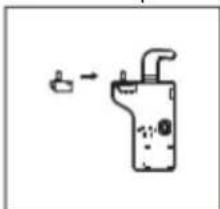
natural_image
Simple line drawing of a water tap with a pipe outlet (no text or symbols)REVERTER A PORTA
natural_image
Two identical black metal frame structures with supports, shown from different angles (no text or symbols)natural_image
Three-step diagram showing a device mounted on a stand, with no visible text or symbols.natural_image
Pure mechanical assembly diagram without any text, numbers, or symbolsnatural_image
Pure electrical circuit lines without any symbolsnatural_image
Two technical line drawings of a table frame with labeled components (no text or symbols present)REVERTER A PORTA
natural_image
Two technical diagrams showing mechanical assembly and screwdriver installation (no text or symbols)REVERTER A PORTA
NOTAS IMPORTANTES :
Combi Fridge Freezer No-Frost
Orima ORH 18601 NF W / ORH 18601 NF X
| Content | |
| 1. Safety Information | Page 1~9 |
| 2. Overview | Page 10 |
| 3. Installation | Page 11~18 |
| 4.User interface | Page 19~21 |
| 5. Daily Use | Page 22~25 |
•
•
!
!
process, other
!
!
!


•
•
•
•
•
!
CE
!
!
:
•
•
•
•
•
•
•
•
•
recommendations
- All accessories, such as drawers, shelves balconies, should be kept there for lower energy consumption.


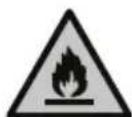
!
During using, service and disposal the appliance, please pay attention to symbol similar as left side, which is located on rear of appliance (rear panel or compressor) and with yellow or orange color.
It's risk of fire warning symbol. There are flammable materials in refrigerant pipes and compressor.
Please be far away fire source during using, service and disposal.

Note: Above picture is for reference only. Real appliance probably is different.
Space Requirement
- Select a location without direct exposure to sunlight;
- Select a location with enough space for the refrigerator doors to open easily;
- Select a location with level (or nearly level) flooring;
- Allow sufficient space to install the refrigerator on a flat surface;
- Allow clearance to the right, left, back and top when installing. This will help reduce power consumption and keep your energy bills lower.
- Keep at lest 50mm gap at two sides and back.
Positioning
Install this appliance at a location where the ambient temperature corresponds to the climate class indicated on the rating plate of the appliance:
for refrigerating appliances with climate class:
- extended temperate: this refrigerating appliance is intended to be used at ambient temperatures ranging from 10 °C to 32 °C; (SN)
- temperate: this refrigerating appliance is intended to be used at ambient temperatures ranging from 16 °C to 32 °C; (N)
- subtropical: this refrigerating appliance is intended to be used at ambient temperatures ranging from 16 °C to 38 °C; (ST)
- tropical: this refrigerating appliance is intended to be used at ambient temperatures ranging from 16 °C to 43 °C; (T)
Location
The appliance should be installed well away from sources of heat such as radiators, boilers, direct sunlight etc. Ensure that air can circulate freely around the back of the cabinet. To ensure best performance, if the appliance is positioned below an overhanging wall unit, the minimum distance between the top of the cabi-net and the wall unit must be at least 50 mm. Ideally, however, the appliance should not be positioned below overhanging wall units. Accurate leveling is ensured by one or more adjustable feet at the base of the cabinet.
This refrigerating appliance is not intended to be used as a built-in appliance.

Warning! It must be possible to disconnect the appliance from the mains power supply; the plug must therefore be easily accessible after installation.
Electrical connection
Before plugging in, ensure that the voltage and frequency shown on the rating plate correspond to your domestic power supply. The appliance must be earthed. The power supply cable plug is provided with a contact for this purpose. If the domestic power supply socket is not earthed, connect the appliance to a separate earth in compliance with current regulations, consulting a qualified electrician. The manufacturer declines all responsibility if the above safety precautions are not observed. This appliance complies with the E.E.C. Directives.
Door Reversibility
Before reversing the door, please be prepared below tools and material: straight screwdriver, cross screwdriver, spanner and the components included in the poly bag:
Left Door Hinge Cover x 1
Left Aid-Closer on Upper Door x 1
Left Aid-Closer on Lower Door x 1
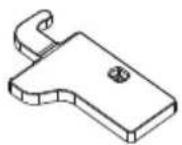


- Unscrew top hinge cover and disconnect connectors of door switch and harness.

natural_image
Simple line drawing of a screwdriver inserted into a clamp on a metal bracket (no text or symbols)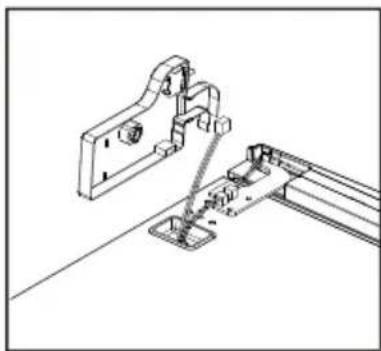
natural_image
Technical line drawing of a mechanical assembly with mounting bracket and rail support (no text or symbols)- Unscrew top hinge

natural_image
Technical line drawing of a mechanical assembly with a screwdriver and base mount (no text or symbols)- Remove the pin with a screwdriver and filp the hinge bracket. Then refit the pin to hinge bracket

natural_image
Technical line drawing of two mechanical bracket components with mounting holes and a cylindrical base (no text or symbols)
natural_image
Technical line drawing of two mechanical clamping components with mounting holes (no text or symbols)- Move door switch from right hinge cover to left hinge cover in accessory bag.

natural_image
Simple line drawing of a mechanical device with a handle and connector, connected to a small component (no text or symbols)
natural_image
Diagram showing a device with a switch and a small component, no text or symbols present- Detach cover in top of upper door and move harness from right side to left side, then replace the cover.
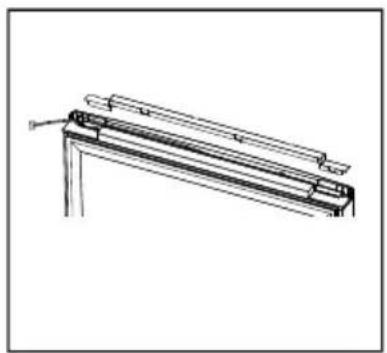
natural_image
Technical line drawing of a mechanical component or bracket assembly (no text or symbols)
natural_image
Simple line drawing of a metal frame with a support bracket and label 'B' (no text or symbols on the frame itself)- Move top left cover to right side
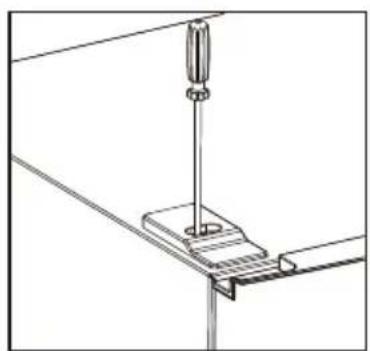
natural_image
Technical line drawing of a mechanical assembly with a screwdriver inserted into a bracket (no text or symbols)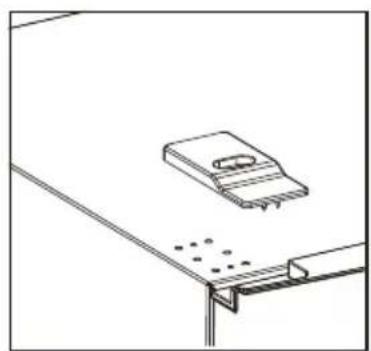
natural_image
Simple line drawing of a desk with a laptop and a bracket, no text or symbols present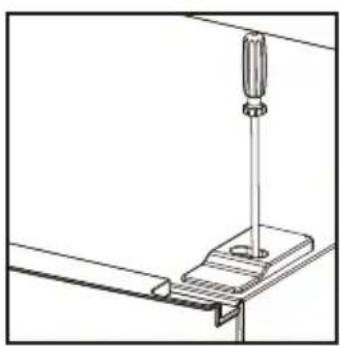
natural_image
Technical line drawing of a mechanical assembly with a screwdriver inserted into a bracket (no text or symbols)- Take off the upper door, take out the screw from the middle hinge by cross screwdriver, then take off the lower door.

natural_image
Technical line drawing of a mechanical clamp or bracket assembly (no text or symbols)
natural_image
Pure mechanical diagram showing two symmetrical components with circular features, no text or symbols present- Unscrew bottom hinge. Then remove the adjustable feet from both side.

natural_image
Technical line drawing of a structural frame with mounting holes and supports (no text or symbols)
natural_image
Line drawing of a simple rectangular frame with supports and a small inset panel (no text or symbols)- Unscrew and remove the bottom hinge pin, turn the bracket over and replace it.

natural_image
Mechanical assembly diagram showing a valve mechanism before and after assembly, with no visible text or symbols.- Refit the bracket fitting the bottom hinge pin. Replace both adjustable feet.

natural_image
Technical line drawing of a structural frame with supports and a small inset detail (no text or symbols)
natural_image
Pure technical line drawing of a structural frame with mounting feet and supports (no text or symbols)- Remove aid-closers from bottom of upper and lower doors, then take new aid-closers from accessory bag and install them to left side.

natural_image
Line drawing of a computer drive chassis with a cable and indicator lights (no text or symbols)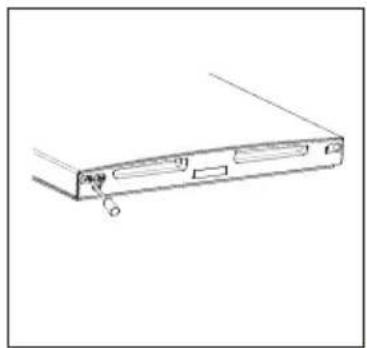
natural_image
Line drawing of a computer drive casing with a button and mounting bracket (no text or symbols)- Detach the Fridge and the Freezer door gaskets and then attach them after rotating.

natural_image
Simple line drawing of a document with arrows indicating rotation or movement (no text or symbols)- Install the lower door, adjust and fix the middle hinge onto the cabinet.
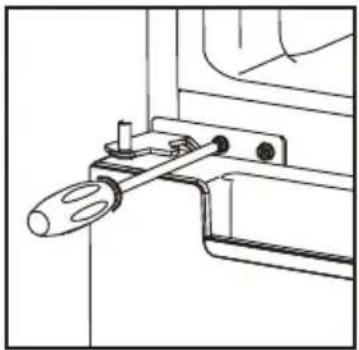
natural_image
Technical line drawing of a mechanical clamp or bracket assembly (no text or symbols)- Replace upper door, please ensure the door align with the cabinet to make sure door gasket seal the cabinet tightly. Then connect door with cabinet by tightly fixed top hinge.

natural_image
Technical line drawing of a screwdriver inserted into a bracket with mounting holes (no text or symbols)- Connect harnesses from door and cabinet. Then replace top hinge cover. Before screw the cover, connect terminals of door switch.
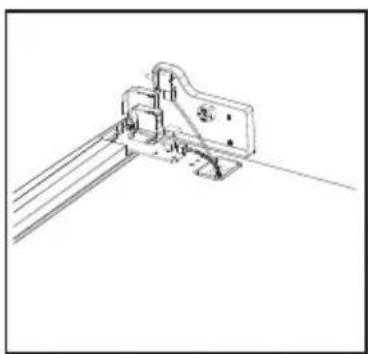
natural_image
Technical line drawing of a mechanical bracket assembly (no text or symbols)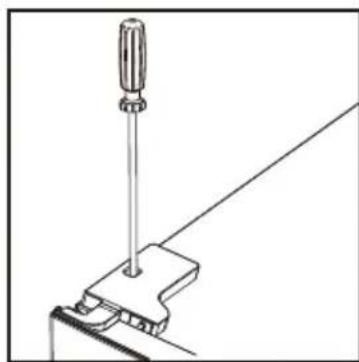
natural_image
Line drawing of a screwdriver holding a tool, with a bracket and diagonal line (no text or symbols)Install door external handle (if external handle is present)

Space Requirement
Keep enough space of door open.
Keep at least 50mm gap at two sides and back.

| FN2-451 | FN2-471 | |
| A | 600 | 600 |
| B | 685 | 685 |
| C | 1850 | 1950 |
| D | min=50 | min=50 |
| E | min=50 | min=50 |
| F | min=50 | min=50 |
| G | 1200 | 1200 |
| H | 1285 1285 | |
| L | 135° | 135° |
Levelling the unit
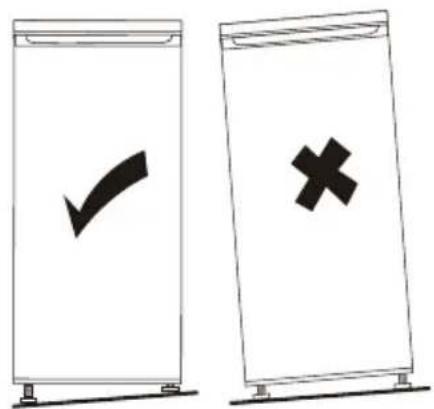
To do this adjust the two levelling feet at front of the unit.
If the unit is not level, the doors and magnetic seal alignments will not be covered properly.

Using the Control Panel
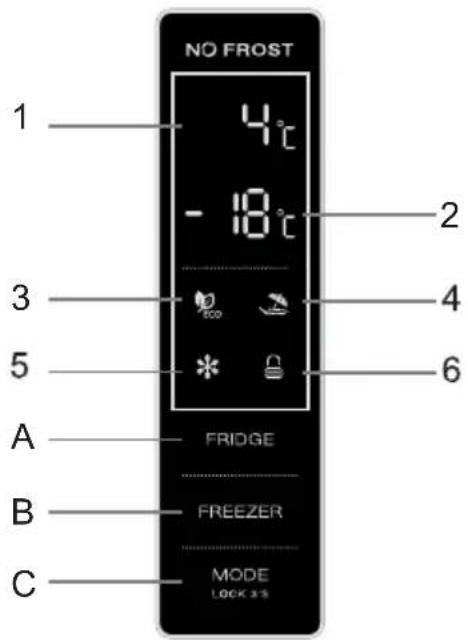
1.1 Key Operation (A & B & C)
FRIDGE
: Temperature control of fridge compartment
This key is available in user defined mode and SUPER mode, not available in ECO mode and VACATION mode.
Short touching this key to select fridge temperature.
FREEZER
: Temperature control of freezer compartment
This key is available in user defined mode and VACATION mode, not available in SUPER mode and ECO mode. Short touching this key to select freezer temperature.
MODE LOCK 3'S
: Running mode select / Locking / Unlocking
Keep touching this key for 3s to lock or unlock the control panel. In "Unlocking" status, short touching this key to select running mode (ECO mode / VACATION mode / SUPER mode / user defined mode).
1.2 Display (1 & 2)
1) Setting temperature display of fridge compartment This area will display setting temperature of fridge compartment. If E0,E1,E2,E3,E5 displays in this area, please call service.
2) Setting temperature display of freezer compartment This area will display setting temperature of freezer compartment.
1.3 Indicators (3 & 4 & 5 & 6)
3) ECO mode indicator
This light is on when ECO mode is selected.
4) VACATION mode indicator
This light is on when VACATION mode is selected.
5) SUPER mode indicator
This light is on when SUPER mode is selected.
6) Locking / Unlocking indicator
This light is on when control panel is locked.
- Illustion of the key
2.1 Operation and display
before the power off. After that, operations are available.
operation key, but operations are not available.
2.2 Temperature setting of fridge compartment
FRIDGE
2.3 Temperature setting of freezer compartment
FREEZER
2.4 Temperature setting recommendation
| Temperature setting recommendation | ||
| Environment Temperature | Fridge Compartment Freezer Compartment | |
| SummerNormalWinter |  |  |
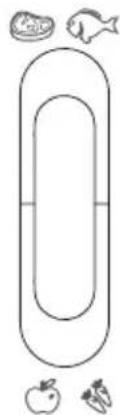
2.5 Temperature control of fresh zone
Temperatire of the fresh can be adjusted according to the type of storage food.
ush the knob upward from the bottom, temperature in the fresh zone will be gradually decreased.
When the knob is placed at the "CRISPER" position, the fresh zone can be functioned as a crisper zone and maintain the appropriate temperature and humidity for fruits and vegetable.
When the knob is placed at the "FRESH" position, it is suitable for short-term storage of fish or other fresh food. The food will keep fresh but not frozen which makes it the best choice for storing fresh food.
Tips: When you choose "FRESH" function, it is recommended to set the refrigerator temperature below 4°C. and preserved lead-time no more than 3 days, in order to keep the best freshness.
FRESH
CONVERTER
natural_image
Simple line drawing of a horizontal oval shape with surrounding icons (no text or symbols)2.6 ECO mode
Activate ECO mode:

key conse cutively,when

(ECO mode indicator) is lit up,
ECO mode is selected.
fridge / freezer temperature will be set automatically to
will flash for 3s, fridge and freezer temperature setting operations are not workable.
Quit from ECO mode:

key, when ECO mode indicator is light off, the appliance quits
from ECO mode.
2.7 VACATION mode
Activate VACATION mode:
Short touching

lit up, VACATION mode is selected.

activated.
available.
mode indicator will flash for 3s, fridge temperature setting operation is not workable.
Quit from VACATION mode:
Short touch MODE key, when VACATION mode indicator is light off, the appliance quits from mode.
2.8 SUPER mode
It is advisable to set SUPER mode 24 hours ahead, if lots of foods need to be frozen in one time.
Activate SUPER mode:
Short touching MODE consecutively, when (SUP mode indicator) is lit up, SUPER mode is selected.
After 5s of flashing of SUPER mode indicator, SUPER mode will be activated. When SUPER mode is activated, freezer temperature will be set automatically to
In SUPER mode, if you set freezer temperature by manual, SUPER mode indicator will flash for 3s, freezer temperature setting operation is not workable.
Quit from SUPER mode:
Short touch H MODE when SUPER mode indicator is light off, the appliance quits from SUPER mode.
WARNING !!!
In SUPER mode, the appliance will keep running under heavy load, noise level will be slightly higher than normal condition.
2.9 User defined mode
Short touch MODE key until ECO mode indicator / VACATION mode indicator / SUPER mode indicator are all light off, user defined mode is activated. In user defined mode, users can set fridge temperature and freezer temperature by manual.
2.10 Door opening alarm function
If fridge door keeps open for 60s, door opening alarm will arise.
First use
Cleaning the Interior
Before using the appliance for the first time, wash the interior and all internal accessories with lukewarm water and some neutral soap so as to remove the typical smell of a brand new product, then dry thoroughly.
Important! Do not use detergents or abrasive powders, as these will damage the finish.
Daily use
Position different food in different compartments according to be below table
| Refrigerator compartments | Type of food |
| Door or balconies of fridge compartment | ·Foods with natural preservatives, such as jams,juices, drinks, condiments.·Do not store perishable foods. |
| Crisper drawer (salad drawer) | ·Fruits, herbs and vegetables should be placed separately in the crisper bin.·Do not store bananas, onions, potatoes, garlic inthe refrigerator. |
| Fridge shelf – middle | ·Dairy products, eggs |
| Fridge shelf – to p | ·Foods that do not need cooking, such as ready-to-eat foods, deli meats, leftovers. |
| Freezer drawer(s)/shelf | ·Foods for long-term storage.·Bottom drawer/shelf for raw meat, poultry, fish.·Middle drawer/shelf for frozen vegetables, chips.·Top drawer/shelf for ice cream, frozen fruit, frozen baked goods. |
Freezing fresh food
- The freezer compartment is suitable for freezing fresh food and storing frozen and deep-frozen food for a long time.
- Place the fresh food to be frozen in the bottom compartment.
- The maximum amount of food that can be frozen in 24 hours is specified on the rating plate.
• The freezing process lasts 24 hours: during this period do not add other food to be frozen.
Storing frozen food
When first starting-up or after a period out of use. Before putting the product in the compartment let the appliance run at least 2 hours on the higher settings.
Important! In the event of accidental defrosting, for example the power has been off for longer than the value shown in the technical characteristics chart under "rising time", the defrosted food must be consumed quickly or cooked immediately and then re-frozen (after cooked).
Thawing
Deep-frozen or frozen food, prior to be used, can be thawed in the freezer compartment or at room temperature, depending on the time available for this operation. Small pieces may even be cooked still frozen, directly from the freezer. In this case, cooking will take longer.
Door balconies can be disassembled for cleaning. To make the disassembling as follows: gradually pull the balcony in the direction of the arrows until it comes free, after cleaning, reposition it.
Disassemble the bottom drawer
- Pull out the bottom drawer to stopper position.
- Lift up the front of drawer.
3.Pull out the bottom drawer.

natural_image
Diagram showing a hand installing or adjusting a shelf panel, and a close-up of a mechanical device with two upward arrows indicating motion (no text or symbols present)
flowchart
graph LR
    A["Initial Component"] --> B["Step 1: ↑ Up"]
    B --> C["Step 2: Down"]
    C --> D["Step 3: Down"]
    D --> E["Final Product"]
Helpful hints and tips
Hints for freezing
To help you make the most of the freezing process, here are some important hints:
- the maximum quantity of food which can be frozen in 24 hrs. is shown on the rating plate;
• the freezing process takes 24 hours. No further food to be frozen should be added during this period; - only freeze top quality, fresh and thoroughly cleaned, foodstuffs;
- prepare food in small portions to enable it to be rapidly and completely frozen and to make it possible subsequently to thaw only the quantity required;
- wrap up the food in aluminium foil or polythene and make sure that the packages are airtight;
- do not allow fresh, unfrozen food to touch food which is already frozen, thus avoiding a rise in temperature of the latter;
- lean foods store better and longer than fatty ones; salt reduces the storage life of food;
- water ices, if consumed immediately after removal from the freezer compartment, can possibly cause the skin to be freeze burnt;
- it is advisable to show the freezing in date on each individual pack to enable you removal from the freezer compartment, can possibly cause the skin to be freeze burnt;
- it is advisable to show the freezing in date on each individual pack to enable you to keep tab of the storage time.
Hints for storage of frozen food
To obtain the best performance from this appliance, you should:
make sure that the commercially frozen foodstuffs were adequately stored by the retailer;
be sure that frozen foodstuffs are transferred from the food store to the freezer in the shortest possible time;
not open the door frequently or leave it open longer than absolutely necessary.
Once defrosted, food deteriorates rapidly and cannot be refrozen.
Do not exceed the storage period indicated by the food manufacture.
Hints for fresh food refrigeration
To obtain the best performance:
- Do not store warm food or evaporating liquids in the refrigerator
- Do cover or wrap the food, particularly if it has a strong flavour
Hints for refrigeration
Useful hints:
• Make (all types): wrap in polythene bags and place on the glass shelves above the vegetable drawer.
- For safety, store in this way only one or two days at the most.
- Cooked foods, cold dishes, etc....: these should be covered and may be placed on any shelf.
- Fruit and vegetables: these should be thoroughly cleaned and placed in the special drawer(s) provided.
- butter and cheese: these should be placed in special airtight containers or wrapped in aluminum foil or polythene bags to exclude as much air as possible.
- Milk bottle: these should have a cap and should be stored in the balconies on the door.
- Bananas, potatoes, onions and garlic, if not packed, must not be kept in the fridge.
Cleaning
For hygienic reasons the appliance interior, including interior accessories, should be cleaned regularly.

Caution! The appliance may not be connected to the mains during cleaning. Danger of electrical shock! Before cleaning switch the appliance off and remove the plug from the mains, or switch off or turn out the circuit breaker or fuse. Never clean the appliance with a steam cleaner. Moisture could accumulate in electrical components, danger of electrical shock! Hot vapors can lead to the damage of plastic parts. The appliance must be dry before it is placed back into service.
Important! Ethereal oils and organic solvents can attack plastic parts, e.g. lemon juice or the juice form orange peel, butyric acid, cleanser that contain acetic acid.
- Do not allow such substances to come into contact the appliance parts.
- Do not use any abrasive cleaners
- Remove the food from the freezer. Store them in a cool place, well covered.
- Switch the appliance off and remove the plug from the mains, or switch off or turn out the circuit breaker of fuse.
- Clean the appliance and the interior accessories with a cloth and lukewarm water. After cleaning wipe with fresh water and rub dry.
• After everything is dry place appliance back into service.
Troubleshooting

Caution! Before troubleshooting, disconnect the power supply. Only a qualified electrician of competent person must do the troubleshooting that is not in this manual.
Important! There are some sounds during normal use (compressor, refrigerant circulation).
| Appliance freezes or cools too much | Temperature is set too cold or the appliance runs at coldest. | Turn the temperature regulator to a warmer setting temporarily. |
| The food is not frozen enough. | Temperature is not properly adjusted. | Please look in the initial Temperature Setting section. |
| Door was open for an extended period. | Open the door only as long as necessary. | |
| A large quantity of warm food was placed in the appliance within the last 24 hours. | Turn the temperature regulation to a colder setting temporarily. | |
| The appliance is near a heat source. | Please look in the installation location section. | |
| Heavy build up of frost on the door seal. | Door seal is not air tight. | Carefully warm the leaking sections of the door seal with a hair dryer (on a cool setting). At the same time shape the warmed door seal by hand such that it sits correctly. |
If the malfunction shows again, contact the Service Center.
These data are necessary to help you quickly and correctly. Write the necessary data here, refer to the rating plate.
This list provides all Eco-design requirements (following the (EU)2019/2019 Eco-design and (EU)2019/2016 Energy labelling), if the requirement is applicable to your product.
The refrigerating appliance is not intended to be used as a built-in appliance, unless specifically shown as such into its instruction manual.
The drawers, baskets and shelves should be kept in their current position unless otherwise specified in this document.
Doors and lids of the refrigeration appliance should be removed before disposal in the landfill, to avoid children or animals getting trapped inside.
Recommended setting:
Refrigerator compartment: +4°C
Freezer compartment: -18°C
FAST FREEZE
The use of this function is recommended when placing a very high quantity of food to be frozen in the freezer compartment. 24 hours before freezing fresh food, press the Fast Freeze button to activate the Fast Freeze function. When activated, the Fast Freeze indicator turns on. After 24 hours place the food to be frozen in the freezing zone of freezer compartment. The function is automatically disabled after 72 hours, or can be manually disabled by pressing Fast Freeze button.
FAST COOL
Using Fast Cool function it is possible to increase the cooling capacity in the refrigerator compartment. The use of this function is recommended when placing a very high quantity of food in the refrigerator compartment. Press the Fast Cool button to activate Fast Cool function. When activated, the Fast Cool indicator turns on. The function is automatically disabled after 6 hours, or can be manually disabled by pressing Fast Cool button again.
How to store foodstuffs:
To avoid food waste, please refer to the recommended setting and storage times:
Fridge compartment: Different food, especially vegetable and fruit, have different storage temperature. The storage time is 1 to 3 days (temp setting: middle)
Freezer compartment: 1 week (temp setting: Min) and 1 month (temp setting: Max)
To optimize freezing speed and get more storage space, the freezer compartment can be used without the freezer drawers.
The quantity of fresh food that can be frozen in a specific time period is indicated on the rating plate. Load limits are determined by baskets, flaps, drawers, shelves etc. Make sure that these components can still close easily after loading.
To avoid food waste, please refer to the recommended setting and storage times found in the user manual.
The model information can be retrieved using the QR-Code reported in the energy label.
The label also includes the model identifier that can be used to consult the portal of the registry at
https://eprel.ec.europa.eu
This product contains a light source of energy efficiency class G (if present).
| Model | ORH 18601 NF W / X |
| Total Net Volume, L | 323 |
| Refrigerator Net Volume, L | 219 |
| Freezer net volume, L | 104 |
| Actual consumption depends on how the device is used and the location | |
| Energy Class based on EU 2019/2016 | E |
| Power Consumption: KWh/year | 249 |
| Climate class SN,N,ST | |
| Dimensions (A x L x P), mm | 1850*600*690 |
| Noise level, db(A) re 1pw 40 | |
| Electrical Information See in the product rating label | |
| Note: The manufacturer reserves the right to make future changes to the Specifications and technical parameters. | |
IMPORTADO POR: MÁRIO MIRANDA DE ALMEIDA, SA
APARTADO 1, 3060-752 CORTICEIRO DE CIMA, PORTUGAL
- orima
- MANUAL DE INSTRUÇÕES
- REVERTER A PORTA
- NOTAS IMPORTANTES :
- Combi Fridge Freezer No-Frost
- Orima ORH 18601 NF W / ORH 18601 NF X
- !
- Space Requirement
- Positioning
- Location
- Electrical connection
- Door Reversibility
- Levelling the unit
- Using the Control Panel
- Key Operation (A & B & C)
- FRIDGE
- FREEZER
- MODE LOCK 3'S
- Display (1 & 2)
- Indicators (3 & 4 & 5 & 6)
- Temperature control of fresh zone
- ECO mode
- VACATION mode
- Activate VACATION mode:
- Quit from VACATION mode:
- SUPER mode
- Activate SUPER mode:
- Quit from SUPER mode:
- WARNING !!!
- User defined mode
- Door opening alarm function
- First use
- Cleaning the Interior
- Daily use
- Freezing fresh food
- Storing frozen food
- Thawing
- Disassemble the bottom drawer
- Helpful hints and tips
- Hints for freezing
- Hints for storage of frozen food
- Hints for fresh food refrigeration
- Hints for refrigeration
- Cleaning
- Troubleshooting
- FAST FREEZE
- FAST COOL
Brand : Orima
Model : ORH-18601-NF-X
Category : Heating