FF830CRR1100C - Freezer Equator - Free user manual and instructions
Find the device manual for free FF830CRR1100C Equator in PDF.


User questions about FF830CRR1100C Equator
0 question about this device. Answer the ones you know or ask your own.
Ask a new question about this device
Download the instructions for your Freezer in PDF format for free! Find your manual FF830CRR1100C - Equator and take your electronic device back in hand. On this page are published all the documents necessary for the use of your device. FF830CRR1100C by Equator.
USER MANUAL FF830CRR1100C Equator
natural_image
Simple line drawing of a rectangular container with a handle and side supports (no text or symbols)OWNER'S MANUAL
Read the instructions carefully and keep for future reference
Warranty
Conserv Appliances undertakes to the consumer-owner to repair or, at our option, to replace any part of this product which proves to be defective in workmanship or material under normal commercial use, in the USA and Canada, for a period of one year from the date of original purchase. During this period, we will provide all labor and parts necessary to correct such defect, free of charge, if the appliance has been installed and operated in accordance with the written instructions with the appliance. Ready access to the appliance, for service, is the responsibility of the consumer-owner. Service would be provided from Monday to Friday between normal business hours.
Exclusions
In no event shall Conserv Appliances be liable for incidental or consequential damages or for damages resulting from external causes such as abuse, misuse, incorrect voltage or acts of God. This warranty does not cover service calls which do not involve defective workmanship or materials covered by this warranty. Accordingly, diagnosis and repair costs for a service call which does not involve defective workmanship or materials will be the responsibility of the consumer-owner.
Specifically, the following work is not covered under warranty and does not constitute warranty work:
Installation – e.g. installing incorrectly
Maintenance – e.g. cleaning appliance using solvents
Mishandling – e.g. breakage of shelves
Most work is covered. The defining factor is, has the machine malfunctioned (Conserv Appliances is responsible) or has the customer omitted or done something to cause machine to malfunction (customer is responsible). Some States do not allow the exclusion or limitation of incidental or consequential damages, so the above limitation or exclusion may not apply to you.
WARRANTY SERVICE
This warranty is given by:
For Service:
ConServ Appliances
Call 1-800-776-3538
10222 Georgibelle Drive, Suite 200
Email: Service@ApplianceDesk.com
Houston, Texas 77043-5249
Web: www.ApplianceDesk.com
Business hours: 9:00 am - 5:00 pm weekdays
You can register your Warranty by any of the following methods:
-
Scan the QR Code
-
Register online at
www.appliancedesk.com/information/warranty_registration
- Cut out and mail the Warranty Card located on the last page.
FF 830 R / B / C
GENERAL
Since it is responsibility of the consumer-owner to establish the warranty period by verifying the original purchase date, Conserv Appliances recommends that a receipt, delivery slip or some other appropriate payment record be kept for that purpose.
This warranty gives you specific legal rights, and you may also have other rights which vary from State to State.
All rights reserved. Manual subject to change without notice.
Please always follow the safety precautions listed below:
- Do not put acid or flammable or volatile materials inside the appliance.
- Do not puncture or damage refrigerant tubing.
- Unplug the unit immediately if you find any abnormal smell or smoke, and contact Customer Service.
- This appliance is not intended for use by children or persons with reduced physical, sensory or mental capabilities, or lack of experience and knowledge, unless they have been given supervision or instruction concerning use of the appliance by a person responsible for their safety. Children should be supervised to ensure that they do not play with the appliance.
- Use a dedicated power outlet and a three prong power socket, that is properly grounded.
- Secure the cord behind the unit to prevent a tripping hazard.
- Do not use extension cords or ungrounded two prong adapters.
- Do not use the power cord or plug if it is damaged.
- When removing the power plug, do not pull on the cord. Grasp the plug firmly and pull it out from the socket.
- Do not connect or disconnect plug with wet hands.
- Unplug the unit first when doing maintenance or repair.
- Keep ventilation openings free of obstructions.
• Repairs must be done only by a qualified technician.
Safe Disposal
- Before discarding the appliance, remove the door in order to prevent risk of child entrapment. Leave shelves in place.
- Dispose off this appliance in accordance with local regulations.

This appliance is intended for household use.
Placement
- Do not tilt the appliance at an angle of more than 45^ when moving it.
- This unit is designed to be free standing and not built-in.
- The unit should be placed in a ventilated and dry environment.
- Do not put the unit in direct sunlight, and keep it as far as possible from heat sources.
- Don't put the unit in a cold area.
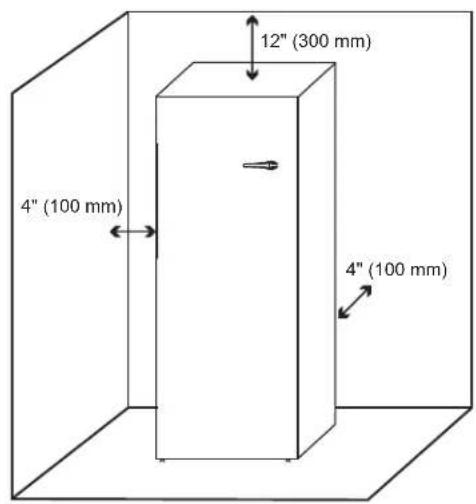
- There should be 4" (100 mm) on either side and between the back of the appliance and the wall, and 12" (300 mm) of space above the unit as shown, to allow proper ventilation.
- The unit should be placed on flat and stable ground. Keep the unit level by adjusting the 2 front leg levelers.
text_image
12" (300 mm) 4" (100 mm) 4" (100 mm)Before Use
- Before initially plugging in the appliance, keep the unit standing upright and stable for 6 hours. The appliance should be on for up to 4 hours and adequately cold, before putting food in it.
- It is recommended that you clean the interior of the unit before placing food inside.
text_image
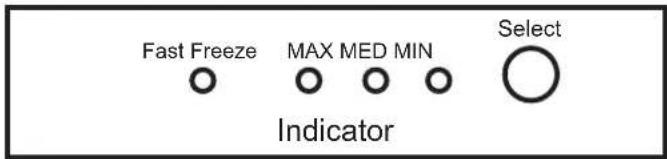
Fast Freeze MAX MED MIN Select IndicatorPress the Select button to choose the temperature setting in the appliance. Each time the Select button is pressed, the indicator light will come on one by one for each temperature setting.
Normal Temperature Setting
Press Select to choose MAX, MED or MIN to set the desired level of cold in the appliance. The indicator light will come on for the selection. Keep the button pressed for 5 seconds to make the selection. MAX is least cold and MIN is coldest. MED is the average medium cold setting and suggested as the default to start with.
Fast Freezing
To freeze quickly, press the Select button until the Fast Freeze indicator light is on. Then keep the Select button pressed for 5 seconds. When the freezer reaches the correct temperature, the indicator lights will go off. Then the normal setting of MAX, MED or MIN can be selected.
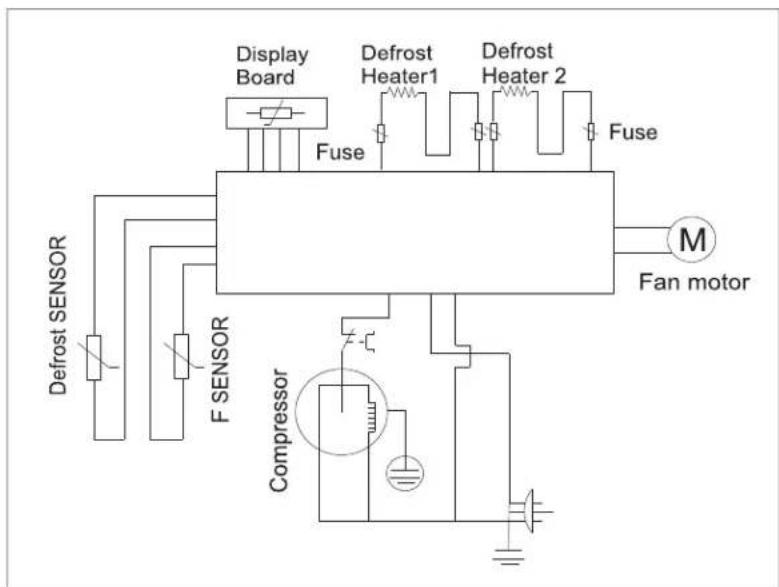
Electrical Diagram
text_image
Display Board Fuse Defrost Heater1 Defrost Heater 2 Fuse M Fan motor Defrost SENSOR F SENSOR CompressorCleaning
• Always remove all items and unplug the unit before cleaning.
- Clean inside, behind and around the appliance regularly, using water and mild detergent, and a damp cloth (not wet).
- Never use boiling water, harsh cleaning chemicals or abrasive materials.
- Clean the door gasket regularly to ensure that the door closes and seals properly.
• Dry all surfaces thoroughly.
- Manual defrosting is not necessary as this appliance has an auto defrost function.
Extended Absence
- If the unit will be switched off for a long time, remove all items, turn off the appliance and clean the unit thoroughly.
- Leave the door open and place the unit in a well ventilated area to avoid build up of odor.
The following phenomenon is normal
- The sound like a rivulet is caused by the refrigerant flowing inside of the system pipe.
- While the unit runs, heat is emitted from both sides of the cabinet.
- When the environment is too humid, the edges around door may have a little moisture. Simply wipe it with a dry cloth.
Technical Specifications
| Model No. | FF 830 R / B / C |
| Capacity | 8.3 cu.ft. |
| Rated Voltage / Frequency | 115V / 60Hz |
| Rated Current | 0.6A |
| Refrigerant | R600a |
| Type of Defrost | No Frost |
| Temperature Range | 3.2°F to -11.2°F |
| Certification | Energy Star (4 Star Rating) |
| Weight (Net/Gross) lbs | 159 / 166 |
| Product Dimensions (H*W*D) inches | 71.9 x 23.5 x 27.8 |
Before calling for service, please check the following issues first
| POSSIBLE CAUSEPROBLEM | |
| The unit does not work | Power is not on or the unit is not connected to powerLow voltageA fuse may be blown or the circuit breaker trippedPlug not fully inserted into the wall outlet |
| Internal temperature not cold enough | Temperature setting is too warmDoor is not shut properly or opened frequentlyExhaust vent is obstructedA large quantity of warm food has been placed in the unitClose proximity to heat source or direct sunlightAmbient temperature or humidity is very high |
| Appliance runs continuously • Temperature setting is too cold | Door not shut properly or opened frequentlyExhaust vent is obstructedA large quantity of warm food has been placed in the unitClose proximity to heat source or direct sunlightAmbient temperature or humidity is very high |
| Internal temperature is too cold • Temperature setting is too cold | |
| Noises • Parts are expanding and / or the refrigerant is circulating; this is normalFloor is not flat, and the unit is not placed in a stable position. | |
| Doors cannot be closed properly | The door is obstructed by items inside the unit.The door gasket is not providing a good seal. Heat the gasket with a hair dryer. |
Warranty Registration Card
| Name (Mr/Mrs/Ms): | ||
| Address: | Apt# | |
| City: | State: | Zip: |
| Phone 1: | Phone 2: | |
| Email*: | ||
| Product: | Model#: | |
| Purchased At: | Purchase Date: | |
| Used in: □House □Apt/Condo □Office □Vacation Home □RV/Boat □Other | ||
| SERIAL# | ||
Place Stamp Here
To: Warranty Registration 10222 Georgibelle Drive, Suite 200 Houston, TX 77043-5249

text_image
ConServRETRO REFRIGERATOR
MODEL: RR 1100 R / B / C

natural_image
Front view of a simple rectangular cabinet or enclosure with a handle and mounting base (no text or symbols visible)OWNER'S MANUAL
Read the instructions carefully and keep for future reference
Warranty
Conserv Appliances undertakes to the consumer-owner to repair or, at our option, to replace any part of this product which proves to be defective in workmanship or material under normal commercial use, in the USA and Canada, for a period of one year from the date of original purchase. During this period, we will provide all labor and parts necessary to correct such defect, free of charge, if the appliance has been installed and operated in accordance with the written instructions with the appliance. Ready access to the appliance, for service, is the responsibility of the consumer-owner. Service would be provided from Monday to Friday between normal business hours.
Exclusions
In no event shall Conserv Appliances be liable for incidental or consequential damages or for damages resulting from external causes such as abuse, misuse, incorrect voltage or acts of God. This warranty does not cover service calls which do not involve defective workmanship or materials covered by this warranty. Accordingly, diagnosis and repair costs for a service call which does not involve defective workmanship or materials will be the responsibility of the consumer-owner.
Specifically, the following work is not covered under warranty and does not constitute warranty work:
Installation – e.g. installing incorrectly
Maintenance – e.g. cleaning appliance using solvents
Mishandling – e.g. breakage of shelves
Most work is covered. The defining factor is, has the machine malfunctioned (Conserv Appliances is responsible) or has the customer omitted or done something to cause machine to malfunction (customer is responsible). Some States do not allow the exclusion or limitation of incidental or consequential damages, so the above limitation or exclusion may not apply to you.
WARRANTY SERVICE
This warranty is given by:
For Service:
ConServ Appliances
Call 1-800-776-3538
10222 Georgibelle Drive, Suite 200
Email: Service@ApplianceDesk.com
Houston, Texas 77043-5249
Web: www.ApplianceDesk.com
Business hours: 9:00 am - 5:00 pm weekdays
You can register your Warranty by any of the following methods:
-
Scan the QR Code
-
Register online at
www.appliancedesk.com/information/warranty_registration
- Cut out and mail the Warranty Card located on the last page.

RR 1100 R / B / C
GENERAL
Since it is responsibility of the consumer-owner to establish the warranty period by verifying the original purchase date, Conserv Appliances recommends that a receipt, delivery slip or some other appropriate payment record be kept for that purpose.
This warranty gives you specific legal rights, and you may also have other rights which vary from State to State.
All rights reserved. Manual subject to change without notice.
Please always follow the safety precautions listed below:
- Do not put acid or flammable or volatile materials inside the appliance.
- Do not puncture or damage refrigerant tubing.
- Unplug the unit immediately if you find any abnormal smell or smoke, and contact Customer Service.
- This appliance is not intended for use by children or persons with reduced physical, sensory or mental capabilities, or lack of experience and knowledge, unless they have been given supervision or instruction concerning use of the appliance by a person responsible for their safety. Children should be supervised to ensure that they do not play with the appliance.
- Use a dedicated power outlet and a three prong power socket, that is properly grounded.
- Secure the cord behind the unit to prevent a tripping hazard.
- Do not use extension cords or ungrounded two prong adapters.
- Do not use the power cord or plug if it is damaged.
- When removing the power plug, do not pull on the cord. Grasp the plug firmly and pull it out from the socket.
- Do not connect or disconnect plug with wet hands.
- Unplug the unit first when doing maintenance or repair.
- Keep ventilation openings free of obstructions.
• Repairs must be done only by a qualified technician.
Safe Disposal
- Before discarding the appliance, remove the door in order to prevent risk of child entrapment. Leave shelves in place.
- Dispose off this appliance in accordance with local regulations.

This appliance is intended for household use.
Placement
- Do not tilt the appliance at an angle of more than 45^ when moving it.
- This unit is designed to be free standing and not built-in.
- The unit should be placed in a ventilated and dry environment.
- Do not put the unit in direct sunlight, and keep it as far as possible from heat sources.
- Don't put the unit in a cold area.
- There should be 4" (100 mm) on either side and between the back of the appliance and the wall, and 12" (300 mm) of space above the unit as shown, to allow proper ventilation.
- The unit should be placed on flat and stable ground. Keep the unit level by adjusting the 2 front leg levelers.

text_image
12" (300 mm) 4" (100 mm) 4" (100 mm)Before Use
- Before initially plugging in the refrigerator, keep the unit standing upright and stable for 6 hours. The refrigerator should be on for up to 4 hours and adequately cold, before putting food in it.
- It is recommended that you clean the interior of the unit before placing food inside.
text_image
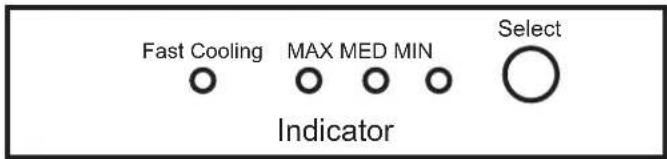
Fast Cooling MAX MED MIN Select IndicatorPress the Select button to choose the temperature setting in the appliance. Each time the Select button is pressed, the indicator light will come on one by one for each temperature setting.
Normal Temperature Setting
Press Select to choose MAX, MED or MIN to set the desired level of cold in the appliance. The indicator light will come on for the selection. Keep the button pressed for 5 seconds to make the selection. MAX is least cold and MIN is coldest. MED is the average medium cold setting and suggested as the default to start with.
Fast Cooling
To cool quickly, press the Select button until the Fast Cooling indicator light is on. Then keep the Select button pressed for 5 seconds. When the refrigerator reaches the correct temperature, the indicator lights will go off. Then the normal setting of MAX, MED or MIN can be selected.
Electrical Diagram

flowchart
graph TD
    A["Compressor"] --> B["Overload protector"]
    B --> C["PTC Relay"]
    C --> D["Capacitance"]
    D --> E["N COMP L"]
    E --> F["Main Control Board"]
    F --> G["Display Board"]
    G --> H["LED Light Switch"]
    G --> I["LED Light"]
    F --> J["Temperature Sensor"]
    F --> K["Defrost Temperature Sensor"]
    F --> L["Freezer Fan Motor"]
    style A fill:#f9f,stroke:#333
    style F fill:#ccf,stroke:#333
    style G fill:#cfc,stroke:#333
    style H fill:#fcc,stroke:#333
    style I fill:#fcc,stroke:#333
    style J fill:#cff,stroke:#333
    style K fill:#cff,stroke:#333
    style L fill:#ffc,stroke:#333
Cleaning
- Always remove all items and unplug the unit before cleaning.
- Clean inside, behind and around the refrigerator regularly, using water and mild detergent, and a damp cloth (not wet).
- Never use boiling water, harsh cleaning chemicals or abrasive materials.
- Clean the door gasket regularly to ensure that the door closes and seals properly.
• Dry all surfaces thoroughly. - Manual defrosting is not necessary as this appliance has an auto defrost function.
Extended Absence
- If the unit will be switched off for a long time, remove all items, turn off the appliance and clean the unit thoroughly.
- Leave the door open and place the unit in a well ventilated area to avoid build up of odor.
The following phenomenon is normal
- The sound like a rivulet is caused by the refrigerant flowing inside of the system pipe.
- While the unit runs, heat is emitted from both sides of the cabinet.
- When the environment is too humid, the edges around door may have a little moisture. Simply wipe it with a dry cloth.
Technical Specifications
| Model No. | RR 1100 R / B / C |
| Capacity | 11.1 cu.ft. |
| Rated Voltage / Frequency | 115V / 60Hz |
| Rated Current | 0.45A |
| Refrigerant | R600a |
| Type of Defrost | No Frost |
| Temperature Range | 36.2°F to 46.4°F |
| Certification | Energy Star (4Star Rating) |
| Weight (Net/Gross) lbs | 143 / 149 |
| Product Dimensions (H*W*D) inches | 71.9 x 23.5 x 27.8 |
Before calling for service, please check the following issues first
| POSSIBLE CAUSEPROBLEM | |
| The unit does not work | Power is not on or the unit is not connected to powerLow voltageA fuse may be blown or the circuit breaker trippedPlug not fully inserted into the wall outlet |
| Internal temperature not cold enough | Temperature setting is too warmDoor is not shut properly or opened frequentlyExhaust vent is obstructedA large quantity of warm food has been placed in the unitClose proximity to heat source or direct sunlightAmbient temperature or humidity is very high |
| Appliance runs continuously • Temperature setting is too cold | Door not shut properly or opened frequentlyExhaust vent is obstructedA large quantity of warm food has been placed in the unitClose proximity to heat source or direct sunlightAmbient temperature or humidity is very high |
| Internal temperature is too cold • Temperature setting is too cold | |
| Noises • Parts are expanding and / or the refrigerant is circulating; this is normalFloor is not flat, and the unit is not placed in a stable position. | |
| Doors cannot be closed properly | The door is obstructed by items inside the unit.The door gasket is not providing a good seal. Heat the gasket with a hair dryer. |
Warranty Registration Card
| Name (Mr/Mrs/Ms): | ||
| Address: | Apt# | |
| City: | State: | Zip: |
| Phone 1: | Phone 2: | |
| Email*: | ||
| Product: | Model#: | |
| Purchased At: | Purchase Date: | |
| Used in: □House □Apt/Condo □Office □Vacation Home □RV/Boat □Other | ||
| SERIAL# | ||
Place Stamp Here
To: Warranty Registration 10222 Georgibelle Drive, Suite 200 Houston, TX 77043-5249