
BR 476 - Refrigerator Equator - Free user manual and instructions
Find the device manual for free BR 476 Equator in PDF.


| Product Type | Beverage Refrigerator (Built-In / Freestanding) |
| Model | BR 476 |
| Capacity | 4.76 cu. ft. (108 cans + 6 wine bottles) |
| Dimensions (H x W x D) | 33.9" x 23.4" x 23.6" |
| Net Weight | 117 lbs |
| Electrical Rating | 115V / 60Hz, 1.25 Amp |
| Refrigerant | R600a (flammable) |
| Temperature Range | 34°F to 65°F (1°C to 18°C) |
| Control Panel | Touch panel with On/Off, temperature adjustment, light brightness (4 levels), light color (orange, blue, white, off), lock, ECO mode, Sabbath mode |
| Display | Digital temperature display with °C/°F toggle |
| Door | Reversible (left or right opening), includes handle and mounting studs |
| Shelves | Adjustable, removable (pull forward and lift) |
| Lighting | LED interior light with adjustable brightness and color |
| Defrost | Automatic defrost with drain pan; manual defrost available via control panel |
| Air Filter | Activated charcoal filter, replace every 3-6 months (located on rear panel inside) |
| Alarms | Door open alarm (after 5 min), high/low temperature alarm, error codes E1/E2 (sensor failure) |
| Installation | Freestanding or built-in; allow adequate spacing for ventilation and door opening |
| Leveling | 4 adjustable leveling feet |
| Power Cord | 3-prong grounded plug; do not use extension cord |
| Warranty | 1 year parts and labor (USA and Canada); 90 days for commercial use |
| Safety | Keep ventilation openings clear; do not store flammable substances; supervise children; safe disposal with door removal |
| California Proposition 65 | WARNING: Contains chemicals known to cause cancer and birth defects |
Frequently Asked Questions - BR 476 Equator
User questions about BR 476 Equator
0 question about this device. Answer the ones you know or ask your own.
Ask a new question about this device
Download the instructions for your Refrigerator in PDF format for free! Find your manual BR 476 - Equator and take your electronic device back in hand. On this page are published all the documents necessary for the use of your device. BR 476 by Equator.
USER MANUAL BR 476 Equator
natural_image
Simple geometric diagram of a circle with a horizontal line crossing through it (no text or symbols)EQUATOR®
ADVANCED Appliances ≡
Beverage Refrigerator
Built-In / Freestanding
Model - BR 476

natural_image
Line drawing of a double-door refrigerator with no text or symbolsOWNER'S MANUAL
Warranty
Equator Appliances undertakes to the consumer-owner to repair or, at our option, to replace any part of this product which proves to be defective in workmanship or materials under normal personal, family or household use, in the USA and Canada, for a period of one year from the date of original purchase. For commercial use, the product is warranted for a period of 90 days. During this period, we will provide all labor and parts necessary to correct such defect, free of charge, if the appliance has been installed and operated in accordance with the written instructions with the appliance. Ready access to the appliance, for service, is the responsibility of the consumer-owner. Service would be provided from Monday to Friday between normal business hours.
Exclusions
In no event shall Equator Appliances be liable for incidental or consequential damages or for damages resulting from external causes such as abuse, misuse, incorrect voltage or acts of God. This warranty does not cover service calls which do not involve defective workmanship or materials covered by this warranty. Accordingly, diagnosis and repair costs for a service call which does not involve defective workmanship or materials will be the responsibility of the consumer-owner.
Specifically, the following work is not covered under warranty and does not constitute warranty work:
Installation - e.g. Insufficient spacing around appliance Maintenance - e.g. Cleaning the appliance using solvents Mishandling - e.g. Breakage of door handle
Most work is covered. The defining factor is, has the machine malfunctioned (Equator Appliances is responsible) or has the customer omitted or done something to cause the appliance to malfunction (customer is responsible). Some states do not allow the exclusion or limitation of incidental or consequential damages, so the above limitation of exclusion may not apply to you.
WARRANTY SERVICE
This warranty is given by:
Equator Appliances
10222 Georgibelle Drive, Suite 200,
Houston, Texas 77043-5249
For Customer Service:
Appliance Desk
Business hours: 9:00 am to 5:00 pm weekdays
You can register your warranty by either of the following methods:
- Scan QR Code
QR Code

-
Open Smart Phone
-
Open Photo
-
Scan QR Code
-
Click the Link
-
Register online at ApplianceDesk.com/Warranty
GENERAL
Since it is the responsibility of the consumer-owner to establish the warranty period by verifying the original purchase date, Equator Appliances recommends that a receipt, delivery slip or some other appropriate payment record be kept for that purpose.
This warranty gives you specific legal rights, and you may also have other rights which vary from State to State.
All rights reserved. Manual subject to change without notice
Safety

Do not store explosive substances such as aerosol cans with a flammable propellant in or near this appliance.
Refrigerant and foaming material is flammable. Take precautions during handling, installation, and maintenance.
Ensure that the refrigerant circuit is not damaged.
Keep ventilation openings clear of obstructions.
When positioning the appliance, ensure the electrical cord is not trapped or damaged.
Do not place multiple portable socket-outlets at the rear of the appliance.
Never unplug the appliance by pulling on the power cord. Grip the plug firmly and pull straight out to remove from wall socket.
Do not use a damaged power cord.
Do not use an extension cord.
Children should be supervised to ensure that they do not climb on or play with the appliance.
This appliance is not intended for use by persons (including children) with reduced physical, sensory or mental capabilities, or lack of experience and knowledge, unless they have been given supervision or instruction.
Safe Disposal
Before discarding the appliance, remove the door in order to prevent risk of child entrapment. Leave the shelves in place.
Please dispose of this appliance in accordance with local regulations.
Installation and Preparation
Do not tilt the appliance at an angle of more than 45° when moving it.
Do not move the appliance while it is loaded with bottles.
Place the appliance away from direct sunlight and sources of heat and high humidity, and also away from areas or moisture and exposure to cold temperatures.
The appliance should be placed in a room where the temperature is between 60^ - 90^ .
After moving the appliance in place, let it stand upright for at least 2 hours before turning it on.
Plug the appliance into a dedicated, properly installed-grounded wall outlet. Do not under any circumstances cut or remove the third (ground) prong from the power cord.
Check the plug and cable before you connect the power and ensure the correct voltage is 115V / 60Hz.
Ensure that the plug is accessible.
Place the appliance on a flat level surface. Ensure the appliance is level by adjusting the 4 levelling feet.
Ensure the bottom vent is not obstructed.
Before use, clean the outside and inside surfaces with a damp soft cloth.
When loading bottles and cans, ensure items are arranged evenly, so that weight is not concentrated in one area of the unit.
Ensure items do not touch the back of the cabinet.
Installation Spacing Requirements
The appliance can be used as built-in or freestanding.
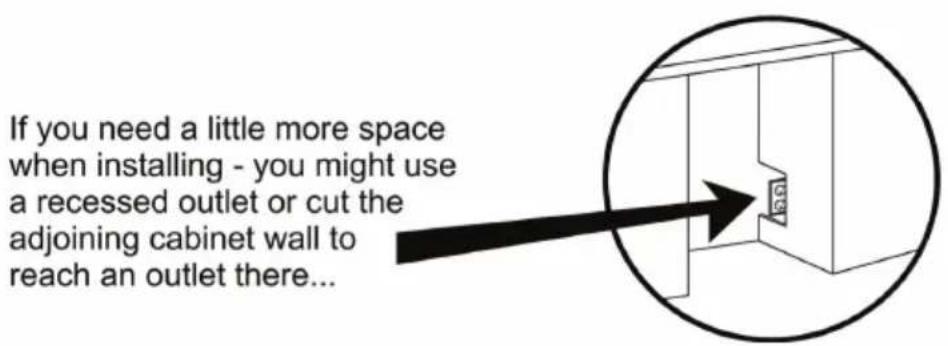
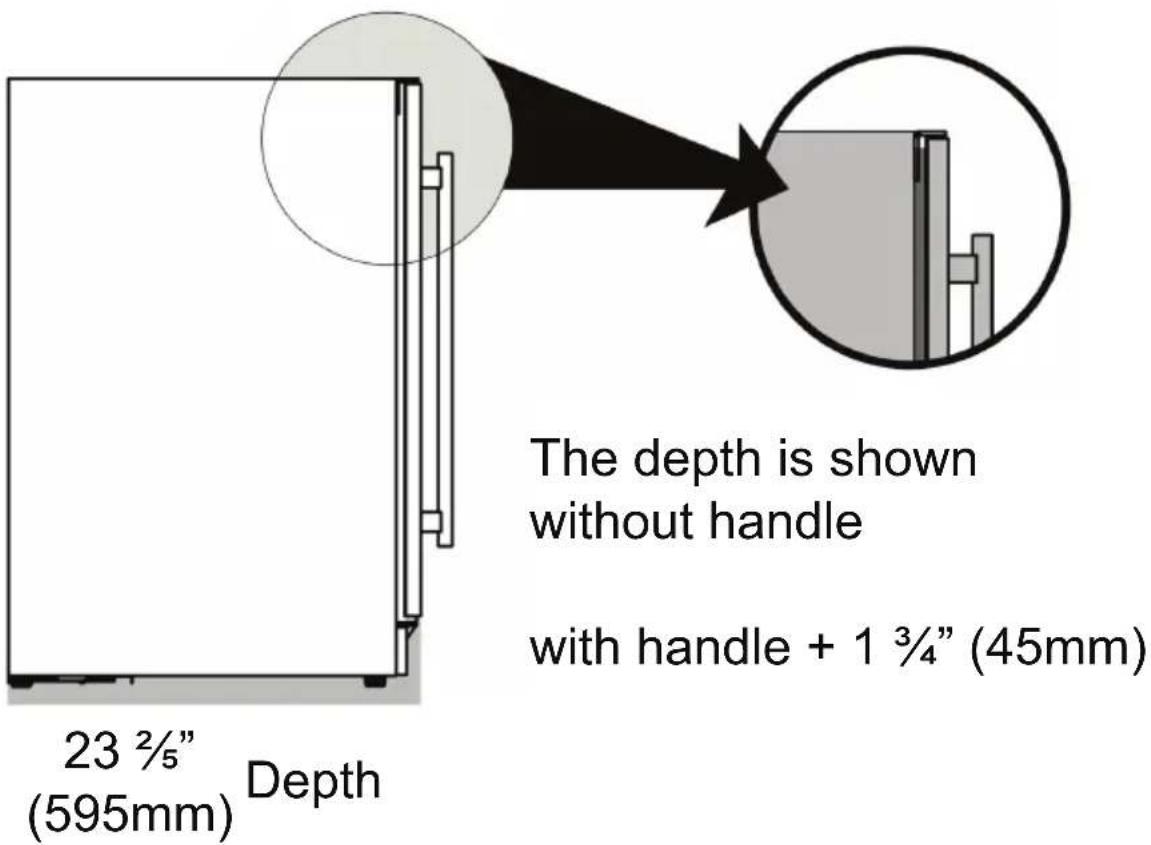
Place the appliance on a flat level surface. Whether installing under a cabinet as a built-in unit or freestanding, ensure to leave adequate space around the unit.

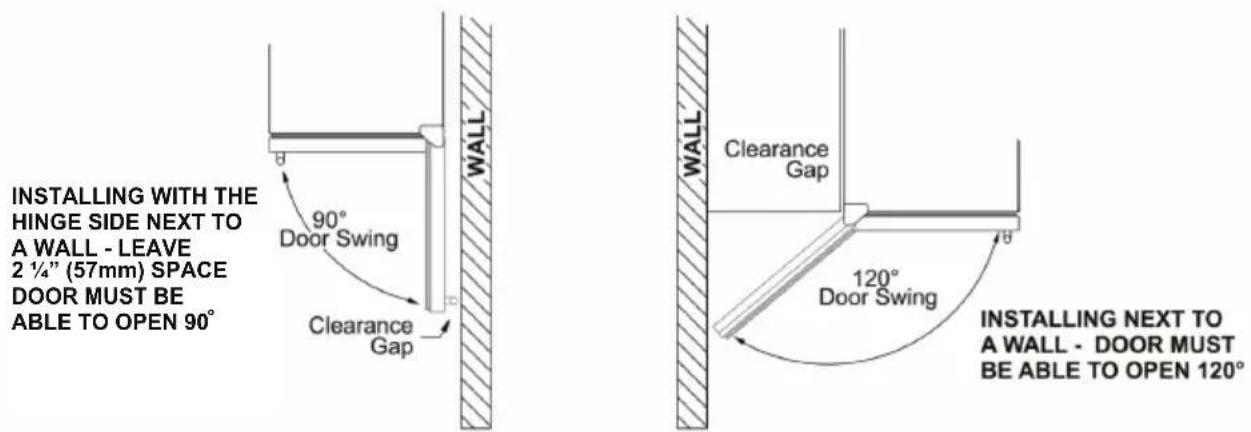
IF THE DOOR CAN'T OPEN FULLY - YOU CAN'T PULL THE SHELVES OUT.
This appliance is intended for indoor use only.

natural_image
Line drawing of a double-door refrigerator with ventilation grilles and a side panel (no text or symbols)33 45 " (860mm) Height
23 25 " (595mm) Width
Installing Door Handle
Install the handle according to the following steps:
Place the handle (B) over the 2 mounting studs (A) on the door frame with the set screws (C) pointing down.

Push the handle tightly against the door and tighten both of the 2 set screws (C) with the hex key (D).
Keep the hex key in a safe place for future use. Two extra set screws are included.
Pulling out Shelves
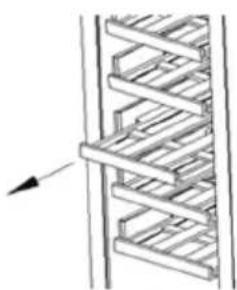
Ensure the door is completely open before pulling out the shelves. This will prevent scratching and damage of the door and shelves.
Remove all bottles from the shelf.
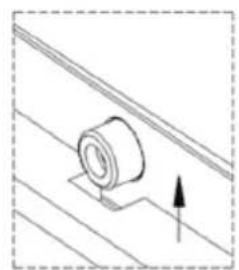
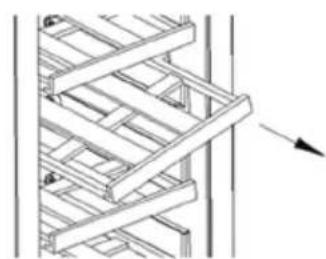
Pull the shelf forward until the groove on either side of the shelf is level with the plastic peg on the sides of the cabinet. Then lift the shelf up from one side and gently pull it out.
Do the reverse to reinstall the shelf.
natural_image
Diagram of a coiled structure with directional arrow (no text or symbols)①
natural_image
Pure technical diagram of a mechanical component with no text or symbols②

natural_image
Pure mechanical diagram showing a lever mechanism with no text or symbols③
natural_image
Pure structural diagram of a lattice framework without any text, numbers, or symbols④
Door Reversal
This appliance has the capability of the door opening from either the left or right side. The unit is delivered to you with the door opening from the left side. Should you desire to reverse the opening direction, please follow the instructions below:
- Carefully lay the appliance on its back. Use cushioning to protect the floor and appliance.
- Using a Philips screwdriver, remove the two screws and bottom right hinge beneath the door. Keep the hinge in a safe place in case you need to reverse the door again in the future.
- Carefully slide the door off and place it on a padded surface.
- Using a Philips screwdriver, remove the two screws and lock bracket beneath the door.
- Remove the stainless steel decorative nail in the middle of the door top and reinstall it in the middle hole of the door bottom.
- Remove the bottom support bracket from the right side.
- Remove the top right hinge and keep in a safe place in case you want to reverse the door in the future.
- Remove the screws from the top left and transfer to the right.
- Install the top left hinge.
- Install the bottom left hinge to the door. Do not over-tighten the screw.
- Rotate the door 180° and relocate it on the top hinge.
- Install the bottom support bracket.
- Adjust door alignment. When set, tighten screw on hinge.
Please note: Keep the spare hinge plate(s) to be able to reverse the door back again.
Operation
This appliance is intended for the storage of beverages. Do not overload the cabinet and ensure that the door can be closed firmly.

Control Panel
On/Off Ⓐ: Press and hold the ON/OFF icon Ⓐ for 5 seconds to turn the appliance on or off.
Mute: If the door remains open for more than 5 minutes, an alarm will sound. The compressor and fan will stop working. Close the door and press the On/Off icon ① once to stop the alarm.
Lamp Brightness ⓘ : Press the On/Off icon ⓘ to turn on the LED light inside the appliance. The light has 4 brightness settings: 100%, 75%, 50% and off. Each time you press the On/Off icon, the brightness will change and cycle through the 4 settings. The default is 100% brightness.
Lock ⏻: Press and hold the Light/Lock icon ⏻ for 3 seconds to lock or unlock the control panel. If the Lock icon ⏻ is illuminated, it indicates that the control panel is locked.
Lamp Color ⚙️: Press the Light/Lock icon ⚙️ to select a color. Each time the icon is pressed, a different color will illuminate and cycle through the selections: orange, blue, white and off.
Temperature Setting
SET ▲▼: The temperature of the appliance can be set by pressing the SET Up arrow ▲ to increase the temperature and SET Down arrow ▼ to decrease the temperature. Each time the arrow is pressed, the temperature changes in one-degree increments. The selected temperature will flash for 5 seconds on the display and then change back to the current internal temperature until the set temperature has been reached.
The temperature range of the appliance is: 34°F - 65°F (1°C - 18°C).
To see the set temperature at any time, simply press one of the arrow icons and it will flash for 5 seconds on the display screen.
If the power goes off or if the appliance is unplugged, the temperatures in the appliance will be saved to memory and the same temperature settings will be activated when the appliance restarts. The lamp color and brightness settings will also be saved to memory.
Press both arrow icons ⚠️ ⼑ simultaneously for 3 seconds to change the temperature between °C and °F.
Temperature Alarm - When the high/low temperature alarm is activated, the alarm will sound continuously. Press the On/Off icon to turn it off.
- If the ambient temperature is too high, the display panel will show "HH"
- If the ambient temperature is too low, the display panel will show "LL"
The cooling system will adjust to achieve the acceptable temperature. However, the unit can be unplugged and restarted after 5 minutes.
Note: If the appliance has been unplugged, turned off or has lost power, you must wait at least 5 minutes before plugging in or turning on the appliance again. It will not start if turned on sooner.
Additional Icons and Functions
Compressor On Indicator: When the compressor is working, the icon will illuminate to indicate that the appliance is cooling.
ECO mode: Press and hold the Up arrow ⬆ for 3 seconds to turn on or off ECO mode. In this mode, the light, compressor indicator and display panels will be off. In the ECO – energy saving mode, the symbol ° will illuminate above °C /°F.
Sabbath mode: Press the On/Off icon ⏻ and the Up arrow icon ⚠ at the same time for a least 5 seconds until the display screen shows “Sb” which indicates Sabbath mode is on. Repeat this to turn the mode off. In this mode, the screen display and interior lights are off and cannot be turned on. The compressor and fan will continue to work and cool the unit. The Sabbath mode will automatically turn off after 96 hours.
Defrost
The evaporator at the back of the appliance defrosts automatically. Ensure there is a pan in place to collect the water that is drained from the unit. Periodically check and empty the pan. To manually defrost, press the On/Off icon ① and Light/Lock icon ⓹/ icons at the same time for 10 seconds.
Maintenance
Make sure the power cord is unplugged before moving or cleaning the back of the appliance.
Clean the outside and inside of the appliance regularly, using a damp cloth and mild detergent.
Replace the activated charcoal filter every 3 - 6 months. The charcoal filter is located on the rear panel inside the unit. To order charcoal filter, contact Customer Service (see p.2)
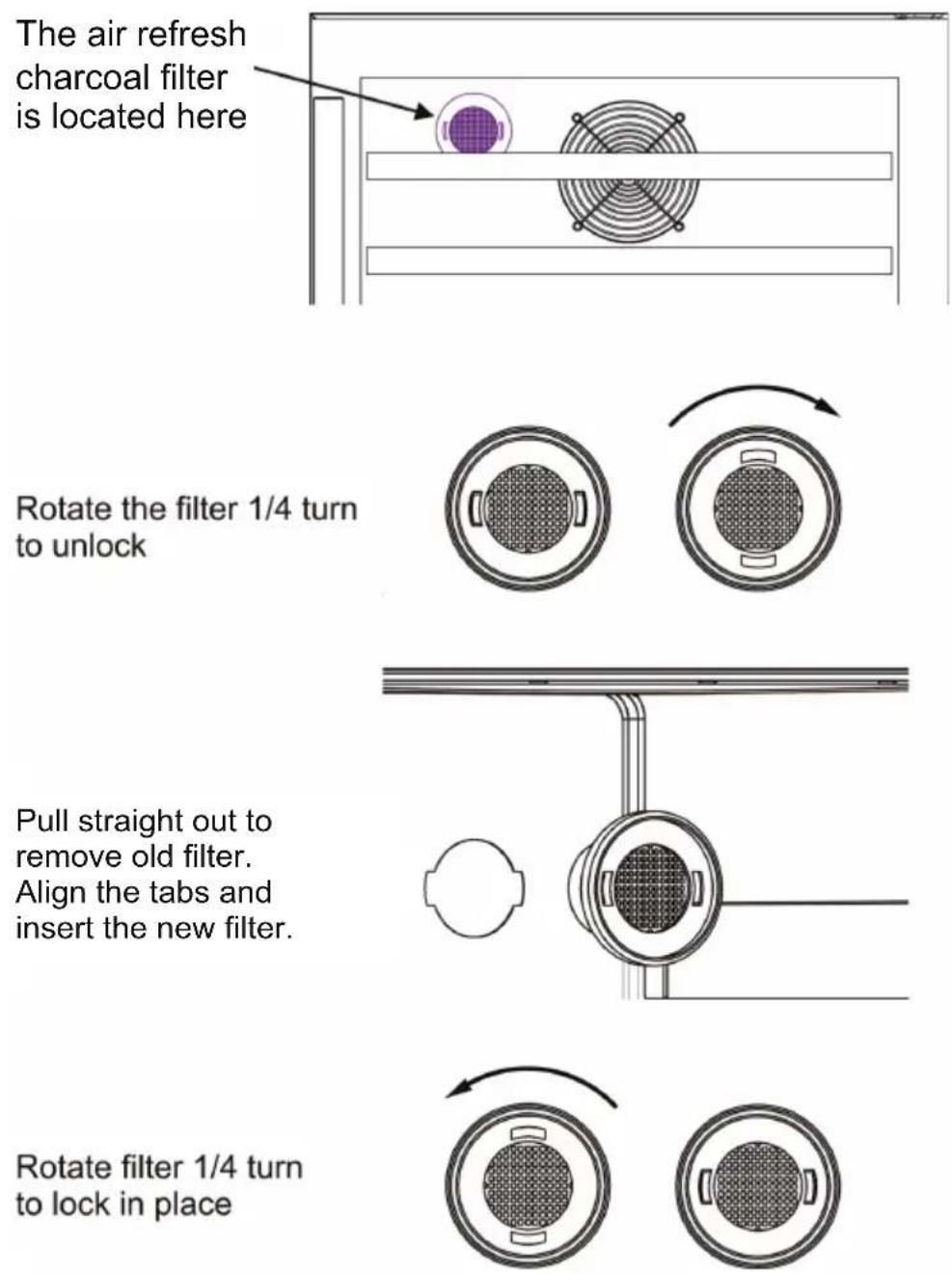
The air refresh charcoal filter is located here
Rotate the filter 1/4 turn to unlock
Pull straight out to remove old filter. Align the tabs and insert the new filter.
Rotate filter 1/4 turn to lock in place
Troubleshooting
Before calling for service, please check the following issues first.
| Problem | Possible Cause and Solution |
| Not Working | ·Check the power source.·Check if it is plugged in correctly to the power source. |
| Not Cooling | ·Temperature is not set correctly. Adjust the temperature.·Move unit if it is near heat source or direct sunlight·Check for proper ventilation and that air inlet or outlet is not blocked.·Door opened frequently or not shut properly.·Door seal is damaged.·Too many bottles stored on the same shelf. |
| Too much noise | ·Appliance not placed on flat surface or not level.·Adjust the feet to level it.·Some parts are loose causing rattling.·The appliance is against a wall. |
| Door does not close properly | ·Check the seal.·Shelves are not positioned properly.·Adjust the shelves.·Check that bottles are stored correctly and fit in the cabinet. |
| Error Codes E1, E2 | Air temperature sensor failure. Call for service. |
The following are normal:
- Moisture on the glass door – wipe with dry cloth
• Sound of fluid is the compressor when it is starting or stopping - Flowing sound of refrigerant in the refrigeration system
- Condensation forming inside the cabinet – wipe with dry cloth
Specifications Table
| Model | BR 476 |
| Capacity | 4.76 cu. ft. |
| Storage | 108 cans + 6 wine bottles |
| Electrical | 115V / 60Hz |
| Current | 1.25 Amp |
| Refrigerant | R600a |
| Temperature Range | 34° - 65°F |
| Net Weight | 117 lbs |
| Product Dimensions (HxWxD) | 33.9" x 23.4" x 23.6" |
California Proposition 65
WARNING: This product contains chemical known to the State of California to cause cancer and birth defects or other reproductive harm.

- EQUATOR®
- ADVANCED Appliances ≡
- Beverage Refrigerator
- Built-In / Freestanding
- OWNER'S MANUAL
- Warranty
- Exclusions
- WARRANTY SERVICE
- Equator Appliances
- For Customer Service:
- Appliance Desk
- GENERAL
- Safety
- Safe Disposal
- Installation and Preparation
- Installation Spacing Requirements
- Installing Door Handle
- Pulling out Shelves
- Door Reversal
- Operation
- Temperature Setting
- Additional Icons and Functions
- Defrost
- Maintenance
- Troubleshooting
Brand : Equator
Model : BR 476
Category : Refrigerator