Wide RS-1200 - Camera Cambo - Free user manual and instructions
Find the device manual for free Wide RS-1200 Cambo in PDF.


User questions about Wide RS-1200 Cambo
0 question about this device. Answer the ones you know or ask your own.
Ask a new question about this device
Download the instructions for your Camera in PDF format for free! Find your manual Wide RS-1200 - Cambo and take your electronic device back in hand. On this page are published all the documents necessary for the use of your device. Wide RS-1200 by Cambo.
USER MANUAL Wide RS-1200 Cambo
natural_image
Black CAMBO camera with attached cable, no visible text or symbols on bodyCAMBO® Wide RS 1200 series
text_image
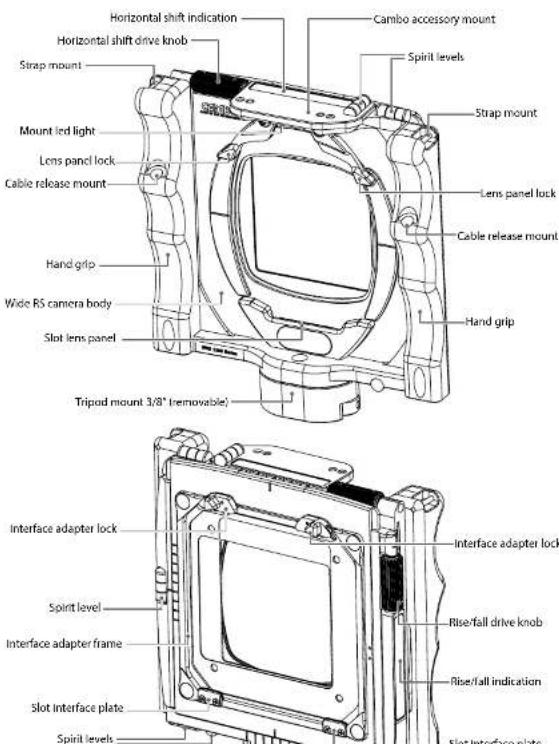
Horizontal shift indication Horizontal shift drive knob Strap mount Mount led light Lens panel lock Cable release mount Hand grip Wide RS camera body Slot lens panel Tripod mount 3/8" (removable) Cambo accessory mount Spirit levels Strap mount Lens panel lock Cable release mount Hand grip Interface adapter lock Rise/fall drive knob Interface adapter frame Rise/fall indication Slot interface plate Spirit levelsThank you for purchasing a Cambo product.
The Wide RS is a compact medium format system camera featuring lateral and vertical shift of the rear standard. The precision rear shift/rise and fall control is ideal for architecture and landscape photography. It enables the photographer the use perspective control, image displacement and high-quality panoramic stitching.
The Wide RS is a high performance camera build with the highest precision and tightest tolerances.
Key Features:
- Small size 160 x 165mm (W x H) incl. hand grips and tripod mount
• Lightweight only 1.0 kg (excl. lens)
• High grade aluminium camera body and shift plates
• Horizontal shift 40mm (20mm left/20mm right)
• Vertical shift 40mm (25mm / 15mm)
• Stitching possibilities (2-way / 4-way) - Accelerated precision spindle gear drive knobs for fast movement
- Millimeter movement indicator
- Movement indicators on rear sides
- Sensible click indication at 5, 10 and 15mm
- Compatible with WDS and Wide Compact
• 2 integrated hand grips for steady holding - Removable cable release (included)
- Removable 3/8" tripod mount (25 mm)
- 5 integrated spirit levels, visible from top or bottom
- Accessory mount for 2 point fixed accessories
• LED light (included) - Compact soft case (included)
- Broad range of optics
• Retrofitting of user lenses offered
Optional:
CAMBO® Wide RS 1200 series
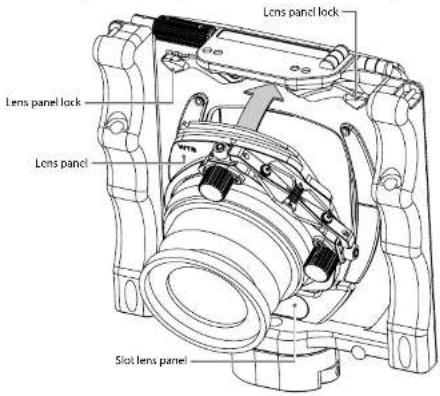
A. MOUNTING THE LENS PANEL
The Wide RS system is compatible with the Cambo WDS/WTS lens panels.
text_image
Lens panel lock Lens panel lock Lens panel Slot lens panel- Open both lens panel locks
- Slide the bottom of the lens plate into the lens panel slot
- Tilt the lens panel flat to the camera body
- lock both lens panel lock
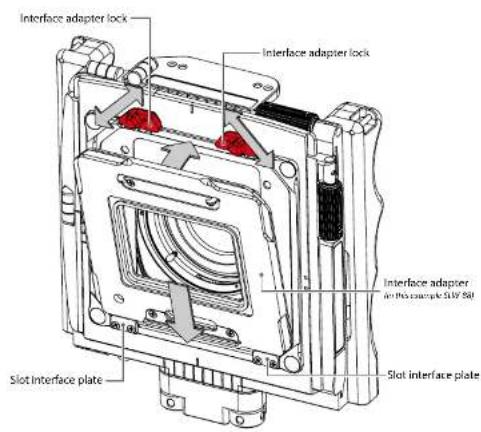
B. MOUNTING AN INTERFACE ADAPTER
The Wide RS system is compatible with the Cambo SLW interface plates. The available interface (adapter) plates are:
Interface plate Compatible mount
SLW-80 Hasselblad®-V
SLW-81 Leaf® AFi, Sinar® HY6
SLW-88 PhaseOne®, Mamiya® 645 AFd
text_image
Interface adapter lock Interface adapter lock Interface adapter and this sample SUV 50 Slot Interface plate Slot interface plate- Open both interface adapter locks
- Slide the bottom of the interface adapter into the interface plate slot
- Tilt the interface adapter flat to the camera body
- lock both interface adapter locks
Note: the interface adapter can be mounted with or without the digital back attached. The interface adapter can be mounted 90° rotated, to change the orientation from landscape to portrait.
The interface adapter can be exchanged with the Cambo WDS-619 ground glass frame with CCD-markings. The WDS-619 frame uses the same SLW mount as the interface adapters.
CAMBO® Wide RS 1200 series
The mechanical shutter must be cocked between every exposure. WDS lens panels featuring the Schneider ^® or Rodenstock ^® electronic shutter are available on request.
D. MOUNTING THE DIGITAL BACK
Please choose the SLW interface adapter corresponding to the interface mount of your digital back. The digital back is mounted to the SLW adapter as it would to corresponding medium format camera body (Hasselblad®-V, Mamiya® AFd, Leaf® AFi, etc.). To synchronize the digital back with the mechanical/electronic shutter please use the brand specific "synchro release cable". For further operating details please follow the instructions of the manufacturer of the digital back.
E. MOVEMENTS: SHIFT, RISE AND FALL
The Wide RS features horizontal as well as vertical (rise/fall) movement of the rear standard. These movements can be used for perspective control, image displacement and stitching of multiple exposures. This allows the user to take full advantage of the large image circle of certain lenses. Both movements shift the image plane, which allows the user to take multiple images within the same focal plane, ideal for stitching. Stitching can be used to create panoramas with the maximum viewing angle or to create higher resolution files.
The horizontal shift is operated by drive knob located at the top of the camera. From the optical center position the rear standard can be moved 20mm left or 20mm right. The vertical shift (rise/fall) is operated by drive knob which is located at the right hand side of the camera. From the optical center position the rear standard can fall 25mm (shifts the image up) or rise 15mm (shifts the image down).
Please note that above movements are the mechanically feasible movements, which do not by default reflect the optical possibilities of all lenses. Each lens has its own possibilities and limits.
F. MOVEMENTS AND SCALES
The horizontal movement can be followed and repeated viewing the scale (20) on top of the main housing. The scale is divided into millimeters for your convenience. There are also movement indicators engraved on the back side of
hand back side of the horizontally moving plate which are always visible from behind the camera, independent of the position of the plates.
text_image
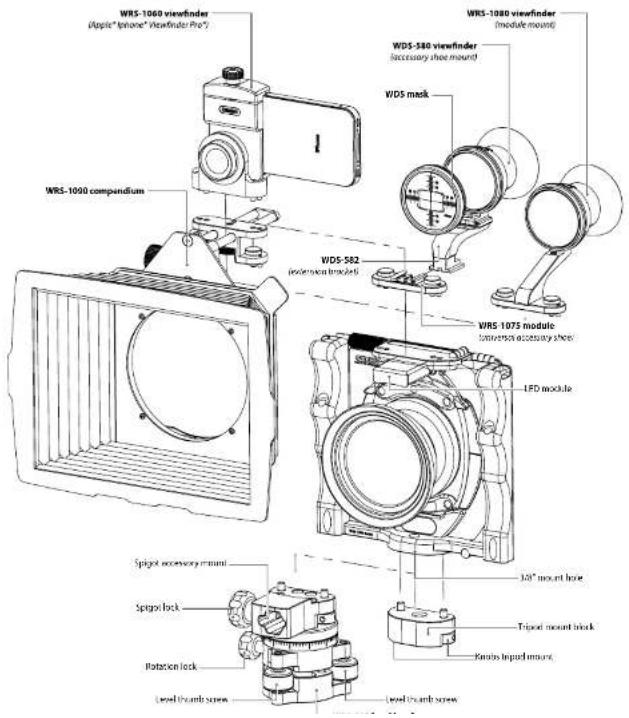
WRS-1060 viewfinder (Apple"iphone" Viewfinder Pro") WRS-1080 viewfinder (module mount) WDS-580 viewfinder (accebrary shee mount) WDS mask WRS-1090 compendium WDS-582 (extension bracket) WRS-1075 module (extension accessory shee) LFD module Spigot accessory mount Spigot lock Rotation lock Level thumb screw Level thumb screw 120° mount hole Tripot mount bracket Ramps Impact mountCAMBO® Wide RS 1200 series
ing block allows the user to take full advantage of the 25mm vertical shift when mounted on a larger tripod. However, to minimise the size of your camera, the mounting block can be removed by loosening the two tripod mount screw knobs. With the mounting block removed you can use the integrated 3/8" mount in the bottom frame of the main housing.
G2. WRS-333 LEVEL HEAD
The optional WRS-333 level head replaces the original mount. The WRS-333 can be fine-levelled with 3 individual thumb screws, 2 for the horizon and 1 for the perpendicular setting. The camera body can be rotated 360 degrees, with at the 0 and 180 degrees position there is a indication click. Any position can be locked with the rotation lock. The WRS-333 features a spigot mount to facilitate any spigot accessory of your choice such as lens shades, flags or sun shades.
H. ACCESSORY MOUNT, VIEWFINDER AND COMPENDIUM
At the top of the camera body features the Cambo accessory mount. The Cambo accessory modules are mounted using a two-way fixation, which results in a accurate and stable fixation.
The available Cambo modules are:
- WRS-1060 Apple® Iphone® viewfinder holder (Iphone® 4 and 4s)
- WRS-1075 Module with an universal accessory shoe mount
- WRS-1080 Optical wide angle (120 degree) viewfinder (optional masks)
• WRS-1090 Compendium
I. LED LIGHT MODULE
The Wide RS system includes a removable LED light which is convenient for use in darker environments when reading the distance scale, aperture and shutter speed. The LED unit attaches to the magnet positioned under the accessory mount of the camera body.
The LED module can be set to different lighting modes. Standard the LED module is in "demonstration mode", which means it will turn off automatically after four seconds. To change the LED module to "constant light mode" press and hold the button until the light turns off (at least 20 seconds).
J. USE OF LENS PANELS
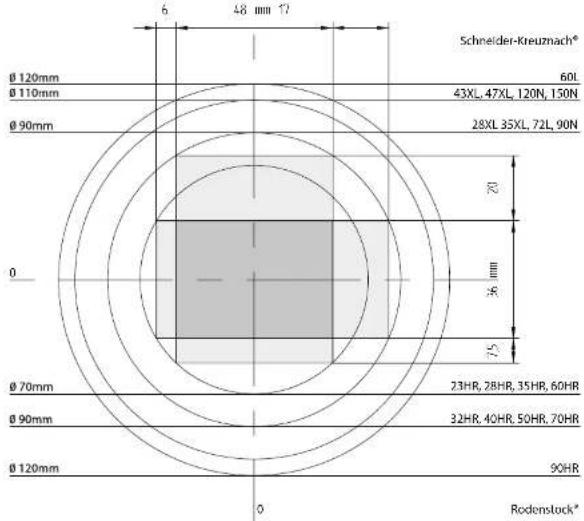
Each lens has a defined image circle and viewing angle specified by the lens manufacturer. The indicated image circle is defined by the circle containing acceptable image quality, defined by the quality standards of the lens manufacturer. Cambo does not change these specifications. For detailed lens specifications users are referred to data provided by Rodenstock ^® or Schneider-Kreuznach ^® .
text_image
Schneider-Kreuzmach* Ø 120mm Ø 110mm Ø 90mm Ø 70mm Ø 90mm Ø 120mm 6 48 mm 17 60L 43XL, 47XL, 120N, 150N 28XL 35XL, 72L, 90N Ø 72 Ø 36 mm Ø 75 23HR, 2BHR, 35HR, 60HR 32HR, 40HR, 50HR, 70HR 90HR Rodenslock*The maximum image displacement, to keep the image inside the specified image circle, depends on the size of the image circle and the image sensor used. In this example we use a digital back with a CCD size of 48 × 36mm . When we
CAMBO® Wide RS 1200 series
K. WTS TILT-SWING LENS PANELS
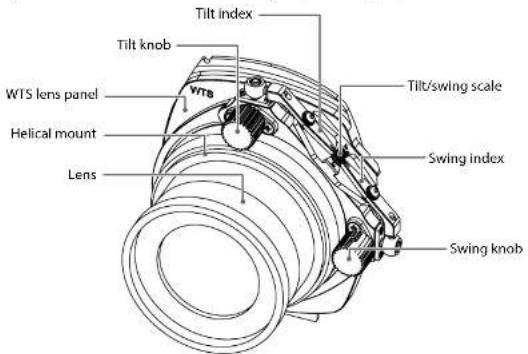
The WTS panel allows an angle adjustment between +5 and -5 degrees in both swing and tilt direction for setting Scheimpflug corrections. These can be used separately as well as simultaneously, using the 2 adjustment knobs. The lens plane and CCD are parallel when the tilt (T) and swing (S) indicators are set to zero on the scale. This zero-position is reached when the bearing snaps into the lock, where the drive knobs become slightly loose by purpose.
text_image
Tilt index Tilt knob WTS lens panel Helical mount Lens VTS Tilt/swing scale Swing index Swing knobTo apply tilt only use tilt knob, to apply swing only use swing knob. When needed, a combination of both can be applied.
Note: do not force beyond the +5/-5 boundary marks.
L. LENS CAST
Under certain circumstances there may be occurrence of lens cast, caused by the light striking the CCD under an angle due to either shifts or very short focal length. The effect may differ quite a lot from one CCD to another and is not a constant factor. This effect is acknowledged by all digital back manufacturers
This instruction manual has been prepared with care. However, Cambo Fotografische Industrie BV can accept no responsibility, financial or other for any consequences arising out of the use of this material.
All specifications in this manual are subject to change without notice. Please check www.cambo.com for updates.
Cambo is a registered trademark. All other mentioned trademarks are owned by their specific owners.
| CAMBO | ||||||
| Fotografische | Industrie | BV | Tel. | +31 | 383 | |
| P.O. | Box | 200 | Fax. | +31 | ||
| All, 200 | AF | Konzern | Faxil | +31 | Qzahl | |