CS-CHRONOS - Camera Cambo - Free user manual and instructions
Find the device manual for free CS-CHRONOS Cambo in PDF.


User questions about CS-CHRONOS Cambo
0 question about this device. Answer the ones you know or ask your own.
Ask a new question about this device
Download the instructions for your Camera in PDF format for free! Find your manual CS-CHRONOS - Cambo and take your electronic device back in hand. On this page are published all the documents necessary for the use of your device. CS-CHRONOS by Cambo.
USER MANUAL CS-CHRONOS Cambo
natural_image
Technical line drawing of a mechanical assembly with articulated arms and cylindrical components (no text or symbols)INSTRUCTION MANUAL
EN
Please read this manual carefully before using the Cambo CS rig!
Thank you for purchasing a Cambo product
The Cambo CS system complies with the “Arriflex ^ 15mm Light Weight” standard. This means the CS system is compatible with parts of other brands using the 15mm light weight standard. The 15mm light weight standard characteristics are: 15mm iris rods that are positioned 60mm apart and 85mm below the optical axis.
The Cambo CS Chronos camera support is a fully adjustable. The offset of the HDSLR is adjustable in the x, y and z axis. This provides an optimal viewing position, whether you use a loupe or a direct view on the HDSLR monitor.
The Chronos features the telescopic CS-H2 handle grips, giving the user full control over the positioning of the grips.
Due to the modular character of the Cambo rig system, the user is fully in charge of customizing the rig to his or her personal preferences.
The Chronos-Rig can be used with any follow-focus and/or matte box, this rig configuration centers the weight of the rig on the handle axis.
Warnings
✗ Before loosening a clamp knob, ensure that the loosened part of the rig is supported.
✗ Do not tighten the clamp without a rod inserted. This can deform and damage the clamp.


✗ Always check, after (re)assembly of the rig, if the clamps connecting the rods are well tightened.
✗ Do not lift the rig while holding only one handle. This could lead to excessive force momentum on the handle joint, causing it to shift.
Item check list
Before starting, please check if all items are included in your package. If anything is missing, contact your dealer.
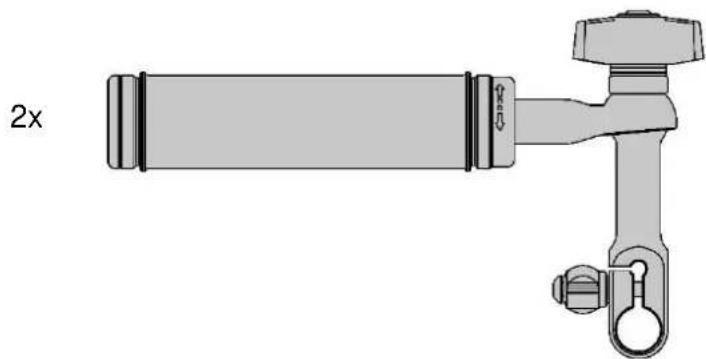
natural_image
Technical line drawing of a pipe fitting with a 2x ratio label (no text or symbols on the diagram itself)CS-H2 grip handle telescopic (2x)
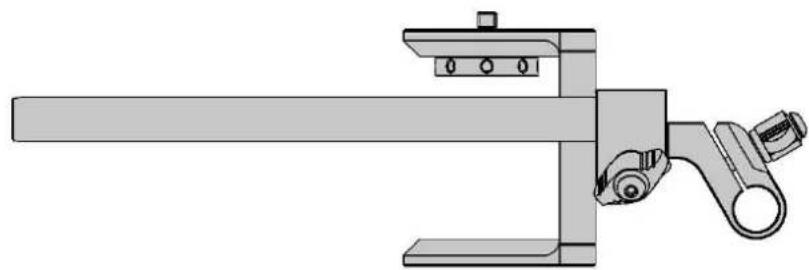
natural_image
Technical line drawing of a mechanical clamp or bracket assembly (no text or symbols)CS-1522 iris rods 220mm (2x), CS-M1 camera/tripod mount (1x), CS-153 triple clamp (1x)

natural_image
Technical line drawing of a mechanical clamp or bracket assembly (no text or symbols)CS-P1 ergonomic pad (1x), CS-153 triple clamp (1x)
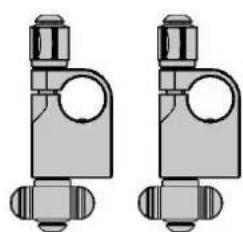
natural_image
Two identical mechanical component diagrams with no visible text or symbols
text_image
6xCS-1512 iris rod 120mm (6x), CS-1509 iris rod 90mm (1x), CS-151 perpendicular clamp (2x)

natural_image
Technical line drawing of a mechanical linkage component (no text or symbols)2x
CS-154 quad parallel 15mm rod clamp (2x)
Overview CS-Chronos rig

text_image
Technical diagram of a mechanical assembly with numbered components for identification1 CS-M1 Camera/tripod mount
2 CS-151 Perpendicular 15mm rod clamp
3 CS-H2 Telescopic handle
4 CS-153 Triple 15mm rod clamp
5 CS-1512 Iris rod 120mm
6 CS-1509 Iris rod 90mm
7 CS-1522 Iris rod 220mm
8 CS-P1 Ergonomic shoulder pad
9 CS-154 Quad parallel 15mm rod clamp
Assembly of the CS-Chronos rig
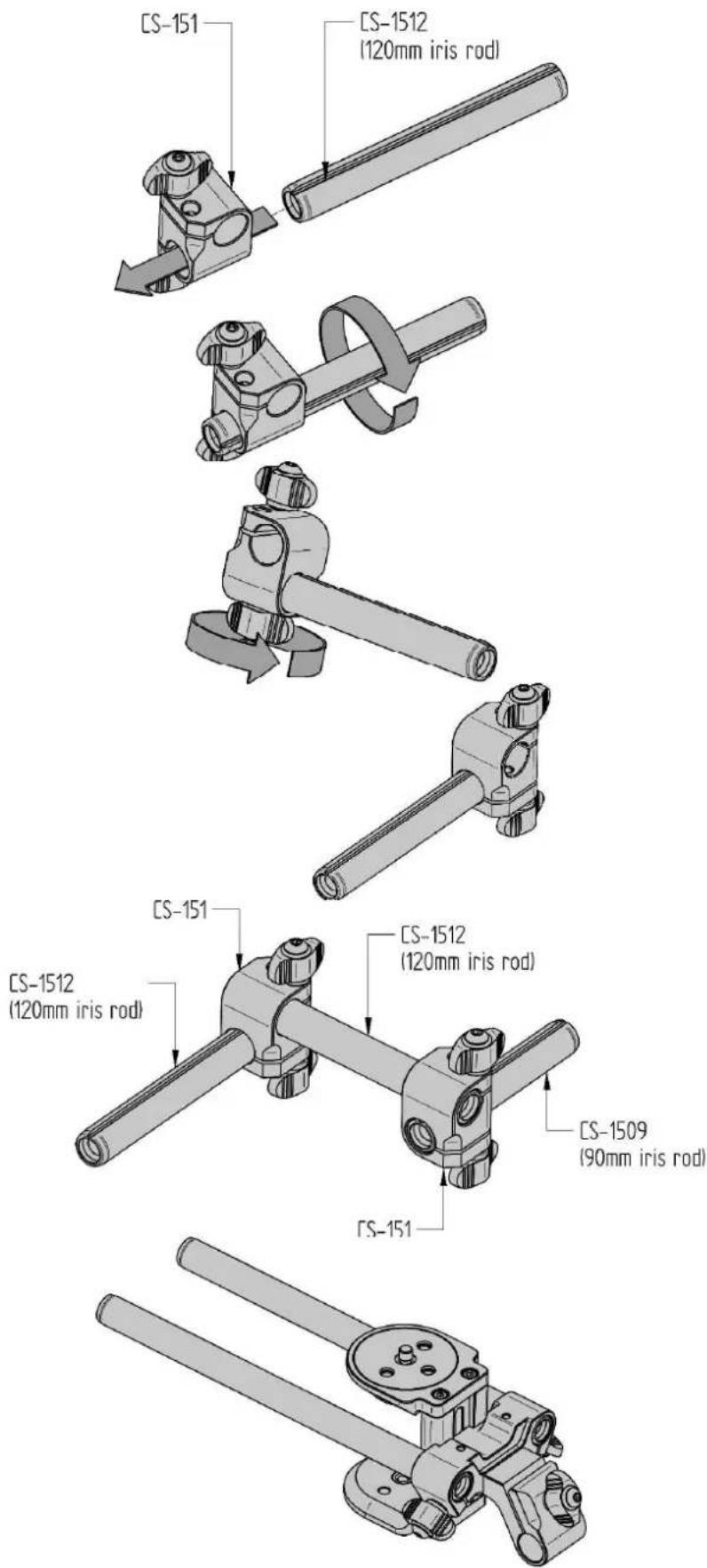
Insert the CS-1512 rod into the CS-151 clamp.
Twist the rod until you feel it snap into the preset position.
Tighten the related clamp knob to fix the position of the iris rod.
Position the rod/clamp assembly as shown in the picture.
Insert the other CS-1512 in to the CS-151 clamp, rotate the rod until the snap, then tighten the related clamp knob. The other CS-151 clamp and CS-1590 are assembled in the same order. This picture show's the assembly of the middle part of the rig.
Its advisable to use a tripod for the assembly of the CS-Chronos rig. Its also advisable to use quick-release plates for the connection between the rig and camera and between rig and tripod. This ensures a fast decoupling of both rig and camera.
text_image
CS-151 CS-1512 (120mm iris rod) CS-151 CS-1512 (120mm iris rod) CS-1509 (90mm iris rod) CS-151The "15mm Arriflex LW" standard, indicates a distance of 85mm between the optical axis and the axis of the rods.
Due to the variation in camera bodies and quick-release plates the distance between the camera and rods is adjustable.
Use a hex-key 4mm to loosen the socket bolt, by turning it counter clockwise. Set the distance between camera and rods to the appropriate value, fasten the CS-M1 mount by turning the hex-key clockwise (do not over tighten the bolt).

natural_image
Mechanical assembly diagram showing two configurations with rotating components and directional arrows (no text or labels)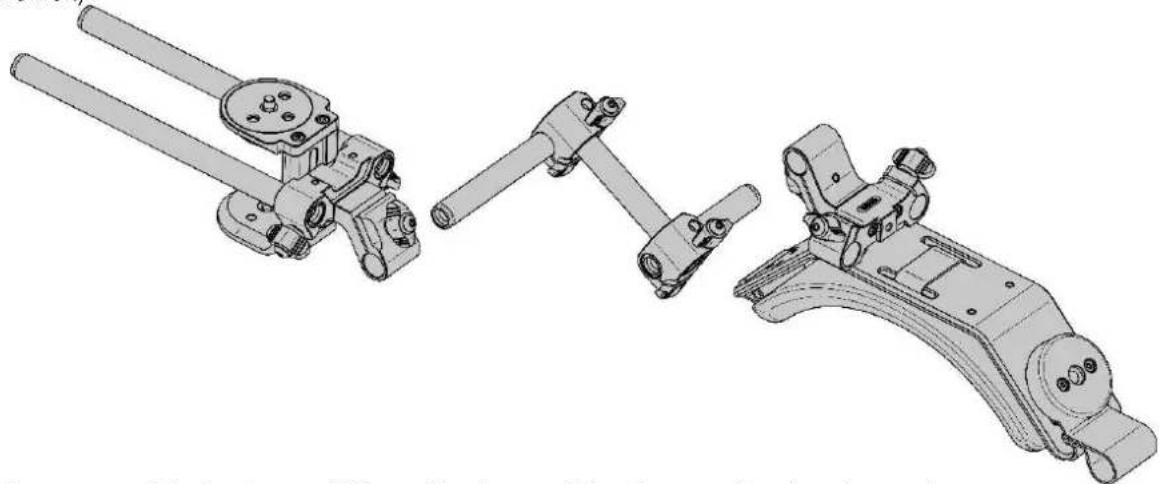
natural_image
Technical line drawing of mechanical components including linkers, levers, and brackets (no text or symbols)Please assemble the front, middle and back part of the rig according the picture above.
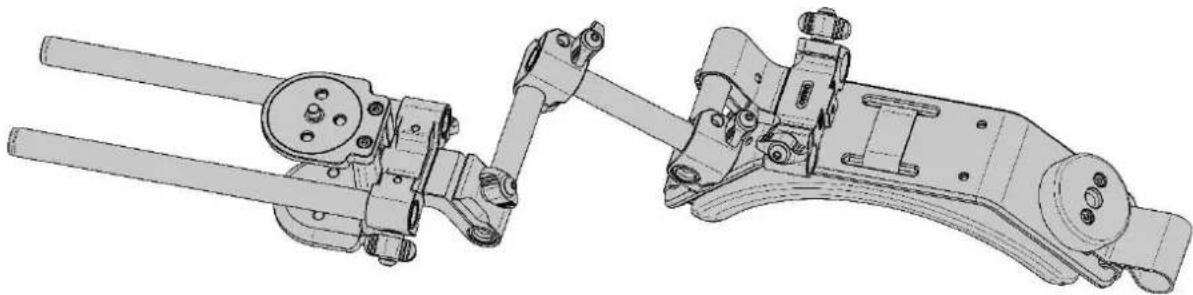
natural_image
Technical line drawing of two mechanical components with articulated arms and linkages (no text or symbols)
natural_image
Technical line drawing of a mechanical assembly with multiple components and rods (no text or symbols)Please assemble the two CS-154 brackets by placing the CS-1512 rods. First place the rods into the CS-154 brackets, when all the rods are placed and when the two CS-154 brackets are parallel, please tighten the screws of the CS-154 brackets.
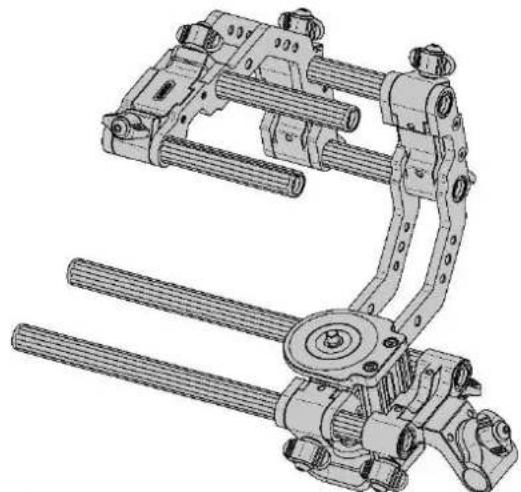
natural_image
Technical line drawing of a mechanical clamp or actuator assembly (no text or symbols visible)Please assemble the two CS-H2 handles.
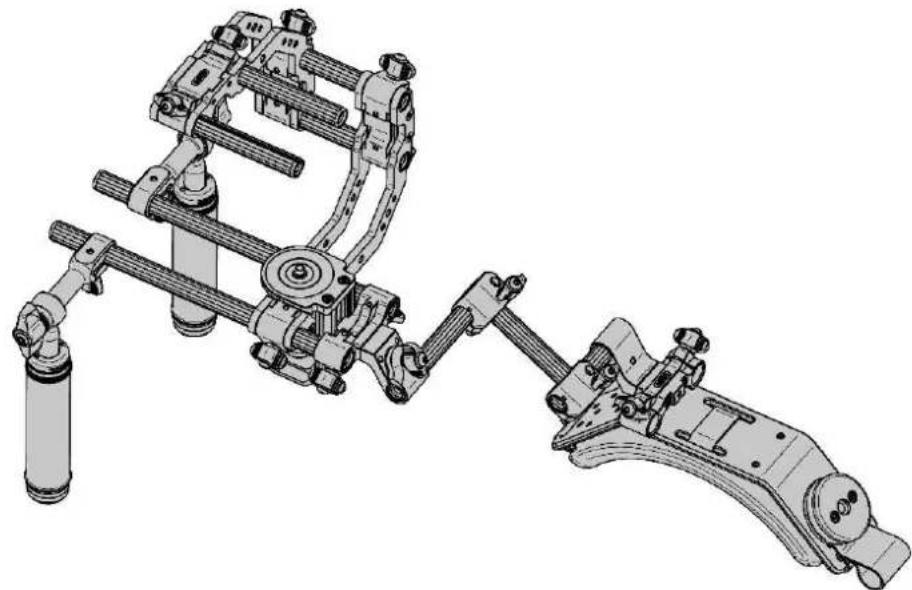
natural_image
Technical line drawing of a mechanical assembly with articulated arms and cylindrical components (no text or symbols)The assembly of the CS Chronos rig is now complete.
CS-Chronos rig adjustments
text_image
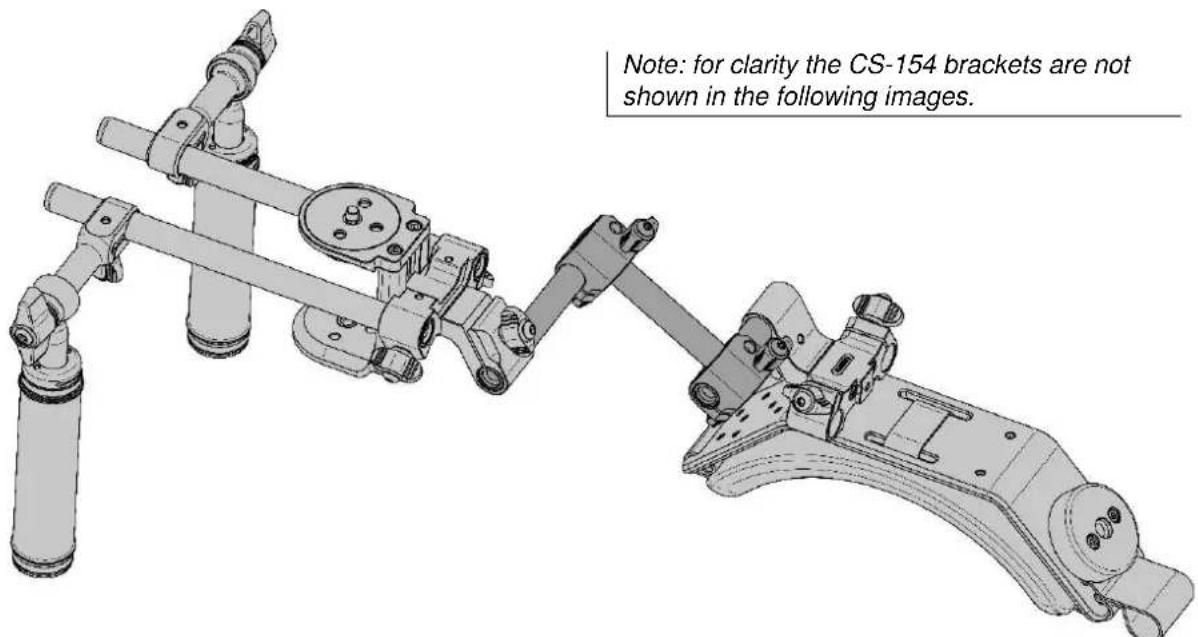
Note: for clarity the CS-154 brackets are not shown in the following images.The position of the front assembly (camera) in relation to the back assembly (shoulder pad) can be adjusted in the x, y and z direction and axis.
The CS Chronos also features a memory setting to ensure a reproduction of the ideal user settings.
Before adjusting the middle assembly (indicated dark grey in the picture above), please ensure that the rods are set into the snapped position of the CS-151 clamps (explained at page 4).
text_image
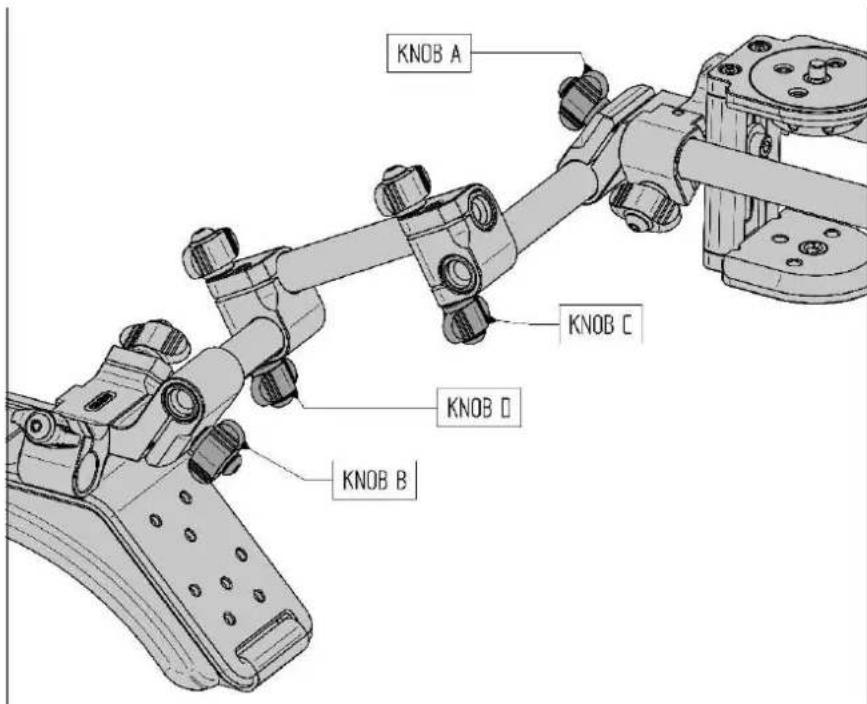
KNOB A KNOB C KNOB D KNOB BLoosen knob A (counter clockwise) and adjust the desired angle of the front assembly in relation to the middle and back assembly, when the desired angle is set fasten knob A (clockwise).
Loosen knob B (counter clockwise) and adjust the desired angle of the back assembly in relation to the middle and front assembly, when the desired angle is set fasten knob B (clockwise).
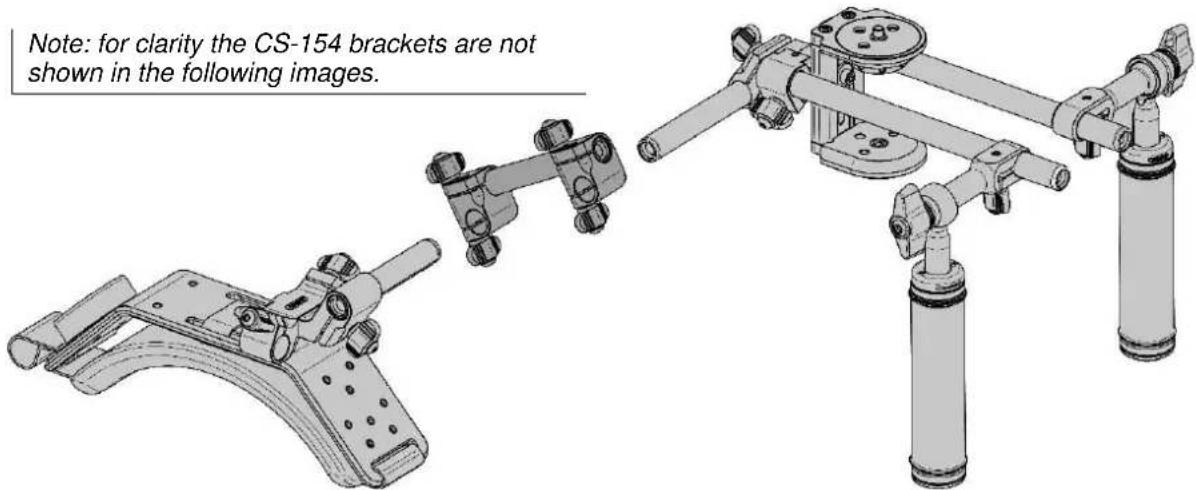
When you want to split up the rig for transport, you leave knob A and B fixed and you loosen knob D and slide of the back assembly, after this you loosen knob C and slide of the middle assembly. The rods still connected to the front and back assembly now feature the custom angle setting. To reassemble the rig use the snapping of the CS-151 clamp to reproduce the custom angle setting.
Note: for clarity the CS-154 brackets are not shown in the following images.
text_image
Note: for clarity the CS-154 brackets are not shown in the following images.The CS-H2 handles can be adjusted in length. The handle is either locked clockwise or counter clockwise. In the example picture below its locked counter clockwise, twist the handle clockwise until you feel that the handle is unlocked, then slide the handle to desired length and twist the handle counter clockwise to lock (of course its also possible to twist the handle clockwise to lock it again).

natural_image
Three sequential diagrams of a mechanical linkage mechanism, showing rotational motion with arrows indicating rotation (no text or symbols present)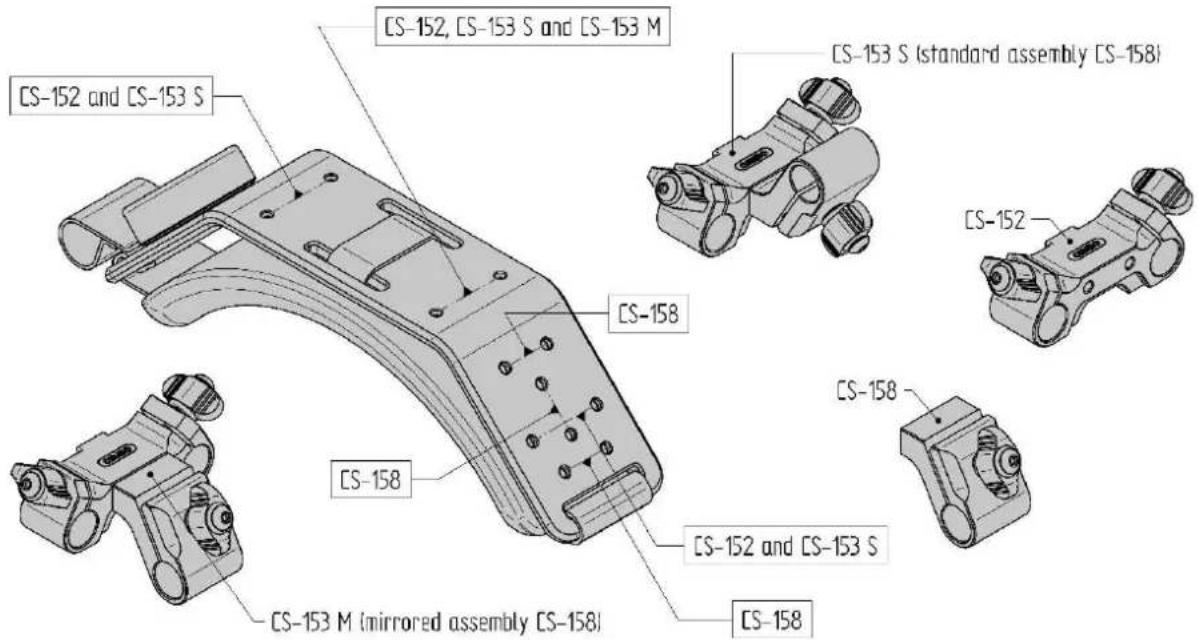
text_image
CS-152, CS-153 S and CS-153 M CS-152 and CS-153 S CS-158 CS-153 S (standard assembly CS-158) CS-152 CS-158 CS-152 and CS-153 S CS-158 CS-153 M (mirrored assembly CS-158)The image above shows the different mounting options of the CS-P1 shoulder pad. The CS-152/153 and the CS-158 can be mounted directly to the CS-P1 shoulder pad.
Cambo CS system accessories
text_image
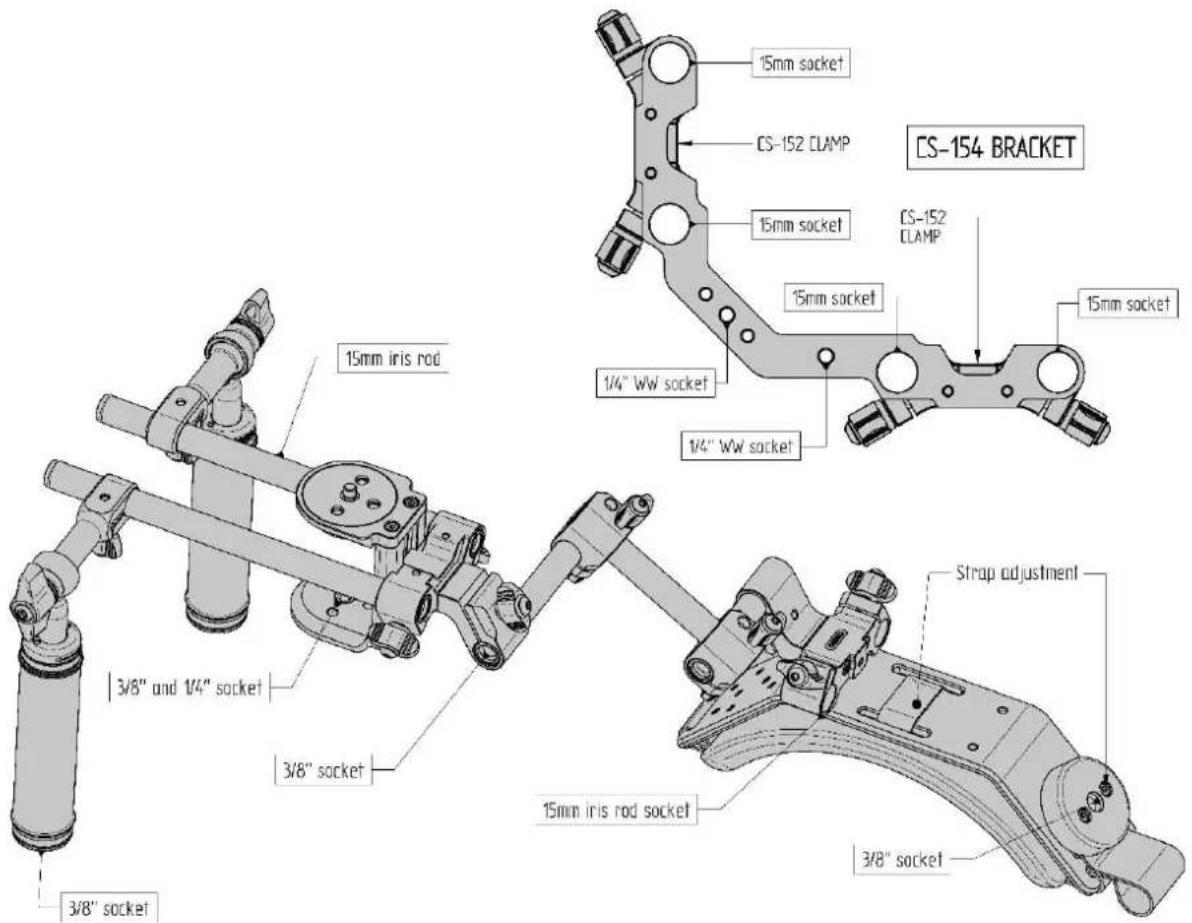
15mm iris rod 3/8" and 1/4" socket 3/8" socket 3/8" socket 15mm iris rod socket 15mm socket 15mm socket 1/4" WW socket 1/4" WW socket 15mm socket CS-152 CLAMP CS-152 CLAMP CS-154 BRACKET Strap adjustmentThe CS-15XX iris rods and the CS-H2 handle feature a 3/8" socket which can be used for mounting attachments.
Name Function
text_image
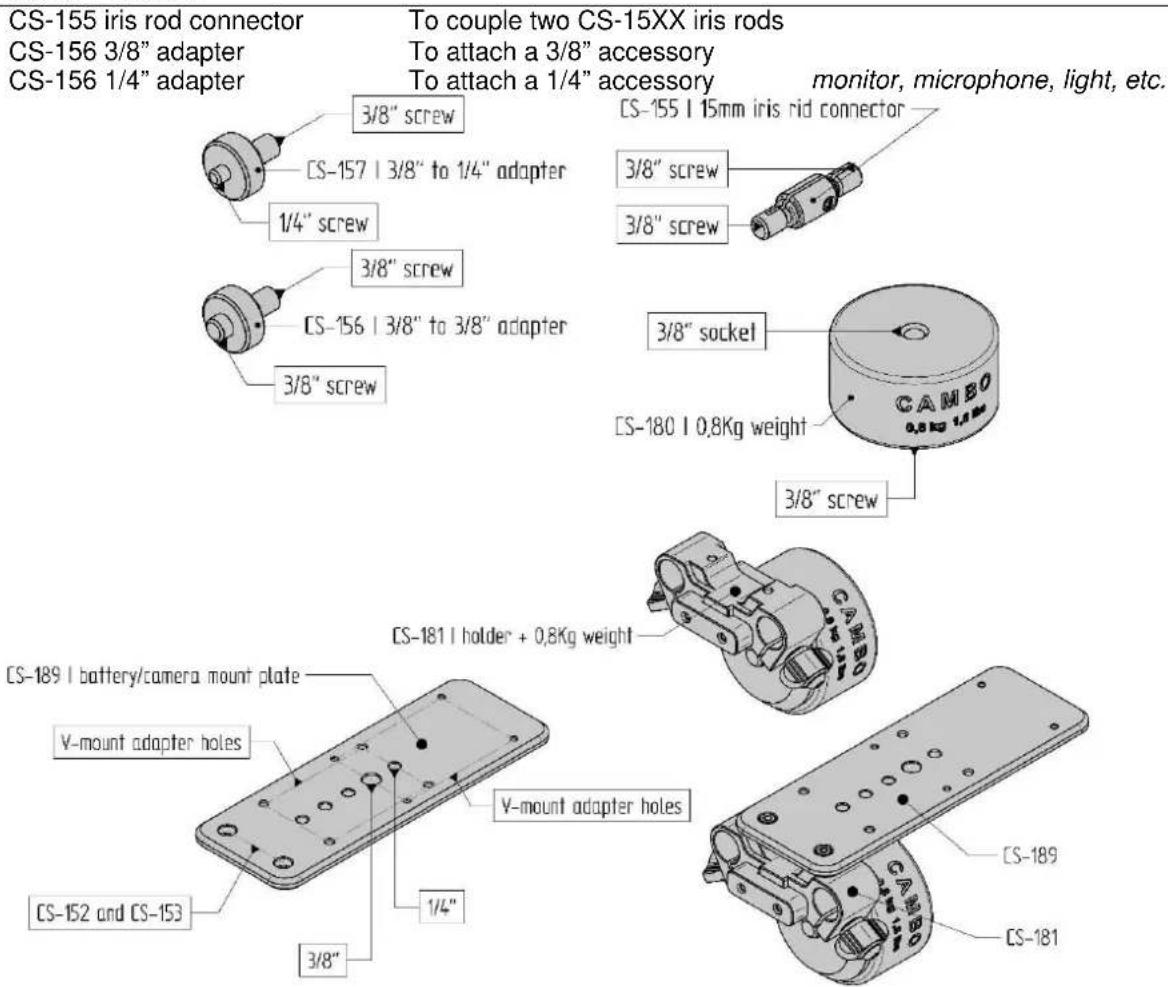
CS-155 iris rod connector CS-156 3/8" adapter CS-156 1/4" adapter To couple two CS-15XX iris rods To attach a 3/8" accessory To attach a 1/4" accessory monitor, microphone, light, etc. CS-157 | 3/8" to 1/4" adapter 1/4" screw CS-156 | 3/8" to 3/8" adapter 3/8" screw CS-155 | 15mm iris rid connector 3/8" screw 3/8" screw CS-180 | 0.8Kg weight 3/8" socket CAMBO 0.8 Kg 1.4 Kg CS-181 | holder + 0.8Kg weight CS-189 | battery/camera mount plate V-mount adapter holes V-mount adapter holes CS-152 and CS-153 1/4" 3/8" CS-189 CS-181The CS-181 unit can be used to adjust the weight distribution of the CS-rig.
text_image
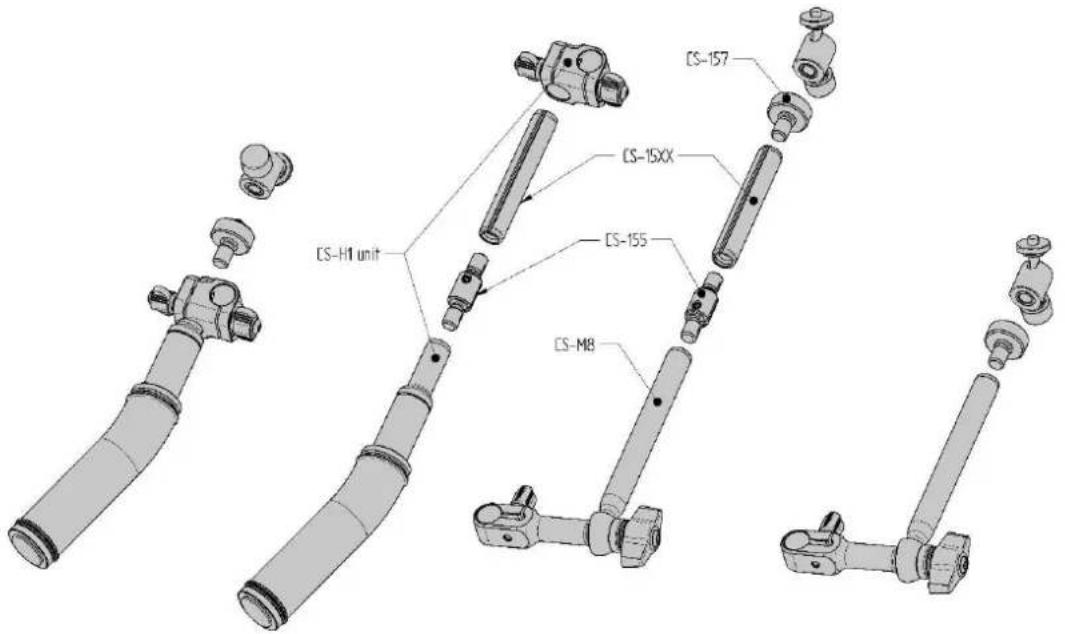
CS-H1 unit CS-15XX CS-155 CS-M8 CS-157The CS-M8 is a separate monitor/microphone/light stand which couples to the 15mm iris rod. The CS-H1 handle can be extended using a CS-155 connector and a CS-15XX iris rod.
Cambo CS system
15mm CS rig assemblies
CS-Cilix HDSLR Support Two Grip Handheld
CS-Styx HDSLR/DV Shoulder Mount
CS-Cirus HDSLR OFFSET RIG
CS-Eris HDSLR Support Fully Adjustable
CS-Chronos HDSLR Cinema Rig Professional
15mm iris rod clamp units
CS-151 Rod Clamp 15mm Perpendicular
CS-152 Rod Clamp 15mm Dual Parallel
CS-153 Rod Clamp 15mm Triple Dual/Perpendicular
CS-154 Rod Clamp 15mm Bracket Quad Parallel
CS-158 Rod Clamp 15mm Single (Connects to the CS-152 and CS-P1)
Camera/tripod mount units
CS-M0 Compact Camera/Accessory Mount
CS-M1 Compact Camera/Tripod Mount
CS-M2 DV Camera/Tripod Mount One Column Base
CS-M4 DV Camera/Tripod Mount Two Column Base
CS-M8 Monitor/Microphone Support
CS-394 Quick Release Mount Manfrotto 394 RC4 Low Profile
Handle units
CS-H1 Grip Handle Compact (Includes the CS-151)
CS-H2 Grip Handle Telescopic
Shoulder support units
CS-P1 Shoulder Pad Ergonomic Adjustable
Weight/battery units
CS-180 0.8Kg/1,8Lbs Weight with 3/8" mount connections
CS-181 Weight Holder Including 1x 0.8Kg/1,8Lbs weights
CS-182 Weight Holder Including 2x 0.8Kg/1,8Lbs weights
CS-189 Battery/Camera Mount Plate (Connects to the CS-152 and CS-153)
15mm Rod Connector and Adapters
CS-155 Cambo Iris Rod Connector
CS-156 Cambo Iris Rod to 3/8" Adapter
CS-157 Cambo Iris Rod to 1/4" Adapter
HDRB Heavy Duty Stainless Steel Reducer Bushing 3/8" to 1/4"
15mm iris rods
CS-1509 Iris Rod 90mm / 3.5"
CS-1512 Iris Rod 120mm / 5"
CS-1522 Iris Rod 220mm / 9"
CS-1530 Iris Rod 300mm / 12"
CS-1536 Iris Rod 380mm / 15"
CS-1546 Iris Rod 460mm / 18"
Matte-box units
CSM-100 Matte-box Flexible Hood
CSM-210 Matte-box Kit, two filter holder, one rotating
Follow-focus units
CSMFC-1 Follow Focus Kit Universal
Viewer-loupe units
CS-30 3" Monitor Viewing Loupe 3.0x Magnification
Cambo Photographic Industry B.V. / Cambo Video and Broadcast Products B.V. Cambo R&D 01 November 2010
This instruction manual is prepared with care, although no responsibility, financial or otherwise, is accepted for any consequences related the information stated in this instruction manual. All specifications in this instruction manual are subject to change without notice.
For more information please visit the Cambo web site: www.cambo.com