PHRM20 - Radio Pyle - Free user manual and instructions
Find the device manual for free PHRM20 Pyle in PDF.


| Product Type | Fitness Watch with Heart Rate Monitor and Pedometer |
| Brand | Pyle |
| Model | PHRM20 |
| Display | LCD with backlight (EL) |
| Sensor | 3D Accelerometer (German-made) for step counting |
| Heart Rate Monitor | Chest belt with conductive patches; wireless transmission |
| Connectivity | USB (built-in sliding connector) for PC data transfer |
| Power Source (Watch) | 1 x CR2032 battery (user-replaceable) |
| Power Source (Belt) | 1 x CR2032 battery (user-replaceable) |
| Functions | Step counting, distance, speed, calories burned, heart rate, chronograph, training modes (distance/time targets), lap recording, stride calibration, alarms (2 daily), 12/24h time, date |
| Modes | Time/Date, Alarm, Chronograph, Training, Memory Recall, User Settings, Heart Rate Zone Setup, Stride Calibration |
| Memory | Stores multiple lap records and training session data |
| PC Software | PC-Link program for data upload and report generation |
| Wearing Position | Watch on left wrist; belt on chest over heart |
| Stride Calibration | Manual input or automatic calibration of walk and run stride length |
| Heart Rate Zones | Configurable zones with alert; also calorie alert |
| Cleaning and Maintenance | Wipe with soft dry cloth; avoid water immersion; remove battery if not in use |
| Safety | Keep away from strong magnets and extreme temperatures; battery disposal per local regulations |
| Repairability | Batteries user-replaceable; no other user-serviceable parts; reset via four-button press |
| General Information | Instruction manual available online; product designed for walking, jogging, running |
Frequently Asked Questions - PHRM20 Pyle
User questions about PHRM20 Pyle
0 question about this device. Answer the ones you know or ask your own.
Ask a new question about this device
Download the instructions for your Radio in PDF format for free! Find your manual PHRM20 - Pyle and take your electronic device back in hand. On this page are published all the documents necessary for the use of your device. PHRM20 by Pyle.
USER MANUAL PHRM20 Pyle
PHRM20
Latest 3D Technology for Speed + Distance & Heart Rate - Built in USB.
3D SENSOR FROM GERMANY MEASURES YOUR MOVEMENT ACCURATELY
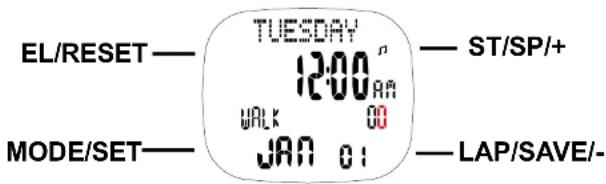

This unit is operated by four different buttons:
- MODE/SET
- LAP/SAVE/-
- ST/SP/+
- FI/RESET
3D SENSOR FROM GERMANY-MEASURES YOUR MOVEMENT ACCURATELY
-The 3D technology in the accelerator is an accelerometer Sensor to measure acceleration in walking or running.
-3D Sensor has intelligent step filter function-steps only count when the unit detects
-3D Sensor allows users to customize to their specific body type for Walking/Running style
The Complete Training System
Thank you for choosing Pulse Sonic The Complete Training System as your personal trainer. In order to be able to make the best use of this device, please read the instruction manual carefully. Do not discard keep the manual for future reference.
Wear the Heart Rate Belt on your chest with the sensor over your heart for detection of the heart rate.
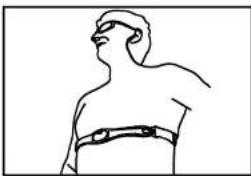
natural_image
Line drawing of a human torso wearing a full-body bandage (no text or symbols)
natural_image
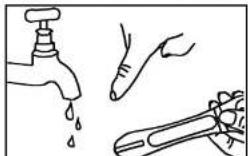
Illustration of a hand holding a tool with an arrow indicating direction (no text or symbols present)You will notice that there are two noticeably different patches on the inside of the Heart Rate Belt. These are the sensor for detecting your Heart Rate. Before you wear the Heart Rate Belt, wet these two patches lightly so that the sensor can detect your heart rate more easily. faster and with increased accuracy.


CONTENTS
Getting Start....2
Wearing the chest belt and Watch 2
Using the watch function.... 3
Symbol on LCD 4
Configuring Personal Information....5
Mode Flow Chart....5
Time / Date Setting.... 5
Alarm Setting....7
Chronograph Mode....7
Training Mode....9
Training Setting Mode....10
Chronograph Memory Mode....11
Training Memory Mode....12
User Setting Mode....14 User Rate Setting Mode....15
Heart Rate Setting Mode....15 Stride Calibration Mode....13
Stride Calibration Mode....16 Download/Installing PC Link Program....17
Download/Installing PC-Link Program....17
PC Link Program Operation....18
PC Link Communication Mode....18
Installing the Battery 19 Specification
Specification 20
Caution 21
NOTE
- When you walk or run for around 10 seconds, the unit sensor will pick this up and a display showing current pace for the walk or run will appear.
- If you wish to have the most accurate fitness index calculated by the unit, the user must use the calibration feature for both walking and running. They will also need to input their personal user settings
- Your watch is designed to count your steps when it is worn on your left hand. It will not count your steps correctly if you wear it on your right wrist or on your belt, or if you have it in your bag.
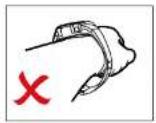
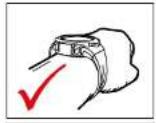
In order to maximize the accuracy of the step counting feature of the watch, please wear the watch properly as shown in the diagram (strap of the watch must fasten tightly around the wrist and it must not be loose; display must also be perpendicular to the forearm and wrist; the watch must only be worn on the left wrist and not the right to maximize the accuracy of step counting) The design and accuracy of the watch for step counting is based on the positioning of the watch
The 3D sensor of the watch will automatically count the steps. By wearing the watch correctly, the steps counted during the daily walk and, or run will be more accurate.
Please take off the strap from your wrist before you take out the watch unit.
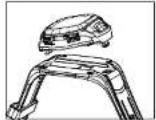
USING THE USB CONNECTOR
- When sliding the USB connector in and out from beneath the watch, please press and slide the USB connector where there is the thumb slide pivot. Please take care and do not push the USB connector back into place when it is locked in its extended position otherwise this will permanently damage the USB connector.


CONFIGURING PERSONAL INFORMATION
You need to preset the following personal information before using the watch.
The Unit You Want To Use
Your Normal Walking Stride Length
Your Chronograph Running Stride Length
Your Current Weight
Your Current Height
Your Gender
Your Age
You need to enter the USER SETTING MODE to configure your personal
information settings.
MODE FLOW CHART
Press the Mode/Set key to change between the following modes.
TIME/DATE MODE- ALARM MODE- CHRONOGRAPH MODE- TRAINING MODE - MEMORY DATA RECALL(FOR CHRONOGRAPH) -MEMORY DATA RECALL(FOR TRAINING)- SETTING MODE (USER/HR ZONE/CALIBRATION)

flowchart
graph TD
    A["TIME/DATE MODE"] --> B["ALARM MODE"]
    B --> C["CHRONOGRAPH MODE"]
    C --> D["TRAINING MODE"]
    D --> E["MEMORY DATA RECALL(FOR TRAINING)"]
    E --> F["SETTING MODE"]
    F --> E
    B --> G["MEMORY DATA RECALL(FOR CHRONO)"]
    G --> E
- To confirm the hour settings, press the MODE/SET button to move on to set the year
- To increment the year digits, press the ST/SP/+ button and to decrement the year digits, press the LAP/SAVE/- button
- Press the MODE/SET button to confirm the year and continue to adjust the month
- To change the month, press the ST/SP/+ or LAP/SAVE/- button until you have reached the desire month
- Press the MODE/SET button to confirm the month and continue to adjust the day.
- To change the day, press the ST/SP+ or LAP/SAVE- button until you have reached the desire day.
- Press mode/set key to select the setting item in the following sequence: Minute - Hour - Year - Month - Day - 12/24 Hr

flowchart
graph TD
    A["TUESDAY\n12:00\na\nwalk 00\nJAN 01"] --> B["MINUTE\n12:00\na\n2008 00\nJAN 01"]
    B --> C["HOUR\n12:00\na\n2008 00\nJAN 01"]
    C --> D["YEAR\n12:00\na\n2008 00\nJAN 01"]
    D --> E["SET YEAR\n24 HOURS"]
    E --> F["12Hr\n12:00\na\n2008 00\nJAN 01"]
    F --> G["DAY\n12:00\na\n2008 00\nJAN 01"]
    G --> H["MONTH\n12:00\na\n2008 00\nJAN 01"]
    H --> I["SET MONTH"]
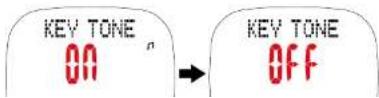
- Press the MODE/SET key to confirm the format and press either ST/SP/+ or LAP/SAVE/- button to turn ON/OFF the key tone
Daily Alarm:
- Press the MODE/SET key until you have arrived at the daily alarm setting and the display should show ALARM 1 in the top section of the screen and you can set up to two separate alarms.

- To set the alarm, press and hold the MODE/SET key for around 3 seconds and select which alarm to set by pressing the ST/SP/+ or LAP/SAVE/- button.
- Confirm the selected alarm by pressing the MODE/SET key and set the hour digits. To increment the hour digits, press the ST/SP+ button and to decrement the hour digits, press the LAT/SAVE/- button.
(Daily alarm icon will be turned on if the setting is changed) - Confirm by pressing the MODE/SET key and to increment the minute digits, press the ST/SP/+ button and to decrement the minute digits, press the LAP/SAVE/- button
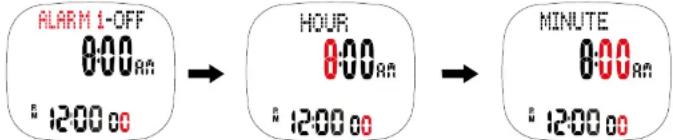
- After so, turn ON/OFF the alarm by pressing the ST/SP+ or LAP/SAVE/- button and confirm by pressing MODE/SET key

- Once heart rate receiver is turned on, the heart icon should be darkened and press and hold the EL/RESET key if you wish to see the number of steps instead of calories burnt which will show steps, average heart rate, lap number and distance.

- Press and hold the EL/RESET keys for around 3 seconds again to see the combination of chronograph with calorie, current heart rate, lap number and speed.
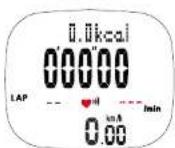
- Press the ST/SP/+ button to start chronograph and this will automatically enable the step counting function and first speed reading will appear after approximately 6 seconds

- To pause, press the ST/SP/+ button and to resume, press the same button once again

- To have a lap record created, press the LAP/SAVE/ - button and this will freeze lap time for around 3 seconds
Note:
-If there is no heart rate signal for 2 minutes, the heart rate reception will be disabled and the heart rate icon will be turned off.
-When the user saves or clears the chronograph record on chronograph mode, the maximum, average and minimum heart rate record are saved and cleared at the same time.
-If heart rate signal is lost, the last heart rate value will remain on display for around 8 more seconds before the screen will show"--". The watch will continue to try to detect the signal for 2 more minutes before logging out.
-If the heart rate belt is on low batteries, the watch will display the low battery icon.
-When chronograph has been activated, training mode cannot be activated at the same time or vice versa.
Training Mode:
- Press the MODE/SET key until you have reached a screen entitled training
TRAINING
- It should show current heart rate and target distance and to switch to training 2, press and hold the EL/RESET button for around 3 seconds and repeat this to access training 3 and 4 or back to 1 again

flowchart
graph LR
    A["TRAINING1\n00000\n1.00"] --> B["TRAINING2\n00000\n5.00"]
    B --> C["TRAINING3\n00000\nHRLF\nNAPA TH"]
    C --> D["TRAINING4\n00000\nFULL\nNAPA TH"]
- The default training screen should show speed, current heart rate, training 1 and distance
TRAINING1 00000 ♥ 85min
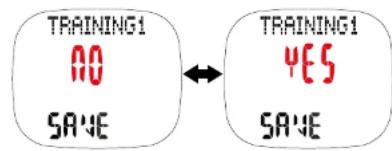
- To save data, press and hold the LAP/SAVE/-button for around 3 seconds and to select whether to save or erase data use the ST/SP/+ button. And to hold the LAP/SAVE/-key for around 3 seconds to confirm your decision.
Note:
-If there is no heart rate signal for 2 minutes, the heart rate reception will be disabled and the heart rate icon will be turned off.
-When the user saves or clears the chronograph record on chronograph mode, the maximum, average and minimum heart rate record are saved and cleared at the same time.
-If heart rate signal is lost, the last heart rate value will remain on display for around 8 more seconds before the screen will show"---". The watch will continue to try to detect the signal for 2 more minutes before logging out.
-If the heart rate belt is on low batteries, the watch will display the low battery icon.
-When chronograph has been activated, training mode cannot be activated at the same time or vice versa
Training Setting Mode:
Training time with Current Heart Rate and Target distance 1. Press the MODE/SET key until you have reached a screen entitled training
TRAINING
- Press and hold the MODE/SET key until training 1 banner starts flashing and select training 1 or 2 by pressing LAP/SAVE/- or ST/SP/+ button Confirm choice by pressing MODE/SET key and adjust distance by press the ST/SP/+ button and to increment distance, press the LAP/SAVE/- button to decrement distance
0.00 km/h
TRAINING1
TRAINING1
Chronograph Memory Recall
- Press MODE/SET key to enter memory data where the screen showing RECALL with Chrono will appear after around 2 seconds
- To increment the laps, press the ST/SP/+ button and to decrement the laps, press the LAP/SAVE/- button
- Press and hold the MODE/SET button for about 3 seconds to enter the lap data record and press the ST/SP/+ button to scroll through the data stored
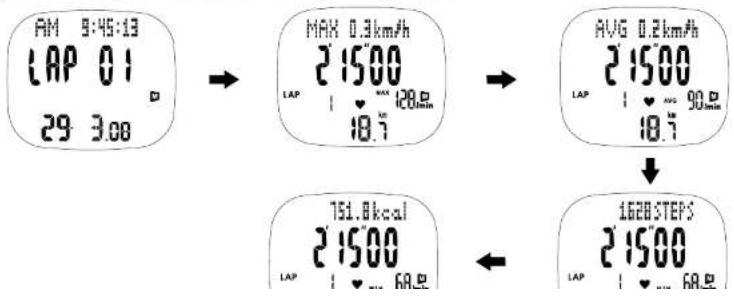
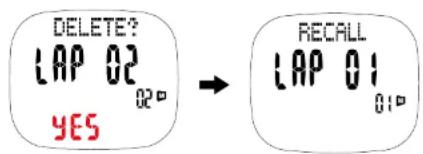
- Hold the EL/RESET key for around 3 seconds to delete and toggle all yes, or no by pressing the LAP/SAVE/- or ST/SP/+ button

- Press MODE/SET key to confirm
Note:
- Press and holding the MODE/SET key will quit the mode immediately and go back to Lap/Training Record Selection Mode.
- In Memory recall mode, if there is no key press or key hold for 60s, it will return to Clock mode.
- In Chronograph memory recall mode, if there is an error on reading the data, then an error display is shown:

Training Memory Recall
- Press MODE/SET key to enter memory data where the screen showing RECALL with
MEMORY DATA

- To delete any data records, exit this screen to return to memory recall record selection by holding the MODE/SET button for approximately 3 seconds
- Then increment the laps, press the ST/SP/+ button and to decrement the laps, press the LAP/SAVE/- button to your selected lap
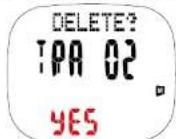
- Hold the EL/RESET key for around 3 seconds to delete and toggle yes or no or all by pressing the LAP/SAVE/ - or ST/SP/+ button
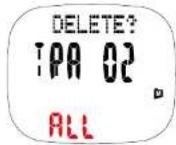

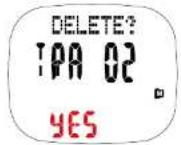

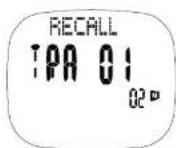

- Press MODE/SET key to confirm


Note:
USER SETTING MODE
- Press the MODE/SET key until you have reached the SETTING mode which will have a banner showing USER displaying SETUP
- Press and hold the MODE/SET button for around 3 seconds to enter into configuring the user setting
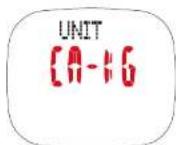
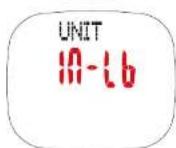
- The first setting is the unit in which you wish your measurements to be measured and recorded in. There are two options which is the combination of CM for height and KG for weight or IN for height and LB for weight which can be manipulated by press the LAP/SAVE/- or ST/SP/+ button
- Press MODE/SET key to confirm. The next setting is gender and this again can be selected by scrolling through the sexes via the ST/SP/+ or LAP/SAVE/ - button
- Press MODE/SET key to confirm and set your age. To increment the age, press the ST/SP/+ button and to decrement the age, press the LAP/SAVE/- button



Heart Rate Zone Setting Mode
- Press the MODE/SET key until you have reached the SETTING mode which will have a banner showing USER displaying SETUP
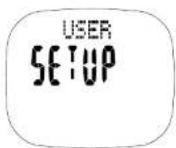
- Press the LAP/SAVE/ - button to enter Heart Rate Zone Setting Mode and holding the MODE/SET key

flowchart
graph LR
    A["HR ZONE SETUP"] --> B["CALIBRATION OF STRIDE"]
    B --> C["STRIDE 71CM WALK"]
    C --> D["STRIDE 120CM RUN"]
- To increment the activity level, press the ST/SP/+ button and to decrement the activity level, press the LAP/SAVE/- button and press MODE/SET key to confirm

- Turn the zone alert ON/OFF by using the LAP/SAVE/- or ST/SP/+ button and press MODE/SET key to confirm

- If zone alert is ON, to increment the zone, press the ST/SP/+ button and to decrement the zone, press MODE/SET key to
- Set calories alert by using ST/SP/+ or LAP/SAVE/- button to increment and decrement setting and press MODE/SET key to confirm of each of the five digits
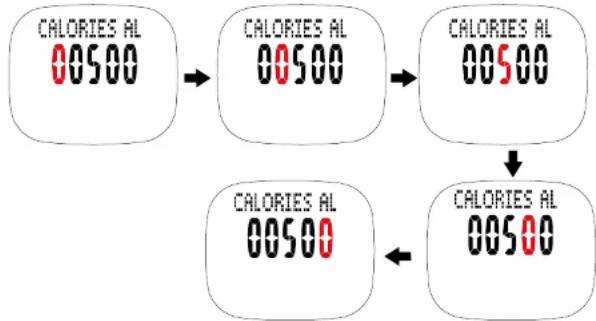
flowchart
graph TD
    A["CALORIES AL 00500"] --> B["CALORIES AL 00500"]
    B --> C["CALORIES AL 00500"]
    C --> D["CALORIES AL 00500"]
    D --> E["CALORIES AL 00500"]
- Press ST/SP+ or LAP/SAVE- button to select calories alert ON or OFF.
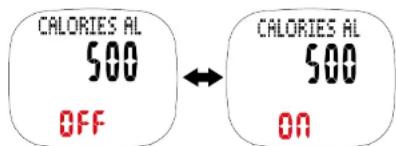
- Press MODE/SET button for approximately 3 seconds to exit heart rate set up mode.
Stride calibration mode
- Press the MODE/SET key until you have reached the SETTING mode which will have a banner showing USER displaying SETUP
- Press LAP/SAVE/- button to enter stride calibration mode and press ST/SP/+ button to scroll through walling stride length and running stride length
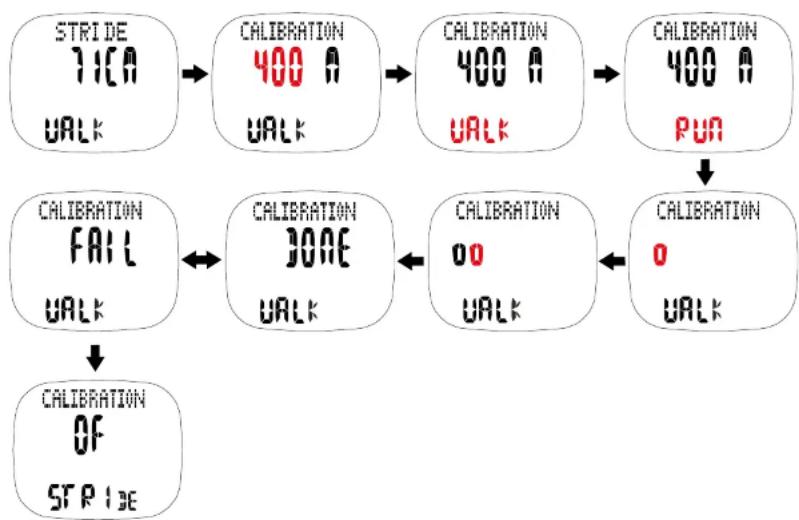
flowchart
graph TD
    A["STRIDE\n71CA\nwalk"] --> B["CALIBRATION\n400 A\nwalk"]
    B --> C["CALIBRATION\n400 A\nwalk"]
    C --> D["CALIBRATION\n400 A\nPUN"]
    D --> E["CALIBRATION\n0\nwalk"]
    E --> F["CALIBRATION\n00\nwalk"]
    F --> G["CALIBRATION\n0\nwalk"]
    G --> H["CALIBRATION\nOF\nSPR13E"]
    H --> I["CALIBRATION\nFAIL\nwalk"]
    I --> J["CALIBRATION\nJONE\nwalk"]
    J --> K["CALIBRATION\n00\nwalk"]
    K --> L["CALIBRATION\n0\nwalk"]
Note:
- If no keys are pressed or held for 60 seconds, it will return to the existing mode.
- Press and hold the MODE/SET key for 3 seconds at anytime during the setting mode to exit and all revised setting will be saved.
- The stride length range is limited to 20 \~ 180cm (8" to 5' 11") for both run and walk. If the calibration result is outside this range, the previous stride length is used.
- During stride length calibration, holding the MODE/SET key will terminate the calibration process and "FAIL" will appear on the screen.
PC-LINK PROGRAM OPERATION
First User:
Click "NEW USER" button to enter one's USER NAME and then enter password.

PC LINK COMMUNICATION MODE
- Press "UPLOAD" button on the pc-link program and will automatically upload the data to PC.

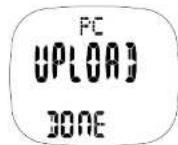
-
Press Mode/Set will back to Time/Date mode. The Watch will exit and go back to Time/Date mode automatically if you do not perform any operation or no step input after around 60 seconds.
-
Login the program and enter to the Main Screen.
-
Click the color bar shown in the left top corner of the main screen to select the desired report.

INSTALLING THE BATTERY
The Watch uses 2 pieces CR 2032 batteries (one each for watch and heart rate belt). Use only the recommended batteries.
NOTE : Changing the battery will erase the data in the watch previously input into the device and you can then/will need to re-set the watch all over again.
Watch
- The battery compartments located at the back of the watch.
- To install/replace the battery, unscrew the battery compartment with the screw driver and simply slide out afterwards.
- Take out the old battery and dispose of properly.
- Gently place a new battery into the battery slot of the battery compartment, making sure that the poles are correctly placed.
- Screw back the battery compartment, when finished as in the diagram below

natural_image
Technical line drawing of a mechanical housing with mounting holes and internal ribbed structure (no text or symbols)Heart Rate Belt
Hold the Heart Rate Belt firmly. Insert a coin into the slit of the compartment lid and turn it clockwise. The lid should come off easily. (Remove used battery CR2032) (Diagram 1) Gently place the battery into the battery slot of the battery compartment. (Diagram 2) Put the compartment lid back into place and tighten it firmly by turning it anti-clockwise with the help of coin.

natural_image
Illustration of a hand holding a circular object with an arrow indicating motion (no text or symbols)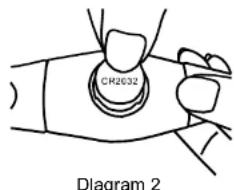
IMPORTANT BATTERY INFORMATION
- Battery installation and removal should be performed by an adult
• Use only batteries recommended in this instruction sheet - Be sure to install the batteries with the correct polarity, as indicated
- Remove all batteries when replacing
- Only batteries of the same and equivalent type as recommended are to be used
- Do not short-circuit the supply terminals
- Exhausted batteries should be removed from the product
• Non-rechargeable batteries are not to be recharges
● Rechargeable batteries are to be removed from the product before being charged - Rechargeable batteries are only to be charged under adult supervision
• Different types of batteries or new and used batteries are not to be mixed.
SPECIFICATIONS
Time Format
: Year, month, date, day, hour, minute, second, am/pm
12/24 hours
Calendar System
: Full Auto-calendar pre-programmed from 2000 to 2099
A. 2017, 11: 18:30, 11: 19:30, 12: 19:30, 13: 19:30, 14: 19:30, 15: 19:30, 16: 19:30, 17: 19:30, 18: 19:30, 19: 19:30, 20: 19:30, 21: 19:30, 22: 19:30, 23: 19:30, 24: 19:30, 25: 19:30, 26: 19:30, 27: 19:30, 28: 19:30, 29: 19:30, 30: 19:30, 31: 19:30, 32: 19:30, 33: 19:30, 34: 19:30, 35: 19:30, 36: 19:30, 37: 19:30, 38: 19:30, 39: 19:30, 40: 19:30, 41: 19:30, 42: 19:30, 43: 19:30, 44: 19:30, 45: 19:30, 46: 19:30, 47: 19:30, 48: 19:30, 49: 19:30, 50: 19:30, 51: 19:30, 52: 19:30, 53: 19:30, 54: 19:30, 55: 19:30, 56: 19:30, 57: 19:30, 58: 19:30, 59: 19:30, 60: 19:30, 61: 19:30, 62: 19:30, 63: 19:30, 64: 19:30, 65: 19:30, 66: 19:30, 67: 19:30, 68: 19:30, 69: 19:30,
CAUTION
Should you encounter any problems with the Speed & Distance Heart Rate System (e.g. malfunctioning of a parameter, static electricity, interferences within the product or the need to re-set the device), please press four buttons at the same time to reset the watch (the watch should not connect with computer). All data previously input into the device will be erased and you can then/will need to re-set the watch all over again. Should this fail to correct the situation, remove the batteries and then put them back into the battery compartment.
Then follow all the steps mentioned above in order to input the necessary data once more. The content of this manual is subject in order to change without further notice. Due to printing limitation, the displays shown in this manual may differ from the actual display. The manufacturer and its suppliers hold no responsibility to you or any other persons for any damage expenses, lost-profits, or any other claims arisen by using this product. The contents of this manual may not be reproduced without the permission of the manufacturer.
3D sensor for steps counting
Produced in Europe, the 3D sensor is of very high quality which has shown great accuracy in detecting and counting steps from walking, jogging and running. In order to maximize the accuracy of the step counting feature, this sensor is able to filter movements that do not belong to the categories of walking, jogging and running. The daily pedometer step count can be switched off if the user does not wish to count or view his daily step count which will help the unit to save energy. However, the chronograph feature with step counting cannot be switched off.
If at any time of the day you wish to count the number of steps for a particular walking/jogging/running event, you may restart the daily pedometer to 0 and switch the daily pedometer feature off once the walking/jogging/running event is over and the number of steps recorded for that particular event will be automatically saved to the memory of the watch.


- The Complete Training System
- CONTENTS
- NOTE
- USING THE USB CONNECTOR
- CONFIGURING PERSONAL INFORMATION
- MODE FLOW CHART
- Daily Alarm:
- Note:
- Training Mode:
- Training Setting Mode:
- Chronograph Memory Recall
- Training Memory Recall
- USER SETTING MODE
- Heart Rate Zone Setting Mode
- Stride calibration mode
- PC-LINK PROGRAM OPERATION
- PC LINK COMMUNICATION MODE
- INSTALLING THE BATTERY
- Watch
- Heart Rate Belt
- IMPORTANT BATTERY INFORMATION
- SPECIFICATIONS
- CAUTION
- 3D sensor for steps counting
Brand : Pyle
Model : PHRM20
Category : Radio