PSWTHM15 - Radio Pyle - Free user manual and instructions
Find the device manual for free PSWTHM15 Pyle in PDF.


| Product Type | ThermoWatch with Temperature Sensor |
| Display | LCD with Electro-luminescent Backlight |
| Power Source | Battery (replaceable, recommended by certified service) |
| Current Time Mode | Hour, minute, second; month, day, day of week; 12/24 hour format; auto calendar 1985-2029 |
| Alarm Mode | Daily or date alarm; 20-second beep; hourly chime |
| Dual Time Mode | Second time zone with hour, minute, second; 12/24 hour format |
| Timer Mode | 1-second resolution; programmable up to 23h 59m 59s; normal or repeat counting; 10-second alarm |
| Stopwatch Mode | 1/100-second resolution; range 23h 59m 59.99s; split time display |
| Thermometer | Measuring range -9°C to 70°C (15.8°F to 158°F); selectable °C/°F |
| Backlight | EL backlight activates for 2 seconds when button pressed |
| Cleaning | Soft moistened cloth; avoid strong chemicals like plastic and alcohol |
| Maintenance | Battery replacement by certified service due to precision sensors |
| Safety Precautions | Avoid extreme conditions, rough use, and do not block sensor openings |
Frequently Asked Questions - PSWTHM15 Pyle
User questions about PSWTHM15 Pyle
0 question about this device. Answer the ones you know or ask your own.
Ask a new question about this device
Download the instructions for your Radio in PDF format for free! Find your manual PSWTHM15 - Pyle and take your electronic device back in hand. On this page are published all the documents necessary for the use of your device. PSWTHM15 by Pyle.
USER MANUAL PSWTHM15 Pyle
Budkin NY 1148
1.2014
www.thcag.com/1987/05/2014
www.pyleaudio.com
www.pyleaudio.com
1.0 Introduction

Thanks of your purchase of the ThermoWatch.
Your ThermoWatch Includes a electronic sensor that measures the ambient temperature, in addition to the temperature display, the Watch also includes current time, alarm, timer, dual time and stopwatch functions.
Your TaxmoWatch is carefully designed and produced, in order to utilize the features of your watch, it is advisable to use the Watch in conformity with the instructions below:
- Read the instruction before you use the Thermolatch.
- Avoid exposing your ThermoWatch to extreme conditions for an unmeasurable time.
- Avicis rough uses or severe impacts to your ThermoWatch.
- It is recommended to complete the battery replacement by a certified service agency because your ThermoWatch contains precise electronic sensor and components.
- Clean your Watch with a soft moistened cloth occasionally. DO NOT expose the Watch to strong chemicals such as plastic, and alcohol, as they will damage the Watch.
• DO NOT insert any objects into or block the sensor's openings.
2.0 Parts and Its Functions

[mode] key
- Press the button to select among the 5 major modes, in setting display, press the button to select among the numbers which to be set.
[adjust] key
- Press the button to change the display to setting display in setting display, press the button to add setting display.
[Barcup] My
- In Current Time Mode, press the button to switch between Normal Display and Temperature Display. In Stopwatch Mode, press the button to start counting if it is stopped, to stop the counting if it is counting.
[spit/visual] key
- Press the button to turn ON the EL back light for about 2 seconds.
- In Stopwatch Mode, press the button to display the split time. In Current/Dual Time Setting Display, press the button to switch between the 12 and 24 time formats. In Time Setting Display, press the button to switch between Normal Counting and Repeat Counting. In Alarm Time Mode, press the button to select the ON-OFF status of the chime and claim.
3
3.0 Major Function Mode
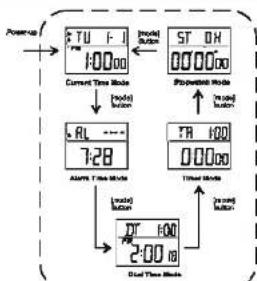
flowchart
graph TD
    A["Power"] --> B["Current Time Mode"]
    B --> C["Mode I: 10000"]
    C --> D["Mode II: 7:28"]
    D --> E["Alarm Time Mode"]
    E --> F["Mode III: 2:00"]
    F --> G["Mode IV: 100"]
    G --> H["Mode V: 0:00"]
    H --> I["Mode VI: 0:00"]
    I --> J["Mode VII: 0:00"]
    J --> K["Mode VIII: 0:00"]
    K --> L["Mode IX: 0:00"]
    L --> M["Mode X: 0:00"]
    M --> N["Mode Y: 0:00"]
    N --> O["Mode Z: 0:00"]
    O --> P["Mode AA: 0:00"]
    P --> Q["Mode AB: 0:00"]
    Q --> R["Mode AC: 0:00"]
    R --> S["Mode AD: 0:00"]
    S --> T["Mode AE: 0:00"]
    T --> U["Mode AF: 0:00"]
    U --> V["Mode AG: 0:00"]
    V --> W["Mode AH: 0:00"]
    W --> X["Mode AI: 0:00"]
    X --> Y["Mode AJ: 0:00"]
    Y --> Z["Mode AK: 0:00"]
    Z --> AA["Mode AL: 0:00"]
    AA --> AB["Mode AM: 0:00"]
    AB --> AC["Mode AN: 0:00"]
    AC --> AD["Mode AO: 0:00"]
    AD --> AE["Mode AP: 0:00"]
    AE --> AF["Mode AQ: 0:00"]
    AF --> AG["Mode AR: 0:00"]
    AG --> AH["Mode AS: 0:00"]
    AH --> AI["Mode AT: 0:00"]
    AI --> AJ["Mode AV: 0:00"]
Major Operation Mode
- The ThermoWatch includes 5 major operation modes and several operation displays.
- The 6 operation modes are: Current Time Mode, Alarm Time Mode, Dual Time Mode, Timer Mode, and Stopwatch Mode.
- Each operation mode may include one or more than one operation displays. These operation displays provide supplementary features of the operation mode.
- Check the individual sections for the detail of these operation displays.
To Switch among Operation Media - Press the [mode] button to select among the Current Time Mode, Alarm Time Mode, Dual Time Mode, Timer Mode and Stopwatch Mode.
4.0 Current Time Mode - Current Time Display & Temperature Display

The Current Time Mode
- This day of week and the risks (minutes, days) rises on the upper level of the display
- The current time (hours, minutes, seconds) shows on the lower row of the display.
- The ON-CIT status of alarm and chime show on the display by the Chime and Alarm indicators
To Select Between Normal Display and Temp Display
- The Watch show the ambient temperature in the Temp Display, press the (start/stop) button to switch between the Normal Display and Temp Display.
Check the To Set the Current Time Section for watching the temperature until between °C and °F.
NOTE: DO NOT block the sensor's openings. If the user intends to get a more accurate temperature, prevent the Water's metal ring in contact with direct heat sources such as the laser's palm.
5
5.0 Alarm Time Mode - Daily Alarm and Date Alarm


The Alarm Time Mode
- Press the [mode] horton charge the display to Alarm Time Mode. in Current Time Mode.
- The alarm case (month, day) shows on the upper row of the display. The alarm time (hour, minute) shows on the lower row of the display.
Daily Alarm and Date Alarm
The alarm can work as daily alarm or data alarm.
- Daily alarm: the alarm will sound at the alarm time everyday, when the alarm is ON. Date alarm: the alarm will sound at the alarm time on the designated date, when the alarm is ON.
- To activate date alarm, set a date, for example 1st December, in the alarm time setting. To activate daily alarm, set “-” for the alarm date (month), and set “-” for the alarm date (day) in the alarm time setting.
- Check the 'To Set the Alarm Time' Section for more detail of how to select between date and daily alarm.
7
4.1 Current Time Mode - To Set the Current Time

flowchart
graph TD
    A["Current Time Mode (Normal Display)"] --> B{Signal}
    B -->|Input| C["+"]
    B -->|Output| D["+"]
    C --> E["Record"]
    D --> F["End"]
    E --> G["+"]
    F --> H["+"]
    G --> I["+"]
    H --> J["+"]
    I --> K["+"]
    J --> L["+"]
    K --> M["+"]
    L --> N["+"]
    M --> O["+"]
    N --> P["+"]
    O --> Q["+"]
    P --> R["+"]
    Q --> S["+"]
    R --> T["+"]
    S --> U["+"]
    T --> V["+"]
    U --> W["+"]
    V --> X["+"]
    W --> Y["+"]
    X --> Z["+"]
    Y --> AA["+"]
    Z --> AB["+"]
To Set the Current Time
- To set the current time, data, four formats and temperature units, press the [adjust] button once in the Current Time Media, the second number will finish on the display.
- Press [mode] button to change the selections following the Current Time Setting Sequence.
- If one of the numbers second, hour, minute year, month, and day is flaring. It is selected. Presses the [startstop] button to increase the number or hold the [startstop] button to increase the number in a higher speed.
- If °C or F is flashing, press the [startstop] button to switch between °C and °F.
- During the above settings, press [spitnessel] button to switch between 12 and 24 times (minutes).
- When the setting finished, press the [adjust] button once to wait the Current Time. Selling Go queue. If no key take h as been
5.1 Alarm Time Mode - To Select the Alarm and Chime ON/OFF

flowchart
graph TD
    A["Power UP"] --> B["On OFF start OFF"]
    B --> C["On ON/OFF end ON"]
    C --> D["On ON start OFF"]
    D --> E["On ON/OFF end ON"]
    E --> F["Power ON/OFF end ON"]
    F --> G["Power ON/OFF end ON"]
    G --> H["Power ON/OFF end ON"]
    H --> I["Power ON/OFF end ON"]
    I --> J["Power ON/OFF end ON"]
    J --> K["Power ON/OFF end ON"]
    K --> L["Power ON/OFF end ON"]
    L --> M["Power ON/OFF end ON"]
    M --> N["Power ON/OFF end ON"]
    N --> O["Power ON/OFF end ON"]
    O --> P["Power ON/OFF end ON"]
    P --> Q["Power ON/OFF end ON"]
    Q --> R["Power ON/OFF end ON"]
    R --> S["Power ON/OFF end ON"]
    S --> T["Power ON/OFF end ON"]
    T --> U["Power ON/OFF end ON"]
    U --> V["Power ON/OFF end ON"]
    V --> W["Power ON/OFF end ON"]
    W --> X["Power ON/OFF end ON"]
    X --> Y["Power ON/OFF end ON"]
    Y --> Z["Power ON/OFF end ON"]
    Z --> AA["Power ON/OFF end ON"]
    AA --> AB["Power ON/OFF end ON"]
    AB --> AC["Power ON/OFF end ON"]
    AC --> AD["Power ON/OFF end ON"]
    AD --> AE["Power ON/OFF end ON"]
    AE --> AF["Power ON/OFF end ON"]
    AF --> AG["Power ON/OFF end ON"]
    AG --> AH["Power ON/OFF end ON"]
    AH --> AI["Power ON/OFF end ON"]
    AI --> AJ["Power ON/OFF end ON"]
    AJ --> AK["Power ON/OFF end ON"]
    AK --> AL["Power ON/OFF end ON"]
    AL --> AM["Power ON/OFF end ON"]
    AM --> AN["Power ON/OFF end ON"]
    AN --> AO["Power ON/OFF end ON"]
    AO --> AP["Power ON/OFF end ON"]
    AP --> AQ["Power ON/OFF end ON"]
    AQ --> AR["Power ON/OFF end ON"]
    AR --> AS["Power ON/OFF end ON"]
    AS --> AT["Power ON/OFF end ON"]
    AT --> AU["Power ON/OFF end ON"]
    AU --> AV["Power ON/OFF end ON"]
    AV --> AW["Power ON/OFF end ON"]
    AW --> AX["Power ON/OFF end ON"]
    AX --> AY["Power ON/OFF end ON"]
    AY --> AZ["Power ON/OFF end ON"]
    AZ --> BA["Power ON/OFF end ON"]
    BA --> BB["Power ON/OFF end ON"]
    BB --> BC["Power ON/OFF end ON"]
    BC --> BD["Power ON/OFF end ON"]
    BD --> BE["Power ON/OFF end ON"]
    BE --> BF["Power ON/OFF end ON"]
    BF --> BG["Power ON/OFF end ON"]
    BG --> BH["Power ON/OFF end ON"]
    BH --> BI["Power ON/OFF end ON"]
    BI --> BJ["Power ON/OFF end ON"]
    BJ --> BK["Power ON/OFF end ON"]
    BK --> BL["Power ON/OFF end ON"]
    BL --> BM["Power ON/OFF end ON"]
    BM --> BN["Power ON/OFF end ON"]
    BN --> BO["Power ON/OFF end ON"]
    BO --> BP["Power ON/OFF end ON"]
    BP --> BQ["Power ON/OFF end ON"]
    BQ --> BR["Power ON/OFF end ON"]
    BR --> BS["Power ON/OFF end ON"]
    BS --> BT["Power ON/OFF end ON"]
    BT --> BU["Power ON/OFF end ON"]
    BU --> BV["Power ON/OFF end ON"]
    BV --> BW["Power ON/OFF end ON"]
    BW --> BX["Power ON/OFF end ON"]
    BX --> BY["Power ON/OFF end ON"]
    BY --> BZ["Power On/OFF end ON"]
    BZ --> CA["Power On/OFF end ON"]
    CA --> CB["Power On/OFF end ON"]
    CB --> CC["Power On/OFF end ON"]
    CC --> CD["Power On/OFF end ON"]
    CD --> CE["Power On/OFF end ON"]
    CE --> CF["Power On/OFF end ON"]
To Change the ON-OFF Status of the Chime and Alarm
In the Alarm Timo Mode, press to [sulforesal] button to change the ON-OFF status of the hourly chime and alarm, the changing follows the Chime, Alarm ON-OFF Setting Sequence.
- When the crime indicator is appeared, the crime is ON. Hence, the search will be open once every hour on the hour.
- When the alarm indicator is appeared, the alarm is ON. Hence, the watch will beeps for about 20 seconds at the alarm time.
The Alarm Sounds
- If the Date or Daily Alarm turns ON, the watch beeps for about 20 seconds at the alarm time.
- The alarm sound can be stopped prematurely by pressing other one of the keys.
5.2 Alarm Time Mode - To Set the Alarm Time

flowchart
graph TD
    A["Alarm Time Note"] --> B["Input Data"]
    B --> C{Decision}
    C -->|Yes| D["Process Step 1"]
    C -->|No| E["Process Step 2"]
    D --> F["Output"]
    E --> F
    F --> G["Alarm Time Setting Sequence"]
    G --> H["Output"]
To Set the Alarm Time
To set the alarm time, press the [adjust] button once in the Alarm Time Mode, the hour number will listen on the display.
Press [mode] button to change the selections following the Alarm Time Setting Sequence.
If one of the numbers (their, minutes) is flaring, it is selected. Press the [start/stop] button to increase the number or hold the [start/stop] button to increase the number at a higher speed.
If the month number is selected, press the [startstop] button to change the setting from 1.2.3 10.11.12 to - If the day number is selected, press the [startstop] button to change the setting from 1.2.3, 28.30.31 to -
- When the selling finished, press the (subject) button once to exit the Alarm Time Selling. So upon no. 11 ma ways-toke has to be an estimated for about 2 minutes. The selling display will change to Alarm Time Mode successfully.
NOTE: If the display changes to Alarm Time Setting Display, the alarm turn ON automatically.
9
6.0 Dual Time Mode - To Select the Dual Time Mode

The Dual Time Mode
- Press the [mode] button once to change the display to Dual Time Mode, in Alarm Time Mode.
- The current time (hours, minutes) shows an upper row of the display.
- The dual-time (hours, minutes and seconds) shows on the lower row of the display.
6.1 Dual Time Mode - To Set the Dual Time

flowchart
graph TD
    A["DT 100"] --> B["2:00:8"]
    B --> C["Max/Min values"]
    C --> D["Max/Min values"]
    D --> E["Max/Min values"]
    E --> F["Max/Min values"]
    F --> G["Max/Min values"]
    G --> H["Max/Min values"]
    H --> I["Max/Min values"]
    I --> J["Max/Min values"]
    J --> K["Max/Min values"]
    K --> L["Max/Min values"]
    L --> M["Max/Min values"]
    M --> N["Max/Min values"]
    N --> O["Max/Min values"]
    O --> P["Max/Min values"]
    P --> Q["Max/Min values"]
    Q --> R["Max/Min values"]
    R --> S["Max/Min values"]
    S --> T["Max/Min values"]
    T --> U["Max/Min values"]
    U --> V["Max/Min values"]
    V --> W["Max/Min values"]
    W --> X["Max/Min values"]
    X --> Y["Max/Min values"]
    Y --> Z["Max/Min values"]
    Z --> AA["Max/Min values"]
    AA --> AB["Max/Min values"]
    AB --> AC["Max/Min values"]
    AC --> AD["Max/Min values"]
    AD --> AE["Max/Min values"]
    AE --> AF["Max/Min values"]
    AF --> AG["Max/Min values"]
    AG --> AH["Max/Min values"]
    AH --> AI["Max/Min values"]
    AI --> AJ["Max/Min values"]
    AJ --> AK["Max/Min values"]
    AK --> AL["Max/Min values"]
    AL --> AM["Max/Min values"]
    AM --> AN["Max/Min values"]
    AN --> AO["Max/Min values"]
    AO --> AP["Max/Min values"]
    AP --> AQ["Max/Min values"]
    AQ --> AR["Max/Min values"]
    AR --> AS["Max/Min values"]
    AS --> AT["Max/Min values"]
    AT --> AU["Max/Min values"]
    AU --> AV["Max/Min values"]
    AV --> AW["Max/Min values"]
    AW --> AX["Max/Min values"]
    AX --> AY["Max/Min values"]
    AY --> AZ["Max/Min values"]
    AZ --> BA["Max/Min values"]
    BA --> BB["Max/Min values"]
    BB --> BC["Max/Min values"]
    BC --> BD["Max/Min values"]
    BD --> BE["Max/Min values"]
    BE --> BF["Max/Min values"]
    BF --> BG["Max/Min values"]
    BG --> BH["Max/Min values"]
    BH --> BI["Max/Min values"]
    BI --> BJ["Max/Min values"]
    BJ --> BK["Max/Min values"]
    BK --> BL["Max/Min values"]
    BL --> BM["Max/Min values"]
    BM --> BN["Max/Min values"]
    BN --> BO["Max/Min values"]
    BO --> BP["Max/Min values"]
    BP --> BQ["Max/Min values"]
    BQ --> BR["Max/Min values"]
    BR --> BS["Max/Min values"]
    BS --> BT["Max/Min values"]
    BT --> BU["Max/Min values"]
    BU --> BV["Max/Min values"]
    BV --> BW["Max/Min values"]
    BW --> BX["Max/Min values"]
    BX --> BY["Max/Min values"]
    BY --> BZ["Max/Min values"]
    BZ --> CA["Max/Min values"]
    CA --> CB["Max/Min values"]
    CB --> CC["Max/Min values"]
    CC --> CD["Max/Min values"]
    CD --> CE["Max/Min values"]
    CE --> CF["Max/Min values"]
    CF --> CG["Max/Min values"]
    CG --> CH["Max/Min values"]
    CH --> CI["Max/Min values"]
    CI --> CJ["Max/Min values"]
    CJ --> CK["Max/Min values"]
    CK --> CL["Max/Min values"]
    CL --> CM["Max/Min values"]
    CM --> CN["Max/Min values"]
    CN --> CO["Max/Min values"]
    CO --> CP["Max/Min values"]
    CP --> CQ["Max/Min values"]
    CQ --> CR["Max/Min values"]
    CR --> CS["Max/Min values"]
    CS --> CT["Max/Min values"]
    CT --> CU["Max/Min values"]
    CU --> CV["Max/Min values"]
    CV --> CW["Max/Min values"]
    CW --> CX["Max/Min values"]
    CX --> CY["Max/Min values"]
    CY --> CZ["Max/Min values"]
To Set the Dual Time
- To set the dual time press [adjust] button in the Dual Time Mode, the hour number will fetch on the display.
- Press [mode] button to change the selections following the Dual Time Getting Sequence.
- If one of the numbers (hour and minute) is flashing, it is selected. Press the [poststop] button to change the number or hood the [startstop] button to change the number at a higher speed.
- During the above settings, press [splbese] button to switch between the 12 and 24 hour formats.
- When the voting Insted, press the (acq.) button to set the Dual Time Setting Sequence
- If no key-stoke has been activated for about 2 minutes, the selling display will return to Dual Time Mode.
11
7.0 Timer Mode - Normal Counting and Repeat Counting

The Timer Mode
- Press [mode] button once to change the display to Timer Mode. In Dual Time Mode.
- The current time (hours, minutes) shows on the upper row of the display. The timer time (hours, minutes and seconds) shows on the lower row of the display.
Normal Counting and Repeat Counting
• The Timer includes two counting methods: Normal Counting and Repeat Counting. - Normal Counting: the timer scores counting from the user-programmed number to zero. The user-programmed number will appear after the beep sound.
- Repeat counting: the timer starts counting from the user-programmed number to zero. When the timer counts to zero, it starts counting from the user-programmed number again immediately, until the [start/stop] button is pressed.
7.1 Timer Mode - To Set the Timer
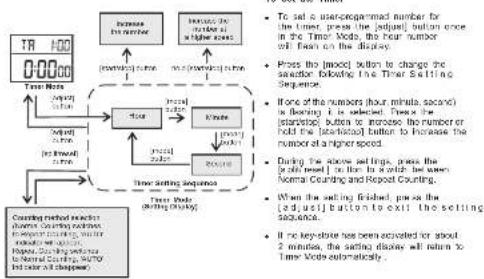
flowchart
graph TD
    A["TR 100"] --> B["Time Limit"]
    B --> C{Number of seconds}
    C -->|Yes| D["Control method selected: first setting second set, then setting second set, then setting second set"]
    C -->|No| E["Control method selected: second set, then setting second set"]
    D --> F["Time Rate (ranging by 24Hz)"]
    E --> G["Time Rate (ranging by 24Hz)"]
    F --> H["Time Setting Sequence"]
    G --> H
    H --> I["Time Rate (ranging by 24Hz)"]

    J["Increase the number of seconds at each time point"] --> K["Increase the number of seconds at each time point"]
    L["Increase the number of seconds at each time point"] --> M["Increase the number of seconds at each time point"]

    N["To set an uncompleted number for the Time, press the [adjusted"] button once in the Time Mode, the Four number will then on the Display.]
    O["Press the [boxed"] button to change the second setting following the Time Setting Sequence.]
    P["None of the numbers (four minutes, second) is being chosen. Then the [start/stop"] button_to_increase_the_number_or_hold_the["start/stop"] button to increase the number of a higher speed.]
    Q["During the above settings, press the [a double"] button to the first bit which be seen as Normal Counting and Repeat Counting.]
    R["When the setting is fixed, press the [adjusted"] button to exit the setting sequence.]
    S["If no key-stroke has been activated for about 2 minutes, the setting deletion will return to Time Mode automatically."]
13
8.0 Stopwatch Mode - To select the Stopwatch Mode
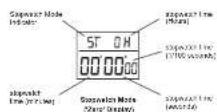
Stopwatch Mode
- Press [mode] button once to change to Stopwatch Mode. In the Timer Mode.
- The Suppression Mode measures elapsed times and split times.
- The display shows the Zero display. If the Watch or the stopwatch has been reset.
- The stopwatch time (hours) shows on the upper row of the display. The stopwatch time (minutes, seconds and 1/100 seconds) shows on lower row of the display.
NOTE: The maximum counting range of the stopwatch is 23 hours 50 minutes, and 59.98 seconds, hence the stopwatch will count continuously until it counts to the above-mentioned number or the start/stop) button is pressed.
7.2 Timer Mode - To Use the Timer

flowchart
graph TD
    A["TR 100 3-5959"] --> B["Three Vode Group Testing"]
    B --> C["TR 100 3-59"]
    C --> D["Three Vode Group Testing"]
    D --> E["TR 100 0-0000"]
    E --> F["Three Vode Group Testing"]
    F --> G["TR 100 0-0000"]
    G --> H["Three Vode Group Testing"]
    H --> I["TR 100 3-5951"]
    I --> J["Three Vode Group Testing"]
    J --> K["TR 100 3-5959"]
    K --> L["Three Vode Group Testing"]
    L --> M["TR 100 3-59"]
    M --> N["Three Vode Group Testing"]
    N --> O["TR 100 3-5959"]
    O --> P["TR 100 3-59"]
    P --> Q["TR 100 3-59"]
    Q --> R["TR 100 3-59"]
    R --> S["TR 100 3-59"]
    S --> T["TR 100 3-59"]
    T --> U["TR 100 3-59"]
    U --> V["TR 100 3-59"]
    V --> W["TR 100 3-59"]
    W --> X["TR 100 3-59"]
    X --> Y["TR 100 3-59"]
    Y --> Z["TR 100 3-59"]
    Z --> AA["TR 100 3-59"]
    AA --> AB["TR 100 3-59"]
    AB --> AC["TR 100 3-59"]
    AC --> AD["TR 100 3-59"]
    AD --> AE["TR 100 3-59"]
    AE --> AF["TR 100 3-59"]
    AF --> AG["TR 100 3-59"]
    AG --> AH["TR 100 3-59"]
    AH --> AI["TR 100 3-59"]
    AI --> AJ["TR 100 3-59"]
    AJ --> AK["TR 100 3-59"]
    AK --> AL["TR 100 3-59"]
    AL --> AM["TR 100 3-59"]
    AM --> AN["TR 100 3-59"]
    AN --> AO["TR 100 3-59"]
    AO --> AP["TR 100 3-59"]
    AP --> AQ["TR 100 3-59"]
    AQ --> AR["TR 100 3-59"]
    AR --> AS["TR 100 3-59"]
    AS --> AT["TR 100 3-59"]
    AT --> AU["TR 100 3-59"]
    AU --> AV["TR 100 3-59"]
    AV --> AW["TR 100 3-59"]
    AW --> AX["TR 100 3-59"]
    AX --> AY["TR 100 3-59"]
    AY --> AZ["TR 100 3-59"]
    AZ --> BA["TR 100 3-59"]
    BA --> BB["TR 100 3-59"]
    BB --> BC["TR 100 3-59"]
    BC --> BD["TR 100 3-59"]
    BD --> BE["TR 100 3-59"]
    BE --> BF["TR 100 3-59"]
    BF --> BG["TR 100 3-59"]
    BG --> BH["TR 100 3-59"]
    BH --> BI["TR 100 3-59"]
    BI --> BJ["TR 100 3-59"]
    BJ --> BK["TR 100 3-59"]
    BK --> BL["TR 100 3-59"]
    BL --> BM["TR 100 3-59"]
    BM --> BN["TR 100 3-59"]
    BN --> BO["TR 100 3-59"]
    BO --> BP["TR 100 3-59"]
    BP --> BQ["TR 100 3-59"]
    BQ --> BR["TR 100 3-59"]
    BR --> BS["TR 100 3-59"]
    BS --> BT["TR 100 3-59"]
    BT --> BU["TR 100 3-59"]
    BU --> BV["TR 100 3-59"]
    BV --> BW["TR 100 3-59"]
    BW --> BX["TR 100 3-59"]
    BX --> BY["TR 100 3-59"]
To Use the Timer
- If the user programmed number has been set, press the [start/stop] button to start the timer.
- If the timer is counting, press the [a]arle top] button again to stop the timer.
- As long as the timer is counting, the time to 'Zoro' will be appeared on the display continuously.
To Reset the Timor
- To read the timer earlier than that at the end of the counting, press the (selflossed) button once when the timer is stopped. The timer will reset in user-programmed number.
The Timer Alarm Sound
- Alarm boops for about 10 seconds when the time court to zero.
• The alarm sound can be stopped prematurely by pressing either one of the shock
15
8.1 Stopwatch Mode - To use the Stopwatch

flowchart
graph TD
    A["Stopper Node (2nd Display)"] --> B["Stopper Node (1st Display)"]
    B --> C["Stopper Node (2nd Display)"]
    C --> D["Stopper Node (3rd Display)"]
    D --> E["Stopper Node (4th Display)"]
    E --> F["Stopper Node (5th Display)"]
    F --> G["Stopper Node (6th Display)"]
    G --> H["Stopper Node (7th Display)"]
    H --> I["Stopper Node (8th Display)"]
    I --> J["Stopper Node (9th Display)"]
    J --> K["Stopper Node (10th Display)"]
    K --> L["Stopper Node (11th Display)"]
    L --> M["Stopper Node (12th Display)"]
    M --> N["Stopper Node (13th Display)"]
    N --> O["Stopper Node (14th Display)"]
    O --> P["Stopper Node (15th Display)"]
    P --> Q["Stopper Node (16th Display)"]
    Q --> R["Stopper Node (17th Display)"]
    R --> S["Stopper Node (18th Display)"]
    S --> T["Stopper Node (19th Display)"]
    T --> U["Stopper Node (20th Display)"]
    U --> V["Stopper Node (21st Display)"]
    V --> W["Stopper Node (22nd Display)"]
    W --> X["Stopper Node (23rd Display)"]
    X --> Y["Stopper Node (24th Display)"]
    Y --> Z["Stopper Node (25th Display)"]
    Z --> AA["Stopper Node (26th Display)"]
    AA --> AB["Stopper Node (27th Display)"]
    AB --> AC["Stopper Node (28th Display)"]
    AC --> AD["Stopper Node (29th Display)"]
    AD --> AE["Stopper Node (30th Display)"]
    AE --> AF["Stopper Node (31st Display)"]
    AF --> AG["Stopper Node (32nd Display)"]
    AG --> AH["Stopper Node (33rd Display)"]
    AH --> AI["Stopper Node (34th Display)"]
    AI --> AJ["Stopper Node (35th Display)"]
    AJ --> AK["Stopper Node (36th Display)"]
    AK --> AL["Stopper Node (37th Display)"]
    AL --> AM["Stopper Node (38th Display)"]
    AM --> AN["Stopper Node (39th Display)"]
    AN --> AO["Stopper Node (40th Display)"]
    AO --> AP["Stopper Node (41st Display)"]
    AP --> AQ["Stopper Node (42nd Display)"]
    AQ --> AR["Stopper Node (43rd Display)"]
    AR --> AS["Stopper Node (44th Display)"]
    AS --> AT["Stopper Node (45th Display)"]
    AT --> AU["Stopper Node (46th Display)"]
    AU --> AV["Stopper Node (47th Display)"]
    AV --> AW["Stopper Node (48th Display)"]
    AW --> AX["Stopper Node (49th Display)"]
    AX --> AY["Stopper Node (50th Display)"]
    AY --> AZ["Stopper Node (51st Display)"]
    AZ --> BA["Stopper Node (52nd Display)"]
    BA --> BB["Stopper Node (53rd Display)"]
    BB --> BC["Stopper Node (54th Display)"]
    BC --> BD["Stopper Node (55th Display)"]
    BD --> BE["Stopper Node (56th Display)"]
    BE --> BF["Stopper Node (57th Display)"]
    BF --> BG["Stopper Node (58th Display)"]
    BG --> BH["Stopper Node (59th Display)"]
    BH --> BI["Stopper Node (60th Display)"]
    BI --> BJ["Stopper Node (61st Display)"]
    BJ --> BK["Stopper Node (62nd Display)"]
    BK --> BL["Stopper Node (63rd Display)"]
    BL --> BM["Stopper Node (64th Display)"]
    BM --> BN["Stopper Node (65th Display)"]
    BN --> BO["Stopper Node (66th Display)"]
    BO --> BP["Stopper Node (67th Display)"]
    BP --> BQ["Stopper Node (68th Display)"]
    BQ --> BR["Stopper Node (69th Display)"]
    BR --> BS["Stopper Node (70th Display)"]
    BS --> BT["Stopper Node (71st Display)"]
    BT --> BU["Stopper Node (72nd Display)"]
    BU --> BV["Stopper Node (73rd Display)"]
    BV --> BW["Stopper Node (74th Display)"]
    BW --> BX["Stopper Node (75th Display)"]
    BX --> BY["Stopper Node (76th Display)"]
    BY --> BZ["Stopper Node (77th Display)"]
    BZ --> CA["Stopper Node (78th Display)"]
    CA --> CB["Stopper Node (79th Display)"]
    CB --> CC["Stopper Node (80th Display)<br>BZ"]
    CC --> CD["Stopper Node (81st Display)<br>BZ"]
    AD --> CE["Stopper Node (82nd Display)<br>BZ"]
    AE --> CF["Stopper Node (83rd Display)<br>BZ"]
    AF --> CG["Stopper Node (84th Display)<br>BZ"]
    AG --> CH["Stopper Node (85th Display)<br>BZ"]
    AH --> CI["Stopper Node (86th Display)<br>BZ"]
    AI --> CJ["Stopper Node (87th Display)<br>BZ"]
    AJ --> CK["Stopper Node (88th Display)<br>BZ"]
    AK --> CL["Stopper Node (89th Display)<br>BZ"]
    AL --> CM["Stopper Node (90th Display)<br>BZ"]
    AM --> CN["Stopper Node (91st Display)<br>BZ"]
    AN --> CO["Stopper Node (92nd Display)<br>BZ"]
    AO --> CP["Stopper Node (93rd Display)<br>BZ"]
    AP --> CQ["Stopper Node (94th Display)<br>BZ"]
    AQ --> CR["Stopper Node (95th Display)<br>BZ"]
    AR --> CS["Stopper Node (96th Display)<br>BZ"]
    AS --> CT["Stopper Node (97th Display)<br>BZ"]
    AT --> CU["Stopper Node (98th Display)<br>BZ"]
    AU --> CV["Stopper Node (99th Display)<br>BZ"]
    AV --> CW["Stopper Node (100th Display)<br>BZ"]
    AU --> CX["Trip 100kV"]
    AU --> CY["Trip 100kW"]
    AU --> CZ["Trip 100kN"]
    AU --> DA["Trip 100kN"]
    AU --> DB["Trip 100kN"]
    AU --> DC["Trip 100kN"]
    AU --> DD["Trip 100kN"]
Stepwatch Mode: MCTP, the T-axial reverse, in 2014.
To Use the Stopwatch
- If the stopwatch is stopped, press the [start/stop] button once to start the counting. If the stopwatch is counting, press the [start/stop] button once to stop the counting.
- The exposed time between the two 'startstop' keystrokes will be appeared on the display. Repeat the above maintenance steps to get the cumulative time of which the stepstroke is counting.
To Reset the Stopwatch
- Record a new set of elapsed time, press the is pin inside button once to reset the stopwatch to 'Zero' Display when the stopwatch is elapsed.
To Get the Split Time
- Press the (split/reset) button once to display the split time during the application is counting. Presses the (split/reset) button once to display the Counting Display again.
- During the split time displaying, the stopwatch is counting continuously. - Unknown bus appearance signs in an
9.0 Specifications
Current Time Mode
• Hour, minute and second
- Month, day and day of week
• 12/24 hour format (user selectable)
• Auto calendar from year 1985 to 2029
Alarm Mode
- Daily alarm or date alarm (user selectable)
• Alarm beeps for about 20 seconds at alarm time
- Hourly china
Dual Time Mode
- Hour, minute and second for the second time
- 12 / 24 hour format (user selectable)
Timer Mode
• 1 second resolution
• Programmable up to 23 hours, 58 minutes 59
seconds
• Alarm beeps for about 10 seconds when the
timer count to zero
• Normal Counting or Repeat Counting (user
Sensitutry
Stopwatch Mode
- 1/100 second resolution
- Counting range 23 hours, 59 minutes, 59.99
seconds - Split time display
Thermometer
• Measuring range -9°C to 70°C (15.8°F to 158°F) - Temperature unit in °C or °F (user selectable)
Other
a. 4 layout
• Electro-luminescent back light


- The Current Time Mode
- The Alarm Time Mode
- Daily Alarm and Date Alarm
- To Set the Current Time
- The Alarm Sounds
- Stopwatch Mode
- To Use the Timer
- To Reset the Timor
- The Timer Alarm Sound
- To Use the Stopwatch
- To Reset the Stopwatch
- To Get the Split Time
- Specifications
- Current Time Mode
- Alarm Mode
- Timer Mode
Brand : Pyle
Model : PSWTHM15
Category : Radio