
PECGW2 - Radio Pyle - Free user manual and instructions
Find the device manual for free PECGW2 Pyle in PDF.


| Product Type | Heart Rate Monitor Watch with Alarm and Chronograph |
| Brand | Pyle |
| Model | PECGW2 |
| Heart Rate Measurement Range | 40-220 beats per minute |
| Chronograph Resolution | 1/100 second |
| Chronograph Max Count | 99 minutes 59 seconds 99 |
| Lap Memory | 30 laps |
| Heart Rate Memory | 12 records with date and time stamp |
| Battery Type | 3V CR2025 |
| Pacer Function Range | 30-180 beats per minute |
| Calorie Counter | Approximate calorie burn based on pulse zone and exercise time |
| Alarm Functions | Daily alarm, hourly chime, time display (hour, minute, second), month, date, day of week, leap year auto-calculation |
| Display Type | LCD with electro-luminescent backlight |
| Water Resistance | Not specified (likely splash resistant only) |
| Wrist Strap Material | Not specified (typical resin or rubber) |
| Dimensions | Standard watch size (approximate 45mm case diameter) |
| Weight | Approximately 50g (including strap) |
| Key Controls | Mode, Set, Sel, Light, Touch Pad |
| Care Instructions | Keep touch pads clean; replace battery when display fades; avoid extreme temperatures and moisture; clean with soft cloth. For battery replacement, consult experienced watch dealer. |
| Safety Warning | Consult physician before starting a fitness programme. Not a medical device. |
Frequently Asked Questions - PECGW2 Pyle
User questions about PECGW2 Pyle
0 question about this device. Answer the ones you know or ask your own.
Ask a new question about this device
Download the instructions for your Radio in PDF format for free! Find your manual PECGW2 - Pyle and take your electronic device back in hand. On this page are published all the documents necessary for the use of your device. PECGW2 by Pyle.
USER MANUAL PECGW2 Pyle
Range: Count up to 99'59"99.
![graph LR A["Press A"] --> B["To pacer mode"] B --> C["Press C adjust"] D["Press B to adjust"] --> E["30-180 beats"] E --> F["Press B to Start / Stop the pacer"]](/content/2026/06/1216435/images/2f12b8824b28d2a2ad284e320339cf37a93a63f5538b1f6fed7e59ef8c23eca0.jpg)
ELECTRO-LUMENCENT BACKLIGHT
Press D to turn on the backlight.
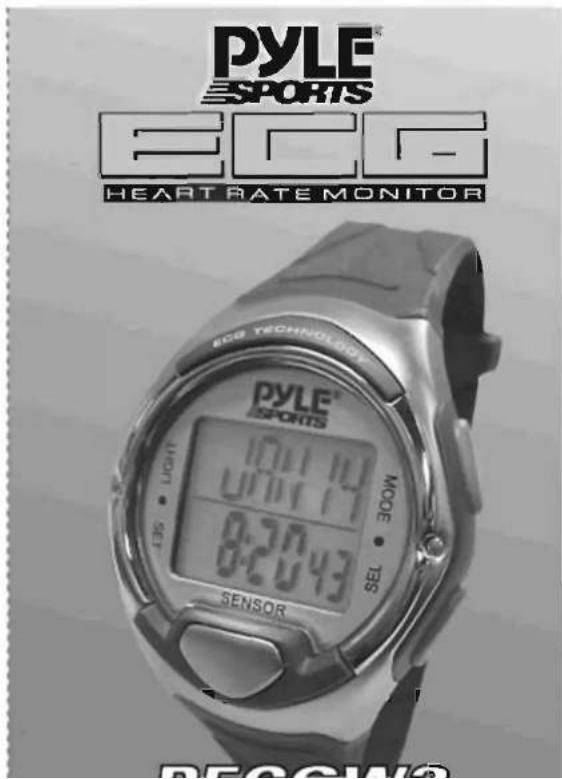
INTRODUCTION
WARNING: Always consult your physician before starting a fitness programme. A pulse computer is not a medical device. It is a training tool designed to measure and display your heart rate.
USE A PRECISE TRAINING METHOD
All the experts agree: the heart is the most important muscle in the body and, like all muscles, should be exercised regularly to remain strong and efficient. But how can you determine whether you are exercising your heart both safely and effectively?
Fortunately, the heart itself provides you with key information that will help you to examine the effectiveness and the degree of safety of your training method. Your heart rate, which is expressed in a single number (Beats Per Minuta), gives a constant account of your body's state of health. Your heart rate will tell you how fast you are using energy or whether you are exercising too hard or too lax. Obviously, your body does not benefit from a training method if your heart rate is too low. If it is too high, you run the risk of injury and you will suffer from fatigue.
It does not matter whether your goal is to win athletics meetings, lose weight or simply to improve your overall health. What Is important is that you can refine your training method by keeping your heart rate within a certain target zone. In order to accomplish this, you would obviously need to know your precise heart rate at any given moment throughout your training session.
Modern technology has now enabled us to present you with wireless electronic pulse computers. Monitoring your heart
KNOW YOUR LIMITS AND DETERMINE YOUR PERSONAL EXERCISE ZONE
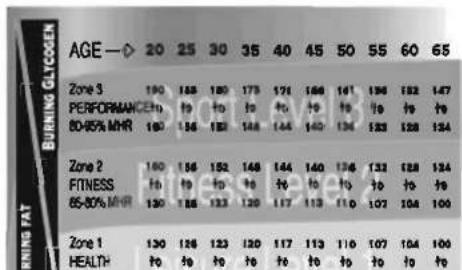
Exercise level are established by setting Upper and Lower Heart Rate Limits. These limits constitute a certain percentage of your Maximum Heart Rate (MHR). You may already know your MHR if you are an avid athlete or if you have already taken a Max. Heart Rate test. If not, the following formula will help you to make an educated guess:
MHR = 220-(Your age)
e.g. Age : 20
MHR:220-20=200
For instance, the current heart rate is 150, then 75% will be shown.
EXERCISE LEVEL (BPM)
- Range: 40-220 beats per minute
- Memory: 12 records with date and time stamp
Chronograph
- Resolution: 1/100 second chronograph
- Memory: 30 lap memory
- Range: Count up to 99'59"99
Alarm Clock Functions
- Hour, minute and second display
- Month, date, day of week
- Auto calculation of leap year
- Daily alarm
- Hourly chime
Backlight
-Electro-lumencent back light
Calorie Counter
- It counts approximate amount of calorie burnt based on pulse zone selected upon exercise timer started.
Pacer Function
- Range: 30-180 beats per minute
BATTERY INSTALLATION
Computer Watch
Remove the back cover of the computer with a screwdriver, install the 3.0V-battery with the positive (+) pole facing up and replace the cover. Remove the battery and re-insert if the LCD displays irregular figures. This will clear and restart the computer's microprocessor.
For the best service of the watch, please go to an experienced watch dealer to change the battery.

PROBLEMS, POSSIBLE CAUSES AND SOLUTIONS
| Problem | Possible Cause(s) and solutions |
| No heart rate is displayed | The touch pads are dirtyCheck or replace the batteryThe contact point between figer and touch pad is not in proper wayHRM is not in firm contact with the user's skin |
| Incorrect heart rate is displayed | The touch pads are dirtyWeak batteriesYou may not push hard enoughHRM is not in firm contact with the user's skin |
| Display fades | Weak computer battery. Replace it immediately |
| Irregular figures on the display | Remove the computer battery and reinsert it again |

Computer battery (3V / CR2025)
ACCESSORIES
Pulse Computer
KEYS OPERATION
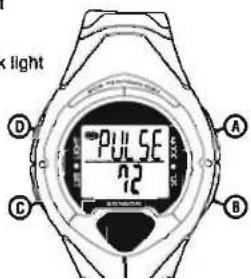
Key "A" (MODE)
-Press this key to select different function mode
Key "B" (SEL)
Press this key to select, adjust or start / stop
Key "C" (SET)
- Press this key to check and reset
Key "D" (LIGHT)
-Press this key to turn on the back light
Key "E" (TOUCH PAD)
FIRST INSTALLATION AND WATCH SETTING
Press any button to wake up the watch.
Hold the button C to enter the setting mode.
Press button B to select and press button C to confirm.
It will auto-matically go for next setting after confirmation.
![graph LR A["Press any button to wake up the watch"] --> B["12:00:00"] B --> C["Hold C 24:40"] C --> D["Press B adjust Press C confirm"] D --> E["2004"] E --> F["Year setting"] F --> G["Press B adjust Press C confirm"] H["Month setting"] --> I["3:15"] I --> J["Press B adjust Press C confirm"] J --> K…](/content/2026/06/1216435/images/30f41ab3fcb1ed20a59ea80b3bf18dbdbcd35306fb52eb58ba0a4c6995fee45b.jpg)
![graph LR A["Start Display"] --> B{Press B adjust Press C confirm} B --> C["Display with 'WEIGH' and '70'"] C --> D["Press B adjust Press C confirm"] D --> E["Display with 'JAN 12:35.00'"]](/content/2026/06/1216435/images/89719230aaf4091189b7f0b783d76b006d2a51a6a2ad6defbc060eb7dc35d28f.jpg)
HEART RATE MEASUREMENT INSTRUCTION
Range: 40-220 beats per minute.
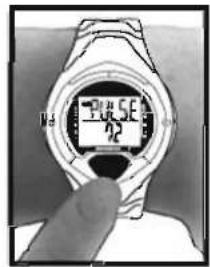
Put the ECG Heart Rate Monitor on wrist, make sure the back of the HRM is in firm contact with the user's skin during measurement.
Put finger onto the touch pad, press and hold for a few seconds.
Symbol (♥) becomes flash when heart rate is detect and measure (♥).
![graph LR A["Press E to pulse mode"] --> B["PULSE"] B --> C["Hold E"] C --> D["PULSE"] D --> E["Detected"]](/content/2026/06/1216435/images/768397f60c5fba88dce2b95d73e23f4abd6341387bfd5404e0862ecc5f91ae8b.jpg)
Features
12 records with date and time stamp.
Every PLUSE rate will record from REC 01- REC 12 automatically and over-write the record after REC 12
Recall and reset heart rate record
![graph LR A["Press A to record mode"] --> B["Heart rate memory"] B --> C["Select record 01-12"] C --> D["Show the day and time stamp"] D --> E["Hold C"]](/content/2026/06/1216435/images/c2e81e57d6cddf1b8146c4c70b4fcbc05079de7e238740b51e838d1e7748e903.jpg)
Clear all record
ALARM CLOCK FUNCTION
![graph TD A["Press A to alarm mode"] --> B["ALARM 12:00"] B --> C["Hold C"] C --> D["ALARM 12:00"] D --> E["Hour setting"] E --> F["Press B adjust Press C confirm"] F --> G["ALARM 12:00"] G --> H["Minute setting"] H --> I["Press B adjust Press C confirm"] I --> J["All Off"] K["Press A"] --> L["ALARM…](/content/2026/06/1216435/images/a534ca54f18a590599609e84027d4960a05e4a68b494d220c42dbf8ef02303de.jpg)
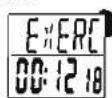
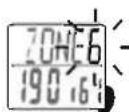
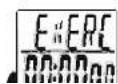
The approximate amount of calorie burnt will be count as follows:
- Select your pulse zone as below.
- Start the exercise timer to count the approximate calorie consumption.
![graph LR A["Press A"] --> B["To select exercise mode"] B --> C["Press C Twice"] C --> D["Enter zone mode"] D --> E["Hold C"] E --> F["To enter select mode"] F --> G["Press B"] G --> H["To select from 1-6"] H --> I["Press C"] I --> J["Press C"] J --> K["To select"] K --> L["Press C"] L --> M["Press C…](/content/2026/06/1216435/images/b419821891fa97bbb5e64b5285b66b4e9ebaff94cfd84188c7c8fd8bd74b9af0.jpg)







CHRONOGRAPH
Resolution: 1/100 second chronograph.
Range: Count up to 99'59"99.
![graph LR A["Press A"] --> B["To select chron mode"] B --> C["Press B"] C --> D["To start / stop"] D --> E["Hold C"] E --> F["To reset"]](/content/2026/06/1216435/images/984d4e44b7797ea8e605e2625eefdab0d9ff57394854a6f06b96ed78552ad707.jpg)
RECALL LAP COUNTING MEMORIES
![graph LR A["Press A"] --> B["To select chron mode"] B --> C["Press B"] C --> D["To start / stop"] D --> E["Press C"] E --> F["Press C"] F --> G["Press C (Max. 30) Laps"] G --> H["Press B to Stop Count"] H --> I["Press C to Display the fastest lap"]](/content/2026/06/1216435/images/bd58a855199d682608a656563dc8c173fc21f82f707c185f1d66cabd0710a4e1.jpg)

- ELECTRO-LUMENCENT BACKLIGHT
- INTRODUCTION
- USE A PRECISE TRAINING METHOD
- KNOW YOUR LIMITS AND DETERMINE YOUR PERSONAL EXERCISE ZONE
- CHRONOGRAPH
- ALARM CLOCK FUNCTIONS
- BACKLIGHT
- CALORIE COUNTER
- PACER FUNCTION
- BATTERY INSTALLATION
- COMPUTER WATCH
- ACCESSORIES
- KEYS OPERATION
- FIRST INSTALLATION AND WATCH SETTING
- HEART RATE MEASUREMENT INSTRUCTION
- FEATURES
Brand : Pyle
Model : PECGW2
Category : Radio