PSWHRP58 - Radio Pyle - Free user manual and instructions
Find the device manual for free PSWHRP58 Pyle in PDF.


| Product Type | Sports Watch with Heart Rate Monitor |
| Brand | Pyle |
| Model | PSWHRP58 |
| Power Supply (Watch) | 1 x CR2032 lithium battery (3V) |
| Power Supply (Chest Strap) | 1 x CR2032 lithium battery (3V) |
| Display | LCD with Electro-Luminescent (EL) backlight |
| Heart Rate Measurement Range | 40 - 240 BPM |
| Distance Measurement | Max 400 km |
| Step Count Range | 0 - 999,999 steps |
| Chronograph Resolution | 1/100 second, up to 99h 59m 59.99s |
| Timer Measurement Range | 99h 59m 59s, with 5 quick-set values |
| Alarm Types | 2 daily/weekly alarms, hourly chime |
| Pacer Range | 30 - 180 beats per minute (in 5 BPM steps) |
| Dual Time Function | Shows second time zone |
| Pedometer Sensitivity | 7 levels |
| Memory | Logbook: up to 100 sessions, 7545 records; 50 lap memories; 10 daily records |
| PC Connectivity | Wireless via PC Pod, compatible with 'Wireless Data Manager' software |
| Maintenance | Clean with soft cloth; store in dry place |
| Water Resistance | Not specified; avoid extreme conditions |
| Included Accessories | Chest strap, PC Pod (if applicable), user manual |
Frequently Asked Questions - PSWHRP58 Pyle
User questions about PSWHRP58 Pyle
0 question about this device. Answer the ones you know or ask your own.
Ask a new question about this device
Download the instructions for your Radio in PDF format for free! Find your manual PSWHRP58 - Pyle and take your electronic device back in hand. On this page are published all the documents necessary for the use of your device. PSWHRP58 by Pyle.
USER MANUAL PSWHRP58 Pyle
"Recreational Gear For The Great Outdoors"
IMPORTANT: Pack currently in original package it possible. We are not responsible for storage installed in recurring items for repairs. A letter stating your exact street address, daytime phone number, and the problem WHAT ARE COMPANYING should be included. You must also choose a copy of the original receipt a sum of date of purchase.
natural_image
Group photo of a large crowd wearing sports uniforms, no visible text or symbols
"Recreational Gear For The Great Outdoors"
PSWHRP58 USÉR'S MANUAL
Frankfurt, NY 1 A204
1800-644-5627
Standa Through Friday 9AM to 5PM
Foster WM in 17th Eastern.
www.pyleaudio.com
www.pyleaudio.com
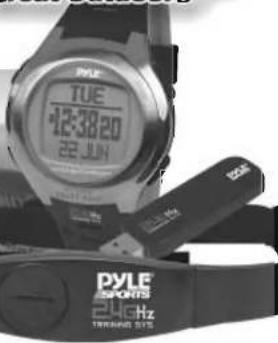
1.0 Introduction
Thank you for purchasing of this Watch.
Your Watch provides the essential information about your body or exercise during your exercise, like heart rate, walking steps, traveling speed, distance, etc.
These data can be further logged into a logbook for later review. Your Watch also includes current time, daily alarm, chronograph, timer, pacer and dual time function.
To get the most of your purchase, it is advisable to use this stopwatch in conformity with the below notes:
- Be sure to carefully read this manual and keep it on hand for later reference when necessary.
- Avoid excising your Watch to extreme conditions for an unreasonable time.
- Avoid rough usages or severe impacts to your Watch.
- Do not open the Watch's case unless a certified service agency because your Watch contains precise electronic sensors and components.
- Clean your Watch with a soft cloth occasionally that working for a longer use life of your watch.
- Store your Watch in a dry place when it is not in use.
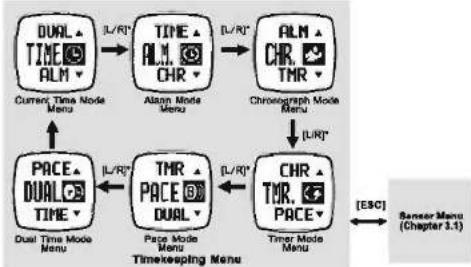
3.0 Major Function Mode - Timekeeping Menu

flowchart
graph TD
    A["DUAL TIME ALM"] -->|IL/R'| B["TIME ALM CHR"]
    B -->|IL/R'| C["ALM CHR TMR"]
    C --> D["Chronograph Mode Menu"]
    D -->|(L/R)| E["PACE DUAL TIME"]
    E -->|IL/R'| F["TMR PACE DUAL"]
    F -->|(L/R)| G["CHR TMR PACE"]
    G --> H["Timer Mode Menu"]
    H --> I["[ESC"]]
    I --> J["Sensor Menu (Chapter 3.1)"]
    A --> K["Current Time Mode Menu"]
    B --> L["Alam Mode Menu"]
    C --> M["Chronograph Mode Menu"]
    E --> N["Dual Time Mode Menu"]
    F --> O["Page Mode Menu Timekeeping Menu"]
NOTE:
- When one of the menus is selected, the corresponding function mode will appear after a few seconds or press [M] to show the function mode instantly.
*Press (S/N) to move the selection in the reverse direction.
2.0 Button Layout

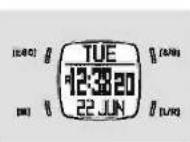
Mode Button (M)
• To select among Current Time, Daily Alarm, Chronograph, Timer, Paper and Dual Time Mode.
• To select among Oistance, Heart Rate, User and Logbook Mode.
- To select among the setting items under setting display. Escape Button (EBC)
• To select between timekeeping and sensor menu.
- To exit from setting mode.
- To go back to the previous screen or function level.
- Hold to turn on the EL back light for about 3 seconds. Note: When 'off' back light function is selected, this function will be disabled.
Start/Stop Button [\$/9]
• To scroll the manu upward.
- To activate the 'start' or 'stop' function under Chronograph and Timer Mode.
- To increase the setting value under setting display.
Lap/Reset Button [UR]
- To scroll the menu downward.
• To activate the 'Lap'/Rasel' function under Chronograph Mode.
3.1 Major Function Mode - Sensor Menu

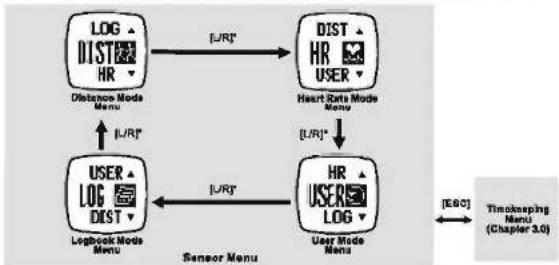
flowchart
graph TD
    A["LOG DIST HR"] -->|L/R*| B["DIST HR USER"]
    B -->|L/R*| C["USER LOG DIST"]
    C -->|L/R*| D["User Mode User"]
    D -->|E&C| E["Time-taking Nana (Chapter 3.0)"]
    A -->|Distance Mode Menu| F["Sensor Menu"]
    B -->|Heart State Mode Menu| G["Sensor Menu"]
    C -->|LogBook Mode Menu| H["Sensor Menu"]
    D -->|User Mode Menu| I["Sensor Menu"]
4.0 Current Time Mode - Setting the Watch


flowchart
graph TD
    A["TUE 12:30:20 22 JUN"] -->|Hold["M"]| B["Level 1"]
    B --> C["Second*1"]
    B --> D["Minutes*1"]
    B --> E["Hour*1"]
    B --> F["12/Weekend*1"]
    B --> G["Year*1"]
    B --> H["Month*1"]
    B --> I["Day*1"]
    B --> J["LCC"]
    B --> K["Sound"]
    B --> L["Light*2"]
    B --> M["Day*2"]
    B --> N["Gender"]
    B --> O["Slice"]
    B --> P["Height"]
    B --> Q["Weight"]
    B --> R["Squeeze"]
    B --> S["Space"]
    B --> T["Other"]
    B --> U["Level 2"]
    U --> V["1-18"]
    U --> W["Keyframe"]
    U --> X["China*1"]
    U --> Y["Normal"]
    U --> Z["Ngh"]
    U --> AA["Off"]
    U --> AB["Male"]
    U --> AC["Female"]
    U --> AD["Year*1"]
    U --> AE["Month*1"]
    U --> AF["Day*1"]
    U --> AG["Wks"]
    U --> AH["Rue"]
    U --> AI["Level 3"]
    AI --> AJ["Season"]
    AI --> AK["mush"]
    AI --> AL["knee"]
    AI --> AM["Melts"]
    AI --> AN["Imperial"]
NOTE:
*1. Press [M] to select among the settings.
*2. Hold [Esc] will turn ON the backlight if "Normal" is selected. Press any button will turn ON the backlight if "Wght" is selected. Backlight will always off if "off" is selected
3. The Heart Rate Chest Stop MUST be worn on the chest (La heart rate zioral is sampling)
4. If 'Chime' is ON (the ' [is appeared], the Watch will beep once at the hour I.e 1:00, 2:00, 3:00, etc.
5.0 Alarm Mode - Selting the Alarm ON and OFF


flowchart
graph LR
    A["ALM1"] -->|Alarm 1| B["ALM2"]
    B -->|Alarm 2| C["ALM1"]
    C --> D["8:38 OFF"]
    D --> E["Alarm Mode"]
    E --> F["OFF"]
    F --> G["Alarm Off"]
    G --> H["I/R"]
    H --> I["DAILY Daily Alarm Or"]
    I --> J["MON SUN"]
    J --> K["Weekly Alarm Alarm ON"]
NOTE:
5.1 Alarm Mode - Setting the Alarm

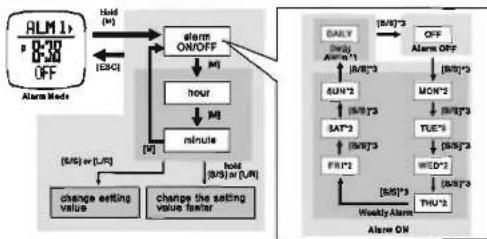
flowchart
graph TD
    A["ALM1"] --> B["0-20 OFF"]
    B --> C["Alarm Mode"]
    C --> D["Alarm ON/OFF"]
    D --> E["hour"]
    E --> F["minute"]
    F --> G["change setting value"]
    F --> H["change the setting value factor"]
    I["DAY"] --> J["Alarm 1"]
    J --> K["SUN*2"]
    K --> L["SAT*2"]
    L --> M["FRI*2"]
    M --> N["Weekly Alarm"]
    O["ON"] --> P["MON*2"]
    P --> Q["TUE*2"]
    Q --> R["WED*2"]
    R --> S["THU*2"]
    T["DAILY"] --> U["Alarm 1"]
    U --> V["SUN*2"]
    V --> W["SAT*2"]
    W --> X["FRI*2"]
    X --> Y["Weekly Alarm"]
    Z["OFF"] --> AA["Alarm 1"]
    AA --> AB["SUN*2"]
    AB --> AC["TUE*2"]
    AC --> AD["WED*2"]
    AD --> AE["THU*2"]
NOTE:
*1. If the "DAILY" is selected, the alarm is fumed ON and the Watch will alarm at the predefined time everyday.
*2. If a Weekday (i.e MON', TUE' and etc.) is selected, the alarm is turned CN and the Watch will alarm at the predefined time that weekday every week.
3. Press (UR) to move the selection in the reverse order.
6.0 Chronograph Mode - Using the Chronograph

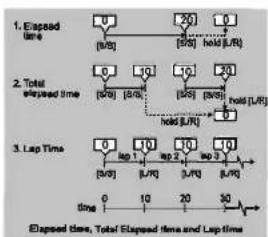
flowchart
graph TD
    A["1. Elapsed time"] --> B["0 (b/0)"]
    B --> C["20 (b/0)"]
    C --> D["0 held (b/R)"]
    E["2. Total elapsed time"] --> F["0 (b/0)"]
    F --> G["10 (b/0)"]
    G --> H["10 (b/0)"]
    H --> I["20 (b/0)"]
    I --> J["hold (b/R)"]
    K["3. Lap Time"] --> L["0 (b/0)"]
    L --> M["10 (b/0)"]
    M --> N["10 (b/0)"]
    N --> O["10 (b/0)"]
    O --> P["30 (b/0)"]
    P --> Q["End"]
NOTE:
*1. The Watch can record up to 50 lap times 1.e
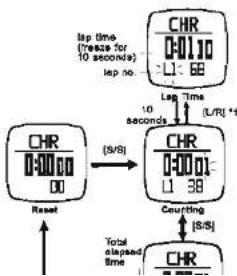
flowchart
graph TD
    A["Reset"] --> B["CHR 0:0000"]
    B --> C["(S/S)"]
    C --> D["SCR 0:0001"]
    D --> E["Courting (S/S)"]
    E --> F["Total elapsed Time"]
    G["Up time (Prease for 10 seconds) isp no."] --> H["SCR 0:0110"]
    H --> I["L1: 68"]
    I --> J["L1/28"]
    J --> K["L1/38"]
    K --> L["SR"]
    M["Up Time (Prease for 10 seconds) isp no."] --> N["SCR 0:0110"]
    N --> O["L1: 68"]
    O --> P["L1/28"]
    P --> Q["L1/38"]
    Q --> R["SR"]
6.1 Chronograph Mode - Recalling Lap Time


flowchart
graph TD
    A["Step 1: CHR 0-0001, L1=38°"] --> B["Step 2: CHR 0-0110, L1=68°"]
    B --> C["Step 3: CHR 0-0001, L1=68°"]
    C --> D["Step 4: Charcl 0-0110, L1=68°"]
    D --> E["Step 5: The 1st lap record"]
    E --> F["Step 6: The 2nd lap record"]
    F --> G["Step 7: The next lap record"]
    G --> H["Step 8: The last lap record"]
    H --> I["Step 9: The TTL Total elapsed time"]
    I --> J["Step 10: Hold (M)"]
    J --> K["Step 11: [S/S"]*]
    K --> L["Step 12: [S/S"]*]
    L --> M["Step 13: [S/S"]*]
    M --> N["Step 14: [S/S"]*]
    N --> O["Step 15: [S/S"]*]
    O --> P["Step 16: [S/S"]*]
    P --> Q["Step 17: [S/S"]*]
    Q --> R["Step 18: [S/S"]*]
    R --> S["Step 19: [S/S"]*]
    S --> T["Step 20: [S/S"]*]
NOTE:
- Press [L/R] to move the selection in the reverse order.
■ See 8.0 to erase the recorded Lap Time(s) (reset the chronograph).
7.0 Timer Mode - Setting the Target Time


flowchart
graph TD
    A["Target Time -1 TMR 0-1000 *8-38"] --> B["Timer Mode"]
    B --> C["10 min"]
    C --> D["6 min"]
    D --> E["3 min"]
    E --> F["User Precast Value -3"]
    F --> G["48 min"]
    G --> H["Quick-Set-Value*2"]
    H --> I["15 min"]
    I --> J["Current State"]
    style A fill:#f9f,stroke:#333
    style B fill:#ccf,stroke:#333
    style C fill:#cfc,stroke:#333
    style D fill:#fcc,stroke:#333
    style E fill:#cff,stroke:#333
    style F fill:#ffc,stroke:#333
    style G fill:#cfc,stroke:#333
    style H fill:#fcc,stroke:#333
    style I fill:#cfc,stroke:#333
NOTE:
(*1) The Timer starts counting from the Target Time to zero.
(2) The Watch includes 5 Quick-Set-Values : 3, 5, 10, 15 and 45 minutes for setting the Target
Time faster, and these values CANNOT be set by user
(92) The Hane Densant Union (has andling the Tessel Time). CASI has not in 1997, ann. 7-1 for the
7.1 Timer Mode - Setting the User Preset Value

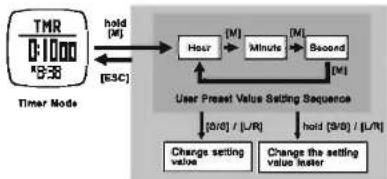
flowchart
graph TD
    A["TMR 0:1000 *536"] -->|hold["M"]| B["Hour"]
    B --> C["Minute"]
    C --> D["Second"]
    D -->|hold["M"]| E["User Preset Value Setting Sequence"]
    E --> F["Change setting value"]
    E --> G["Change the setting value faster"]
    F --> H["0/0"] / [L/R]
    G --> I[" hold [S/B"] / [L/R]]
    B --> J[" M "]
    C --> K[" M "]
    D --> L[" M "]
    J --> M[" [ESC"] ]
    K --> N[" [M"] ]
    L --> O[" [M"] ]
NOTE:
■ The setting range is up to 89 hours 59 minutes 89 seconds.
7.2 Timer Mode - Using the Countdown Timer
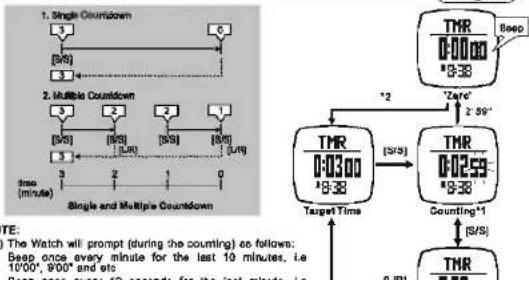
flowchart
graph TD
    A["1. Single Countdown"] --> B["3"]
    B --> C["6"]
    C --> D["2"]
    D --> E["3"]
    E --> F["3"]
    F --> G["3"]
    G --> H["3"]
    H --> I["3"]
    I --> J["3"]
    J --> K["3"]
    K --> L["3"]
    L --> M["3"]
    M --> N["3"]
    N --> O["3"]
    O --> P["3"]
    P --> Q["3"]
    Q --> R["3"]
    R --> S["3"]
    S --> T["3"]
    T --> U["3"]
    U --> V["3"]
    V --> W["3"]
    W --> X["3"]
    X --> Y["3"]
    Y --> Z["3"]
    Z --> AA["3"]
    AA --> AB["3"]
    AB --> AC["3"]
    AC --> AD["3"]
    AD --> AE["3"]
    AE --> AF["3"]
    AF --> AG["3"]
    AG --> AH["3"]
    AH --> AI["3"]
    AI --> AJ["3"]
    AJ --> AK["3"]
    AK --> AL["3"]
    AL --> AM["3"]
    AM --> AN["3"]
    AN --> AO["3"]
    AO --> AP["3"]
    AP --> AQ["3"]
    AQ --> AR["3"]
    AR --> AS["3"]
    AS --> AT["3"]
    AT --> AU["3"]
    AU --> AV["3"]
    AV --> AW["3"]
    AW --> AX["3"]
    AX --> AY["3"]
    AY --> AZ["3"]
    AZ --> BA["3"]
    BA --> BB["3"]
    BB --> BC["3"]
    BC --> BD["3"]
    BD --> BE["3"]
    BE --> BF["3"]
    BF --> BG["3"]
    BG --> BH["3"]
    BH --> BI["3"]
    BI --> BJ["3"]
    BJ --> BK["3"]
    BK --> BL["3"]
    BL --> BM["3"]
    BM --> BN["3"]
    BN --> BO["3"]
    BO --> BP["3"]
    BP --> BQ["3"]
    BQ --> BR["3"]
    BR --> BS["3"]
    BS --> BT["3"]
    BT --> BU["3"]
    BU --> BV["3"]
    BV --> BW["3"]
    BW --> BX["3"]
    BX --> BY["3"]
    BY --> BZ["3"]
    BZ --> CA["3"]
    CA --> CB["3"]
    CB --> CC["3"]
    CC --> CD["3"]
    CD --> CE["3"]
    CE --> CF["3"]
    CF --> CG["3"]
    CG --> CH["3"]
    CH --> CI["3"]
    CI --> CJ["3"]
    CJ --> CK["3"]
    CK --> CR["3"]
    CR --> CS["3"]
    CS --> CT["3"]
    CT --> CU["3"]
    CU --> CV["3"]
    CV --> CW["3"]
    CW --> CX["3"]
    CX --> CY["3"]
    CY --> CZ["3"]
    CZ --> DA["3"]
    DA --> DB["3"]
    DB --> DC["3"]
    DC --> DD["3"]
    DD --> DE["3"]
    DE --> DF["3"]
    DF --> DG["3"]
    DG --> DH["3"]
    DH --> DI["3"]
    DI --> DJ["3"]
    DJ --> DK["3"]
8.0 Pacer Time Mode - To Use The Pacer


flowchart
graph TD
    A["PACE 0 100B/M"] -->|B/S| B["PACE 1 100B/M"]
    B -->|Counting| C["PACE 2 100B/M"]
    C -->|Held["L/R"]| D["Stop Counting"]
    style A fill:#f9f,stroke:#333
    style B fill:#f9f,stroke:#333
    style C fill:#f9f,stroke:#333
    style D fill:#ccf,stroke:#333
8.2 Pacer Mode - To Use Pacer with Chronograph


flowchart
graph TD
    A["Start"] --> B{PACE}
    B --> C["beep"]
    B --> D["1008/M"]
    D --> E["Pacer Mode Activates"]
    B --> F{CHR}
    F --> G["Stop Counting"]
    F --> H["Counting"]
    G --> I["CHR"]
    H --> J["LI 38"]
    I <--> J
    style A fill:#f9f,stroke:#333
    style B fill:#ccf,stroke:#333
    style C fill:#cfc,stroke:#333
    style D fill:#fcc,stroke:#333
    style E fill:#cff,stroke:#333
    style F fill:#ffc,stroke:#333
    style G fill:#cfc,stroke:#333
    style H fill:#fcc,stroke:#333
    style I fill:#ffc,stroke:#333
    style J fill:#cfc,stroke:#333
Note:
(1) In Chronograph Mode, press [S/S] to start/stop the counting with pacer (beacing). If the Pacer is activated.
8.1 Pacer Mode - To Set Pacer

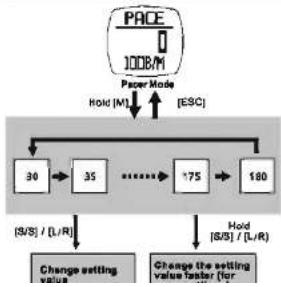
flowchart
graph TD
    A["PACE 1008/M"] --> B["Paper Mode"]
    B --> C["Hold [M"]]
    C --> D["ESC"]
    D --> E["30"]
    E --> F["35"]
    F --> G["..."]
    G --> H["75"]
    H --> I["180"]
    I --> J["Hold [S/S"] / (L/R)]
    J --> K["Change setting value"]
    K --> L["Change the setting value faster (for"]
    L --> M["(S/S) / (L/R)"]
9.0 Dual Time Mode - Setting Dual Time


flowchart
graph TD
    A["2:38:20"] -->|hold["M"]| B["hour"]
    C["8:38"] -->|hold["M"]| B
    B --> D["time"]
    E["Dual Time Mode"] --> F["Dual Time Setting Sequence"]
    F --> G["Change setting value"]
    F --> H["Change setting value faster"]
    G --> I["$/S"] / (L/R)
    H --> J["$/S"] / (L/R)
    I --> K["E&C"]
    J --> L["E&C"]
NOTE:
■ The 'second' digits of Oval Time and the 'second' digits of Current Time are the same.
10.0 Sensor Mode: To Start/Stop the Sensor, Timer and Logbook

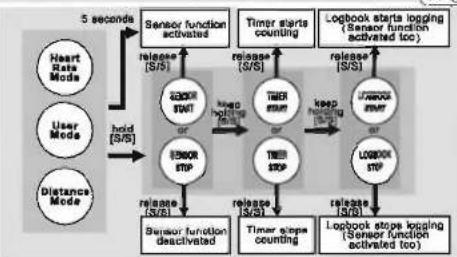
flowchart
graph TD
    A["Heart Rate Mode"] --> B["Sensor STOP"]
    C["User Mode"] --> B
    D["Distance Mode"] --> B
    B --> E["Sensor function deactivated"]
    E --> F["Sensor function activated"]
    F --> G["Sensor start counting"]
    G --> H["Logbook starts logging (Sensor function activated too)"]
    H --> I["Logbook stops logging (Sensor function activated too)"]
    I --> J["Logbook stop counting"]
    J --> K["Logbook stops logging (Sensor function activated too)"]
    K --> L["Time steps counting"]
    L --> M["Sensor stop counterming"]
    M --> N["Sensor stop counterming"]
    N --> O["Sensor stop counterming"]
    O --> P["Sensor stop counterming"]
    P --> Q["Sensor stop counterming"]
    Q --> R["Sensor stop counterming"]
    R --> S["Sensor stop counterming"]
    S --> T["Sensor stop counterming"]
    T --> U["Sensor stop counterming"]
    U --> V["Sensor stop counterming"]
    V --> W["Sensor stop counterming"]
    W --> X["Sensor stop counterming"]
    X --> Y["Sensor stop counterming"]
    Y --> Z["Sensor stop counterming"]
    Z --> A
    style A fill:#f9f,stroke:#333
    style C fill:#f9f,stroke:#333
    style D fill:#f9f,stroke:#333
    style B fill:#ccf,stroke:#333
    style E fill:#cfc,stroke:#333
    style F fill:#fcc,stroke:#333
    style G fill:#cff,stroke:#333
    style H fill:#ffc,stroke:#333
    style I fill:#ffc,stroke:#333
    style J fill:#ffc,stroke:#333
    style K fill:#ffc,stroke:#333
    style L fill:#ffc,stroke:#333
    style M fill:#ffc,stroke:#333
    style N fill:#ffc,stroke:#333
    style O fill:#ffc,stroke:#333
    style P fill:#ffc,stroke:#333
    style Q fill:#ffc,stroke:#333
    style R fill:#ffc,stroke:#333
    style S fill:#ffc,stroke:#333
    style T fill:#ffc,stroke:#333
    style U fill:#ffc,stroke:#333
    style V fill:#ffc,stroke:#333
Note:
(1) When enter the Heart Rate, User or Distance Mode, the sensor function will be activated automatically after 5 seconds.
(2) When the sensor function is activated, the Logbook will start automatically too if 'AUTO' alert feature is selected. See 14.0 for the details of the setting.
(3) While the Log function is started, a 'LOG' indicator starts flashing on the screen.
(4) The Watch includes a stand-alone count-up timer for timing the accumulative exercises time under Heart Rate, User and Distance Mode.
10.1 Sensor Mode: To Reset Screen, Session and Timer

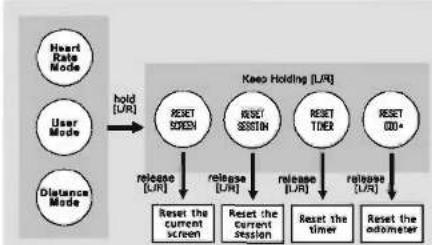
flowchart
graph TD
    A["Heart Rate Mode"] --> B["User Mode"]
    B --> C["Distance Mode"]
    C --> D["hold [UR"]]
    D --> E["RESET SCREEN"]
    E --> F["release [UR"]]
    F --> G["Reset the current screen"]
    G --> H["RESET Session"]
    H --> I["release [UR"]]
    I --> J["Reset the Current Session"]
    J --> K["release [UR"]]
    K --> L["Reset the Timer"]
    L --> M["release [UR"]]
    M --> N["Reset the Odometer"]
    style E fill:#f9f,stroke:#333
    style H fill:#f9f,stroke:#333
    style J fill:#f9f,stroke:#333
    style L fill:#f9f,stroke:#333
    style N fill:#f9f,stroke:#333
11.0 Distance Mode - Distance Mode Function

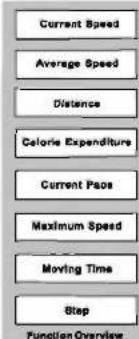
flowchart
graph TD
    A["Current Speed"] --> B["Average Speed"]
    B --> C["Distance"]
    C --> D["Coloric Expenditure"]
    D --> E["Current Paos"]
    E --> F["Maximum Speed"]
    F --> G["Moving Time"]
    G --> H["Step"]
    H --> I["Function Overview"]
- The measurement of the walking/running speed.
■ The measurement of the average walking/running speed.
■ The calculation of total walking/minning distance.
■ The calculation of calories expenditure
■ The measurement of time which needs to accomplish one kilometer/mile by the current speed.
- The measurement of the maximum walking/running speed.
■ The measurement of time then the user is in motion.
■ The calculation of total walking/running steps.
11.1 Distance Mode - To Get the Measurement


flowchart
graph LR
    A["0.000 KM 8:38"] -->|5 seconds| B["0.000 KM 8:38"]
    B --> C["0.2 KM 8:38"]
    C --> D["0.2 KM /h"]
    style A fill:#f9f,stroke:#333
    style B fill:#f9f,stroke:#333
    style C fill:#f9f,stroke:#333
    style D fill:#f9f,stroke:#333

NOTS:
(1) When enter Distance Mode, the function (sensor) will be activated automatically after 5 seconds. Which can be activated manually too soon as 10 s for the distilled operations.
(2) When the function (sensor) is activated, the Watch will aggregate the readings of the exercise into the current "session".
(3) This data of the current session can be saved into the 'Daily Record' (11.3.1) or reviewed (11.3.2) by the Function Menu.
(4) The 'Daily Record' can be reviewed by the Function Menu too [11.3.3]. The Watch can store up to 10 daily records
11.2 Distance Mode - Distance Function Display


flowchart
graph TD
    A["38.5T"] --> B["38.0K"]
    B --> C["x50°08", Exercise Time"]
    C --> D["30°08", Moving Time"]
    D --> E["0.2V, Current Speed"]
    E --> F["0.2V, Maximum Speed"]
    F --> G["0.5V, Average Speed"]
    G --> H["0.30V, Pace"]
    H --> I["0.5V, Steps"]
    I --> A
    style A fill:#f9f,stroke:#333
    style B fill:#ccf,stroke:#333
    style C fill:#cfc,stroke:#333
    style D fill:#fcc,stroke:#333
    style E fill:#cff,stroke:#333
    style F fill:#ffc,stroke:#333
    style G fill:#cfc,stroke:#333
    style H fill:#fcc,stroke:#333
    style I fill:#ffc,stroke:#333
NOTE:
(1) The Exercise Timer is counting independently, switched off the sensor or changed the screen to other mode will NOT affect the counting. Is the same set of exercise time can be checked from either Heart Rate Mode, Distance Mode or User Mode.
(2) The Calorie Expenditure is calculated by Heart Rate and Pedometer, changed the screen to other mode will NOT affect the calculation unless the sensor is switched OFF. In The same set of Calorie Expenditure can be checked from either Heart Rate Mode, Distance Mode or User Mode.
1.3 Distance Mode - Distance Mode Function Menu

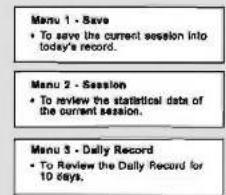
Menu 4 - Sleep
• To set the auto-sleep time for Pedometer.
Menu 5 - Sense
- To set sensitivity of the Pedometer.
Distance Mode Function Menu
NOTE:
(1) Hold down 100 in Distortion Units to use the function menu. This Miami provides the
11.3.1 Distance Mode - Menu 1, Save (a Session)

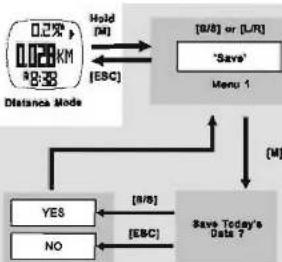
flowchart
graph TD
    A["Distance Mode"] --> B{Hold["M"]}
    B --> C["OK"]
    B --> D["OR"]
    C --> E["Menu 1"]
    D --> F["Save Today's Data ?"]
    G["YES"] --> H["No"]
    I["NO"] --> H
    J["8/8"] --> K["Save Today's Data ?"]
    L["EBC"] --> K
    M["8/8 or [L/R"]] --> N["Save Today's Data ?"]
    O["ESC"] --> N
11.3.2 Distance Mode - Menu 2, Session (Review)


flowchart
graph TD
    A["0.27m KM R8-38"] -->|Hold["M"]| B["8/8 or [L/R"]]
    B --> C["Menu 2"]
    C -->|ESC| D["Average/Minimum Pace"]
    D --> E["L/R"]*]
    E --> F["Average/Maximum Speed"]
    F --> G["L/R"]*]
    G --> H["Distance/Step"]
    H --> I["L/R"]*]
    I --> J["Moving time"]
    J --> K["L/R"]*]
    K --> L["Average/Max/Min Heart Rate"]
    L --> M["L/R*"]
    M --> N["Head rate"]
    N --> O["Start"]
    O --> P["L/R*"]
    P --> Q["Calculate Expansion"]
    Q --> R["End"]
11.3.3 Distance Mode - Function Menu 3, Daily Record (Review)

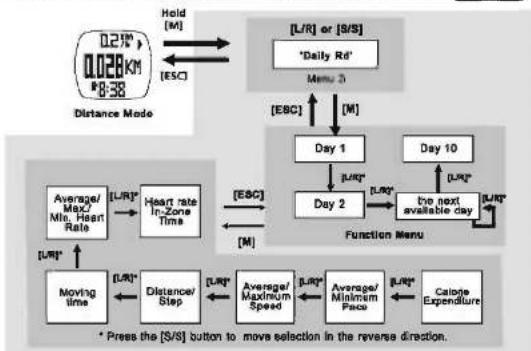
flowchart
graph TD
    A["Distance Mode"] --> B["0.27m 0.028KM 18:38"]
    B --> C["Hold [M"]]
    C --> D["EMC"]
    D --> E["Day 1"]
    E --> F["Day 2"]
    F --> G["Day 10"]
    G --> H["the next available day"]
    H --> I["Function Menu"]
    I --> J["Energy Transfer"]
    J --> K["Energy Transfer"]
    K --> L["Energy Transfer"]
    L --> M["Energy Transfer"]
    M --> N["Energy Transfer"]
    N --> O["Energy Transfer"]
    O --> P["Energy Transfer"]
    P --> Q["Energy Transfer"]
    Q --> R["Energy Transfer"]
    R --> S["Energy Transfer"]
    S --> T["Energy Transfer"]
    T --> U["Energy Transfer"]
    U --> V["Energy Transfer"]
    V --> W["Energy Transfer"]
    W --> X["Energy Transfer"]
    X --> Y["Energy Transfer"]
    Y --> Z["Energy Transfer"]
    Z --> AA["Energy Transfer"]
    AA --> AB["Energy Transfer"]
    AB --> AC["Energy Transfer"]
    AC --> AD["Energy Transfer"]
    AD --> AE["Energy Transfer"]
    AE --> AF["Energy Transfer"]
    AF --> AG["Energy Transfer"]
    AG --> AH["Energy Transfer"]
    AH --> AI["Energy Transfer"]
    AI --> AJ["Energy Transfer"]
    AJ --> AK["Energy Transfer"]
    AK --> AL["Energy Transfer"]
    AL --> AM["Energy Transfer"]
    AM --> AN["Energy Transfer"]
    AN --> AO["Energy Transfer"]
    AO --> AP["Energy Transfer"]
    AP --> AQ["Energy Transfer"]
    AQ --> AR["Energy Transfer"]
    AR --> AS["Energy Transfer"]
    AS --> AT["Energy Transfer"]
    AT --> AU["Energy Transfer"]
    AU --> AV["Energy Transfer"]
    AV --> AW["Energy Transfer"]
    AW --> AX["Energy Transfer"]
    AX --> AY["Energy Transfer"]
    AY --> AZ["Energy Transfer"]
    AZ --> BA["Energy Transfer"]
    BA --> BB["Energy Transfer"]
    BB --> BC["Energy Transfer"]
    BC --> BD["Energy Transfer"]
    BD --> BE["Energy Transfer"]
    BE --> BF["Energy Transfer"]
    BF --> BG["Energy Transfer"]
    BG --> BH["Energy Transfer"]
    BH --> BI["Energy Transfer"]
    BI --> BJ["Energy Transfer"]
    BJ --> BK["Energy Transfer"]
    BK --> BL["Energy Transfer"]
    BL --> BM["Energy Transfer"]
    BM --> BN["Energy Transfer"]
    BN --> BO["Energy Transfer"]
    BO --> BP["Energy Transfer"]
    BP --> BQ["Energy Transfer"]
    BQ --> BR["Energy Transfer"]
    BR --> BS["Energy Transfer"]
    BS --> BT["Energy Transfer"]
    BT --> BU["Energy Transfer"]
    BU --> BV["Energy Transfer"]
    BV --> BW["Energy Transfer"]
    BW --> BX["Energy Transfer"]
    BX --> BY["Energy Transfer"]
    BY --> BZ["Energy Transfer"]
    BZ --> CA["Energy Transfer"]
    CA --> CB["Energy Transfer"]
    CB --> CC["Energy Transfer"]
    CC --> CD["Energy Transfer"]
    CD --> CE["Energy Transfer"]
    CE --> CF["Energy Transfer"]
    CF --> CG["Energy Transfer"]
    CG --> CH["Energy Transfer"]
    CH --> CI["Energy Transfer"]
    CI --> CJ["Energy Transfer"]
    CJ --> CK["Energy Transfer"]
    CK --> CR["Energy Transfer"]
    CR --> CS["Energy Transfer"]
    CS --> CT["Energy Transfer"]
    CT --> CU["Energy Transfer"]
    CU --> CV["Energy Transfer"]
    CV --> CW["Energy Transfer"]
    CW --> CX["Energy Transfer"]
    CX --> CY["Energy Transfer"]
    CY --> CZ["Energy Transfer"]
11.3.5 Distance Mode - Menu 5, Sense (Sensitivity Setting)

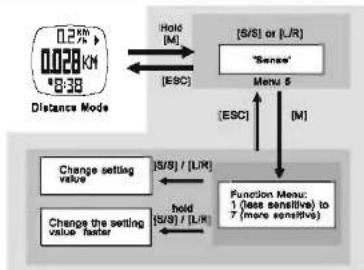
flowchart
graph TD
    A["Distance Mode 0.28 KM"] -->|Hold["M"]| B["ESC"]
    B --> C["(S/S) or (L/R)"]
    C --> D["Sense"]
    D --> E["Menu 5"]
    E --> F["(ESC)"]
    F --> G["M"]
    G --> H["Function Menu: 1 (less sensitive) to 7 (more sensitive)"]
    H --> I["change setting value"]
    I --> J["Change the setting value faster"]
    J --> K["(S/S) / (L/R)"]
    K --> L["change setting value"]
    L --> M["(S/S) / (L/R)"]
NOTE: This setting adjusts the sensitivity of the Watch to wall suit user's walking or running pattern, i.e. Select a higher sensitivity value, the Watch will be more sensitive to detect a motion.
11.3.4 Distance Mode - Menu 4, Sleep (Time Setting)

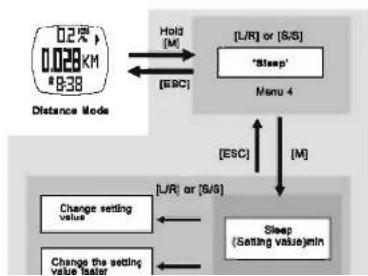
flowchart
graph TD
    A["0.2% 0.028 KM 0-38"] --> B["Distance Mode"]
    B --> C["Hold [M"]]
    C --> D["["Sleep""] Menu 4]
    D --> E["[ESC"]]
    E --> F["["L/R"] or["S/S"]"]
    F --> G["Change setting value"]
    G --> H["Change the setting value timer"]
    H --> I["Sleep (Setting value)min"]
    I --> J["[L/R"] or["S/S"]]
    J --> K["Change setting value"]
    K --> L["Change the setting value timer"]
    L --> M["Change setting value"]
12.0 Heart Rate Mode: Heart Rate Functions


flowchart
graph TD
    A["Current Heart Rate"] --> B["Heart Rate Zone Alert"]
    B --> C["Calorie Expenditure Calculation"]
    C --> D["Heart Rate Statistics"]
    D --> E["In Zone Timer"]
    E --> F["Save/view Session and Daily Record"]
Show current heart rate in beats per minute and percentage of estimated maximum heart rate.
Alerts the user if the current heart rate falls above or below the defined zone.
Show the Calorie Expenditure which deduces from heart rate and other sensors.
Show the average, minimum and maximum heart rate.
Show the elapsed time for which the heart rate falls within the defined Zone.
Logs the heart rate and other readings into a session, and save them into a daily record. View the current session or
12.1 Heart Rate Mode: Wear Heart Rate Chest Strap on the Chest


- Connect one connector with the chest strap. Ensure the connector is completely lodged into the chest strap.
- Extend the classic band for allowing a loose filling the chest strap on the chest.
*Connect the remain connector with the chest strap.


- Fasten the elastic band until it is fitted on your chest comfortably.
• Turn the chest strap back to the front until the two contacts are firmly contacted with the skin of your chest comfortably.


IMPORTANT: DO NOT wearing the chest strap on your cloth, otherwise the chest strap CANNOT get the heart rate signal.
NOTE: In dry seasons, wet the contacts with water to make the signal transmission normal.
12.2 Heart Rate Mode: To get the Measurement


flowchart
graph LR
    A["18:33"] -->|5 seconds| B["18:38"]
    B -->|5 to 8 seconds| C["140.69×8:38"]
    C --> D["Heart rate measured activated"]
    E["Watch"] --> F["radio frequency signal"]
    F --> G["heart beat signal"]
NOTE: (1) When enter Head Rate Mode, the function (sensor) will be activated automatically after 5 seconds. Which can be activated manually too, see 10.0 for the detailed operations. (2) When the function (sensor) is activated, the Watch will aggregate the readings of the exercise into the current session'.
12.3 Heart Rate Mode: Heart Rate Function Displays


flowchart
graph TD
    A["+160.78%"] --> B["Calorie Expenditure"]
    B --> C["+50.08%"]
    C --> D["+20.90%"]
    D --> E["+140.69%"]
    E --> F["+8.38%"]
    A --> G["Average Heart rate"]
    G --> H["√120.59%"]
    H --> I["Minimum Heart rate"]
    I --> J["√180.89%"]
    J --> K["Maximum Heart rate"]
    K --> L["Heart Rate Mode Function Display"]
    C --> M["Exercise Time"]
    M --> N["Exercise Time"]
Node:
(1) The Exercise Timer is counting independently, switched off the sensor or changed the screen to other mode will NOT affect the counting. I.e. The same set of exercise time can be checked from either Head Rate Mode, Distance Mode or User Mode.
(2) The Calorie Expenditure is calculated by Heart Rate and Pedometer, changed the screen to other mode will NOT affect the calculation unless the sensor is switched OFF. I.e. The serve set of Calorie Expenditure can be checked from either Heart Rate Mode, Distance Mode or User Mode.
12.4 Heart Rate Mode: EMHR and %EMHR

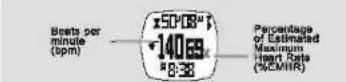
Estimated Maximum Heart Rate (EMHR)
■ EMHR = 220 - age of the user
Percentage of Estimated Maximum Heart Rate (%EMHR)
■ %EMHR = Acquired heart rate / EMHR X100%
An Example about EMHR and NEMHR for a user aged 18
An Example Scott LEMA and ACAM
EMH = 720 - 15 (upede pass) = 301
=EMRK = 220 + 18 (user & big) = 202
■ Acquired heart rate = 140 (by measurement).
■%EMHR = 140/202 ×100% = 69%
NOTE:
(1) For general purpose, percentage of Estimated Maximum Heart Rate (%EMHR) can be used
12.5 Heart Rate Mode: Lower/Upper Limits of Zone Alert

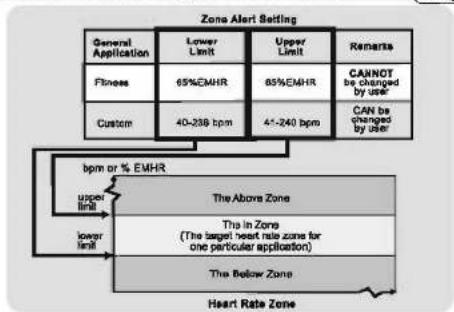
flowchart
graph TD
    A["General Application"] --> B["Fitness"]
    B --> C["Custom"]
    C --> D["40-238 bpm"]
    D --> E["45-240 bpm"]
    E --> F["45-240 bpm"]
    F --> G["45-240 bpm"]
    G --> H["45-240 bpm"]
    H --> I["45-240 bpm"]
    I --> J["45-240 bpm"]
    J --> K["45-240 bpm"]
    K --> L["45-240 bpm"]
    L --> M["45-240 bpm"]
    M --> N["45-240 bpm"]
    N --> O["45-240 bpm"]
    O --> P["45-240 bpm"]
    P --> Q["45-240 bpm"]
    Q --> R["45-240 bpm"]
    R --> S["45-240 bpm"]
    S --> T["45-240 bpm"]
    T --> U["45-240 bpm"]
    U --> V["45-240 bpm"]
    V --> W["45-240 bpm"]
    W --> X["45-240 bpm"]
    X --> Y["45-240 bpm"]
    Y --> Z["45-240 bpm"]
    Z --> AA["45-240 bpm"]
    AA --> AB["45-240 bpm"]
    AB --> AC["45-240 bpm"]
    AC --> AD["45-240 bpm"]
    AD --> AE["45-240 bpm"]
    AE --> AF["45-240 bpm"]
    AF --> AG["45-240 bpm"]
    AG --> AH["45-240 bpm"]
    AH --> AI["45-240 bpm"]
    AI --> AJ["45-240 bpm"]
    AJ --> AK["45-240 bpm"]
    AK --> AL["45-240 bpm"]
    AL --> AM["45-240 bpm"]
    AM --> AN["45-240 bpm"]
    AN --> AO["45-240 bpm"]
    AO --> AP["45-240 bpm"]
    AP --> AQ["45-240 bpm"]
    AQ --> AR["45-240 bpm"]
    AR --> AS["45-240 bpm"]
    AS --> AT["45-240 bpm"]
    AT --> AU["45-240 bpm"]
    AU --> AV["45-240 bpm"]
    AV --> AW["45-240 bpm"]
    AW --> AX["45-240 bpm"]
    AX --> AY["45-240 bpm"]
    AY --> AZ["45-240 bpm"]
    AZ --> BA["45-240 bpm"]
    BA --> BB["45-240 bpm"]
    BB --> BC["45-240 bpm"]
    BC --> BD["45-240 bpm"]
    BD --> BE["45-240 bpm"]
    BE --> BF["45-240 bpm"]
    BF --> BG["45-240 bpm"]
    BG --> BH["45-240 bpm"]
    BH --> BI["45-240 bpm"]
    BI --> BJ["45-240 bpm"]
    BJ --> BK["45-240 bpm"]
    BK --> BL["45-240 bpm"]
    BL --> BM["45-240 bpm"]
    BM --> BN["45-240 bpm"]
    BN --> BO["45-240 bpm"]
    BO --> BP["45-240 bpm"]
    BP --> BQ["45-240 bpm"]
    BQ --> BR["45-240 bpm"]
    BR --> BS["45-240 bpm"]
    BS --> BT["45-240 bpm"]
    BT --> BU["45-240 bpm"]
    BU --> BV["45-240 bpm"]
    BV --> BW["45-240 bpm"]
    BW --> BX["Heart Rate Zone"]

    style A fill:#f9f,stroke:#333
    style B fill:#ccf,stroke:#333
    style C fill:#cfc,stroke:#333
    style D fill:#fcc,stroke:#333
    style E fill:#cff,stroke:#333
    style F fill:#ffc,stroke:#333
    style G fill:#fcf,stroke:#333
    style H fill:#cff,stroke:#333
    style I fill:#ffc,stroke:#333
    style J fill:#cfc,stroke:#333
    style K fill:#fcc,stroke:#333
    style L fill:#ffc,stroke:#333
    style M fill:#cfc,stroke:#333
    style N fill:#fcc,stroke:#333
    style O fill:#ffc,stroke:#333
    style P fill:#cfc,stroke:#333
    style Q fill:#fcc,stroke:#333
    style R fill:#ffc,stroke:#333
    style S fill:#cfc,stroke:#333
    style T fill:#fcc,stroke:#333
    style U fill:#ffc,stroke:#333
    style V fill:#cfc,stroke:#333
    style W fill:#fcc,stroke:#333
    style X fill:#cfc,stroke:#333
NOTE:
(1) The lower and upper limit of the Zone Alert can be set at 12.8.4.
12.6 Heart Rate Mode: To Turn ON/OFF the Zone Alert


12.7 Heart Rate Mode: Causes for NO Heart Rate Reading or Long Response Time
1) Cause: Dry Skin.
Solution: Apply conductive gel thoroughly to chest area. (Even water will help if conductive gel is not available).
2) Cause: Chest Strap is not placed firmly over the chest.
Solution: Make sure the Chest Strap Is firmly over the chest; and the Watch is placed securely on wrist.
3) Cause: Muscle tremors caused by holding the Chest Strip too hard on your chest. Solution: The contacts must make firm contact with the user's skin during measurement. This will ensure good and consistent readings even while walking or jogging with arms swung naturally.
4) Causes: Dead skin on wrist.
Solution: Usually rubbing your skin with a towel will help.
5) Causes: A thin layer of body grease can insulate the ECG signal which prevents the contacts on the back of the Chest Strap from picking up one's ECG.
Solution: Wine cheat and the back of Chest Strap with a tissue or soft towel.
6) Cause: Hairy chest.
Solution: Apply conductive gel to chest area.
7) Cause: Irregular heartbeats.
Solution: N/A it is difficult to consistently pick up a reading for those with irregular heartbeats. Inconsistent response times are expected for those with arrhythmia.
8) Cause: Battery Low.
Solution: It might be due to the battery level of the Chest Strap is low. Replace the battery of the Chest Strap.
12.8 Heart Rate Mode: Heart Rate Mode Function
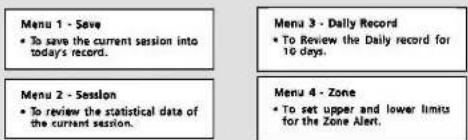
Heart Rate Mode Function Menu
Note:
(1) Hold down [M] In Heart Rate Mode to pop up the Function menu. This Menu provides the supplementary functions for the Heart Rate Mode.
(2) If the last session has NOT been saved, the Watch will put save that session into today's
12.8.1 Heart Rate Mode: Menu 1, Save (a Session)

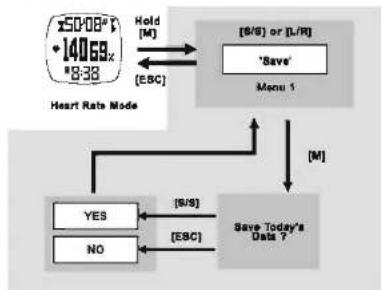
flowchart
graph TD
    A["Heart Rate Mode"] --> B{Hold["M"]}
    B --> C["Menu 1: [S/S"] or["L/R"]]
    C --> D["Save Today's Data ?"]
    D --> E{[S/S]}
    E --> F["YES"]
    E --> G["NO"]
    F --> H["ESC"]
    G --> I["ESC"]
    D --> J["M"]
12.8.3 Heart Rate Mode: Menu 3, Daily Record (Review)


flowchart
graph TD
    A["Heart Rate Mode"] --> B["Hold [M"]]
    B --> C["Function Menu 3"]
    C --> D["Day 1"]
    D --> E["Day 2"]
    E --> F["Function Menu"]
    F --> G["Day 10"]
    G --> H["the next available day"]
    H --> I["Calorie Expenditure"]
    I --> J["Average/Max. Min. Heart Rate"]
    J --> K["Heart rate in-Zone Time"]
    K --> L["Average/Maximum Speed"]
    L --> M["Distance/Step"]
    M --> N["Moving time"]
    N --> O["Pres the [S/S"] button to move selection in the reverse direction.]
    style A fill:#f9f,stroke:#333
    style C fill:#ccf,stroke:#333
    style F fill:#cfc,stroke:#333
    style H fill:#fcc,stroke:#333
12.8.2 Heart Rate Mode: Menu 2, Session (Review)


flowchart
graph TD
    A["150/18* + 140.69 x 8:38"] -->|Hold["M"]| B["ESC"]
    B --> C["[B/S"] or["L/R"]]
    C --> D["Session"]
    D --> E["Menu 2"]
    E --> F["[ESC"] ↑]
    F --> G["[M"]]
    G --> H["Average/Minimum Pace"]
    H --> I["[L/R"]*]
    I --> J["Average/Maximum Speed"]
    J --> K["[L/R"]*]
    K --> L["Distance/Step"]
    L --> M["[L/R"]*]
    M --> N["Moving Time"]
    N --> O["[L/R"]*]
    O --> P["Average/Min Heart Rate"]
    P --> Q["[L/R"]*]
    Q --> R["Calorie"]
    R --> S["Start"]
    S --> T["[L/R"]*]
    T --> U["[L/R"]*]
    U --> V["Heart rate"]
12.8.4 Heart Rate Mod: Menu 4, Zone (Setting)


flowchart
graph TD
    A["Heart Rate Mode"] --> B["Hold [M"]]
    B --> C["Menu 4"]
    C --> D["Energy Optimization"]
    D --> E["Yes [B/S"]]
    D --> F["Fitness (65 - 83%EMHR)"]
    F --> G["Response: [S/S"] / [L/R]]
    F --> H["Change setting value faster"]
    H --> I["Change setting value hold"]
    I --> J["ESG"]
    J --> K["ESG or [L/R"]]
    K --> L["ESG"]
    L --> M["ESG"]
    M --> N["ESG"]
    N --> O["ESG"]
    O --> P["ESG"]
    P --> Q["ESG"]
    Q --> R["ESG"]
    R --> S["ESG"]
    S --> T["ESG"]
    T --> U["ESG"]
    U --> V["ESG"]
    V --> W["ESG"]
    W --> X["ESG"]
    X --> Y["ESG"]
    Y --> Z["ESG"]
    Z --> AA["ESG"]
    AA --> AB["ESG"]
    AB --> AC["ESG"]
    AC --> AD["ESG"]
    AD --> AE["ESG"]
    AE --> AF["ESG"]
    AF --> AG["ESG"]
    AG --> AH["ESG"]
    AH --> AI["ESG"]
    AI --> AJ["ESG"]
    AJ --> AK["ESG"]
    AK --> AL["ESG"]
    AL --> AM["ESG"]
    AM --> AN["ESG"]
    AN --> AO["ESG"]
    AO --> AP["ESG"]
    AP --> AQ["ESG"]
    AQ --> AR["ESG"]
    AR --> AS["ESG"]
    AS --> AT["ESG"]
    AT --> AU["ESG"]
    AU --> AV["ESG"]
    AV --> AW["ESG"]
    AW --> AX["ESG"]
    AX --> AY["ESG"]
    AY --> AZ["ESG"]
    AZ --> BA["ESG"]
    BA --> BB["ESG"]
    BB --> BC["ESG"]
    BC --> BD["ESG"]
    BD --> BE["ESG"]
    BE --> BF["ESG"]
    BF --> BG["ESG"]
    BG --> BH["ESG"]
    BH --> BI["ESG"]
    BI --> BJ["ESG"]
    BJ --> BK["ESG"]
    BK --> BL["ESG"]
    BL --> BM["ESG"]
    BM --> BN["ESG"]
    BN --> BO["ESG"]
    BO --> BP["ESG"]
    BP --> BQ["ESG"]
    BQ --> BR["ESG"]
    BR --> BS["ESG"]
    BS --> BT["ESG"]
    BT --> BU["ESG"]
    BU --> BV["ESG"]
    BV --> BW["ESG"]
    BW --> BX["ESG"]
    BX --> BY["ESG"]
    BY --> BZ["ESG"]
13.0 User Mode: User Mode Function
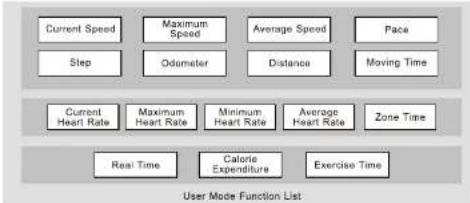
flowchart
graph TD
    A["Current Speed"] --> B["Step"]
    C["Maximum Speed"] --> D["Odometer"]
    E["Average Speed"] --> F["Distance"]
    G["Face"] --> H["Moving Time"]
    I["Current Heart Rate"] --> J["Maximum Heart Rate"]
    K["Minimum Heart Rate"] --> L["Average Heart Rate"]
    M["Zone Time"] --> N["Real Time"]
    O["Calorie Expenditure"] --> P["Exercise Time"]
    Q["User Mode Function List"]
User can select one of the above 16 functions to display on the top, middle or bottom row of the display under User Mode.
IMPORTANT: This mode functions with the Chest Strap, see chapter 11 before the measurement.
13.1 User Mode: To get the Measurement


flowchart
graph LR
    A["CALORIE H. RATE DISTANCE"] --> B["0.000°C"]
    B --> C["5 seconds"]
    C --> D["0.000°C"]
    D --> E["Sensor Activated"]
    E --> F["1400 MHz"]
    F --> G["Reading Captured"]
    G --> H["36.000°C"]
    H --> I["heart rate"]
    H --> J["distance"]
    K["User Mode"] --> L["Watch"]
    L --> M["Radio Frequency Signal"]
    M --> N["Heart Beat Signal"]
NOTE:
(1) When enter User Mode, the function (sensor) will be activated automatically after 5 seconds. Which can be activated manually too, see 10.9 for the detailed operations.
(2) When the function (sensor) is activated, the Watch will aggregate the readings of the exercise into the current 'sensor'.
(2) 1.4.1. 3.6. 5.7. 6.8. 7.9. 8.0. 9.1. 10.2. 11.3. 12.4. 13.5. 14.6. 15.7. 16.8. 17.9. 18.0. 19.1. 20.2. 21.3. 22.4. 23.5. 24.6. 25.7. 26.8. 27.9. 28.0. 29.1. 30.2. 31.3. 32.4. 33.5. 34.6. 35.7. 36.8. 37.9. 38.0. 39.1. 40.2. 41.3. 42.4. 43.5. 44.6. 45.7. 46.8. 47.9. 48.0.
13.2 User Mode: To Change the Function Display

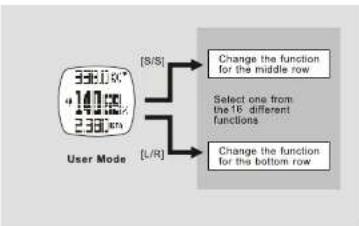
flowchart
graph TD
    A["User Mode"] --> B["[S/S"]]
    A --> C["L/R"]
    B --> D["Change the function for the middle row"]
    C --> E["Change the function for the bottom row"]
    F["Select one from the 16 different functions"] --> B
    F --> E
Note:
(1) See 13.3.4 for more detail about changing the display function for the top row.
13.3 User Mode: Function Menu

Note:
(1) Hold down [M] in User Mode to pop up the function menu. This Menu provides the supplementary functions for the User Mode.
13.3.1 User Mode: Monu 1, Save (a Session)


flowchart
graph TD
    A["User Mode"] --> B{Hold["M"]]
    B --> C["ESC"]
    C --> D["Menu !"]
    D --> E["Save Today's Data ?"]
    E --> F{[S/B] or["L/R"]}
    F --> G["Save"]
    G --> H["END"]
    I["YES"] --> J["ESC"]
    K["NO"] --> L["ESC"]
    M["3380K* 1406K% 2380km"] --> N["Hold [M"]]
    N --> O["ESC"]
    O --> P["Menu !"]
    P --> Q["END"]
13.3.3 User Mode: Menu 3, Daily Record (Review)


flowchart
graph TD
    A["User Mode"] --> B["38.0K* 140.68 2.380 sec"]
    B --> C["Hold (M)"]
    C --> D["ESCI"]
    D --> E["ESCI"]
    E --> F["Day 1"]
    F --> G["Day 10"]
    G --> H["ESCI"]
    H --> I["ESCI"]
    I --> J["Day 2"]
    J --> K["Day 2"]
    K --> L["ESCI"]
    L --> M["ESCI"]
    M --> N["Day 10"]
    N --> O["ESCI"]
    O --> P["ESCI"]
    P --> Q["Day 1"]
    Q --> R["ESCI"]
    R --> S["ESCI"]
    S --> T["Day 2"]
    T --> U["ESCI"]
    U --> V["ESCI"]
    V --> W["Day 10"]
    W --> X["ESCI"]
    X --> Y["ESCI"]
    Y --> Z["Day 2"]
    Z --> AA["ESCI"]
    AA --> AB["ESCI"]
    AB --> AC["Day 10"]
    AC --> AD["ESCI"]
    AD --> AE["ESCI"]
    AE --> AF["Day 2"]
    AF --> AG["ESCI"]
    AG --> AH["ESCI"]
    AH --> AI["Day 10"]
    AI --> AJ["ESCI"]
    AJ --> AK["ESCI"]
    AK --> AL["Day 2"]
    AL --> AM["ESCI"]
    AM --> AN["ESCI"]
    AN --> AO["Day 10"]
    AO --> AP["ESCI"]
    AP --> AQ["ESCI"]
    AQ --> AR["Day 2"]
    AR --> AS["ESCI"]
    AS --> AT["ESCI"]
    AT --> AU["Day 10"]
    AU --> AV["ESCI"]
    AV --> AW["ESCI"]
    AW --> AX["Day 2"]
    AX --> AY["ESCI"]
    AY --> AZ["ESCI"]
    AZ --> BA["ESCI"]
    BA --> BB["Day 10"]
    BB --> BC["ESCI"]
    BC --> BD["ESCI"]
    BD --> BE["Day 2"]
    BE --> BF["ESCI"]
    BF --> BG["ESCI"]
    BG --> BH["Day 10"]
    BH --> BI["ESCI"]
    BI --> BJ["ESCI"]
    BJ --> BK["Day 2"]
    BK --> BL["ESCI"]
    BL --> BM["ESCI"]
    BM --> BN["Day 10"]
    BN --> BO["ESCI"]
    BO --> BP["ESCI"]
    BP --> BQ["Day 2"]
    BQ --> BR["ESCI"]
    BR --> BS["ESCI"]
    BS --> BT["Day 10"]
    BT --> BU["ESCI"]
    BU --> BV["ESCI"]
    BV --> BW["Day 2"]
    BW --> BX["ESCI"]
    BX --> BY["ESCI"]
    BY --> BZ["Day 10"]
    BZ --> CA["ESCI"]
    CA --> CB["ESCI"]
    CB --> CC["Day 2"]
    CC --> CD["ESCI"]
    CD --> CE["ESCI"]
    CE --> CF["Day 10"]
    CF --> CG["ESCI"]
    CG --> CH["ESCI"]
13.3.2 User Mode: Menu 2, Session (Review)

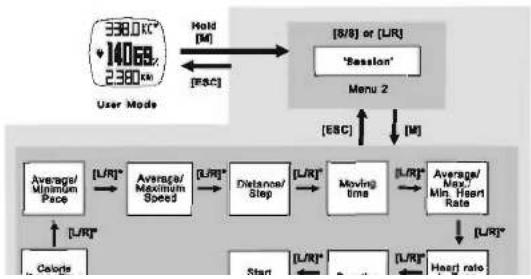
flowchart
graph TD
    A["User Mode"] -->|Hold["M"]| B["Menu 2"]
    B --> C["[ESC"] or["L/R"]]
    C --> D["Average/Minimum Pace"]
    D --> E["Average/Maximum Speed"]
    E --> F["Distance/Step"]
    F --> G["Moving time"]
    G --> H["Average/Max/Min Heart Rate"]
    H --> I["[L/R"]*]
    I --> J["Start"]
    J --> K["[L/R"]*]
    K --> L["Heart rate"]
    L --> M["[L/R"]*]
    M --> N["Colorize"]
    N --> O["[L/R"]*]
    O --> P["Distance/Step"]
    P --> Q["Moving time"]
    Q --> R["Average/Max/Min Heart Rate"]
13.3.4 User Mode: Menu 4, View (Display Setting)

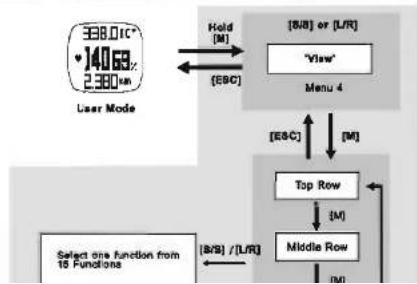
flowchart
graph TD
    A["User Mode 338.01C* 140.63% 2.380km"] --> B["Hold [M"]]
    B --> C["[S/B"] or["L/R"]]
    C --> D["[E&C"]]
    D --> E["Menu 4"]
    E --> F["[E&C"]]
    F --> G["Top Row"]
    G --> H["[M"]]
    H --> I["Middle Row"]
    I --> J["[B/S"] / [L/R]]
    J --> K["Select one function from 15 Functions"]
14.0 Logbook Mode - Logbook Function Menu

Menu 1 - View
• To recall the details of the logged record.
Menu 2 - Start/Stop
• To start or stop the data logging function.
Menu 3 - PC link
• To pair the Watch with the 'Wireless Data Manager' program.
• To upload the data from the Watch to PC.
Menu 5 - Auto
- To set the Auto-Start log function.
Menu 4 - Log Rate
• To set the sampling rate for the data logging.
Menu 6 - Erase
• To erase the logged Record.
Menu 7 - Mem
• To view the free memory capacity.
Logbook Mode Function Menu
Note:
(1) Hold down [M] In Logbook Mode to pop up the function menu. This Menu provides the supplementary functions for the Logbook Mode.
14.0.1 Logbook Mode - Function Menu 1 - View


flowchart
graph TD
    A["LOG 1/30 22 JUN"] -->|Hold["M"]| B["[O/B"] or["U/R"]]
    A -->|ESC| C["Menu 1"]
    B --> D["View"]
    B --> E["[ESC"]]
    D --> F["M"]
    E --> G["M"]

flowchart
graph LR
    A["Start Time"] --> B["Duration"]
    B --> C["Heart Rate In-Zone Time"]
    C --> D["Average/Max/Mit. Heart Rate"]
    D --> E["Moving Time"]
    E --> F["Distance/Step"]
    F --> G["Average/Maximum Speed"]
    G --> H["Calorie Expenditure"]
    H --> B
    style A fill:#f9f,stroke:#333
    style B fill:#f9f,stroke:#333
    style C fill:#f9f,stroke:#333
    style D fill:#f9f,stroke:#333
    style E fill:#f9f,stroke:#333
    style F fill:#f9f,stroke:#333
    style G fill:#f9f,stroke:#333
    style H fill:#f9f,stroke:#333
address 18/61 or 21/91, butous by salient a tunnel connection for n 1/35-2/60-30/90 for radius
14.0.2 Logbook Mode - Function Menu 2, Start/Stop the Logbook


flowchart
graph TD
    A["LOG 1/30 22 JUN"] -->|Hold["M"]| B["ESC"]
    B --> C["Menu 2"]
    C --> D["Function Menu (Yes or No)"]
    D --> E["ESC"]
    E --> F["Menu 2"]
    F --> G["YES: Start or Stop the log"]
    style A fill:#f9f,stroke:#333
    style B fill:#ccf,stroke:#333
    style C fill:#cfc,stroke:#333
    style D fill:#fcc,stroke:#333
    style E fill:#cff,stroke:#333
    style F fill:#ffc,stroke:#333
Note:
(1) While the Log function is started, a 'LOG' indicators start flashing on the screen, the Watch will create a new log session and log the readings into a 'record' at the pre-defined log rate.
(2) This Log function can be started or stopped at Heart Rate, Distance and User Mode by holding down [S/S], see 10.0 for the detailed operations.
14.0.3 Logbook Mode - Menu 3, PC Link


flowchart
graph TD
    A["LOG 1/30 22 JUN"] -->|Hold["M"]| B["[ESC"]]
    B --> C["[S/S"] or["L/R"]]
    C --> D[""PC link" Upload record"]
    D --> E["Menu 3"]
    E --> F["[ESC"] ↑]
    F --> G["[M"]]
    G --> H["Sending"]
    I["Logbook Mode"] --> A
IMPORTANT: This mode is functioned with the PC Pod, read the corresponding chapter before the upload.
Note:
14.0.4 Logbook Mode - Menu 4, Log Rate (Setting)


flowchart
graph TD
    A["Log 1/30\n22 JUN\nLogbook Mode"] --> B["Hold (M)"]
    B --> C["[ESC"]]
    C --> D["[B/B"] or["L/R"]]
    D --> E["Menu 4"]
    E --> F["[M"]]
    F --> G["Function Menu\n(Sampling Rate)"]
    G --> H["[B/B"]]
    G --> I["[L/R"]]
    H --> J["Change the rate by\nforeword\scotiling"]
    I --> K["Change the rate by\nbackward\scotiling"]
IMPORTANT: If a log is started, the log rate cannot be changed.
14.0.6 Logbook Mode - Menu 6, Erase (Session for Logbook)


flowchart
graph TD
    A["LOG 1/30 22 JUN"] --> B["Logbook Mode"]
    B --> C["Hold [M"]]
    C --> D["[(S&S) or (L/R)"]
    D --> E["Menu 8"]
    E --> F["ONE Session"]
    F --> G["Function Nans"]
    G --> H["Function Menu (Yes or No)"]
    H --> I["YES: Session XX/ All Sessions Erseed"]
    I --> J["[(ESC)"]
    J --> K["[(S/S) or (L/R)"]]
    K --> L["Menu 8"]
    L --> M["ONE Session"]
    M --> N["Function Nans"]
    N --> O["Function Menu (Yes or No)"]
    O --> P["YES: Session XX/ All Sessions Erseed"]
    P --> Q["[(ESC)"]
    Q --> R["Menu 8"]
    R --> S["ONE Session"]
    S --> T["Function Nans"]
    T --> U["Function Menu (Yes or No)"]
-Prase the [S/B] or [UR] button to select a target session (e.g. 1/30, 2/30... 30/30) for erase
14.0.5 Logbook Mode - Menu 5, Auto (Log Auto Start Setting)


flowchart
graph TD
    A["LOG 1/30 22 JUN\nLogbook Mode"] -->|Hold (M)| B["[S/S"] or["L/R"]]
    B --> C["Auto Start a Log\nMenu 5"]
    C --> D["[EBC"]]
    D --> E["[S/S"] or["L/R"]]
    E --> F["ON*"]
    E --> G["OFF"]
    H["[ESC"]] --> I["[S/S"] or["L/R"]]
    I --> J["ON*"]
    I --> K["OFF"]
Note: If 'ON' is selected, activating the sensor in Distance, Heart Rate or User Mode will start the low function too
14.0.7 Logbook Mode - Menu 7, View (Free Memory)

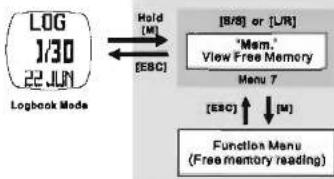
flowchart
graph TD
    A["LOG 1/30 22.JUN\nLogbook Mode"] -->|Hold["M"]| B["[B/S"] or["UR"]]
    B --> C["Mem." View Free Memory\nMenu 7"]
    C --> D["[ESC"] ↑]
    D --> E["Function Menu\n(Free memory reading)"]
    C --> F["[EBC"]]<--> G["[EBC"]]<--> H["[M"]]
15.0 PC Link - To Install the Program


1
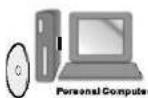
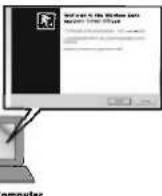
insert the bundled CD or execute the installation software, the menu will be shown.
Click the 'PC Software' button from the side menu and then the 'here' button to execute the installation wizard.
Follow the instructions to install the program into the target PC.
2
3
15.0.1 PC Link - To Pair the Watch & Chest Strap with the Program


NOTE: During the pairing.
(1) The Watch MUST be switched to PC-Link Display of the Logbook Mode, and activate the PC-link function.
(2) The Chest Strap MUST be worn on the chest or press the two oestrels (i.e. heart rate signal is sampling).
When the installation is completed, execute the "Wireless Data Manager" Program from the Window program manuscript.
When the pairing is done. The ID of the Watch, chest strap will be saved into the program.
1
3
15.0.2 PC Link - Data Send to PC via the PC Pod


1
The data send to PC from the Heart Rate Chest Strap:
(1) Real-time heart rate, Average Heart Rate, Minimum Heart Rate and Maximum Heart Rate
2 The data send to PC from the Watch: (1) Chronograph logs: Lap time and spill time for every leg, Maximum, Average, Minimum Lap time and the total time. (2) Logbook logs: Session Info (Start Time, log rate, no. of session, duration, etc) and the data summary of the Session (Calorie expenditure, etc.) (3) Daily Statistics logs: The daily data summary for Speed, Distance, Calorie, heart rate, etc.
15.0.3 PC Link - Download/Analyse/Save Data from the Watch

NOTE
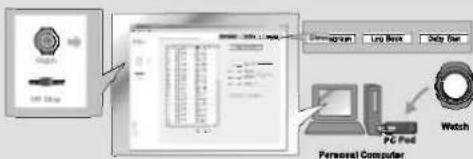
The watch MUST be switched to PC-Link Display of the Logbook Mode, and activate the PC-Link function.
Click the 'Watch' icon from the side menu to pop the 'Watch' Page.
3 Click "Download" button to download the data from the Watch through the corresponding page. The respective data will be shown on the screen after a while.
1
15.0.4 PC Link - Analyze/ Save Real-Time Data from the Chest Strap

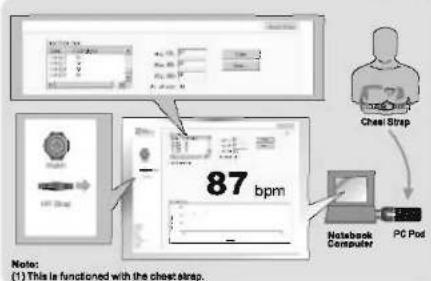
Click the 'IR Strap' Icon from the side menu to pop the 'Chest Strap' Page. Analyze the data on the PC by the options provided by the program.
The real-time heart rate readings will be shown on that page. Save the data into PC for further analysis.
16.0 Battery - Low Battery Indication
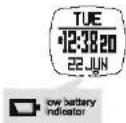
Note:
■ Replace the battery with a new CR2032.
■ However, if the appearance of battery-low indicator is caused by using the Watch under very cold condition, the indicator will be disappeared when normal temperature returns.
It is recommended to complete the battery replacement by a certified service agency, because this Watch contains precise electronic sensors and components.
16.1 Battery - To Replace Battery for the Chest Strap


1. Turn the battery cover with a coin counterclockwise until the snow pointing to snow.
2. Turn the cover further gently to pop it out.
3. Put aside the battery cover.
4. Remove the empty battery.
5. Insert a new CR2032 battery with the (+) side of the battery touch with the 'L' shape metal contact.
6. IMPORTANT: Make sure that the sealing rubber o-ring is placed correctly in its slot before the battery cover is closed.
7. Put the battery cover back with the arrow on the cover pointing to the arrow, and then press the cover down onto until it is on the same level with the surface.
8.Turn the cover with the coin clockwise until the arrow pointing to dot.
Tips: In case the chest strap CANNOT properly reset (NO signal transmission), resolve this problem with the following steps: A) Remove the battery, B) Short line (+) and (-) battery contact of the chest strap with the metal shell (+ ve) of the battery, C) Reinstall the battery for normal operations.
17.0 Power Saving Mode
■ Under Current Time Mode, hold [L/R] 5 seconds to enter power saving mode.
■ LCD will be off to save power, but time-keeping function will keep running.
■ Presaling any key can resume display normal.

Current Time Mode
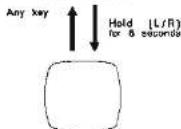
Power Saving Mode
18.0 Specifications - Timekeeping Mode
Current Time Mode
■ Hour, minute, second, am, pm, month, day and day of week
■ Tierra Systent:
■ Auto-Galander pre-programmed from the year
2000 to 2009
Daily Alarm Mode
■ 2 daily or weekly alarms
■ Hourly chime
- Alarm Sound
■ Sounds for 30 seconds at preset time
Chenograph Mode
CHRONOGRAPHIC MODE
■ Resolution: 1/100 second
■ Measuring Range: 99 hours 58 minutes 59.90 seconds
■ Nessuring Mode: 50 lon memories: Recall len
- Receiving mode: 50 map histories, Vocal map memories and total time.
Countdown Timer Mode
■ Resolution: 1 second resolution
■ Measuring range: 99 hours 59 minutes 58 seconds
Operation Mode: Countdown
■ Quick Set : 5 quick set Values (3, 5, 10, 15 and 45
minutes)
■ Timer Sounds:
■ Last 10 minutes been once every minute
- Last 10 minutes soap once every minute - Last 1 minute keeps once every 10 seconds
- Last 1 minute bumps once every 10 seconds - last 5 seconds have even every second
■ Last 5 seconds beeps once every second
■ Sounds for 30 seconds when
■ Logbook up to 100 sessions
Pacer Mode
- Range 30-180 beats per min in step of 5
Dual Time Mode
- Hour minute, second
1 obock
Logistics
- Up to 7545 records
■ 1 /2 /3 /5 /10 /20 /30 second or 1 /2 /3 /5 /10
18.1 Specifications - Sensor Mode
Daily Records
■ 10 statistical daily records
Heart Rate Measurement
■ Measuring Range: 40 to 240 BPM
■ Heart rate zone alert
■ Head Rate in euro Times 28:30:00 to 28:50:50
■ Heart Rate in 201
■ 1 Exercise Timor
■ 2 Heart rate zone limit selection
■ Calorie Expenditure range: 0-99998 kcal
Distance Mode
■ Steps range: 0-999999
■ Motion Timer: 00:00:00 to 23:58:59
■ 1 Exercise Timer
■ Distress Henswageni max. 400 kg
- Distance measurement: Max. 400 km
- Odometer Measurement: max. 900 km
■ Pedometer sensitivity selection: 7 levels
Backlight
■ Electro-Luminescent (EL) backlight
Battery
- Watch: 3V lithium battery (CR2032) 1 piece


Brand : Pyle
Model : PSWHRP58
Category : Radio