NTV-KIT736 - Car audio interface NAV-TV - Free user manual and instructions
Find the device manual for free NTV-KIT736 NAV-TV in PDF.


User questions about NTV-KIT736 NAV-TV
0 question about this device. Answer the ones you know or ask your own.
Ask a new question about this device
Download the instructions for your Car audio interface in PDF format for free! Find your manual NTV-KIT736 - NAV-TV and take your electronic device back in hand. On this page are published all the documents necessary for the use of your device. NTV-KIT736 by NAV-TV.
USER MANUAL NTV-KIT736 NAV-TV
Head Unit Replacement interface for select Mercedes
NTV-KIT736

natural_image
Interior view of a Mercedes-Benz car dashboard and infotainment system (no visible text or symbols)
BHM
04/26/16
NTV-DOC210
Overview
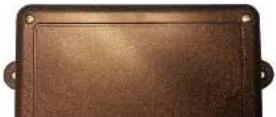
The MOST-HUR ML V2 is a radio replacement interface for Mercedes Benz ML vehicles equipped with an external M.O.S.T. ber opc amplifier. The module allows the factory amplifier, speakers and sound quality to be retained when adding a modern aermarket radio. Other components in the factory system, such as a CD changer, satellite radio, telephone module, DVD player, or any other factory component in the M.O.S.T loop will not need to remove, but will not funcon aer the installaon.
Kit Content

text_image
Plug & Play T-Harness NTV-HAR285 3.5mm plug for IR NTV-CAB026 USB Cable (updates) NTV-CAB009 MOST-HUR MB interface NTV-ASY202 Antenna Adapter NTV-CAB027 Fiber Opc extension cable/connector NTV-HAR067/NTV-CON002MOST HUR-MB V2 Pinout
| Pln # | Descripon | Color | Radio Connecons: |
| 1 | Constant 12v (+) | Yellow | Radio, Constant Power |
| 2 | Le Front Audio IN | White RCA | Radio, Le Front RCA OUT |
| 3 | Rear Common Shield | Green/Purple RCA | Radio, Rear RCA Common |
| 4 | Le Rear Audio IN | Green RCA | Radio, Le Rear OUT |
BHM
04/26/16
NTV-DOC210
HUR-MB Installaon
1. Base-line the factory radio:
a. Source the radio to FM radio.
b. Adjust the volume to a comfortable listening seng
c. Be certain the MUTE funcon is not enabled
d. Center the balance and fade, center the bass and treble
e. Be certain there are no other problems with the factory stereo system before installing this unit.
2. Remove the factory radio from the dash.
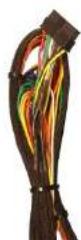
3. Connect the provided Plug & Play Harness to the main factory connector previously removed from the OEM radio.
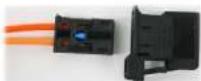
4. Remove the ber opc plug from the OEM Harness.
a. Connect the provided ber connector to the OEM ber plug
b. Connect the new ber assembly to the MOST HUR-MB interface at the ber port.
5. Connect the RCAs among the Plug & Play Harness to the low-level pre-outs of the aermarket radio. NOTE: factory subwoofer (if equipped) is not adjustable through the amplifier, therefore will not be adjustable with the aermarket HU.
6. Make all remaining radio connecons:
a. Ground (-) is provided from the HUR Black wire (PIN 10)
b. Constant Power (+) is provided from the HUR Yellow wire (PIN 1)
c. ACC 12v (+) power is provided from the HUR module RED wire (PIN 17). Connect the vehicle's blue Power Antenna wire to this ACC as well (oen mes, some radios will not supply sucient current to the vehicle power antenna wire.
BHM
04/26/16
NTV-DOC210
MOST HUR-MB V2 Menu Setup
- Once all connecons are made, verify sound is heard through the system with the key on. Verify balance and FM radio signal (via the aermarket HU).
- The following MOST-HUR/OEM Amplifier adjustments can be made with the OEM steering wheel controls, and feedback is shown through the cluster LCD screen during the process.
To begin, the cluster must be resng in 'AUDIO' display mode (use Page UP or DOWN until 'Audio' appears)

flowchart
graph TD
    A["Page UP"] --> B["Arrow UP Press to adjust value of current onpon"]
    C["Page DOWN"] --> D["Arrow DOWN Press to adjust value of current onpon"]
    E["Phone pick up"] --> F["Volume UP Press to change onpon"]
    G["Phone hang up: HOLD 10 seconds to enter HUR menu, press once again to exit"] --> F
    H["Volume DOWN Press to change onpon"] --> F
BHM
04/26/16
NTV-DOC210
MOST HUR-MB V2 Steering wheel type / LOGIC 7 setup
- Before steering wheel controls will operate properly, you must select the proper protocol in the HUR Cluster menu (see page 4). Each type is detailed below:
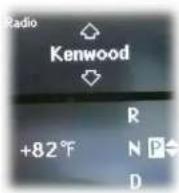
Use for Kenwood radio
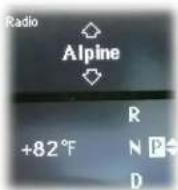
Use for Alpine radio
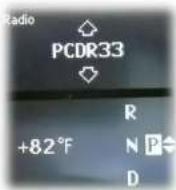
Use for Pioneer radio with remote model PCDR33
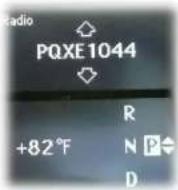
Use for Pioneer radio with remote model PQXE1044

Use for Sony radio

Select whether or not to use OEM LOGIC 7 processing
BHM
04/26/16
NTV-DOC210
MOST HUR-MB V2 Diagram
MOST-HUR MB V2
NOTE: Not all
connecons are
shown in this
diagram. Oponal
connecons not
shown.

natural_image
Top-down view of a silver sedan car (no visible text or symbols)MOST Fiber Optic
Ground (-)
Connections must be made manually
