NTV-KIT987 - Car accessory NAV-TV - Free user manual and instructions
Find the device manual for free NTV-KIT987 NAV-TV in PDF.


User questions about NTV-KIT987 NAV-TV
0 question about this device. Answer the ones you know or ask your own.
Ask a new question about this device
Download the instructions for your Car accessory in PDF format for free! Find your manual NTV-KIT987 - NAV-TV and take your electronic device back in hand. On this page are published all the documents necessary for the use of your device. NTV-KIT987 by NAV-TV.
USER MANUAL NTV-KIT987 NAV-TV
natural_image
Interior view of a luxury sports car with digital dashboard and steering wheel (no visible text or symbols)MOST®

natural_image
Yellow convertible sports car with sleek design and black accents (no visible text or symbols)WARNING: Do not connect any RCA cables to the ZEN-F interface or additional processors prior to properly grounding aftermarket amplifier(s)!
DES
12/01/2020
NTV-DOC367
Overview
The NAV-TV ZEN-F processor seamlessly converts Ferrari Portofino factory MOST-150 audio bus to 12-channel analog RCA and TOSLink output. Adding aftermarket amplifiers to the OE Ferrari system has never been so simple. This kit integrates with the OEM M.O.S.T.® bus to retain volume control, full fade (and balance: analog only), treble, mid-range & Bluetooth voice calls with no external speaker (true OEM integration). NOTE: OEM radio systems not equipped with a fiber optic amplifier are not compatible.
Kit Content

natural_image
Coiled orange cable with two connector terminals (no text or symbols visible)ZEN MOST Fiber NTV-CAB134
text_image
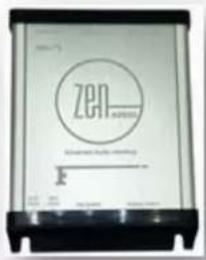
Zen Zen®ZEN-F Interface NTV-ASY319
text_image
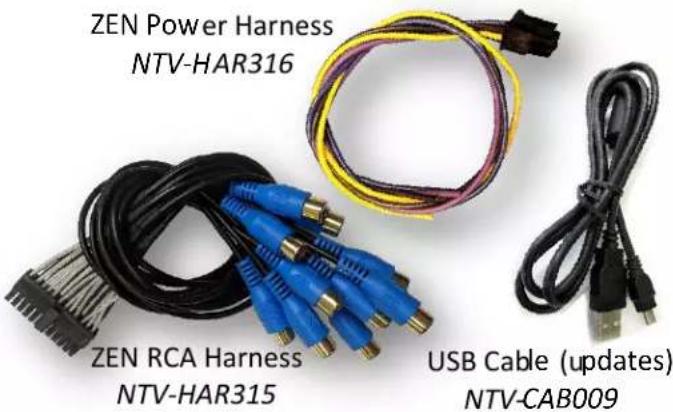
ZEN Power Harness NTV-HAR316 ZEN RCA Harness NTV-HAR315 USB Cable (updates) NTV-CAB009ZEN-F overview
text_image
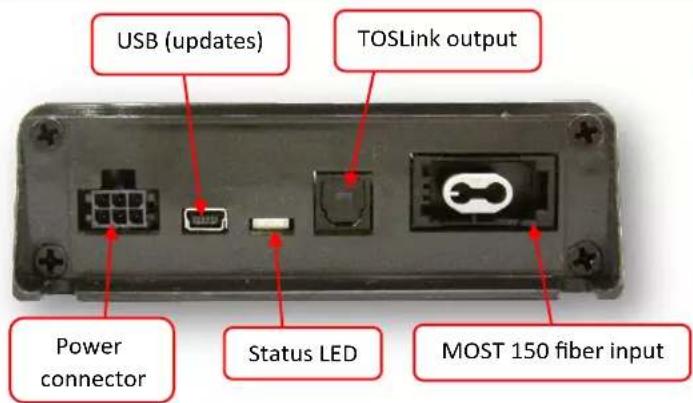
USB (updates) TOSLink output Power connector Status LED MOST 150 fiber input
text_image
--FUTURE USE-- DIP switches --FUTURE USE-- Analog RCA outputsZEN-F Compatibility
Ferrari Portofino with MOST 150 fiber optic amplifier
| Year(s) | Make | Model |
| 2017+ | Ferrari | Portofino with MOST 150 fiber optic amplified audio system |
ZEN-F Installation
-
If this vehicle has a factory amplifier, it must be removed and the ZEN-F can be installed into its place. If this vehicle is not amplified from factory, it is not compatible with the ZEN-F.
-
Connect the following wires from the provided power harness:

| ZEN-F pin | Color | To vehicle: |
| 1 | Yellow | 12v (+) Constant |
| 3 | Violet | --Reserved, NOT USED-- |
| 4 | Black | Ground (-) |
| 6 | Blue | 12v (+) remote output* |
*This remote wire must be used for aftermarket amplifier remote for proper functionality. If installing more than one amplifier/DSP, a relay must be used for reliable turn-on (500mA max).
- Before connecting power to the ZEN-F, adjust dip-switch settings for the desired options:
| Time Alignment | Attenuation | TOSLink DownMix | Loudness | Vehicle Settings | ||
| Position | DIP 1 | DIP 2 | DIP 3 | DIP 4* | DIP 5 | DIP 6 |
| UP (off) | Front Row | Full Scale output (0 dB) | Not used | Loudness OFF | Keep in factory default | |
| DOWN (on) | Driver Focused | -12 dB output | Not used | Loudness ON | ||
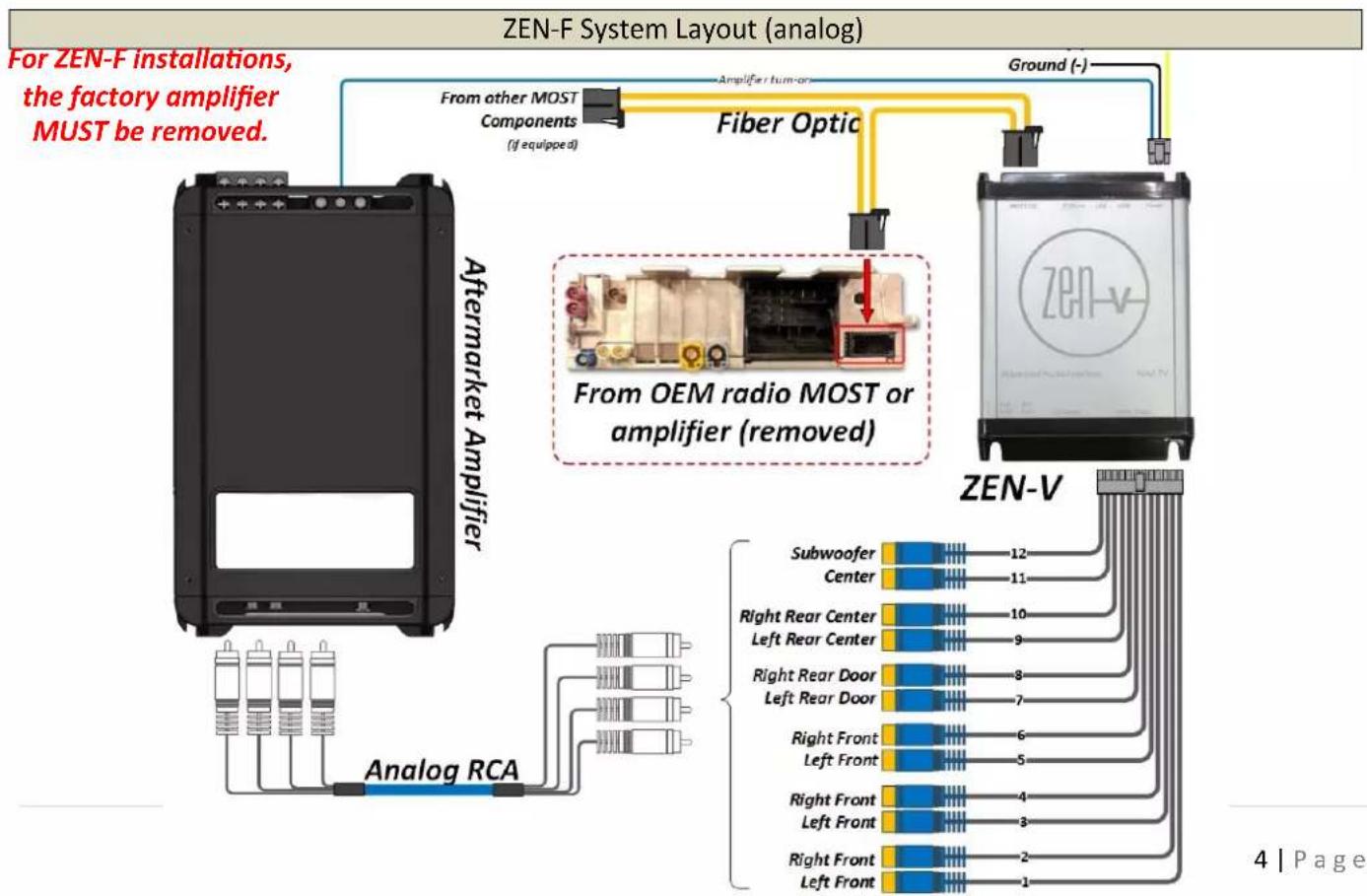
- If using analog RCAs for signal to the amplifier, connect according to the reference chart below. WARNING: Do not connect RCA cables to this interface until all amplifiers/external processors are properly grounded. Failure to do this may cause damage to the interface and VOID the warranty!
| 1 | 2 | 3 | 4 | 5 | 6 | 7 | 8 | 9 | 10 | 11 | 12 |
| Left Front | Right Front | Left Front | Right Front | Left Front | Right Front | Left Rear Door | Right Rear Door | Left Rear Center | Right Rear Center | Center | Sub |
-
If using TOSLink for signal to the amplifier, connect the cable to the TOSLink port shown on page 2. NOTE: both Analog and Digital output sound simultaneously, regardless of which type is used.
-
Connect the provided MOST Fiber Cable from the (previously removed) amplifier, or from the radio's fiber port to the MOST port on the ZEN-F.
ZEN-F General Installation Notes
- This interface can only be installed in vehicles with a factory MOST fiber optic amplifier.
- The factory amplifier must be removed. Connect the OEM fiber previously connected to the amp, directly into the ZEN-F.
- Tuning tips:
- Before beginning tuning process (especially with external EQ/Processors), set Bass & Treble on the head unit for each source to flat (0).
- Begin with amplifier/EQ gains all the way down.
- With dynamic music playing, adjust the radio volume to maximum.
- Adjust the amplifier/EQ gains to desired maximum level.
- From the factory, some vehicles' audio will attenuate when in reverse. Simply set the 'reverse volume' to desired level while in reverse to adjust this. The ZEN-F will retain this method. The same is true for NAV guidance audio and BT voice calls.
Multi-Color LED Status Indication

natural_image
Close-up of a device rear panel showing ports, buttons, and a highlighted switch (no text or symbols visible)| LED Status | Indication |
| Solid Red | MOST Active |
| Violet | MOST traffic commands |
| Blinking Red | Peaking (maximum digital signal level achieved) |
| Blinking Blue | PC Link with app (future use) |
flowchart
graph TD
    A["Aftermarket Amplifier"] -->|Analog RCA| B["Subwoofer Center"]
    A -->|Analog RCA| C["Right Rear Center Left Rear Center"]
    A -->|Analog RCA| D["Right Rear Door Left Rear Door"]
    A -->|Analog RCA| E["Right Front Left Front"]
    A -->|Analog RCA| F["Right Front Left Front"]
    G["Fiber Optic"] --> H["From other MOST Components (if equipped)"]
    H --> I["Amplifier/turn-on"]
    I --> J["Ground (-)"]
    J --> K["ZEN-V"]
    K --> L["Subwoofer Center 12"]
    K --> M["Right Rear Center Left Rear Center 10"]
    K --> N["Right Rear Door Left Rear Door 8"]
    K --> O["Right Front Left Front 6"]
    K --> P["Right Front Left Front 4"]
    K --> Q["Right Front Left Front 3"]
    K --> R["Right Front Left Front 2"]
    K --> S["ZEN-V"]
    style A fill:#f9f,stroke:#333
    style G fill:#ccf,stroke:#333
    style K fill:#cfc,stroke:#333
ZEN-F System Layout (digital TOSLink)

flowchart
graph TD
    A["Aftermarket Amplifier"] --> B["From other MOST Components (if equipped)"]
    B --> C["Fiber Optic"]
    C --> D["From OEM radio MOST or amplifier (removed)"]
    D --> E["ZEN-V"]
    E --> F["EQ/Processor"]
    F --> G["Analog RCA"]
    G --> H["TOSlink"]
    H --> I["Amplifier turn-on"]
    I --> J["Ground (-)"]
    J --> K["12v (+)"]
    K --> L["Amplifier turn-on"]
    style A fill:#f9f,stroke:#333
    style B fill:#ccf,stroke:#333
    style C fill:#cfc,stroke:#333
    style D fill:#fcc,stroke:#333
    style E fill:#cff,stroke:#333
    style F fill:#ffc,stroke:#333
    style G fill:#cfc,stroke:#333
    style H fill:#fcc,stroke:#333
    style I fill:#ffc,stroke:#333
    style J fill:#cfc,stroke:#333
    style K fill:#fcc,stroke:#333
    style L fill:#ffc,stroke:#333
ZEN-F Technical Specifications
| Hardware & Software | |
| Current HW version: | --1r0-- |
| Current SW version: | ZEN-F-1.6.26-3-19-19 |
| Compatible SW (update) OS: | Windows 7 (64 bit), 8, 10 |
| INPUT | |
| Digital Input | MOST 150 Fiber Optic |
| OUTPUT | |
| Digital Outputs: | TOSLink |
| Digital Outputs supported: | 24bit/48kHz |
| Frequency Response (digital): | 18Hz – 24kHz |
| Analog Outputs: | 12 channels (RCA) |
| Output Voltage Peak: | 6v |
| Output Voltage RMS: | 2.1v |
| Analog Output Type: | Single-Ended |
| S/N Ratio (analog): | 114dB |
| Frequency Response (analog): | 18Hz – 24kHz |
| THD+N @ -1dBFS | -94dB |
| DAC | 48kHz 32bit |
| DSP | 32bit Floating Point |
| Delay (Time Alignment) | Selectable |
| Power Supply | |
| Current Consumption Stand-by | <1 mA |
| Current Consumption Operational | 350 mA MAX |
| Operational Voltage | 7V – 20V DC |
| Amp Turn-On Output | Automatic |
| Amp Turn-On Voltage | V-batt |
| Amp Turn-On Current Limitation | 500mA |
| Other | |
| Dimensions: | 4"x5"x1 3/8" |
| Weight: | 10 oz |
| Country of Origin: | USA |
FAQ
- For installations with this ZEN processor, make certain that any added amplifier's ground resistance (reference vehicle battery ground) does not exceed 1 ohm.
- If you've installed a third-party DSP (receiving signal from the ZEN, before the amplifier) and you're having issues with audio bleeding from one channel to another, echoing Bluetooth phone calls or any other signal processing issues, rule out the ZEN first by temporarily bypassing the third-party DSP and running signal directly from the ZEN to the amplifier(s) and verify the problem still exists before calling technical support.
NAV-TV
INTERFACING THE FUTURE

text_image
MADE IN U.S.A. PRODUCT