EXHOC - Audio/Video Accessories BZBGear - Free user manual and instructions
Find the device manual for free EXHOC BZBGear in PDF.


User questions about EXHOC BZBGear
0 question about this device. Answer the ones you know or ask your own.
Ask a new question about this device
Download the instructions for your Audio/Video Accessories in PDF format for free! Find your manual EXHOC - BZBGear and take your electronic device back in hand. On this page are published all the documents necessary for the use of your device. EXHOC by BZBGear.
USER MANUAL EXHOC BZBGear
HDMI 2.0 Extender over Single Coax with Bi-directional IR
User Manual

natural_image
Exterior view of a black BUBO CEAR device (no visible text or symbols on body)
text_image
BBL CEARTABLE OF CONTENTS
INTRODUCTION 1
FEATURES....1
PACKAGE CONTENTS 2
SPECIFICATIONS....2
PANEL DESCRIPTIONS....3
CONNECTION DIAGRAM....4
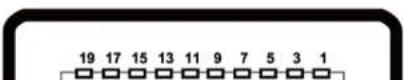
HDMI PIN DEFINITION 4
TECH SUPPORT 5
WARRANTY 5
MISSION STATEMENT....5
INTRODUCTION
The BG-EXHOC HDMI 2.0 Extender over Single Coax with Bi-directional IR boosts your HDMI transmission range up to 110m (363ft) in Ultra HD 4K2K format over a single coaxial cable. BG-EXHOC is easy to install and works perfectly with Belden 1694A coaxial cables. This device is also equipped with bi-directional IR pass-through. This feature allows users to rely on the same coax cable to carry IR control data for devices like displays and media players.
The BG-EXHOC is comprised of two units: transmitter (BG-EXHOC[TX]) and receiver (BG-EXHOC[RX]). The transmission range between the sending and receiving units can be up to 110m (363ft) using Ultra HD (4K2K) with 2 channel audio.
FEATURES
• HDMI 2.0 compliant
• Supports up to 4K2K@60 4:4:4 8bits*
• Extends the transmission range up to 110m (363ft) from the HDMI sources at 4K2K@60 4:4:4 8bits
• HDCP input & output support
- Single coaxial cable
• Uncompressed HDMI over Coaxial cable transmission
• Audio sample rate supports 32KHz, 44.1KHz, 48KHz
• Auto signal equalization
• Supports full frequency IR signal from 20KHz to 60KHz
• Bi-directional IR path
• Wall mounting housing design for easy and robust installation

The range is dependent on the characteristics and quality of the coax cables. Higher resolutions and longer transmission distances require low skew cables for best performance.
PACKAGE CONTENTS
• 1x BG-EXHOC [TX & RX]
• 2x DC 5V wall wart
1x User Manual
SPECIFICATIONS
| Model Name | BG-EXHOC | |
| Technical | ||
| Role of usage | Transmitter [TX] | Receiver [RX] |
| HDMI compliance | HDMI 2.0a | |
| HDCP compliance | Yes | |
| Video bandwidth | Single-link 594MHz [18Gbps] | |
| Video support | up to 4K2K@60 4:4:4 8bits | |
| Audio support | Stereo audio | |
| HDMI over Coax transmission range | Ultra HD [4K2K 24-bit color] – up to 110m [363ft] | |
| HDMI Equalization | Auto | |
| Input TMDS signal | 1.2 Volts [peak-to-peak] | |
| Input DDC signal | 5 Volts [peak-to-peak, TTL] | |
| ESD protection | Human body — ±15kV [air-gap discharge] & ±8kV [contact discharge] | |
| PCB stack-up | 4-layer board [impedance control — differential 100Ω; single 50Ω] | |
| Input | 1x HDMI/ 1x IR socket | 1x BNC/ 1x IR socket |
| Output | 1x BNC/ 1x IR socket | 1x BNC/ 1x IR socket |
PANEL DESCRIPTIONS
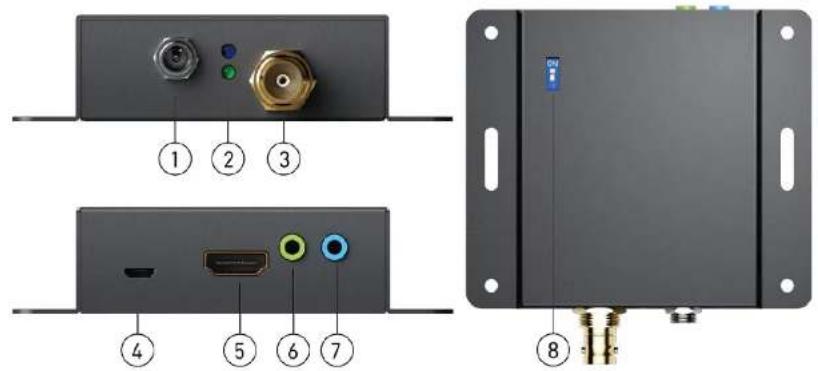
Transmitting unit ▶ BG-EXHOC-TX
text_image
Diagram of an electronic device rear panel with labeled ports and connectors, showing front, top, and side views.- +5V DC: Connects to 5V DC power supply
- POWER/SIGNAL LED: Blue light - POWER; Green light - SIGNAL ACTIVE
- COAX OUT: Connect to coaxial cable
- Micro-USB: for F/W update
- HDMI IN: Connect to HDMI source device
- IR Receiver: Infrared 3.5mm socket for plugging in the extension cable of an IR receiver
- IR Blaster: Infrared 3.5mm socket for plugging in the extension cable of an IR blaster
- DIP Switch: [ON] FW update mode; [OFF] Normal mode
CONNECTION DIAGRAM

text_image
Blu-ray HDMI CABLE IR Receiver control system IR Emitter Display IR Receiver IR Emitter COAX CABLEHDMI PIN DEFINITION
TECH SUPPORT
Before contacting tech support, we may have answered your question already! Visit our BZBGEAR support page at bzbgear.com/support for valuable information on our products.
Here you will find our Knowledge Base (bzbgear.com/knowledge-base) consisting of tutorials, quick start guides, and step-by-step troubleshooting instructions. Also visit our YouTube channel BZB TV at youtube.com/c/BZBTVchannel for help setting up, connecting, and other how-to videos regarding our products.
If you still need answers, please call 1.888.499.9906, email support@bzbgear.com, or chat at bzbgear.com.
WARRANTY
BZBGEAR Pro AV products and Cameras come with a three-year warranty. An extended two-year warranty is available for our Cameras upon registration for a total of five years.
For an extended two-year warranty on our Cameras, follow these steps:
- Register your Camera within 90 days of purchase by visiting bzbgear.com/warranty.
- Complete the registration form. Provide all necessary proof of purchase details, including serial number and a copy of your sales receipt.
For complete warranty information, please visit bzbgear.com/warranty or scan the QR code below.