
Phase Motion 2 - Audio Effects AudioThing - Free user manual and instructions
Find the device manual for free Phase Motion 2 AudioThing in PDF.


| Product Type | Audio effect plugin (stereo phaser) |
| Brand | AudioThing |
| Model | Phase Motion 2 |
| Category | Effects |
| Phasing Stages | Up to 32 |
| LFO Waveforms | 6 (sine, triangle, square, ramp up, ramp down, random) |
| Tempo Sync | Yes (host tempo) |
| Stereo Operation | Yes (independent left/right settings) |
| Preset System | Yes, with randomizer |
| Randomizer | Yes, with parameter locking and unlock all |
| Limiter | Soft clip limiter on output |
| Formats | VST, AU, AAX (32/64-bit) |
| Platforms | Windows, macOS |
| Installation (macOS) | DMG package, right-click to open |
| Installation (Windows) | Extract RAR archive |
| Registration | Required (product key) |
| Maintenance | Regular software updates from developer |
| Safety | No special safety precautions; follow OS guidelines |
| Spare Parts | Not applicable (software) |
| Developer | Carlo Castellano |
| Designer | John Gordon (vstyler) |
Frequently Asked Questions - Phase Motion 2 AudioThing
User questions about Phase Motion 2 AudioThing
0 question about this device. Answer the ones you know or ask your own.
Ask a new question about this device
Download the instructions for your Audio Effects in PDF format for free! Find your manual Phase Motion 2 - AudioThing and take your electronic device back in hand. On this page are published all the documents necessary for the use of your device. Phase Motion 2 by AudioThing.
USER MANUAL Phase Motion 2 AudioThing
PHASE MOTION 2
Table of Contents
- Phase Motion ....3
1.1 Specifications....3
1.2 Installation....3
1.3 Registration....3
- Parameters....4
2.1 Parameter List....4
2.2 Waveforms....4
2.3 Stereo Phaser....4
- Features....5
3.1 Randomizer....5
3.2 Limiter....5
- End.... 5
4.1 Credits....5
4.2 EULA....5
4.3 Thank You....5
1. Phase Motion
Phase Motion is a stereo phaser plugin featuring up to 32 phasing stages. The Rate can be adjusted in Hertz or it can be synced to the host/DAW tempo.
You can choose 6 waveforms (sine, triangle, ramp up, rump down, square, random) to modulate the phase, and you can tweak Depth and Feedback to get a classic vintage phaser sound or extreme digital modulations.
From version 2 you can have different settings for left and right channel.
1.1 Specifications
•32 Phasing Stages
- 6 LFO Waveforms
- Rate can be synced to the host tempo
•Stereo Parameters
- Preset system with randomizer
- Formats: VST, AU, and AAX (32/64bit)
- Platforms: OSX, Windows
1.2 Installation
OSX
- Double click on the DMG image AudioThing_PhaseMotion2.dmg
• Right click on the package Phase Motion v2.0.0.pkg and click open - Follow the instructions to install the plug-in(s)
Windows
- Extract AudioThina PhaseMotion2.rar
2. Parameters
2.1 Parameter List
Invert Inverts the phase sweep of one channel
Sync Selects the range of the Rate knob (Hz or Synced)
Phase Changes the modulation waveform phase
Rate Controls the frequency of the phase modulation
Depth Controls the amount (sweep range) of the phase modulation
Stages Changes the amount of phasing stages (all-pass filters)
Feedback Changes the amount of output fed back into the input
Dry Controls the amount of dry signal
Wet Controls the amount of the effect signal
2.2 Waveforms
The Waveform box lets you choose between 6 different waveforms for the internal modulation LFO: sine, triangle, square, ramp up, ramp down, random. The typical waveform used on most analog stomp boxes is the triangle.
2.3 Stereo Phaser
Phase Motion 2 is a stereo phaser, meaning you can have different settings on each channel. Essentially it is like having two phasers, one for the Left and one for the Right channel.
By clicking on the I or D button, the parameters will
3. Features
3.1 Randomizer
It is possible to randomize all the parameters in the interface by clicking on the Random button in the top bar.
Right-clicking on a parameter will show the Randomizer menu.
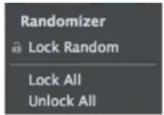
Lock/Unlock Random Decides if the parameter can be randomized
Lock All No parameters will be randomized
Unlock All All parameters will be randomized
By clicking on the More button you can access additional features:
3.2 Limiter
Enables or disables a soft clip limiter on the output.
4. End
4.1 Credits
Programming: Carlo Castellano
Design: John Gordon (vstyler)

Brand : AudioThing
Model : Phase Motion 2
Category : Audio Effects