Megaphone - Audio processor AudioThing - Free user manual and instructions
Find the device manual for free Megaphone AudioThing in PDF.


| Product Type | Audio Processor (VST/AU/AAX plugin) |
| Developer | AudioThing |
| Model | Megaphone |
| License Type | Commercial |
| Platform Compatibility | Windows 7+, macOS 10.12+ |
| Plugin Formats | VST2, VST3, AU, AAX |
| Bit Depth | 64-bit |
| Sample Rate Support | Up to 192 kHz |
| Main Features | Megaphone effect simulation, distortion, high-pass filter, noise, impulse response loading |
| User Interface | Resizable GUI with preset browser |
| Presets | Factory presets included |
| CPU Usage | Low to moderate |
| Installation | Download installer from AudioThing website |
| Activation | Serial number or iLok (machine-based) |
| Manual | PDF included with purchase |
| Warranty | 30-day money-back guarantee |
| Support | Email and forum |
Frequently Asked Questions - Megaphone AudioThing
User questions about Megaphone AudioThing
0 question about this device. Answer the ones you know or ask your own.
Ask a new question about this device
Download the instructions for your Audio processor in PDF format for free! Find your manual Megaphone - AudioThing and take your electronic device back in hand. On this page are published all the documents necessary for the use of your device. Megaphone by AudioThing.
USER MANUAL Megaphone AudioThing
MEGAPHONE
USER GUIDE
v1.5
MEGAPHONE....3
INSTALLATION....3
REGISTRATION....4
PARAMETERS....5
FEATURES....6
RANDOMIZER....6
MONO (L+R)....6
WINDOW SIZE......6
PRESET COPY/PASTE......6
END....7
WHERE IS EVERYTHING?......7
CREDITS....7
EULA....7
THANK YOU....7
MEGAPHONE
Megaphone is a plugin that emulates a bullhorn / loudspeaker effect.
It features two loudspeaker emulations (Mode I and Mode II), feedback control, and a noise section.
Megaphone can be used to make any audio source sound as if it's being played by a bullhorn.
The feedback section is essentially a slapback echo effect. When using megaphones, the Koutput Kof Kthe Kloudspeaker Kcan Kbe Kcaptured Kagain Kby Kthe Kinput Kmicrophone, introducing a delay/reflection and the usual feedback tones (those can be triggered with high gain sources and feedback amount higher than 50%).
The megaphone noises can be enabled by the Trigger button. There are two types of noise: Button and Burst. The button noise is the noise made by clicking on the megaphone button to enable its microphone. The burst is the typical background noise Kof Kthe Kloudspeaker. Klf Kenvelope Kis Kenabled, Kthe KBurst Knoise Kwill Kfollow Kthe transients of the input signal.
INSTALLATION
MAC OS
- Double click on the DMG archive to extract it
• Right click on the PKG installer and click open - Follow the instructions to install the plug-in(s)
WINDOWS
- Extract the ZIP archive
•Double click on the setup file (.exe) - Follow the instructions to install the plug-in(s)
REGISTRATION
In demo mode the plug-in will output silence for 3 seconds every 45 seconds, and you won't be able to save presets.
You can open the registration window by clicking on the ≡ icon next to the bypass button, in the top-right corner.
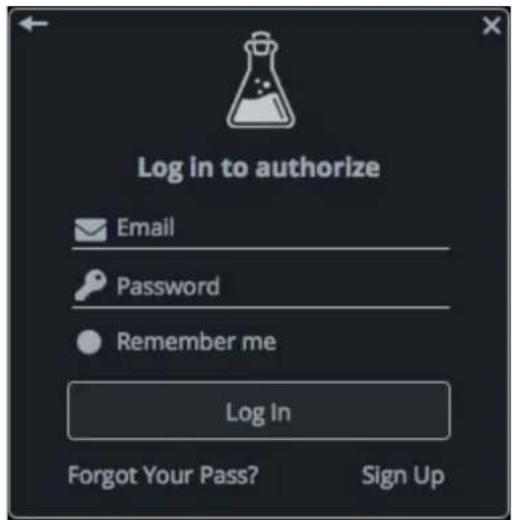
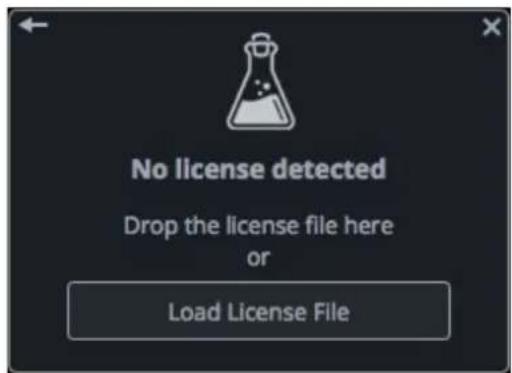
You can choose between Online and Offline authorization.
ONLINE
- If you haven't created an account yet, you can signup here using the same email address used at check out.
• Just input your credentials into the text fields and click on Log In
OFFLINE
- Download the license file from your account.
- Copy the file to your offline computer.
- Just drag and drop the license into the registration window or click on the Load License File button and browse to the downloaded license.
PARAMETERS
Main
Bandwidth Changes the frequency response of the signal Drive Controls the amount of overdrive Mode I / II Change the type of loudspeaker emulation
Feedback
Time Changes the feedback/slapback delay time Amount Controls the amount of feedback/slapback
Noise
Trigger Triggers the noise according to the source selected Envelope Applies an envelope to the burst noise Source Controls the balance between the button and burst noise Level Controls the volume of the noise
Master
Input Controls the amount of Input signal Output Controls the amount of Output signal Limiter Enables or disables the soft clip limiter Mix Controls the balance between wet and dry signals
FEATURES
RANDOMIZER
It is possible to randomize all the parameters in the interface by clicking on the Random button in the top bar.
Right-clicking on a parameter will show the Randomizer menu.
Randomizer
Lock Random
Lock All
Unlock All
Lock/Unlock Random Decides if the parameter can be randomized
Lock All No parameters will be randomized
Unlock All All parameters will be randomized
By clicking on the ≡ icon you can access additional features.
MONO (L+R)
When enabled, turns a stereo signal into a mono signal by summing the left and right channels together.
WINDOW SIZE
You can resize the plugin window using three predefined sizes (small, standard, big). You can also resize the plugin window by clicking and dragging the bottom-right corner of the interface. Double clicking will reset to the standard size.
PRESET COPY/PASTE
You can easily share presets by using this Copy/Paste feature instead of sharing the actual preset file.
By clicking on Copy to Clipboard, the status of all parameters will be saved to the Clipboard.
By clicking on Paste from Clipboard instead, you can load a preset shared using the previous function.
END
WHERE IS EVERYTHING?
The installer will place the plugins, presets and other data in these folders.
MAC OS
AU: /Library/Audio/Plug-ins/Components/
VST: /Library/Audio/Plug-ins/VST/
VST3: /Library/Audio/Plug-ins/VST3/
AAX: /Library/Application Support/Avid/Audio/Plug-Ins/
Data: /Users/Shared/AudioThing/
WINDOWS
VST: custom path from installer
VST3: \Program Files\Common Files\VST3\
AAX: \Program Files\Common Files\Avid\Audio\Plug-Ins\
Data: \Users\Public\Public Documents\AudioThing\
CREDITS
DSP & Code: Carlo Castellano
Design: John Gordon (vstyler)
EULA
Please visit www.audiothing.net/eula/ to review this product EULA.
THANK YOU
Thank you for your purchase! We hope you will have as much fun using it as we had making this product.
For help or any question, feel free to contact us here: www.audiothing.net/contact/

natural_image
Simple line drawing of a laboratory flask with liquid and bubbles (no text or symbols)

Brand : AudioThing
Model : Megaphone
Category : Audio processor