Reels - Processor AudioThing - Free user manual and instructions
Find the device manual for free Reels AudioThing in PDF.


| Product Type | Audio Processor Plugin (Tape Emulation) |
| Plugin Formats | VST2, VST3, AU, AAX (Native) |
| Supported Operating Systems | Windows 7 or later, macOS 10.9 or later |
| Bit Depth | 32-bit float, 64-bit float |
| Sample Rate Support | Up to 192 kHz |
| Key Features | Tape saturation, Wow and Flutter, Noise, EQ section |
| CPU Usage | Low (optimized for real-time use) |
| Presets | Over 50 factory presets |
| License Activation | Online activation via iLok account (machine or iLok dongle) |
| Installation Method | Download installer from AudioThing website |
| Documentation | PDF manual included |
| Support | Email support, FAQ, user forum |
| Maintenance | Keep your DAW and OS updated; no physical cleaning required |
| Safety | No hardware safety concerns; use in accordance with DAW guidelines |
| Spare Parts / Repairability | Not applicable (software); license transferable under iLok policy |
Frequently Asked Questions - Reels AudioThing
User questions about Reels AudioThing
0 question about this device. Answer the ones you know or ask your own.
Ask a new question about this device
Download the instructions for your Processor in PDF format for free! Find your manual Reels - AudioThing and take your electronic device back in hand. On this page are published all the documents necessary for the use of your device. Reels by AudioThing.
USER MANUAL Reels AudioThing
REELS
USER GUIDE
v1.0
REELS....3
INSTALLATION....3
REGISTRATION....4
PARAMETERS......5
INTERFACE......5
TAPE MODELLING....6
TAPE STOP......6
FEATURES....7
RANDOMIZER....7
CLEAR BUFFER....7
ANIMATION....7
WET ONLY LOCK....7
PRESET COPY/PASTE....7
WINDOW SIZE......8
END....9
WHERE IS EVERYTHING?......9
CREDITS....9
EULA....9
THANK YOU....9
REELS
Reels is a tape emulation plugin with built-in echo section and tape-stop effect.
Based on an old Japanese portable tape recorder with a very distinct Lo-Fi analog sound, Reels emulates all the imperfections of consumer reel-to-reel recorders.
We have modeled three different 1/4" tape frequency responses and saturations, along with all the analog imperfections of tape recording/playback.
Use Reels to add a very rough retro analog sound to your mixes. If you are looking for a Hi-Fi mastering tape emulation, this is not the plugin for you!
Reels is based on a vintage reel-to-reel recorder, ironically marked as High Fidelity, found in a distressed state at a local flea market. Most of these consumer tape recorders, also due to their age, produce has a very rough Lo-Fi analog sound.
During recording or playback, the motor noise bleeds in, along with the usual tape hiss, limiting the actual bandwidth available on the tape.
Reels recreates all the imperfection of vintage reel-to-reel recorders, including:
• Harshness, harmonic distortion with loss of clarity (mid-range)
- WOW/Flutter, pitch instabilities due to recording and playback issues
- Ducking, random volume loss due to tape or rec/play head imperfections
• Crosstalk, the leak between left and right channel in a stereo signal
- Hiss, high-frequency noise caused by the magnetic particles in the tape
• Motor, mid-frequency noise caused by the reels motor
INSTALLATION
MAC OS
- Double click on the DMG archive to extract it
- Right click on the PKG installer and click open
- Follow the instructions to install the plug-in(s)
WINDOWS
- Extract the ZIP archive
•Double click on the setup file (.exe) - Follow the instructions to install the plug-in(s)
REGISTRATION
In demo mode the plug-in will output silence for 3 seconds every 45 seconds, and you won't be able to save presets.
You can open the registration window by clicking on the ≡ icon next to the bypass button, in the top-right corner.
You can choose between Online and Offline authorization.
ONLINE
- If you haven't created an account yet, you can signup here using the same email address used at check out.
- Just input your credentials into the text fields and click on Log In

OFFLINE
- Download the license file from your account.
- Copy the file to your offline computer.
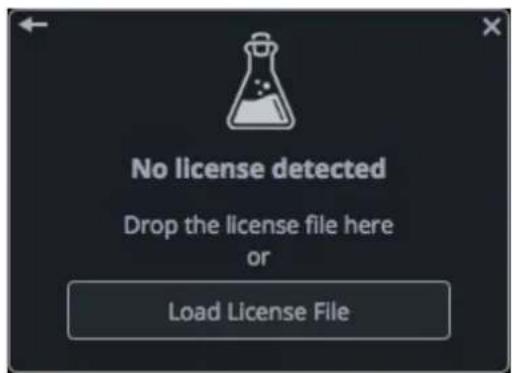
- Just drag and drop the license into the registration window or click on the Load License File button and browse to the downloaded license.
PARAMETERS
INTERFACE
TAPE
Tape Type Selects between three kind of tape emulations (see below)
Tape Speed Selects the speed of the tape affecting the frequency response
Harshness Controls the amount of distortion and loss of clarity in the tape
WOW / Flutter Controls the amount of pitch imperfections in the sound
Ducking Controls the amount of volume loss of the tape emulation
Crosstalk Controls the amount of leak between the left and right channel
TAPE
Hiss Controls the amount of tape noise
Motor Controls the amount of motor noise
Env Enables/disables the envelope to activate the noise only when an input signal is passing through
ECHO
Echo Bypass Enables/disables the Echo section
Echo Sync Syncs the delay time to the host/DAW BPM
Time Controls the time between each repetition
Feedback Controls the amount of feedback, increasing the amount of repetitions in the echo signal
Lowpass Controls a low-pass filter inside the feedback loop
Wet Only Disables the Dry signal
MASTER
Input Controls the amount of input signal
Output Controls the amount of output signal
BOTTOM
Limit Enables/disable a soft clip limiter
Mono Sums the left and right channel of a stereo signal
Pre-Emphasis Boosts high frequencies before the tape emulation section
Rec / Stop Starts/stops the tape-stop effect
Speed Controls the time of the tape-stop effect
Mix Controls the balance of the wet and dry signals
TAPE MODELLING
We've modeled three different tape types, from ruined to NOS (new old stock) state. The tape types are named after the country of origin: JP (Japan), IT (Italy), FR (France).
JP Used tape but with an overall better frequency response
IT New old stock but with a limited frequency response
FR Overused and badly stored, very bad frequency response
Each tape will affect the sound in different ways, especially at higher feedback settings when using the Echo section.
WOW/Flutter, Ducking, and other parameters will also change according to the selected tape, creating different amount of pitch and volume changes.
TAPE STOP
When pressing stop on a reel-to reel-player, the tape doesn't stop immediately. Instead, it slows down creating a pitch down and fade out effect.
You can replicate this effect with Reels, and you can also change the speed of the tape stop effect.
FEATURES
RANDOMIZER
It is possible to randomize all the parameters in the interface by clicking on the Random button in the top bar.
Right-clicking on a parameter will show the Randomizer menu.
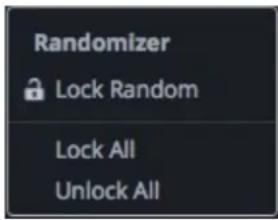
Lock/Unlock Random Decides if the parameter can be randomized
Lock All No parameters will be randomized
Unlock All All parameters will be randomized
By clicking on the ≡ icon you can access additional features.
CLEAR BUFFER
When enabled, every time your host/DAW starts playback or resets, Reels will clear the feedback loop of the Echo section. You have two options: Host Playback and Host Reset. Since every DAW is different, you might need to try both settings to see what works best in your system.
ANIMATION
When disabled, the reels animation will not play. This might save same CPU on older systems.
WET ONLY LOCK
If this option is enabled, changing presets won't affect the Wet Only selector. This option can be useful when using Reels (with the Echo section on) as a send effect while browsing the presets.
PRESET COPY/PASTE
You can easily share presets by using this Copy/Paste feature instead of sharing the actual preset file.
By clicking on Copy to Clipboard, the status of all parameters will be saved to the Clipboard.
By clicking on Paste from Clipboard instead, you can load a preset shared using the previous function.
WINDOW SIZE
You can resize the plugin window using three predefined sizes (small, standard, big). You can also resize the plugin window by clicking and dragging the bottom-right corner of the interface. Double clicking will reset to the standard size.
END
WHERE IS EVERYTHING?
The installer will place the plugins, presets and other data in these folders.
MAC OS
AU: /Library/Audio/Plug-ins/Components/
VST: /Library/Audio/Plug-ins/VST/
VST3: /Library/Audio/Plug-ins/VST3/
AAX: /Library/Application Support/Avid/Audio/Plug-Ins/
Data: /Users/Shared/AudioThing/
WINDOWS
VST: custom path from installer
VST3: \Program Files\Common Files\VST3\
AAX: \Program Files\Common Files\Avid\Audio\Plug-Ins\
Data: \Users\Public\Public Documents\AudioThing\
CREDITS
DSP & Code: Carlo Castellano
Design: John Gordon (vstyler)
Presets: RM (Ry Manning), LK (Kontis Leonidas)
EULA
Please visit www.audiothing.net/eula/ to review this product EULA.
THANK YOU
Thank you for your purchase! We hope you will have as much fun using it as we had making this product.
For help or any question, feel free to contact us here: www.audiothing.net/contact/



- REELS
- USER GUIDE
- REELS....3
- PARAMETERS......5
- FEATURES....7
- END....9
- INSTALLATION
- MAC OS
- WINDOWS
- REGISTRATION
- ONLINE
- OFFLINE
- PARAMETERS
- INTERFACE
- TAPE
- ECHO
- MASTER
- BOTTOM
- TAPE MODELLING
- TAPE STOP
- FEATURES
- RANDOMIZER
- CLEAR BUFFER
- ANIMATION
- WET ONLY LOCK
- PRESET COPY/PASTE
- WINDOW SIZE
- END
- WHERE IS EVERYTHING?
- CREDITS
- EULA
- THANK YOU
Brand : AudioThing
Model : Reels
Category : Processor