PSCN42 - Pregnant Pyle - Free user manual and instructions
Find the device manual for free PSCN42 Pyle in PDF.


User questions about PSCN42 Pyle
0 question about this device. Answer the ones you know or ask your own.
Ask a new question about this device
Download the instructions for your Pregnant in PDF format for free! Find your manual PSCN42 - Pyle and take your electronic device back in hand. On this page are published all the documents necessary for the use of your device. PSCN42 by Pyle.
USER MANUAL PSCN42 Pyle
natural_image
Black PYLE-branded audio device with blue trim and control buttons (no readable text or symbols beyond branding)PSCN42
Portable Conference Speakerphone
Multifunctional Wireless BT Streaming Speaker with USB-C Data Cable and 3.5mm Aux Cable
USER GUIDE
Please read these operating instructions before using the unit and save them for future reference.
Introduction
This is a multifunctional Wireless BT speaker with professional-quality for meetings at home, in office or on-the-go. You can use it as a basic Wireless BT speaker too. If you want to have a better experience, please read this instruction carefully.
Important:
Your speakerphone is shipped from the factory in a deep sleep mode to conserve battery. Activate your speakerphone by connecting the USB cable to a power source before first use.
What's in the Box:
• Conference Speakerphone
- Protective Carrying Case
- USB-C Data Cable
- 3.5mm Aux Cable
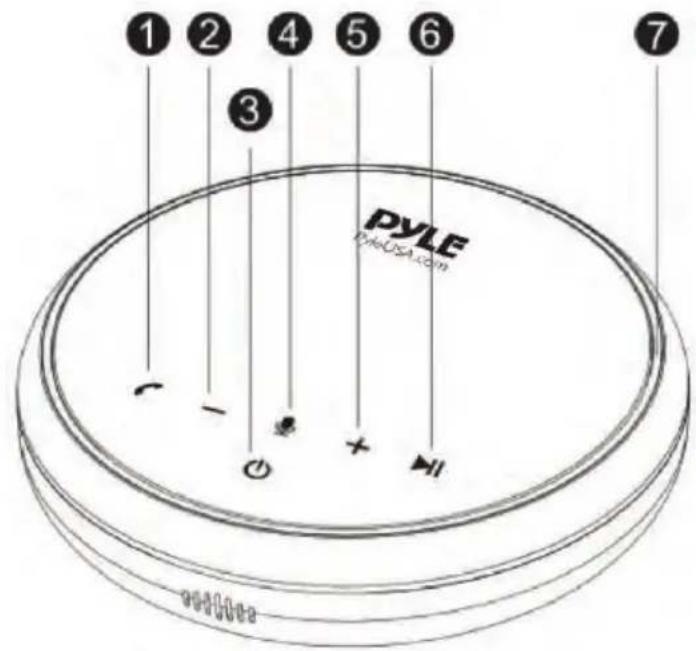
At a Glance
- Phone call button
- Volume down
- Power button
- Mute button
- Volume up
- Pause/Play
- Status LED
-
Audio Input port
-
USB port (type-C) for charging
text_image
① ② ③ PYLE PyleUSA.com ⑦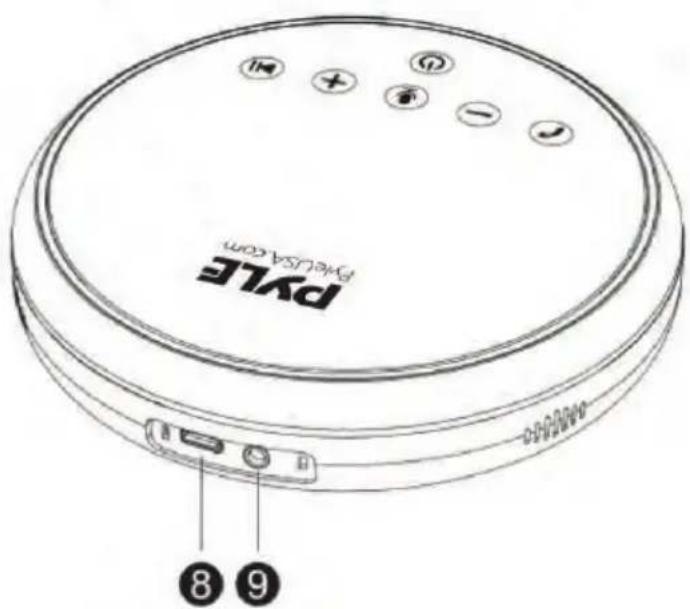
text_image
PVLE PVLE USA.com 8 9Connecting
a. Connect to your computer by using a USB-C data cable.

text_image
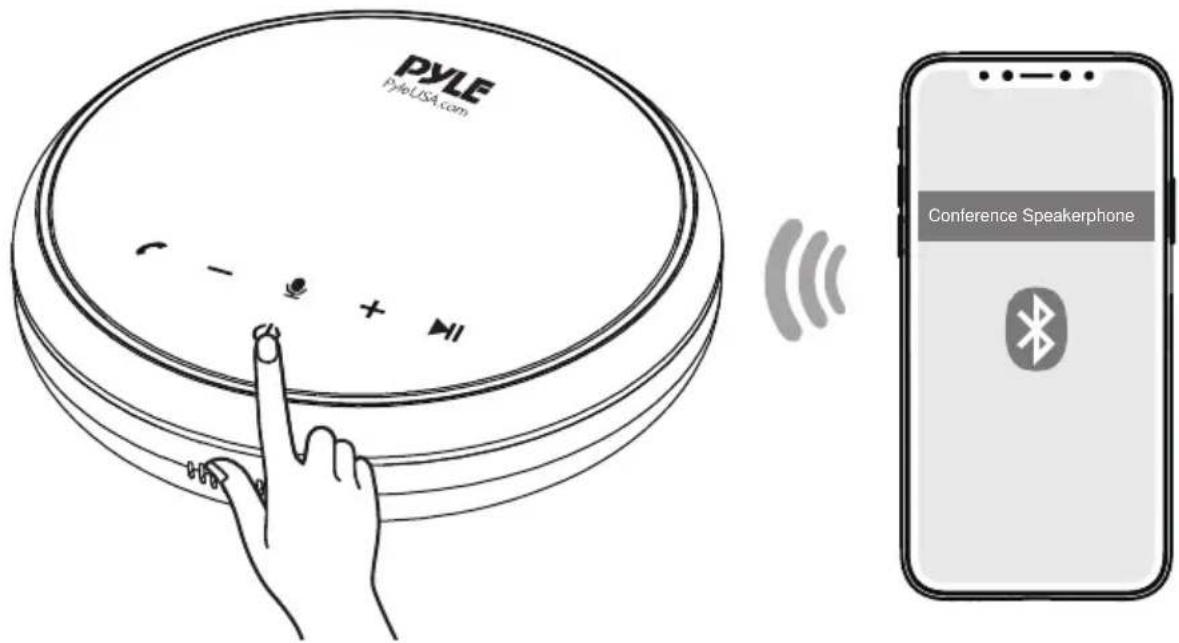
Diagram showing connection between a laptop and a PAVE device via USB cable, with a close-up of the device's cable.b. Connect to your computer or mobile device via Wireless BT pairing. Power ON this product for the first time, it will automatically enter the Wireless BT pairing mode.
Note: in our sample, usually the Wireless BT pairing name is PYLE Conference Speaker
text_image
PYLE PyleUSA.com Conference Speakerphone| Flashes blue quickly Enter | Wireless BT pairing mode | |
| Flashes blue every 5 seconds | Wireless BT paired |
Each time you power on the product, it will automatically connect with the last successfully connected device if available.
Powering ON/OFF
Press and hold the power button for 2 seconds to power ON. The status LED will light on counterclockwise and then fade out. To power OFF, press and hold the power button for 2 seconds.
Power LED behavior
 | Flashes light purple slowly and turns blue and flashes quickly in circles | Power ON |
 | Flashes red in circles and light off | Power OFF |
- Once connected to your computer, it will automatically power ON.
- It will automatically power off after 4 minutes of inactivity when the Wireless BT is not paired.
Button Controls

Press to increase and decrease Volume

Press to Answer/End a call
Press and hold for 2 seconds to reject a call

Press to Mute or restore the microphone

Press to Play/Pause music
Status LED behaviors
- Steady purple: USB connected to computer
- No LED Flash but a "beep": Incoming call
- Lights up light purple counterclockwise or counterclockwise:
Increase or decrease volume - Steady red: Muted
- Lights up red: Press Power button to check the battery level
- Steady blue: Aux connected
- Flashes blue every 5 seconds: Wireless BT paired
Charging
Power LED behavior
• Steady purple: Being charged
• Light off: Fully charged
- Flashes red: Low battery
Audio Input
Connect an external audio source to the AUX jack of this product by using an AUX cable (included). The audio will be played through the speakerphone.
Wireless BT Streaming:
• Built-in BT for Wireless Music Streaming
• Simple & Hassle-Free Pairing
- Works with All of Today's Latest Devices
Smartphones, Tablets, Laptops, Computers, etc.
- Wireless BT Version: V5.1
- Wireless BT Pair Name: "PYLE Conference Speaker"
- Wireless Range: Up to 32' ft
Features:
- Easy to use with Dedicated Answer/End, Volume Control, and mute buttons
- Compatible with Windows Microsoft Team
• HD Voice for conversations in High-Definition sound quality,
• Supports USB TO Mobile/PC, AUX TO Mobile/PC, and Bluetooth TO Mobile/PC - Optimizes the Voices on the other End to Enable To Hear Clearer
- Powered by Qualcomm Bluetooth A2DP Technology for Crystal Sound
• Universal Compatibility, Services such as Skype, Zoom, Microsoft Teams, WebEx, etc. - Private Acoustic Algorithm "SWISS" to Provide a Truly Wireless Immersive Sound System
Technical Specs:
• Microphone: Omni-directional MIC (3PCS)
• Microphone Sensitivity: -27dB;
• Microphone Distortion: ≤3%;
- Microphone SNR:70dB;
• Microphone Coverage: 10 meters (33 feet);
• Microphone Frequency Response: 100Hz-7.5KHz;
• Talk Time: Up to 12 hours
• Music streaming: Up to 10 hours
• Rechargeable Lithium-ion Battery: 2600mAh
- Charging Time: 3 hours
- Speaker: 2.05'' × 0.91'' -inches, 4 , 3 Watts;
- Speakerphone Dimensions: 5.12" x 1.4"-inches
12-Hour Call Time (under max volume)
2600mAh battery powers meeting in wireless mode

natural_image
Overhead view of five business professionals in a meeting around a table with laptops and a digital interface (no visible text or symbols)
text_image
PYLE BY-DAJSA.COM C I G X MIICalifornia Prop 65 Warning
! WARNING:
This product contains Lead (Pb) which is known to the state of California to cause cancer birth defects and other reproductive harm. Do not ingest.
For more info go to: www.P65warnings.ca.gov
PYLE
PyleUSA.com

natural_image
Illustration of a laptop with a checkmark icon on the screen (no text or symbols)VISIT US ONLINE:
Have a question?
Need service or repair?
Want to leave a comment?
PyleUSA.com/ContactUs
PYLE
Questions? Issues?
We are here to help!
Phone: (1) 718-535-1800
Email: support@pyleusa.com