ACCB100 - Heat pump DIMPLEX - Free user manual and instructions
Find the device manual for free ACCB100 DIMPLEX in PDF.


User questions about ACCB100 DIMPLEX
0 question about this device. Answer the ones you know or ask your own.
Ask a new question about this device
Download the instructions for your Heat pump in PDF format for free! Find your manual ACCB100 - DIMPLEX and take your electronic device back in hand. On this page are published all the documents necessary for the use of your device. ACCB100 by DIMPLEX.
USER MANUAL ACCB100 DIMPLEX
natural_image
Exterior view of a white industrial air conditioning unit with a circular vent and grid-patterned panel (no visible text or symbols)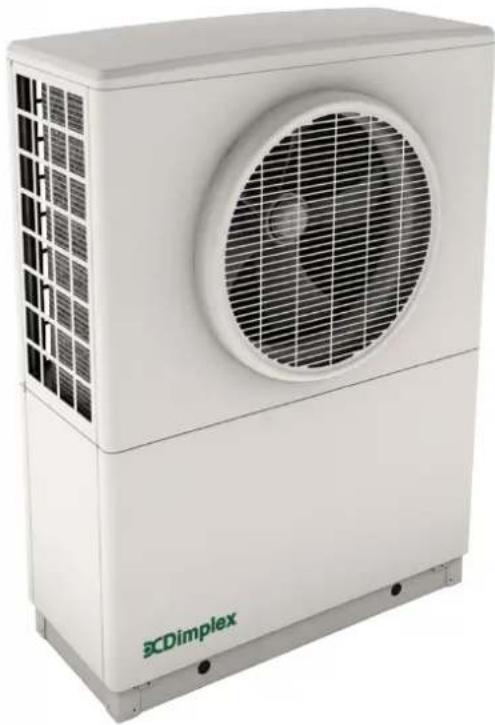
natural_image
Exterior view of a white BCDimplex air conditioning unit with fan grille and ventilation grille (no text or symbols on body)DCDimplex®
A-Class Heat Pumps
A8M, A12M & A16M Installation Manual
dimplex.co.uk
8/60472/0
Issue 1.07
Contents
1. Introduction 5
1.1 Manual Information 5
1.2 Important Safety Information 6
1.3 Intended Use 8
1.4 Legal 8
1.5 Heat Pump Labels and Pipe Connections 9
1.6 Heat Pump Dimensions 9
1.7 Scope of Delivery 10
1.7.1 Installation pack 1 - Space heating and Dimplex A-Class cylinder 11
1.7.2 Installation pack 2 - Space heating and Dimplex standard cylinder 12
1.7.3 Installation pack 3 - Space heating only 13
2. Important pre-installation information 14
2.1 Connection to the Grid - Notifying the DNO 14
2.1.1 Heat Pump Sizing 14
2.2 Heat Pump Location 14
3. Installation instructions 16
3.1 Positioning and fixing the heat pump 16
3.1.1 Temperature Control Devices 18
3.1.2 Space Heating Zones 19
3.1.3 Location of Wiring Centre 19
4. Installation 20
4.1 Important - Plumbing Information 20
4.1.1 Pipe Sizing Information 22
4.1.2 Buffer tank 23
4.1.3 Adjusting the spring loaded by-pass valve (if fitted) 23
4.1.4 Metering for the Domestic Renewable Heat Incentive - UK 24
4.2 Electrical Information 25
4.2.5 Access to Electrical Connections - Opening the heat pump 25
4.2.6 Electrical Connections - power and Modbus cable heat pump connections 26
4.2.7 Modbus Cable Information 28
4.2.8 Opening and Installing the User Interface 28
4.3 Heat Pump Controller / Commissioning 30
4.3.1 Important pre-startup information 30
4.4 Commissioning 31
4.4.1 Starting the heat pump in cold weather 31
4.4.2 General / Schematic 31
4.4.3 Waterside Check 33
4.4.4 Temperature Check 34
4.4.5 Electrical connections 34
4.4.6 Water Flow Check 34
4.4.7 DHW set-up 36
4.4.8 Electrical connections (DHW) 36
4.4.9 DHW Test 36
4.4.10 Disinfection (thermal) 38
4.4.11 Weather compensation 39
4.4.12 Heating curves 39
4.4.13 Comfort level 40
4.4.14 Setup complete 40
4.5 Additional Installer Menu Options 40
4.5.1 Service menu 40
4.5.2 Message log 40
4.5.3 Output Tests 41
4.5.4 Defrost 41
4.5.5 Operating data 41
4.5.6 History 41
5. System Health Check / Maintenance 42
5.1 Heat pump: 42
5.2 Electrical: 42
5.3 Hydraulics: 42
5.4 Indoor settings: 42
6. Appendices 43
6.1 Technical Specifications 44
6.2 Refrigeration cycle 45
6.3 Schematics - Example 1 46
6.4 Schematics - Example 2 47
6.5 Schematics 1, 2, 3 & 4 : Space Heating Only 48
6.6 Schematics 5, 6, 7, 8 : Zone space heating + DHW 49
6.7 Schematics 9, 10, 11, 12 : Bivalent space heating 50
6.8 Schematics 13, 14, 15, 16 - Bivalent zone space heating + DHW 51
6.9 Wiring centre electrical configurations - with non A Class cylinder / no cylinder 52
6.10 Wiring centre electrical configurations - with A Class cylinder 53
6.11 Jumper configurations 54
6.12 Controller cable connections 55
6.13 Installer menu flow chart 56
6.14 Installer hand-over form 57
6.15 Certificate of Conformity 58
1. Introduction
1.1 Manual Information
NOTE: This manual is intended for electricians and qualified installers only!
This manual is intended for installers and electricians installing Dimplex A-Class air-source heat pumps. All installers must have prior knowledge regarding the installation of Dimplex A-Class air-source heat pump systems, and must be competent to install the system safely and successfully.
Installers must have knowledge of any local or national standards, codes or regulations that may apply, as well as safe methods of practice. Dimplex accept no responsibility for compliance with these codes and regulations on the part of the installer.
All electrical installations must be carried out in accordance with local and national standards and regulations, including BS 7671.
NOTE: Repair should not be attempted by unqualified persons.
NOTE: Retain this manual for information
The instructions included in this manual are important for the correct installation and use of Dimplex A-Class air-source heat pumps. Please ensure that you retain this manual for reference.
The specifications and information supplied in this manual may be subject to change without notice at the discretion of Dimplex. All attempts have been made to ensure that this document is complete and that the information supplied is correct at the time of publication, however Dimplex will assume no responsibility for damages (including consequential and indirect / accidental damages) resulting from reliance on the information presented in this document.
NOTE: Check that you have the latest issue of this manual before installation.
NOTE: Go to http://www.dimplex.co.uk/customer_support/downloads and enter your A-Class heat pump model number for the latest PDF download of this manual.
These original instructions must be left with the user after installation, including the hand-over form at the back, where the installer should record key information during commissioning.
Unauthorised reproduction of this document is prohibited.
1.2 Important Safety Information

text_image
Maximum Tilt Angle 45°Figure 1: Maximum tilt angle
- Do not tilt the heat pump by more than 45^ in any direction.
• Do not lift without using correct lifting devices. - Ensure that all clearance dimensions are observed - this is important for correct heat pump operation and air flow.
- Use a suitable lifting device in accordance with any relevant health and safety regulations.
• Do not move or transport the heat pump flat.
WARNING: When using lifting rods to lift the heat pump, straps must also be used to prevent toppling.
NOTE: Leaving a clear pathway for delivery will allow the heat pump to be delivered as close to the installation site as possible to minimize moving / lifting.
- Never use cleaning agents containing sand, soda, acid or chloride as these can damage surfaces / components.
- Do not use muddy or dirty water to fill the heating system. This can cause components to malfunction and poses a corrosion risk to the system.
- If the heat pump may be disconnected from the power supply for long periods of time, or where power supplies are susceptible to failure, antifreeze must be added to the system.
Example: Mono ethylene glycol at 25% volume to protect down to -14°C in a holiday home.
- Use a suitable filtration protection system and a corrosive additive to prevent the formation of oxides or solids in the heat pump condenser.
- This appliance can be used by children aged from 8 years and above and persons with reduced physical, sensory or mental capabilities or lack of experience and knowledge if they have been given supervision or instruction concerning use of the appliance in a safe way and understand the hazards involved.
• Children shall not play with the appliance. - Cleaning and user maintenance shall not be made by children without supervision.
NOTE: The heat pump contains refrigerant at high pressure.
Safety measures are in place to avoid system pressure build up;
Stage 1: Pressure transducer stops compressor.
Stage 2: Pressure switch switches heat pump off. All safety devices reset automatically.
WARNING: Before removing the cover of the heat pump, cylinder or wiring centre, ensure that all electrical circuits are isolated.
NOTE: The heat pump has a multi-layered, software generated alarm management system, which prevents it from running outside its operating limits.
NOTE: If an alarm / message occurs, the heat pump will attempt to take remedial action before causing the system to stop completely if the problem persists. However, the overriding safety feature is the high pressure switch, which de-energises the main contactor supplying power, in accordance with EN378.
NOTE: This device is suitable for mains connection only (230V, 1P&N, 50Hz) and is not suitable for operation with an electrical generator or power modulator, due to possible effects on the quality of the electrical supply. Any attempt to do so will void warranty.
- Means for disconnection from the supply mains must be incorporated into the fixed wiring in accordance with the national wiring regulations.
- This device must be installed in accordance with national wiring regulations.
- The local wiring regulations should always be followed paying particular attention to the mixing of low voltage and extra low voltage cabling.
- Ensure the incoming power supply and the distribution board are suitably rated.
- Ensure that the regulations specified by the local electricity supplier have been adhered to.
- All fuse rating and protective overload device information is provided in the wiring label located on the inside of the front bottom panel of the heat pump. For instruction on how to remove this panel please see section 3.1.
- The installation of a heat pump designated residual current device (type B RCD) having a rated residual operating current not exceeding 30mA is recommended, in accordance with local regulations (BS7671 for UK installations).
- The correct earthing (grounding) of the heat pump is of the utmost importance.
CAUTION: The heat pump has a high leakage current and must be properly grounded for safety in accordance with local and national regulations regarding equipment with a leakage current exceeding 3.5ma.
CAUTION: Two separate, designated RCD devices should be fitted - one for the heat pump and one for the cylinder. The heat pump system must not share an already existing domestic RCD device.
1.3 Intended Use
This product is designed to extract heat from outside air to provide energy for a water-based heating system, and is intended for domestic and light commercial use. Any other use beyond that intended by the manufacturer is prohibited. This requires the user to abide by the manufacturer's product information. Please refrain from tampering with or altering the device.
NOTE: Additional heating may be required if the heat pump is intended to dry out a new or renovated building, as the initial heat load may be higher than the design load.
1.4 Legal
The construction and design of the heat pump complies with all relevant EU directives (see CE declaration of conformity in Appendices section).
When connecting the heat pump to the power supply, the relevant EN and IEC standards must be adhered to. Any further connection requirements stipulated by the network operation must also be observed.
When connecting to the heating system all applicable regulations must also be adhered to.
NOTE: Products not installed with the Dimplex hydraulics packs will not be supported by Dimplex. This includes but is not limited to thermal stores.
NOTE: Installation and any service work on the heat pump may only be performed by an authorised and qualified installer and after-sales service technicians.
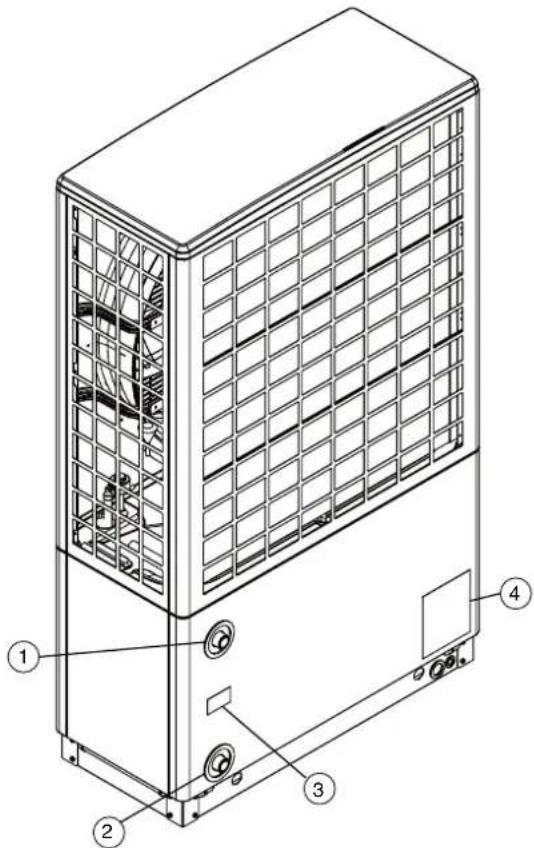
1.5 Heat Pump Labels and Pipe Connections
text_image
Technical diagram of a multi-story HVAC unit with labeled components and structural details① Water outlet connection
② Water inlet connection
③ Water connection label
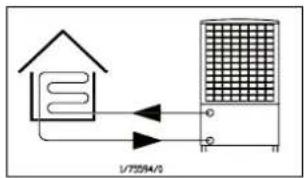
text_image
1/72594/3④ Rating label

text_image
DC Dimplex Name: DIPY Atria Water Divisions Speed Unit Parts Gan# Co. 001 Havens Fusca# SFA High Pressure DAP/MPB Pressure Filter 0.90 Standard pressure range 8.5 MPa RITDCA Rating Max. Rate Max. Rate Max. Rate Max. Rate Operating type: Up to 3000000000000000000000000000000000000000000000000000000000000000000000000000000000000 Production NO. Weight 1222 MPa 1222 MPa 1222 MPa 1222 MPa 1222 MPa 1222 MPa 1222 MPa 1222 MPa 1222 MPa 1222 MPa 1222 MPa 1222 MPa 1222 MPa 1222 MPa 1222 MPa C E T W M C A P R O N T I N G U T H I N G U T H I N G U T H I N G U T H I N G U T H I N G U T H I N G U T H I N G U T H I N G U T H I N G U T H I N G U T H I N G U T H I N G U T H I N G U T H I N G U T H I N G U T H I N G U T H I N G The product cycle is mechanical used. Conflates Hydro-Inductors and Laser-Inductors in the process of the product. As well as the product is not currently used in the current portion of the product.Figure 2: Heat pump connections and labels
1.6 Heat Pump Dimensions

text_image
Vertical Height A8M - 1260mm A12M / A16M - 1571mm 400mm 930mm Heat Pump Volume A8M - 0.47m³ A12M / A16M - 0.59m³ Ø30mm holes for lifting rodsFigure 3: Heat pump dimensions
1.7 Scope of Delivery
Please ensure you check the scope of delivery before signing any delivery documentation.
Below is a guideline checklist for what should be contained in each pack.
Claims for missing or damaged parts after signing for the delivery will not be accepted.
There are 3 options to select from when installing a Dimplex Heat Pump:
Pack 1 - Space heating and Dimplex A-Class Cylinder
This pack should contain four boxes;
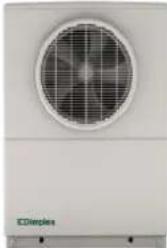
- Heat Pump
- ACCHYPK Hydraulics Kit A (contains all of the necessary hydraulic components)
- Cylinder
- Cylinder Accessories
A separate wiring centre is not required as the wiring centre is built into the cylinder.
Pack 2 - Space heating and Dimplex Standard Heat Pump Cylinder
This pack should contain five boxes;
- Heat Pump
- ACCHYPK Hydraulics Kit A (contains all of the necessary hydraulic components)
- Cylinder
- Cylinder Accessories
- Wiring Centre
A separate wiring centre is required as the wiring centre is not built into the standard cylinder.
Pack 3 – Space heating only
This pack should contain three boxes;
- Heat Pump
- ACSHYPK Hydraulics Kit B (contains all of the necessary hydraulic components)
- Wiring Centre
- Accessories
A separate wiring centre is required to wire the circulation pumps and controls.
NOTE: Details for each installation pack are shown on pages 11-13.
All hydraulic kits listed in the following tables include the following documents;
• ASHP Installation manual, part number 8/60472/0 A8M, A12M, A16M
• ASHP User manual, part number 8/60476/0 A8M, A12M, A16M
Please ensure that these manuals are left with the end user. Manuals must be stored safely for future reference.
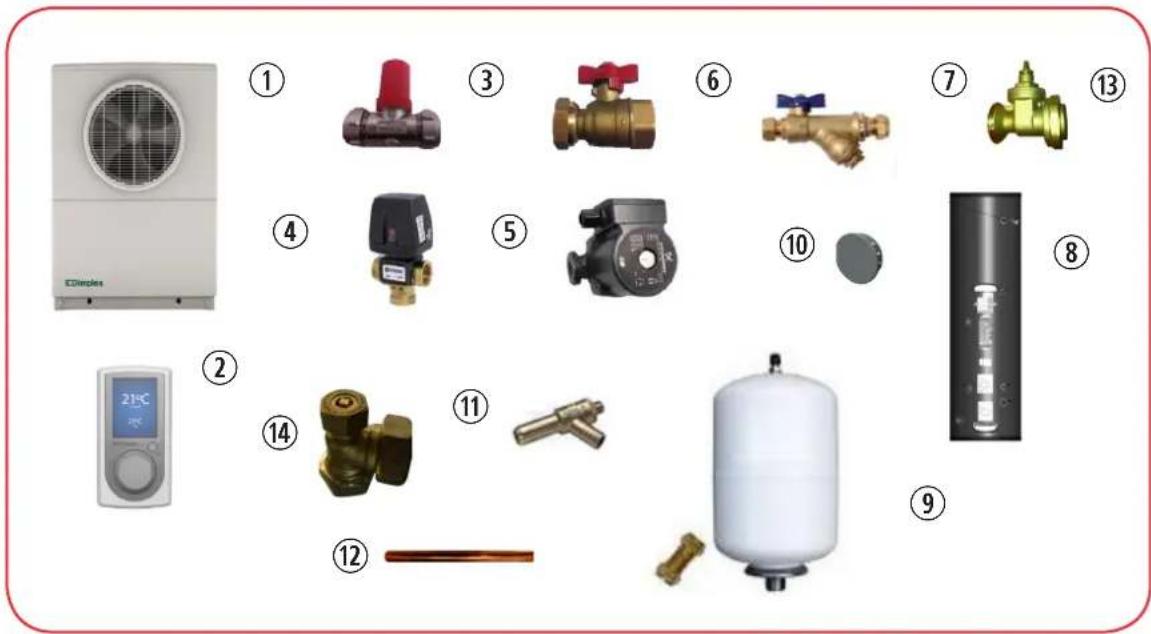
1.7.1 Installation pack 1 - Space heating and Dimplex A-Class cylinder
text_image
Exploded view diagram of various household air conditioners and pressure vessels with numbered labels| No. | Description Part No. | |
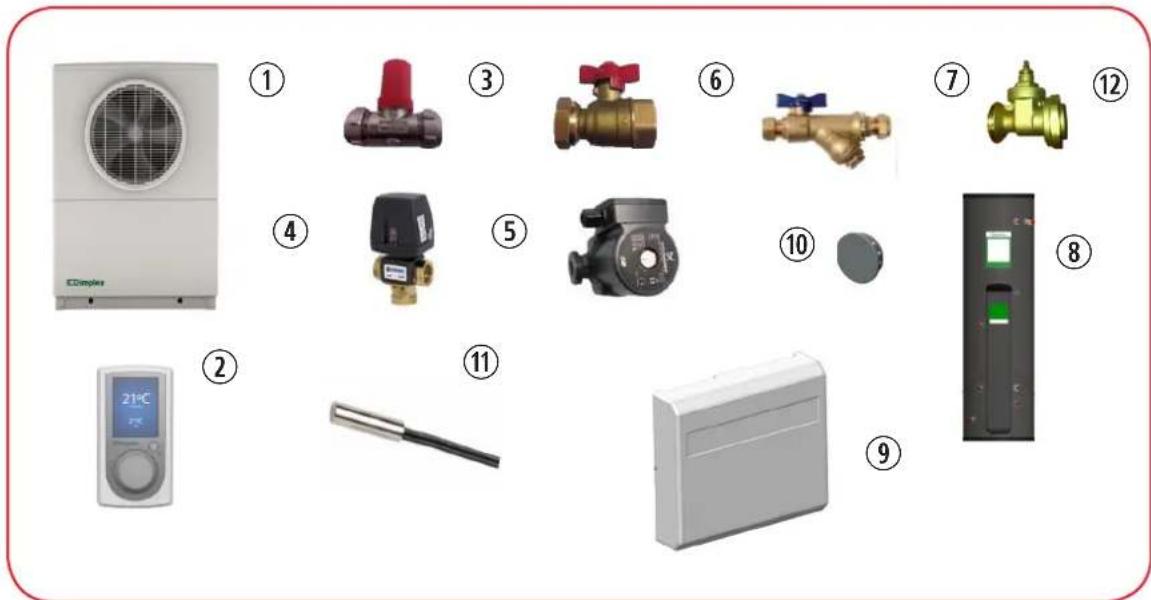
| 1 A-Class heat pump A8M / A12M / A16M | ||
| 10 Blanking plugs (x4, stored inside heat pump) 4592624105 | ||
| Hydraulics Kit A ACCHYPK | ||
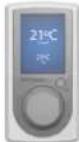
| 2 User interface (UI) 1754600 | ||
| 3 ERES spring loaded by-pass valve (22mm comp. fitting) 1755780 | ||
| 4 3-port diverting valve (28mm comp. fittings) 1755750 | ||
| 5 Pump - UPM GEO 25-85 180 (1500mm cable) 1755740 | ||
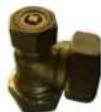
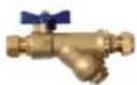
| 6 Isolation valves (1” swivel BSP to 28mm comp.) - Flow 1755760 | ||
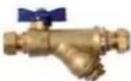
| 7 Isolation valves (1” swivel BSP to 28mm comp.) - Return with strainer 1755770 | ||
| 13 | 2 x Circulation Pump Gate Valve 11/2” swivel to 28mm comp2 x Washer 30.1x21x2mm | 1756090 |
| Dimplex A-Class cylinder kit, which includes; | ||
| 8 A-Class cylinder with integrated buffer | ||
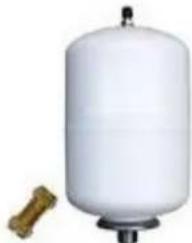
| 9 | Safety group DHW side; expansion vessel, hose and bracket, inlet group,tundish | |
| 11 Drain | ||
| 12 3x copper pipes - Pump to buffer / cylinder | ||
| 14 Air vent | ||
| Pipe connections to coil, pipe, drain and vent.Pipe connections to pump. | ||
natural_image
Exterior view of a white industrial air conditioner unit with fan grille (no visible text or symbols)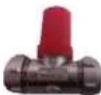




natural_image
White cylindrical pressure vessel with a small wooden bolt beside it (no text or symbols visible)1.7.2 Installation pack 2 - Space heating and Dimplex standard cylinder
text_image
Exploded view diagram of various household air conditioners with numbered labels and icons| No. | Description Part No. | |
| 1 | A-Class heat pump A8M / A12M / A16M | |
| 10 | Blanking plugs (x4, stored inside heat pump) 4592624105 | |
| Hydraulics Kit A ACCHYPK | ||
| 2 | User interface (UI) 1754600 | |
| 3 | ERES spring loaded by-pass valve (22mm comp. fitting) 1755780 | |
| 4 | 3-port diverting valve (28mm comp. fittings) 1755750 | |
| 5 | Pump - UPM GEO 25-85 180 (1500mm cable) 1755740 | |
| 6 | Isolation valves (1" swivel BSP to 28mm comp.) - Flow 1755760 | |
| 7 | Isolation valves (1" swivel BSP to 28mm comp.) - Return with strainer 1755770 | |
| 12 | 2 x Circulation Pump Gate Valve 11/2" swivel to 28mm comp2 x Washer 30.1x21x2mm | 1756090 |
| 8 | Dimplex standard cylinder | |
| Wiring centre module, which includes; | ||
| 9 | Wiring centre module | 049162 |
| 11 | 1 x Temperature probe (NTC10) for DHW | |
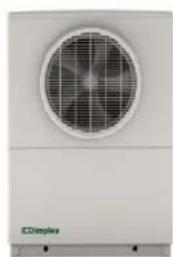
natural_image
Front view of a white industrial air conditioner unit with a circular fan and grid grille (no visible text or symbols)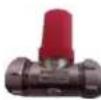
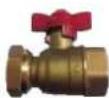


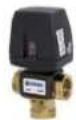


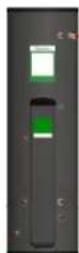

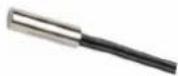
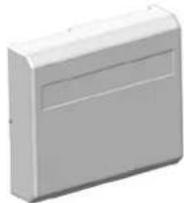
NOTE: Cylinder required for pack 2 installation; please see Dimplex EC-EAU cylinder manual for range of non A-Class cylinders.
1.7.3 Installation pack 3 - Space heating only
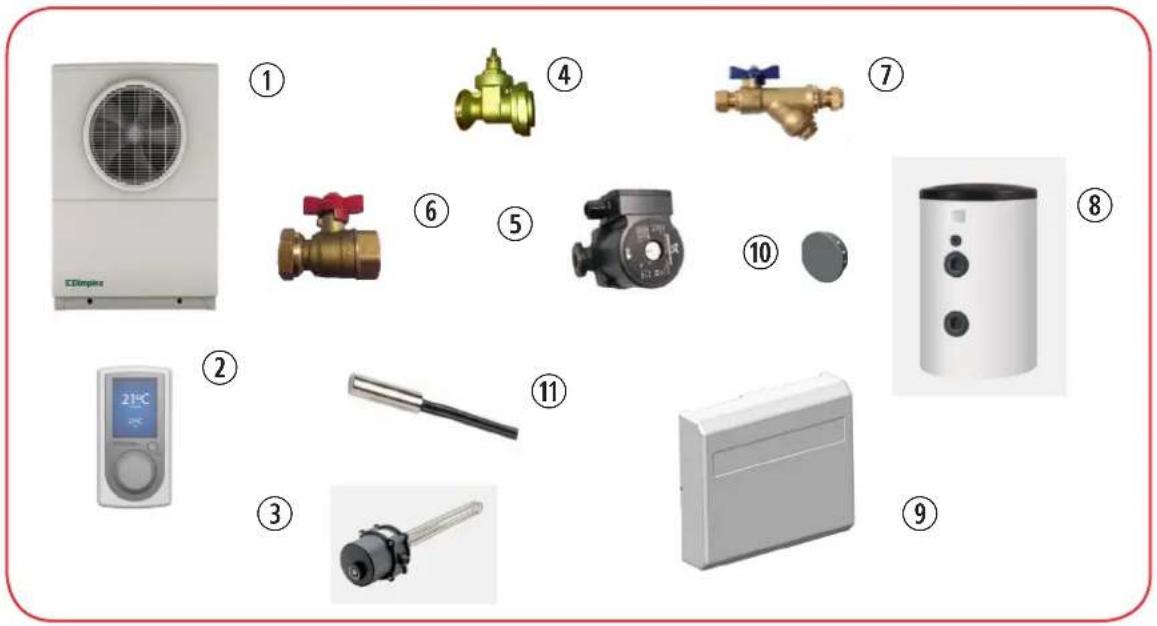
text_image
Exploded view diagram of various household air conditioners and devices with numbered labels| No. | Description Part No. | |
| 1 | A-Class heat pump A8M / A12M / A16M | |
| 10 | Blanking plugs (x4, stored inside heat pump) 4592624105 | |
| Hydraulics Kit B ACCHYPK | ||
| 2 | User interface (UI) 1754600 | |
| 5 | Pump - UPM GEO 25-85 180 (1500mm cable) 1755740 | |
| 6 | Isolation valves (1” swivel BSP to 28mm comp.) - Flow 1755760 | |
| 7 | Isolation valves (1” swivel BSP to 28mm comp.) - Return with strainer 1755770 | |
| 4 | 2 x Circulation Pump Gate Valve 11/2” swivel to 28mm comp2 x Washer 30.1x21x2mm | 1756090 |
| Wiring centre module, which includes; | ||
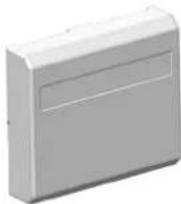
| 9 | Wiring centre module | 049162 |
| 11 | 1 x Temperature probe (NTC10) for DHW | |
| Accessories | ||
| 8 | 100L / 200L / 300L buffer tank (depending on installation) 025586 | |
| 3 | 2kW buffer immersion element 363610 | |

natural_image
Exterior view of a white industrial air conditioning unit with a circular fan and ventilation grille (no visible text or symbols)



natural_image
White cylindrical device with black circular buttons and a small square top (no visible text or symbols)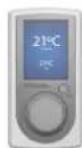

2. Important pre-installation information
CAUTION: You must read and understand all of the information in this section before attempting an installation!
2.1 Connection to the Grid - Notifying the DNO
Before you connect a heat pump to the grid, the necessary permissions must be granted by the distribution network operator. Not obtaining the necessary permissions may result in an unexpected network upgrade charge, and may compromise the integrity of the local supply if a ‘disturbing load’ is connected to the network.
The required forms are supplied by Dimplex and must be filled in by the heat pump installer alongside the client. We recommend notifying the DNO as early as possible in the planning stage to discuss the project and any additional information. Further information can be found on the Energy Networks website (www.energynetworks.org) or from your local DNO.
2.1.1 Heat Pump Sizing
NOTE: Ensure that the correct size heat pump has been selected in accordance with the latest version of MIS3005 (for UK installations).
If a non A-Class heat pump cylinder is being used, ensure that it has been accurately sized with the appropriate coil surface area of the cylinder to match the heat pump's output and flow rate requirements, and that all necessary hydraulic connections have been considered in connecting it to the heat pump system.
Ensure that suitable heat emitters have been sized in accordance with the BRE publication Design of low-temperature domestic heating systems: A guide for system designers and installers. To maximise system efficiency it is important to design the system with the lowest flow temperature possible.
For more information on sizing heat emitters or to order BRE publications, please visit the BRE bookshop website: www.brebookshop.com
2.2 Heat Pump Location
- The heat pump must be installed outdoors.
- The fan should not face prevailing winds to ensure correct air flow through the evaporator.
- The minimum clearance distances provided in this manual must be followed.
- NO obstructions in front of the heat pump fan for at least 1m.
- Clearance is important for good air flow and service access to the heat pump.
- Do not position the heat pump close to bedroom windows, as the fan and compressor may be operational at night.

flowchart
graph TD
    A["OBSTRUCTION"] --> B["Signal"]
    B --> C["Device with grid"]
    C --> D["Output"]
    style A fill:#f9f,stroke:#333
    style B fill:#ccf,stroke:#333
    style C fill:#cfc,stroke:#333
    style D fill:#fcc,stroke:#333
Figure 4: Poor air flow
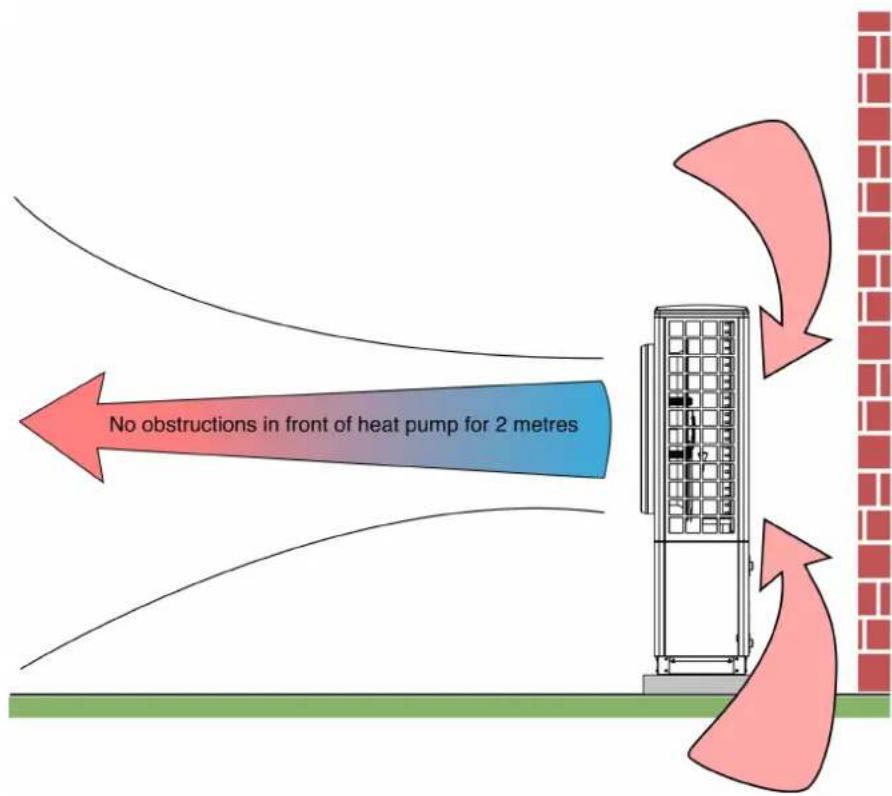
CAUTION: Ensure that there are no obstructions in front of the heat pump fan for at least 1m - however, 2m is recommended. ANY type of obstruction in front of the heat pump, even small shrubs, can block the air flow and cause cold air recirculation.
text_image
No obstructions in front of heat pump for 2 metresFigure 5: Good air flow with recommended clearances
3. Installation instructions
3.1 Positioning and fixing the heat pump
- The heat pump must be fixed onto a level, stable concrete plinth of minimum dimensions approx. 1000mm × 500mm .
- The concrete plinth must be able to withstand the unit's weight of 110-140kg (depending on model).
- A minimum distance of 50 ~mm between the heat pump and the edge of the plinth is required on all sides.
CAUTION: The minimum clearance distances around the heat pump are shown in figure 3; 300mm at the rear for air flow, 500mm each side for service and at least 1000mm in front of the fan to avoid air recirculation.
Figure 6: Required service and air flow clearance dimensions

text_image
Minimum service clearance at back of heat pump = 0.3m 270 170 128 500 245 167 Ø37 ④ 50° 250 Ø16 Minimum service clearance = 0.5m 496 993 ⑤ Minimum service clearance = 0.5m ① Fixing bolt holes ② Condensate drain hole ③ Cable feed hole ④ Flow and return pipe connections ⑤ Concrete Plinth Minimum service clearance at front of heat pump = 1m *50mm clearance between plinth and heat pump on all sides1) Check that plinth dimensions are within the required clearances, as per figure 6.
Positioning the heat pump in a confined space, frost hollow or well will result in reduced heat pump efficiency.
The cold air which is expelled by the fan cannot disperse and may be drawn back into the system.
This means that the heat pump may be operating using a lower inlet temperature than what is actually available from the ambient air.

text_image
Condensate PipeFigure 7: Removing the panels to fit fixing bolts and condensate pipe
CAUTION: Ensure that the condensate pipe is uncoiled and is running to a drain
2) Remove the heat pump panels to mark drilling holes on plinth.
The heat pump panels must be removed so that the base panel is visible. To do this, remove the screws and slide the panels downwards and out.
Once the panels are removed, mark the holes for the fixing bolts (figure 6), then lift or slide the heat pump out of the way to drill the holes. Leave the panels off until all fixing and positioning of the heat pump, bolts and condensate pipe have been carried out (steps 3 -4).
3) Run the condensate pipe to an appropriate drain
The condensate drain pipe is coiled up inside the heat pump for protection during transportation. In order to access this for installation, the panels will need to be removed (see figure 7). The condensate pipe must be uncoiled and run through the condensate pipe hole in the base panel to the drain.
- The pipe should be prevented from exposure to the elements, as this may contribute to freezing issues. The condensate pipe must run through the base panel and underground to the drain. Freezing of this pipe due to incorrect installation can result in irreparable damage and void warranty.
- Approximately 2 litres of condensate water are drained from the system every time a defrost cycle occurs (approximately once every hour in cold and humid weather). Therefore, it is essential that the condensate pipe is fed into a rain water drain or soak away to allow for safe disposal of the excess water, away from footpaths or patios.
- The removal of condensate must be secured and the condensate pipe must be kept free from debris and frost.
- The condensate pipe should not run into sewer pipe as fumes may travel into the heat pump and cause corrosion to the evaporator coil.
4) Inserting the fixing bolts
Once the holes for the fixing bolts are drilled, place the heat pump back onto the plinth and fix in place using the M10 bolts supplied in the installation pack.
5) Positioning and Fixing Indoor Components
The controller and thermostats should be installed on internal walls in living area to reflect the correct room temperature, and away from direct sunlight, drafts (windows and doors) and heat emitters.
3.1.1 Temperature Control Devices
- The controller/user interface that is supplied with the Dimplex A-Class heat pump is used as a heat pump controller as well as a space heating and domestic hot water (DHW) controller. The preferred option is to use the user interface as a room temperature control device.
- The user interface and room thermostats should be installed indoors in a location that is out of reach of children, but where the LCD display can be easily seen (usually 1.2m – 1.7m from the floor).
While only one user interface is currently available per system, there are additional options of either temperature probes or mechanical thermostats, which can be used to control the temperature in up to four zones.
- Mechanical thermostats provide less control over the heating system, while the temperature probe option allows the heat pump to sense changes in demand and adjust accordingly. The temperature probe option is generally recommended over the mechanical thermostat option.
3.1.2 Space Heating Zones
A zone is defined as the physical area of the home in which temperatures are controlled by each individual device. For example, there might be a user interface installed in the living area, in which case this may be referred to as zone 1. There may also be a temperature probe installed upstairs in the sleeping/bedroom area, which would then be designated as zone 2, and so on.
Extra zones are an additional, optional feature of the heating system. The standard package comes with one user interface and the possibility of four separate zones. Each heating zone can be assigned a heat curve specific to the type of heat emitters.
3.1.3 Location of Wiring Centre
If a Dimplex A-Class cylinder is used, the wiring centre is built in to the A-class cylinder and pre-wired. If a non A-Class cylinder is used, the wiring centre module must be installed.
The wiring centre module is designed to be wall mounted, and it is recommended that it is installed in close proximity to the cylinder to allow for installation of components which require a control cable (modbus) connection, i.e. pump, DHW probe, 3-port valve and heat pump connections.
4. Installation
4.1 Important - Plumbing Information
NOTE: To simplify underfloor heating initial screed heating, it is essential to have a thermostatic mixing valve on the underflood heating (UFH) manifold.
This allows the heat pump to run at higher temperature and capacity when the screed is cold.
- If multiple heat emitter circuits are installed, operating at different flow and return temperatures (such as under floor heating and standard radiators), a mixing valve must be used on low temperature circuits to prevent high temperature water from entering the under floor heating manifold.
- Isolation valves (non-return valve and ball valve with strainer), supplied in the Dimplex heat pump hydraulics pack, allow the strainer to be removed and cleaned without having to drain the system.
- Existing hot water systems should be flushed prior to connection to the heat pump to remove all contaminants and impurities, in accordance with the latest version of MIS3005.
- Flow and return isolation valves and piping must be fitted to each of the heat pump water connections on the back of the heat pump, as shown in figure 1.
- The isolation valve on the return is also fitted with a non-return valve and a strainer (included in the Dimplex heat pump hydraulics pack). This means that in order to clean the strainer, the system does not have to be drained. Instead, it is possible just to close the isolation valves on the return and remove the strainer. This way, the only water that will be lost from the system is that between the non-return valve and strainer.
- The strainer must be fitted in order to prevent contamination of the condenser heat exchanger. If an alternative strainer is used, it must be at least 7 microns in size.
- System should be pressurised and the system pressure must be checked once valves are re-opened.
- Direct condensate drain pipe to soak away or drain.
- All piping must be properly insulated and external length kept to a minimum.
- The return isolation valve provided in the hydraulics pack has a built in strainer to help prevent debris entering the condenser and must be fitted.
- The system must be filled and flushed with clean fresh water to ensure the removal of all the air from the installation.
CAUTION: When filling the system, always ensure that clean, fresh water is used. Using dirty or untreated water may cause severe damage to components and may affect the efficiency of the system when operating.
- Air bleed points must be installed at the highest point in the system; in particular, the installer must remember to install an air bleed on the heat pump pipe if it is a local high point since there is no air bleed point on the heat pump itself. Dimplex recommend the use of a power flush and purge cart to facilitate this process.
- Flow and return isolation valves and piping must be fitted to each of the heat pump water connections on the back of the heat pump, as shown in figure 8.
- The isolation valve on the return is also fitted with a non-return valve and a strainer (included in the Dimplex heat pump hydraulics pack). This means that in order to clean the strainer, the system does not have to be drained. Instead, it is possible just to close the isolation valves on the return and remove the strainer. This way, the only water that will be lost from the system is that between the non-return valve and strainer.
- The strainer must be fitted in order to prevent contamination of the condenser heat exchanger. If an alternative strainer is used, it must be at least 7 microns in size.
• System should be pressurised and the system pressure must be checked once valves are re-opened. - Direct condensate drain pipe to soak away or drain.
- All piping must be properly insulated and external length kept to a minimum.
- The return isolation valve provided in the hydraulics pack has a built in strainer to help prevent debris entering the condenser and must be fitted.

text_image
108.5mm 461mm 132mm
text_image
FLOW isolation valve 28mm copper pipe RETURN isolation valve fitted with non-return valve and strainer 1" BSP swivel connectionsFigure 8: Details of flow and return isolation valves
CAUTION: The quality of the water used to fill the heating system is of vital importance. Muddy or dirty water, for example, from a freshly drilled well, is not suitable, as this can lead to the incorrect functioning of some components and poses a corrosion risk to the system.
4.1.1 Pipe Sizing Information
When selecting piping to install with the heat pump please ensure that:
• The pipe sizes are adequate to allow the correct nominal water flow rate through the heat pump
- The safety group and expansion vessel (space heating side) are accurately sized by the installer based on the system volume (these are not supplied by Dimplex).
- External pipework and valves should be adequately insulated with vapour resistant insulation and protected against damage to prevent excessive heat losses. All joints should be suitably sealed and exposed pipework must be avoided.
- Ensure the water out and water in pipes are positioned correctly for connection to the heat pump as shown on the label in figure 2.
NOTE: The hydraulic installation information provided in this manual applies only to the components provided in the Glen Dimplex hydraulics pack (see Scope of Delivery for information).
| A8M A1 | 2M / A16M | ||||
| Space heating only | DHW with A-Class cylinder | ||||
| Water flow rate | @ 1100 l/h (nominal) | @ 2100 l/h (nominal) | @ 1800 l/h (nominal) | ||
| Associated head available 60kPa 14kPa | 8kPa | ||||
| Pipe diameter (mm) | Internal diameter (mm) | Volume of water per metre of pipe | Maximum equivalent pipe length | ||
| 22 | 19.8 | 0.31 l/m | 90 N/A | N/A | |
| 28 | 25.6 | 0.51 l/m | 300 23 38 | ||
| 32 | 29.6 | 0.69 l/m 600 | 46 77 | ||
Table 1: Maximum equivalent length for copper pipe - water only
CAUTION: Table 1 above is provided as a guideline when using water only. Any percentage of anti-freeze added will affect the pressure drop of the system greatly and will render this table invalid.
Not all types of pipe will have the same internal diameter, e.g. multi-layered/plastic pipes will have a thicker wall so the guidelines set out in table 1 will not apply. Microbore (8mm) and 15mm pipe is not suitable.
As a rule of thumb, the equivalent straight length (L [mm]) of each elbow is found by multiplying the outer diameter of the pipe (D [mm]) by 30, e.g. 4 elbows of diameter 22mm pipe is equivalent to 2.5m of 22mm pipe.
4.1.2 Buffer tank
The heat pump uses a reverse cycle defrost in order to defrost the evaporator by taking heat from the heating system. It is therefore necessary to connect a buffer tank in series with the heat pump, as shown in the hydraulic schematic diagrams (Appendices). The Dimplex A-Class cylinder range come with an integrated buffer tank, which;
- Provides some energy storage for the unit to carry out successful defrost.
- Increases compressor life due to reduction in the number of starts.
It is recommended that a buffer with a heating element/immersion is used as it may be required if initial start-up and commissioning are carried out in very cold weather.
Buffer Tank Sizing
The minimum total system water volume (including water in heat emitters) should be no less than 100l. Water volume in pipework, heat emitters and the built-in 40l buffer tank included in the A-Class cylinder must all be taken into account. This is particularly important when using Smartrads, as their water content is low compared to standard radiators (0.6l for SRX180 model).
4.1.3 Adjusting the spring loaded by-pass valve (if fitted)
CAUTION: If an externally controlled zone pump is connected when using any schematic, the spring loaded bypass must not be used and instead must be replaced by an open bypass fitted with a gate valve. This is to ensure that the zone pump(s) is/are not running against a dead head when the heat pump is idle or in DHW mode
The bypass valve is used to maintain a minimum flow rate and prevents faulty operation of the heat pump, as well as allowing it to run efficiently. The bypass valve must be adjusted correctly after commissioning the heat pump.
Please ensure that the following steps are taken when adjusting the bypass valve;
- Ensure that the bypass valve is open fully and begin running the heat pump.
- Close all of the heating circuits that may be closed during the operation of the heating system so that the least favourable flow rate can be achieved. This should cause all of the flow to go through the bypass valve. To check that all of the water flow is going through the bypass valve, feel the pipe after the valve to check its temperature (it should be getting heat from the heat pump).
- Slowly close the valve until the water is no longer flowing through it, then turn the valve back slightly (approx. 0.5 to 1 turn) to allow some flow and prevent the heat pump from tripping.
- Open the zone valves while the heat pump is still running, and again check the flow through the bypass valve by feeling the pipe after the valve and checking its temperature (it should not be as hot as flow temperature). The bypass setting should allow hot water to flow through the bypass valve when some of the heating circuits are closed.
4.1.4 Metering for the Domestic Renewable Heat Incentive - UK
Please take note of the following requirements if the installation is to be fitted with a meter;
- Leave sufficient space for appropriate meters to be fitted in defined locations.
- For Dimplex installations using 22mm pipe, please leave 440mm of straight pipework on the meter inlet pipe and 175mm of straight pipework on the outlet pipe;
- For installations using 28mm pipe, please leave 560mm of straight pipework on the meter inlet pipe and 175mm of straight pipework on the outlet pipe.
- Install low pressure-drop isolation valves to avoid the need to drain systems when fitting heat meters. See the schematics (Appendices) for more information on valve locations.
- Leave sufficient pipework accessible, i.e. not boxed in or under floor boards, to enable meters to be fitted.
- Guidelines for fitting an MCS approved meter can be found in the Domestic Renewable Heat Incentive essential guide to metering, available on the Ofgem website: www.ofgem.gov.uk
4.2 Electrical Information
The heat pump system consists of the heat pump, wiring centre and user interface. If a Dimplex A-Class cylinder is also used, the wiring centre is built into the cylinder.
The user interface acts as a thermostat and is sufficient if one heating zone is present. Optional, additional temperature probes or room thermostats are required for additional heating zones.
The wiring diagrams in the Appendices section show the different possible wiring configurations for systems with and without a Dimplex A-Class cylinder.
WARNING: Before opening the heat pump, ensure all circuits are isolated.
WARNING: Ensure that the components in the electrical box do not get wet when the electrical box is opened.
WARNING: The main 230V power cable must be supplied via a suitable sized exterior isolator, lockable in the OFF position.
4.2.5 Access to Electrical Connections - Opening the heat pump
text_image
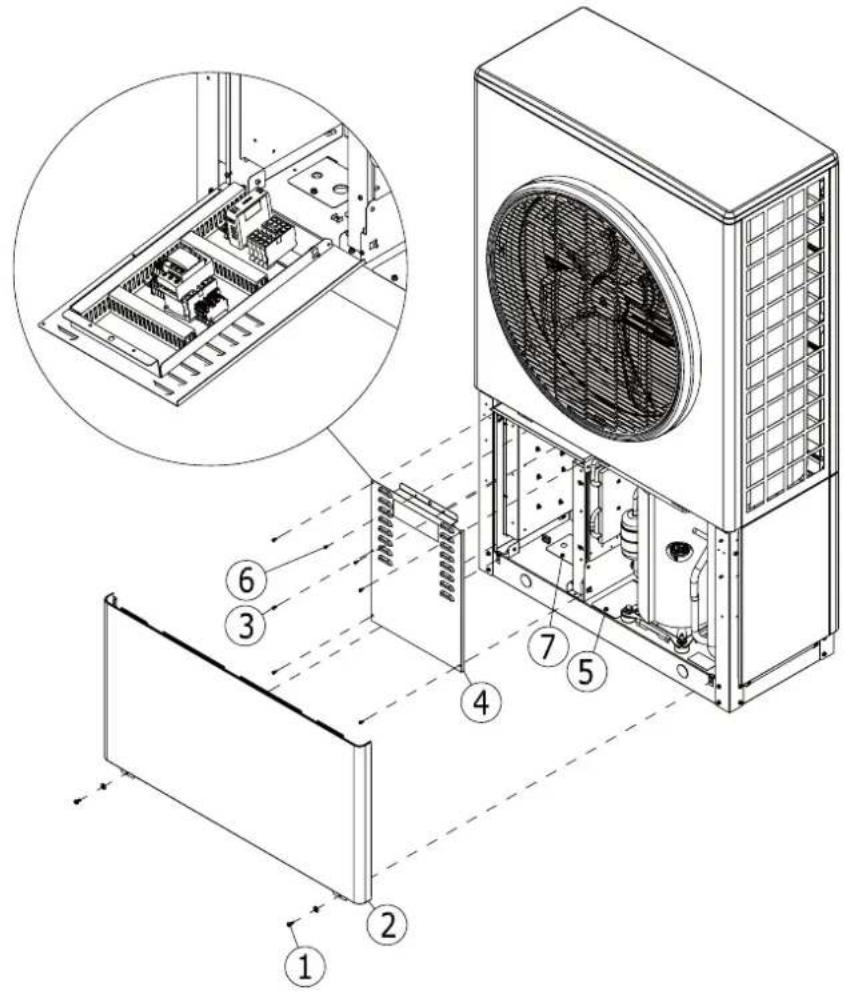
Technical diagram of an air conditioning unit with numbered components and a magnified inset showing internal structure.Figure 9: Access to the electrical box
To open the heat pump, follow the procedure shown in figure 9;
1) Unscrew 2 screws (1) holding front bottom panel (2) using a PZ2 screwdriver
2) Pull the front bottom panel (2) down then out to remove
3) Unscrew 5 screws (3) holding the front cover (4) of the electrical box to open and then pull down
4) Remove 2 PZ2 screws (6) holding the door flap in place to access cable connections.
5) Cable access cover (7) only used on some models.
For model cable connection configurations for your heat pump model, please see figure(s) 11/12.
6) The cable access covers (5 and 7) can be opened by removing a screw to allow access to cables.
CAUTION: Ensure that cable access covers are closed correctly when not in use.
CAUTION: Follow steps in reverse order to close the heat pump. When closing the heat pump front panel, ensure that the top and bottom panels are interlocked.
4.2.6 Electrical Connections - power and Modbus cable heat pump connections
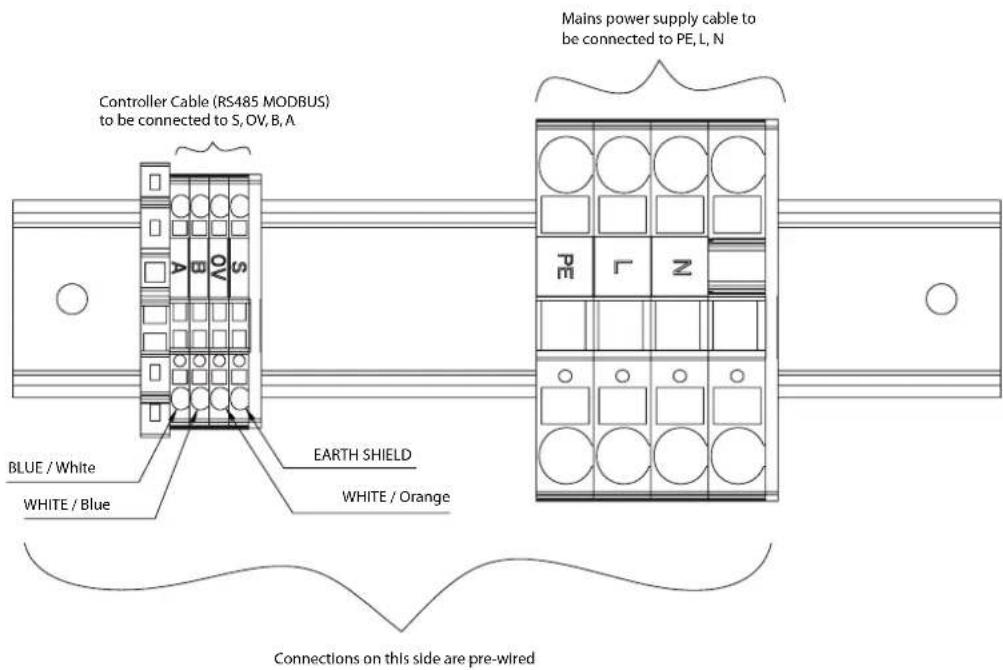
The electrical connections to the heat pump may have one of two configurations, depending on the model. Please see diagrams 11/12 for your configuration.
text_image
Controller Cable (RS485 MODBUS) to be connected to S, OV, B, A Mains power supply cable to be connected to PE, L, N BLUE / White WHITE / Blue EARTH SHIELD WHITE / Orange Connections on this side are pre-wiredFigure 10: Heat pump electrical connections
NOTE: 'S' as shown in figure 10 above is the earth shield and must be connected during installation.
- For configuration 1, the cables are fed through the holes at the back of the heat pump and directly inside the electrical box through the base of the heat pump (see figure 11).

text_image
M25x1.5 Cable Gland M16X1.5 Cable Armoured Power Cable RS485 Modbus Cable M25 Lock Nut M16 Lock Nut GlandFigure 11: Electrical cabling configuration 1
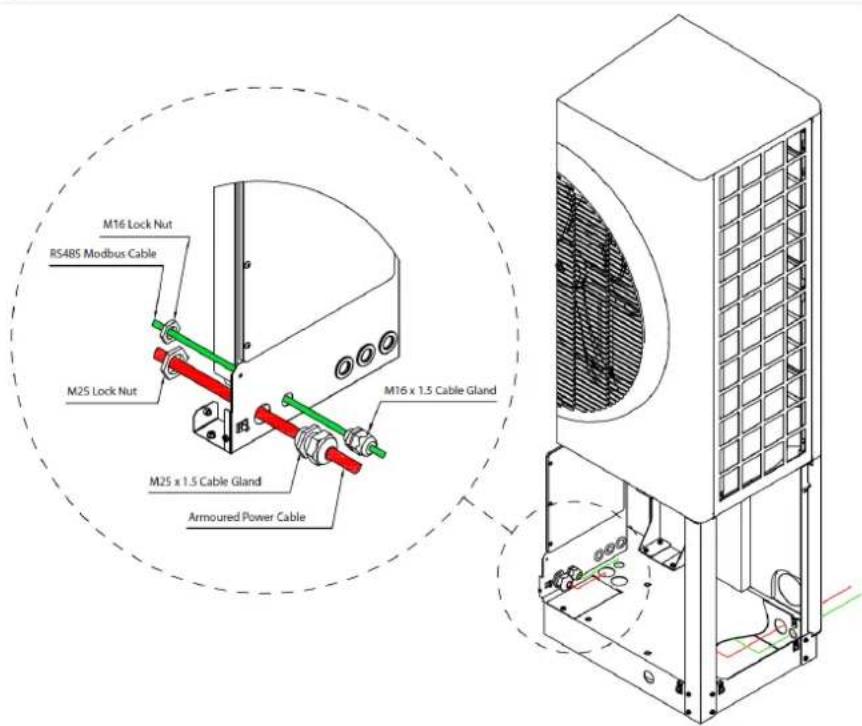
- For configuration 2, the cables are fed through the holes at the back of the heat pump, up through the holes in the base of the heat pump and then from outside the electrical box through the cable glands (see figure 12).
text_image
M16 Lock Nut RS485 Modbus Cable M25 Lock Nut M25 x 1.5 Cable Gland Armoured Power Cable M16 x 1.5 Cable GlandFigure 12: Electrical cabling configuration 2
Allow sufficient cable length to ensure the connections are not strained when the cover is opened. Once cables have been routed through the cable glands, close the access cover.
Connect power cable and controller cable as shown in figure 10. Do not strip the cables before pulling them through the glands in the access panel. Where stranded cable is being used, a ferrule must be fitted before inserting into the push connections.
The controller (Modbus) cable is then connected from the heat pump to the wiring centre (see wiring diagrams in Appendices).
4.2.7 Modbus Cable Information
Table 2: Recommended cable specifications/electrical characteristics for Modbus cable
| Belden Cable 9842 Typical Equivalent Cable | ||
| Nominal Characteristic Impedance 120Ω 120Ω | ||
| Nominal Conductor DC Resistance | 24.0Ω/1000ft78.7401 Ω/km* | 78.80 Ω/km* |
| Nominal Capacitance Core to Core | 12.8pF/ft41.99pF/m | 42pF/m |
| *Conversion factor for ft to m = 3.28 ft = 1m | ||
| 1km of Belden cable would have a resistance of 78.74 Ω/km | ||
| 1km of Equivalent cable has a resistance of 78.8 Ω/km | ||
4.2.8 Opening and Installing the User Interface
It is recommended to connect the Modbus cable in daisy-chain series (as shown in figure 13) from the heat pump on to the wiring centre and then on to the UI. The jumpers will be in the correct factory setting for this wiring configuration by default. If using the recommended configuration, the jumper position does not need to be changed.
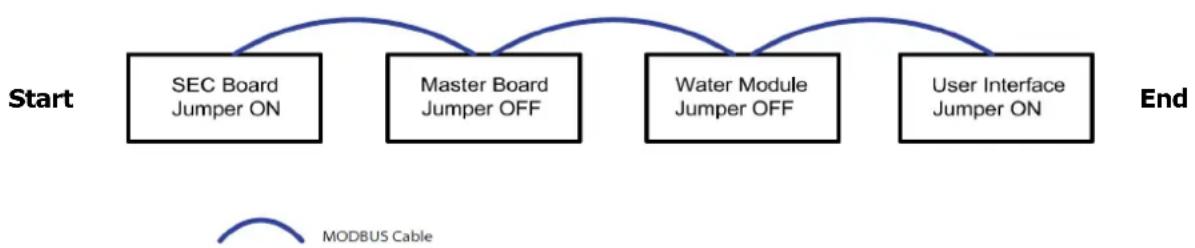
flowchart
graph LR
    A["Start"] --> B["SEC Board Jumper ON"]
    B --> C["Master Board Jumper OFF"]
    C --> D["Water Module Jumper OFF"]
    D --> E["User Interface Jumper ON"]
    E --> F["End"]
    G["MODBUS Cable"] --> A
Figure 13: Recommended MODBUS cable configuration
If it is deemed necessary to install the Modbus cable in a different order, please see Appendices. The cover of the UI must be removed in order to move the jumper. To remove the cover, unscrew the screw at the bottom of the UI and lift the cover and rotary dial.
To replace the cover, position the rotary dial over the holding pin on the board, ensuring the two are lined up correctly. Replace the cover and bottom screw. Ensure that rotary dial is tested and working once cover has been replaced.
4.3 Heat Pump Controller / Commissioning
4.3.1 Important pre-startup information
When starting up the heat pump, you must first ensure that;
- All covers are replaced.
• The heat pump isolator switch is switched on. - The heat pump is connected to the mains power supply via a separate suitable circuit breaker and RCD protection.
- The wiring centre or DHW cylinder is connected to the mains power supply.
The Modbus network is complete and the UI and the heat pump are connected to the wiring centre or DHW cylinder.
Once the connections have been made and the power supplies have been switched on, the system may take a couple of minutes to start up.
When switching on the heat pump for the first time, and after the start up sequence, you will be greeted by the main menu or screensaver if the heat pump is idle (use the Esc button to return to the main menu).

text_image
23.7°C Current 18.5°C Set BCDimplex RSC 12:00AM 38°C 26°C 01.01.2015 Thursday Information Model: 16 Serial No: 12345 Login 000To access the Installer Menu, you must select the information menu, represented by the 'i' icon on the main menu (shown in figure 14).
Use the rotary dial to select the 'Login' option and to scroll through numbers from 0 - 999.
Input the code to access the installer settings (22), then the code to bring up the installer menu (55).
NOTE: You will not be able to access any other options on the main menu, except the information menu, until the heat pump has been fully commissioned.
Figure 14: Starting up the user interface
NOTE: Some of the commissioning checks are functional and will require physically starting pumps, valves, etc. rather than inputting information on the UI only.
NOTE: The model no. displayed on the information screen will be 8, 12 or 16 depending on your heat pump model. The serial number displayed will be specific to your heat pump.
CAUTION: Access to functions by unatuhorised personnel negates warranty and may cause damage to the system.
When you enter the installer menu, select the Language Selection option, which will bring you to the Start Guide screen. Selecting UK will bring you back to the installer menu, which will now display Commissioning as an option.
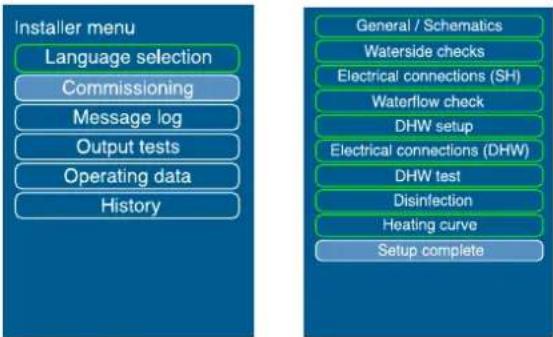
flowchart
graph TD
    A["Installer menu"] --> B["Language selection"]
    B --> C["Commissioning"]
    C --> D["Message log"]
    D --> E["Output tests"]
    E --> F["Operating data"]
    F --> G["History"]

    H["General / Schematics"] --> I["Waterside checks"]
    I --> J["Electrical connections (SH)"]
    J --> K["Waterflow check"]
    K --> L["DHW setup"]
    L --> M["Electrical connections (DHW)"]
    M --> N["DHW test"]
    N --> O["Disinfection"]
    O --> P["Heating curve"]
    P --> Q["Setup complete"]
Figure 15: Installer and commissioning menu options (when complete)
4.4 Commissioning
Select Commissioning to begin and follow the instructions on the system controller.
The commissioning routine will take you through a number of checks and tests to complete the installation.
When you finish using each submenu in the commissioning process, selecting Next will take you back to the main commissioning menu, where a new submenu will be available.
4.4.1 Starting the heat pump in cold weather
When carrying out a commissioning and setting a heat pump to work in conditions where defrosting is required ( ≤12^ ) and/or the space heating return temperature is ≤18^ , start by heating the buffer tank. There is not currently a software function to close down the heating circuits, so to do this the rest of the heating circuit must be closed down manually to allow the buffer tank to heat up (well above 25^ ).
Once this temperature has been achieved, individual heating circuits (i.e. zones) can be opened gradually. During this procedure, DO NOT:
- Allow excess volumes of cold water to return from the heating circuit
- Allow the heat pump return temperature to drop below 18^ C
• Bivalent Mode (Alternative back-up heat sources) - If the heat pump cannot meet the heating load (if it is undersized for extreme conditions), the system must call on an alternative, back-up heat source. This bivalence feature is automatically triggered by the controller and allows a backup heater to help the heat pump in reaching its set point.
4.4.2 General / Schematic
Accessing General/Schematic menu allows you to set the date and time, and the level of access allowed. It is recommended that the Standard user access level is selected for most installations.

text_image
Schematic Please select the pre set schematic code 1 to 8 No. Code 1. 10200110 2. 10200210 3. 10200310 4. 10200410 5. 10220190 6. 10220290 7. 10220390 8. 10220490 More NextFigure 16: Schematics
Selecting Next will bring you to the Schematic menu, as shown in figure 16.
The schematic number refers to one of the plumbing schematics described in the Appendices section.
Please ensure that your plumbing reflects the diagram set up to ensure correct operation. The schematic coding is explained below.
Numbers that are shaded grey do not change. These are determined by the type of device being installed.
Numbers not shaded are determined by the type of installation being used.
Table 3: Explanation of digits of schematic codes
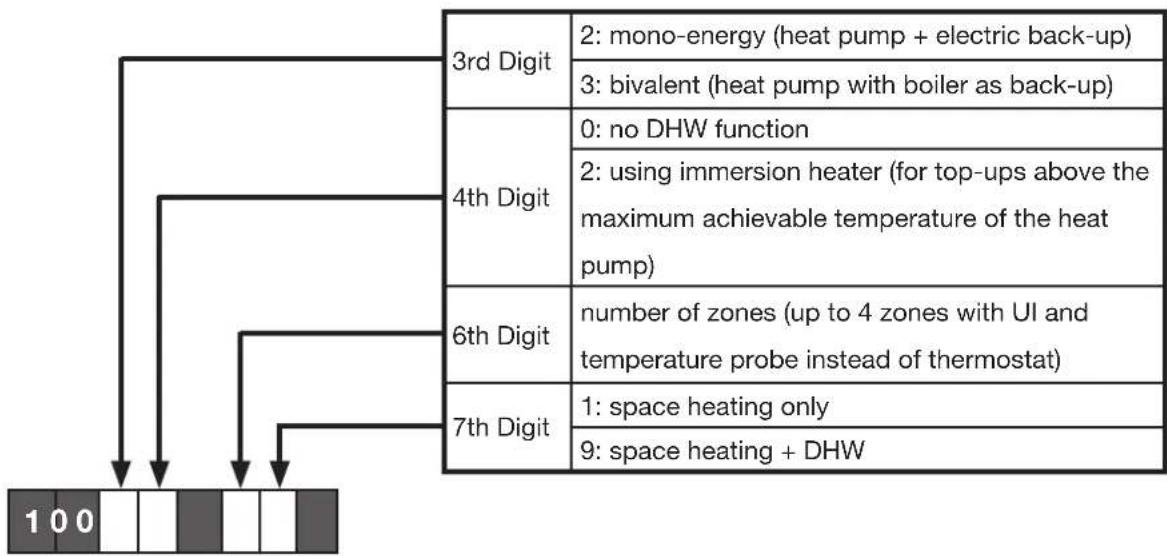
flowchart
graph TD
    A["3rd Digit"] --> B["2: mono-energy (heat pump + electric back-up)"]
    A --> C["3: bivalent (heat pump with boiler as back-up)"]
    D["4th Digit"] --> E["0: no DHW function"]
    D --> F["2: using immersion heater (for top-ups above the maximum achievable temperature of the heat pump)"]
    G["6th Digit"] --> H["number of zones (up to 4 zones with UI and temperature probe instead of thermostat)"]
    I["7th Digit"] --> J["1: space heating only"]
    I --> K["9: space heating + DHW"]
| No. on UI Code Appendix No. | |
| 1 1020 | 0110 6.5 |
| 2 1020 | 0210 6.5 |
| 3 1020 | 0310 6.5 |
| 4 1020 | 0410 6.5 |
| 5 1022 | 0190 6.6 |
| 6 1022 | 0290 6.6 |
| 7 1022 | 0390 6.6 |
| 8 1022 | 0490 6.6 |
| 9 1030 | 0110 6.7 |
| 10 1030 | 0210 6.7 |
| 11 1030 | 0310 6.7 |
| 12 1030 | 0410 6.7 |
| 13 1031 | 0190 6.8 |
| 14 1031 | 0290 6.8 |
| 15 1031 | 0390 6.8 |
| 16 1031 | 0490 6.8 |
The example schematics 1 and 2 (appendix) would therefore both use the schematic code 10220290, as they are both;
- mono-energy systems
• using an immersion heater - two zones
• space heating and DHW functions
The difference between examples 1 and 2 is that example 1 shows an example of a system requiring an open by-pass while example 2 requires the installation of a spring by-pass.
Table 4: Schematic codes information
4.4.3 Waterside Check
The ‘Waterside Check’ menu allows you to select whether temperature control is based on the flow or return temperature. This will apply to heating curves, as discussed in section 4.4.12.
It is generally always recommended to set the temperature control based on the return temperature (the default selection on the UI), unless it is absolutely necessary to use flow temperature instead for a particular set up.
CAUTION: Flow control may lead to unnecessary stopping and starting of the heat pump.
Selecting Next will bring you to the waterside checks menu (figure 17).
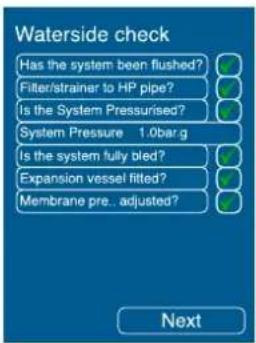
A number of waterside checks must be carried out as part of commissioning, and must be ticked as completed. In the Waterside check menu:
text_image
Waterside check Has the system been flushed? Filter/strainer to HP pipe? Is the System Pressurised? System Pressure 1.0barg Is the system fully bled? Expansion vessel fitted? Membrane pre.. adjusted? Next• The system must be flushed.
- The strainer must be fitted to the return pipe and checked to ensure that it is clean.
- The system must be pressurized (you must enter the system pressure).
• The system must be fully bled.
• The expansion vessel must be fitted
- Membrane pressure of the expansion vessel must be checked and adjusted
Figure 17: Waterside Check
When checks are completed and 'Next' is selected, the type of temperature measurement devices to be used in each heating zone must also be selected by scrolling across and pressing confirm. The following options are available;

text_image
Temperature device Select to assign temperature Sensing device for zone Zone 1 User interface 1 Zone 2 Temperature probe Zone 3 Temperature probe Zone 4 Temperature probe Next- User Interface (usually in zone 1 – heating system controller)
- Temperature probe (option for temperature probe 1 to 3, for additional zones).
- Mechanical thermostat (option for mechanical stat 1 to 3, for additional zones).
- Using a mechanical stat limits the level of heating control on the zone from the UI. Heating in zones using temperature probes can be fully controlled using the UI. Selecting ‘Next’ will bring you to the ‘Temperature check’ menu.
Figure 18: Temperature device selection
NOTE: If any changes must be made to the commissioning configuration (e.g. selecting a different probe), it is strongly advised that a factory reset is performed and that the heat pump is recommissioned entirely. Changing individual settings during the commissioning process may cause commands to be ignored or cause the heat pump to stop working correctly.
NOTE: If you leave the commissioning menu before you successfully complete commissioning, all previous information entered will be saved and completed menus will be highlighted in green. You can then return at a later stage to complete the process.
text_image
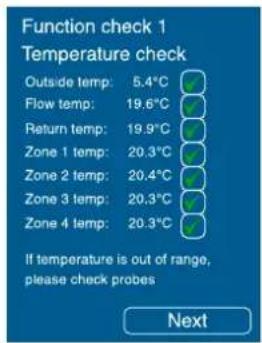
Function check 1 Temperature check Outside temp: 5.4°C Flow temp: 19.6°C Return temp: 19.9°C Zone 1 temp: 20.3°C Zone 2 temp: 20.4°C Zone 3 temp: 20.3°C Zone 4 temp: 20.3°C If temperature is out of range, please check probes Next4.4.4 Temperature Check
This screen displays the temperatures currently being read by all temperature probes. It is the duty of the installer to ensure that all sensors are installed and working correctly.
CAUTION: The boxes on this menu should not be ticked unless all displayed temperatures have been confirmed to be within an acceptable and expected range.
Figure 19: Temperature check
text_image
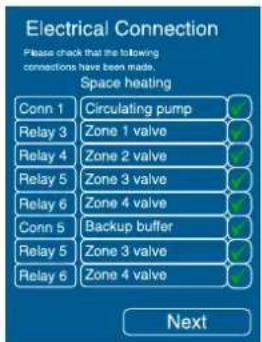
Electrical Connection Please check that the following connections have been made. Space heating Conn 1 Circulating pump Relay 3 Zone 1 valve Relay 4 Zone 2 valve Relay 5 Zone 3 valve Relay 6 Zone 4 valve Conn 5 Backup buffer Relay 5 Zone 3 valve Relay 6 Zone 4 valve Next4.4.5 Electrical connections
This menu provides a list of electrical connections that should be made prior to commissioning for space heating. The list is based on the schematic zone diagram selected and also the type of temperature devices that will be used in each zone.
Once you have confirmed all checks and select Next, you will return to the commissioning menu where you can now access the 'Water flow check' menu.
Figure 20: Electrical connections
text_image
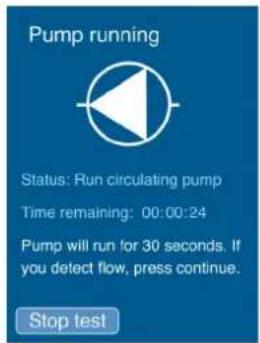
Pump running Status: Run circulating pump Time remaining: 00:00:24 Pump will run for 30 seconds. If you detect flow, press continue. Stop test4.4.6 Water Flow Check
Select 'Run Test' to start the circulation pump. Ensure that all valves are open to allow flow. The circulation pump will be tested first by running for 30 seconds. When the timer reaches zero, the pump will continue to run until flow is confirmed, which allows time for the installer to check that the pump is working.
Figure 21: Pump check
Once you are confident that the pump is on and that there is water flow, select Continue to confirm that the pump is working correctly. Do not confirm that the pump is working in this menu unless you have physically checked it, as the UI requires your input and does not detect this automatically.
text_image
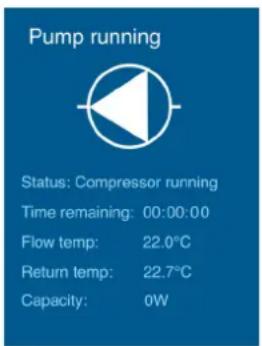
Pump running Status: Compressor running Time remaining: 00:00:00 Flow temp: 22.0°C Return temp: 22.7°C Capacity: 0WOnce this is successful, the compressor will run for 5 minutes. As the test runs, the screen will give you information on the status of the heat pump and the time remaining on the test.
If you do not have flow or if there is a problem, you can stop the test. If you stop the test, there is a 5 minute delay before you can attempt to run the test again. It is not possible to bypass the test, as good water flow is critical to the operation of the heat pump.
Figure 22: Compressor test
If there is no flow at all, a high pressure fault will appear on the UI screen and the commissioning will be aborted. Once the test is completed, you will see one of three messages:
- No flow detected
- Flow too low
- Flow detected
If you see message 1 or 2, this might be an indication of an air-lock, dirty strainer, flow restriction or pump too small for the required pipework. Please check for these issues and if present, rectify to ensure that there is sufficient flow then repeat the test. There will be a time delay before you can restart the test.
When you see a screen with the pump highlighted in green, flow has been detected and the compressor 'flow check' test is complete. You will receive the status 'Waterside is OK' when the waterside checks are completed. Selecting Next brings you to the Electrical Connections menu.

text_image
Pump running Status: Good flow detected Retry in: 00:00:00 Next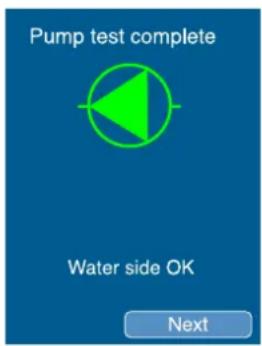
text_image
Pump test complete Water side OK NextFigure 23: Good flow detected and water side OK confirmation screens
If carrying out start up in cold weather, commission the heat pump heating only the buffer. Once it reaches the required temperature open each zone slowly and in series, especially for under floor heating. If you have selected Schematic 1 or 3 (Space heating only or Bivalent space heating), move now to section 4.4.12 Heating Curves to complete the commissioning process.
CAUTION: For safety reasons, if the heat pump pressure exceeds 38 bar/temperature exceeds 60°C, the commissioning will be aborted. Under these conditions, measures should be taken to allow the temperature to drop below 60°C, i.e. a zone should be opened.
text_image
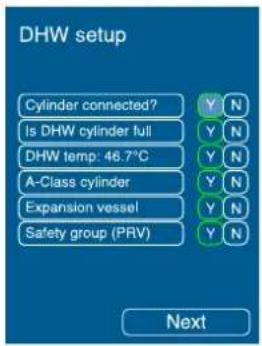
DHW setup Cylinder connected? Is DHW cylinder full DHW temp: 46.7°C A-Class cylinder Expansion vessel Safety group (PRV) Next4.4.7 DHW set-up
Before commissioning the DHW, a number of checks must be carried out, as shown in figure 24. When you have ticked each box to confirm each DHW check, Next will bring you back to the installer menu, where you can now select Electrical Connections (DHW).
Figure 24: DHW set-up
NOTE: It is possible to use space heating without completing the DHW setup. This can be done by selecting 'N' on the DHW setup screen where it asks if the cylinder is connected (see figure 24).
This may be necessary where the DHW is not yet connected or where the cylinder has not yet been filled. When the cylinder is ready, it will be necessary to return to this step of the commissioning and select 'Y' instead for "Cylinder Connected?" to set up domestic hot water.
4.4.8 Electrical connections (DHW)
text_image
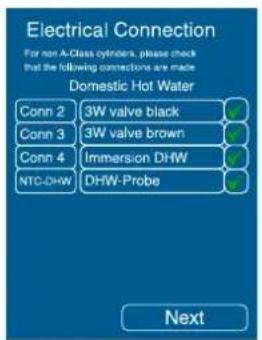
Electrical Connection For non A-Class cylinders, please check that the following connections are made Domestic Hot Water Conn 2 3W valve black ✓ Conn 3 3W valve brown ✓ Conn 4 Immersion DHW ✓ NTC-DHW DHW-Probe ✓ NextThis menu provides a list of electrical connections that should be made prior to commissioning the domestic hot water cylinder. You must check and confirm all connections in order to make the DHW Test available in the installer menu.
The numbers listed on the LHS of the screen refer to the connections which are labelled in the wiring diagrams included in this manual.
Figure 25: DHW electrical connections
4.4.9 DHW Test
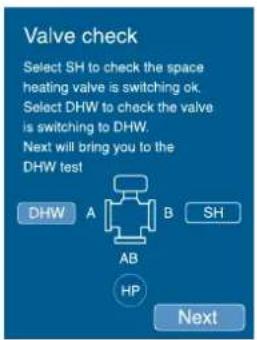
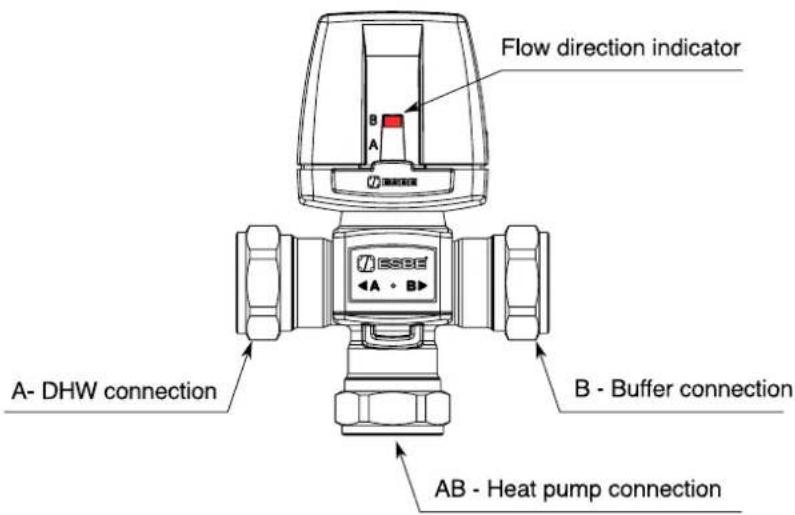
Before you run the DHW test, which consists of heating up the cylinder to maximum temperature from the heat pump, you will be asked to check that the valve (figure 27) is in the DHW position (A position), as shown on the screen in figure 26. Check that the red actuator marker changes to the correct position (the default position is B).
NOTE: If the 3-port valve head is removed and the valve moved by hand, the valve must be power cycled (switched off and on again) in order to ensure normal operation.
text_image
Valve check Select SH to check the space heating valve is switching ok. Select DHW to check the valve is switching to DHW. Next will bring you to the DHW test DHW A B SH AB HP NextFigure 26: Valve check
text_image
Flow direction indicator A- DHW connection B - Buffer connection AB - Heat pump connectionFigure 27: Valve positions

text_image
DHW Test DHW will go into test mode. This will heat the cylinder to its maximum temperature. This process can take up to 90 minutes. Do not draw off water during this test. Stop Run testFigure 28: DHW Test
When you have completed the valve check and select Next, you will see the DHW test screen, which informs that the test can take up to 90 minutes (based on a 300L cylinder). Selecting 'Run test' begins the DHW cycle and shows you the time remaining (see figure 28).
The DHW test is important for non A-class cylinders to ensure that the cylinder is compatible with the heat pump. If the coil in the cylinder is too small, the maximum achievable temperature might be too low for comfort (e.g. < 40^ )
For system with A-class cylinders, the "Finish" button (figure 29) can be used before 60^ temperature has been reached, as the compatibility doesn't have to be proven.
Once the DWH cylinder is showing signs of being heated up then the Finish function allows to shorten the DHW test without having to wait until temperature achieves 60^ C.
This Finish function should be used in cold humid conditions to avoid defrost issues (defrost is currently not enabled during DHW test).
It is recommended to pre-heated the cylinder first by using normal function and then do a DHW test to top-up the cylinder. Please refer to technical bulletin for detailed procedure.
NOTE: During the DHW test, the defrost function will be disabled. If the coil starts frosting due to external conditions, it is possible to postpone the test by selecting Finish while the test is still running. Even if this test is postponed, the DHW function may be used.

text_image
DHW Test 39°C Status: Running Time remaining: 00:00:00 Finish Stop testNOTE: Selecting 'Stop test' will cancel the test completely. If the DHW test has been cancelled rather than postponed, the information regarding the immersion displayed on the set temperature menu for DHW will not be correct (the immersion will not be used until the maximum temperature achievable by the heat pump has been reached).
Figure 29: DHW test finish function
text_image
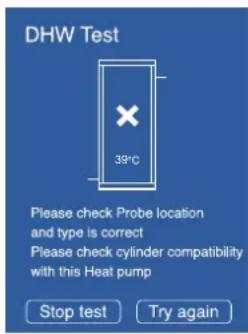
DHW Test 39°C Please check Probe location and type is correct Please check cylinder compatibility with this Heat pump Stop test Try again
text_image
DHW Test complete 46.7°C Status: Complete Time to reach: 60:23 NextFigure 30: DHW test fail and DHW test completed
If the test fails, you will see the screen shown on the left in figure 30, which provides information on why the test failed, and advice on checks to carry out.
If the test is complete and has been successful, you will see the screen shown on the right in figure 30, which shows the maximum temperature that the cylinder can achieve.
text_image
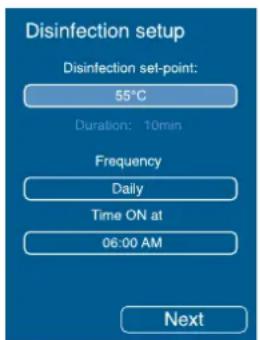
Disinfection setup Disinfection set-point: 55°C Duration: 10min Frequency Daily Time ON at 06:00 AM Next4.4.10 Disinfection (thermal)
Thermal disinfection is a function which keeps the level of legionella bacteria in the cylinder under acceptable levels. This is carried out by heating the hot water in the cylinder to a high temperature for a minimum set time.
The temperature and frequency of the disinfection cycle can be adjusted in this menu.
Figure 31: Disinfection setup
If the temperature is set to above what the heat pump can achieve, text on the screen will appear which notifies that the immersion heater will be used at the end of the cycle to top up to the required disinfection temperature.
4.4.11 Weather compensation
The biggest factor in defining the heat demand required for a building is typically the weather. Which affects the required heat load for a building. Weather compensation works by adjusting the set point temperature of the heating system to reflect changes in the outside (external) temperature, allowing the heat pump to operate more efficiently.
Weather compensation is determined by the heat curve settings for the system. The pre-defined heating curves should only be modified by an installer to best match the heat emitters used.
4.4.12 Heating curves
Each zone is associated to a pre-set heat curve. Selecting the zone and pressing Next will allow you to assign a pre-set curve for typical heat emitters.
The four pre-set heating curves are shown the table below.
Each curve can be reviewed and modified to meet the requirements of the heating system by selecting Edit.
This will bring you to a default heating curve for the selected emitter. Selecting Next will select the default. The pre-defined curves have recommended temperature ranges for each heat emitter;
Table 5: Heating Curve Parameters
| Heat Emitter Type Max. | Water Temp. At Low External Temp. Min. | Water at High External Temp. | ||
| SmartRad 48°C -10°C | 35°C 10°C | |||
| Underfloor Heating 30°C | -10°C 25°C 12°C | |||
| Standard Radiator 55°C | -10°C 40°C 15°C | |||
| Custom (flat line) 55°C | -15°C 55°C 15°C | |||
The values that generate the heating curve graph can be changed, by scrolling through the temperature value to adjust and setting it.
This is validated using the Set button when complete (see figure 32).

Figure 32: SmartRad
Heating Curve
- The green line on the right indicates the maximum outdoor temperature at which space heating stops running (DHW is still adjusted independently).
- The yellow line on the left indicates the minimum outdoor temperature at which the bivalent heating system starts working and may need to be adjusted depending on the location/property.
- The red line indicates the temperature that the water will be heated to, based on the outdoor temperatures.
- The Def option will reset the pre-defined values. Nxt will save entered values.
NOTE: If the heat pump is in heating “ON” mode and the maximum outside temperature is reached, the heat pump will revert to and maintain the set back temperature until the heating is turned off and on again. To prevent this, it is recommended to set your summer temperature (see heat curves section 4.4.12), at a higher value (the default outside ambient setting is 18^ C).
4.4.13 Comfort level
For end-users, the preferred method of modifying the heating system comfort level is by using the comfort level function rather than modifying the heat curve. Here, it is possible to raise or lower the water input temperature within a range of 9K (-3 to +6) by accessing the comfort level.
For more information please see the A-Class User Manual
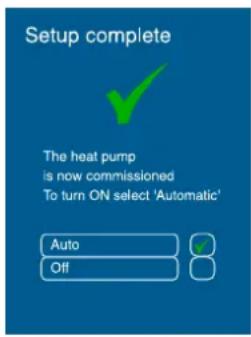
text_image
Setup complete The heat pump is now commissioned To turn ON select 'Automatic' Auto Off4.4.14 Setup complete
NOTE: To complete commissioning and allow the heat pump to operate, you must select the 'Setup complete' submenu in the installer menu, as shown in figure 33. if you do not see this screen, commissioning has not been successful and the heat pump will not operate correctly.
Once all of these steps have been carried out successfully, you will see the screen shown in figure 33.
Figure 33: Setup complete
Selecting Auto will activate all settings, where as selecting Off will enable the heat pump only to carry out frost protection (i.e. no heating is required but the heat pump is protected from freezing conditions).
The default setting for the heat pump is Off. To turn on the heat pump, you must return to the home screen to access the user menu.
For further information on end user controller instructions please see A-Class Air Source Heat Pump User Guide supplied in the hydraulics pack.
4.5 Additional Installer Menu Options
Once the commissioning process has been completed, additional menus will be available to the installer, as outlined in this section. These options must be accessed through the service menu.
4.5.1 Service menu
The service menu can be accessed, in a similar manner to the installation menu, by inputting the installer menu code (22) and then using the 'Login' access code 998. Access to this menu may be required for fault finding or servicing.
4.5.2 Message log
The message log menu provides a list of all errors that have taken place, including the date and time when they occurred. Selecting an individual error code will provide more information on the type of error that occurred if an SD card is present. Active error messages will show a ticked box.
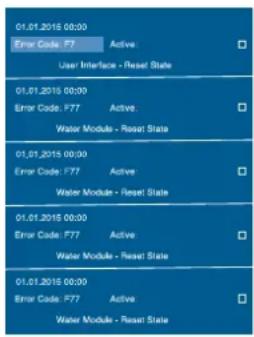
text_image
01.01.2015 00:00 Error Code: F7 Active User Interface - Reset State 01.01.2015 00:00 Error Code: F77 Active Water Module - Reset State 01.01.2015 00:00 Error Code: F77 Active Water Module - Reset State 01.01.2015 00:00 Error Code: F77 Active Water Module - Reset StateFigure 34 shows an example of the messages shown in the message list menu. When a new error occurs, it will appear at the top of the list.
Up to 20 errors can be shown on the list at once, then, if another error occurs, the oldest error will be pushed off the list to make room for the new error. If the same error message is being displayed more than once, it may be necessary to check back through some of the older error messages in order to find the cause of the problem.
Figure 34: Message log
NOTE: If a major fault occurs many times, the compressor will go into lock-out mode to prevent any further damage to the heat pump. In order to resolve this, the power to the compressor will have to be turned off for at least 2 minutes and turned on again.

text_image
Output tests Circulation pump ON OFF DHW-SH valve ON OFF Zone 1 Pump/Valve ON OFF Zone 2 Pump/Valve ON OFF Zone 3 Pump/Valve ON OFF Zone 4 Pump/Valve ON OFF R7 Immersion ON OFF R8 Backup/Buffer ON OFF Fan ON OFF Relay 7 ONLY = Immersion Relay 7 & 8 = Backup/Buffer Next4.5.3 Output Tests
The output tests menu allows you to turn ON/OFF tests on individual components of the system, as shown in figure 35, and can be accessed once Electrical Connections (Space Heating) are confirmed.
The relays which control the immersion and backup heater/buffer use an electric interlocking system, and therefore R7 and R8 must be used together in order for the backup heater to function. Testing these relays individually will not reflect this.
Figure 35: Output tests
4.5.4 Defrost
Before running a manual defrost cycle you must ensure the buffer has been isolated from the heating, as stated by the message on the UI. Selecting 'Start Defrost' begins the defrost cycle. The defrost screen will state the time remaining in the defrost cycle.
A heating water return temperature of 18^ C is required for proper defrosting of the evaporator.
4.5.5 Operating data
The operating data menu provides a list of all the system parameters, such as all temperatures, including each zone set and actual temperatures, flow rate, and heat pump status. If an SD card is present, this data will be recorded to every message listed.
4.5.6 History
The History menu shows the temporary and permanent run time history of the system. These values can be reset in order to record run times over a certain time period. Selecting 'Next' brings you to the permanent run time history which cannot be reset unless a software update is installed.
5. System Health Check / Maintenance
NOTE: These are checks that should be carried out regularly to ensure that your Dimplex product performs at its best.
5.1 Heat pump:
• Is the fan grille clear from debris? - Visual check
- Is the tray clear from debris and water flowing freely? - Visual check
• Is the condensate drain clear from debris?
- Is the evaporator coil clean and free from damage? E.g. flattened fins
- Are all of the outer panels secure?
5.2 Electrical:
• Is the power cable firmly fixed?
• Is the earth wire connection secure?
• Is the supply voltage correct?
5.3 Hydraulics:
• Is the system correctly pressurized?
- Are there any water leaks in the system? Is the required pressure holding?
• Is the strainer on the return pipe clear of debris?
See section 4.1.3 for details on isolating and cleaning the strainer.
5.4 Indoor settings:
- Are the set temperatures and heating times suitable for the occupants?
- Is the building warm enough for the occupants or does the heating curve need to be adjusted?
NOTE: It is recommended that the strainer is checked and cleaned 24 hours after commissioning, and each time the system is modified or has service work carried out thereafter.
6. Appendices
6.1 Technical Specifications
6.2 Refrigeration Cycle diagram
6.3 Schematics - Example 1
6.4 Schematics - Example 2
6.5 Schematics 1, 2, 3 & 4 : Space Heating Only
6.6 Schematics 5, 6, 7 & 8 : Zone Space Heating & Domestic Hot Water
6.7 Schematics 9, 10, 11 & 12 : Bivalent Space Heating
6.8 Schematics 13, 14, 15 & 16 : Bivalent Zone Space Heating & Domestic Hot Water
6.9 Wiring Centre Electrical Connections - with A-Class Cylinder
6.10 Jumper Information for Alternative Wiring Configuration
6.11 Controller Cable Connections
6.12 Installer Menu Flow Chart
6.13 Installer Hand-Over Form
6.14 Certificate of Conformity
6.1 Technical Specifications
| TECHNICAL SPECIFICATIONS | ||||||
| 1 T | YPE AND ORDER CODE | UNITS | A8M | A12M | A16M | |
| 2 | DESIGN | |||||
| 2.1 | Degree of protection according to EN 60529 for compact unit or heating element | IP 24 | ||||
| 2.2 | Installation Location | Outside | ||||
| 3 | PERFORMANCE DATA | |||||
| 3.1 | Heating Water Operating Temperature Range (min / max) | °C | 25/65 | |||
| Outside Air Operating Temperature Range (min / max) | °C | -20/30 | ||||
| 3.2 | Heat Output / COP | @ A7W35 | kW/--- | 6.30 / 4.42 | 12.30 / 4.72 | 12.30 / 4.72 |
| Heating Water Temperature Difference @ Standard Rating Condition | @ A7W55 | kW/--- | 6.2 / 3.1 | 12.5 / 3.2 | 12.5 / 3.2 | |
| @ A7W65 | kW/--- | 6.3 / 2.7 | 12.4 / 2.6 | 12.4 / 2.6 | ||
| These figures characterise the size and performance of the system according to EN 14511. Abbreviations have the following meaning, e.g. A7 W35: Outside temperature 7°C and heating water supply temperature 35°C. | @A-2W35 | kW/--- | 6.7 / 2.9 | 12 / 3.3 | 15.5 / 3.2 | |
| @A-2W55 | kW/--- | 7.1 / 2.1 | 12.0 / 2.5 | 15.6 / 2.4 | ||
| @ A-7W35 | kW/--- | 7.0 / 2.9 | 12.0 / 3.0 | 13.2 / 3.0 | ||
| @ A-7W55 | kW/--- | 7.1 / 2.1 | 12.0 / 2.2 | 15.3 / 2.2 | ||
| 3.3 | Sound Power Level1 | dB(A) | 63 | 63.5 | 63.5 | |
| 3.4 | Sound Pressure Level @ 10m (Heat Pump positioned against wall) | dB(A) | 41.5 | 38.5 | 38.5 | |
| 3.5 | Heating Water Flow Rate @ A7W35, nominal / minimum | m3/h | 1.15 / 0.85 | 2.1 / 1.2 | 2.1 / 1.2 | |
| 3.6 | Condenser Pressure Drop @ nominal flow rate (A7W35) | kPa | 3 | 4 | 4 | |
| 3.7 | Air Flow @ A7W35 | m3/h | 2600 | 3700 | 3700 | |
| 3.8 | Refrigerant; total filling weight | Type/kg | R410A / 1.75 | R410A / 2.0 | R410A / 2.0 | |
| 3.9 | Water Capacity of Stainless Steel Heat Exchanger | litre | 0.85 | 1 | 1 | |
| 3.10 | Polyol Ester Oil in Compressor | litre | 1.18 | |||
| 4 | DIMENSIONS, CONNECTIONS & WEIGHT | |||||
| 4.1 | Device Dimensions Without Connections | H x W x L (mm) | 1260 x 932 x 401 | 1571 X 932 X 401 | ||
| 4.2 | Physical Volume | m3 | 0.5 | 0.59 | ||
| 4.3 | Device Connections to Heating System | inch | 1" ext. thread | |||
| 4.4 | Weight of the Transportable Unit (Excluding Packaging) | kg | 110 | 130 | ||
| 5 | ELECTRICAL CONNECTIONS (HEAT PUMP) | |||||
| 5.1 | Nominal Voltage / Phase / Frequency | - | 230V / 1ph / 50 Hz | 230V / 1ph / 50 Hz | ||
| 5.2 | Fuse Protection | C 20 | C 40 | |||
| 5.3 | Nominal Power Consumption / Nominal Current @ A7W35 | kW/A | 1.4 / 6.3 | 2.6 / 11 | ||
| 5.4 | Maximum Power Consumption / Maximum Current @ A-2W55 | kW/A | 4 / 16 | 6.9 / 30 | 8.1 / 35 | |
| 5.5 | Maximum Starting Current - Inverter Ramp Up | A | Gradual Starting Current 2.5A | |||
| 5.6 | Power Factor A7W35 / (cos Ω) | - | ≥0.94 | ≥0.95 | ≥0.95 | |
| 5.7 | Power Input of Integral Fan @ A7W352 | W | 50 | 60 | 60 | |
| 6 | OTHER DESIGN CHARACTERISTICS | |||||
| 6.1 | Defrosting Mode / Type | Automatic / Reverse Cycle | ||||
| 6.3 | Device Freeze Protection | Yes : Heating Water in Device Protected Against Freezing by Software | ||||
^1 According to EN 12102.
^2 Fan is variable speed, rated input relates to nominal input power.
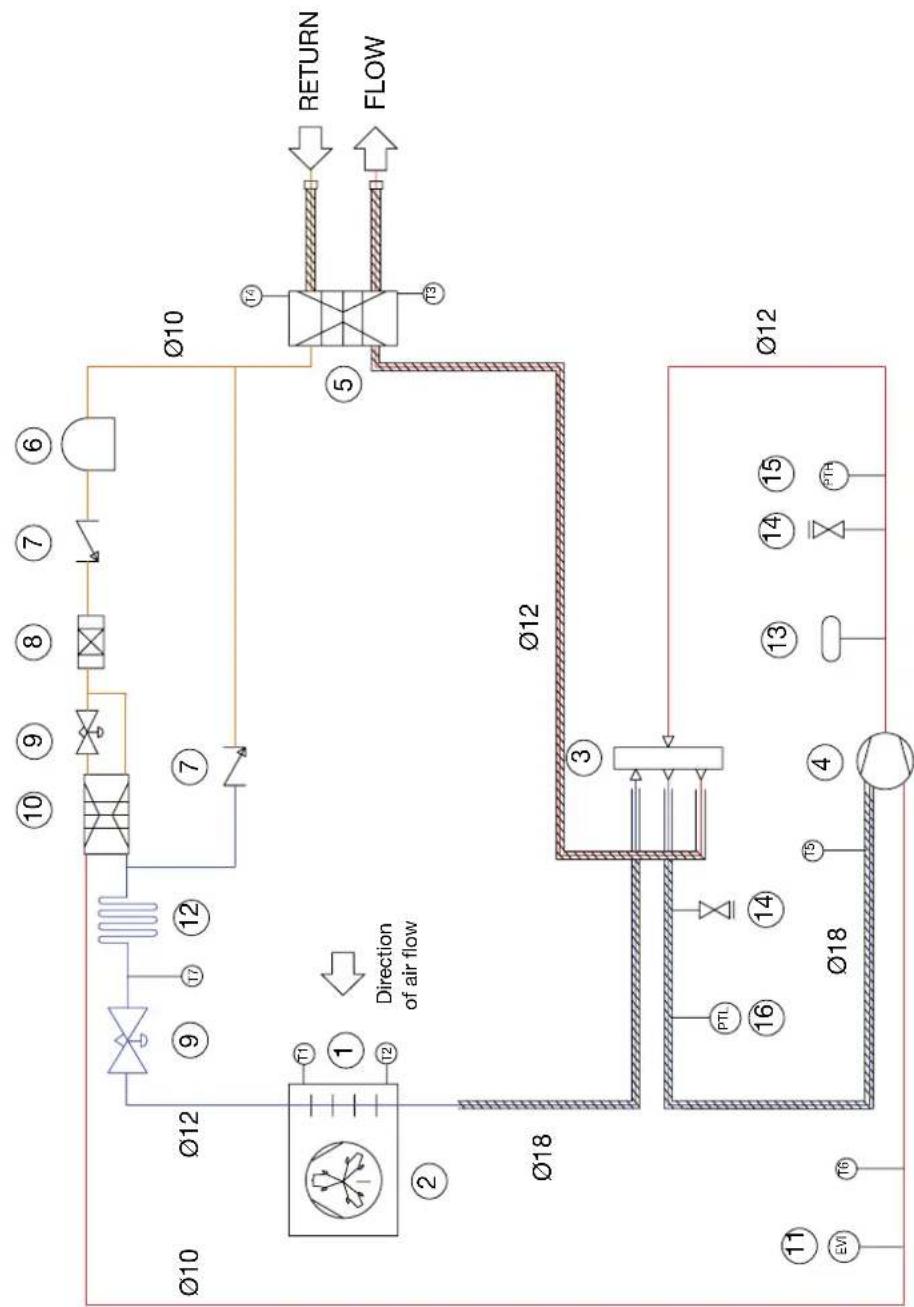
6.2 Refrigeration cycle
REFRIGERANT CYCLE
flowchart
graph TD
    A["Direction of air flow"] --> B["T1"]
    B --> C["①"]
    C --> D["T2"]
    D --> E["∅18"]
    E --> F["T3"]
    F --> G["∅12"]
    G --> H["T4"]
    H --> I["RETURN"]
    H --> J["FLOW"]
    K["∅10"] --> L["∅12"]
    L --> M["⑨"]
    M --> N["T7"]
    N --> O["⑫"]
    O --> P["∅10"]
    Q["∅12"] --> R["∅18"]
    R --> S["③"]
    S --> T["T5"]
    T --> U["∅18"]
    V["∅10"] --> W["∅12"]
    X["∅12"] --> Y["∅18"]
    Y --> Z["④"]
    Z --> AA["T6"]
    AA --> AB["∅18"]
    AC["∅10"] --> AD["∅12"]
    AD --> AE["T4"]
    AE --> AF["RETURN"]
    AE --> AG["FLOW"]
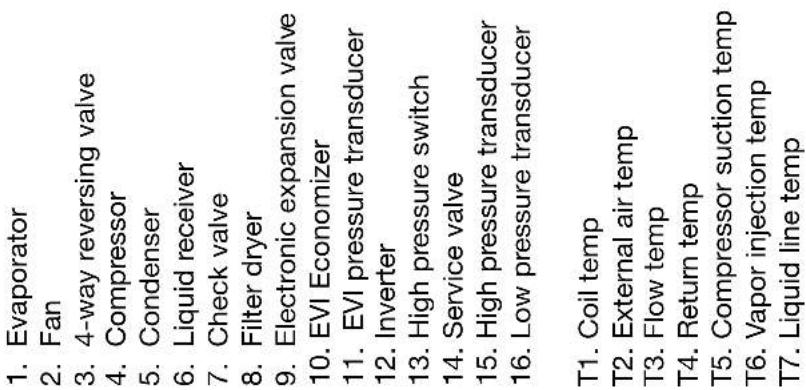
text_image
1. Evaporator 2. Fan 3. 4-way reversing valve 4. Compressor 5. Condenser 6. Liquid receiver 7. Check valve 8. Filter dryer 9. Electronic expansion valve 10. EVI Economizer 11. EVI pressure transducer 12. Inverter 13. High pressure switch 14. Service valve 15. High pressure transducer 16. Low pressure transducer T1. Coil temp T2. External air temp T3. Flow temp T4. Return temp T5. Compressor suction temp T6. Vapor injection temp T7. Liquid line tempExample 1: Schematic for zones with circulating pump and open by-pass

flowchart
graph TD
    A["16Amp Isolation Switch"] --> B["Water Module Mains Supply: Single Phase 230-240V 50Hz"]
    B --> C["Zone 1: UFH"]
    C --> D["Voll-free contact on UFH electronic / logic switch; To connect to mechanical thermostat input on the water module"]
    D --> E["Zone 2: Radiators NTC10 or mechanical stat."]
    E --> F["Zone Valve*"]
    F --> G["*Isolation switch to suit heat pump model: 20Amp for 8kW heat pumps or 40 Amp for 12-16kW."]
    G --> H["** Additional relay required if pump is controlled by water module"]
    H --> I["NOTE: If ANY of the zones are using an externally controlled circulating pump, the open by-pass must be filled."]
    I --> J["Expansion Vessel Depending on system volume"]
    J --> K["Fill & Flush connections"]
    K --> L["Fill & Flush connections"]
    L --> M["Heat Pump"]
    M --> N["Isolation Switch*"]
    N --> O["Max 1 Meter"]
    O --> P["Drain to Soak Away"]
    P --> Q["3-Way Mixing Valve"]
    Q --> R["Flow"]
    R --> S["Return Flow"]
    S --> T["Electrical Connections"]
    T --> U["3-Way Mixing Valve"]
    U --> V["Heat Pump Main Supply: Single Phase 230-240V 50Hz"]
    V --> W["Isolation Switch*"]
    W --> X["Max 1 Meter"]
    X --> Y["Drain to Soak Away"]
    Y --> Z["3-Way Mixing Valve"]
    Z --> AA["Heat Pump"]
    AA --> AB["Isolation Switch*"]
    AB --> AC["Max 1 Meter"]
Example 2: Schematic for zones without circulating pumps and with a spring-loaded by-pass fitted
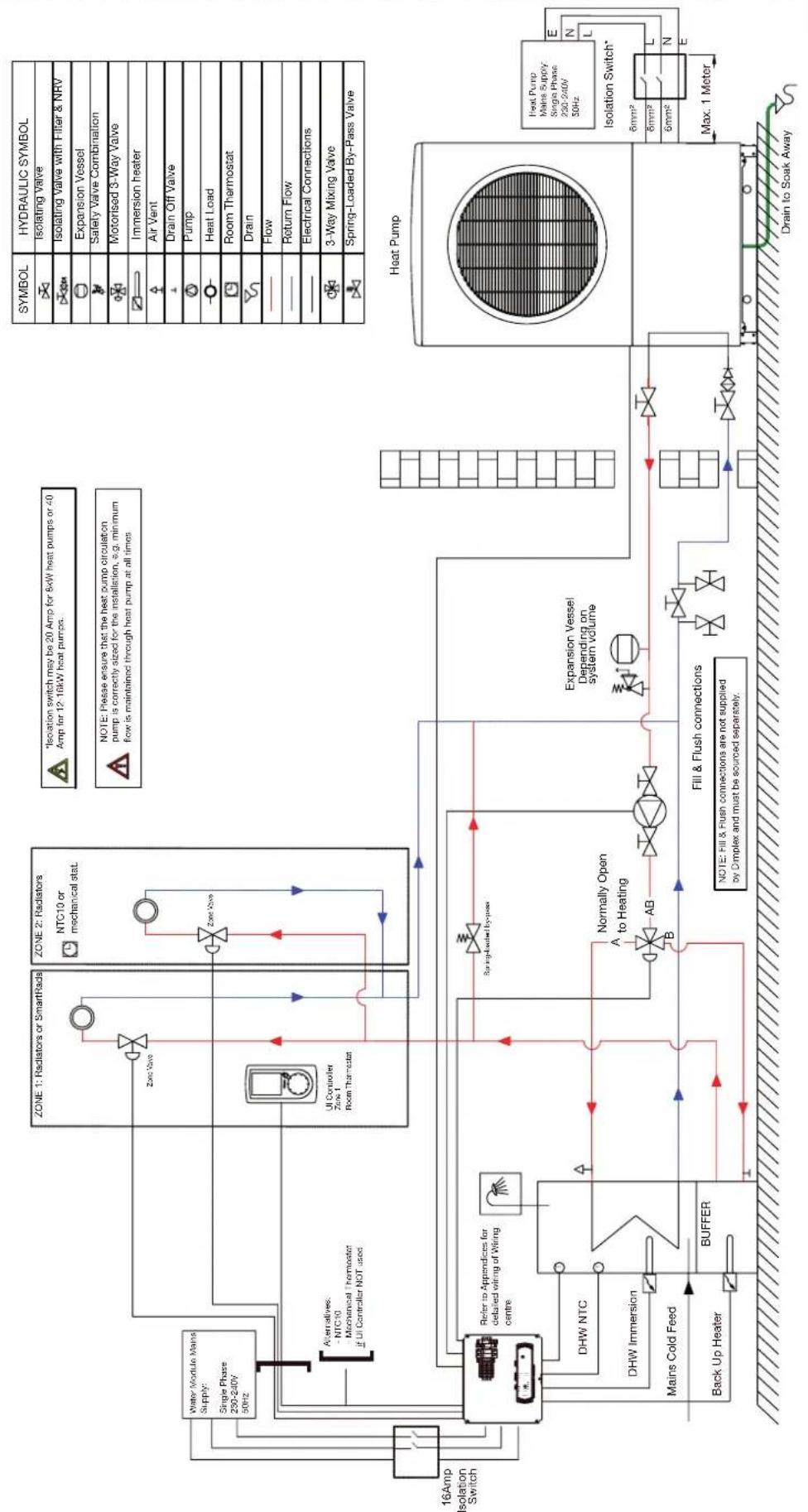
flowchart
graph TD
    A["16Amp Isolation Switch"] --> B["Water Module Mains Supply: Single Phase 250-240V 50Hz"]
    B --> C["Zone 1: Radiators or SmartRads"]
    B --> D["Zone 2: Radiators NTC10 or mechanical stat."]
    C --> E["UI Controller Zone 1 Room Thermostat"]
    D --> F["Zone Valve"]
    F --> G["Spring-loaded by-pass"]
    G --> H["Expansion Vessel Depending on system volume"]
    H --> I["Fill & Flush connections"]
    I --> J["Back Up Heater"]
    J --> K["BUFFER"]
    K --> L["DHW NTC"]
    L --> M["DHW Immersion"]
    M --> N["Mains Cold Feed"]
    N --> O["Refer to Appendices for detailed wiring of Wiring centre"]
    O --> P["Zone 1: Radiators or SmartRads"]
    P --> Q["Zone 2: Radiators NTC10 or mechanical stat."]
    Q --> R["Zone Valve"]
    R --> S["Spring-loaded by-pass"]
    S --> T["Expansion Vessel Depending on system volume"]
    T --> U["Fill & Flush connections"]
    U --> V["Back Up Heater"]
    V --> W["BUFFER"]
    W --> X["DRAI TO SOAK AWAY"]

    subgraph Legend
        direction TB
        Y["SYMBOL"] --> Z["HYDRAULIC SYMBOL"]
        Y --> AA["Isolating Valve"]
        Y --> AB["Isolating Valve with Hiter & NRV"]
        Y --> AC["Expansion Vessel"]
        Y --> AD["Safety Valve Combination"]
        Y --> AE["Motorised 3-Way Valve"]
        Y --> AF["Immersion heater"]
        Y --> AG["Air Vent"]
        Y --> AH["Drain Off Valve"]
        Y --> AI["Pump"]
        Y --> AJ["Heat Load"]
        Y --> AK["Room Thermostat"]
        Y --> AL["Drain"]
        Y --> AM["Flow"]
        Y --> AN["Return Flow"]
        Y --> AO["Electrical Connections"]
        Y --> AP["3-Way Mixing Valve"]
        Y --> AQ["Spring-Loaded By-Pass Valve"]

    subgraph Insulation Switch*
        direction LR
        Z --> AR["6mm²"]
        Z --> AS["6mm²"]
        Z --> AT["6mm²"]
        Z --> AU["N"]
        Z --> AV["E"]
        Z --> AW["L"]
        Z --> AX["E"]
        Z --> AY["E"]
        Z --> AZ["E"]
        Z --> BA["E"]
        Z --> BB["E"]
        Z --> BC["E"]
        Z --> BD["E"]
        Z --> BE["E"]
        Z --> BF["E"]
        Z --> BG["E"]
        Z --> BH["E"]
        Z --> BI["E"]
        Z --> BJ["E"]
        Z --> BK["E"]
        Z --> BL["E"]
        Z --> BM["E"]
        Z --> BN["E"]
        Z --> BO["E"]
        Z --> BP["E"]
        Z --> BQ["E"]
        Z --> BR["E"]
        Z --> BS["E"]
        Z --> BT["E"]
        Z --> BU["E"]
        Z --> BV["E"]
        Z --> BW["E"]
    end
6.5 Schematics 1, 2, 3 & 4 : Space Heating Only

flowchart
graph TD
    A["Room Thermostat Zone 1"] --> B["UI Controller"]
    B --> C["Buffer"]
    C --> D["Back Up Heater"]
    D --> E["20Amp Isolation Switch"]
    E --> F["Mains Supply: Single Phase 230-240V 50Hz"]
    F --> G["Adder to Room Thermostat Zone 1"]
    G --> H["Zone 1"]
    H --> I["Zone 2"]
    I --> J["Zone 3"]
    J --> K["Zone 4"]
    K --> L["Expansion Vessel Depending on system volume"]
    L --> M["Heat Pump"]
    M --> N["Isolation Switch^a"]
    N --> O["Drain to Soak Away"]

    subgraph Zone 1
        P["User Interface or NTC10 or Mechanical Tstat"] --> Q["Zone 1"]
        R["User Interface or NTC10 or Mechanical Tstat"] --> S["Zone 2"]
        T["User Interface or NTC10 or Mechanical Tstat"] --> U["Zone 3"]
        V["User Interface or NTC10 or Mechanical Tstat"] --> W["Zone 4"]
    end

    subgraph Zones 2
        X["User Interface or NTC10 or Mechanical Tstat"] --> Y["Zone 2"]
        Z["User Interface or NTC10 or Mechanical Tstat"] --> AA["Zone 3"]
        AB["User Interface or NTC10 or Mechanical Tstat"] --> AC["Zone 4"]
    end

    subgraph Zones 3
        AD["User Interface or NTC10 or Mechanical Tstat"] --> AE["Zone 3"]
        AF["User Interface or NTC10 or Mechanical Tstat"] --> AG["Zone 4"]
    end

    subgraph Zones 4
        AH["User Interface or NTC10 or Mechanical Tstat"] --> AI["Zone 4"]
    end

    style Zone 1 fill:#f9f,stroke:#333
    style Zone 2 fill:#ccf,stroke:#333
    style Zone 3 fill:#cfc,stroke:#333
    style Zone 4 fill:#fcc,stroke:#333

    note right of Z
        "For details of different types of zone set up (with / without circulating pump), see example schematics"
    end

    note right of Z
        "See example 1 or 2 for by-pass options"
    end

    note right of L
        "Expansion Vessel Depending on system volume"
    end

    note right of M
        "Mains Supply: Single Phase 230-240V 50Hz"
    end

    note right of N
        "Notes: Fill & Flush connections are not supplied by Dimplex and must be sourced separately."
    end

    note right of O
        "Isolation Switch^a"
        "Isolation Switch^b"
        "Max 1 Meter"
        "Drain to Soak Away"
    end
6.6 Schematics 5, 6, 7, 8 : Zone space heating + DHW
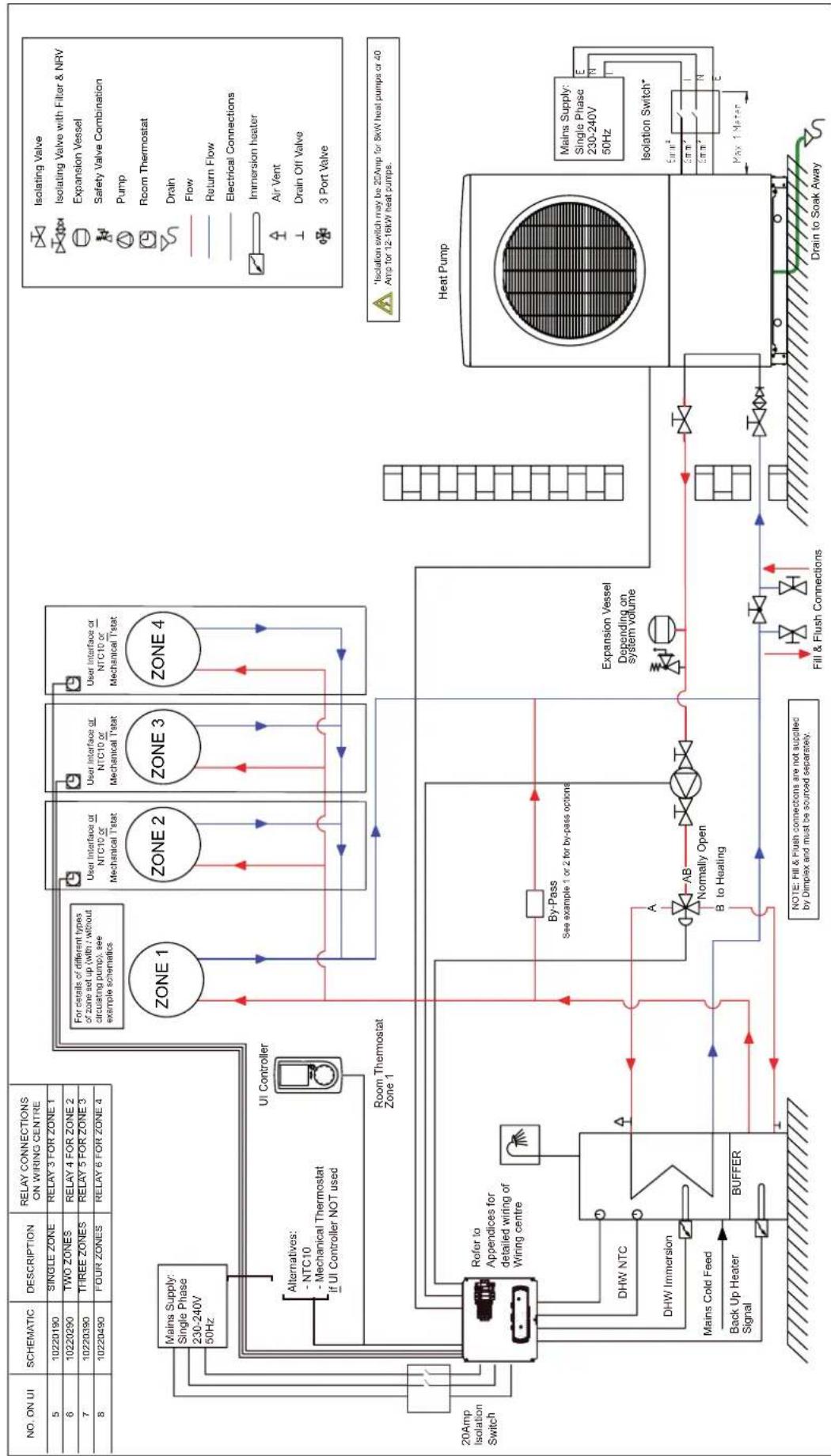
flowchart
graph TD
    subgraph_Room_Thermostat_Zone1["Zone 1"]
        A["UI Controller"] --> B["Zone 2"]
        B --> C["Zone 3"]
        C --> D["Zone 4"]
    end
    subgraph_Room_Thermostat_Zone2["Zone 2"]
        E["User Interface or NTC10 or Mechanical Tstat"] --> F["User Interface or NTC10 or Mechanical Tstat"]
    end
    subgraph_Room_Thermostat_Zone3["Zone 3"]
        G["User Interface or NTC10 or Mechanical Tstat"] --> H["User Interface or NTC10 or Mechanical Tstat"]
    end
    subgraph_Room_Thermostat_Zone4["Zone 4"]
        I["User Interface or NTC10 or Mechanical Tstat"] --> J["User Interface or NTC10 or Mechanical Tstat"]
    end
    K["20Amp Isolation Switch"] --> L["Refer to Appendices for detailed wiring of Wiring centre"]
    M["DHW NTC"] --> N["DHW Immersion"]
    O["Mains Cold Feed"] --> P["Back Up Heater Signal"]
    Q["Buffer"] --> R["Buffer"]
    S["A"] --> T["AB"]
    T --> U["B Normally Open to Heating"]
    V["NOTE: Fill & Flush connections are not supplied by Dimplex and must be sourced separately."] --> W["Fill & Flush Connections"]
    X["Expansion Vessel Depending on system volume"] --> Y["Heat Pump"]
    Z["Isolation Switch*"] --> AA["Main Supply: Single Phase 230-240V 50Hz"]
    AB["Flow"] --> AC["Flow"]
    AD["Return Flow"] --> AE["Return Flow"]
    AF["Safety Valve Combination"] --> AG["Pump"]
    AH["Room Thermostat"] --> AI["Drain"]
    AJ["Air Vent"] --> AK["Drain Off Valve"]
    AL["3 Port Valve"] --> AM["3 Port Valve"]
    AN["Isolation Switch*"] --> AO["5μm²"]
    AP["Max 1 Meter"] --> AQ["Nm²"]
6.7 Schematics 9, 10, 11, 12 : Bivalent space heating
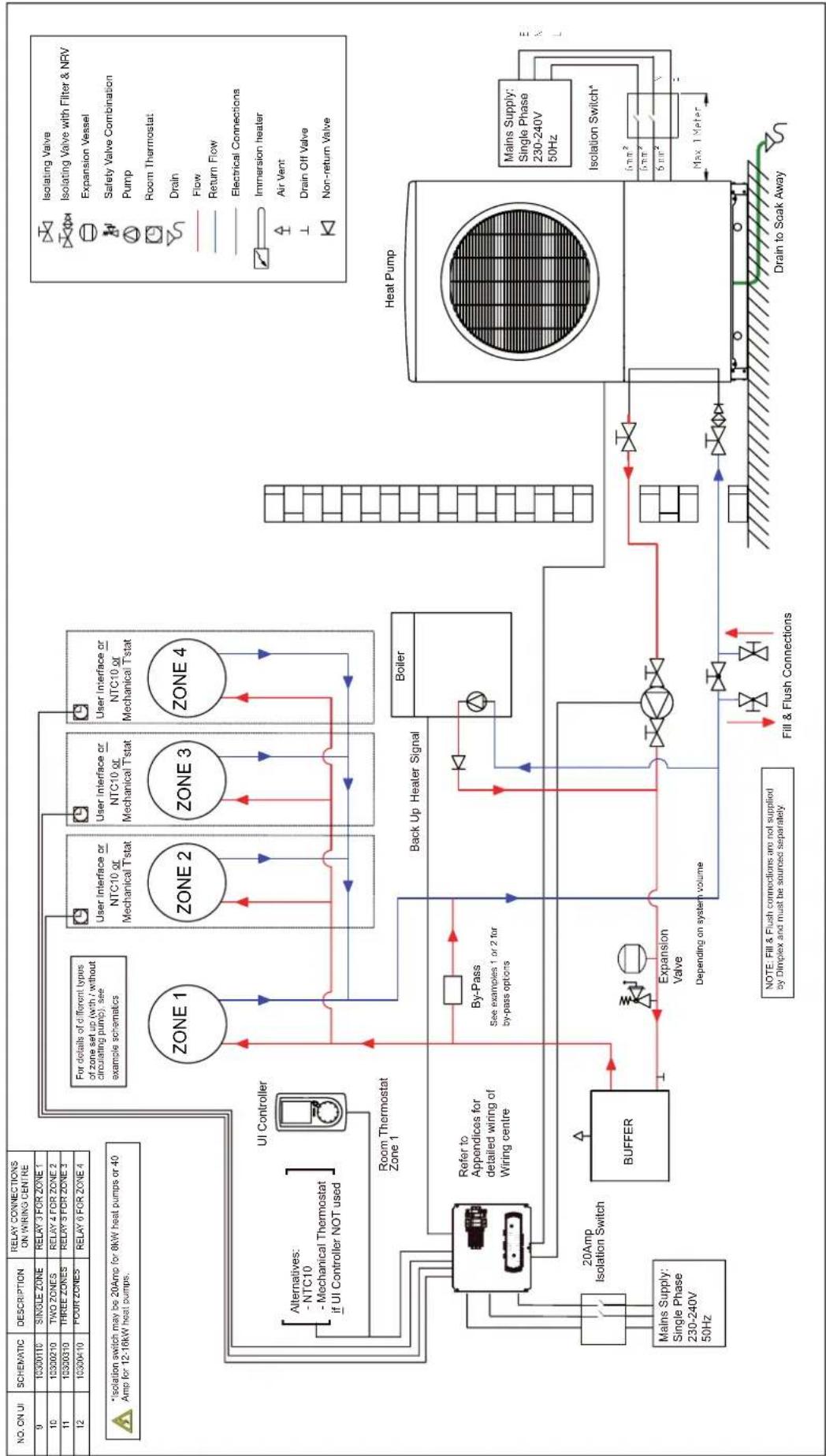
flowchart
graph TD
    A["Main Supply: Single Phase 230-240V 50Hz"] --> B["20Amp Isolation Switch"]
    B --> C["Buffer"]
    C --> D["Zone 1"]
    D --> E["Zone 2"]
    E --> F["Zone 3"]
    F --> G["Zone 4"]
    G --> H["Zone 1"]
    H --> I["Zone 2"]
    I --> J["Zone 3"]
    J --> K["Zone 4"]
    K --> L["Zone 1"]
    L --> M["UI Controller"]
    M --> N["Room Thermostat Zone 1"]
    N --> O["Buffer"]
    O --> P["Back Up Heater Signal"]
    P --> Q["Boiler"]
    Q --> R["Heat Pump"]
    R --> S["Drain to Soak Away"]

    style A fill:#f9f,stroke:#333
    style B fill:#f9f,stroke:#333
    style C fill:#f9f,stroke:#333
    style D fill:#f9f,stroke:#333
    style E fill:#f9f,stroke:#333
    style F fill:#f9f,stroke:#333
    style G fill:#f9f,stroke:#333
    style H fill:#f9f,stroke:#333
    style I fill:#f9f,stroke:#333
    style J fill:#f9f,stroke:#333
    style K fill:#f9f,stroke:#333
    style L fill:#f9f,stroke:#333
    style M fill:#f9f,stroke:#333
    style N fill:#f9f,stroke:#333
    style O fill:#f9f,stroke:#333
    style P fill:#f9f,stroke:#333
    style Q fill:#f9f,stroke:#333
    style R fill:#f9f,stroke:#333
    style S fill:#f9f,stroke:#333
    style T fill:#f9f,stroke:#333
    style U fill:#f9f,stroke:#333
    style V fill:#f9f,stroke:#333
    style W fill:#f9f,stroke:#333
    style X fill:#f9f,stroke:#333
    style Y fill:#f9f,stroke:#333
    style Z fill:#f9f,stroke:#333
    style AA fill:#f9f,stroke:#333
    style AB fill:#f9f,stroke:#333
    style AC fill:#f9f,stroke:#333
    style AD fill:#f9f,stroke:#333
    style AE fill:#f9f,stroke:#333
    style AF fill:#f9f,stroke:#333
    style AG fill:#f9f,stroke:#333
    style AH fill:#f9f,stroke:#333
    style AI fill:#f9f,stroke:#333
    style AJ fill:#f9f,stroke:#333
    style AK fill:#f9f,stroke:#333
    style AL fill:#f9f,stroke:#333
    style AM fill:#f9f,stroke:#333
    style AN fill:#f9f,stroke:#333
    style AO fill:#f9f,stroke:#333
    style AP fill:#f9f,stroke:#333
    style AQ fill:#f9f,stroke:#333
    style AR fill:#f9f,stroke:#333
    style AS fill:#f9f,stroke:#333
    style AT fill:#f9f,stroke:#333
    style AU fill:#f9f,stroke:#333
    style AV fill:#f9f,stroke:#333
    subgraph Zone 1
        B1["20Amp Isolation Switch"]
        B2["-NTC10 - Mechanical Thermostat if UI Controller NOT used"]
        B3["Room Thermostat Zone 1"]
        B4["By-Pass See examples 1 or 2 for by-pass options"]
        B5["Expansion Valve Depending on system volume"]
        B6["Fill & Flush Connections"]
        B7["Back Up Heater Signal"]
        B8["Boxer"]
        B9["Water Flow"]
        B10["Return Flow"]
        B11["Electrical Connections"]
        B12["Irrmersion heater"]
        B13["Air Vent"]
        B14["Drain Off Valve"]
        B15["Non-return Valve"]
        B16["Mains Supply: Single Phase 230-240V 50Hz"]
        B17["Isoitation Switch^*"]
        B18["Mains Supply: Single Phase 230-240V 50Hz"]
        B19["Isolation Switch^*"]
        B20["Max. 1 Meter"]
        B21["SHEMATIC: 10/50Hz"]
        B22["SINGLE ZONE: 10/50Hz"]
        B23["TWO ZONES: 10/50Hz"]
        B24["THREE ZONES: 10/50Hz"]
        B25["FLOOR ZONES: 10/50Hz"]
        B26["FOR ZONES: 10/50Hz"]
        B27["FOR ZONES: 10/50Hz"]
        B28["FOR ZONES: 10/50Hz"]
        B29["FOR ZONES: 10/50Hz"]
        B2A["FOR ZONES: 10/50Hz"]
        B2B["FOR ZONES: 10/50Hz"]
        B2C["FOR ZONES: 10/50Hz"]
        B2D["FOR ZONES: 10/50Hz"]
        B2E["FOR ZONES: 10/50Hz"]
        B2F["FOR ZONES: 10/50Hz"]
        B2G["FOR ZONES: 10/50Hz"]
        B2H["FOR ZONES: 10/50Hz"]
        B2I["FOR ZONES: 10/50Hz"]
        B2J["FOR ZONES: 10/50Hz"]
        B2K["FOR ZONES: 10/50Hz"]
        B2L["FOR ZONES: 10/50Hz"]
        B2M["FOR ZONES: 10/50Hz"]
        B2N["FOR ZONES: 10/50Hz"]
        B2O["FOR ZONES: 10/50Hz"]
        B2P["FOR ZONES: 10/50Hz"]
        B2Q["FOR ZONES: 10/50Hz"]
        B2R["FOR ZONES: 10/50Hz"]
        B2S["FOR ZONES: 10/50Hz"]
        B2T["FOR ZONES: 10/50Hz"]
        B2U["FOR ZONES: 10/50Hz"]
        B2V["FOR ZONES: 10/50Hz"]
        B2W["FOR ZONES: 10/50Hz"]
        B2X["FOR ZONES: 10/50Hz"]
        B2Y["FOR ZONES: 10/50Hz"]
        B2Z["FOR ZONES: 10/50Hz"]
6.8 Schematics 13, 14, 15, 16 - Bivalent zone space heating + DHW

flowchart
graph TD
    A["NO. ON UI"] --> B["13 10310190 SINGLE ZONE RELAY 3 FOR ZONE 1"]
    A --> C["14 10310290 TWO ZONES RELAY 4 FOR ZONE 2"]
    A --> D["15 10310390 THREE ZONES RELAY 5 FOR ZONE 3"]
    A --> E["16 10310490 FOUR ZONES RELAY 6 FOR ZONE 4"]
    B --> F["Zone 1"]
    C --> G["Zone 2"]
    D --> H["Zone 3"]
    E --> I["Zone 4"]
    F --> J["Room Thermostat Zone 1"]
    G --> K["User Interface or NTC10 or Mechanical Tstat"]
    H --> L["User Interface or NTC10 or Mechanical Tstat"]
    I --> M["User Interface or NTC10 or Mechanical Tstat"]
    J --> N["Zone 1"]
    K --> O["Zone 2"]
    L --> P["Zone 3"]
    M --> Q["Zone 4"]
    N --> R["Zone 1"]
    O --> S["Zone 2"]
    P --> T["Zone 3"]
    Q --> U["Zone 4"]
    R --> V["Zone 1"]
    S --> W["Zone 2"]
    T --> X["Zone 3"]
    U --> Y["Zone 4"]
    V --> Z["Zone 1"]
    W --> AA["Zone 2"]
    X --> AB["Zone 3"]
    Y --> AC["Zone 4"]
    Z --> AD["Zone 1"]
    AA --> AE["Zone 2"]
    AB --> AF["Zone 3"]
    AC --> AG["Zone 4"]
    AD --> AH["Zone 1"]
    AE --> AI["Zone 2"]
    AF --> AJ["Zone 3"]
    AG --> AK["Zone 4"]
    AH --> AL["Zone 1"]
    AI --> AM["Zone 2"]
    AJ --> AN["Zone 3"]
    AK --> AO["Zone 4"]
    AL --> AP["Zone 1"]
    AM --> AQ["Zone 2"]
    AN --> AR["Zone 3"]
    AO --> AS["Zone 4"]
    AP --> AT["Zone 1"]
    AQ --> AU["Zone 2"]
    AR --> AV["Zone 3"]
    AT --> AW["Zone 1"]
    AU --> AX["Zone 2"]
    AV --> AY["Zone 3"]
    AW --> AZ["Zone 4"]
    AX --> BA["Zone 1"]
    AY --> BB["Zone 2"]
    AZ --> BC["Zone 3"]
    BA --> BD["Zone 4"]
    BB --> BE["Zone 1"]
    BC --> BF["Zone 2"]
    BD --> BG["Zone 3"]
    BE --> BH["Zone 4"]
    BF --> BI["Zone 1"]
    BG --> BJ["Zone 2"]
    BH --> BK["Zone 3"]
    BI --> BL["Zone 4"]

    subgraph Legend
        Mains_1["Sains*"] --> Mains_2["Sains*"] --> Mains_3["Sains*"] & Mains_4["Sains*"] & Mains_5["Sains*"] & Mains_6["Sains*"] & Mains_7["Sains*"] & Mains_8["Sains*"] & Mains_9["Sains*"] & Mains_10["Sains*"] & Mains_11["Sains*"] & Mains_12["Sains*"] & Mains_13["Sains*"] & Mains_14["Sains*"] & Mains_15["Sains*"] & Mains_16["Sains*"] & Mains_17["Sains*"] & Mains_18["Sains*"] & Mains_19["Sains*"] & Mains_20["Sains*"] & Mains_21["Sains*"] & Mains_22["Sains*"] & Mains_23["Sains*"] & Mains_24["Sains*"] & Mains_25["Sains*"] & Mains_26["Sains*"] & Mains_27["Sains*"] & Mains_28["Sains*"] & Mains_29["Sains*"] & Mains_30["Sains*"] & Mains_31["Sains*"] & Mains_32["Sains*"] & Mains_33["Sains*"] & Mains_34["Sains*"] & Mains_35["Sains*"] & Mains_36["Sains*"] & Mains_37["Sains*"] & Mains_38["Sains*"] & Mains_39["Sains*"] & Mains_40["Sains*"] & Mains_41["Sains*"] & Mains_42["Sains*"] & Mains_43["Sains*"] & Mains_44["Sains*"] & Mains_45["Sains*"] & Mains_46["Sains*"] & Mains_47["Sains*"] & Mains_48["Sains*"] & Mains_49["Sains*"] & Mains_50["Sains*"] & Mains_51["Sains*"] & Mains_52["Sains*"] & Mains_53["Sains*"] & Mains_54["Sains*"] & Mains_55["Sains*"] & Mains_56["Sains*"] & Mains_57["Sains*"] & Mains_58["Sains*"] & Mains_59["Sains*"] & Mains_60["Sains*"] & Mains_61["Sains*"] & Mains_62["Sains*"] & Mains_63["Sains*"] & Mains_64["Sains*"] & Mains_65["Sains*"] & Mains_66["Sains*"] & Mains_67["Sains*"] & Mains_68["Sains*"] & Mains_69["Sains*"] & Mains_70["Sains*"] & Mains_71["Sains*"] & Mains_72["Sains*"] & Mains_73["Sains*"] & Mains_74["Sains*"] & Mains_75["Sains*"] & Mains_76["Sains*"] & Mains_77["Sains*"] & Mains_78["Sains*"] & Mains_79["Sains*"] & Mains_80["Sains*"] & Mains_81["Sains*"] & Mains_82["Sains*"] & Mains_83["Sains*"] & Mains_84["Sains*"] & Mains_85["Sains*"] & Mains_86["Sains*"] & Mains_87["Sains*"] & Mains_88["Sains*"] & Mains_89["Sains*"] & Mains_90["Sains*"] & Mains_91["Sains*"] & Mains_92["Sains*"] & Mains_93["Sains*"] & Mains_94["Sains*"] & Mains_95["Sains*"] & Mains_96["Sains*"] & Mains_97["Sains*"] & Mains_98["Sains*"] & Mains_99["Sain *"]

    %% Diagrammatic elements
        direction TB
        A: 'Isolation switch may be 20Amp for breath heat pumps or 40 Amp for 12-16kW heat pumps.
Note: For details of different types of zone set up (with / without circulating pump), see example schematics'
        B: 'Refer to Appendices for detailed wiring of Wiring centre'
        C: 'DHW NTC'
        D: 'DHW Immersion'
        E: 'Mairs Supply: Single Phase 230-240V 50Hz'
        F: 'Buffer'
        G: 'Back Up Heater Signal'
        H: 'Boxer'
        I: 'Expansion Vessel Depending on system volume'
        J: 'Fill & Flush Connections**
Note: Fill & Flush connections are not supplied by Dimplex and must be sourced separately'
        K: 'Drain to Soak Away'
        L: 'Heat Pump'
        M: 'Isolation Switch'
        N: 'Drain to Soak Away'
        O: 'Drain to Soak Away'
        P: 'Drain to Soak Away'
        Q: 'Drain to Soak Away'
        R: 'Drain to Soak Away'
        S: 'Drain to Soak Away'
        T: 'Drain to Soak Away'
        U: 'Drain to Soak Away'
        V: 'Drain to Soak Away'
        W: 'Drain to Soak Away'
        X: 'Drain to Soak Away'
        Y: 'Drain to Soak Away'
        Z: 'Drain to Soak Away'
        AA: 'Drain to Soak Away'
        AB: 'Drain to Soak Away'
        AC: 'Drain to Soak Away'
        AD: 'Drain to Soak Away'
        AE: 'Drain to Soak Away'
        AF: 'Drain to Soak Away'
        AG: 'Drain to Soak Away'
        AH: 'Drain to Soak Away'
        AI: 'Drain to Soak Away'
        AJ: 'Drain to Soak Away'
        AK: 'Drain to Soak Away'
        AL: 'Drain to Soak Away'
        AM: 'Drain to Soak Away'
        AN: 'Drain to Soak Away'
        AO: 'Drain to Soak Away'
        AP["UI Controller"] --> AQ["Room Thermostat Zone 1"]
        AR["By-Pass See example 1 or 2 for by-pass options"] --> AS["A常温器开关和压力传感器"]
        AT["Normally Open to Heating Signal"] --> AU["B压缩阀与阀门控制逻辑"]
        AV["Back Up Heater Signal"] --> AW["B压缩阀与阀门控制逻辑"]
        AX["Boxer Signal"] --> AY["B压缩阀与阀门控制逻辑"]
        AZ["Expansion Vessel Depending on system volume"] --> BA["B压缩阀与阀门控制逻辑"]
        BB["Fill & Flush Connections**"]
6.9 Wiring centre electrical configurations - with non A Class cylinder / no cylinder
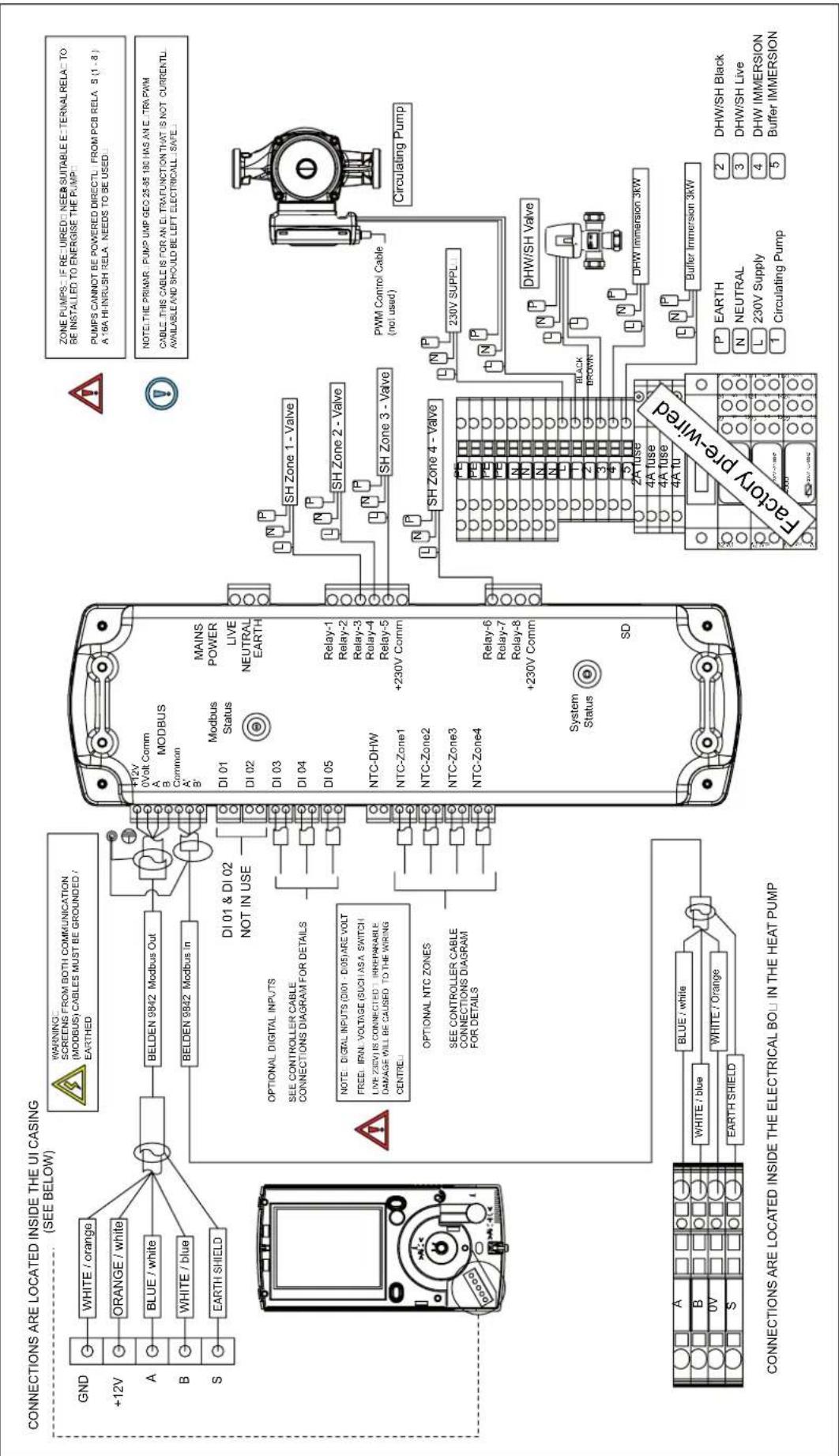
text_image
CONNECTIONS ARE LOCATED INSIDE THE UI CASING (SEE BELOW) GND +12V A B S WHITE / orange ORANGE / white BLUE / white WHITE / blue EARTH SHIELD BELDEN 9842 Modbus Out BELDEN 9842 Modbus in DI 01 & DI 02 NOT IN USE OPTIONAL DIGITAL INPUTS SEE CONTROLLER CABLE CONNECTIONS DIAGRAM FOR DETAILS NOTE: DIGITAL INPUTS (DI01 - DI05) ARE VOLT FREEL IFRN. VOLTAGE (SUCHASA SWITCH LIVE ZEBV) IS CONNECTED / IRREPARABLE DAMAGE WILL BE CAUSED TO THE WIRING CENTRED OPTIONAL NTC ZONES SEE CONTROLLER CABLE CONNECTIONS DIAGRAM FOR DETAILS P12V 0Volt Comm MODBUS A B Common A B DI 01 Modbus Status MAINS POWER LIVE NEUTRAL EARTH DI 02 DI 03 DI 04 DI 05 Relay-1 Relay-2 Relay-3 Relay-4 Relay-5 +230V Comm NTC-DHW NTC-Zone1 NTC-Zone2 NTC-Zone3 NTC-Zone4 NTC-Zone5 SD System Status SH Zone 1 - Valve SH Zone 2 - Valve SH Zone 3 - Valve PWM Control Cable (not used) SH Zone 4 - Valve 230V SUPPL DHW/SH Valve DHW Immersion 3kW Buffer Immersion 3kW P EARTH 2 DHW/SH Black N NEUTRAL 3 DHW/SH Live L 230V Supply 4 DHW IMMERSION 1 Circulating Pump 5 Buffer IMMERSION CONNECTIONS ARE LOCATED INSIDE THE ELECTRICAL BOJ IN THE HEAT PUMP6.10 Wiring centre electrical configurations - with A Class cylinder
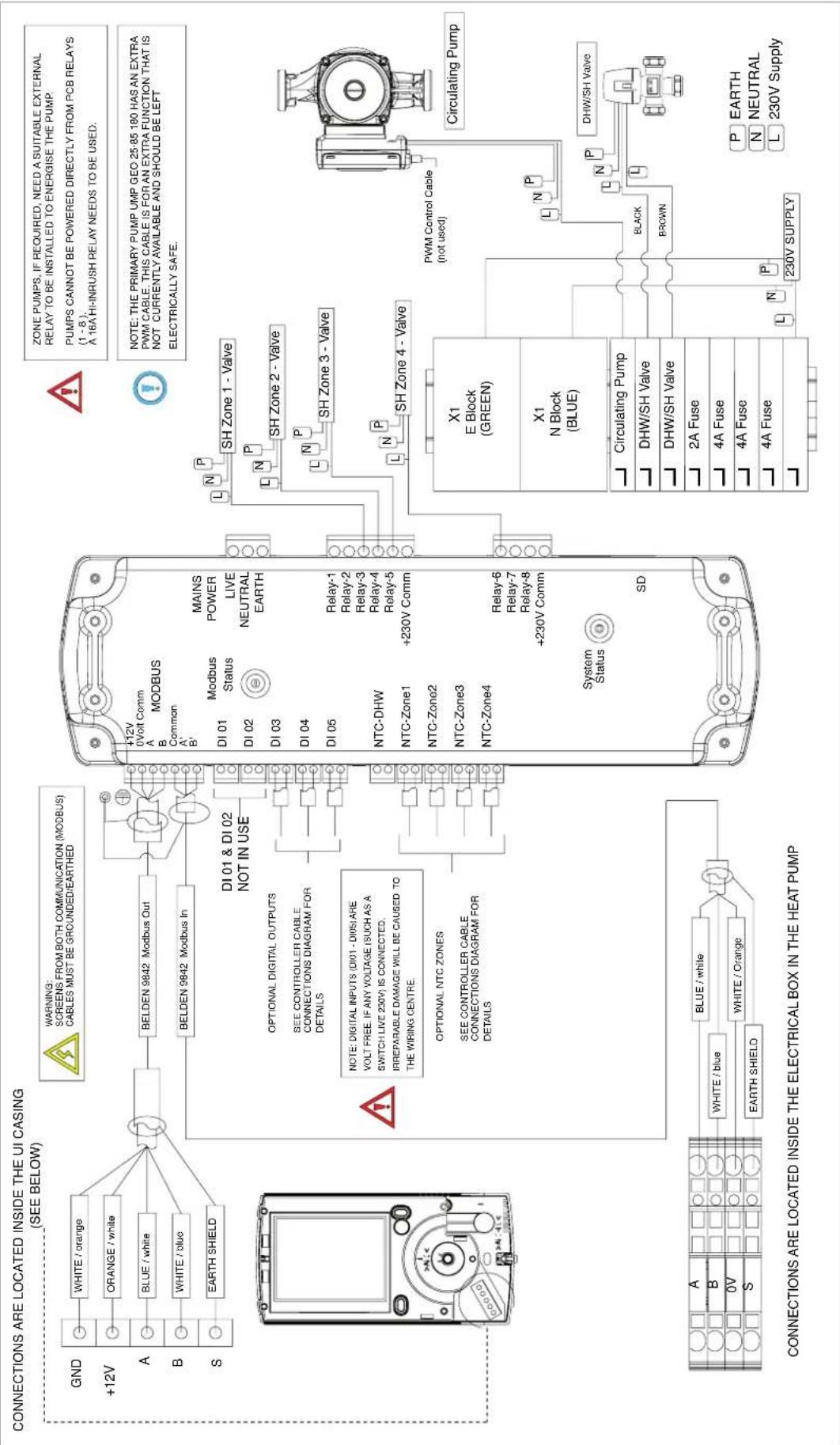
text_image
CONNECTIONS ARE LOCATED INSIDE THE UI CASING (SEE BELOW) GND +12V A B S WHITE / orange ORANGE / white BLUE / white WHITE / blue EARTH SHIELD BELDEN 9842 Modbus Out BELDEN 9842 Modbus In DI 01 & DI 02 NOT IN USE OPTIONAL DIGITAL OUTPUTS SEE CONTROLLER CABLE CONNECTIONS DIAGRAM FOR DETAILS NOTE: DIGITAL INPUTS (DI01 - DI05) ARE VOLT FREE. IF ANY VOLTAGE (SUCH AS A SWITCH LIVE 230V) IS CONNECTED. IRREPARABLE DAMAGE WILL BE CAUSED TO THE WIRING CENTRE. OPTIONAL NTC ZONES SEE CONTROLLER CABLE CONNECTIONS DIAGRAM FOR DETAILS +12V 0Volt Comm MODBUS DI 01 Modbus Status MAINS POWER LIVE NEUTRAL EARTH DI 02 Di 03 Relay-1 Relay-2 Relay-3 Relay-4 Relay-5 DI 04 DI 05 +230V Comm NTC-DHW NTC-Zone1 NTC-Zone2 NTC-Zone3 NTC-Zone4 Relay-6 Relay-7 Relay-8 +230V Comm System Status SD SD ZONE PUMPS, IF REQUIRED, NEED A SUITABLE EXTERNAL RELAY TO BE INSTALLED TO ENERGISE THE PUMP. PUMPS CANNOT BE POWERED DIRECTLY FROM PCB RELAYS (1 - 8), A 16A HI-INRUSH RELAY NEEDS TO BE USED. NOTE: THE PRIMARY PUMP UMP GEO 25-85 180 HAS AN EXTRA PWM CABLE. THIS CABLE IS FOR AN EXTRA FUNCTION THAT IS NOT CURRENTLY AVAILABLE AND SHOULD BE LEFT ELECTRICALLY SAFE. Circulating Pump PWM Control Cable (not used) X1 E Block (GREEN) X1 N Block (BLUE) Circulating Pump DHW/SH Valve DHW/SH Valve 2A Fuse 4A Fuse 4A Fuse 4A Fuse 230V SUPPLY P EARTH N NEUTRAL L 230V Supply6.11 Jumper configurations
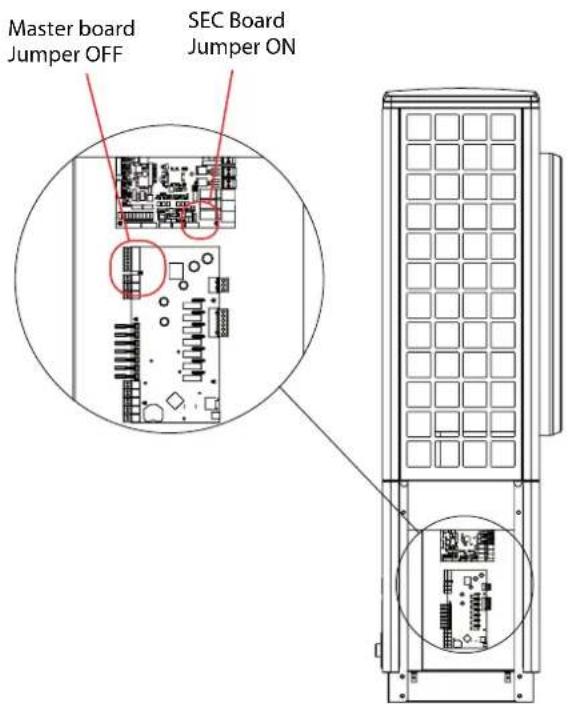
text_image
Master board Jumper OFF SEC Board Jumper ON
text_image
Water Module Jumper OFF User Interface Jumper ON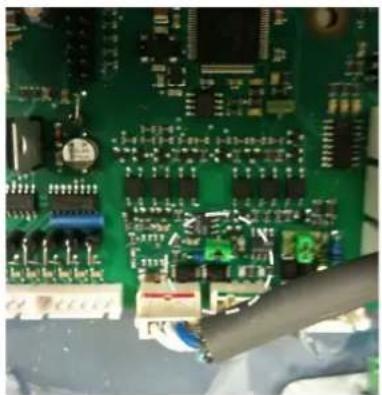
natural_image
Close-up of a green printed circuit board with electronic components and connectors (no visible text or symbols)Figure 36: Jumper in ON position on SEC board

text_image
2013 E24J951 ModBus= E Termination off on +⊥ A B S A B'Figure 37: Jumper in OFF position on water module
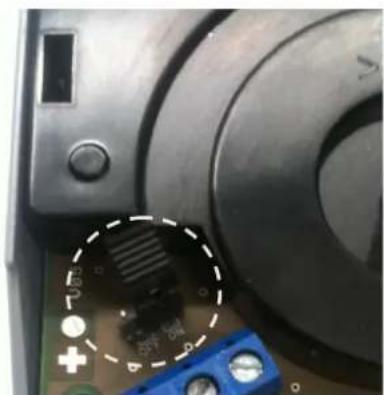
natural_image
Close-up of a mechanical component with a highlighted circular section showing internal components (no readable text or symbols)Figure 38: Jumper in ON position on user interface (UI)
NOTE: The diagram above shows the ON/OFF positions of jumpers for the recommended configuration.
NOTE: The alternative wiring configuration is shown below, but should only be used if absolutely necessary. Wiring centre electrical configurations - with A Class cylinder
Start
SEC Board Jumper ON
Master Board Jumper OFF
User Interface Jumper OFF
Water Module Jumper ON
End

MODBUS Cable
6.12 Controller cable connections
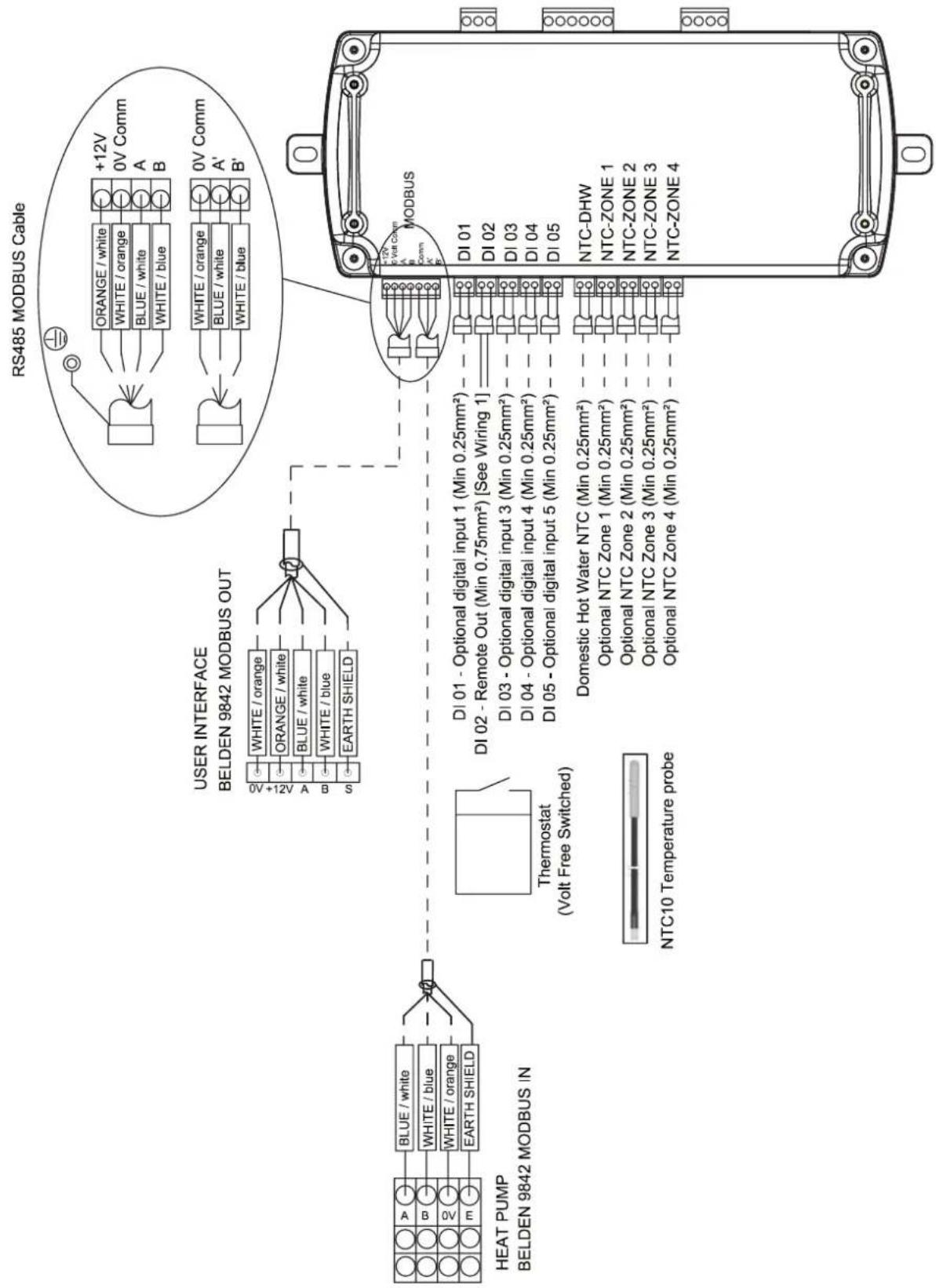
flowchart
graph TD
    A["HEAT PUMP Belden 9842 MODBUS IN"] --> B["Thermostat (Volt Free Switched)"]
    B --> C["USER INTERFACE Belden 9842 MODBUS OUT"]
    C --> D["RS485 MODBUS Cable"]
    D --> E["RS485 MODE with 12V +12V power supply"]
    D --> F["RS485 MODE with 0V Comm power supply"]
    D --> G["RS485 MODE with 0V Comm power supply"]
    D --> H["RS485 MODE with 0V Comm power supply"]
    D --> I["RS485 MODE with 0V Comm power supply"]
    D --> J["RS485 MODE with 0V Comm power supply"]
    D --> K["RS485 MODE with 0V Comm power supply"]
    D --> L["RS485 MODE with 0V Comm power supply"]
    D --> M["RS485 MODE with 0V Comm power supply"]
    D --> N["RS485 MODE with 0V Comm power supply"]
    D --> O["RS485 MODE with 0V Comm power supply"]
    D --> P["RS485 MODE with 0V Comm power supply"]
    D --> Q["RS485 MODE with 0V Comm power supply"]
    D --> R["RS485 MODE with 0V Comm power supply"]
    D --> S["RS485 MODE with 0V Comm power supply"]
    D --> T["RS485 MODE with 0V Comm power supply"]
    D --> U["RS485 MODE with 0V Comm power supply"]
    D --> V["RS485 MODE with 0V Comm power supply"]
    D --> W["RS485 MODE with 0V Comm power supply"]
    D --> X["RS485 MODE with 0V Comm power supply"]
    D --> Y["RS485 MODE with 0V Comm power supply"]
    D --> Z["RS485 MODE with 0V Comm power supply"]
    D --> AA["RS485 MODE with 0V Comm power supply"]
    D --> AB["RS485 MODE with 0V Comm power supply"]
    D --> AC["RS485 MODE with 0V Comm power supply"]
    D --> AD["RS485 MODE with 0V Comm power supply"]
    D --> AE["RS485 MODE with 0V Comm power supply"]
    D --> AF["RS485 MODE with 0V Comm power supply"]
    D --> AG["RS485 MODE with 0V Comm power supply"]
    D --> AH["RS485 MODE with 0V Comm power supply"]
    D --> AI["RS485 MODE with 0V Comm power supply"]
    D --> AJ["RS485 MODE with 0V Comm power supply"]
    D --> AK["RS485 MODE with 0V Comm power supply"]
    D --> AL["RS485 MODE with 0V Comm power supply"]
    D --> AM["RS485 MODE with 0V Comm power supply"]
    D --> AN["RS485 MODE with 0V Comm power supply"]
    D --> AO["RS485 MODE with 0V Comm power supply"]
    D --> AP["RS485 MODE with 0V Comm power supply"]
    D --> AQ["RS485 MODE with 0V Comm power supply"]
    D --> AR["RS485 MODE with 0V Comm power supply"]
    D --> AS["RS485 MODE with 0V Comm power supply"]
    D --> AT["RS485 MODE with 0V Comm power supply"]
    D --> AU["RS485 MODE with 0V Comm power supply"]
    D --> AV["RS485 MODE with 0V Comm power supply"]
    D --> AW["RS485 MODE with 0V Comm power supply"]
    D --> AX["RS485 MODE with 0V Comm power supply"]
    D --> AY["RS485 MODE with 0V Comm power supply"]
    D --> AZ["RS485 MODE with 0V Comm power supply"]
    D --> BA["RS485 MODE with 0V Comm power supply"]
    D --> BB["RS485 MODE with 0V Comm power supply"]
    D --> BC["RS485 MODE with 0V Comm power supply"]
    D --> BD["RS485 MODE with 0V Comm power supply"]
    D --> BE["RS485 MODE with 0V Comm power supply"]
    D --> BF["RS485 MODE with 0V Comm power supply"]
    D --> BG["RS485 MODE with 0V Comm power supply"]
    D --> BH["RS485 MODE with 0V Comm power supply"]
    D --> BI["RS485 MODE with 0V Comm power supply"]
    D --> BJ["RS485 MODE with 0V Comm power supply"]
    D --> BK["RS485 MODE with 0V Comm power supply"]
    D --> BL["RS485 MODE with 0V Comm power supply"]
    D --> BM["RS485 MODE with 0V Comm power supply"]
    D --> BN["RS485 MODE with 0V Comm power supply"]
    D --> BO["RS485 MODE with 0V Comm power supply"]
    D --> BP["RS485 MODE with 0V Comm power supply"]
    D --> BQ["RS485 MODE with 0V Comm power supply"]
    D --> BR["RS485 MODE with 0V Comm power supply"]
    D --> BS["RS485 MODE with 0V Comm power supply"]
    D --> BT["RS485 MODE with 0V Comm power supply"]
    D --> BU["RS485 MODE with 0V Comm power supply"]
    D --> BV["RS485 MODE with 0V Comm power supply"]
    D --> BW["RS485 MODE with 0V Comm power supply"]
    D --> BX["RS485 MODE with 0V Comm power supply"]
    D --> BY["RS485 MODE with 0V Comm power supply"]
    D --> BZ["RS485 MODE with 0V Comm power supply"]
    D --> CA["RS485 MODE with 0V Comm power supply"]
    D --> CB["RS485 MODE with 0V Comm power supply"]
    D --> CC["RS485 MODE with 0V Comm power supply"]
    D --> CD["RS485 MODE with 0V Comm power supply"]
    D --> CE["RS485 MODE with 0V Comm power supply"]
    D --> CF["RS485 MODE with 0V Comm power supply"]
    D --> CG["RS485 MODE with 0V Comm power supply"]
    D --> CH["RS485 MODE with 0V Comm power supply"]
    D --> CI["RS485 MODE with 0V Comm power supply"]
    D --> CJ["RS485 MODE with 0V Comm power supply"]
    D --> CK["RS485 MODE with 0V Comm power supply"]
    D --> CL["RS485 MODE with 0V Comm power supply"]
    D --> CM["RS485 MODE with 0V Comm power supply"]
    D --> CN["RS485 MODE with 0V Comm power supply"]
    D --> CO["RS485 MODE with 0V Comm power supply"]
    D --> CP["RS485 MODE with 0V Comm power supply"]
    D --> CQ["RS485 MODE with 0V Comm power supply"]
6.13 Installer menu flow chart
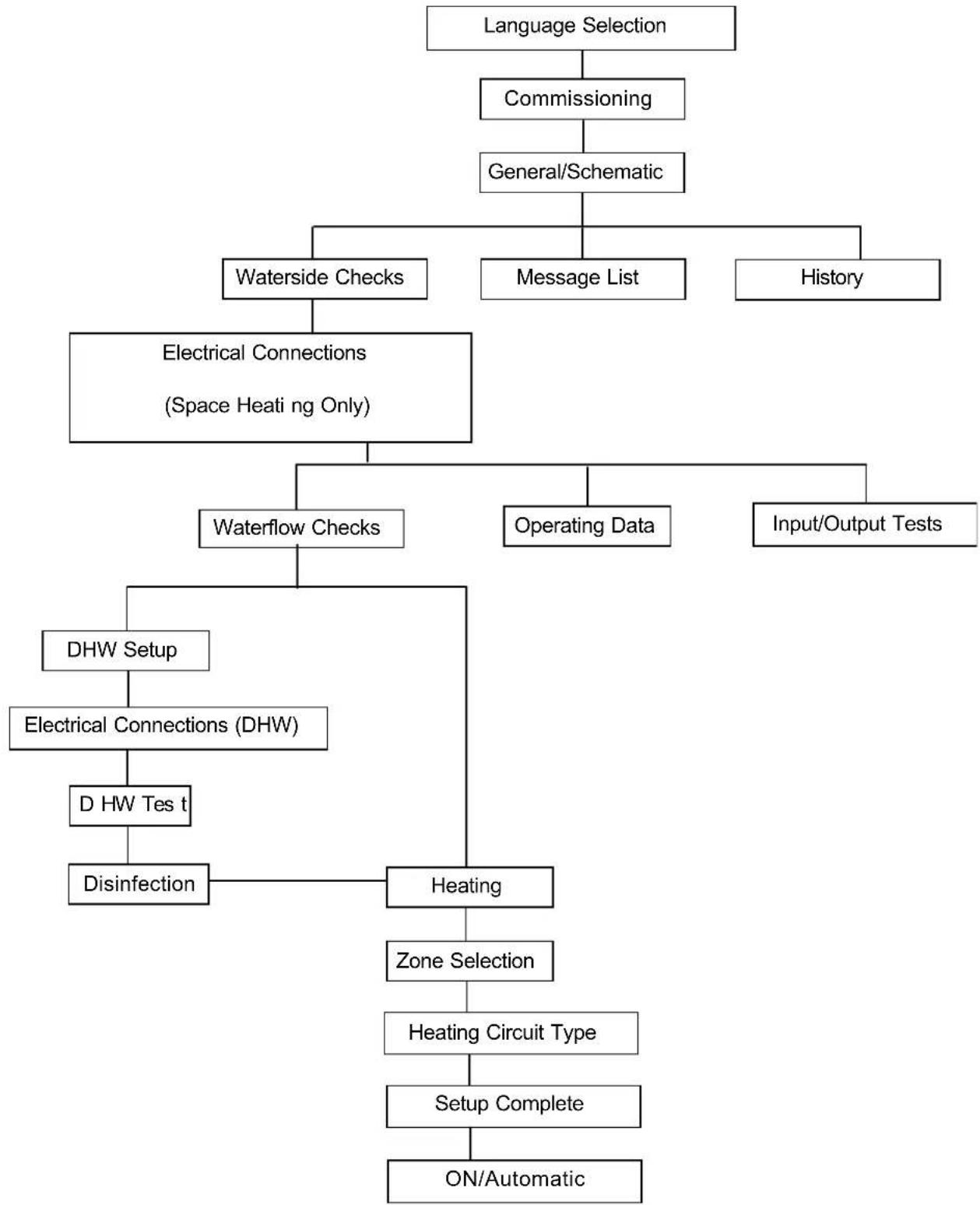
flowchart
graph TD
    A["Language Selection"] --> B["Commissioning"]
    B --> C["General/Schematic"]
    C --> D["Waterside Checks"]
    C --> E["Message List"]
    C --> F["History"]
    D --> G["Electrical Connections (Space Heating Only)"]
    G --> H["Waterflow Checks"]
    G --> I["Operating Data"]
    G --> J["Input/Output Tests"]
    H --> K["DHW Setup"]
    K --> L["Electrical Connections (DHW)"]
    L --> M["D HW Tes t"]
    M --> N["Disinfection"]
    H --> O["Heating"]
    O --> P["Zone Selection"]
    P --> Q["Heating Circuit Type"]
    Q --> R["Setup Complete"]
    R --> S["ON/Automatic"]
Installer menu flow chart
Each submenu will appear once the upper level menu has been completed. Availability of menus will depend on the schematic zone diagram selected (as shown in Appendix B).
6.14 Installer hand-over form
INSTALLER INFORMATION
| Name: | |
| Phone No. | |
| Company: | |
| Address: | |
| Email: | |
| MCS No. |
INSTALLATION INFORMATION
| Date of Installation / Commissioning: | |
| Heat Pump Model: | |
| Heat Pump Serial No.: | |
| Cylinder Model: | |
| Cylinder Serial No.: | |
| Accessories Installed: | |
| Schematic No. Used in Commissioning: | |
| Temperature Devices Used for Zone Control: | |
| Zone 1: | |
| Zone 2: | |
| Zone 3: | |
| Zone 4: | |
| Heat Emitters Installed: |
TEMPERATURES RECORDED AT COMMISSIONING:
| Flow Temperature °C | ||
| Return Temperature °C | ||
| Outside Temperature °C | ||
| Spread K | ||
| Flow Rate m3/h |
Refrigeration:
| High Pressure | ||
| Low Pressure |
Heat Exchanger
| Temp. Refrigeration | ||
| Temp. Water | ||
| Running Amps | ||
EC Declaration of Conformity
GDC Group Limited,
Millbrook House, Grange Drive,
Hedge End, Southampton,
Hants, SO302DF,
United Kingdom
Manufacturer: GDC Group,
Greenbank Industrial Estate,
Rampart Road,
Newry,
Co. Down,
BT34 2QU
Hereby certified that the following device(s) complies/comply with the applicable EU directives. This certification loses its validity if the device(s) is/are modified.
Description: Heat Pump
Type: Air – to – Water
Model: A16M
Model: A12M
Model: A8M
EC Directives:
Low voltage directive 2006/95/EC
EMC directive 2004/108/EC
Pressure equipment directive 97/23/EC
Applied Standards:
EN 60335-1:2002+A11+A1+A12+corr.+A2:2006; EN60335-1/A13:2008; EN60335-2-
40:2003+A11+A12+A1+corr.+A2:2009
EN55014-1:2006; EN55014-2:1997+A1:2001
EN61000-3-2:2006; EN61000-3-3:1995+A1:2001+A2:2005
EN378-1:2008; EN378-2:2008+A1:2009; EN378-3:2008; EN378-4:2008
EN 14511-1:2007; EN14511-2:2007; EN14511-3:2007+EN14511-3:2007/AC:2008;
EN14511-4:2007
Conformity assessment procedure according to pressure equipment directive:
Module A
CE mark added:
2013
EC declaration of conformity issued on:
25 ^th September 2014
Ireland, 25.09.14
Issue: 1.03