SV4F183DK - Fridge SVAN - Free user manual and instructions
Find the device manual for free SV4F183DK SVAN in PDF.


User questions about SV4F183DK SVAN
0 question about this device. Answer the ones you know or ask your own.
Ask a new question about this device
Download the instructions for your Fridge in PDF format for free! Find your manual SV4F183DK - SVAN and take your electronic device back in hand. On this page are published all the documents necessary for the use of your device. SV4F183DK by SVAN.
USER MANUAL SV4F183DK SVAN
natural_image
Line drawing of a refrigerator front view showing door, frontrest, and side panels (no text or symbols)INSTRUCTION MANUAL
Model No.: SV4F183DK
SAFETY

text_image
4 !WARNING!
It is hazardous for anyone other than authorized service personnel to carry out servicing or repairs which involves the removal of covers. To avoid the risk of an electric shock do not attempt to repair this appliance yourself.
WARNING!
Risk of fire / flammable materials.

Safety tips
Do not use electrical appliances such as a hair dryer or heater to defrost your Freezer.
Containers with flammable gases or liquids can leak at low temperatures.
Do not store any containers with flammable materials, such as spray cans, fire extinguisher refill cartridges etc. in the Freezer.
Do not place carbonated or fizzy drinks in the Freezer compartment. Ice lollies can cause "Frost/Freeze burns". If consumed straight from the Freezer.
Do not remove items from the Freezer compartment if your hands are damp/wet, as this could cause skin abrasions or "Frost/Freezer burns". Bottles and cans must not be placed in the Freezer compartment as they can burst when the contents freeze.
Manufacturer's recommended storage times should be adhered to. Refer to relevant instructions.
Do not allow children to tamper with the controls or play with the Freezer. The Freezer is heavy. Care should be taken when moving it. It is dangerous to alter the specification or attempt to modify this product in any way.
Do not store inflammable gases or liquids inside you Freezer.
If the power cable is damaged, it must be replaced by the manufacturer, its service agent or similarly qualified persons in order to avoid a hazard.
This appliance can be used by children aged from 8 years and above and persons with reduced physical, sensory or mental capabilities or lack of experience and knowledge if they have been given supervision or instruction concerning use of the appliance in a safe way and understand the hazards involved. Children shall not play with the appliance. Cleaning and user maintenance shall not be made by children without supervision.
This appliance is intended to be used in household.
Do not use mechanical devices or other means to accelerate the defrosting process, other than those recommended by the manufacturer.
Do not damage the refrigerant circuit.
Do not use electrical appliances inside the food storage compartments of the appliance, unless they are of type recommended by the manufacturer.
Do not store explosive substances such as aerosol cans with a flammable propellant in this appliance.
This appliance is not intended for use by persons (including children) with reduced physical, sensory or mental capabilities, or lack of experience and knowledge, unless they have been given supervision or instruction concerning use of the appliance by a person responsible for their safety. Children should be supervised to ensure that they do not play with the appliance.
- WARNING: Keep ventilation openings, in the appliance enclosure or in the built-in structure, clear of obstruction.
- WARNING: Do not use mechanical devices or other means to accelerate the defrosting process, other than those recommended by the manufacturer.
- WARNING: Do not damage the refrigerant circuit.
- WARNING: Do not use electrical appliances inside the food storage compartments of the appliance, unless they are of the type recommended by the manufacturer.
- WARNING: Refrigerating appliances – in particular a refrigerator-freezer Type I – might not operate consistently (possibility of defrosting of contents or temperature becoming too warm in the frozen food compartment) when sited for an extended period of time below the cold end of the range of temperatures for which the refrigerating appliance is designed;
- WARNING: The necessity that, for doors or lids fitted with locks and keys, the keys be kept out of the reach of children and not in the vicinity of the refrigerating appliance, in order to prevent children from being locked inside.
- WARNING: The refrigerant used in your appliance and insulation materials requires special disposal procedures.
- WARNING: When positioning the appliance, ensure the supply cord is not trapped or damaged.
- WARNING: Do not locate multiple portable socket-outlets or portable power supplies at the rear of the appliance.
Locks
If your Refrigerator is fitted with a lock, to prevent children being entrapped keep the key out of reach and not in the vicinity of the appliance. If disposing of an old Refrigerator break off any old locks or latches as a safeguard.
INTRODUCTION
Before use
Please read these instructions and the Safety guidelines on page 1 carefully before using your new Refrigerator. The Refrigerator is for indoor, domestic use only.
General Description of Refrigerator

text_image
1 2 3 3 4 5 6 7 8| No | Description |
| 1 | Light |
| 2 | Egg Tray |
| 3 | Bottle Rack |
| 4 | Refrigerator Glass Shelf |
| 5 | Salad Crisper |
| 6 | Upper Freezer Drawer |
| 7 | Bottom Freezer Drawer |
| 8 | Adjustable Foot |
INSTALLATION
Location
When selecting a position for your Refrigerator you should make sure the floor is flat and firm, and the room is well ventilated with an average room temperature of between 10^ C and 43^ C. Avoid locating your Refrigerator near a heat source, eg. cooker, boiler or radiator. Also avoid direct sunlight in out-buildings or sun lounges. If you are placing your Refrigerator in an out-building such as a garage or annex ensure that the Refrigerator is placed above the damp course,
otherwise condensation will occur on the Refrigerator cabinet. Never place the Refrigerator in a wall recess or into fitted cabinets or furniture. When your Refrigerator is working, the grille at the back may become hot and the sides warm. It must therefore be installed so that the back of the Refrigerator has at least 9cm (31/2") of free space and the sides have 2cm (3/4"). Do not drape the Refrigerator with any covering.
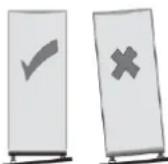
Leveling the Refrigerator
If the Refrigerator is not level, the door and magnetic seal alignment will be affected and may cause you. Refrigerator to work incorrectly. Once the Refrigerator is placed in its final location, adjust the leveling feet at the front by turning them.
Cleaning before use
Wipe the inside of the Refrigerator with a weak solution of bicarbonate of soda. Then rinse with warm water using a damp sponge or cloth. Wash the baskets and shelves in warm soapy water and dry completely before replacing in the Refrigerator. The external parts of the Refrigerator can be cleaned with wax polish.
Before plugging in YOU MUST
Check that you have a socket which is compatible with the plug supplied with the Refrigerator.
Before switching on!
The coolant fluid needs time to settle. If the appliance is switched off at any time, wait 30 minutes before switching back on to allow the coolant fluid to settle.
Before filling your Refrigerator
Before storing foods in your Refrigerator, turn the Refrigerator on and wait for 24 hours, to make sure it is working properly and to allow the Refrigerator drops to the correct temperature.
Electrical Connection
WARNING
Improper use of the grounded plug can result in the risk of electrical shock. If the power cord is damaged, have it replaced by an authorized service center.
This refrigerator should be properly grounded for your safety. The power cord of this refrigerator is equipped with a three-prong plug which mates with standard three prong wall outlets to minimize the possibility of electrical shock. Do not, under any circumstances, cut or remove the third ground prong from the power cord supplied.
This refrigerator requires a standard 230( or 220\~240)V A.C. \~/50Hz Hz electrical outlet with three-prong ground. This refrigerator is not designed to be used with an inverter.
The cord should be secured behind the refrigerator and not left exposed or dangling to prevent accidental injury. Never unplug the refrigerator by pulling the power cord. Always grip the plug firmly and pull straight out from the receptacle.
Do not use an extension cord with this appliance. If the power cord is too short, have a qualified electrician or service technician install an outlet near the appliance. Use of an extension cord can negatively affect the performance of the unit.
START
1. Keys
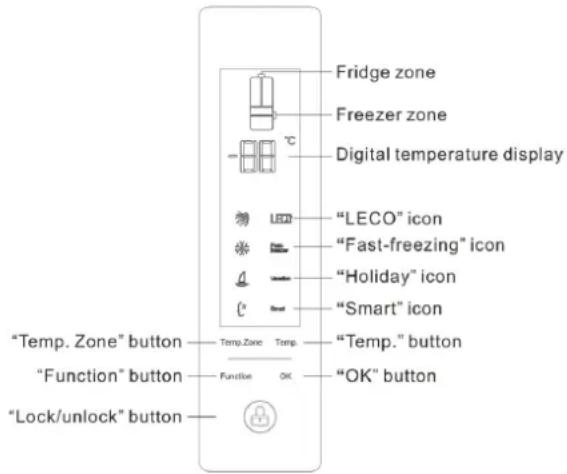
1.1 Display panel
1.2 Single key operation
1.2.1 'Temp. Zone' key
1) This key is to select the temperature zone, and the temperature zone changes each time the key is pressed, with the temperature of the selected zone displayed by digits.
2) The temperature zone selection changes through the following cycle:
Fridge → Freezer → Fridge ;
3) Every time when settings are finished (with no flickering any more), if the 'Temp. Zone' key is pressed again, 'Fridge' starts flickering first.
1.2.2 'Temp.' key
1) Under the temperature setting state, if the temperature zone is selected to be Fridge (with patterns of both the left and the right fridge doors flickering at the same
text_image
Fridge zone Freezer zone Digital temperature display "LECO" icon "Fast-freezing" icon "Holiday" icon "Smart" icon "Temp. Zone" button Temp Zone Temp. "Temp." button "Function" button Function OK "OK" button "Lock/unlock" button(time), press the 'Temp.'key, then the two digits starts flickering, which takes effect when the 'OK' key is pressed; and if the temperature zone is selected to be Freezer (with patterns of both the left and the right freezer doors flickering at the same time and the '-'sign illuminated), set the freezer temperature by reference to the fridge temperature setting.
The temperature will rise by 1^ C with each key response, which can be set in a cyclic manner.
2) Adjustable temperature range for each compartment:
Fridge compartment: 08\~02;
Freezer compartment: -16\~-24;
The default value for each compartment when the refrigerator is energized for the first time:
Fridge compartment temperature is 05, and freezer compartment temperature -18.
3) Fridge OFF: When the fridge temperature is set, the temperature setting progresses through the following cycle.
$$ 2 ^ {\circ} \mathrm{C} \rightarrow 3 ^ {\circ} \mathrm{C} \rightarrow 4 ^ {\circ} \mathrm{C} \rightarrow 5 ^ {\circ} \mathrm{C} \rightarrow 6 ^ {\circ} \mathrm{C} \rightarrow 7 ^ {\circ} \mathrm{C} \rightarrow 8 ^ {\circ} \mathrm{C} \rightarrow \mathbf {O F} \rightarrow 2 ^ {\circ} \mathrm{C} $$
('OF' represents the OFF state, and when the OF setting takes effect, the fridge will be shut off, with no refrigeration request.)
1.2.3 'Function' key
1) The selected function changes with each key response.
2) Function selection changes through the following cycle: LECO→ Quick Freezer→ Holiday→Smart→LECO;
3) Every time when the function setting is finished, if the 'Function' key is pressed again, 'LECO' starts flickering first.
4) When a function has not been set, press this key to select the function, and then press the 'Ok' key, the selected function is enabled.
5) When a function has been enabled, press this key to select the function, and then press the OK key, the enabled function gets exited.
1.2.4 'OK' key
1) Under the state of function selection or temperature setting, the selected function or the set temperature value comes into force when this key is pressed, with the corresponding flickering stopped immediately.
2) Under the function selection or the temperature setting state, if this key is not pressed within 5 seconds, flickering gets stopped, with the selected function or the set temperature value invalid.
1.2.5 'Unlock' key
Under the state of keys being locked, keys can be unlocked by holding down this key for 3s.
1.3 Key combination operation
1.3.1 Hold down the 'Unlock' key, and then press the 'Function' key for more than 3S, you can access the parameter setup program.
1.3.2 Hold down the 'Unlock' key, and then press the 'OK' key for more than 5S, you can access the maintenance program.
1.3.3 Hold down the 'Unlock' key, and then press the 'Temp.' key for more than 3S, you can access the hardware self-check program.
1.4 Function program rules
1.4.1 'Quick Freeze' function
1) To enter 'Quick Freeze'
◆ Refer to the 'Single Key Operation';
2) To exit 'Quick Freeze' (the followings refer to the OR relationship)
◆ Refer to 'Single Key Operation'
The 'Quick Freeze' function exits automatically when the refrigerator total run time reaches 26 hours, counting from the moment the quick freeze function is enabled, with the character 'Quick Freeze' and its icon extinguished.
When the 'Smart' function is enabled, the 'Quick Freeze' function gets exited, with its icon extinguished.
3) When the 'Quick Freeze' function is enabled, the freezer temperature can't be modified.
4) When the 'Quick Freeze' function gets exited, the freezer temperature restores to its original temperature that is set before the 'Quick Freeze' function is enabled.
1.4.2 'Holiday' function
1) To enter 'Holiday'
◆ Refer to 'Single key operation';
2) To exit 'Holiday' (the follows refer to the OR relationship)
◆ Refer to 'Single key operation';
When the 'Smart' function is enabled, the 'Holiday' or 'Fridge Off' function gets exited.
3) When the 'Holiday' function is enabled, the fridge temperature is set at 14°C, which can't be modified.
4) When the 'Holiday' function is exited, the fridge temperature is restored to its original value that is set before the 'Holiday' function is enabled.
1.4.3 'Smart' function
1) To enter 'Smart':
a) Refer to 'Single key operation';
2) To exit 'Smart' (the follows refer to the OR relationship):
◆ Refer to 'Single key operation';
When the 'Quick Freeze' or 'Holiday' function is enabled, the 'Smart' function gets exited.
When the fridge temperature or the freezer temperature is modified, the 'Smart' function gets exited, with the set temperature executed.
3) When the 'Smart' function is enabled, the fridge temperature is set at 05°C and the freezer temperature at -18°C.
4) When the 'Smart' function is disabled, the temperature of each compartment is restored to its original value that is set before the 'Smart' function is enabled.
1.4.4 'Fridge Off' function
1) To enter 'Fridge Off':
In the case of fridge temperature setup, the fridge is shut off when the 'OK' key is pressed after the temperature setting is adjusted to 'OF'.
2) To exit 'Fridge Off' (the follows refer to the OR relationship):
Refer to 'Single key operation'; Adjust the fridge temperature to the mode other than OF, and then press the 'OK' to validate it.
When the 'Smart' function or the 'Holiday' function is enabled, the 'Fridge Off' function gets exited.
1.4.5 Function program setting relationships table
| Function to set\Current function | Quick freeze Smart Holiday | |
| Quick freeze Out Or | And | |
| Smart | Or Out | Or |
| Holiday | And | Or |
Note:
-
'Out': indicates that the current function will be exited.
-
'Or': indicates that the current function will be disabled when the function to set is enabled.
-
'And': indicates the function to set can not be enabled with the current function still running, and the two function can be executed at the same time after setting.
2. Display
2.1 Display Rules
2.1.1 Characters and icons that can be displayed independently: Fridge icon, freezer icon, LECO and its icon, Quick Freeze and its icon, Holiday and its icon, Smart and its icon, minus sign, °C symbol, and two 8-bit digits.
2.1.2 The display gets all illuminated when the refrigerator is energized for the first time, which restores to the normal display2S later.
2.1.3 When the display gets illuminated, it will be off if no key operation within 3 minutes, with keys locked.
2.1.4 When the display is off, a key can be awakened when pressed for the first time, and if any key is pressed at this time, this key becomes invalid; In such case, hold down the 'Unlock' key for 3s to unlock the key, and then press the key to enable its function.
2.1.5 In the case of failure or any door open action, the display gets illuminated.
2.1.6 Over-temperature alarm:
When energized, if the freezer sensor temperature is higher than -10^ , its corresponding icon (the upper and lower freezer doors) and set temperaturegets flickering. The temperature of the freezer when it is energized can be displayed by pressing any key. And the normal display is restored by pressing any key again.
2.1.7 Special function program display contents:
Under the state that the display is on, when the 'LECO' function is enabled, the character "LECO'vets illuminated; when the 'Quick Freeze' function is enabled, the character 'Quick Freeze' gets illuminated; when the 'Holiday' function is enabled, the character "Holiday' gets illuminated; and when the 'Smart' function is enabled, the character 'Smart' gets illuminated.
2.1.8 Failure indications
1) Failure information displayed for different types of failures :
| S/N Failure Types Item Information Displayed | ||
| 1 | Fridge sensor failure Fridge temperature display as ‘E0’ | |
| 2 | Freezer sensor failure Freezer temperature display as ‘E0’ | |
| 3 | Freezer evaporator sensor failure | Freezer temperature display as ‘E1’ |
| 4 | Ambient temperature sensor failure | Display as ‘EH’ |
| 5 | Communication failure | Display as ‘EC’ |
| 6 | Fan alarm | Display as ‘EF’ |
2) In case 'E0' and 'E1' alarm information need to be displayed at the same time, 'E2' is displayed.
3) Normal operation can be restored immediately after a failure is troubleshooted, without any manual intervention.
3. Special Programs
3.1 Maintenance program
3.1.1 By pressing combination keys, you can access the maintenance program (refer to the section Keys), with the buzzer issuing one sound first. And all characters other than the digits that are displayed according to the rules are hidden.
3.1.2 The parameters to be set, the load running state, or the sensor temperature value can be displayed.
3.1.3 When you press the 'Temp.Zone' key, parameters to be set can be selected according to the following table from left to right and from top to bottom.
3.1.4 When the 'Temp.' key is pressed, the running state can be adjusted.
| Parameters to be set | Running state parameters (0 indicates Stop, and 1 indicates Run) | |
| Initial Value | Parameter Value | |
| C1 | Instant fridge temperature | |
| d1 | Instant freezer temperature | |
| d2 | Instant freezer evaporator temperature | |
| CH | Instant ambient sensor temperature | |
| C (compressor) | 0, 1 | |
| CP(fridge throttle) | 0, 1 | |
| Fd (freezer fan) | 0, 1 | |
| Hd (defrost heater) | 0, 1 | |
| HL(anti-condensation heater) | 0, 1 | |
| H1 (LECO lamp) | 0, 1 | |
3.1.5 After the operating parameters are set, the refrigerator runs according to the settings of maintenance program.
3.1.6 When the maintenance program is running, you can press the 'Temp. Zone' key to select parameters to set or view the real value of each sensor, and press the 'Temp.' key to change the load running parameters.
3.1.7 Exit conditions:
1) The maintenance program keeps running for maximum 3 hours, and it exits automatically when the time limit is exceeded, with the normal operation program restored.
2) The maintenance program gets exited immediately when you disconnect the refrigerator power supply and energize it again.
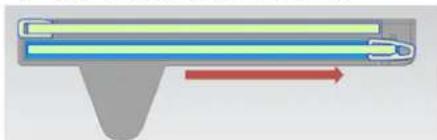
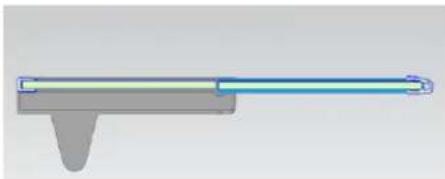
Instructions for use of the foldable glass shelf:
1、Pull out the lower glass shelf first.
natural_image
Diagram of a mechanical or fluidic component with a red arrow indicating direction (no text or symbols)2、Move the lower shelf in the manner as illustrated below.

natural_image
Pure diagram of a mechanical or electrical component with no visible text, numbers, or symbols
natural_image
Pure diagram of a mechanical or electrical component with no visible text, numbers, or symbols3、Make sure the shelf should be put in position as illustrated below, so that it will not come off.
natural_image
Pure mechanical component diagram without any text, numbers, or symbolsTips for keeping food perfect in the Fridge
Take extra care with meat and fish
Cooked meats should always be stored on a shelf above raw meats to avoid bacterial transfer. Keep raw meats on a plate which is large enough to collect juices and cover it with cling film or foil.
Leave space around food
This allows cold air to circulate around the Fridge, ensuring all parts of the Fridge are kept cool.
Wrap up food!
To prevent transfer of flavors and drying out, food should be separately packed or covered. Fruit and vegetables need not be wrapped.
Pre-cooked food should be cooled properly
Allow pre-cooked food to cool down before placing in the Fridge. This will help to stop the internal temperature of the Fridge from rising.
Shut the door!
To prevent cold air escaping, try to limit the number of times you open the door. When retuning from shopping, sort foods to be kept in your Fridge before opening the door. Only open the door to put food in or take it out.
Tips for shopping for frozen foods
Your Freezer is 4 star

When you are buying frozen food, look at the Storage Guidelines on the packaging. You will be able to store each item of frozen food for the period shown against the 4 star rating. This is usually the period stated as "Best, Before", found on the front of the packaging.
Check the Refrigerator temperature
Check the temperature of the frozen food cabinet in the shop where you buy your frozen foods.
Choose packs carefully
Make sure the frozen food package is in perfect condition.
Purchase frozen food last
Always buy frozen products last on your shopping trip or visit to the supermarket.
Keep frozen foods together
Try to keep frozen food together whilst shopping, and on the journey home as this will help to keep the food cooler.
Store food straight away
Don't buy frozen food unless you can freeze it straight away. Special insulated bags can be bought from most supermarkets and hardware shops. These keep frozen food cold for longer.
Thawing frozen food
For some foods, thawing before cooking is unnecessary. Vegetables and pasta can be added directly to boiling water or steam cooked. Frozen sauces and soups can be put into a saucepan and heated gently until thawed.
Freezing fresh foods, useful tips
Use quality food and handle it as little as possible. Freeze food in small quantities, it freezes faster, takes less time to thaw and enables you to eat it in the quantity you need.
Freezing fresh foods
First, estimate the amount of food you will be freezing. If you are freezing large amounts of fresh food, remember to turn the control dial to Max. This will lower the temperature in the Freezer, freezing your food quicker and helping to keep the goodness in. However you should do this sparingly to conserve energy.
Preparations for freezing
Leave cooked food to cool completely.
- Chill food in a Fridge before freezing if possible.
- Consider how you want to cook the food before freezing it.
- Don't freeze food in metal containers as you may want to microwave it straight from the Freezer.
- Use special Freezer bags available from supermarkets, Freezer film, polythene bags, plastic containers, aluminum foil for acidic foods(such as citrus fruits).
Do not use thin cling film or glass. Do not use used food containers (unless cleaned thoroughly first).
Exclude as much air from the container as possible. You could buy a special vacuum pump which sucks excessive air out of the packaging.
-Leave a small amount of "air space" when freezing liquids, to allow for expansion.
- You can use the space in the Freezer most efficiently if you freeze liquids(or solids with liquids, such as stew) in square blocks.
This is known as "performing" Pour the liquid into a polythene bag which is inside a square sided container.
Freeze it like this, then remove it from the container and seal the bag.
Defrosting
This appliance is designed as automatic defrosting ,no need to defrost by hand.
Recommended storage periods
For recommended food storage time, refer to the information given on your food packaging.
Cleaning inside the Refrigerator
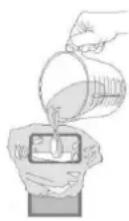
You should clean the Refrigerator internally with a weak solution of bicarbonate of soda. Then rinse with warm water using a damp sponge or cloth and wipe dry. Wash the baskets in warm soapy water and ensure they are completely dry before replacing in the Refrigerator.
Cleaning outside the Refrigerator
Use standard non-abrasive detergent diluted in warm water to clean the Refrigerator exterior.
The grille of the condenser at the back of the Refrigerator and the adjacent components can be vacuumed using a soft brush attachment.
Do not use harsh cleaners, scouring pads or solvents to clean any part of the Refrigerator
Simple fault analysis and elimination
Not every failure requires technical service personnel to solve the following simple small problem; you can try to solve the problem.
| Case Inspection Solutions | ||
| Completely non refrigeration | Is power plug off?Are breakers and fuses a broken?No electricity or line trip? | Re-plug.Opening the door and checking whether the lamp is lit. |
| Abnormal noise | Is refrigerator stable?Does refrigerator reach the wall? | Adjusting refrigerator's adjustable feet.Off the wall. |
| Poor refrigerating efficiency | Do you put hot food or too much food?Do you open the door frequently?Do you clip food bag to the seal of door?Direct sunlight or near a furnace or stove?Is it well-ventilated?Temperature setting in too high? | Putting food into refrigerator when hot food becomes cool.Checking and closing the door.Removing the refrigerator from the heat source.Emptying the distance to maintain good ventilation.Setting to the appropriate temperature. |
| Peculiar smell in refrigerator | Any spoiled food?Do you need to clean refrigerator?Do you packed food of strong flavors? | Throwing away spoiled food.Cleaning refrigerator.Packing food of strong flavors. |
Moving the Refrigerator
Location
Do not place your Refrigerator near a heat source, eg. Cooker, boiler or radiator. Also avoid direct sunlight in out-buildings or sun lounges.
Leveling the Refrigerator
Make sure the Refrigerator is level. Use the rotating leveling feet at the front. If the Refrigerator is not level, the doors and magnetic seal alignments will be affected and may cause your Refrigerator to work incorrectly.
Do not turn on the Refrigerator for 4 hours
After the Refrigerator is in place it needs to be left for 4 hours. This allows time for the coolant to settle.
Installation
Don't cover or block the vents or grilles of your appliance.
If you're not at home for a long time
- Turn off the refrigerator first and then unplug the unit from the wall outlet.
- Remove all the food.
-
Clean the refrigerator.
-
Leave the lid open slightly to avoid possible formation of condensation, mold, or odors.
- Use extreme caution in the case of children. The unit should not be accessible to child's play.
- Short vacations: Leave the refrigerator operating during vacations of less than three weeks.
- Long vacations: If the appliance will not be used for several months, remove all food and unplug the power cord. Clean and dry the interior thoroughly. To prevent odor and mold growth, leave the door open slightly: blocking it open if necessary or have the door removed.
How to save energy
- Install the refrigerator in the coolest part of the room, out of direct sunlight and away from heating ducts or registers. Do not place the refrigerator next to heat-producing appliances such as a range, oven or dishwasher.
- The refrigerator door should remain open only as long as necessary; do not place hot food inside the refrigerator.
- Organize the refrigerator to reduce door openings .Remove as many items as needed at one time and close the door as soon as possible.
- The refrigerator door should be properly closed to avoid increased energy consumption, and the formation of excess ice and / or condensation inside.
- Constantly circulating cold air keeps the temperature homogenous inside the refrigerator. For this reason, it is important to properly distribute the food, to facilitate the flow of air.
- Cover foods and wipe containers dry before placing them in the refrigerator. This cuts down on moisture build-up inside the unit.
- Do not overcrowd the refrigerator or block cold airvents. Doing so causes the refrigerator to run longer and use more energy. Shelves should not be lined with aluminum foil, wax paper or paper toweling. Liners interfere with cold air circulation, making the refrigerator less efficient, which could cause food spoilage.
- During prolonged absences (example: vacations), it is advisable to disconnect the refrigerator, remove all the food, and clean it. The door should be left slightly open to avoid mold and unpleasant odors. This will not affect the refrigerator when it is reconnected.
- During short absences (example: holidays), the refrigerator can remain on. However, remember that prolonged power outages may occur while you are gone.
Servicing
This product should be serviced by an authorized engineer and only genuine spare parts should be used.
Under no circumstances should you attempt to repair the appliance yourself.
Repairs carried out by inexperienced persons may cause injury or serious malfunctioning. Contact the local store where your purchase was made.
When the appliance is not in use for long periods, disconnect from the electricity supply, empty all foods and clean the appliance, leaving the door ajar to prevent unpleasant smells.
THIS APPLIANCE MUST BE EARTHED.
This appliance is fitted with a plug which will be suitable for use in all houses fitted with sockets to current specifications. If the fitted plug is not suitable for your socket outlets, it should be cut off and carefully disposed of. To avoid a possible shock hazard, do not insert the discarded plug into a socket.
Correct Disposal of this product
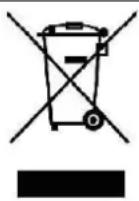
This marking indicates that this product should not be disposed with other household wastes throughout the EU. To prevent possible harm to the environment or human health from uncontrolled waste disposal, recycle it responsibly to promote the sustainable reuse of material resources. To return your used device, please use the return and collection systems or contact the retailer where the product was purchased. They can take this product for environmental safe recycling.
svan
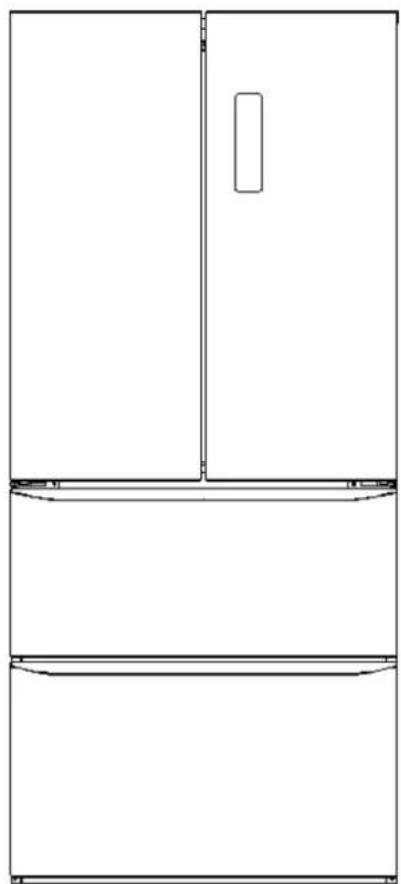
FRIGORÍFICO COMBI FRANCÉS
natural_image
Line drawing of a double door with a rectangular opening, shown in top and front views (no text or symbols)text_image
Fridge zone Freezer zone Digital temperature display "LECO" icon "Fast-freezing" icon "Holiday" icon "Smart" icon "Temp. Zone" button Temp Zone Temp. "Temp." button "Function" button Function OK "OK" button "Lock/unlock" button de1.2.5 Tecla "Desbloquear"
natural_image
Diagram of a mechanical component with a red arrow indicating direction (no text or symbols)natural_image
Pure diagram of a mechanical or electrical component with no visible text, numbers, or symbols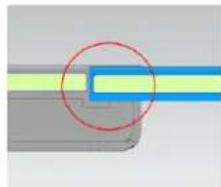
natural_image
Pure diagram of a mechanical joint or connector with no text, numbers, or symbols visiblenatural_image
Pure mechanical component diagram without any text, numbers, or symbolsnatural_image
Line drawing of a refrigerator front view showing door, frontrest, and side panels (no text or symbols)MANUAL DE INSTRUÇÕES
Model No.: SV4F183DK
SEGURANÇA
text_image
4 !ATENÇÃO!
text_image
Fridge zone Freezer zone Digital temperature display "LECO" icon "Fast-freezing" icon "Holiday" icon "Smart" icon "Temp. Zone" button "Temp." button "Function" button "OK" button "Lock/unlock" button1.2.5 Tecla "desbloquear"
natural_image
Diagram of a mechanical component with colored lines and directional arrow (no text or symbols)natural_image
Pure diagram of a mechanical or electrical component with no visible text, numbers, or symbols