VK80102HX - Vacuum Cleaner LG - Free user manual and instructions
Find the device manual for free VK80102HX LG in PDF.


User questions about VK80102HX LG
0 question about this device. Answer the ones you know or ask your own.
Ask a new question about this device
Download the instructions for your Vacuum Cleaner in PDF format for free! Find your manual VK80102HX - LG and take your electronic device back in hand. On this page are published all the documents necessary for the use of your device. VK80102HX by LG.
USER MANUAL VK80102HX LG
This information contains important instructions for the safe use and maintenance of the vacuum cleaner. Especially, please read all of the information on page 4, 5, 6, 7 for your safety. Please keep this manual in an easily accessible place and refer to it anytime.
ЦИКЛОНИЧЕСКИЙ ПЫЛЕСОС НОВОГО ТИПА
Important safety instructions.... 4\~7
Assembling vacuum cleaner 20
Сборка пылесоса
Зборка пилососа
Шансорғышты жинау
Operating vacuum cleaner 22
Работа с пылесосом
Using carpet and floor nozzle 24
Using the accessory nozzles 25
Basic using method of the steam cleaner 26
Vacuum cleaning, Steam cleaning, Simultaneous vacuum steam cleaning 27
When cleaning hardwood/laminated/general floor/carpet, When removing old stain/floor stain 28
How to supply water, How to replace and clean the microfiber cloth 29
Cleaning dust tank 31
Cleaning air filter and motor safety filter 32
Cleaning exhaust filter 33
Storage method after use 34
What to do if your vacuum cleaner does not work 35
What to do when suction performance decreases 35
IMPORTANT SAFETY INSTRUCTIONS
Read and follow all instructions before using your vacuum cleaner to prevent the risk of fire, electric shock, personal injury, or damage when using the vacuum cleaner. This guide do not cover all possible conditions that may occur. Always contact your service agent or manufacturer about problems that you do not understand. This appliance complies with the following EC Directives :-2006/95/EC Low Voltage Directive -2004/108/EC EMC Directive.

This is the safety alert symbol.
This symbol alerts you to potential hazards that can kill or hurt you and others.
All safety messages will follow the safety alert symbol and either the word “WARNING” or “CAUTION.” These words mean:

WARNING
This symbol will alert you to hazards or unsafe practices which could cause serious bodily harm or death.

CAUTION
This symbol will alert you to hazards or unsafe practices which could cause bodily injury or property damage.

WARNING
- This appliance is not intended for use by persons (including children) with reduced physical, sensory or mental capabilities, or lack of experience and knowledge, unless they have been given supervision or instruction concerning use of the appliance by a person responsible for their safety.
- Children should be supervised to ensure that they do not play with the appliance.
- If the supply cord is damaged, it must be replaced by LG Electronics Service Agent in order to avoid a hazard
-
This appliance can be used by children aged from 8 years and above and persons with reduced physical, sensory or mental capabilities or lack of experience and knowledge if they have been given supervision or instruction concerning use of the appliance in a safe way and understand the hazards involved. Children shall not play with the appliance. Cleaning and user maintenance shall not be made by children without supervision.
-
CAUTION: This hose contains electrical connections:
-
do not use to suck up water ;
– do not immerse in water for cleaning; - the hose should be checked regularly and must not be used if damaged.
IMPORTANT SAFETY INSTRUCTIONS

WARNING
-
Symbol cop means steam.
-
The steam must not be directed towards equipment containing electrical components, such as the interior of ovens.

WARNING
- Do not plug in if control knob is not in OFF position. Personal injury or product damage could result.
- Keep children away and beware of obstructions when rewinding the cord to prevent personal injury The cord moves rapidly when rewinding.
- Disconnect electrical supply before servicing or cleaning the unit or when cleaner is not in use. Failure to do so could result in electrical shock or personal injury.
- Do not use vacuum cleaner to pick up anything that is burning or smoking such as cigarettes, or hot ashes. Doing so could result in death, fire or electrical shock.
- Do not vacuum flammable or explosive substances such as gasoline, benzene, thinners, propane (liquids or gases).
The fumes from these substances can create a fire hazard or explosion. Doing so could result in death or personal injury.
- Do not handle plug or vacuum cleaner with wet hands.
Doing so could result in death or electrical shock. - Do not unplug by pulling on cord. Doing so could result in product damage or electrical shock. To unplug, grasp the plug, not the cord.
- Keep hair, loose clothing, fingers, and all parts of the body away from openings and moving parts. Failure to do so could result in electrical shock or personal injury.
- Do not pull or carry by cord, use cord as a handle, close a door on cord, or pull cord around sharp edges or corners. Do not run vacuum cleaner over cord. Keep cord away from heated surfaces. Failure to do so could result in electrical shock or personal injury or fire or product damage.
- The hose contains electrical wires. Do not use it if it is damaged, cut punctured. Failure to do so could result in death, or electrical shock.
-
Do not allow to be used as toy. Close attention is necessary when used by or near children. Personal injury or product damage could result.
-
Do not use the vacuum cleaner if the power cord or plug is damaged or faulty.
Personal injury or product damage could result. In these cases, contact LG Electronics Service Agent to avoid hazard. - Do not use vacuum cleaner if it has been under water. Personal injury or product damage could result. In these cases, contact LG Electronics Service Agent to avoid hazard.
- Do not continue to vacuum if any parts appear missing or damaged.
Personal injury or product damage could result. In these cases, contact LG Electronics Service Agent to avoid hazard.
- Do not use an extension cord with this vacuum cleaner.
Fire hazard or product damage could result.
• Using proper voltage.
Using improper voltage may result in damage to the motor and possible injury to the user. Proper voltage is listed on the bottom of vacuum cleaner.
- Turn off all controls before unplugging.
Failure to do so could result in electrical shock or personal injury.
- Do not change the plug in any way.
Failure to do so could result in electrical shock or personal injury or product damage. Doing so result in death. If plug does not fit, contact a qualified electrician to install the proper outlet.
If the supply cord is damaged, it must be replaced by the manufacturer, its service agent or similarly qualified persons in order to avoid a hazard.
• Repairs to electrical appliances may only be performed by qualified service engineers.
Improper repairs may lead to serious hazards for the user.
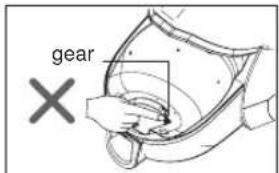
- Do not put fingers near the gear.
Failure to do so could result in personal injury.
text_image
gear XIMPORTANT SAFETY INSTRUCTIONS
WARNING
- Be careful when using the product on hardwood, coated floor, brick floor and high quality floor etc. It can cause discoloration or deformation depending on the floor material.
- Please try your vacuum cleaner with steam function on a little floor area beforehand, in order to check there is no awkward reaction.
- Do not stay in one location or use it on the same location repeatedly. It can cause discoloration or deformation by the hot heat of the steam.
- Do not open the water hole cap of the nozzle or supply water when the product is being used or when the power is turned on. It can cause burns or overspill the hot water by hot heat of the steam.
- Never flip or tilt the steam nozzle when the power is turned on, being used for cleaning or right after finishing cleaning. It can cause burns from the spraying of steam.
- When cleaning the exterior of the nozzle, always unplug the power and do not use volatile substance. It can cause electric shock and exterior damage.
- Do not touch the bottom surface of the steam nozzle directly with you hands or feet. It can cause burns.
- Do not pour in synthetic detergent, chemical substance and other substances instead of water. It can cause product damage or explosion.
- Please use 50% demineralized water and 50% tap water. Do not use only demineralized water, because it is too acid for home appliances. In regions more calcareous, vous can use 2/3 demineralized water and 1/3 tap water.
- Do not clean the exterior and bottom surface of the steam nozzle with water or detergent It can cause product damage and electric shock.
- Unlike the hose of the existing cleaner, high current flows through the hose, this can cause fire and electric shock.
- Make sure the steam is not applied directly to human or animal. It can cause a direct burn.
-
Make sure that the children, the elderly or people who does not know how to operate the cleaner, do not use the product. It can cause burns.
-
Do not directly touch the surface of the nozzle when cleaning or when the nozzle is heated. It can cause burns.
- Do not vacuum water or clean with water because the steaming hose is internally installed on the electric connection part.
Periodically check whether there are any problems with the pipe and if there are any damaged parts, stop using the product and contact the service center.
- When attaching or replacing the microfiber cloth, turn off the power and use the cloth board to attach/ detach the cloth.
If you replace the microfiber cloth with the power on, it can cause damage on the floor or cause a fire.
- When the circuit breaker operated when the power is turned on or when using the steam cleaner, immediately stop using the product and contact the AS center.
It can cause electric shock may occur.
IMPORTANT SAFETY INSTRUCTIONS
CAUTION
- Do not put any objects into openings.
Failure to do so could result in product damage.
- Do not use with any opening blocked: keep free of dust, lint, hair, and anything that may reduce air flow. Failure to do so could result in product damage.
- Do not use vacuum cleaner without dust tank and/or filters in place.
Failure to do so could result in product damage.
• Always clean the dust bin after vacuuming carpet cleaners or fresheners, powders and fine dust.
These products clog the filters, reduce airflow and can cause damage to the cleaner. Failure to clean the dust bin could cause permanent damage to the cleaner.
- Do not use vacuum cleaner to pick up sharp hard objects, small toys, pins, paper clips, etc.
They may damage the cleaner or dust bin.
- Store the vacuum cleaner indoors.
Put the vacuum cleaner away after use to prevent tripping over it.
- The vacuum cleaner is not intended to use by young children or infirm people without supervision.
Failure to do so could result in personal injury or product damage.
- Only use parts produced or recommended by LG Electronics Service Agents.
Failure to do so could result in product damage.
- Use only as described in this manual. Use only with LG recommended or approved attachments and accessories.
Failure to do so could result in personal injury or product damage.
- To avoid personal injury and to prevent the machine from falling when cleaning stairs, always place it at the bottom of stairs.
Failure to do so could result in personal injury or product damage.
- Use accessory nozzles in "MIN" mode.
Failure to do so could result in product damage.
- Don't grasp the tank handle when you are moving the vacuum cleaner.
The vacuum cleaner's body may fall when separating tank and body. Personal injury or product damage could result. You should grasp the carrier handle when you are moving the vacuum cleaner.
- Make sure the filters (exhaust filter and motor safety filter) are completely dry before replacing in the machine.
Failure to do so could result in product damage.
- Do not dry the filter in an oven or microwave.
Failure to do so could result in fire hazard.
- Do not dry the filter in a clothes dryer.
Failure to do so could result in fire hazard.
- Do not dry near an open flame.
Failure to do so could result in fire hazard.
- If the power cord is damaged, it must be replaced by an approved LG Electronics Service Agent to avoid a hazard.
- This appliance is not intended for use by persons (including children) with reduced physical, sensory or mental capabilities, or lack of experience and knowledge, unless they have been given supervision or instruction concerning use of the appliance by a person responsible for their safety.
Children should be supervised to ensure that they do not play with the appliance.
Thermal protector :
This vacuum cleaner has a special thermostat that protects the vacuum cleaner in case of motor overheating. If the vacuum cleaner suddenly shuts off, turn off the switch and unplug the vacuum cleaner. Check the vacuum cleaner for possible source of overheating such as a full dust tank, a blocked hose or clogged filter. If these conditions are found, fix them and wait at least 30 minutes before attempting to use the vacuum cleaner. After the 30 minute period, plug the vacuum cleaner back in and turn on the switch. If the vacuum cleaner still does not run, contact a qualified electrician.
How to use Assembling vacuum cleaner
Push the nozzle into the telescopic pipe.
Push the fitting pipe on the flexible hose into the attachment point on the vacuum cleaner. To remove the flexible hose from the vacuum cleaner, press the button situated on the fitting pipe, then pull the fitting pipe out of the vacuum cleaner.
How to use Operating vacuum cleaner
- Pull out the power cord to the desired length and plug into the socket.
- Slide the control knob of the hose handle to operate vacuum cleaner.
• To turn off, slide the control knob to off position.
- Press the cord reel button to rewind the power cord after use.
• Always empty the dust tank when the dust tank level reaches the MAX line.
• To store during vacuuming, for example to move a small piece of furniture or a rug, use park mode to support the flexible hose and nozzle.
- Slide the hook on the nozzle into the slot on the side of vacuum cleaner.
- When you have switched off and unplugged the vacuum cleaner, press the cord reel button to automatically rewind the cord.
- You can store your vacuum cleaner in a vertical position by sliding the hook on the nozzle into the slot on the underside of the vacuum cleaner.
Liquid suction can cause defects.
ПОПЕРЕДЖЕННЯ
text_image
Diagram illustrating the step-by-step installation of a mechanical device, showing hand positioning and tool path changes.① All Floor nozzle (depend on model)
- Cleaning all floor nozzle
How to Use Using carpet and floor nozzle
① Carpet and floor nozzle(depend on model)
This is equipped with a pedal which allows you to
alter its position according to the type of floor to be cleaned.
- Carpet or rug position
Press the pedal ( ) to lower brush.
- Hard floor position (tiles, parquets floor)
Press the pedal ( ) to lift the brush up.
How to use Using the accessory nozzles
natural_image
Illustration of a robotic arm operating a mechanical device, enclosed in a dashed circle (no text or symbols)natural_image
Illustration of a robotic arm operating a lamp with a paper tag, enclosed in a dashed circle (no text or symbols)Crevice tool
Насадка для обработки щелей
Щілинна насадка
Тесік құралы
natural_image
Diagram showing a tool interacting with a bracket, enclosed in a dashed circle (no text or symbols)Upholstery nozzle is for vacuuming upholstery, mattresses, etc.
Dusting brush is for vacuuming picture frames, furniture frames, books and other irregular surfaces.
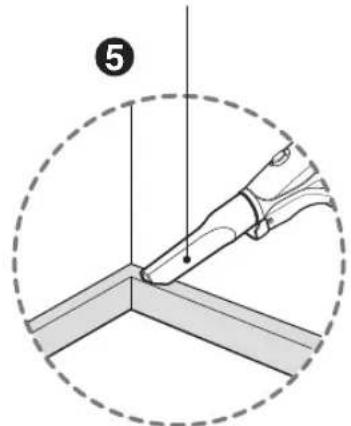
Crevice tool is for vacuuming in those normally hard-to-reach places such as reaching cobwebs or between the cushions of a sofa.
Use accessory in the MIN mode.
ПРИМЕЧАНИЕ
text_image
MAX MIN OTTAM OFFHow to use Basic using method of the steam cleaner
By using the steam cleaning vacuum tool, you can do vacuum cleaning and steam cleaning simultaneously or individually, in an easy way.
Please check not to put only demineralized water in your tank. We advice you to mix 50% demineralized water and 50% tap water. In regions more calcareous, you can mix 2/3 demineralized water to 1/3 tap water.

ОСТОРОЖНО
natural_image
Three-step illustration showing a hand holding a small object, with no visible text or symbols.Always hold the steam safety switch during steam cleaning.
- Align the extension pipe (2) and the terminal part of the steam cleaning vacuum tool (3), and connect the two completely until you hear the "Click". If the steam cleaning vacuum tool and the extension are not completely connected, the nozzle will be pulled out or the steam will not be generated. - Connect the hose (1) and the extension pipe (2) completely until you hear the "Click" sound.
- When you press the "STEAM" button (4) on the function control button on the handle part of the hose (1), the steam will be generated. Initial steam generation time is about 2.5 minutes and it will take a little longer for the cloth to get wet. You must operate the "STEAM" button after filling the water. - When you press the "STEAM" button (4) once more time or press the "DEF" button (5), the steam will stop
To supply water, always unplug the power and put the hose handle on the floor. And then pour the water into the unit.
- Use the measuring cup to pour 250cc of water and then close the water hole cap tightly. When attaching the cloth, you must always turn off the system power.
- After attaching the cloth on the cloth board, install it on the nozzle for steam cleaning. Be careful because the cloth board can be hot. - After aligning the vacuum tool with the cloth board, press it from the top. Connect after you hear the clicking sound. The cloth must be attached on the cloth board for the vacuum tool and the cloth board to be connected.
To prevent safety accidents during steam cleaning, if you do not press the steam safety switch within 30 seconds, the unit will recognize that the cleaning has been completed and turn off the power. If you want to use the steam again, press the "STEAM" button one more time. - During initial steam nozzle operation, it will operate for 150 seconds (2.5 minutes) even when you do not press the steam safety switch. - About 2 minutes after pressing the "STEAM" button, you can start the cleaning and alter about 2.5 minutes, you can check the steam with your eyes.
- The cloth can get wet faster depending on how the steam vacuum tool is used and the time. At this time, when you replace the cloth, you can clean with a dry cloth.
How to use Vacuum cleaning, Steam cleaning, Simultaneous vacuum steam cleaning
natural_image
Illustration of a hand using a vacuum cleaner to clean or adjust a small component, shown in two states (no text or symbols present)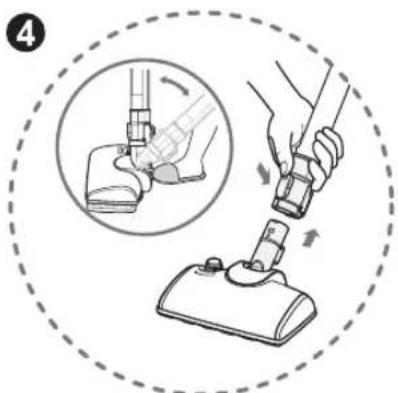
text_image
Diagram illustrating a hand tool application on a floor-mounted device, showing step 4 with an inset close-up of the tool.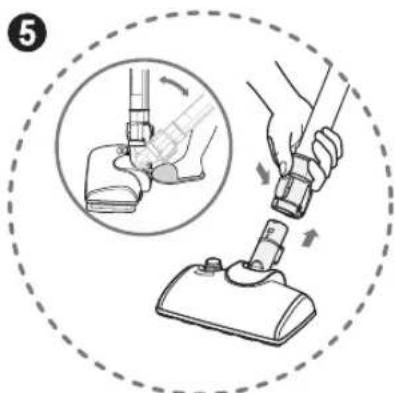
text_image
Diagram illustrating a hand tool application on a floor-mounted device, showing step-by-step instructions with magnified detail.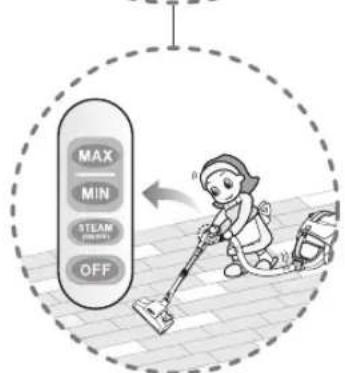
text_image
MAX MIN STEAM OFF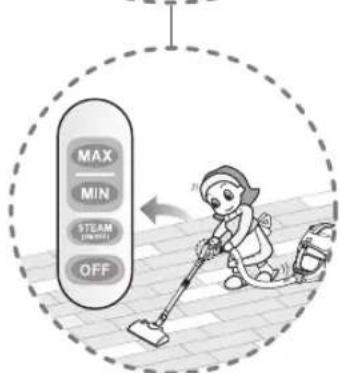
text_image
MAX MIN TEAM OFF
text_image
MAX MIN STEAM (MIN/100%) OFFHow to use When cleaning hardwood/laminated/general floor/carpet
text_image
Diagram illustrating a vacuum cleaner's step to clean floor, showing component positioning and movement direction.
text_image
8 MAX AI STEAM OFF- Attach the microfiber cloth on the cloth board and install the steam cleaning vacuum.
- If the stain is not removed at once, repeat the process couple of times.
- If you try to remove the old stain or floor stain excessively in one spot, it can damage the floor
When cleaning on the carpet, don't operate the function control button to "MAX" or "MIN" mode. It can cause fire or electric shock.
⑧ When cleaning the carpet Очистка ковра Під час чищення килиму Кілемді тазалағанда
How to use How to supply water, How to replace and clean the microfiber cloth
- When the "SUPPLY WATER" light is turn on the LED display window of the nozzle, stop operating the steam cleaning vacuum tool and unplug the power.
- Open the water hole cap of the nozzle and use the measuring cup (water supply cup) to pour the water. (Appropriate amount: 250cc)
- Lock the water hole cap of the vacuum tool in the arrow direction as shown in the picture.
- Turn the cap to the right direction until you hear a clicking sound as the fuel cap of an automobile.
- After turning on the power again, start cleaning when the "STEAM" lamp on the LED display window is turned on.
- When the "SUPPLY WATER" LED is turned on, it will be turned off after 30 seconds to 1 minute after supplying the water and the "STEAM" lamp will be turned on.
When replacing the microfiber cloth, always make sure the power is turned off.
- Detach the cloth board from the steam cleaning vacuum tool and replace the microfiber cloth. Attach the white side of the microfiber cloth on the cloth board on the bottom surface of the cleaner.
- Reuse the dirty cloth by cleaning it with clean water, soap, detergent etc. and then by completely drying the cloth in the shade.
How to use Emptying dust tank
The dust tank needs emptying when the dust tank level reaches the MAX line.
- Turn off the vacuum cleaner and unplug it.
- Grasp the handle of the tank and then press the tank separation lever.
• Pull out the dust tank. - Empty the tank and then assemble the dust tank as below.
text_image
Diagram illustrating two-step steps of a device being handled, showing hand positioning and disassembly.How to use Cleaning dust tank
If suction power decreases or Indicator on hose flickers after cleaning dust tank, clean air filter and motor safety filter.
→ Next page
ПРИМЕЧАНИЕ
How to use Cleaning air filter and motor safety filter
Dry fully for more than 24 hours in shade.

ОПАСНО
If filters are damaged, do not use them.
In this cases, contact LG Electronics Service Agent.
Wash filters at least once a month.
ПРИМЕЧАНИЕ
How to use Cleaning exhaust filter
• The exhaust filter is reusable.
- To clean the exhaust filter, remove the exhaust filter cover on the body by pulling it out.
- Separate the exhaust filter.
- Dust off filter.(Do not wash filter with water.)
• The exhaust filter should be cleaned at least a year.
Exhaust filter cover assembling
How to use Storage method after use
Store like this after using the cleaner
text_image
Diagram illustrating the step-by-step installation of a vacuum cleaner, showing how to change from a pipe clamp to a standard air purifier.Check that the vacuum cleaner is plugged in correctly and that the electrical socket is working.
text_image
LG Life's Good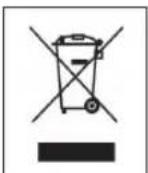
Disposal of your old appliance
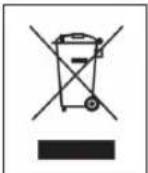
- When this crossed-out wheeled bin symbol is attached to a product it means the product is covered by the European Directive 2002/96/EC.
- All electrical and electronic products should be disposed of separately from the municipal waste stream via designated collection facilities appointed by the government or the local authorities.
- The correct disposal of your old appliance will help prevent potential negative consequences for the environment and human health.
- For more detailed information about disposal of your old appliance, please contact your city office, waste disposal service or the shop where you purchased the product.
The equipment complies with requirements of the Technical Regulation, in terms of restrictions for the use of certain dangerous substances in electrical and electronic equipment
LG Electronics Inc. EU Representative, Krijgsman 1,1186 DM Amstelveen, The Netherlands