SS E06 - Simulateur UNIDEN - Free user manual and instructions
Find the device manual for free SS E06 UNIDEN in PDF.


| Product Type | Simulator |
| Brand | Uniden |
| Model | SS E06 |
| Dimensions (H x W x D) | 2.0 x 6.5 x 11.5 inches |
| Weight | 1.2 lbs (545 g) |
| Power Source | 6 AA batteries (not included) or 12V DC adapter |
| Frequency Range | 26.965 – 27.405 MHz (CB band) |
| Channels | 40 AM channels |
| Display | Backlit LCD with channel and signal indicators |
| Antenna | BNC connector, flexible whip antenna included |
| Audio Output | Built-in speaker, 3.5mm headphone jack |
| Controls | Channel selector, volume, squelch, push-to-talk button |
| Simulation Modes | Weather alert, emergency channel, channel scan |
| Key Functions | Transmit power simulation, noise filtering, auto-squelch |
| Maintenance | Clean with dry cloth; avoid moisture; remove batteries if not in use |
| Safety | Do not open casing; keep away from children under 3; use only recommended batteries |
| Accessories Included | Belt clip, wrist strap, user manual |
| Spare Parts Availability | Antenna, battery cover, belt clip available online |
| Repairability | Serviceable by authorized technicians only; no user-serviceable parts |
| Operating Temperature | 32°F to 104°F (0°C to 40°C) |
Frequently Asked Questions - SS E06 UNIDEN
User questions about SS E06 UNIDEN
0 question about this device. Answer the ones you know or ask your own.
Ask a new question about this device
Download the instructions for your Simulateur in PDF format for free! Find your manual SS E06 - UNIDEN and take your electronic device back in hand. On this page are published all the documents necessary for the use of your device. SS E06 by UNIDEN.
USER MANUAL SS E06 UNIDEN
For more exciting new products please visit our website:
Australia: www.uniden.com.au
New Zealand: www.uniden.co.nz
OWNER'S MANUAL
IMPORTANT SAFETY INSTRUCTIONS
When using your telephone equipment, basic safety precautions should always be followed to reduce the risk of fire, electric shock and injury to persons, including the following:
• This unit is NOT waterproof. DO NOT expose this unit to moisture.
• DO NOT expose this unit to rain.
- Do not use this product near water, for example, near a bath tub, wash bowl, kitchen sink or laundry tub, in a wet basement or near a swimming pool.
- Avoid using a telephone (other than a cordless type) during an electrical storm. There may be a remote risk of electric shock from lightning.
- Do not use the telephone to report a gas leak in the vicinity of the leak.
SAVE THESE INSTRUCTIONS!
Important Notice
Under power failure conditions this appliance may not operate. Please ensure that a separate telephone, not dependent on local power, is available for emergency use.
General Notices for New Zealand Model:
- The grant of a NZ Telepermit for any item of terminal equipment indicates only that Telecom has accepted that the item complies with minimum conditions for connection to its network. It indicates no endorsement of the product by Telecom, nor does it provide any sort of warranty. Above all, it provides no assurance that any item will work correctly in all respects with another item of Telepermitted equipment of a differentmake or model, nor does it imply that any product is compatible with all of Telecom's network services.
- The maximum volume setting of this telephone exceeds the Telecom specified volume requirement. Telecom takes no responsibility for the high volume available on this telephone, who believe this telephone is too loud should contact the manufacturer at the website indicated on owner's manual warranty page.
- For telephone networks other than Telecom there may be a charge incurred for local calls if the Insert 0 feature is on. Turn Insert 0 off.
- This equipment may not provide for the effective hand-over of a call to another device connected to the same line.
SSE06
What's in the Box?

text_image
Uniden ON MENU TALK FLASH VOL END CLEAR 1 2 3 4 5 6 7 8 9 *10 #
PAUSE DELETE UnidenSSE 06 accessory handset with charger
natural_image
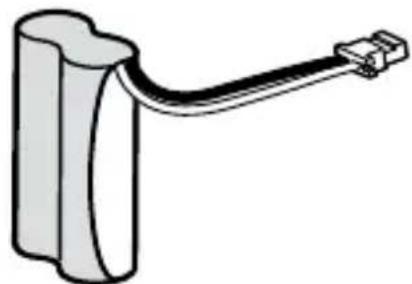
Simple line drawing of a battery with a cable extending from its side (no text or symbols)Rechargeable Battery Pack

natural_image
Simple line drawing of a rectangular battery with a small 4-pin connector (no text or symbols)Battery Cover

natural_image
Simple line drawing of a rectangular device connected to a cable with a terminal connector (no text or symbols)AC adaptor

natural_image
Abstract gray curved shape resembling a stylized letter or symbol (no text or symbols present)Belt Clip
If any items are missing or damaged, contact your place of purchase immediately. Never use damaged products!
Need help? Get answers at our website:
• www.uniden.com.au for Australian model
• www.uniden.co.nz for New Zealand model.
INSTALLING YOUR HANDSET
Charge the Battery
-
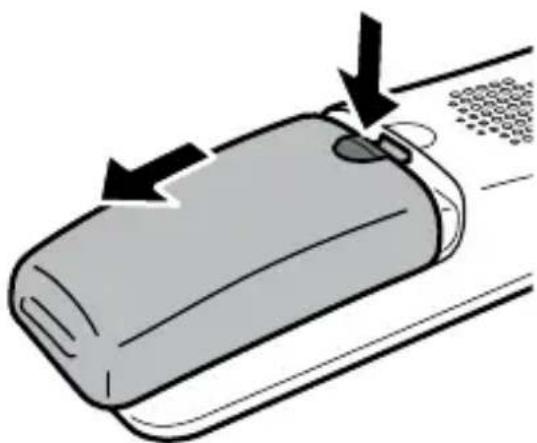
Unpack the handset, battery pack, and battery cover. If you need to remove the cover, press in on the notch and slide the cover down and off.
-
Line up the battery connector with the jack inside the handset; the connector only fits one way.
-
Push the connector in until it clicks into place; tug gently on the wires to make sure the battery is securely connected.
-
Replace the battery cover and slide it into place.
-
Use the AC adaptor to connect the power jack on the charger to a regular indoor (240V AC) power outlet.
-
Place the handset in the charger with the display facing forward. If the display doesn't light up, reseat the handset or connect the charger to a different outlet.
natural_image
Illustration of a smartphone with arrows indicating motion or force (no text or symbols)
Charge the handset completely (about 15 hours) before using it.
REGISTERING TO A BASE
The accessory handset won't work until you register it to a compatible Uniden cordless phone!
Compatible Bases
This handset is designed for use with Uniden's SSE35 and SSE37 bases.
Registration Methods
| Does the handset fit in the base cradle? | ||
| Yes Place | the handset in the base. The display should say Registering. | |
| No Does | the base have an LCD display? | |
| Yes | On the base, press MENU to open the menus and then scroll to Register Accy. Press OK. On the handset, press and hold #DND until the handset display shows Registering (about 2 seconds). | |
| No | On the base, press and hold FIND HS when the phone is in standby (about 5 seconds). On the handset, press and hold #DND until the handset display shows Registering (about 2 seconds). | |

After about 30 seconds, the handset display should say Registration Complete.
Test the Connection
Pick up the handset and press TALK/FLASH. Make sure you get a dial tone. (Press END/CLEAR to hang up.)
| If.. Try.. | |
| • you don’t hear a dial tone the display shows Registration Failed | • making sure the handset is fully charged, then try again. |
IMPORTANT INFORMATION
-
All features and operation for the handset are described in the owner's manual for the base.
-
Owner's Manual for all Uniden phones are available on our website for free downloading.
AC Adaptor
| Parts Number Input Voltage Output Voltage | ||
| AAD-600S(M) 100 | -240V AC, 50/60Hz 9V DC @ | 210mA |
Battery Information
| Type Capacity | Talk time Standby | Time | |
| BT-694 or BT-694sBT- 694n | 650mAh or 500mAh or 400mAh | about 10 hours about 7 days |
• Use only the supplied AC adaptors.
• Use the proper adaptor for the base and any charger.
- Do not place the unit in direct sunlight or subject it to high temperatures.
- Replace the battery when the talk or standby time becomes noticeably reduced. For replacements, visit the online shop on our website (see the front cover).
- When the battery gets low, the handset beeps and shows a low battery alert; put the handset in the cradle for recharging.
ONE-YEAR LIMITED WARRANTY
XDECT SSE06
Important:
Satisfactory evidence of the original purchase is required for warranty service. Please refer to our Uniden website for any details or warranty durations offered in addition to those contained below.
Warrantor:
The warrantor is either Uniden Australia Pty Limited ABN 58 001 865 498 (“Uniden Aust”) or Uniden New Zealand Limited (“Uniden NZ”) as the case maybe.
Terms of Warranty: Uniden Aust/NZ warrants to the original retail purchaser only that the SSE06 (“the Product”), will be free from defects in materials and craftsmanship for the duration of the warranty period, subject to the limitations and exclusions set out below.
Warranty Period: This warranty to the original retail purchaser is only valid in the original country of purchase for a Product first purchased either in Australia or New Zealand and will expire one (1) year from the date of the original retail sale. If a warranty claim is made, this warranty will not apply if the Product is found by Uniden to be:
A. Damaged or not maintained in a reasonable manner or as recommended in the relevant Uniden Owner's Manual;
B. Modified, altered or used as part of any conversion kits, subassemblies or any configurations not sold by Uniden Aust or Uniden NZ;
C. Improperly installed contrary to instructions contained in the relevant Owner's Manual
D. Repaired by someone other than an authorized Uniden Repair Agent in relation to a defect or malfunction covered by this warranty; or
E. Used in conjunction with any equipment, parts or a system not manufactured by Uniden.
Parts Covered: This warranty covers the Product and included accessories.
User-generated Data: This warranty does not cover any claimed loss of or damage to user-generated data (including but without limitation phone
numbers, addresses and images) that may be stored on your Product.
Statement of Remedy: If the Product is found not to conform to this warranty as stated above, the Warrantor, at its discretion, will either repair the defect or replace the Product without any charge for parts or service. This warranty does not include any reimbursement or payment of any consequential damages claimed to arise from a Product's failure to comply with the warranty. Our goods come with guarantees that cannot be excluded under the Australian Consumer Law. You are entitled to a replacement or refund for a major failure and for compensation for any other reasonably foreseeable loss or damage. You are also entitled to have the goods repaired or replaced if the goods fail to be of acceptable quality and the failure does not amount to a major failure. This warranty is in addition to and sits alongside your rights under either the COMPETITION AND CONSUMER ACT 2010 (Australia) or the CONSUMER GUARANTEES ACT (New Zealand) as the case may be, none of which can be excluded.
Procedure for Obtaining Warranty Service: Depending on the country in which the Product was first purchased, if you believe that your Product does not conform with this warranty, you should deliver the Product, together with satisfactory evidence of your original purchase (such as a legible copy of the sales docket) to Uniden at the addresses shown below. You should contact Uniden regarding any compensation that may be payable for your expenses incurred in making a warranty claim. Prior to delivery, we recommend that you make a backup copy of any phone numbers, images or other data stored on your Product, in case it is lost or damaged during warranty service.
UNIdEN AUSTRALIA PTY LTd
Service Division
345 Princes Highway,
Rockdale, NSW 2216
Phone number: 1300 366 895
Email: custservice@uniden.com.au
UNIdEN NEW ZEALAND LTd
Service Division
150 Harris Road, East Tamaki
Auckland 2013
Phone number: (09) 273 8377
Email: service@uniden.co.nz