EXS 2050 - Simulateur UNIDEN - Free user manual and instructions
Find the device manual for free EXS 2050 UNIDEN in PDF.


User questions about EXS 2050 UNIDEN
0 question about this device. Answer the ones you know or ask your own.
Ask a new question about this device
Download the instructions for your Simulateur in PDF format for free! Find your manual EXS 2050 - UNIDEN and take your electronic device back in hand. On this page are published all the documents necessary for the use of your device. EXS 2050 by UNIDEN.
USER MANUAL EXS 2050 UNIDEN
natural_image
Black-and-white photo of a woman smiling while being examined by another person, both focused on the camera (no visible text or symbols)EXS 2050
OWNER'S MANUAL
Digital Spread Spectrum Provides Long Range, Clear Sound, and Secure Communication
Uniden®
Introduction
Thank you for choosing the Uniden EXS 2050 cordless telephone. This phone is designed for reliability, long life, and outstanding performance utilizing the latest 900 MHz Spread Spectrum technology.
Note: Some illustrations in this manual may differ from the actual unit for explanation purposes.
Features
• 900 MHz Spread Spectrum Technology
• Digital Answering Device
• 10 Memory Dial Locations
• 32 Digit Redial
- Flash and Pause
- Redial
- Pulse / Tone Dialing
• Page
- 6 Hour Talk Time
• 10 Day Standby Battery Time
- Handset Earpiece and Ringer Volume Control
• Hearing Aid Compatible
- Headset Compatible
Digital Spread Spectrum Technology utilizes a “wider frequency band” vs. a “single narrow band” used in standard digital transmissions. The result is a more secure conversation with the clarity of digital sound, extended range, and minimal interference from other cordless phones.
Random Code ^™ digital security automatically selects one of over 65,000 codes for the handset and base.
These features enhance your phone's security and prevent unauthorized calls as a result of your phone being activated by other equipment.
Controls and functions

- Handset antenna
- Headset jack cover
- Handset battery compartment
- Ringer on/off switch
- Handset speaker
- Talk/Batt LED
- Talk key
- Volume down key
- Mute key
- Channel key
- Pause key
- Handset microphone
- Volume up key
- Flash key
- Redial key
- Memory key
- Ringer key
- Tone key
-
Handset charge contacts
-
Base microphone
- Base speaker
- Speaker key
- Handset retainer clip
- Speaker LED
- Volume down key
- Status LED
- Delete key
- Repeat key
- Greeting key
- Base charge contacts
- Answer on/off key
- Pin code key
- Clock key
- Page key
- Base antenna
- Volume up key
- LED display
- Play/Stop key
- Skip key
- Voice memo record key
- Record time switch
- Ring time switch
- Base ringer switch
- Pulse-Tone switch
- DC power input
- Tel line jack
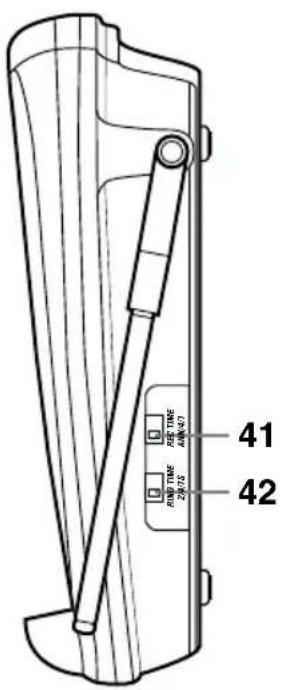
text_image
41 42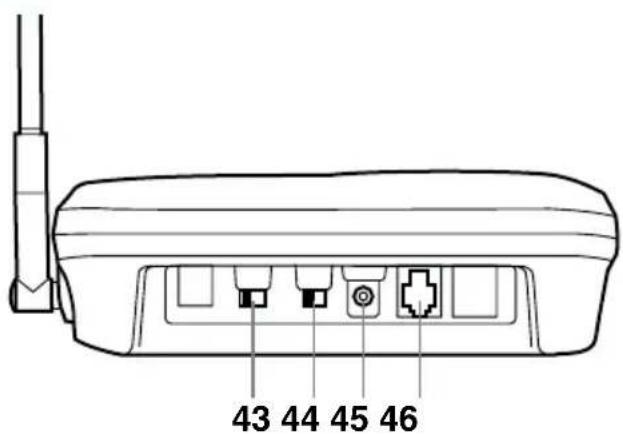
text_image
43 44 45 46Contents
Introduction / Features.....inside front cover Controls and Functions .....inside front cover
Getting Started
Read this first....3
Step 1: Checking the package contents .....4
Step 2: Setting up the base unit ....5
Mounting the base unit on a wall ....8
Step 3: Installing the handset battery pack.....10
Basics
Making a call 12
Receiving a call ....13
Ringer mute 13
Adjusting the volume .....14
Flash and Call Waiting .....15
Redialing a call ....15
Mute 15
Traveling out-of-range....16
Using the page feature....16
Memory Dialing
Storing phone numbers 17
Making calls with memory dialing....18
Chain dialing....18
Erasing a stored phone number....19
3-way Conference Features
3-way conferencing....20
Integrated Answering Device
Features....21
Setting up your answering system .....22
Using your answering system ....26
Additional Information
Changing the digital security code....32
Installing the beltclip....33
Headset installation 33
Note on power sources 34
Maintenance....34
Troubleshooting....35
Index 38
Getting Started
Basics
Memory Dialing
3-way
Conference
Features
Integrated
Answering
Device
Additional
Information
Troubleshooting
Index
Read this first
This cordless telephone must be set up before use. Follow these steps;
Step 1 (page 4)
Unpack and check the telephone and accessories.
Step 2 (page 5 to 9)
Next, choose the best location to set up the base unit.
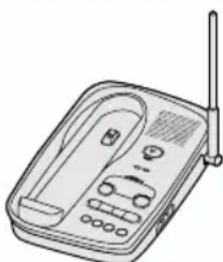
natural_image
Line drawing of a portable electronic device with antenna and control panel (no text or symbols)Base unit
Step 3 (page 10 to 11)
Then, insert the battery pack into the handset. You have to charge the battery pack for 15-20 hours before using the phone.

Handset
About the digital security code
This cordless telephone uses a digital security code to prevent unauthorized access to your base unit. This security code prevents other cordless handsets from making calls through your base unit. A random security code will be assigned automatically between your base unit and handset when you charge the battery pack for the first time.
Checking the package contents
Make sure you have received the following items in the package. If any of these items are missing or damaged, contact the Uniden Parts Department (see below).

natural_image
Line drawings of three electronic devices: a landline telephone, a mobile phone with antenna, and a connected charging unit (no text or symbols)- Base unit • Handset • AC adapter (AD-420)
natural_image
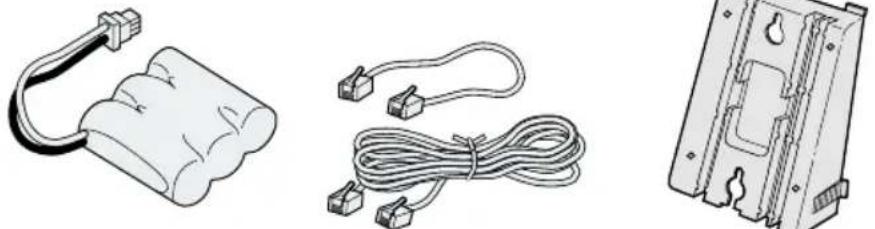
Three technical line drawings of electrical connectors and wiring components (no text or symbols)• Rechargeable battery pack (BT-905)
• Telephone line cord (Long, Short)

natural_image
Technical line drawing of a mechanical bracket component (no text or symbols)- Beltclip

natural_image
Simple 3D illustration of a blank white square with black border (no text or symbols)- Memo sticker
• This Owner's Manual
- Precautions and Important Safety Instructions
- Registration Card
Uniden Parts Department
(800) 554-3988
Hours: M-F 8:30 AM to 5:00 PM CST.
We can also be reached on the web at www.uniden.com.
Setting up the base unit
Do the following steps.
- Choose the best location
- Connect the base unit
- Choose the dialing mode
Choose the best location
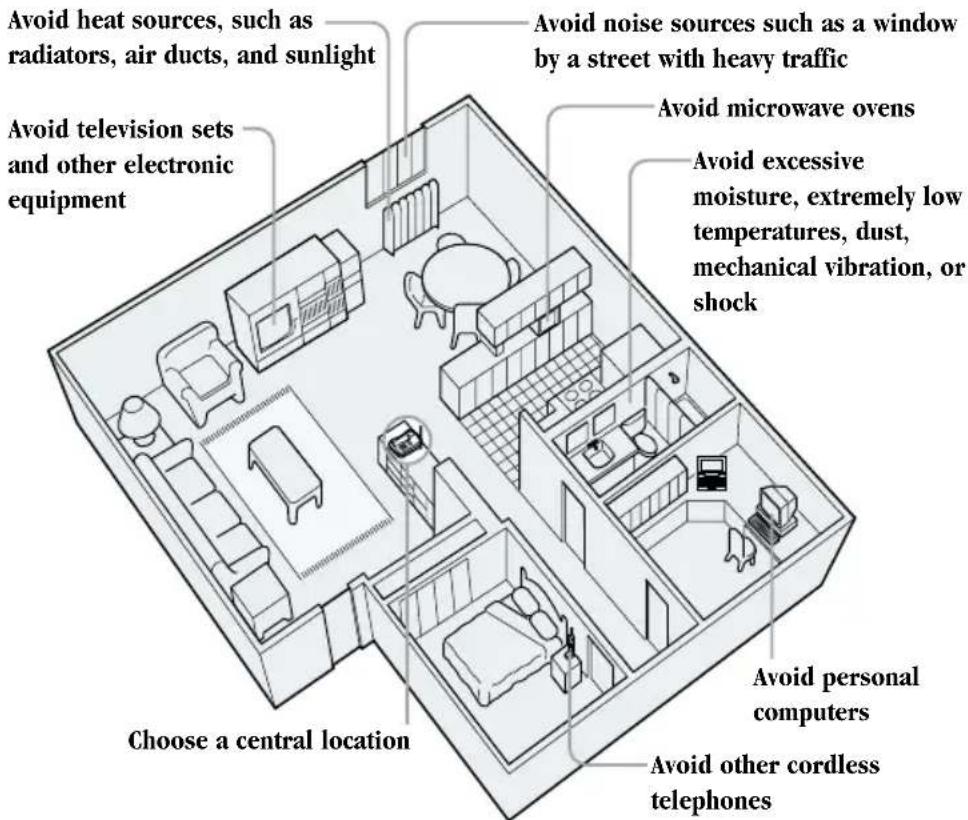
Before choosing a location for your new phone, read the INSTALLATION CONSIDERATIONS included in the PRECAUTIONS AND IMPORTANT SAFETY INSTRUCTIONS brochure. Here are some important guidelines you should consider:
text_image
Avoid heat sources, such as radiators, air ducts, and sunlight Avoid television sets and other electronic equipment Choose a central location Avoid noise sources such as a window by a street with heavy traffic Avoid microwave ovens Avoid excessive moisture, extremely low temperatures, dust, mechanical vibration, or shock Avoid personal computers Avoid other cordless telephones- You should charge your handset for 15-20 hours before using the phone.
- The location should be close to both a phone jack and continuous power outlet which is not switchable.
- Keep the base and handset away from sources of electrical noise such as motors and fluorescent lighting.
- Be sure there is sufficient space to raise the base antenna fully vertical.
- The base can be placed on a desk, tabletop or mounted on a standard wall plate.

text_image
NOTEPlace the power cord so it does not create a trip hazard, or where it could become chafed and create a fire or electrical hazard.
Connect the base unit
If you want to install the base unit on the wall, see page 8.
flowchart
graph TD
    A["1 Telephone outlet"] --> B["2 AC outlet"]
    B --> C["3 Route the cord"]
    C --> D["4 To DC IN 9V"]
    D --> E["5 Telephone line cord (supplied)"]
    E --> F["6 To TEL LINE"]
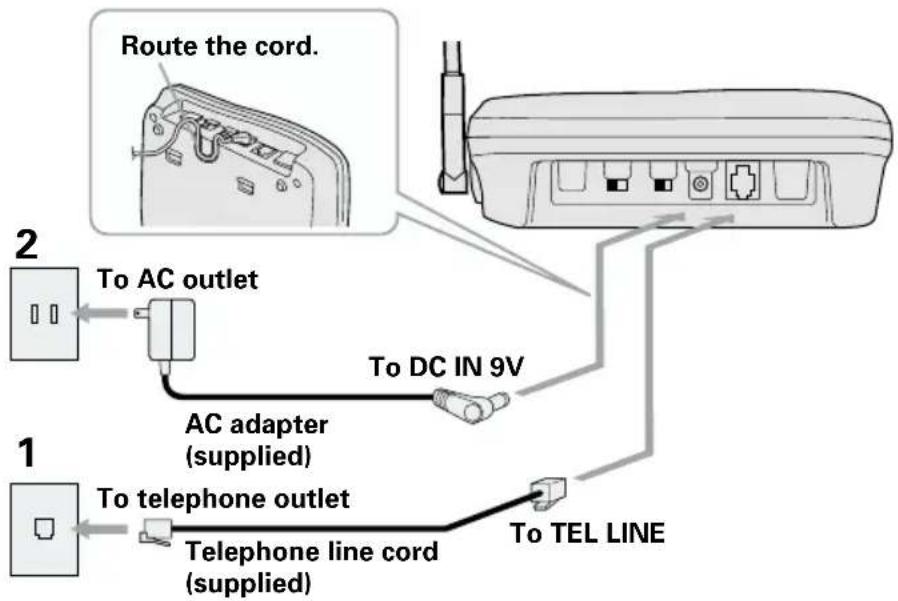
1 Connect the telephone line cord to the TEL LINE jack and to a telephone outlet.
2 Connect the AC adapter to the DC IN 9V jack and to a standard 120V AC wall outlet.
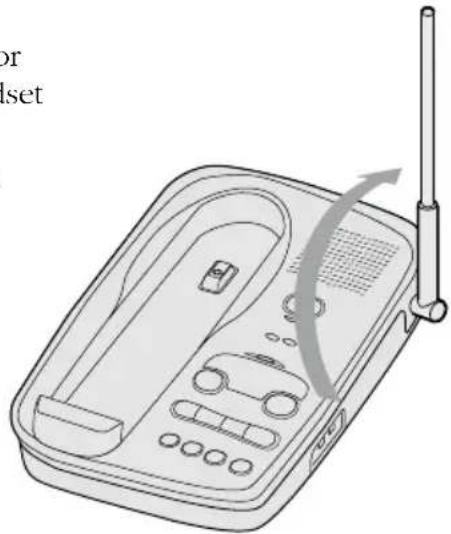
3 Set the base unit on a desk or tabletop and place the handset on the base unit. Then raise the antenna to a vertical position.
natural_image
Line drawing of a portable electronic device with a radio emitting signal waves (no text or symbols)
Use only the supplied AD-420 AC adapter. Do not use any other AC adapter.
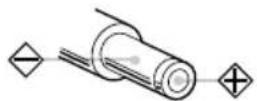
Polarity of the plug

Connect the AC adapter to a continuous power supply.

Place the base unit close to the AC outlet so that you can unplug the AC adapter easily.

If your telephone outlet isn't modular, contact your telephone company for assistance.
Modular

Choose the dialing mode
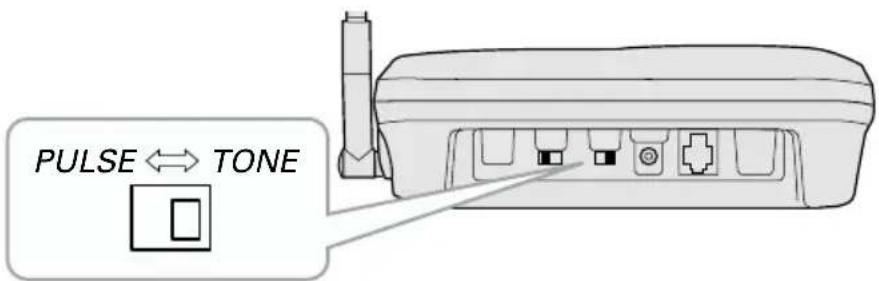
text_image
PULSE ↔ TONEDepending on your dialing system, set the PULSE-TONE switch as follows:
| If your dialing system is Set the switch to | |
| Tone TONE | |
| Pulse PULSE | |
If you aren't sure of your dialing system
Make a trial call with the PULSE-TONE switch set to TONE. If the call connects, leave the switch as is; otherwise, set to PULSE.
Mounting the base unit on a wall
Standard wall plate mounting
This phone can be mounted on any standard telephone wall plate.

natural_image
Technical illustration of a device housing with internal components and mounting holes (no text or symbols)1 Snap the wall mount adapter into the notches on the base.
2 Plug the telephone line cord to the TEL LINE jack and the AC adapter to the DC IN 9V jack.
3 Plug the telephone line cord into the telephone outlet.
4 Wrap the AC adapter cord inside the molded wiring channel. Then wrap the cord around the strain relief notch.
5 Plug the AC adapter into a standard 120V AC wall outlet.
6 Raise the antenna to a vertical position.
7 Align the mounting slots on the base with the mounting posts on the wall. Push in and down until the phone is firmly seated.
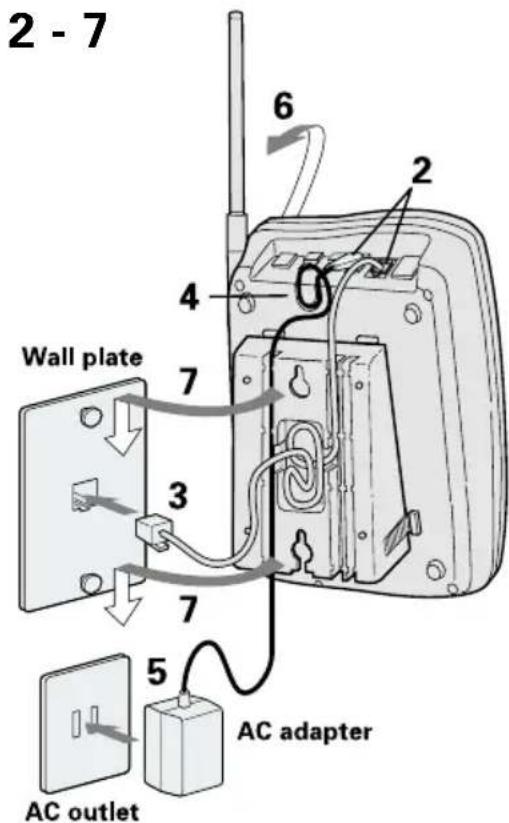
text_image
2 - 7 Wall plate 6 2 4 7 3 7 5 AC adapter AC outlet
text_image
NOTEIf you have wall mounted the base, you must remove the beltclip to charge the handset facing forward.

text_image
Handset retainer8 On the base unit, pull the handset retainer out of the slot. Rotate it clockwise 180 degrees.
9 Flip the retainer from front to back. Slide it back into the slot so that the lip of the retainer is up and the ▼ symbol is pointed down. The retainer holds the handset in place.
Direct wall plate mounting
If you don't have a standard wall plate, you can mount your phone directly to the wall. Before doing this, consider the following:
- Avoid electrical cables, pipes, or other items behind the mounting location, that could cause a hazard when inserting screws into the wall.
- Try to mount your phone within 10 - 15 feet of a working phone jack to avoid excessive cord lengths.
- Make sure the wall material is capable of supporting the weight of the base and handset.
- Use #10 screws (minimum length of 1-3/8 inches) with anchoring devices for the wall material where the base unit will be placed.

text_image
TOP 3/16 in. 3-15/16 in.1 Insert two mounting screws into the wall, (with their appropriate anchoring device), 3-15/16 inches apart. Allow about 3/16 of an inch between the wall and screwheads for mounting the phone.
2 Refer to steps 1 through 9 on page 8 and 9 to mount the telephone.
Installing the handset battery pack
Charge the battery pack for 15-20 hours before you start using your phone.

text_image
Black Red status LED1 Press in on the battery cover release and slide the cover down until it comes off.
2 Connect the battery pack connector with the correct polarity (black and red wires), then insert the battery pack into the battery compartment.
3 Slide the battery cover forward until it snaps into place.
4 Place the handset on the base.
5 Make sure that the "status" LED lights. If the LED doesn't light, check to see that the AC adapter is plugged in and that the handset makes good contact with the base charging contacts.

Use only Uniden Battery (BT-905) supplied with your phone.


text_image
NOTEEven when the battery pack is not being used, it will gradually discharge over a long period. For optimum performance, be sure to return the handset to the base unit after a telephone call for charging the battery.
Battery use time (per charge)
From fully charged
- Six hours continuous use
- Ten days when the handset is in the standby mode
When the battery charge becomes low
When the voltage of battery pack in the handset is very low and needs to be charged, the phone is programmed to eliminate functions in order to save power. If the battery charge becomes low, talk/batt LED blinks. If the phone is in use, the handset beeps.
Complete your conversation as quickly as possible and return the handset to the base unit for charging.
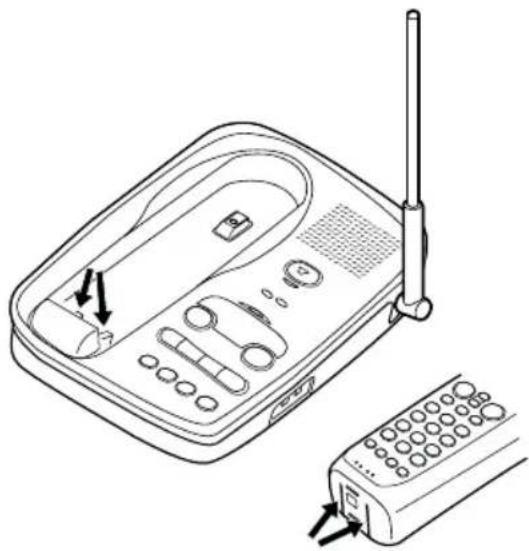
Cleaning the charging contacts
To maintain a good charge, it is important to clean the charging contacts on the handset and base unit with a dry cloth about once a month.
Do not use any liquids or solvents.
natural_image
Line drawing of a portable electronic device with antenna, ports, and control panel (no text or symbols)
text_image
NOTEIf the talk/batt LED does not stop flashing, place the handset on the base for at least three seconds and make a call again.
Making a call
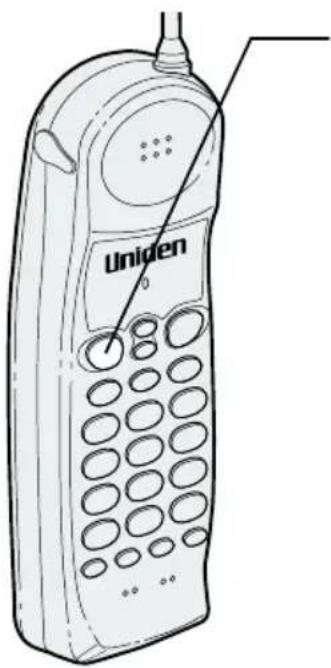
text_image
Uniden1 Press talk. The talk/batt LED lights.
2 Dial the phone number.
3 To hang up, press talk or return the handset to the base.
Other Operations
| To Do this | |
| To adjust the ear speaker volume | Press ▲ or ▼ during the call. |
| To temporarily switch to tone dial Press tone. The following (When the base is set to pulse numbers will be sent as tone mode) dialing. | |
| To improve reception Press | channel |


text_image
NOTEWhen you receive a call during a page or memory dialing operation, press talk to answer the call.

text_image
NOTEThe base microphone is located under the phone. Position yourself as near to the base as possible and speak clearly.
Receiving a call
From the handset

text_image
UnidenHandset on the base
1 The phone rings. The talk/batt LED flashes.
2 Pick up the handset and begin speaking.
3 To hang up, press talk or return the handset to the base.
Handset off the base
1 Phone rings. The talk/batt LED flashes.
2 Press talk or any key (except mute) and begin speaking.
3 To hang up, press talk or return the handset to the base.
From the base

text_image
status LED Microphone1 The phone rings. The status LED on the base flashes.
2 Press speaker and begin speaking.
3 To hang up, press speaker.
Ringer mute
You can temporarily mute the handset's ringer by pressing mute when the phone rings. You may still press talk to answer the call.
Adjusting the volume
Handset ringer tone and volume
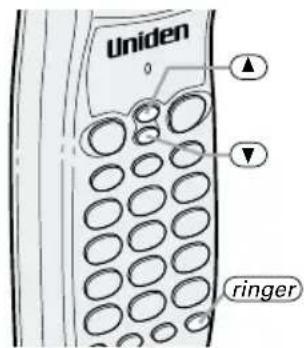
Press ringer repeatedly in standby mode to select one of four types ringer tone and volume combinations.
text_image
Uniden 0 ▲ ▼ ringerRinger on/off switch
This switch turns the handset ringer on or off.

text_image
ringer off on ringer off onHandset earpiece volume
The phone has four earpiece volume levels, Normal, Medium, High, and Loud. Pressing ▲ or ▼ during a telephone call will change the earpiece volume of the handset. This setting will remain in effect after the telephone call has ended.
When you press ⬆ in Loud mode or press ⬇ in Normal mode, error sound beeps.
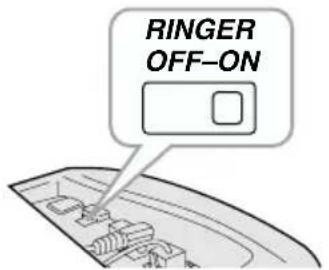
Base ringer switch
This switch turns the base ringer on or off.
text_image
RINGER OFF-ONBase speaker volume
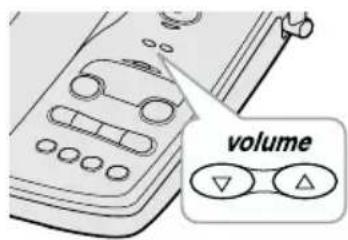
To control the speaker volume of the base, adjust the volume ▲ volume▼ button as desired.
text_image
volume

text_image
NOTEIf the recently dialed number exceeds 32 digits, only the first 32 digits are retained for redialing.
Flash and Call Waiting
text_image
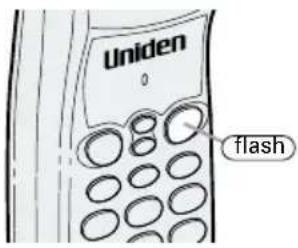
Uniden 0 flashIf you have "Call Waiting" service and a call waiting tone sounds while you are on a call, press flash to accept the waiting call. There is a short pause, then you will hear the new caller. To return to the original caller, press flash again.
Redialing a call
The last phone number dialed can be quickly redialed.
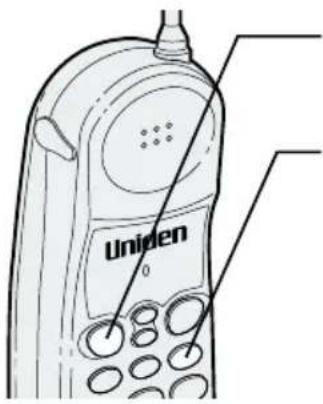
text_image
Uniden1 Press talk. The talk/batt LED lights.
2 Press redial.
3 To hang up, press talk or place the handset on the base.
Mute
You can turn off the handset microphone and temporarily mute the ringer.
When speaking on the handset

text_image
Uniden talk1 Press mute during a telephone call. The talk/batt LED blinks. The other party will not be able to hear you although you can hear them.
2 To cancel mute, press talk or mute again.
When the phone is ringing
Press mute when the phone rings. The ringer sound turns off. You may still press talk to answer the call.
Traveling out-of-range
During a call, as you begin to move your handset too far from your base unit, noise increases. If you pass the range limits of the base unit, your call will terminate within 30 seconds.
Using the page feature
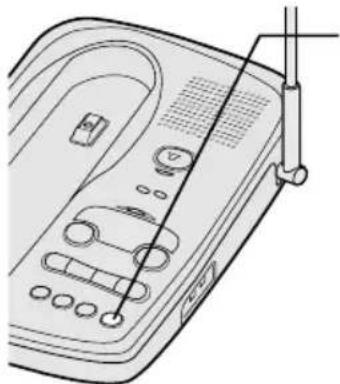
natural_image
Line drawing of a portable electronic device with ports and cables (no text or symbols)1 To locate the handset (while it's off the base), press page on the base. The handset beeps for 5 seconds.

text_image
NOTEIf you cancel the page by pressing talk, press talk again to return to standby.

Press and hold page for more than 2 seconds to page the handset for a minute. Press any key or return the handset to the base to cancel the page.
If you hold down page for more than a minute, the handset beeps until you release page.
Storing phone numbers
Your EXS 2050 stores up to 10 numbers in the handset.


text_image
NOTEYou must press a key within 20 seconds or the phone will return to standby. If you return the handset in the cradle, the phone will return to standby too.
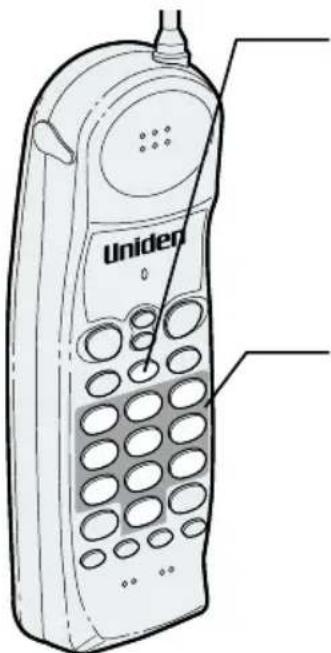
text_image
Uniden1 Press mem while in standby mode. The talk/batt LED flashes.
2 Dial the number you wish to store (up to 20 digits).
3 Press mem again.
4 Enter a number key (0 - 9) to select the memory location where you wish to store the number.
5 The talk/batt LED goes out and the confirmation beep indicates the number has been stored.

Press pause to enter a pause in the dialing sequence. The pause feature is useful for long distance calling, credit card dialing, or sequences that require a pause between digits.

Use the supplied memo sticker to write stored numbers.
Making calls with memory dialing
Memory dialing
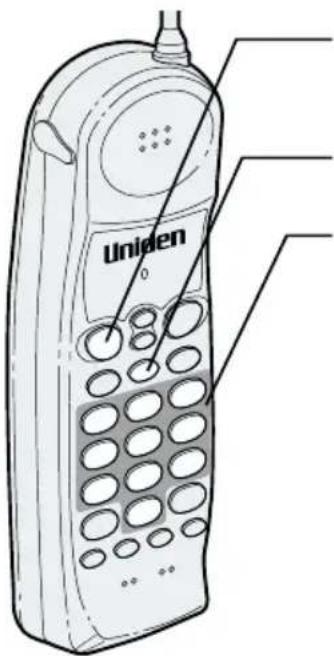
text_image
Uniden1 Press talk. The talk/batt LED lights.
2 Press mem.
3 Enter a number key (0 - 9) to select the memory location you wish to dial.
4 To hang up, press talk or return the handset to the base.
Chain dialing
On certain occasions after dialing a number, you may be requested to enter an access code, such as your account number. You can enter this number into a memory location for later use by doing the following:
1) Store the access code into one of the memory locations (0-9) following the steps on page 17.
2) Dial the party or service main number.
3) When you need to enter the special number, press followed by the memory location (0-9).
Erasing a stored phone number
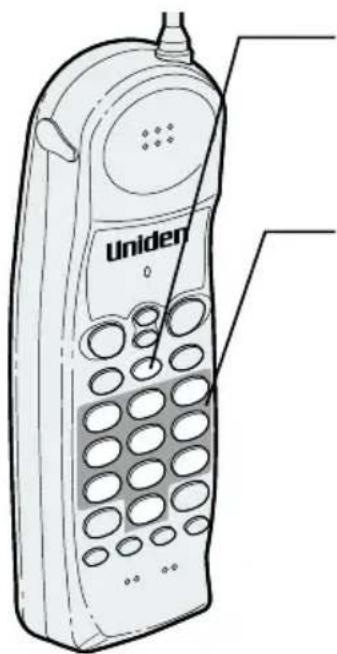
text_image
Uniden1 Press mem in the standby mode. The talk/batt LED flashes.
2 Press mem again.
3 Enter a memory location number (0 - 9) you wish to delete. A confirmation beep indicates the number has been erased.

text_image
NOTEDialing is possible only from the handset during the 3-way conversation.

text_image
NOTEIf you pick up the handset from the base while speaking on the base, the call will be transferred to the handset.
3-way conferencing
The Uniden EXS 2050 permits 3-way conversations between the handset, base and outside line.

text_image
Diagram showing connection between a telephone, a digital landline, and a mobile phone with signal linesWhen speaking on the handset

natural_image
Line drawing of a portable electronic device with ports and buttons (no text or symbols)1 Press speaker on the base to join the 3-way conversation.
2 To hang up, press speaker on the base. The handset will still be connected to the call.

CONFERENCE FEATURES
When speaking on the base
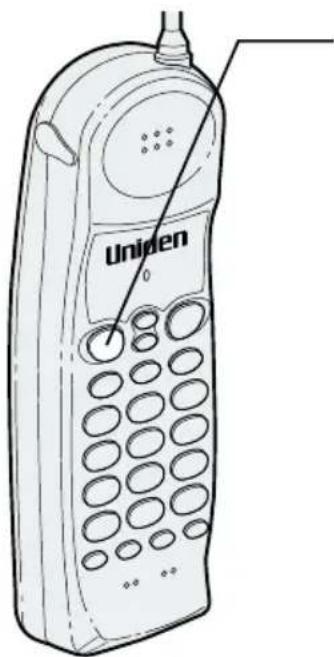
text_image
Uniden1 Press talk on the handset to join the 3-way conversation.
2 To hang up, return the handset to the base, or press talk on the handset. The base will still be connected to the call.
Integrated answering device
The EXS 2050 has a built-in answering system that answers and records incoming calls.
You can also use your answering system to record a conversation, leave a voice memo message for others who use the phone, or to announce a special message to callers when you're away from your phone.
Features
• Digital Tapeless Recording
• 15 minutes of Recording Time
- Selective Greetings (Outgoing Messages)
• Time and Day Stamp
- Remote Message Retrieval and Room Monitor
- Toll Saver
- Conversation Recording
Digital Tapeless Recording allows you to quickly review, save or delete the messages. You'll never have to worry about a tape wearing out, jamming, or resetting improperly.
The Integrated Answering System is easy and convenient to use, but please read through all of the instructions carefully.

text_image
NOTEIf you have not recorded your personal outgoing message when you turn the answering system on, the preset message is automatically set. To set your personal message, see page 23.

text_image
NOTEHolding skip or repeat to scroll through days, hours, minutes, etc.

text_image
NOTEIf you don't set the clock within two minutes, the system returns to standby.
Setting up your answering system
Turning the answering system on/off

natural_image
Line drawing of a portable electronic device with control panel and buttons (no text or symbols)1 To turn the answering system on, press answer on/off. The current greeting message is played and a tone sounds.
2 To turn the answering system off, press answer on/off again.

When the answering system is full, F ^L displays on the base and the system announces "No remaining time". You should delete some messages so that the system can record new messages.
Setting the clock
The clock on the EXS 2050 Answering System starts when power is applied to the base. Follow these steps to set the clock to the correct time.

text_image
skip/▶1 Press and hold clock until a tone sounds.
2 First, press skip or repeat repeatedly until the correct day of the week is announced. (Numbers 8 through 6 display on the base as each day is announced.) Press clock again to select the day.
3 Next, press skip ▶ or repeat ◀ repeatedly until you hear the correct hour setting. Numbers through display on the base as each hour is announced. Press clock again to select the correct time.
4 Press skip▶▶ or repeat◀▶ repeatedly until you hear the correct time setting. Numbers through display on the base as each minute is announced. Press clock again to select the correct time.


text_image
NOTEYou can record a greeting up to 30 seconds.

text_image
NOTEPosition yourself as near to the base as possible and speak clearly when recording your outgoing message.
5 The LED displays R or P. Press skip ▶▶ or repeat ◀◀ until you hear the correct AM/PM setting.
6 Press clock again to end the time/day setting. The EXS 2050 announces the time that you have set.
Setting your greeting
When you receive a call, the answering system automatically plays either a preset message or your own greeting.
▼ Preset Message
The following message is prerecorded:
"Hello, no one is available to take your call. Please leave a message after the tone."
▼ Recording a personal outgoing message (Greeting)
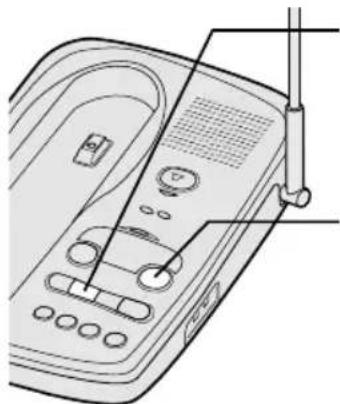
natural_image
Line drawing of a portable electronic device with control panel and buttons (no text or symbols)1 Press and hold greeting until you hear a tone. Start recording your message immediately after you hear the tone end.
2 When you finish recording your message, press greeting or play/stop. A tone sounds and your message plays back on the phone.
▼ Choosing between the two outgoing messages
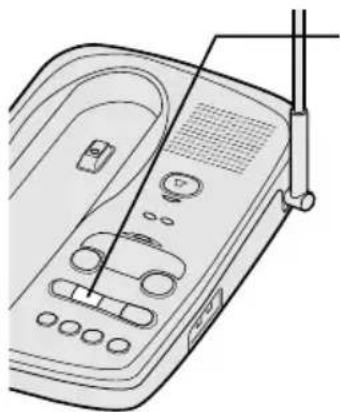
natural_image
Line drawing of a portable electronic device with control panel and buttons (no text or symbols)1 Press greeting to play the outgoing message.
2 Press greeting again while the message is played. This switches between the two options.

text_image
NOTEPress and hold skip ▶ or repeat ◀ to scroll through numbers on the display.
Selecting the message record time
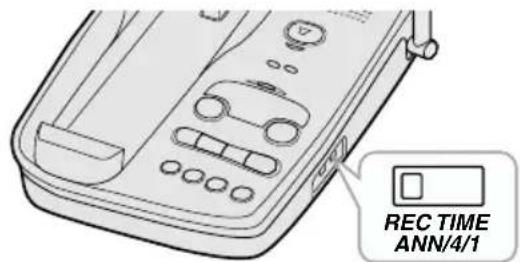
You can set your answering system to record messages between one to four minutes long.
One minute option: move the REC TIME switch to 1.
Four minute option: move the REC TIME switch to 4.
text_image
REC TIME ANN/4/1▼ Announce only feature:
The announce only feature plays an outgoing message, but it will not allow the caller to leave a message. Move the REC TIME switch to the ANN position.
The message counter LED displays “R” when system is on standby.
The prerecorded outgoing message for Announce only feature is:
"Hello, no one is available to take your call."
Selecting a PIN code
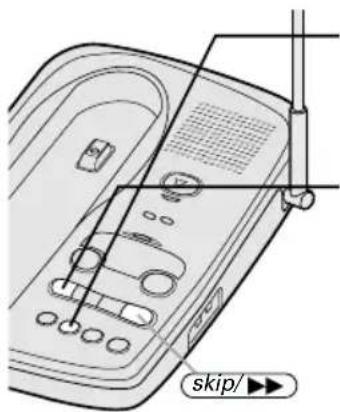
To play your messages from a remote location, you will need to enter a two-digit Personal Identification Number (PIN) code (00-99). To select a PIN, perform the following steps.
text_image
skip/▶→1 On the base, press and hold pin until a tone sounds and the LED displays .
2 To set the first number, press skip ▶▶ or repeat ◀◀ repeatedly to scroll from 0 to 9. When the desired number appears in the display, press pin .
3 To set the second number, press skip ▶▶ or repeat ◀◀ to scroll from 0 to 9. When the desired number appears in the display, press pin . Then the entered PIN is announced.
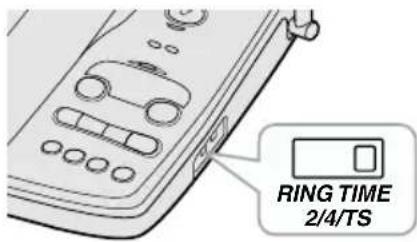
Setting ring time switch
The ring time/toll saver switch allows you to set the number of rings the caller hears before the answering system plays your outgoing message. You can set the switch to answer after two rings or after four rings.
text_image
RING TIME 2/4/TSOnce the greeting has started, you can stop it when you pick up the call at the handset or base.

If you answer at another phone extension and the greeting has started, you cannot stop the message. Wait until your greeting is complete before starting your conversation.
In the TS (Toll Saver) position, the answering system picks up after two rings if you have new messages, and after four rings if there are none. This way, if you call long distance to check your messages, you can hang up after the third ring to avoid billing charges.


text_image
NOTETo stop playing your messages, press play/stop again.
Using your answering system
Playing your messages
The base LED shows the number of total messages on the display. If the display is blinking, then there are new messages waiting for you. The EXS 2050 is designed to play your new messages first. After you play your new messages, you can then play your old messages.

natural_image
Line drawing of a portable electronic device with control panel and antenna (no text or symbols)1 Press play/stop. The system announces the number of new and old messages, then the incoming messages are played. The time and day each message was received is announced after the message is played, and the message counter LED displays the number of the current message.
2 When all new messages have played, a tone is heard. The message counter LED stops flashing to indicate that all of the new messages have been reviewed.
3 After you have reviewed all your messages, you can play your old messages again. Press play/stop and follow the instructions above.

text_image
NOTEPressing repeat before 2 seconds (4 seconds from remote) of the message has played causes the system to scan back one message.

text_image
NOTEIf you have several messages, press and hold repeat until you return to the message you want to replay.

text_image
NOTEEach time skip is pressed, the system scans forward one message.

text_image
NOTEIf you have several messages, press and hold skip ▶▶ to find the message you want to play.
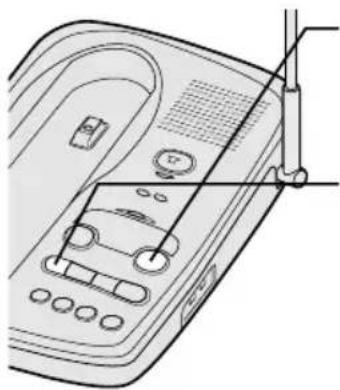
Repeating a message
natural_image
Line drawing of a device with control panel and attached tubing (no text or symbols)1 Press play/stop to review your message. The number of stored messages is announced.
2 After a message has played for a few seconds, press repeat to repeat the message.
3 Press play/stop at any time to stop reviewing messages and return to standby. The message counter LED shows the total number of messages remaining on the system.
Skipping a message

natural_image
Line drawing of a portable electronic device with ports and cables (no text or symbols)1 Press play/stop to review your messages. The number of messages is announced.
2 Press skip ▶▶ at anytime to skip to the next message.
3 Press play/stop at any time to stop reviewing your messages and return to standby. The message counter LED shows the total number of messages on the system.

text_image
NOTEWhen you press delete, you are permanently deleting the message and the message cannot be replayed.

text_image
NOTEThe voice memo function is completely independent of the outgoing message. It's handy for leaving others a quick message.

text_image
NOTEA voice memo message will be stored as a typical recorded message.

text_image
NOTEPosition yourself as near to the base as possible and speak clearly.
Deleting a message
▼ Deleting individual messages
natural_image
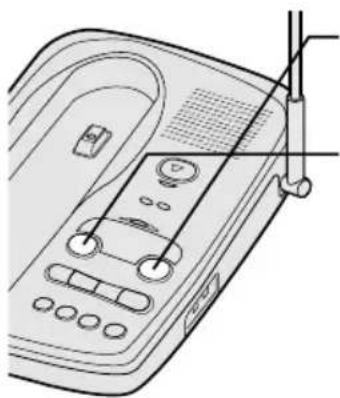
Line drawing of a portable electronic device with control panel and buttons (no text or symbols)1 Press play/stop to review your message.
2 If you decide to delete a message, press delete anytime during the message. The system beeps and immediately goes to the next message.
▼ Deleting all messages
Press and hold delete while the system is in standby. A tone sounds when all messages are deleted.
If there is a message you have not reviewed, you cannot delete all messages at once.
Voice memo
The voice memo function allows the user to record a message (up to 10 minutes) on the base.
text_image
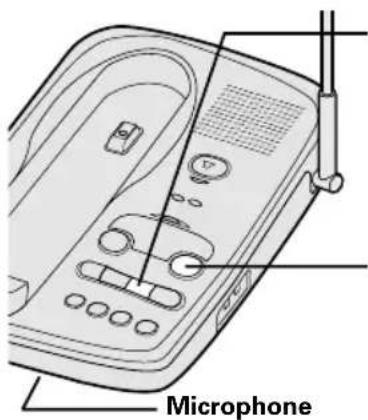
Microphone1 Press and hold voice memo until you hear a tone. The message counter LED blinks.
2 Speak into the microphone.
3 When you have finished, press voice memo or play/stop to stop recording. The system returns to standby.
4 To play voice memo, press play/stop.

text_image
NOTEA recorded conversation is stored and played back with typical recorded messages.

Recording a conversation
You can record up to 10 minutes of conversation while you are making your call from the handset.
natural_image
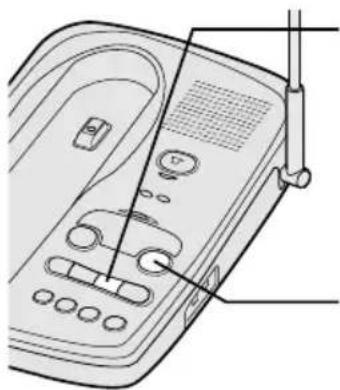
Line drawing of a portable electronic device with control buttons and a scroll (no text or symbols)1 During the conversation from the handset, press and hold voice memo on the base. The unit begins recording and the LED blinks. Both parties can hear tones every 15 seconds.
2 To stop the recording, press voice memo or play/stop.

You cannot record a conversation while you are speaking on the base.

text_image
NOTEDuring the remote operation, displays on the base.

text_image
NOTEYou must enter a command within 15 seconds of entering the command waiting mode or the answering system automatically hangs up and returns to standby.

text_image
NOTEThe system will only play back messages for four minutes and then it returns to the command waiting mode. To continue playing your message, press # then 2 again within 15 seconds
Remote access away from home
You can operate your answering system from a remote location using any touch-tone telephone. Use this function to check for recorded messages, to play or delete messages, to record a new outgoing message, and to monitor sounds in the room.
1 Call your telephone number.
2 While the greeting message plays, press # and your PIN code. If the answering machine is off, let it ring 10 times until the greeting message plays. Then, press # and your PIN code.
3 The answering system announces the time and day stamp and the number of messages stored in memory. Then the message playback automatically begins.
4 You may continue to listen to your message or you may select a command from the following chart.
| Command | Function |
| # then 1 | Repeat |
| # then 2 | Playing your messages |
| # then 3 | Skipping a message |
| # then 4 | Deleting a message |
| # then 5 | Stop message playback |
| # then 6 | Answering system on |
| # then 7 | Voice memo record/stop(up to 4 minute recording time) |
| # then 8 | Greeting message record/stop |
| # then 9 | Answer system off |
| # then *oom | monitor |
5 After all of your messages have played, or the playback time exceeds 4 minutes, you will hear intermittent tones indicating that the system is in the command waiting mode. You may enter another command at this time from the chart above.
6 When you finish, hang up to exit the system. The answering system automatically returns to standby.

text_image
NOTEYou cannot use # and * while the new messages are playing. Press # then 5 to stop message playback first and go to step 5.

Remote room monitor
You can call your answering system from any touch-tone phone to monitor sounds in the room where your base is installed.
1 Call your telephone number.
2 While the greeting message is played, press # and your PIN code.
3 The answering system begins announcing the time and day.
4 Press # then 5 to stop the messages.
5 Press # then *. You hear sounds in the room where your phone is installed. After 15 seconds, the answering system returns to the command waiting mode.
6 Press # then * to monitor the room for another 15 seconds. Select another remote function or hang up to exit the system. The answering system automatically returns to standby.

text_image
NOTEIf the handset battery pack is completely discharged or the battery pack is removed, the digital security code will be lost. If this happens, a new security code is set automatically next time the battery pack is charged.
INFORMATION
Changing the digital security code
The digital security code is an identification code used to connect the handset and the base unit. Normally, setting the code is not necessary.
The first time you charge your handset, the security code is automatically set.
In the rare situation that you suspect another cordless telephone is using the same security code, you can change the code.

natural_image
Line drawing of a portable electronic device with control panel and antenna (no text or symbols)1 Remove the handset from the base unit. Press and hold page.
2 While the handset is emitting the paging sound, place the handset on the base unit holding page. The paging tone stops. Leave the handset on the base for more than 3 seconds. A random, new security code is set.


text_image
NOTEIf you have wall mounted the base, you must remove the beltclip to charge the handset facing forward.
Installing the beltclip
To attach the beltclip
Insert the beltclip into the holes on each side of the handset. Press down until it clicks.
To remove the beltclip
Pull both sides of the beltclip to release the tabs from the holes.

natural_image
Line drawing of a mobile phone device with a handle and antenna, showing internal components and rotation arrows (no text or symbols)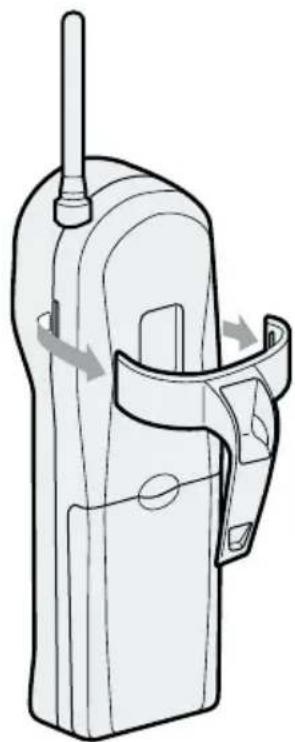
natural_image
Line drawing of a mobile phone device with handle and antenna (no text or symbols)Headset installation
Your phone may be used with an optional headset, the Uniden HS910. To use this feature, insert the headset plug into the headset jack. Your phone is ready for hands-free conversation.

text_image
headset jack UnidenNote on power sources
Battery replacement and handling
When the operating time becomes short, even after the battery is recharged, please replace the battery.
With normal usage, your battery should last about one year.
Please contact your place of purchase for a replacement battery.
Power Failure
During the period that the power is off, you will not be able to make or receive calls with the telephone.
RECYCLING NICKEL-CADMIUM BATTERIES

Ni-Cd
NICKEL- CADMIUM BATTERIES MUST BE DISPOSED OF PROPERLY.
Nickel-cadmium cells are used in the battery pack. Please take your used nickel-cadmium battery packs to a store that recycles nickel-cadmium batteries.
Caution
- Use the specified battery pack.
- Do not remove the battery from the handset to charge it.
- Never throw the battery into a fire, disassemble it, or heat it.
- Do not remove or damage the battery casing.
Maintenance
When slightly dirty
Wipe with a soft, dry cloth.
When very dirty
Wipe with a soft cloth that has been dampened with diluted, neutral detergent. Dry with a dry cloth.
When the charging terminals become dirty
Wipe with a dry cloth.
Caution
Do not use paint thinner, benzene, alcohol, or other chemical products. Doing so may discolor the surface of the telephone and damage the finish.
Troubleshooting
If your phone is not performing to your expectations, please try these simple steps first.
| Symptom | Suggestion |
| The status LED won't come on when the handset is placed in the base unit. | Make sure the AC adapter is plugged into the base unit and wall outlet.Make sure the handset is properly seated in the base unit.Make sure the charging contacts on the handset and base unit are clean. |
| The audio sounds weak and/or scratchy. | Press channel to help eliminate background noise.Make sure that the base unit antenna is in a vertical position.Move the handset and or base unit to a location away from metal objects or appliances and try again.Make sure that you are not too far from the base. |
| Can't make or receive calls. | Check both ends of the base unit telephone line cord.Make sure the AC adapter is plugged into the base unit and wall outlet.Disconnect the AC adapter for a few minutes, then reconnect it.Make sure talk is pressed. |
| The handset doesn't ring or receive a page. | The battery pack may be weak. Charge the battery on the base unit for 15-20 hours.The handset may be too far away from the base unit.Place the base unit away from appliances or metal objects.Make sure the ringer on/off switch is set to on. |
| The answering system does not work. | Make sure the base unit is plugged in.Make sure that the answering system is turned on. |
| Messages are incomplete. | The incoming messages may be too long. Remind callers to leave a brief message.The memory may be full. Delete some or all of the saved messages. |
| After a power failure, the outgoing message is deleted. | Record your greeting again.The preset messages should remain. |
| No sound on the base unit speaker during call monitoring or message playback. | Adjust the speaker volume on the base unit. |
| Cannot access remote call-in features from another touch-tone phone. | Make sure you are using the correct PIN number.Make sure that the touch-tone phone you're using can transmit the tone for at least two seconds. If it cannot, you may have to use another phone to access your message. |
At Uniden, we'll take care of you!
If you need any assistance with this product, please call our Customer Hotline at
1-800-297-1023
PLEASE DO NOT RETURN THIS PRODUCT TO THE PLACE OF PURCHASE.
Our Uniden representatives will be happy to help you with any matters regarding the operation of this unit, available accessories, or any other related matters.
Thank you for purchasing a Uniden product.
Hours: M-F 7:00 AM to 7:00 PM CST.
Index
0 - 9
3-way conferencing......20
A
Answering device
Features......21
Setting up....22
Using 26
B
Base ringer switch....14
Battery pack
Preparing and
charging ....10
Replacement and
handling 34
C
Connection......6
D
Dialing mode....7
Digital security code ......3,32
E, F, G
Earpiece volume......14
H
Handset ringer tone
and volume......14.
Headset installation ....33
I, J, K, L
Installing the beltclip......33
M, N, O
Maintenance....34
Making a call ......12
Memory dialing
Erasing a stored
phone number......19
Making a call
with memory dialing.....18
Storing phone
numbers 17
Mounting the base unit
to a wall....8
Mute 15
P, Q
Package contents......4
R
Receiving a call ......13
Redialing a call ......15
S
Setting up your answering
system
Selecting a PIN code.....24
Selecting the
message record time .....24
Setting the clock......22
Setting ring time
switch....25
Setting your greeting.....23
Turning the answering
system on/off......22
Setup
Base unit....5
Handset....10
T
Troubleshooting......35
U, V, W, X, Y, Z
Using your answering system
Deleting a message .....28
Playing your message ....26
Recording a
conversation 29
Remote access
away from home ......30
Remote room monitor....31
Repeating a message.....27
Skipping a message .....27
Voice memo......28
THANK YOU
FOR PURCHASING A UNIDEN PHONE!
Uniden®
Covered under one or more of the following U.S. patents:
4,511,761 4,523,058 4,595,795 4,797,916 5,381,460
5,426,690 5,434,905 5,491,745 5,533,010 5,574,727
5,650,790 5,660,269 5,661,780 5,663,981 5,671,248
5,717,321 5,754,407 5,768,345 5,787,356 5,838,721
© 2000 Uniden America Corporation
All rights reserved • Printed in China UCZZ01670BZ