CHE-HDBTWP105K - Audio/Video Equipment Comprehensive - Free user manual and instructions
Find the device manual for free CHE-HDBTWP105K Comprehensive in PDF.


User questions about CHE-HDBTWP105K Comprehensive
0 question about this device. Answer the ones you know or ask your own.
Ask a new question about this device
Download the instructions for your Audio/Video Equipment in PDF format for free! Find your manual CHE-HDBTWP105K - Comprehensive and take your electronic device back in hand. On this page are published all the documents necessary for the use of your device. CHE-HDBTWP105K by Comprehensive.
USER MANUAL CHE-HDBTWP105K Comprehensive
natural_image
Exterior view of a white network device with a black USB drive unit (no visible text or symbols)1. Introduction
Comprehensive's CHE-HDBTWP105K Wall Plate Extender kit was designed to extend high speed USB 2.0 up to 328ft over Cat5e or Cat6 cables with data transfer speeds up to 480Mbps. This product can be used as an extension for applicable USB devices such as keyboards, mice, webcams, printers and USB hard drives. No additional drivers needed. You can connect your USB 2.0 devices hassle free. The two high speed USB 2.0 ports allow you to connect two USB devices and use them simultaneously. When connected to the power adapter at the receiver (RX) end, this unit will transit power to the wall plate transmitter to operate.
2. Features
• Supports USB 2.0 protocol, transmission rate up to 480Mbps
• Supports extend distance up to 328ft (100 meters) via CAT 5e/6 cable
• Supports one USB-B port Input in wall-plate Transmitter
• Supports two USB 2.0 ports Output in Receiver
- Receiver is powered by a connecting 12V/1A power adapter
- Simply plug and play with no drive and setting installation required
• Compact design for easy and flexible installation
• 3 Year Warranty
3. Package Contents
- USB 2.0 Extender Wallplate Transmitter x 1
- Screws for mounting Wallplate x 2
- White face plate x 1
- Screws to mount face plate x 2
- USB 2.0 Box Receiver x 1
- USB 2.0 cable Type A to Type B (3 feet) x 1
• 12V/1A Power Adapter x 1 - User Manual x 1
4. Specifications
| Technical | |
| USB protocol | USB 2.0 |
| Transmission rate | Up to 480Mbps |
| Transmission distance | 328ft (100M) |
| ESD Protection | Human-body Model: ±8kV (Air-gap discharge), ±4kV (Contact discharge) |
| Connections | |
| Wall-plate Transmitter | Input port: USB-B [female] x 1Output port: RJ45 [female] x 1 |
| Receiver | Input port: RJ45 [female] x 1Output port: USB-A [female] x 2 |
| Mechanical | |
| Housing | Metal Enclosure |
| Color | Transmitter: White decora panel, Black chassisReceiver: Black |
| Dimensions | Wall-plate Transmitter: 4.1" [W] x 1.77" [D] x 1.38" [H] Receiver: 3.23" [W] x 1.93" [D] x 0.79" [H] |
| Weight | Wall-plate Transmitter: 0.25 lb, Receiver: 0.25 lb |
| Power Supply | Input: AC100~240V 50/60HzOutput: DC 12V/1A |
| Power Consumption | Transmitter: 1.3 Watts, Receiver: 2.3 Watts |
| Operating Temperature | 32°F ~ 104°F |
| Storage Temperature | -4°F ~ 140°F |
| Relative Humidity | 20~90% RH (non-condensing) |
5. Operation Controls and Functions
5.1 Wall Plate Transmitter Panel
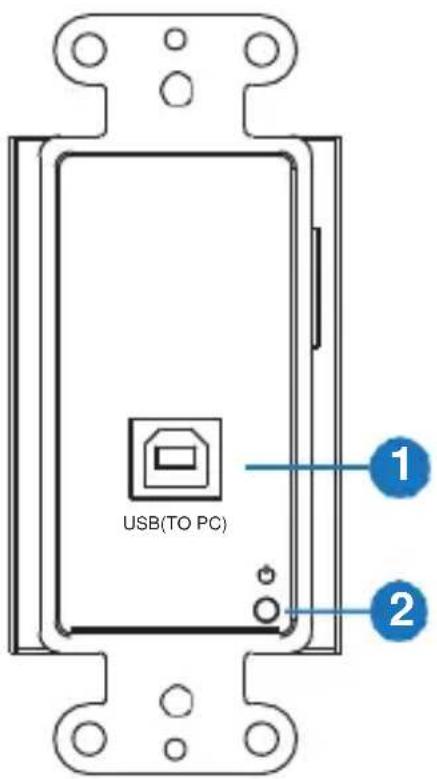
text_image
USB(TO PC) 1 2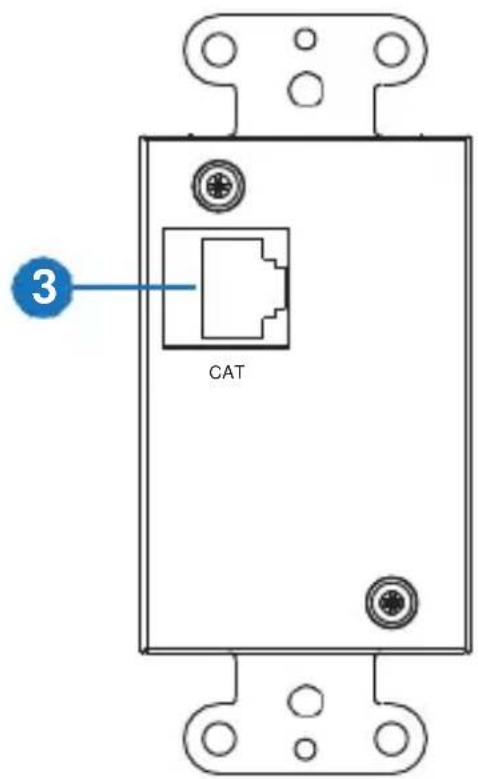
text_image
3 CAT| Number | Name | Function description |
| 1 | USB Port | Use a USB-B male head to a USB-A male head wire to connect to a PC’s USB port.Note:The PC can control USB ports’ device of the receiver. |
| 2 | POWER LED | Power LED indicator. The red LED will illuminate when receiver is provided power. |
| 3 | CAT Port | The CAT port is connected to the receiver’s CAT port by a CAT 5e/6 cable. |
5.2 Receiver Panel
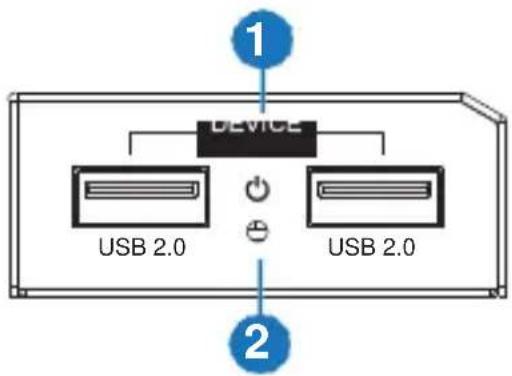
text_image
1 DEVICE USB 2.0 USB 2.0 2
text_image
DC 12V CAT 3 4| Number | Name | Function description |
| 1 | USB 2.0 port | Connect to a device with a USB port (e.g. keyboards, mice, webcams, printers and USB hard drives) |
| 2 | POWER LED | Power LED indicator. The green LED will illuminate when the receiver is connected to the power supply. |
| 3 | DC 12V | Plug the 12V/1A DC power supply into the unit and connect the adapter to an AC outlet. |
| 4 | CAT port | The CAT port is connected to the transmitter's CAT port by a CAT 5e/6 cable. |
- Application Example
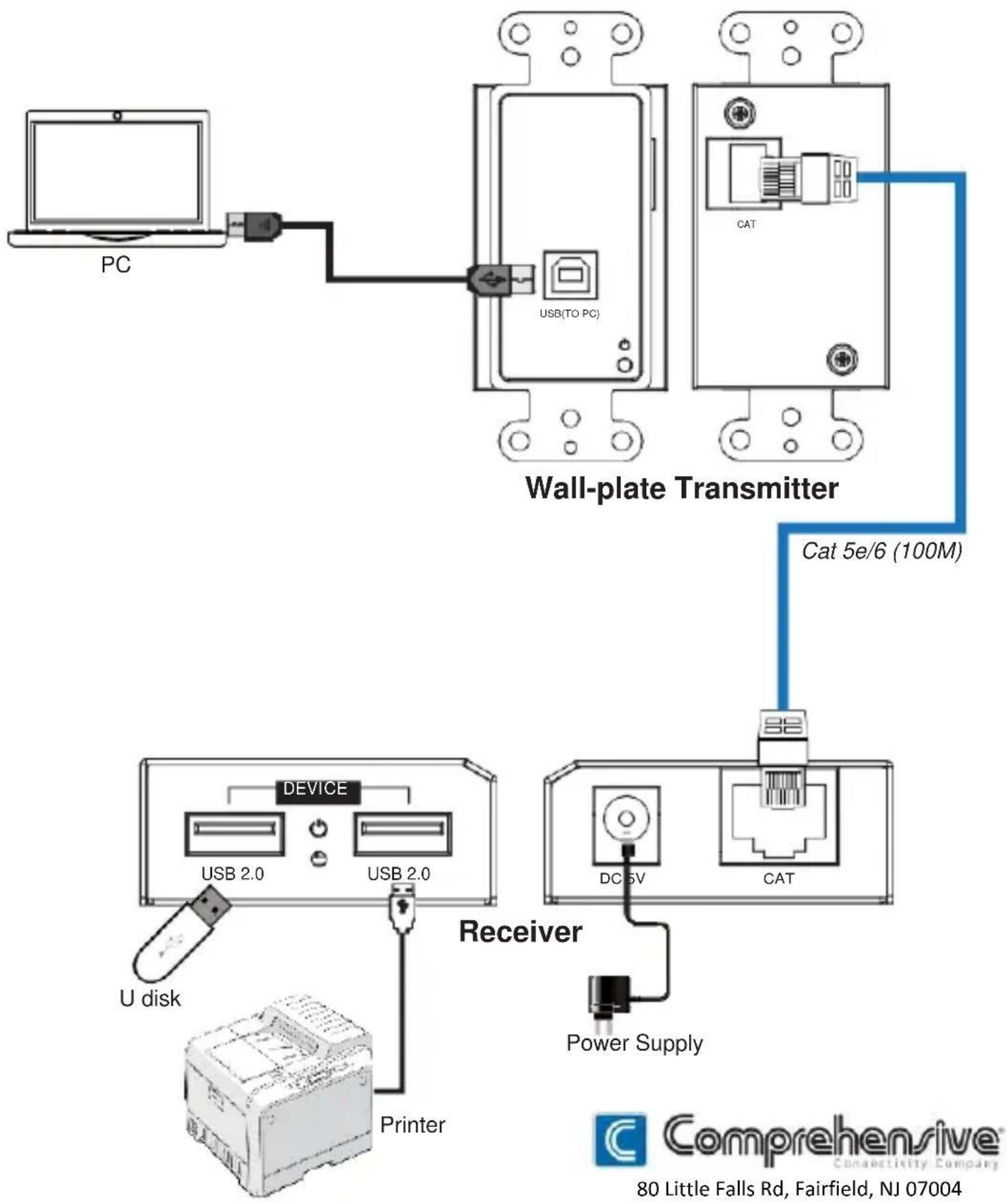
flowchart
graph TD
    A["PC"] --> B["USB(TO PC)"]
    B --> C["Wall-plate Transmitter"]
    C --> D["Cat 5e/6 (100M)"]
    D --> E["Device"]
    E --> F["USB 2.0"]
    E --> G["USB 2.0"]
    E --> H["DC 5V"]
    E --> I["CAT"]
    J["U disk"] --> K["Printer"]
    L["Power Supply"] --> M["Receiver"]
    style A fill:#f9f,stroke:#333
    style B fill:#ccf,stroke:#333
    style C fill:#cfc,stroke:#333
    style D fill:#fcc,stroke:#333
    style E fill:#cff,stroke:#333
    style F fill:#ffc,stroke:#333
    style G fill:#ffc,stroke:#333
    style H fill:#ffc,stroke:#333
    style I fill:#ffc,stroke:#333
    style J fill:#fff,stroke:#333
    style K fill:#fff,stroke:#333
    style L fill:#fff,stroke:#333
    style M fill:#fff,stroke:#333
    style_N["80 Little Falls Rd, Fairfield, NJ 07004"]
80 Little Falls Rd, Fairfield, NJ 07004
Phone: 1-800-526-0242
www.comprehensiveco.com
sales@comprehensiveco.com