
CDA-HD220EK - Amplifier Comprehensive - Free user manual and instructions
Find the device manual for free CDA-HD220EK Comprehensive in PDF.


| Product Type | Stereo Amplifier |
| Brand | Comprehensive |
| Model | CDA-HD220EK |
| Power Output | 2x 50W RMS (8 ohms) |
| Frequency Response | 20 Hz - 20 kHz |
| Input Impedance | 47 kOhms |
| Signal-to-Noise Ratio | > 90 dB |
| Total Harmonic Distortion | < 0.05% |
| Inputs | 2x RCA, 1x AUX (3.5 mm) |
| Outputs | Speaker terminals (binding posts) |
| Dimensions (W x H x D) | 430 x 100 x 280 mm |
| Weight | 5.2 kg |
| Power Supply | AC 110-240V, 50/60Hz |
| Power Consumption | 200W max |
| Standby Power | < 0.5W |
| Operating Temperature | 0°C to 40°C |
| Protection Features | Short circuit, overheat, overload |
| Cooling | Passive (heat sink) |
| Cabinet Material | Aluminum front panel, steel chassis |
| Accessories Included | Power cord, remote control (optional) |
| Care Instructions | Wipe with dry cloth; avoid liquids |
| Safety Certifications | CE, RoHS |
| Repairability | Spare parts available; consult service center |
Frequently Asked Questions - CDA-HD220EK Comprehensive
User questions about CDA-HD220EK Comprehensive
0 question about this device. Answer the ones you know or ask your own.
Ask a new question about this device
Download the instructions for your Amplifier in PDF format for free! Find your manual CDA-HD220EK - Comprehensive and take your electronic device back in hand. On this page are published all the documents necessary for the use of your device. CDA-HD220EK by Comprehensive.
USER MANUAL CDA-HD220EK Comprehensive
UHD 1x2 HDMI Splitter
CDA-HD220EK
User manual
Introduction
This 1 by 2 HDMI UHD Splitter with HICP 2.2 is an advanced
solution for splitting a single HDMI input to two HDMI
outputs. It requires high performance and video
output through HDMI cables up to 4K2K@5011a (YUV420)
resolution and is capable of receiving and transmitting up to
9Gbps of bandwidth with no data loss. Supporting the latest
features you can be assured of reliable and high quality
HDMI distribution.
Package
UHD 1x2 HDMI Splitter---- 1Pes
5V/1A DC power adaptor 1Pcs
User manual 1 pcs
Feature
➢ Compliant with HDMI2.0, HDCP2.2 and DVI 1.0;
➢ Support video format up to 4k2k@301hz with 24bit RGB/YcbCR 4:4:4/YCBCR 4:2:2, and up to 4k2k@601hz with 12bit YCBCR 4:2:0;
➢ Support 3D frame sequential video format up to 1080p@60Hz;
➢ Support high resolution VESA made video format up to QSXGA@60Hz;
➢ Support LPCM 7.1CII, Dolby TrueID, and DTS-IID
Master Audio:
Support smart EDID control;
Specification
Video Bandwidth
Input Ports
300MHz/10.2 Gbps
Output Ports
1 x HDMI (Female type)
Output Resolution
2 x HDMI (Female type)
4801\~1080p50/60,4Kx2K0f24/30,
4k2k@6011x with 12hit YCBCR 4:2:0.
VGA\~UXGA
ESD Protection Human Body model:
1.8 kV (air-gap discharge)
Power Supply 14 kV (contact discharge)
Dimensions 5 V/1A DC
Weight 56 mm (W) × 96 mm (D) × 17 mm (II)
Chassis Material 100 g
Silkscreen Color Metal
Operating Temperature Black
Storage Temperature 0°C-40°C/32°F-104°F
-20^ 60^/-4^ 140^
Relative Humidity
20\~90% RH (non-condensing)
Power Consumption
1.5W
Connect and Operate
Connect the signal sources such as Blu-Ray Player, Play Station
3, satellite receivers and computers equipped with HDMI output
interfaces with a short high-speed HDMI cable to the HDMI
Splitter input.
Connect the HDMI outputs from the HDMI Splitter to high-
definition display devices such as HD-LCD, HD-TLP and HI
projectors with HDMI input interfaces. Use high-speed HDMI
rahles that are recommended for the distances that are required
for each connection.
The Splitter is powered by an external power supply which is
included. Connect power first to the source, then to the Splitter
and then to such HD TV or projector.

- POWER LED: This blue LED illuminated when the
device is connected with power supply.
2.IN LED: This blue LED illuminated when the Source
connect to the device
3.OUT LED: These blue LEDs will light up to indicate
which HDMI outputs are connected to an active
TV/display/monitor
- EDID STD: When in 'STT' mode, the unit will use its own
built-in EDID settings. In this mode, the video output will be set
to 1000p@50Hz and the audio output at LPGK 2CH Stereo. Use
this mode if there are display problems in TV Mode.
- EDID TV: When in 'TV' mode, the unit will read the EDID
settings of the display device connected to HDMI OUT 1. If it
detects a 4K2K capable EDID setting it will transmit the signal in
that format in all outputs. If no 4K2K capable EHD is detected
then the unit will output

OUT 1\~2: Connect each of the HDMI outputs to an HDMI display
for simultaneous HDMI distribution, or cascade the output to
another transmitter to extend the operating distance.
- HDMI IN: Connect the input port to the HDMI or DVI output or
your source device such as a DVD player or set-top box with an
HDMI
3.DC 5V: Plug the 5V DC power supply into the unit and
connected the adaptor to an AC outlet.
Connection Diagram
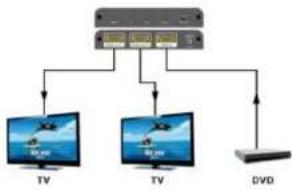
flowchart
graph TD
    A["Central Device"] --> B["TV"]
    A --> C["TV"]
    A --> D["DVD"]
    B --> E["Computer 1"]
    C --> F["Computer 2"]
    D --> G["Computer 3"]

Brand : Comprehensive
Model : CDA-HD220EK
Category : Amplifier