
CHE-HD200 - Audio/Video Accessories Comprehensive - Free user manual and instructions
Find the device manual for free CHE-HD200 Comprehensive in PDF.


| Product Type | HDMI 18Gbps Extender (Transmitter + Receiver) |
| Brand | Comprehensive |
| Model | CHE-HD200 |
| Dimensions (each unit) | 61mm (W) x 58mm (D) x 18mm (H) |
| Weight (Transmitter) | 160g |
| Weight (Receiver) | 155g |
| Power Supply | Input: AC 100-240V 50/60Hz; Output: DC 12V/1A |
| Power Consumption | 3.84W |
| HDMI Compliance | HDMI 2.0 |
| HDCP Compliance | HDCP 2.2 / 1.4 |
| Video Bandwidth | 18Gbps |
| Maximum Resolution | 4K@60Hz 4:4:4 |
| HDR Support | Yes |
| Extension Distance | Up to 164ft (50m) over Cat5e/6 |
| IR Control | One-way IR pass-through (from receiver to transmitter) |
| Power over Cable (PoC) | Yes – power either unit, other gets power via Cat cable |
| HDMI Loop Output | Yes (on transmitter) |
| EDID Copy | Automatic |
| Enclosure Material | Metal |
| Color | Black |
| Operating Temperature | 0°C to 40°C (32°F to 104°F) |
| Storage Temperature | -20°C to 60°C (-4°F to 140°F) |
| Relative Humidity | 20% to 90% RH (non-condensing) |
| ESD Protection | Air-gap ≥8kV, Contact ≥4kV |
| Surge Protection | Recommended – use surge protector |
| Package Contents | Transmitter, Receiver, IR Blaster (1.5m), IR Receiver (1.5m), DC 12V/1A Adapter, Mounting Ears, User Manual |
Frequently Asked Questions - CHE-HD200 Comprehensive
User questions about CHE-HD200 Comprehensive
0 question about this device. Answer the ones you know or ask your own.
Ask a new question about this device
Download the instructions for your Audio/Video Accessories in PDF format for free! Find your manual CHE-HD200 - Comprehensive and take your electronic device back in hand. On this page are published all the documents necessary for the use of your device. CHE-HD200 by Comprehensive.
USER MANUAL CHE-HD200 Comprehensive
The Pro's Connectivity Since 1974
CHE-HD200
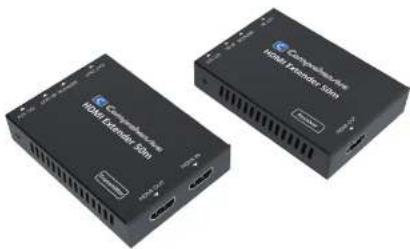
HDMI 4K Extender with one-way IR up to 230ft
natural_image
Two black hardware modules labeled 'Compuktower HDMI Generator 50m' and 'Compuktower HDMI Remake 10m', shown without any text or symbols on the devices themselves.User Manual
VER 1.0
Thank you for purchasing this product
For optimum performance and safety, please read these instructions carefully before connecting, operating or adjusting this product. Please keep this manual for future reference.
Surge protection device recommended
This product contains sensitive electrical components that may be damaged by electrical spikes, surges, electric shock, lighting strikes, etc. Use of surge protection systems is highly recommended in order to protect and extend the life of your equipment.
Table of Contents
- Introduction....1
- Features....1
- Package Contents....2
- Specifications....2
- Operation Controls and Functions....3
5.1 Transmitter Panel....3
5.2 Receiver Panel....4
5.3 IR Pin Definition....5 - Application Example....7
1. Introduction
The HDMI 18Gbps Extender can extend high definition video / audio signal and one-way IR, and the distance is up to 164ft / 50 meters between transmitter and receiver over a single CatSe6 cable. It supports resolution up to 4K2K@60Hz 4.4.4, 18Gbps and HDCP 2.2. In addition, the extender is equipped with one-way IR pass-through which allows for source control and one HDMI loop output.
The extender includes two units: transmitter unit and receiver unit. The transmitter unit is responsible for capturing HDMI input signal and carries the signal via one cost effective Cat6 cable, and emitting IR control signals. The receiver unit is responsible for receiving the HDMI signal and transmitting IR control signal.
The extender offers the most convenient solution for HDMI extension over a single Cat5e/6 with long distance capability, and is the perfect solution for any application.
2. Features
☆ HDMI 2.0, HDCP 2.2 / HDCP 1.4 and DVI 1.0 compliant
☆ Supports 18Gbps bandwidth
Supports input and output video resolution up to 4k2k@60Hz 4:4:4, extends distance up to 164ft / 50 meters
Supports one HDMI loop output
☆ Supports one-way IR pass-through
☆ Supports HDR function
Supports PoC (Power over Cable) function, it means that either transmitter or receiver is powered supply by 12V/1A power adapter, the other doesn't need power supply.)
☆ Supports automatic copy EDID function
☆ Compact design for easy and flexible installation.
3. Package Contents
① 1× HDMI 18Gbps Extender (Transmitter)
② 1× HDMI 18Gbps Extender ( Re
③ 1× IB Blaster cable (1.5 meters)
④ 1×20-60KHz IR Receiver cable (1.5 meters)
⑤ 1× 12V/1A Locking Power adapter
⑥ 4× Mounting Ears
⑦ 1× User Manual
- Specifications
| Technical | |
| HDMI Compliance HDMI 2.0 | |
| HDCP Compliance HDCP 2.2 / HDCP 1.4 | |
| Video Bandwidth 186bps | |
| Video Resolution Up to 4K60Hz 4:4:4 | |
| Color Space RGB / YCbCr 4:4:4, YCbCr 4:2:2/4:20, YUV 4:4:4 | |
| Color Depth | 8/10-12-bit (1080P60Hz, 4K30Hz, 4K50Hz YCbCr 4:2:2/4:2:0)8-bit (4K60Hz 4:4:4) |
| HDMI Audio Formats | LPCM 2:0/2, I/S 1/6, I7/1, Dolby Digital, Dolby TrueHD, Dolby Digital Plus(DI+), DTS-ES, DTS HD Master, DTS HD HRA, DTS-X |
| ESD Protection | Human body model — ≥8kV (Air-gap discharge) & ≥4kV (Contact discharge) |
| Connections | |
| Transmitter | Inputs: 1x HDMI Type A [19-pin female]1x SERVICE [Micro USB, Update port]Outputs: 1x HDMI Type A [19-pin female]1x IR OUT [3.5mm Stereo Mini-jack]1x CAT OUT [RJ45, 8-pin female] |
| Recover | Inputs: 1x IR IN [3.5mm Stereo Mini-jack]1x CAT IN [RJ45, 8-pin females]1x SERVICE [Micro USB, Update port]Outputs: 1x HDMI Type A [19-pin female] |
| Mechanical | |
| Metal EnclosureHousing | |
| BlackColor | |
| Dimensions | Transmitter / Receiver:61mm [W] x 58mm [D] x 18mm [H] |
| Weight Transmitter: | 160g, Receiver: 155g |
| Power Supply | Input: AC 100 - 240V 50/60HzOutput: DC 12V/1A |
| Power Consumption | 3.84 W |
| Operating Temperature | 32 - 104°F / 0 - 40°C |
| Storage Temperature | -4 - 140°F / -20 - 60°C |
| Relative Humidity | 20 - 90% RH (no condensation) |
| Resolution / Distance | 4K60 - Feet / Meters 4K30 / 1080P - Feet / Meters |
| CAT50 | |
| CAT6/6a/7 197ft / 60M | 16ft / 50M 16ft / 50M |
| HDMI INOUT | 30ft / 10M10ft / 3M |
| The use of "Premium High Speed HDMI" cable is highly recommended. | |
5. Operation Controls and Functions
5.1 Transmitter Panel
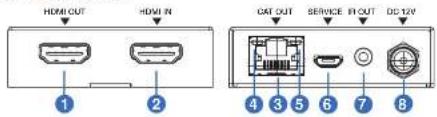
| Number | Name Function | description |
| 1 | HDMI OUT | HDMI loop output port, connect to HDMI display device such as TV or Projector with an HDMI cable. |
| 2 | HDMI IN | HDMI input port, connect to HDMI source device such as DVD or PS4 player with an HDMI cable. |
| 3 | CAT OUT | Connect to CAT IN port on the receiving end with a CAT6 cable. |
| 4 | Power Indicator Lamp (Green) | The lamp will illuminate when the transmitter is powered on. |
| 5 | Data signal Indicator Lamp (Orange) | The lamp will illuminate when the transmitter and the receiver have signal transmission. |
| 6 | SERVICE port | For firmware updated use. |
| 7 | IR OUT | Connect to wideband IR Blaster cable. The IR signal is from the IR IN port of the receiver. |
| 8 DC | 12V | Plug DC 12V/1A power supply into the unit and connect the adapter to an AC outlet.(Note: The extensor supports PoC function, it means that either transmitter or receiver is powered supply by 12V/1A power adapter, the other doesn't need power supply.) |
5.2 Receiver Panel

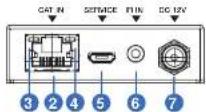
| Number | Name Function | description |
| 1 | HDMI OUT | HDMI output port, connect to HDMI display device such as TV or Projector with an HDMI cable. |
| 2 | CAT IN | Connect to CAT OUT port on the transmitter and with a CAT6 cable. |
| 3 | Power Indicator Lamp (Groon) | The lamp will illuminate when the receiver is powered on. |
| 4 | Data signal Indicator Lamp (Orange) | The lamp will illuminate when the transmitter and the receiver have signal transmission. |
| 5 | SERVICE port For firmware updated use. | |
| 6 | IR IN | Connect to wideband IR Receiver cable. The IR signal will send to the IR OUT port of the transmitter. |
| 7 DC | 12V | Plug DC 12V*1A power supply into the unit and connect the adapter to an AC outlet.(Note: The extender supports PoC function. It means that either transmitter or receiver is powered supply by 12V*1A power adapter, the other doesn't need power supply.) |
5.3 IR Pin Definition
IR Receiver and Blaster pin's definition as below:

IR RECEIVER
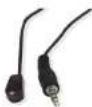
IR BLASTER
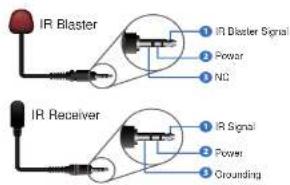
The following is IR system diagram about IR cable use method.

- Application Example
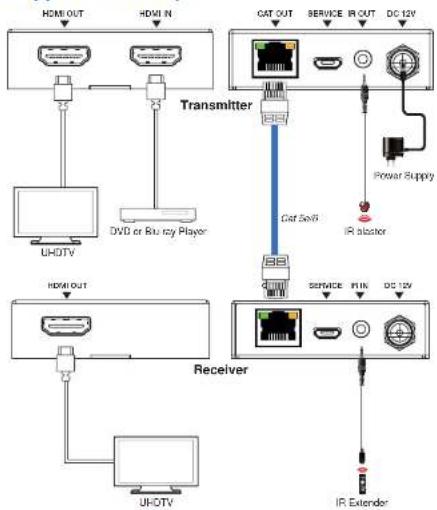
flowchart
graph TD
    A["TRANSMITTER"] --> B["CAT OUT"]
    A --> C["Service"]
    A --> D["IR OUT"]
    A --> E["DC 12V"]
    A --> F["Power Supply"]
    A --> G["IR Abstor"]
    H["Receiver"] --> I["Service"]
    H --> J["IR"]
    H --> K["DC 12V"]
    L["HDMI OUT"] --> M["UHDTV"]
    N["HDMI IN"] --> O["DVD or Blu-ray Player"]
    P["IR Extender"] --> Q["IR"]

Comprehensive
50 Little Falls Road, Fairfield, NJ 07004
xie@gcpentech.com / NO.5283942 | www.gcpentech.com
Brand : Comprehensive
Model : CHE-HD200
Category : Audio/Video Accessories