ION Linear 2 - Barcode Printer POS-X - Free user manual and instructions
Find the device manual for free ION Linear 2 POS-X in PDF.


User questions about ION Linear 2 POS-X
0 question about this device. Answer the ones you know or ask your own.
Ask a new question about this device
Download the instructions for your Barcode Printer in PDF format for free! Find your manual ION Linear 2 - POS-X and take your electronic device back in hand. On this page are published all the documents necessary for the use of your device. ION Linear 2 by POS-X.
USER MANUAL ION Linear 2 POS-X
natural_image
Black barcode scanner with attached cable and stand, no visible text or symbolsION Linear 2
1D Linear Imager
Configuration Guide
Table of Contents
Chapter 1 System Information
1.1 About this Manual 3
1.2 How to Set Up Parameters 3
1.3 How to Set Up Special Parameters 4
Chapter 2 System Setup
2.1 Keyboard Emulation Parameters 5
2.2 Scanning Mode Selection 8
2.3 Beeper Tone Selection 9
2.4 String Options (Prefix & Suffix) 10
2.5 Setup Insertion 11
Chapter 3 Barcode parameters
3.1 UPC-A 15
3.2 UPC-E 18
3.3 EAN-13 21
3.4 EAN-8 23
3.5 Code39 25
3.6 Codabar 28
3.7 Code93 32
3.8 Code128 34
3.9 Interleaved 2 of 5 37
3.10 Industrial 2 of 5 39
3.11 Matrix 2 of 5 41
3.12 China Postal Code 43
3.13 MSI/Plessey 45
3.14 Code 32 47
3.15 Code 11 49
3.16 Telepen 51
3.17 GS1 Data Bar 53
3.18 Function Key Emulation & Function Code 54
Chapter 1 - System Information
1.1 About this manual
This User's Guide provides detailed programming instructions. Barcode scanners are factory programmed for the most common communication settings. If you need to change these settings, programming is accomplished by scanning the bar codes in this guide.
1.2 How to set up parameters
(1) Scan Start Configuration
(2) Scan all necessary barcodes
(3) Scan End Configura tion to end the programming

Start configuration End configura on

ti

Standard Product Defaults Setting

Check Version
An asterisk (*) next to an option indicates the default setting.
1.3 How to set up special parameters
Generally, you will only need to scan one barcode for most parameters. You will hear two beeps when you successfully set the new values. In some cases, when using special parameters you may need to read more than one barcode. For example:
Hexadecimal barcodes, such as, prefix or suffix
◆ Numeric barcode, such as, inter-character delay or min/max length.
To complete the change, you will need to scan the "Confirm" barcode after you scan the parameter barcode. Below is the flow chart to explain two different configurations.
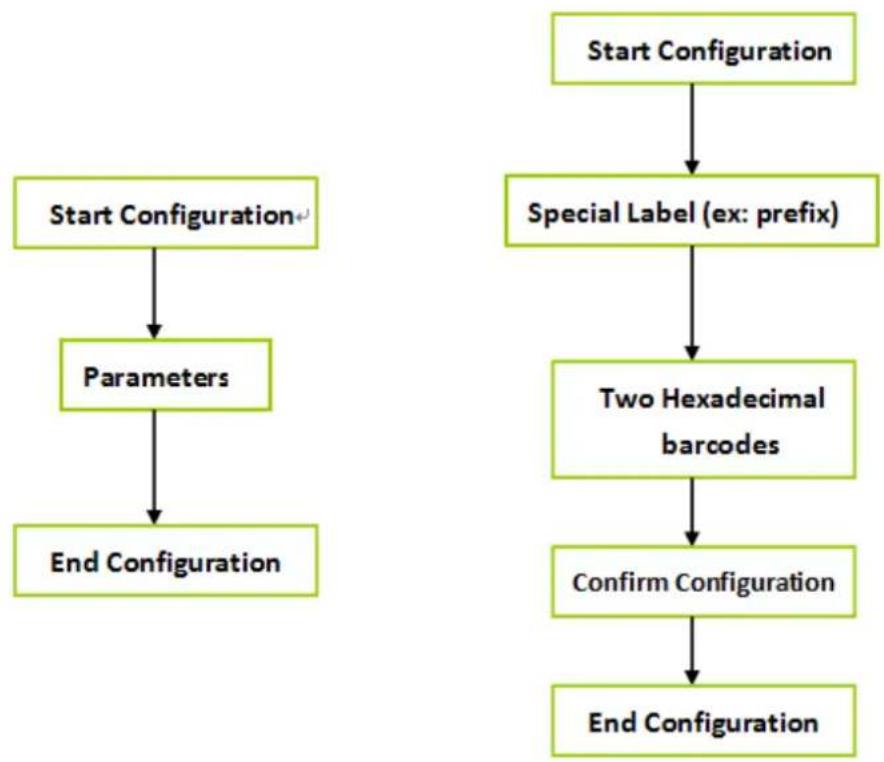
flowchart
graph TD
    A["Start Configuration"] --> B["Parameters"]
    B --> C["End Configuration"]
    D["Start Configuration"] --> E["Special Label (ex: prefix)"]
    E --> F["Two Hexadecimal barcodes"]
    F --> G["Confirm Configuration"]
    G --> H["End Configuration"]
Chapter 2 - System Setup
2.1 Keyboard Emulation Parameters

Start configuration End configura on

ti
| ITEM OPTION | |
| Function Key | * Disable |
| Enable | |
| Emulate External Keyboard | * Disable |
| Enable | |
| ALT Mode | * Disable |
| Enable |
NOTE : Emulate External Keyboard
Scan the "Enable" barcode if you do not have an external keyboard.
After scanning the Enable barcode, you will need to restart your
computer.

Start configuration

End configuration
| ITEM OPTION | |
| Caps Lock |  * Disable * Disable |
 Enable Enable | |
| Num Lock |  * Disable * Disable |
 Enable Enable | |
| Inter Character Delay(Default:00) |  Ref: Appendix (00—64H) Ref: Appendix (00—64H) |
Presentation Mode

Start configuration

Presentation mode

End configuration


Start configuration End configuration
ITEM OPTION
 None None | |
 * CR * CR | |
| Terminator |  Tab Tab |
| Block transmission delay (Default: 00) |  Ref: Appendix (00—0AH) Ref: Appendix (00—0AH) |
| Keyboard Speed (Default 00: high clock rate) |  Ref: Appendix (00—08H) Ref: Appendix (00—08H) |
2.2 Scanning mode selection

Start configuration End configuration

ITEM OPTION

* Trigger On/Good Read Off

Trigger On/Off

Continuous/Trigger Off

Continuous/Testing
Reading Mode

Continuous/Trigger on

Continuous /Auto power on

Flash

Flash / Auto Power On
2.3 Beeper tone selection


Start configuration End configuration
| ITEM OPTION | |
| Beep Tone(Default:09H) |  Ref:Appendix (00-10H) Ref:Appendix (00-10H) |
| Beep Sound Duration(Default:05H) |  Ref:Appendix (00-10H) Ref:Appendix (00-10H) |
| Power On Beeper |  * Enable * Enable |
 Disable Disable | |
| Beeper |  * ON * ON |
 OFF OFF | |
2.4 String Options (Prefix & Suffix)
This section describes the alterations which can be made to the format of the transferred suffixing characters maximum, may be included in front of or at the end of a scanned barcode.
Format
{Prefix} {Code ID} {Bar Code} {Suffix}
How to set up a prefix?
To configure “##” as prefix
(1) Scan Start Configura tion barcode
(2) Scan Preamble bar code
(3) Scan ‘#’ twice from FULL ASCII table
(4) Scan Confirm configura tion barcode
(5) Scan End Configura tion barcode.
How to set up a suffix?
To configure "\\" as suffix
(1) Start configura tion barcode
(2) Scan Postamble barcode
(3) Scan '\$' twice from FULL ASCII table
(4) Scan Confirm configura tion barcode
(5) Scan End configura tion barcode.
2.5 Setup Insertion
This section describes how to setup the insertion of output.
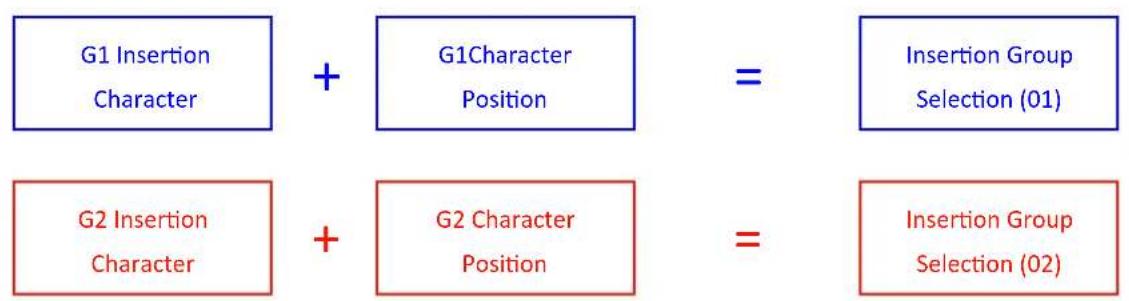
flowchart
graph LR
    A["G1 Insertion Character"] + B["G1Character Position"] = C["Insertion Group Selection (01)"]
    D["G2 Insertion Character"] + E["G2 Character Position"] = F["Insertion Group Selection (02)"]
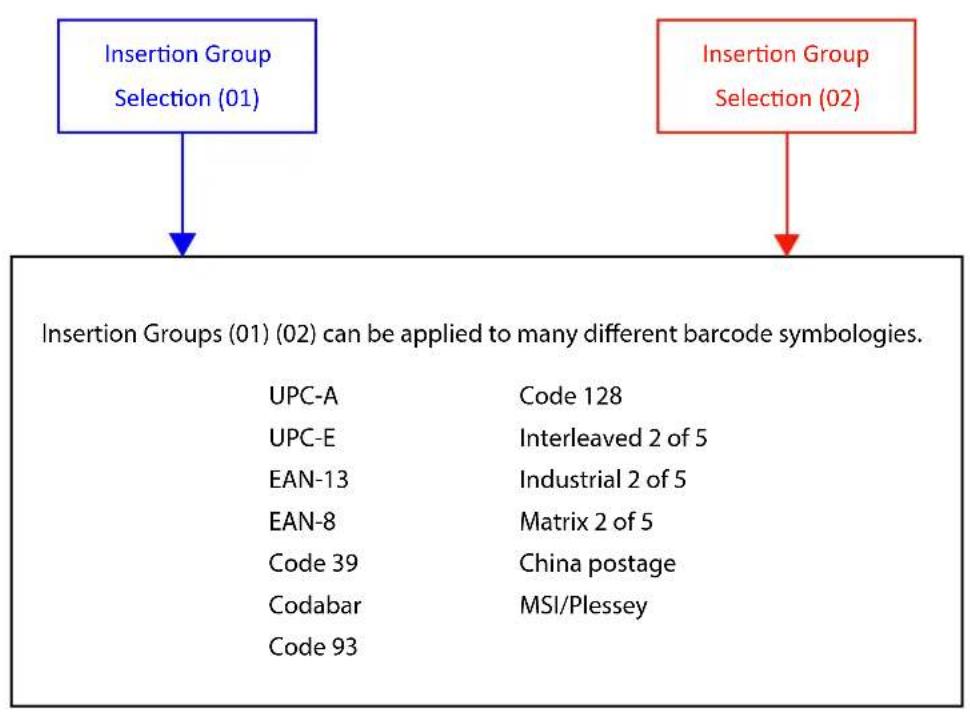
flowchart
graph TD
    A["Insertion Group Selection (01)"] --> B["Insertion Groups (01) (02) can be applied to many different barcode symbologies."]
    B --> C["UPC-A"]
    B --> D["UPC-E"]
    B --> E["EAN-13"]
    B --> F["EAN-8"]
    B --> G["Code 39"]
    B --> H["Codabar"]
    B --> I["Code 93"]
    B --> J["Code 128"]
    B --> K["Interleaved 2 of 5"]
    B --> L["Industrial 2 of 5"]
    B --> M["Matrix 2 of 5"]
    B --> N["China postage"]
    B --> O["MSI/Plessey"]
NOTE :
• Max. 10 characters can be inserted each time
• Max. Insertion group is two
- Insertion Group (01) or (02) can be used on different barcode symbologies at the same time
Example:

To insert character "A" before the third digit(3)
Final Output will be: 12A3456789
How to set up a character you want to insert
(1) Scan Start Configura tion barcode
(2) Scan "G1 Inser tion character"
(3) Scan "4" and "1" from FULL ASCII Table
(4) Scan Confirm configura tion barcode
(5) Scan End configura tion barcode
How to set up position you wish to place the character
(6) Scan Start Configura tion barcode
(7) Scan "G1 Character Position"
(8) Scan "0" and "3" from FULL ASCII Table (which pr ee sents the position)
(9) Scan Confirm configura tion barcode
(10) Scan End configura tion barcode
How to set up insertion for code 39
Go to chapter 3.5 (code 39)
(11) Scan Start Configura tion barcode
(12) Scan "Insert group selec tion" bar code
(13) scan "0" and "1" from FULL ASCII Table (which presents the group- 01 you just set up previously)
(14) Scan Confirm configura tion barcode
(15) Scan End configura tion barcode


Start configuration End configuration

Confirm configuration
| ITEM OPTION | |
| Preamble(Default:00) |  Ref:Appendix Ref:Appendix |
| Postamble(Default:00) |  Ref:Appendix Ref:Appendix |
| G1 Insertion character(Default:00) |  Ref:Appendix Ref:Appendix |
| G2 Insertion character(Default:00) |  Ref:Appendix Ref:Appendix |
| G1 Character Position to be inserted (Default:00) |  Ref:Appendix Ref:Appendix |
| G2 Character Position to be inserted (Default:00) |  Ref:Appendix Ref:Appendix |


Start configuration End configuration
| ITEM OPTION | |
| Bar Code ID | *Disable |
| Enable | |
| Accuracy | * Read 1 Time |
| Read 2 Times | |
| Bar equals high Reading | |
| Bar equals low |
| Code Type ID | Code Type ID | |
| UPC-A F Interleaved | 25 N | |
| UPC-E G Industrial | 25 O | |
| EAN-13 | H Matrix 25 P | |
| EAN-8 | I | China Postal Code |
| Code 39 | J | MSI/Plessey |
| Codabar | K | Code 32 |
| Code 93 | L Code 11 T | |
| Code 128 | M Telepen V |
Chapter 3 - Barcode parameters setting
How to set up a Code ID?
(1) Scan Start configura tion bar code
(2) Go to the ASCII Table and scan the barcodes that represent the characters you want inserted.
(3) Scan Confirm configura tion bar code
(4) Scan End configura tion bar code

Start configuration End configura on

ti

Confirm configuration
3.1 UPC-A
| ITEM OPTION | |
| Read |  Disable Disable |
 * Enable * Enable | |
| Code ID Setting(Default : F) |  Ref: Appendix (20-7EH) Ref: Appendix (20-7EH) |


Start configuration End configuration
| ITEM OPTION | |
| UPC-A Expand to EAN-13 |  * Disable * Disable |
 Enable Enable | |
| Check Digit Send |  Disable Disable |
 * Enable * Enable | |
| Truncate Leading Zero |  * Disable * Disable |
 Enable Enable | |
| Truncate Leading(Default:00) |  Ref: Appendix (00-0DH) Ref: Appendix (00-0DH) |
| Truncate Ending(Default:00) |  Ref: Appendix (00-0DH) Ref: Appendix (00-0DH) |
| Insert group selection |  Ref: Appendix (00—02H) Ref: Appendix (00—02H) |


Start configuration End configuration
ITEM OPTION
| Supplement digits | * NONE |
| 2 digits | |
| 5 digits | |
| 2 or 5digits | |
| Auto-discriminate Supplement |
3.2 UPC-E


Start configuration End configuration
| ITEM OPTION | |
| Read | Disable |
| * Enable | |
| Code ID setting (Default: G) Ref: Appendix (20-7EH) | |


Start configuration End configuration
| ITEM OPTION | |
| UPC-E Expand to UPC-A |  * Disable * Disable |
 Enable Enable | |
| Check Digit Send |  Disable Disable |
 * Enable * Enable | |
| Truncate Leading(Default:00) |  Ref: Appendix (00-08H) Ref: Appendix (00-08H) |
| Truncate Ending(Default:00) |  Ref: Appendix (00-08H) Ref: Appendix (00-08H) |
| Insert group selection(Default:00) |  Ref: Appendix (00-02H) Ref: Appendix (00-02H) |


Start configuration End configuration
| ITEM OPTION | |
| Truncate Leading Zero |  * Disable * Disable |
 Enable Enable | |
| Supplement digits |  * None * None |
 2 digits 2 digits | |
 5 digits 5 digits | |
 2 or 5 digits 2 or 5 digits | |
 Auto-discriminate Supplement Auto-discriminate Supplement | |
3.3 EAN-13

Start configuration End configuration

| ITEM OPTION | |
| Read |  Disable Disable |
 * Enable * Enable | |
| Code ID setting(Default : H) |  Ref: Appendix (20-7EH) Ref: Appendix (20-7EH) |
| Check Digit Send |  Disable Disable |
 * Enable * Enable | |
| Truncate Leading(Default : 00 ) |  Ref: Appendix (00-0DH) Ref: Appendix (00-0DH) |
| Truncate Ending(Default : 00 ) |  Ref: Appendix (00-0DH) Ref: Appendix (00-0DH) |


Start configuration End configuration
| ITEM OPTION | |
| Supplement digits |  * None * None |
 2 digits 2 digits | |
 5 digits 5 digits | |
 2 or 5 digits 2 or 5 digits | |
 Auto-discriminate Supplement Auto-discriminate Supplement | |
| ISBN/ISSN Conversion |  * Disable * Disable |
 Enable Enable | |
| Insert group selection(Default : 00 ) |  Ref: Appendix (00-02H) Ref: Appendix (00-02H) |
3.4 EAN-8

Start configuration End configuration

| ITEM OPTION | |
| Read |  Disable Disable |
 * Enable * Enable | |
| Code ID setting(Default:1) |  Ref: Appendix (20-7EH) Ref: Appendix (20-7EH) |
| Check Digit Send |  Disable Disable |
 * Enable * Enable | |
| Truncate Leading(Default:00) |  Ref: Appendix (00-08H) Ref: Appendix (00-08H) |


Start configuration End configuration
| ITEM OPTION | |
| Truncate Ending (Default: 00) |  Ref: Appendix (00-08H) Ref: Appendix (00-08H) |
| Supplement digits |  * None * None |
 2 digits 2 digits | |
 5 digits 5 digits | |
 2 or 5 digits 2 or 5 digits | |
 Auto-discriminate Supplement Auto-discriminate Supplement | |
| Insert group selection (Default: 00) |  Ref: Appendix (00-02H) Ref: Appendix (00-02H) |
3.5 Code39


Start configuration End configuration
| ITEM OPTION | |
| Read |  Disable Disable |
 * Enable * Enable | |
| Code ID setting(Default: J) |  Ref: Appendix (20-7EH) Ref: Appendix (20-7EH) |
| Check-sum verification |  * Disable * Disable |
 Enable Enable | |
| Check-sum transmission |  Disable Disable |
 * Enable * Enable | |


Start configuration End configuration
| ITEM OPTION | |
| Append |  * Disable * Disable |
 Enable Enable | |
| Min. code length(Default: 00) |  Ref: Appendix (00-32H) Ref: Appendix (00-32H) |
| Max. code length(Default: 32H) |  Ref: Appendix (00-32H) Ref: Appendix (00-32H) |
 * Standard Code39Format * Standard Code39Format | |
 Code 39 Full ASCII Code 39 Full ASCII | |


Start configuration End configuration
| ITEM OPTION | |
| Transmit Start/End Character |  * Disable * Disable |
 Enable Enable | |
| Truncate Leading(Default: 00) |  Ref: Appendix (00-32H) Ref: Appendix (00-32H) |
| Truncate Ending(Default: 00) |  Ref: Appendix (00-32H) Ref: Appendix (00-32H) |
| Insert group selection(Default: 00) |  Ref: Appendix (00-02H) Ref: Appendix (00-02H) |
3.6 Codabar


Start configuration End configuration
| ITEM OPTION | |
| Read |  Disable Disable |
 * Enable * Enable | |
| Code ID setting(Default : K) |  Ref: Appendix (20-7EH) Ref: Appendix (20-7EH) |


Start configuration End configuration
| ITEM OPTION | |
| Check-sum verification |  Disable Disable |
 * Enable * Enable | |
| Check-sum transmission |  * Disable * Disable |
 Enable Enable | |
| Append |  * Disable * Disable |
 Enable Enable | |
| Truncate Leading(Default:00) |  Ref: Appendix (00-7EH) Ref: Appendix (00-7EH) |


Start configuration End configuration
| ITEM OPTION | |
| Truncate Ending (Default:00) |  Ref: Appendix (00-7EH) Ref: Appendix (00-7EH) |
| Start/End type |  * ABCD/ABCD * ABCD/ABCD |
 abcd/abcd abcd/abcd | |
 abcd/tn*e abcd/tn*e | |
| Start/End transmission |  * Disable * Disable |
 Enable Enable | |
| Min. code length (Default: 05) |  Ref: Appendix (00-3CH) Ref: Appendix (00-3CH) |


Start configuration End configuration
| ITEM OPTION | |
| Max. code length(Default: 3CH) |  Ref: Appendix (00-3CH) Ref: Appendix (00-3CH) |
| Insert group selection(Default: 00) |  Ref: Appendix (00-02H) Ref: Appendix (00-02H) |
3.7 Code93


Start configuration End configuration
| ITEM OPTION | |
| Read |  Disable Disable |
 * Enable * Enable | |
| Code ID setting(Default : L) |  Ref: Appendix (20-7EH) Ref: Appendix (20-7EH) |
| Check-sum verification |  Disable Disable |
 * Enable * Enable | |


Start configuration End configuration
| ITEM OPTION | |
| Check-sum transmission |  * Disable * Disable |
 Enable Enable | |
| Min. code length(Default: 00) |  Ref: Appendix (0-50H) Ref: Appendix (0-50H) |
| Max. code length(Default: 50H) |  Ref: Appendix (0-50H) Ref: Appendix (0-50H) |
| Truncate Leading(Default: 00) |  Ref: Appendix (00-7EH) Ref: Appendix (00-7EH) |
| Truncate Ending(Default: 00) |  Ref: Appendix (00-7EH) Ref: Appendix (00-7EH) |
| Insert group selection |  Ref: Appendix (00-02H) Ref: Appendix (00-02H) |
3.8 Code 128


Start configuration End configuration
| ITEM OPTION | |
| Read |  Disable Disable |
 * Enable * Enable | |
| Code ID setting(Default : M) |  Ref: Appendix (20-7EH) Ref: Appendix (20-7EH) |
| Check-sum verification |  Disable Disable |
 * Enable * Enable | |


Start configuration End configuration
| ITEM OPTION | |
| Check-sum transmission |  * Disable * Disable |
 Enable Enable | |
| FNC2 Append |  * Disable * Disable |
 Enable Enable | |
| UCC/EAN128 |  * Disable * Disable |
 Enable Enable | |
| FNC1 transmission |  * Disable * Disable |
 Enable Enable | |


Start configuration End configuration
| ITEM OPTION | |
| Truncate Leading (Default: 00) |  Ref: Appendix (00-7FH) Ref: Appendix (00-7FH) |
| Truncate Ending (Default: 00) |  Ref: Appendix (00-7FH) Ref: Appendix (00-7FH) |
| Min. code length (Default: 00) |  Ref: Appendix (00-7FH) Ref: Appendix (00-7FH) |
| Max. code length (Default: 7FH) |  Ref: Appendix (00-7FH) Ref: Appendix (00-7FH) |
| Insert group selection (Default: 00) |  Ref: Appendix (00-02H) Ref: Appendix (00-02H) |
3.9 Interleaved 2 of 5


Start configuration End configuration
| ITEM OPTION | |
| Read |  * Disable * Disable |
 Enable Enable | |
| Code ID setting(Default : N) |  Ref: Appendix (20-7EH) Ref: Appendix (20-7EH) |
| Check-sum verification |  Disable Disable |
 *Enable *Enable | |
| Check-sum transmission |  Disable Disable |
 * Enable * Enable | |


Start configuration End configuration
| ITEM OPTION | |
| Truncate Leading (Default: 00) |  Ref: Appendix (00-7EH) Ref: Appendix (00-7EH) |
| Truncate Ending (Default: 00) |  Ref: Appendix (00-7EH) Ref: Appendix (00-7EH) |
| Min. code length (Default: 00) |  Ref: Appendix (00-7FH) Ref: Appendix (00-7FH) |
| Max. code length (Default: 7FH) |  Ref: Appendix (00-7FH) Ref: Appendix (00-7FH) |
| Insert group selection (Default: 00) |  Ref: Appendix (00-02H) Ref: Appendix (00-02H) |
3.10 Industrial 2 of 5


Start configuration End configuration
| ITEM OPTICON | |
| Read |  * Disable * Disable |
 Enable Enable | |
| Code ID setting(Default:O) |  Ref: Appendix (20-7EH) Ref: Appendix (20-7EH) |
| Min. code length(Default:00) |  Ref: Appendix (00-32H) Ref: Appendix (00-32H) |
| Max. code length(Default:32H) |  Ref: Appendix (00-32H) Ref: Appendix (00-32H) |


Start configuration End configuration
| ITEM OPTION | |
| Truncate Leading (Default: 00) |  Ref: Appendix (00-32H) Ref: Appendix (00-32H) |
| Truncate Ending (Default: 00) |  Ref: Appendix (00-32H) Ref: Appendix (00-32H) |
| Check-sum verification |  * Disable * Disable |
 Enable Enable | |
| Check-sum transmission |  Disable Disable |
 * Enable * Enable | |
| Insert group selection (Default: 00) |  Ref: Appendix (00-02H) Ref: Appendix (00-02H) |
3.11 Matrix 2 of 5


Start configuration End configuration
| ITEM OPTION | |
| Read |  * Disable * Disable |
 Enable Enable | |
| Code ID setting(Default : P) |  Ref: Appendix (20-7EH) Ref: Appendix (20-7EH) |
| Check-sum verification |  * Disable * Disable |
 Enable Enable | |


Start configuration End configuration
| ITEM OPTION | |
| Check-sum transmission |  Disable Disable |
 * Enable * Enable | |
| Truncate Leading(Default:00) |  Ref: Appendix (00-50H) Ref: Appendix (00-50H) |
| Truncate Ending(Default:00) |  Ref: Appendix (00-50H) Ref: Appendix (00-50H) |
| Min. code length(Default:0B) |  Ref: Appendix (00-50H) Ref: Appendix (00-50H) |
| Max. code length(Default:50H) |  Ref: Appendix (00-50H) Ref: Appendix (00-50H) |
| Insert group selection(Default:00) |  Ref: Appendix (00-02H) Ref: Appendix (00-02H) |
3.12 CHINA POSTAL CODE


Start configuration End configuration
| ITEM OPTION | |
| Read |  * Disable * Disable |
 Enable Enable | |
| Code ID setting(Default: Q) |  Ref: Appendix (20-7EH) Ref: Appendix (20-7EH) |
| Check-sum verification |  * Disable * Disable |
 Enable Enable | |
| Check-sum transmission |  Disable Disable |
 * Enable * Enable | |


Start configuration End configuration
| ITEM OPTION | |
| Truncate Leading (Default: 00) |  Ref: Appendix (00-50H) Ref: Appendix (00-50H) |
| Truncate Ending (Default: 00) |  Ref: Appendix (00-50H) Ref: Appendix (00-50H) |
| Min.code length (Default: 00) |  Ref: Appendix (00-50H) Ref: Appendix (00-50H) |
| Max.code length (Default: 50H) |  Ref: Appendix (00-50H) Ref: Appendix (00-50H) |
| Insert group selection (Default: 00) |  Ref: Appendix (00-02H) Ref: Appendix (00-02H) |
3.13 MSI/Plessey


Start configuration End configuration
| ITEM OPTION | |
| Read |  * Disable * Disable |
 Enable Enable | |
| Code ID setting(Default : R) |  Ref: Appendix (20-7EH) Ref: Appendix (20-7EH) |
| Check-sum verification |  * Disable * Disable |
 MOD 10 MOD 10 | |
 MOD 10/10 MOD 10/10 | |
 MOD 11/10 MOD 11/10 | |


Start configuration End configuration
| ITEM OPTION | |
| Check-sum transmission |  Disable Disable |
 * Enable * Enable | |
| Truncate Leading(Default:00) |  Ref: Appendix (00-3CH) Ref: Appendix (00-3CH) |
| Truncate Ending(Default:00) |  Ref: Appendix (00-3CH) Ref: Appendix (00-3CH) |
| Min. code length(Default:00) |  Ref: Appendix (00-3CH) Ref: Appendix (00-3CH) |
| Max. code length(Default:3CH) |  Ref: Appendix (00-3CH) Ref: Appendix (00-3CH) |
| Insert group selection(Default:00) |  Ref: Appendix (00-02H) Ref: Appendix (00-02H) |
3.14 CODE 32 (Italian Pharma-Code)


Start configuration End configuration
| ITEM OPTION | |
| Read |  * Disable * Disable |
 Enable Enable | |
| Code ID Setting(Default:S) |  Ref: Appendix (20-7EH) Ref: Appendix (20-7EH) |
| Check-sum verification |  Disable Disable |
 * Enable * Enable | |
| Check-sum transmission |  Disable Disable |
 * Enable * Enable | |


Start configuration End configuration
| ITEM OPTION | |
| Truncate Leading (Default : 00) |  Ref: Appendix (00-0AH) Ref: Appendix (00-0AH) |
| Truncate Ending (Default : 00) |  Ref: Appendix (00-0AH) Ref: Appendix (00-0AH) |
| Insert group selection (Default : 00) |  Ref: Appendix (00-02H) Ref: Appendix (00-02H) |
3.15 CODE 11


Start configuration End configuration
| ITEM OPTION | |
| Read |  * Disable * Disable |
 Enable Enable | |
| Code ID setting(Default:T) |  Ref: Appendix (20-7EH) Ref: Appendix (20-7EH) |
| Check-sum verification |  Disable Disable |
 * Enable * Enable | |


Start configuration End configuration
| ITEM OPTION | |
| Check-sum transmission |  * Disable * Disable |
 Enable Enable | |
| Truncate Leading(Default:00) |  Ref: Appendix (00-50H) Ref: Appendix (00-50H) |
| Truncate Ending(Default:00) |  Ref: Appendix (00-50H) Ref: Appendix (00-50H) |
| Min. code length(Default:00) |  Ref: Appendix (00-50H) Ref: Appendix (00-50H) |
| Max. code length(Default:50H) |  Ref: Appendix (00-50H) Ref: Appendix (00-50H) |
| Insert group selection(Default:00) |  Ref: Appendix (00-02H) Ref: Appendix (00-02H) |
3.16 Telepen


Start configuration End configuration
| ITEM OPTION | |
| Read |  * Disable * Disable |
 Enable Enable | |
| Code ID setting(Default:V) |  |
| Ref: Appendix (20-7EH) | |
| Check-sum verification |  Disable Disable |
 * Enable * Enable | |
| Data Format |  Only Numnic Only Numnic |
 *Full ASCII *Full ASCII | |


Start configuration End configuration
| ITEM OPTION | |
| Check-sum transmission |  * Disable * Disable |
 Enable Enable | |
| Truncate Leading(Default:00) |  Ref: Appendix (00-40H) Ref: Appendix (00-40H) |
| Truncate Ending(Default:00) |  Ref: Appendix (00-40H) Ref: Appendix (00-40H) |
| Min. code length(Default:00) |  Ref: Appendix (00-40H) Ref: Appendix (00-40H) |
| Max. code length(Default:40H) |  Ref: Appendix (00-40H) Ref: Appendix (00-40H) |
| Insert group selection(Default:00) |  Ref: Appendix (00-02H) Ref: Appendix (00-02H) |
3.17 GS1 Data Bar (RSS)


Start configuration End configuration
| ITEM OPTION | |
| RSS-14 |  Enable Enable |
 *Disable *Disable | |
| RSS-14 LIMITED |  Enable Enable |
 *Disable *Disable | |
| RSS-14 EXPANDED |  Enable Enable |
 *Disable *Disable | |
| RSS TO UPC/EAN |  Enable Enable |
 *Disable *Disable | |
3.18 Function Key Emulation


Start configuration End configuration
| ITEM OPTION | |
| Function Key | * Disable |
| Enable | |
| Code 39 format | Full ASCII Code 39 |
To scan a function key barcode label, Full ASCII Code 39 must be enabling. Please refer to Full ASCII Code 39 Table to produce the function key barcode label.
Function Code
 UP(A) F1(Q) UP(A) F1(Q) |  |
 DOWN(B) F2(R) DOWN(B) F2(R) |  |
 LEFT(C) F3(S) LEFT(C) F3(S) |  |
 RIGHT(D) F4(T) RIGHT(D) F4(T) |  |
 PAGE UP(E) F5(U) PAGE UP(E) F5(U) |  |
 PAGE DOWN(F) F6(V) PAGE DOWN(F) F6(V) |  |
 BS(H) F7(W) BS(H) F7(W) |  |
 TAB(I) F8(X) TAB(I) F8(X) |  |
 HOME(K) F9(Y) HOME(K) F9(Y) |  |
 END(L) F10(Z) END(L) F10(Z) |  |
 ENTER(M) ESC(%A) ENTER(M) ESC(%A) |  |
 INSERT(N) F11(%B) INSERT(N) F11(%B) |  |
 DELETE($O) F12(%C) DELETE($O) F12(%C) |  |
Appendix A –
| Dec Hex Char. Dec Hex Char. | ||||||
| 0 00 NUL 32 20 SP | ||||||
| 1 01 SOH 33 21 ! | ||||||
| 2 02 STX 34 22 " | ||||||
| 3 03 ETX | 35 23 | # | ||||
| 4 04 EOT | 36 24 | $ | ||||
| 5 05 ENQ 37 25 | % | |||||
| 6 06 ACK | 38 26 | & | ||||
| 7 07 | BEL 39 27 ' | |||||
| 8 08 | BS 40 28 ( | |||||
| 9 09 HT 41 29 ) | ||||||
| 10 | 0A | LF | 42 | 2A | * | |
| 11 | 0B VT 43 | 2B | + | |||
| 12 | 0C | FF 44 2C , | ||||
| 13 | 0D | CR | 45 2D - | |||
| 14 | 0E | SO 46 2E | . | |||
| 15 | 0F | SI | 47 | 2F | / | |
| 16 | 10 DLE | 48 30 | 0 | |||
| 17 | 11 DC1 | 49 31 | 1 | |||
| 18 | 12 DC2 | 50 32 | 2 | |||
| 19 | 13 DC3 | 51 33 | 3 | |||
| 20 | 14 DC4 | 52 34 | 4 | |||
| 21 | 15 NAK 53 35 | 5 | ||||
| 22 | 16 SYN | 54 36 | 6 | |||
| 23 | 17 ETB | 55 37 | 7 | |||
| 24 | 18 CAN | 56 38 | 8 | |||
| 25 | 19 | EM | 57 | 39 | 9 | |
| 26 | 1A SUB | 58 3A | : | |||
| 27 | 1B ESC | 59 3B | ; | |||
| 28 | 1C | FS | 60 | 3C | < | |
| 29 | 1D | GS | 61 | 3D | = | |
| 30 | 1E | RS | 62 | 3E | > | |
| 31 | 1F | US 63 3F ? | ||||
| Dec Hex Char. Dec Hex Char. | |||||
| 64 40 @ 96 60 ' | |||||
| 65 41 A 97 61 a | |||||
| 66 42 B | 98 62 b | ||||
| 67 43 C | 99 63 c | ||||
| 68 44 D | 100 64 | d | |||
| 69 45 E 101 | 65 e | ||||
| 70 | 46 | F | 102 | 66 | f |
| 71 | 47 | G | 103 | 67 | G |
| 72 | 48 | H | 104 | 68 | h |
| 73 | 49 | I | 105 | 69 | i |
| 74 | 4A | J | 106 | 6A | j |
| 75 | 4B | K | 107 | 6B | k |
| 76 | 4C | L | 108 | 6C | l |
| 77 | 4D | M | 109 | 6D | m |
| 78 | 4E | N | 110 | 6E | n |
| 79 | 4F | O | 111 | 6F | o |
| 80 | 50 | P | 112 | 70 | P |
| 81 | 51 | Q | 113 | 71 | q |
| 82 52 R | 114 | 72 | r | ||
| 83 | 53 | S | 115 | 73 | s |
| 84 | 54 | T | 116 | 74 | t |
| 85 | 55 | U | 117 | 75 | u |
| 86 56 V | 118 | 76 v | |||
| 87 57 | W 119 | 77 w | |||
| 88 58 X | 120 | 78 x | |||
| 89 | 59 | Y | 121 | 79 | y |
| 90 | 5A | Z | 122 | 7A | z |
| 91 | 5B | [ | 123 | 7B | { |
| 92 | 5C | \ | 124 | 7C | | |
| 93 | 5D | } | 125 | 7D | } |
| 94 | 5E | ^ | 126 | 7E | ~ |
| 95 | 5F | _ | 127 | 7F | DEL |
Table-Hex HEXADCIMAL
 |  |
| 1 | A |
 |  |
| 2 | B |
 | |
| 3 |  |
| C | |
 |  |
| 4 | D |
 | |
| 5 |  |
 | E |
| 6 | |
 |  |
| 7 | F |
 | |
| 8 |  |
 | Confirm configuration |
| 9 |  |
| 0 | End Configuration |
End Configuration
Function Key Table
| 0 1 | ||
| 0 NULL | ||
| 1 UP F1 | ||
| 2 DOWN F2 | ||
| 3 LEFT F3 | ||
| 4 RIGHT F4 | ||
| 5 PAGE UP F5 | ||
| 6 PAGE DOWN | F6 | |
| 7 F7 | ||
| 8 BS F8 | ||
| 9 TAB F9 | ||
| A F10 | ||
| B HOME ESC | ||
| C END | F11 | |
| D | ENTER | F12 |
| E | INSERT | |
| F | DELETE |
POSX

DEFAULT

CHECK VERSION
Version: 1
- ION Linear 2
- Table of Contents
- Chapter 1 System Information
- Chapter 2 System Setup
- Chapter 3 Barcode parameters
- Chapter 1 - System Information
- About this manual
- How to set up parameters
- How to set up special parameters
- Chapter 2 - System Setup
- Keyboard Emulation Parameters
- Scanning mode selection
- Beeper tone selection
- String Options (Prefix & Suffix)
- Format
- How to set up a prefix?
- How to set up a suffix?
- Setup Insertion
- NOTE :
- Example:
- How to set up a character you want to insert
- How to set up position you wish to place the character
- How to set up insertion for code 39
- Chapter 3 - Barcode parameters setting
- How to set up a Code ID?
- UPC-A
- EAN-13
- EAN-8
- Code39
- CODE 32 (Italian Pharma-Code)
- CODE 11
- Telepen
- Function Key Emulation
- Function Code
- Appendix A –
- Function Key Table
- POSX
Brand : POS-X
Model : ION Linear 2
Category : Barcode Printer