
FM-LPM - Shoes Gabor - Free user manual and instructions
Find the device manual for free FM-LPM Gabor in PDF.


| Product Type | Shoes |
| Brand | Gabor |
| Model | FM-LPM |
| Category | Women's Comfort Shoes |
| Upper Material | Leather |
| Sole Material | Rubber |
| Closure Type | Lace-Up |
| Insole | Removable, Cushioned |
| Heel Height | Approx. 3 cm |
| Weight per Shoe | Approx. 400 g |
| Available Sizes | EU 36 - 42 |
| Care Instructions | Clean with damp cloth; use leather conditioner |
| Features | Shock-absorbing sole, breathable lining, slip-resistant outsole |
| Warranty | 2 years |
| Country of Origin | Germany |
Frequently Asked Questions - FM-LPM Gabor
User questions about FM-LPM Gabor
0 question about this device. Answer the ones you know or ask your own.
Ask a new question about this device
Download the instructions for your Shoes in PDF format for free! Find your manual FM-LPM - Gabor and take your electronic device back in hand. On this page are published all the documents necessary for the use of your device. FM-LPM by Gabor.
USER MANUAL FM-LPM Gabor
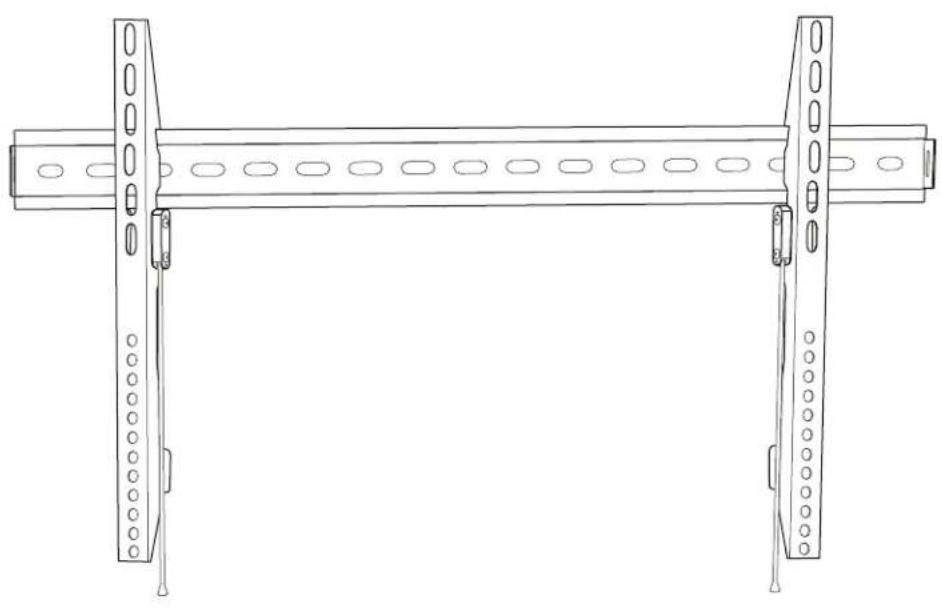
LOW-PROFILE FIXED WALL MOUNT
for Flat-Panel Screens
natural_image
Technical line drawing of a structural beam with multiple supports and central grooves (no text or symbols)User Manual
Thank you for choosing Gabor.
The Gabor Low-Profile Fixed Wall Mount Series, available in 3 sizes, offer durable and discreet wall supports for displays measuring 30 to 90 inches and can hold a maximum weight ranging from 75 to 130 pounds. This low-profile mount offers a mounting depth of 1 inch (25 mm), ensuring that your display will hang nearly flush against the wall.
If you have safety concerns about installing this product, contact a qualified professional or installation contractor.
If this product is missing hardware or there are defective parts, visit www.madebygabor.com or call Customer Service at 212-594-2353.
Safety Warnings
- Do not use this product for any flat-panel monitor device other than what it is intended for; the exact specification, size parameters, and weight limits are found both on the product box and in the instruction manual.
- It is strongly recommended that this product be installed by a qualified professional or installation contractor; Gabor takes no responsibility for any product damage or personal injury resulting from mishandling, incorrect mounting, faulty assembly, or improper use of this product.
- This product has been designed specifically for mounting directly on wooden studs or concrete walls; depending on wall type and material, the use of additional appropriate mounting hardware and/or accessories such as heavy-duty anchors may be required.
- The supplied mounting hardware is not intended for use on metal studs or cinderblock walls, and may not be appropriate for old or weak walls; it is best to consult with a qualified professional to determine whether your walls are capable of supporting this bracket.
-
Do not mount the device on structures that may be affected by vibrations or noticeable impacts; do not install near a heater, fireplace, or any other source of direct heat energy.
-
It is recommended that at least 2 people perform the installation process to prevent injury from mishandling or dropping of the product and/or flat-screen device.
- When installing this product, be sure to refer to the mounting instructions detailed in this manual; failure to abide by the mounting instructions may void the product's warranty.
- This product may contain small parts which can possibly pose a choking hazard; keep out of reach of children and pets.
- Excessive exposure to liquids may damage the finish of this product; when cleaning this product, use only a mild detergent solution, and quickly wipe dry with a soft cloth.
- All images are for illustrative purposes only.
Product Specifications
Depth from Mounting Source
1 in. (25 mm)
Recommended Screen Sizes
FM-LPM: 30-50 in. (76.2-127 cm)
FM-LPL: 50-70 in. (127-178 cm)
FM-LPX: 70-90 in. (178-229 cm)
VESA Mounting Pattern
FM-LPM: 75×75 mm to 400×400 mm
FM-LPL: 75×75 mm to 600×400 mm
FM-LPX: 75×75 mm to 800×600 mm
Max Weight Capacity
FM-LPM: 75 lb. (34 kg)
FM-LPL: 99 lb. (45 kg)
FM-LPX: 130 lb. (59 kg)
Material
Steel
Weight
FM-LPM: 2.54 lb. (1.15 kg)
FM-LPL: 3.06 lb. (1.39 kg)
FM-LPX: 4.24 lb. (1.92 kg)
Overview
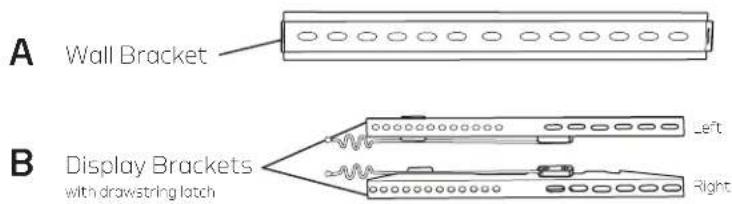
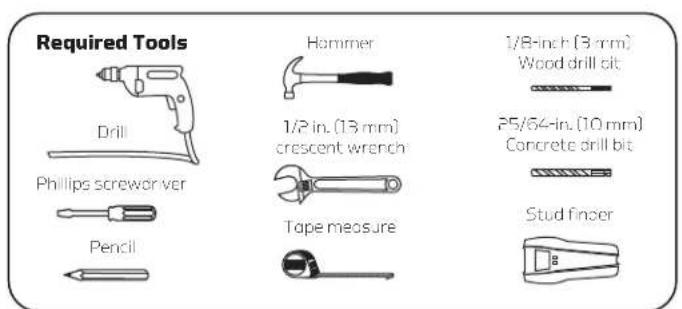
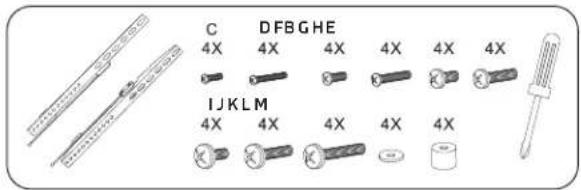
| CDE4x | 4X | 4X | 4X | G 4X | H 4X4X|4X | J4X | K |
| 18×30 mm screw X5×1.7 mm screw M4×12 mm screw | 15×30 mm screw | V6×30 mm screw M5×12 mm screw | [AGAW] |  | |||
| LMNQ | PQ 4X | 3X | 3X | 3X | 1X | ||
| 18×35×15 mm washer for M4, V6, and 96 cores | 18×8×20 mm anchor | M0×60 mm anchor screw | 20×8×1mm anchor screw anchor | 10×50 mm anchor anchor | Bubble level | ||
Display/TV Placement
Before installing the Gabor Low-Profile Fixed Wall Mount, you will need to determine the placement of your display and identify surrounding support structures for attachment.
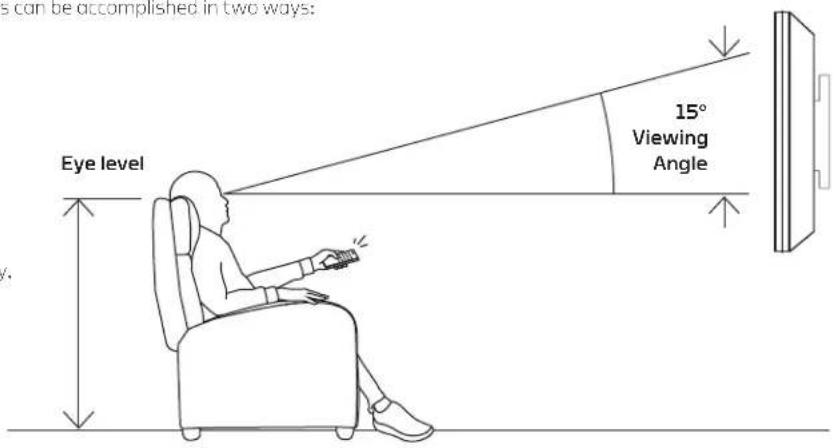
The optimal height to position a display is at the viewer'seye level. This can be accomplished in two ways:
- Measure the distance from the seating area to viewing area. Ideally, the center of the display (where the diagonals meet) should be as close as possible to eye level.
OR
- Cut a piece of sturdy cardboard that's approximately the same size as your display. Determine a comfortable level for the display, and mark the location with a pencil.
Attaching the Display/TV Brackets
Selecting the Right VESA Mounting Hardware for Your Display
A variety of screws are included to fit VESA standards on the backs of most displays. Select the M4, M5, M6 or M8, screws and washers that best fit your display. Hand-thread the screws to determine the correct diameter.

Note: Attach the display brackets with the drawstring latches facing inward, towards each other.


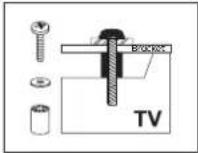
If the screw is too short, it may not hold the display. If it's too long, it may damage the display.

If Your TV Has a Flat Back:
Install the bracket directly to your TV, using only the screws and washers provided.
If Your TV Has a Curved Back or Recessed Mounting:
Install the spacers between the bracket and your TV. Then fasten with the screws and washers until secure.

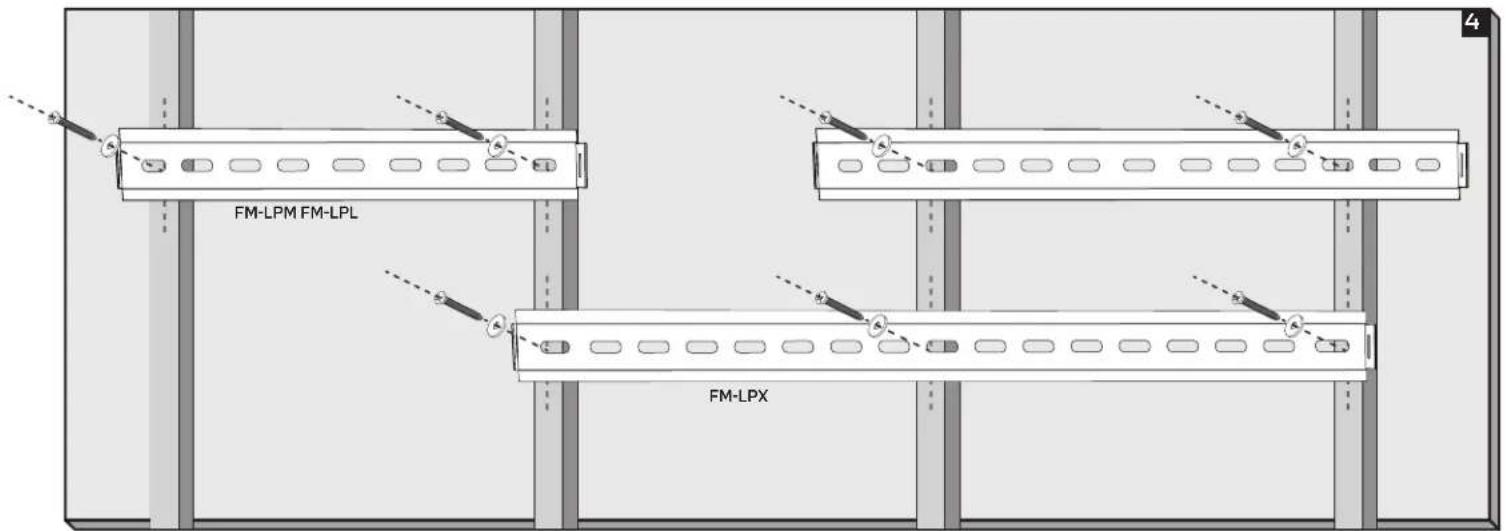
Attaching the Wall Bracket to Wooden Studs
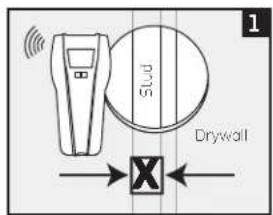
Wood studs run vertically inside the wall, 16 inches apart, behind the drywall or plaster.
The wall bracket must be mounted to the wood studs, or the bracket could fall out and damage your display or cause personal harm. Three anchor screws are included for use
with the FM-LPX, but for the FM-LPM and FM-LPL you will need only two anchor screws. If you want to use a third anchor screw with these models, you will need to use one of the included concrete anchors to secure it into the drywall.
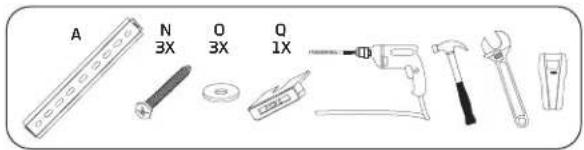
- Use a stud finder to locate the edges of the wooden studs, and mark the center of each stud.
- Place the wall bracket up to the marked locations, and use a pencil to mark drilling holes for the anchor screws. Use the included bubble level to make sure the bracket is level before drilling.
- Use a 3 mm wood drill bit to predrill the marked holes 1,2 in. (30 mm) deep, and then clean out the debris from the holes.
- Attach the bracket to the wall by inserting the anchor screws through the washers and the wall bracket's mounting holes, and screw them into the predrilled support holes until secure. Use the wrench to further tighten the anchor screws, but do not overtighten. Use the included bubble level to make sure the bracket is level.

Wall brackets mounted to wooden studs, with correct screw placement
GABOR
Attaching the Wall Bracket to Concrete
Warning! Make sure the concrete wall is solid and at least 8 inches (20 cm) thick. If the concrete exhibits cracks or other defects, this may result in failure of the concrete anchors and cause serious personal injury and damage your display.
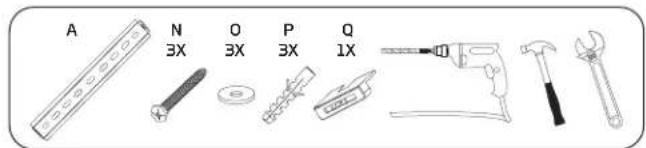
- Place the wall bracket up to the location marked for your display, and use a pencil to mark three drilling holes for the concrete anchors. Use the included bubble level to make sure the bracket is level before drilling.
- Use a 10 mm concrete drill bit to predrill the holes 2.4 inches (60 mm) deep, and then clean out the debris from the holes.
- Insert the concrete anchors, and use a hammer to tap the anchors into the concrete.
- Attach the bracket to the wall by inserting the anchor screws through the washers and the wall bracket's mounting holes and screw them into the anchors until secure. Use the wrench to further tighten the anchor screws, but do not overtighten. Use the included bubble level to make sure the bracket is level.
Wall brackets mounted to concrete, with correct screw placement

natural_image
Diagram of a train track with multiple lanes and directional arrows indicating movement or navigation (no text or symbols)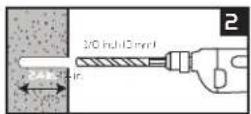
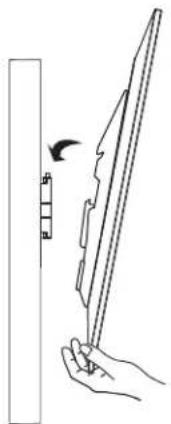
Mounting the Display on the Wall Bracket
Important! We recommend that two people perform this step.
Lift your display up to the wall bracket, and hang it from the top hooks of the display's brackets until the latches click secure.
Removing the Display from the Wall Bracket
Important! We recommend that two people perform this step.
To remove the display from the wall bracket, pull down on both drawstrings, and swing the display outward, and away from the wall.

natural_image
Line drawing of a hand holding a folded paper or plastic sheet with a ruler, no text or symbols present
One-Year Limited Warranty
This Gabor product is warranted to the original purchaser to be free from defects in materials and workmanship under normal consumer use for a period of one (1) year from the original purchase date or thirty (30) days after replacement, whichever occurs later. The warranty provider's responsibility with respect to this limited warranty shall be limited solely to repair or replacement, at the provider's discretion, of any product that fails during normal use of this product in its intended manner and in its intended environment. Inoperability of the product or part(s) shall be determined by the warranty provider. If the product has been discontinued, the warranty provider reserves the right to replace it with a model of equivalent quality and function.
This warranty does not cover damage or defect caused by misuse, neglect, accident, alteration, abuse, improper installation or maintenance. EXCEPT AS PROVIDED HEREIN, THE WARRANTY PROVIDER MAKES NEITHER ANY EXPRESS WARRANTIES NOR ANY IMPLIED WARRANTIES, INCLUDING BUT NOT LIMITED TO ANY IMPLIED WARRANTY OF MERCHANTABILITY OR FITNESS FOR A PARTICULAR PURPOSE. This warranty provides you with specific legal rights, and you may also have additional rights that vary from state to state.
To obtain warranty coverage, contact the Gabor Customer Service Department to obtain a return merchandise authorization ("RMA") number, and return the defective product to Gabor along with the RMA number and proof of purchase. Shipment of the defective product is at the purchaser's own risk and expense.
For more information or to arrange service, visit www.madebygabor.com or call Customer Service at 212-594-2353.
Product warranty provided by the Gradus Group.
www.grodusgroup.com
Gabor is a registered trademark of the Gradus Group. © 2020 Gradus Group LLC. All Rights Reserved.

GABOR® A Gradus Group Brand


- LOW-PROFILE FIXED WALL MOUNT
- Thank you for choosing Gabor.
- Safety Warnings
- Product Specifications
- Depth from Mounting Source
- Recommended Screen Sizes
- VESA Mounting Pattern
- Max Weight Capacity
- Material
- Weight
- Display/TV Placement
- Attaching the Display/TV Brackets
- Selecting the Right VESA Mounting Hardware for Your Display
- If Your TV Has a Flat Back:
- If Your TV Has a Curved Back or Recessed Mounting:
- Attaching the Wall Bracket to Wooden Studs
- Attaching the Wall Bracket to Concrete
- Mounting the Display on the Wall Bracket
- Removing the Display from the Wall Bracket
- One-Year Limited Warranty
Brand : Gabor
Model : FM-LPM
Category : Shoes