CM2 - Mp3 player COWON - Free user manual and instructions
Find the device manual for free CM2 COWON in PDF.


| Product Type | MP3 Player |
| Brand | Cowon |
| Model | CM2 |
| Storage Capacity | 512 MB / 1 GB (depending on version) |
| Display | 1.8-inch color TFT LCD |
| Supported Audio Formats | MP3, WMA, OGG, ASF |
| Frequency Response | 20 Hz - 20 kHz |
| Battery Type | Built-in rechargeable lithium-ion |
| Battery Life | Up to 10 hours of playback |
| Dimensions | 4.4 x 2.2 x 0.7 inches |
| Weight | 1.5 oz (approx. 42 g) |
| Interface | USB 2.0 |
| Recording | Built-in microphone, voice recording |
| FM Tuner | Yes, with 20 presets |
| Equalizer | Preset EQ (Normal, Rock, Pop, Jazz, Classic, Vocal) and custom 5-band EQ |
| Playback Modes | Normal, Repeat, Shuffle, Intro |
| Signal-to-Noise Ratio | 95 dB |
| Output Power | 30 mW (L) + 30 mW (R) |
| Supports ID3 Tags | ID3v1, ID3v2 |
| Language Support | Multiple languages (English, Korean, etc.) |
| Cleaning | Wipe with soft, dry cloth; avoid liquids |
| Storage Temperature | -10°C to 60°C |
| Operating Temperature | 0°C to 40°C |
Frequently Asked Questions - CM2 COWON
User questions about CM2 COWON
0 question about this device. Answer the ones you know or ask your own.
Ask a new question about this device
Download the instructions for your Mp3 player in PDF format for free! Find your manual CM2 - COWON and take your electronic device back in hand. On this page are published all the documents necessary for the use of your device. CM2 by COWON.
USER MANUAL CM2 COWON
| COWON CM2 | |||
| COWON CM2 Portable Charging Cradle Quick Guide | |||
| Small(2EA) Medium(2EA) Medium(2EA) | |||
| Ear Tips Micro USB Cable | |||
* Actual package contents may differ from the above images.
+ Before you start \_ Names of Parts and Functions
COWON CM2 Charging Cradle

COWON CM2—3
+ Before you start \_ Charging
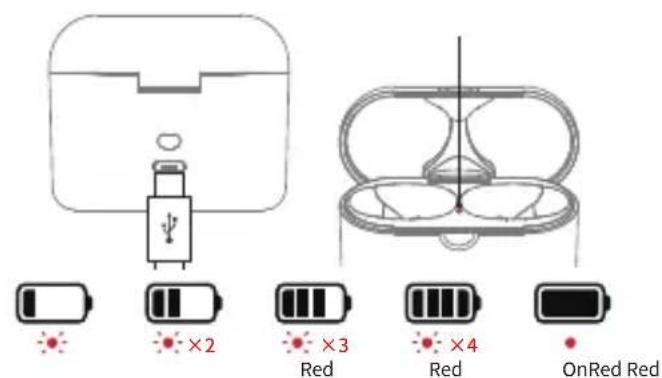
Charge the CM2 Charge the Charging Cradle

text_image
LEDLED LED Red Red Red Blue OffCharging (Red LED Stays On → Blue LED Stays On)
text_image
×2 ×3 ×4 OnRed RedCharging (Red LED Blinks)
* Please charge the charging cradle periodically. When the cradle battery is discharged, the earphone units may turn-on instead of being charged, causing the earphone to be discharged.
* Check the battery level by pressing the [Battery Level Check Button] on the cradle.
+ Using the Product \_ Power On / Off
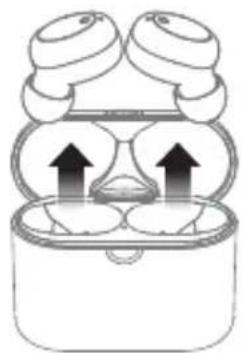
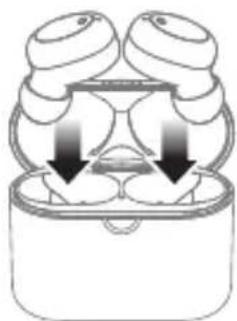
Auto Manual
1
natural_image
Diagram of a smart earbuds with two heads and two cups, showing upward arrows indicating sound or vibration (no text or symbols)©
natural_image
Diagram of a dental implant with three cups and two cups inserted into a container, showing internal structure (no text or labels)1

natural_image
Hand cursor clicking a circular button on a computer monitor (no text or symbols visible)00:03 00:03
©
natural_image
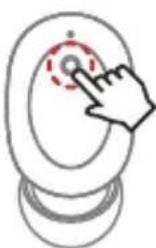
Hand cursor clicking a circular button on a computer monitor (no text or symbols visible)Remove : Power On Insert : Power Off 3 Sec Press : Power On / Off
+ Using the Product \_ Pairing & Connection
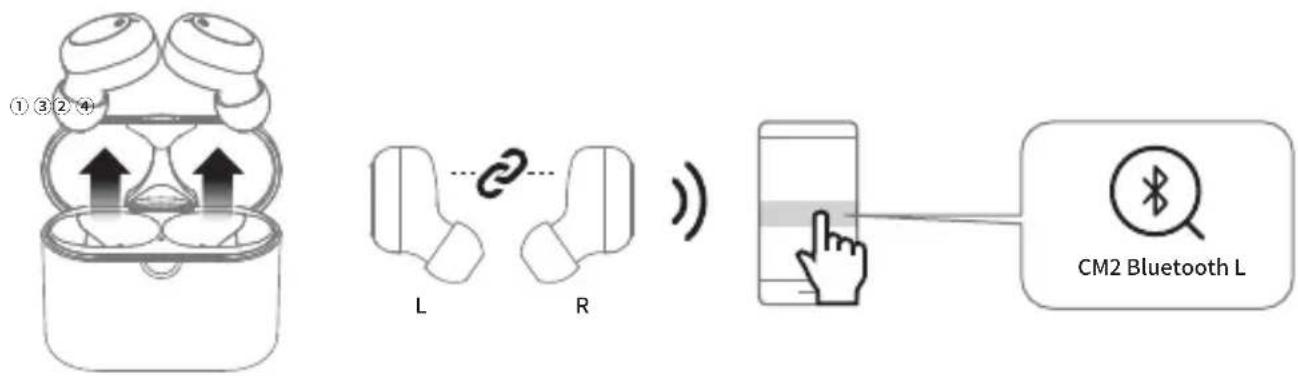
Dual Mode: The CM2's left and right earphones can be used together in stereo.
flowchart
graph LR
    A["Wire ear with 3/4 sensors"] --> B["L"]
    B --> C["R"]
    C --> D["Mobile phone with Bluetooth L"]
    D --> E["Smartphone with Bluetooth L"]
    style A fill:#f9f,stroke:#333
    style B fill:#ccf,stroke:#333
    style C fill:#cfc,stroke:#333
    style D fill:#fcc,stroke:#333
    style E fill:#cff,stroke:#333
| Power On L , R Unit Connection Pairing Connection | ||
| When both earphones are removed at the same time from the charging cradle, they will automatically turn on. | L and R units are connect to each other. | Enter pairing mode following an “Pairing Mode” voice. |
* After the initial pairing, the CM2 and your smartphone will connect automatically when the CM2 is on and Bluetooth is enabled on your phone.
+ Using the Product \_ Pairing & Connection
Single Mode: The CM2's left and right earphones can be used individually in mono.
a) Pair the CM2 in Dual Mode as previously shown.
b) Proceed steps ①\~④.
c) You can now turn on and use only the desired unit.
①
L

R

Off
②
L
R

OffOff
00:05
③


④
text_image
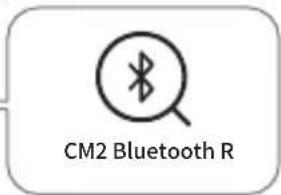
CM2 Bluetooth R| Power Off 5 Sec Press → Pairing Connection | ||
| Turn off both the left and right earphones. | Press and hold the button on the right earphone for 5 seconds to enter pairing mode for only the right earphone. (Even if you have heard the “Power On” voice, please continue to press until you hear “Pairing Mode”.) | Pair the detected right earphone(CM2 Bluetooth R) to your smartphone. |
+ Using the Product \_ Reset to Dual Mode (When the L and R units are not connecting to each other)
Refer to page 'Pairing & Connection' when connecting the product to a smart device for the first time.
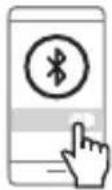
If the L and R units only connect in single mode during normal dual mode operation, reset to dual mode by following the instructions below. If it fails to reset, start again from Step ②.
①
Off
②
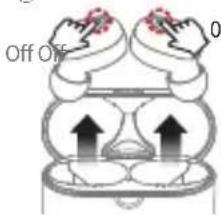
text_image
Off Off 0③④⑤
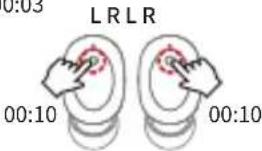
text_image
LRLR 0:03 00:10 00:10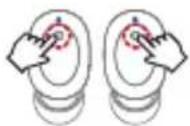
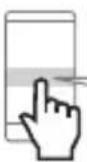

| Delete connected device & Turn off Bluetooth | Power Off | Hold for 10 seconds and release | Press and release when the LED turns blue | Connection |
| Delete the [CM2 Bluetooth] device registered on your smartphone or other Bluetooth device and turn off Bluetooth. | Remove the earphones from the cradle and turn off both L and R units. | Press and hold the left and right buttons simultaneously for 10 seconds. Then release them. | Press and release both left and right buttons when the LED turns blue. Once reset, the L unit will enter pairing mode, and its LED will flash red and blue. | Turn on Bluetooth on your smartphone or other Bluetooth device and select [CM2 Bluetooth L] from the detected devices to complete pairing and automatically connect. |
- Using the Product _Listening to Music · Calling
 | ):01 |  |  | |
 Listening to Music Listening to Music |   Play · Pause Play · Pause |  Voice Recognition Voice Recognition |  Next Track Previous Track Next Track Previous Track |  |
 Calling Calling |   Answering a call · Ending a call Answering a call · Ending a call |  Rejecting a call Rejecting a call |
- Voice Prompts · Status LED
| Status Voice Prompts LED | |
| Power On “Power On” |  |
| Power Off “Power Off” |  |
| L, R Unit Connection |  |
| Pairing Mode “Pairing Mode” |  |
| Bluetooth Connection | “Connected” |
| Incoming call | “Incoming call” * |
| Disconnected |  |
* For iPhone, user ringtone will be applied.
- Specification
| Bluetooth Version V5.0 | |
| Bluetooth Profiles HSP / HFP / A2DP / AVRCP | |
| Standby Time Up to 150 hours | |
| Music-Playing Time | Single Mode : About 8.5 hoursDual Mode : About 6 hours |
| Charging Time | CM2 : About 1.2 hours*Charging Cradle : About 1.5 hours |
| Battery | CM2 : 3.7V / 60mAhCharging Cradle : 3.7V / 450mAh |
| Input DC 5V / 500mA | |
| Operating Distance Up to 10m (Free space) | |
| Weight | CM2 : 4.1g x 2Charging Cradle : 27g |
| * Number of available CM2 charges using charging cradle (450mAh) : 3 times(with fully charged charging cradle) | |
DIGITAL PRIDE.
©WON