
E2 - Mp3 player COWON - Free user manual and instructions
Find the device manual for free E2 COWON in PDF.


| Product Type | MP3 Player |
| Brand | Cowon |
| Model | E2 |
| Color | Black (also White, Pink, etc.) |
| Memory Capacity | 4GB (internal flash) |
| Dimensions | 79.5 x 36.8 x 10 mm |
| Weight | 20.2 g |
| Display | None (LED indicator) |
| Supported Audio Formats | MP3, WMA, FLAC, OGG, WAV |
| Sound Enhancement | JetEffect 3.0 |
| Playback Modes | Normal, Shuffle, Repeat One, Repeat All |
| User Interface | Physical buttons (Play/Pause, Volume, Skip) |
| Battery Type | Built-in Li-Polymer (rechargeable) |
| Battery Life | Up to 11 hours (audio playback) |
| Charging | USB 2.0 via direct connection |
| PC Connection | USB Mass Storage |
| Headphone Output | 3.5mm stereo jack |
| Clip | Integrated clip |
| Accessories Included | USB cap, earphones, manual |
| Operating System Support | Windows, macOS |
| Cleaning | Wipe with dry cloth; avoid liquids |
| Safety | Keep away from water and extreme temperatures |
| Spare Parts / Repairability | Battery replaceable by service center; other parts not user-serviceable |
| General Information | Warranty: 1 year (depending on region) |
Frequently Asked Questions - E2 COWON
User questions about E2 COWON
0 question about this device. Answer the ones you know or ask your own.
Ask a new question about this device
Download the instructions for your Mp3 player in PDF format for free! Find your manual E2 - COWON and take your electronic device back in hand. On this page are published all the documents necessary for the use of your device. E2 by COWON.
USER MANUAL E2 COWON
Thank you for purchasing a COWON product.
We do our utmost to deliver DIGITAL PRIDE to our customers.
This manual contains information on how to use the product and the precautions to take during use.
If you familiarize yourself with this manual, you will have a more enjoyable digital experience.
Introduction to website
- The address of the product-related website is http://www.COWON.com.
- You can download the latest information on our products and newest firmware from our website.
- For first-time users, we provide an FAQ section and a user guide.
- Become a member of the website by using the serial number on the back of the product to register the product.
You will then be a registered member. - Once you become a registered member, you can use the one-to-one enquiry service to receive online customer advice.
You can also receive information on new products and events by e-mail.
+ COPYRIGHT NOTICE
General
- COWON is a registered trademark of COWON SYSTEMS, INC.
- COWON SYSTEMS, INC. owns the copyright to this manual, and any unauthorized distribution of its contents, whether in part or in its entirety, is strictly prohibited.
- COWON SYSTEMS, INC. complies with laws and regulations related to records, disks, videos and games. Users are also encouraged to comply with the relevant laws and regulations.
- As soon as you purchase the product, visit the website (http://www.COWON.com), and become a registered member.
You will benefit from various member services.
+ This manual is based on product specifications, and various exemplary texts, illustrations, pictures, detailed functions and H/W and S/W specifications contained herein can be altered without any prior notice by the copyright owner.
BBE information
- BBE Sound, Inc. owns the license to the BBE name and information as applied to this product, in compliance with USP4638258, 5510752 and 5736897.
- BBE and the BBE symbol are registered trademarks of BBE Sound, Inc.
DIGITAL PRIDE.

All rights reserved by COWON SYSTEMS, Inc.
+ CONTENTS
Before you start! 6
Precautions
Package Contents
Names of Parts and Functions
Charging
Connecting and Disconnecting the PC
Firmware Upgrade
Basic Use 14
LED Lamp Description
Music Playback and Using the Product
Additional 18
Product Specifications
COWON MediaCenter – Converting Music CDs with JetAudio
Troubleshooting 22
∈2
iAUDIO
Before you start!
+ Precautions
As these precautions are provided for the correct use of the product as well as user safety, be sure to familiarize yourself with them. The company will not be held responsible for any accident that may occur due to the failure to heed these precautions. The following information applies commonly to all products manufactured and produced by COWON SYSTEMS, INC.
- Do not use this product for other purposes than those described in this manual.
- Handle manual, product package materials, accessories, etc with care to prevent cuts and injuries to your body.
- Do not view videos, pictures and texts stored in your player while driving a vehicle for your safety.
Operating other features of the player is also dangerous and may cause fatal accidents while driving. - The wearing of earphones while operating a vehicle, exercising, or walking may impair driving, mask or prevent recognition of emergency signals, alarms, announcements, the approach of vehicles and human speech. Doing so may also be unlawful depending on the region.
- Do not use detergent or other chemicals on the product surface as it may cause fading. In this case, wipe the polluted area carefully with a soft cloth.
- Do not expose the player in either cold weather of under 0°C or hot temperature over 40°C such as inside automobiles.
This may cause fatal damages to your player. - Do not expose the player to water or keep it in a damp or humid location for an extended period of time. If the player is damaged from moisture as described above, product failure is then classified as a user's misuse.
- Take extra care not to apply external shock or pressure when using products with displays(LCD, AMOLED, or Touch Pad). Warranty may be voided if damage occurs due the aforementioned circumstances.
- Do not attempt to disassemble the player. Disassembly will void the warranty and the unit will be permanently disqualified from any warranty services.
Before you start!
+ Precautions
- Do not mix directions when connecting cables to your player or PC. Connecting cables incorrectly may damage your player or PC. Also, do not bend or press connection cables with heavy objects.
- If you smell something burning or feel excessive heat while using the product, press the RESET button to stop operation and contact the place of purchase.
- Touching the player with wet hands may cause damages and malfunctions. Handle the power plug only with dry hands (otherwise an electric shock may occur).
- Listening at high volume (85 dB and above) for an extended period of time may harm your hearing.
- For your protection, use the player in a well lit area where LCD screen will not overly strain your eyes.
- Using the player in places with high occurrences of static electricity may cause malfunctions.
- In case of using this device primarily for a storage device, it is recommended to back up all data before use. COWON SYSTEMS Inc. is not responsible for any data loss due to hardware failure.
- All data stored in the player may become deleted when being serviced. Our Service Center does not back up files while repairing players. Please note that COWON SYSTEMS, Inc. is not responsible for any data loss from products entrusted to us for service.
- Keep the player in cool and ventilated places, away from direct sunlight as it may cause deformation and damages to internal circuitry or LCD screen.
- For your own safety, it is recommended that customers use the USB power adaptor and simple USB connector approved by COWON SYSTEMS, Inc.
- If you are using a product that comes with an AC power adaptor, please use the genuine charger offered by COWON.
- When connecting to a PC, use only USB ports on the mother board or a USB Host card. Using an external USB hub may not guarantee proper operation (e.g. USB ports on a keyboard or an external USB hub).
Before you start!
+ Precautions
- When formatting the built-in memory, select the file system specified in the manual (e.g. FAT32 / FAT16 / NTFS).
- Be sure to disconnect the power supply to the PC and USB power adaptor during lightning or thunder storm, to prevent danger to the user or the risk of fire hazards.
- Keep the player away from magnets and direct magnetic fields, as they can cause malfunctions.
- Do not drop or expose the product to hard impact. This may result in malfunctions and/or unit failure, voiding the warranty.
- If you find any abnormalities with the battery such as swelling, press the RESET button immediately to stop the operation and contact the place of purchase.
- The price of the product may fluctuate due to unexpected commercial conditions. COWON SYSTEMS, Inc. accepts no liability to compensate for any price fluctuation.
Before you start! + Package Contents

natural_image
Simple line drawing of a rectangular shape with a circular top and small symbols at the bottom (no text or labels)iAUDIO E2

natural_image
Line drawing of a medical or laboratory device with a coiled tube and connector (no text or symbols)Earphones
natural_image
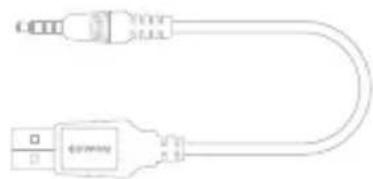
Pure electrical connector diagram without any text, numbers, or symbolsSimple USB Connector

Quick guide
Before you start!
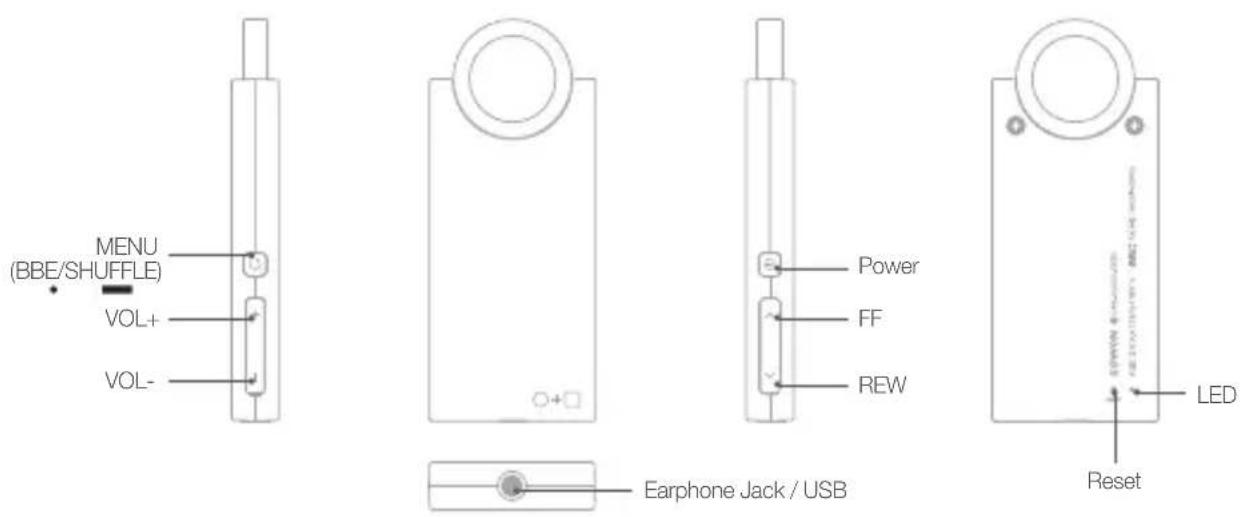
+ Names of Parts and Functions
Before you start!
+ Charging
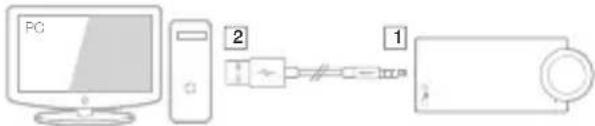
To charge iAUDIO E2, use the simple USB connector to connect the product to the PC.
iAUDIO E2 supports USB charging only.
flowchart
graph LR
    PC["PC"] --> Tower["Tower"]
    Tower --> Cable["Switch"]
    Cable --> Cable1["Switch"]
    Cable1 --> Cable2["Wireless Cable"]
※ Connect part 1 first, and then connect part 2.
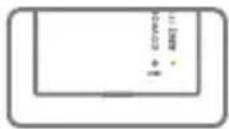
The red LED lamp appears when charging, and it takes about 1.5 hours before it is fully charged.
The green LED lamp appears when fully charged.

- If you use the 'Safely remove the hardware' function in Windows to remove the USB from iAUDIO E2, charging will not take place.
- When charging the player for the first time or the player has not been charged for an extended time, fully charge the battery before use.
- iAUDIO E2 has a built-in Lithium Polymer battery. To prolong the life of the battery, it is recommended that you charge the device frequently, as opposed to fully discharging and then charging the device.
- When connected to a USB hub, the player may not charge properly. Please try connecting the player directly to a USB port on the PC.
- For safety during charging, use simple USB connector approved by COWON SYSTEMS, Inc.
Before you start!
+ Connecting and Disconnecting the PC
1

2

3

4

- Use the simple USB connector to connect iAUDIO E2 to the PC. (Connect [1] → [2] )
- Check whether the LED lamp on the back of iAUDIO E2 turns green (fully charged) or red (charging in progress).
- The contents of iAUDIO E2 can be viewed by using My Computer or Windows Explorer while it is connected.
- Copy music files to iAUDIO E2.
-
When done, click the icon on the system tray to safely remove iAUDIO E2 from the PC.
-
Click the popup message.

- Safely remove the hardware and disconnect the simple USB connector.

- The player can recognize up to 100 folders, and up to 1,000 files
- Disconnect the product after performing 'Safely remove hardware' function.
- The following message may appear randomly, but it does not indicate that the product is abnormal condition.
- If your operating system does not display the 'Safe To Remove Hardware' window, disconnect the player after all transfer operations are completed.
- Only simple file transfer operation is available for Linux and Mac OS.

Before you start!
+ Firmware Upgrade
Firmware is software that is embedded within the hardware.
Upgrading it can enhance system stability and provide additional features.
The performance and usage of iAUDIO E2 may be changed through the firmware without any prior notice, and slight malfunctioning may occur in some firmware.
How to Upgrade the Firmware
- Download the latest firmware from the SUPPORT section of the website (http://www.COWON.com).
- Use the simple USB connector to connect iAUDIO E2 to the PC.
- Unzip the firmware file and copy it to the root folder of iAUDIO E2.
- Perform 'Safely remove the hardware' function before disconnecting the simple USB connector.
- When you turn on iAUDIO E2, the firmware will be upgraded automatically.
- Turn on iAUDIO E2 again, and confirm that a music file can play back normally.
- Fully charge the player before upgrading the firmware.
- Do not turn off the player before firmware upgrade is complete. It may damage the product, and will void any warranty.
- Back up any important data before the firmware upgrade as any data stored on the device may be deleted during the process. COWON accepts no liability for any loss of data.
Basic Use
+ LED Lamp Description
The iAUDIO E2 LED can display either green or red.
The following table provides a detailed description of the colors and the LED status.
| Function LED display Outline Description | |||
| POWER ON |  | Green LED On → Off after booting | It appears immediately after the product is turned on, or after the USB is connected, and turns off after booting is complete. |
| POWER OFF |  | Red LED On → Off | It appears immediately after the product is turned on, or after the USB is connected, and turns off after booting is complete. |
| Playback |  | Green LED On → Off → On(repeated blinking at intervals of 3 seconds) | Music file is being played after booting. |
| Charging | ### | Red LED On(with the USB connected) | The battery is charging. |
| Charging complete | ### | Green LED On(with the USB connected.) | Charging completed. Connected to PC. |
| Charging error | ### ... | Red LED On → Off → On → Off(with the USB connected, blinking at intervals of 0.5 seconds) | Error occurred while charging. |
| Discharged | ### | Three warning beeps will sound and the red LED will blink three times, and the power is turned off. | Low battery. |
| Firmware upgrade | ### ... | The green LED will continue to blink at intervals of 0.25 seconds. | Firmware updating is in progress. |
Basic Use
+ Music Playback and Using the Product
[POWER on/off and music playback]
- You can turn on the product by pressing the POWER button on the right. As an indication, the green LED lamp blinks momentarily and music starts playing.
- With the power turned on, connect the earphones to the iAUDIO E2, and then music will automatically play. Once the earphones are removed, music playback stops.
- More than one minute after the earphones are removed, iAUDIO E2 automatically turns off.
-
When there are no music files in the unit memory, the green LED lamp will blink, and you will hear no sound.
-
iAUDIO E2 can be turned off with a beep sound by pressing the POWER button.
![COWON E2 - [POWER on/off and music playback] - 1](/content/2026/05/1052978/images/2240bab6674e36b409890879a431c38a50c8da5531fd8c8f3fabfc828ff1bd69.jpg)
![COWON E2 - [POWER on/off and music playback] - 2](/content/2026/05/1052978/images/8b54caa91276009812f7f1ea9260820523c338bd7d662d83bcb9fa4e61eb69d8.jpg)
[Adjusting the Volume]
- Use + and - button to adjust the volume.
- Maximum volume for iAUDIO E2 is 40.
![COWON E2 - [Adjusting the Volume] - 1](/content/2026/05/1052978/images/2b9aff42bfc77d45d50aaedd9cc5a8d12c7b56c92db2240af8f20f75f6d811b8.jpg)
- Protect your hearing with iAUDIO E2's auto volume feature. iAUDIO E2 automatically plays music if an earphone is connected and powered on. When the last volume setting is higher than level 20, it will be automatically adjusted to level 20 when turned on next time. In case the volume setting was lower than level 20, there will be no change.
[Selecting a track]
Briefly press FF/REW button to select the music track.
- Briefly press FF button to skip to next track.
- Briefly press REW button to return to the previous track, while when the music plays for more than 5 seconds it goes back to the beginning of the track
![COWON E2 - [Selecting a track] - 1](/content/2026/05/1052978/images/d03ad092355a229be41e00d4294d92d1a876dfe02cafb5a75e166c4b7a00981d.jpg)
iAUDIO E2
Basic Use
+ Music Playback and Using the Product
[Rewind/Fast Forward]
Press and hold FF/REW button to rewind or fast forward.
- A beep will sound during FF/REW.

[Setting up the sound effect]
Press the menu button to assign various sound effects.
- iAUDIO E2 is equipped with 9 sound effects featuring BBE+ technology.
- Each preset is announced by a voice guide when pressing the Menu button.
- Sound effect sequence as follows:

BBE+ sound effect
Normal → BBE → BBE VIVA → BBE VIVA 2 → BBE Mach3Bass → BBE MP → BBE Headphone → BBE Headphone 2 → BBE Headphone 3 → then, loop
Press and hold menu button to activate shuffle function.
(voice guide: 'Shuffle On').
The shuffle function plays back stored music files in a random sequence.
Press and hold menu button again to deactivate shuffle function.

[Reset]
Press reset button on the rear of the unit to cut the power to iAUDIO E2.
Basic Use
+ Music Playback and Using the Product
- The Reset function should be used only when iAUDIO E2 is not responding.
- Use a pencil or clip that has a pointed end when you reset the product, and use caution not to press the LED lamp next to the Reset button instead.
Additional
+ Product Specifications
| Hardware | ||
| Audio | Earphone Channel Stereo | |
| Frequency Range 20Hz - 20KHz | ||
| Sound Output | Left 12mW + Right 12mW (16 Ω Earphone) | |
| SNR 95dB | ||
| Power | Battery Internal Lithium Polymer Battery | |
| Charging USB: ~ 1.5 hrs * on the condition that Input exceeds 5V/500mA * | ||
| Capacity | Flash Memory 2GB / 4GB, | FAT32 file system ** |
| USB Interface | USB Device USB 2.0 High | Speed |
| Buttons | POWER, MENU, VOL+, VOL-, FF, REW | |
| General | Dimension 26.6mm x 64.2 mm x 7.7mm (W x L x H) | |
| Weight 16.6g (Including internal Battery) | ||
| Working Temperature | 0°C ~ 40°C | |
| System Requirements | CPU Pentium III 500 MHz or higher | |
| OS | Windows Vista / XP / 2000 / ME | |
| MAC OS 10.X / Linux v2.4 or higher: Data transfer supported *** | ||
| USB Port 2.0 High Speed | Recommended | |
Additional
+ Product Specifications
| Applications - Application can be modified with improvements. | ||
| Music Player | File Format MP3/2, WMA | FLAC (FLA), OGG, WAV |
| Audio Codec | MP3 : MPEG 1/2/2.5 Layer 3, ~320Kbps, ~48KHz, Mono/StereoWMA : ~320Kbps, ~48KHz, Mono/StereoOGG : ~Q10, ~44.1KHz, Mono/StereoFLAC : Compression Level 0 - 8, ~44.1KHz, Mono/StereoWAV : ~48KHz, 16Bit, Mono/Stereo | |
| Sound Effects | BBE+ 9 Presets(Normal, BBE, BBE ViVA, BBE ViVA 2, BBE Mach3Bass, BBE MP, BBE Headphone,BBE Headphone 2, BBE Headphone 3) | |
| Playback time Up to 11 hrs and 30 mins **** | ||
* The status of battery left may vary according to the conditions of PC.
^** Due to the system space, the actual storage may differ from the indicated memory storage.
** MAC OS users are recommended to start using iAUDIO E2 after formatting to the MS-DOS (FAT).
^**** Battery performance test was conducted based on the manufacturer's standard. Actual performance may differ.
※ iAUDIO E2 sold in EU region is set to limited volume level for hearing protection.
Additional
+ COWON MediaCenter – Converting Music CDs with JetAudio
※ COWON MediaCenter - JetAudio is downloadable from www.cowon.com.
- Install and run the COWON MediaCenter - JetAudio.
![Rip Convert Record Burn Broadcast Get Music [대상 목표 - 키일 업가] TVDC 100% +100% 100% +100% 100% +100% 100% +100% 100% +100% 100% +100% 100% +100% 100% +100% 100% +100% 100% +100% 100% +100% +100% +100% +100% +100% +100% +100% +100% +100% +100% +100% +100% +100% +100% +100% +100% +100% +100% +100% +100% +100% +100 +100 +100 +100 +100 +100 +100 +100 +100 +100 +100 +100 +100 +100 +100 +100 +100 +100 +100 +100 +100](/content/2026/05/1052978/images/9bc642956538de5820d061d349b70d7567eb8974dff92bcb705d6dfcb6027992.jpg)
- To convert music CD into an audio file, click the Rip button (CD ripping) in the upper left-hand corner.

- When the audio CD extraction window appears, confirm that the name and information of each track is correctly displayed. If the track name does not appear or the text appears broken, press the 'Read from CD Data Base Server' button as illustrated below to update the ID3 tag. In some cases, certain CDs may not have information on the Internet CD database server. In this case, the user can directly enter CD information.

Additional
+ COWON MediaCenter – Converting Music CDs with JetAudio
- Check the track information and other ID3 tag information, and then specify the format of the audio file to save.
(This manual assumes an OGG file.)
For more detailed information on the specified audio format, click the 'Configuration' button.
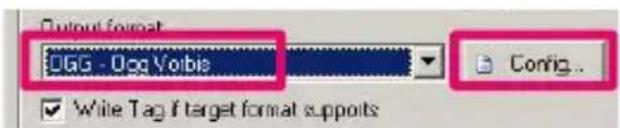
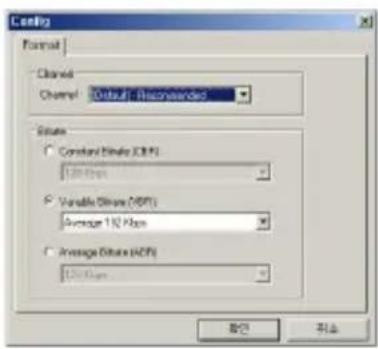
- Specify the file format to convert and finish the detailed setup, and then press the 'Start' button.

- The CD track will be converted to the specified audio file format.
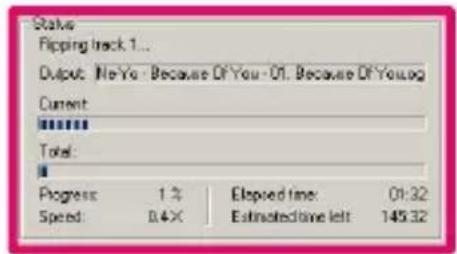
- Copy/move the converted audio file to the memory of iAUDIO E2.
+ Troubleshooting
+ My booting speed seems slower.
* When the battery is not enough or has been completely discharged. * When the player turned off by pressing reset button.
+ I am still confused even after reading the manual.
COWON website(www.COWON.com) provides support for users of COWON products with FAQ (Frequently Asked Questions). Users are strongly encouraged to check out the website for further information regarding product usages and firmware upgrades. For individual inquiries, please contact us on-line as we will try to help you as best as we can.
+ I would like to set the device as factory default.
To delete all files in iAUDIO E2, connect it to a PC, and format them as FAT32 files. Once formatted, all files in the product will be deleted.
+ The player does not turn on.
If the battery is completely discharged, charge the battery before you start the player. The charging time may vary depending on the battery's discharge status. If the player does not work at all, press the RESET button on the rear side. For your information, RESET will just disconnect the power and does not damage the product or delete any files stored on the device.
+ I can't hear any sound.
Check if the volume is set to "0". Check if there is any file available in the player. If there is no file in the player, you will not hear any sound. Please note that corrupted files will result in a noise or discontinued playback. Make sure the earphones are connected properly. Impurities in the earphone jack can cause a noise.
+ Computer cannot recognize the player when connected.
Try the RESET button in the back. If you experience a frequent disconnection or unstable connectivity, connect the player directly to the USB port of the PC, rather than a separate USB hub. As COWON products use the USB connection for the main power system, unstable power supply can cause a connection failure..
+ Memory capacity of the player is different or smaller than specified.
The memory capacity indicated by Windows may be different from that indicated by the memory manufacturer. The actual capacity will be reduced from the original size because some space of the memory should be used as the system area for normal operation.
+ Troubleshooting
+ The player does not play properly when memory is full. For the player to function properly, it requires at least 5 MB of space for saving settings and other system files.
+ PC connection is unstable.
Connect the player directly to the USB port of the PC. When connected to a laptop, try removing other connected USB hardware, or try connecting to PCMCIA USB host card.
Fully charge the product, or connect the product to the pc while charging with genuine COWON adapter.
+ Files do not appear in the product when files are transferred with a MAC computer.
Format the product as MS-DOS(FAT), and transfer the files.
+ FCC Information to User
This equipment has been tested and found to comply with the limits for a Class B digital device, pursuant to Part 15 of the FCC Rules. These limits are designed to provide reasonable protection against harmful interference in a residential installation. This equipment generates, uses and can radiate radio frequency energy and, if not installed and used in accordance with the instructions, may cause harmful interference to radio communications. However, there is no guarantee that interference will not occur in a particular installation. If this equipment does cause harmful interference to radio or television reception, which can be determined by turning the equipment off and on, the user is encouraged to try to correct the interference by one of the following measures:
- Reorient or relocate the receiving antenna.
- Increase the separation between the equipment and receiver.
- Connect the equipment into an outlet on a circuit different from that to which the receiver is connected.
- Consult the dealer or an experienced radio/TV technician for help.
Caution
Modifications not expressly approved by the party responsible for compliance could void the user's authority to operate the equipment.
FCC Compliance Information:
This device complies with Part 15 of the FCC Rules. Operation is subject to the following two conditions: (1) This device may not cause harmful interference, and (2) this device must accept any interference received, including interference that may cause undesired operation.
IMPORTANT NOTE:
FCC RF Radiation Exposure Statement:
This equipment complies with FCC RF radiation exposure limits set forth for an uncontrolled environment. This equipment should be installed and operated with a minimum distance of 20 centimeters between the radiator and your body. This transmitter must not be co-located or operating in conjunction with any other antenna or transmitter.
+ Battery Replacement

natural_image
Gray circular icon with battery symbol and arrows, representing energy recycling or cycle (no text)The rechargeable batteries have limited number of charge cycles, and it will require a replacement as capacity to hold power will eventually diminish.
The rechargeable batteries in COWON products should be replaced only by official COWON service centers. Please contact batteryreplace@cowon.com for more information on official COWON service centers.
+ Product Disposal

natural_image
Symbol of a trash bin crossed with no text or labels, representing environmental restriction (no text present)COWON products contain built-in rechargeable batteries, and must be separately disposed from household waste. Disposing the products with regular waste may cause pollution of environment due to the waste batteries inside. Contact your local authorities for specified locations/guidance of E-waste and waste batteries, and dispose them in compliance with local regulation/guidance.
DIGITAL PRIDE.

COWON SYSTEMS, Inc.
www.cowon.com
- Introduction to website
- + COPYRIGHT NOTICE
- General
- BBE information
- + CONTENTS
- Before you start! 6
- Basic Use 14
- Additional 18
- Troubleshooting 22
- ∈2
- iAUDIO
- + Precautions
- Before you start!
- Before you start! + Package Contents
- + Charging
- + Connecting and Disconnecting the PC
- + Firmware Upgrade
- How to Upgrade the Firmware
- + LED Lamp Description
- + Music Playback and Using the Product
- [POWER on/off and music playback]
- [Adjusting the Volume]
- [Selecting a track]
- + Product Specifications
- + COWON MediaCenter – Converting Music CDs with JetAudio
- + Troubleshooting
- + PC connection is unstable.
- + Files do not appear in the product when files are transferred with a MAC computer.
- + FCC Information to User
- Caution
- FCC Compliance Information:
- IMPORTANT NOTE:
- FCC RF Radiation Exposure Statement:
- + Battery Replacement
- + Product Disposal
Brand : COWON
Model : E2
Category : Mp3 player