S930 - Smartphone LENOVO - Free user manual and instructions
Find the device manual for free S930 LENOVO in PDF.


User questions about S930 LENOVO
0 question about this device. Answer the ones you know or ask your own.
Ask a new question about this device
Download the instructions for your Smartphone in PDF format for free! Find your manual S930 - LENOVO and take your electronic device back in hand. On this page are published all the documents necessary for the use of your device. S930 by LENOVO.
USER MANUAL S930 LENOVO
Read this guide carefully before using your phone.
Technical specifications

Model and system
Model: Lenovo S930
System: Android 4.2

① Size and weight
Height: 170 mm
Width: 86.5 mm
Depth: 8.65 mm
Weight: 170 g

CPU and capacity
CPU: MT6582 Quard Core 1.3 GHz
Capacity: 4.67 GB

Camera
Type: CMOS
Pixels: 8.0 MP (back) + 1.6 MP (front)
Power and battery
Battery: 3000 mAh (Built-in rechargeable lithium-ion battery)
Display
Size: 5.98 inches (diagonal)
Screen: Multi-touch display
Resolution: 1280 × 720
LCD type: IPS

Wireless communication
Bluetooth 3.0
WLAN
WCDMA, GSM

GPS

① Based on actual measurements.
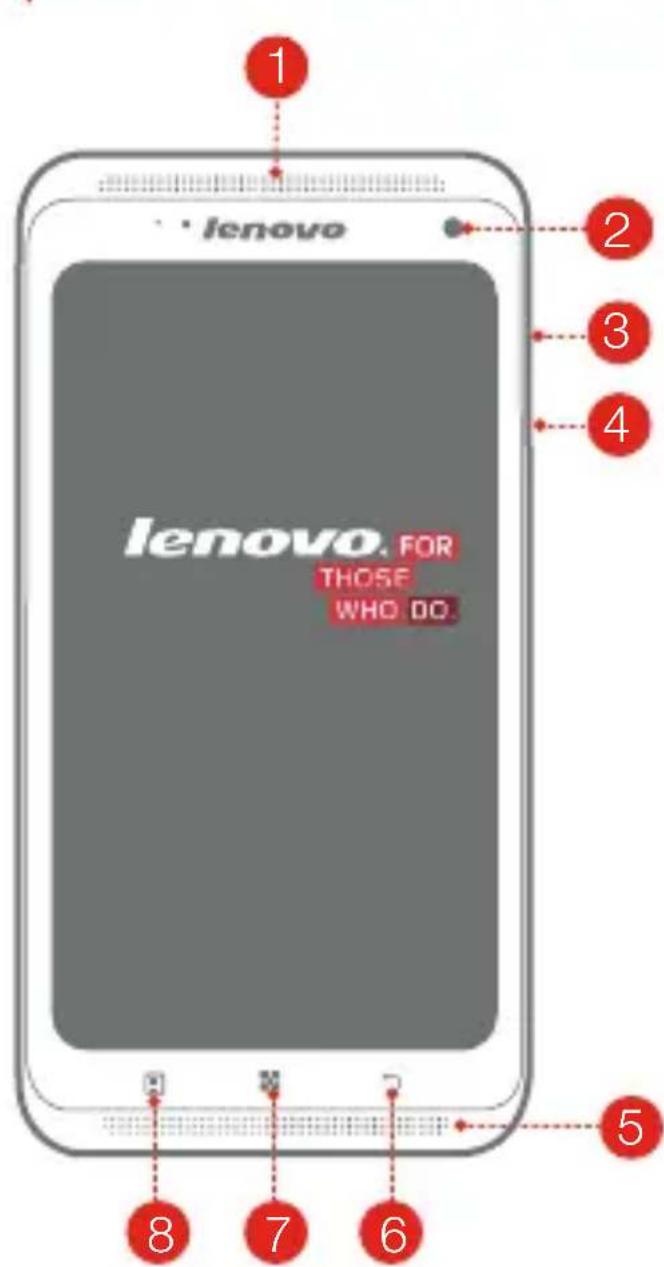
First glance
text_image
lenovo lenovo. FOR THOSE WHO DO.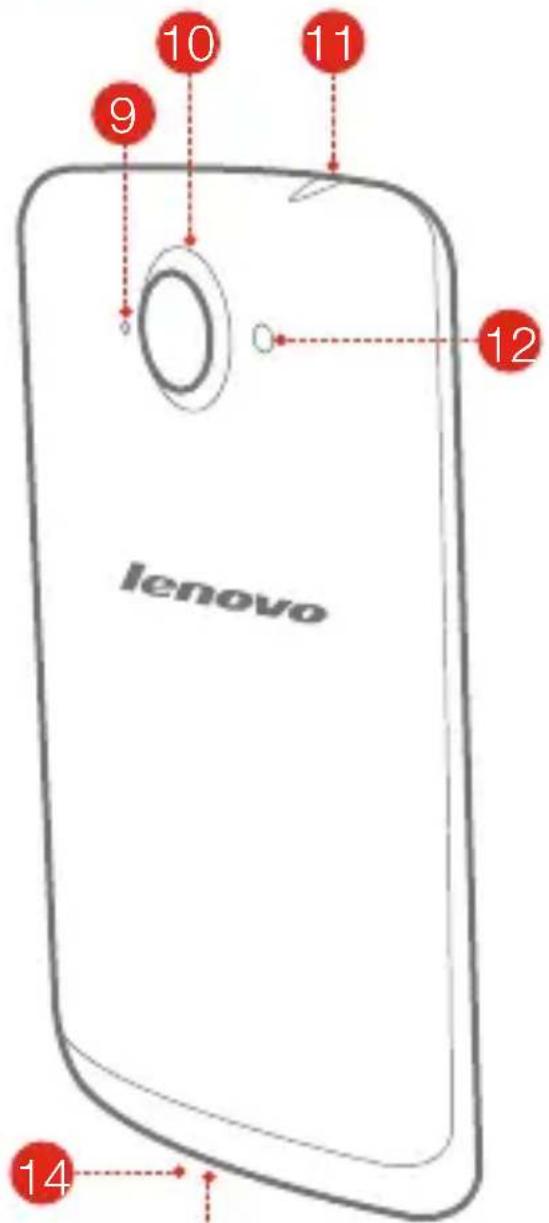
text_image
lenovo 9 10 11 12 1413
1 Receiver
4 On/Off button
7 Home
10 Back camera
13 Micro USB
Front camera
5 Speaker
8 App menu
11 Earphone jack
14 Main microphone
3 Volume key
6 Back
9 Sub microphone
12 Flashlight
Preparing your phone
You need to insert the SIM card provided by your carrier to use cellular services. Install your phone as shown.
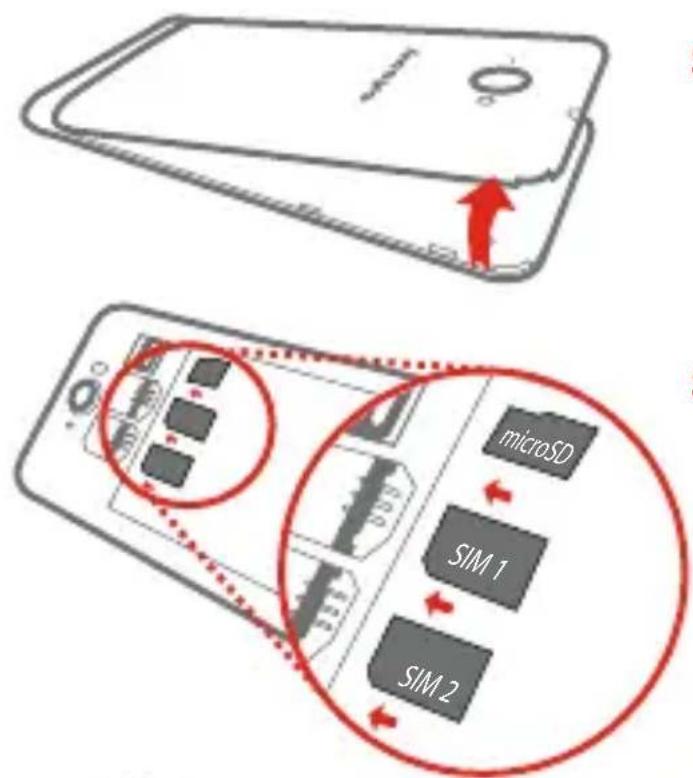
text_image
Diagram illustrating the internal structure and internal components of a smartphone, including microSD, SIM 1, and SIM 2 chips.Step 1. Open the back cover.
Step 2. Insert the SIM cards and the memory card.
Tip: Insert (U)SIM card into SIM 1 slot and SIM card into SIM 2 slot.
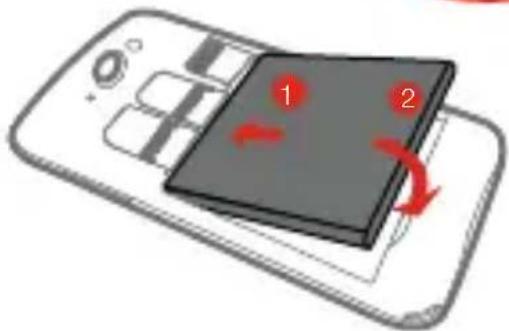
text_image
Diagram showing a smartphone with two labeled components (1 and 2) and red arrows indicating rotation or movement, likely illustrating a device's motion.Step 3. Install the battery.
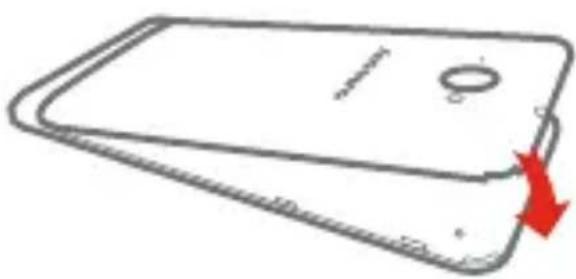
natural_image
Simple line drawing of a smartphone with a red arrow indicating speed (no text or symbols)Step 4. Install the back cover.

DO NOT insert or remove the SIM cards while your phone is turned on. Doing so can permanently damage your SIM card or your phone.
Charging the battery
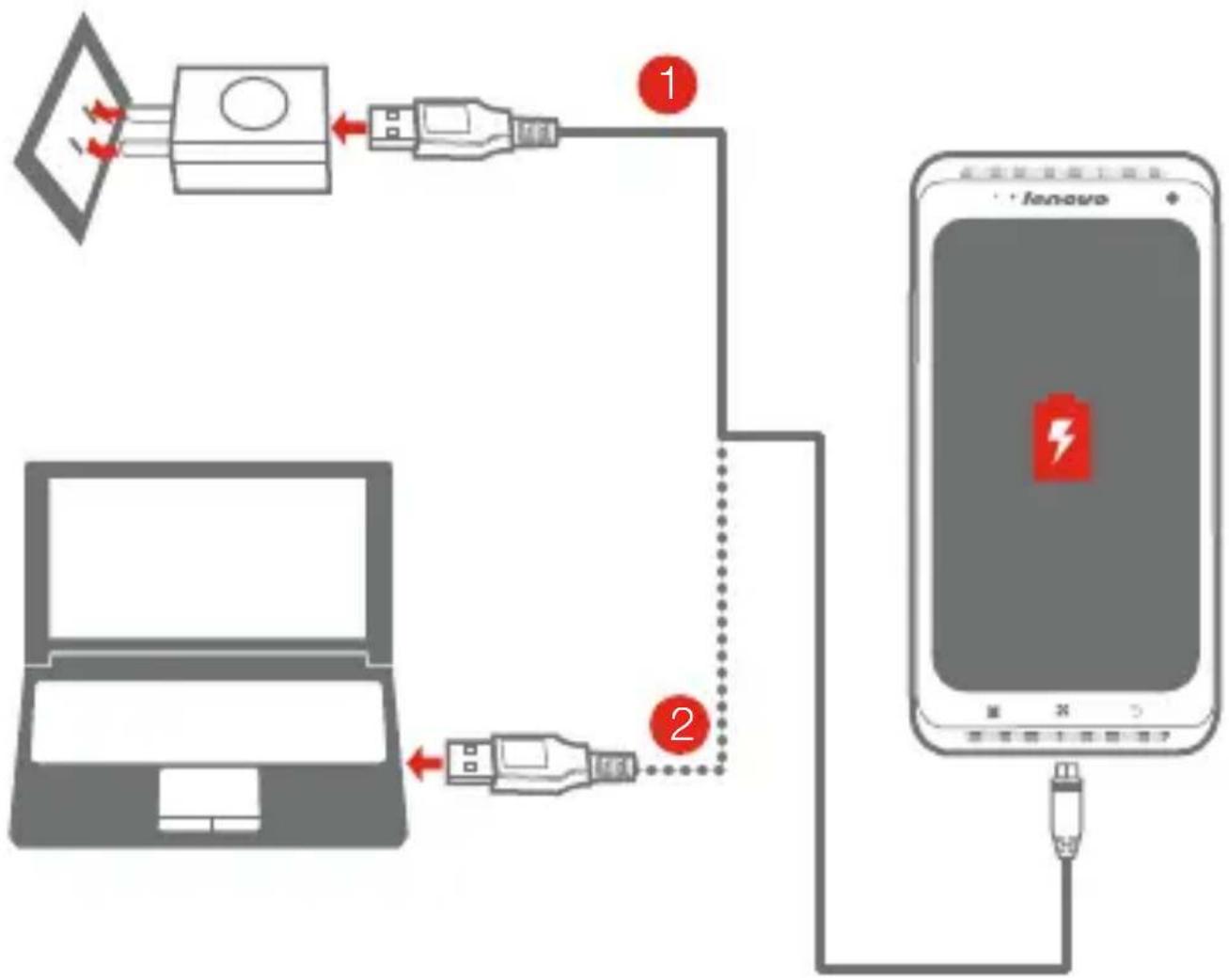
Charge the battery as shown.
flowchart
graph TD
    A["Laptop"] -->|USB cable| B["USB Cable"]
    B --> C["Switch 1"]
    C --> D["Smartphone"]
    D --> E["USB Cable"]
    E --> F["Switch 2"]
    F --> G["Switch 3"]
    style A fill:#f9f,stroke:#333
    style D fill:#ccf,stroke:#333
    style E fill:#cfc,stroke:#333
    style F fill:#fcc,stroke:#333
Method 1. Connect your phone to a power outlet using the included cable and USB power adapter.
Method 2. Charge the battery using a computer.

Low battery Fully charged Charging


For more information about battery safety, see the Important Product Information Guide.
Learn more
For more information about Lenovo Mobile Phone functions, Regulatory Notices and other useful manuals, go to http://support.lenovo.com/.
Legal notices
Lenovo and the Lenovo logo are trademarks of Lenovo in the United States, other countries, or both.
Other company, product, or service names may be trademarks or service marks of others.
Manufactured under license from Dolby Laboratories. Dolby and the double-D symbol are trademarks of Dolby Laboratories.
First Edition (October 2013)
© Copyright Lenovo 2013.
Reduce | Reuse | Recycle


text_image
Black and white barcode image with vertical lines and a horizontal bar at the bottom5SC9A464TJ
Printed in China