K910L - Smartphone LENOVO - Free user manual and instructions
Find the device manual for free K910L LENOVO in PDF.


User questions about K910L LENOVO
0 question about this device. Answer the ones you know or ask your own.
Ask a new question about this device
Download the instructions for your Smartphone in PDF format for free! Find your manual K910L - LENOVO and take your electronic device back in hand. On this page are published all the documents necessary for the use of your device. K910L by LENOVO.
USER MANUAL K910L LENOVO
Read this guide carefully before using your phone.
Technical specifications

Model and system
Model: Lenovo K910L
System: Android 4.3

① Size and weight
Height: 149 mm
Width: 77 mm
Depth: 7.9 mm
Weight: 147 g

CPU and capacity
CPU: Qualcomm 8974 Quad core 2.2 GHz
Capacity: 16 GB

Camera
Type: CMOS
Pixels: 13.0 MP (back) + 5.0 MP (front)
Power and battery
Battery: 3000 mAh (Built-in battery)
Display
Size: 5.5 inches
Screen: Multi-touch display
Resolution: 1080 × 1920
LCD type: IPS

Wireless communication
Bluetooth 4.0
WLAN
WCDMA, GSM

GPS

① Based on actual measurements.
First glance
text_image
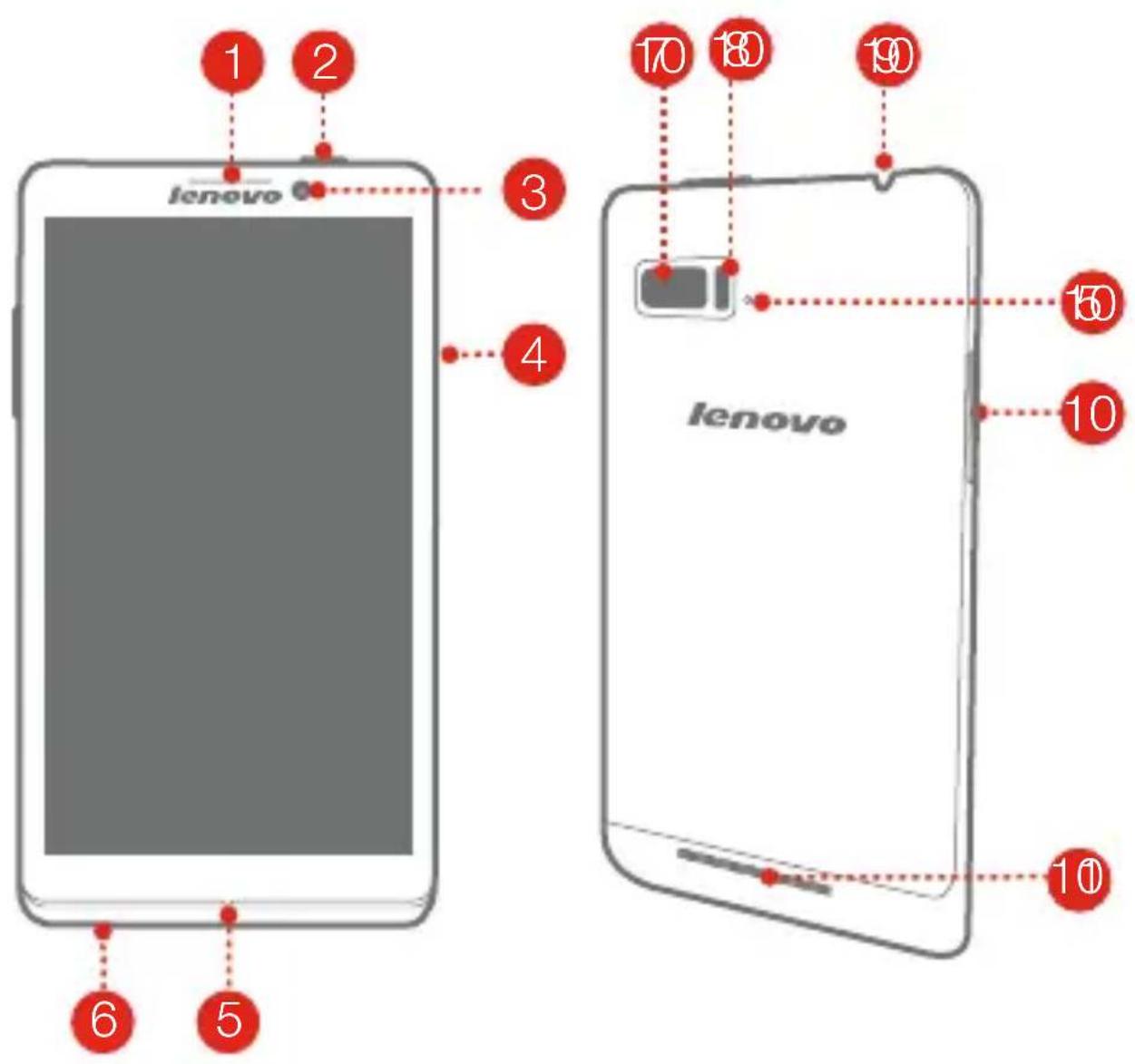
1 2 3 4 6 5 10 18 19 lenovo lenovo 10 10 101 Receiver
4 SIM card slot
7 Back camera
10 Volume key
2 Power on/off
5 Microphone
8 Flashlight
11 Speaker
3 Front camera
6 Micro USB
9 Earphone jack
Installing the Micro SIM card
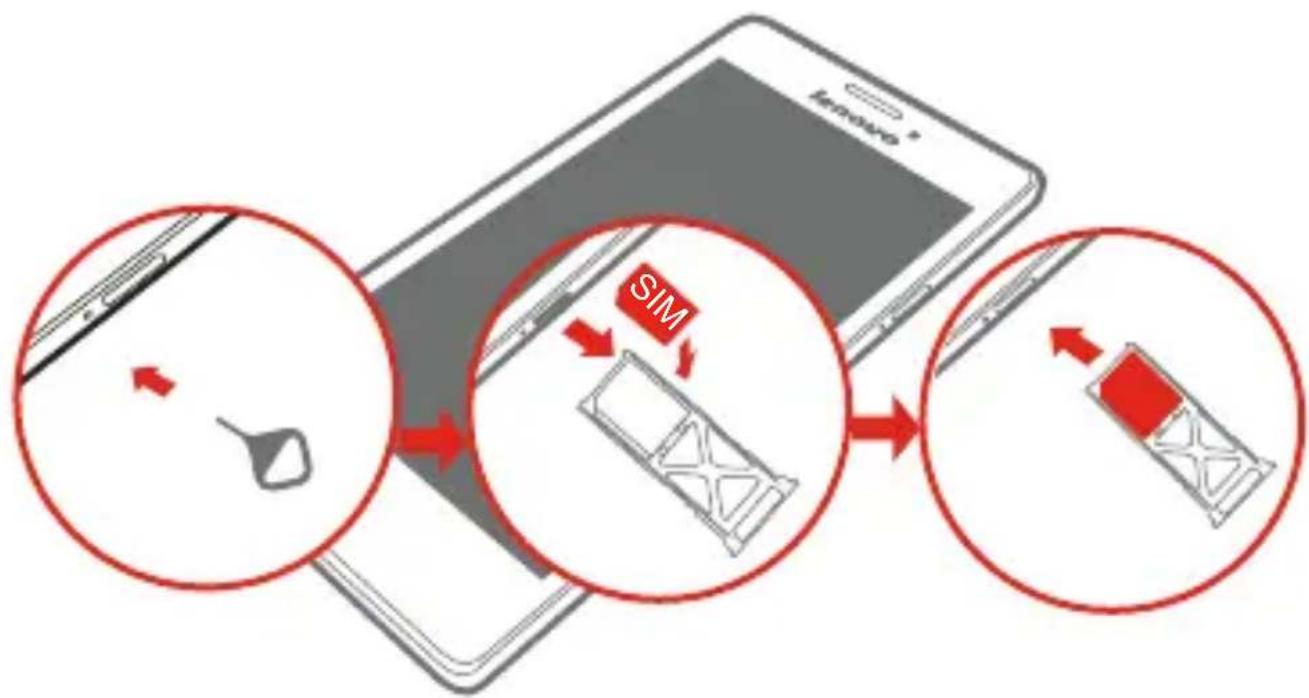
A Micro SIM card provided by your carrier is required in order to use cellular services. Install the Micro SIM card as shown.
flowchart
graph TD
    A["Device with SIM icon"] --> B["Product with SIM icon"]
    B --> C["Product with SIM icon"]
    C --> D["Product with SIM icon"]
Step 1. Insert the Micro SIM eject tool into the hole on the Micro SIM card tray.
Step 2. Pull out the Micro SIM card tray and place the Micro SIM card in the tray.
Step 3. Carefully replace the tray.
Only Micro SIM cards work with your phone.
DO NOT insert or remove the Micro SIM card while your phone is turned on. Doing so may permanently damage your Micro SIM card or phone.
Charging the battery
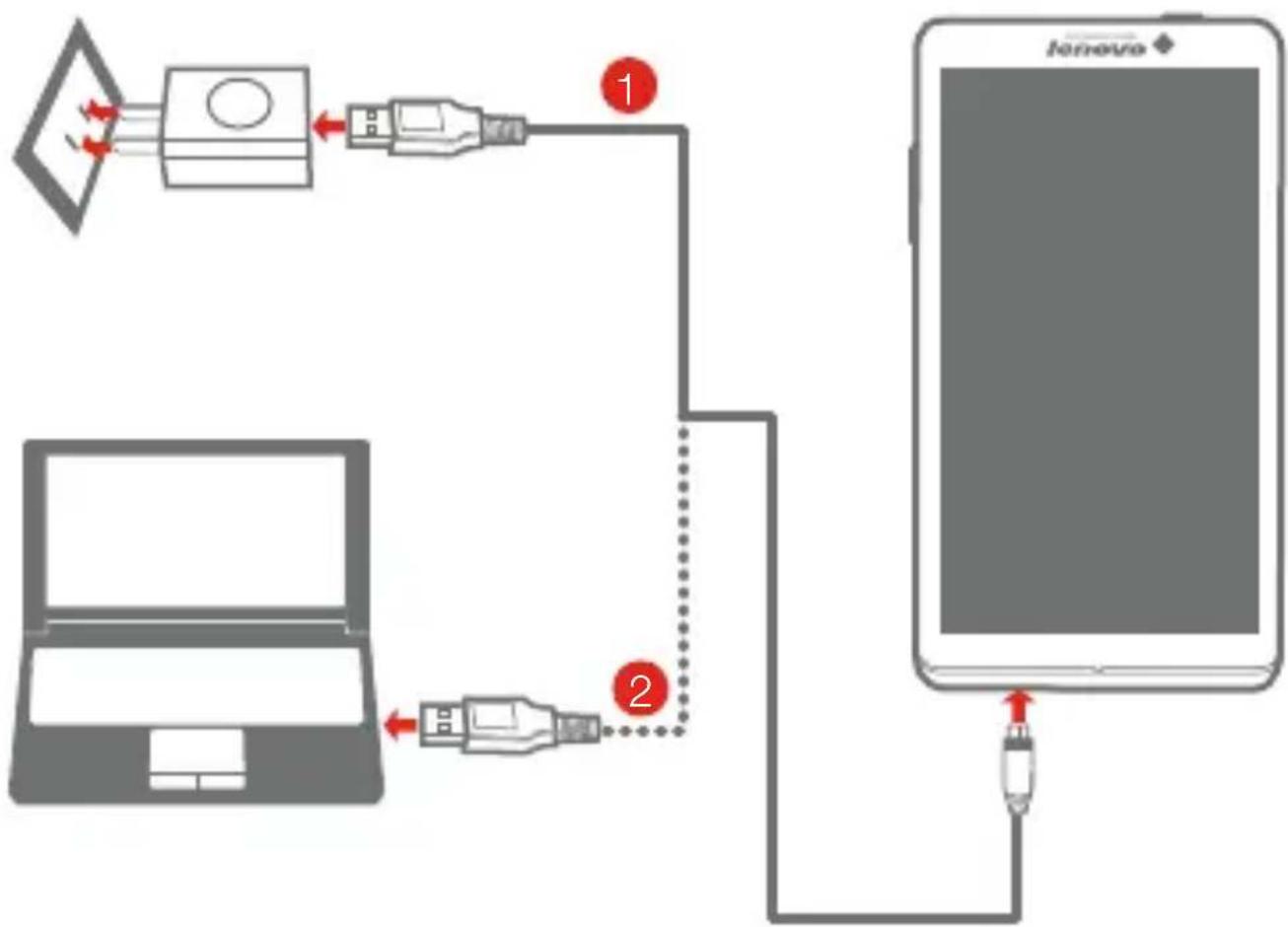
Charge the battery as shown.
flowchart
graph TD
    A["Laptop"] -->|Data Link| B["USB Device"]
    B -->|Data Link| C["Smartphone"]
    C -->|Data Link| D["USB Device"]
    D -->|Data Link| E["Smartphone"]
Method 1. Connect your phone to a power outlet using the included cable and USB power adapter.
Method 2. Charge the battery using a computer.

Low battery Fully charged Charging


For more information about battery safety, see the Important Product Information Guide.
Learn more
For more information about Lenovo Mobile Phone functions, Regulatory Notices and other useful manuals, go to http://support.lenovo.com/.
Legal notices
Lenovo and the Lenovo logo are trademarks of Lenovo in the United States, other countries, or both.
Other company, product, or service names may be trademarks or service marks of others.
First Edition (December 2013)
© Copyright Lenovo 2013.
Reduce | Reuse | Recycle

text_image
Black and white barcode image with vertical lines on both sides5SC9A6MXBS
Printed in China