BA-113 - Tripod Oben - Free user manual and instructions
Find the device manual for free BA-113 Oben in PDF.


User questions about BA-113 Oben
0 question about this device. Answer the ones you know or ask your own.
Ask a new question about this device
Download the instructions for your Tripod in PDF format for free! Find your manual BA-113 - Oben and take your electronic device back in hand. On this page are published all the documents necessary for the use of your device. BA-113 by Oben.
USER MANUAL BA-113 Oben
natural_image
Black camera headluster with adjustable arm and green indicator lights, displayed against a red background (no text or symbols visible on the device itself)You're on steady ground™
Thank You for choosing Oben!
This Oben BA Series ballhead is a compact and lightweight head that provides nimble, reliable operation. The single lock makes it easy to rapidly adjust the ball and calibrated base. A snap-in quick-release plate is included for effortless mounting and dismounting of the camera. The dual-locking quick-release keeps the camera securely attached to the ballhead and prevents the camera from being accidentally released. For additional security, the ballhead is constructed with extra tension to offer greater control when repositioning the camera.
Integrated bubble levels ensure accurate alignment of the camera with the horizon. The calibrated base of the ballhead allows for full 360° panning, as well as precise placement of the camera.
Please read through this entire manual before using the BA series ballhead.
Note: Images are for illustrative purposes only. Actual product may vary.
Key Features
Mount Ballhead To Tripod 5
Converting Mounting Thread 5
Main Locking Knob Operation 5
Calibrated Base
Dual-Locking Quick-Release 6
Mount Quick-Release Plate 6
Mount Camera
Warnings 7
text_image
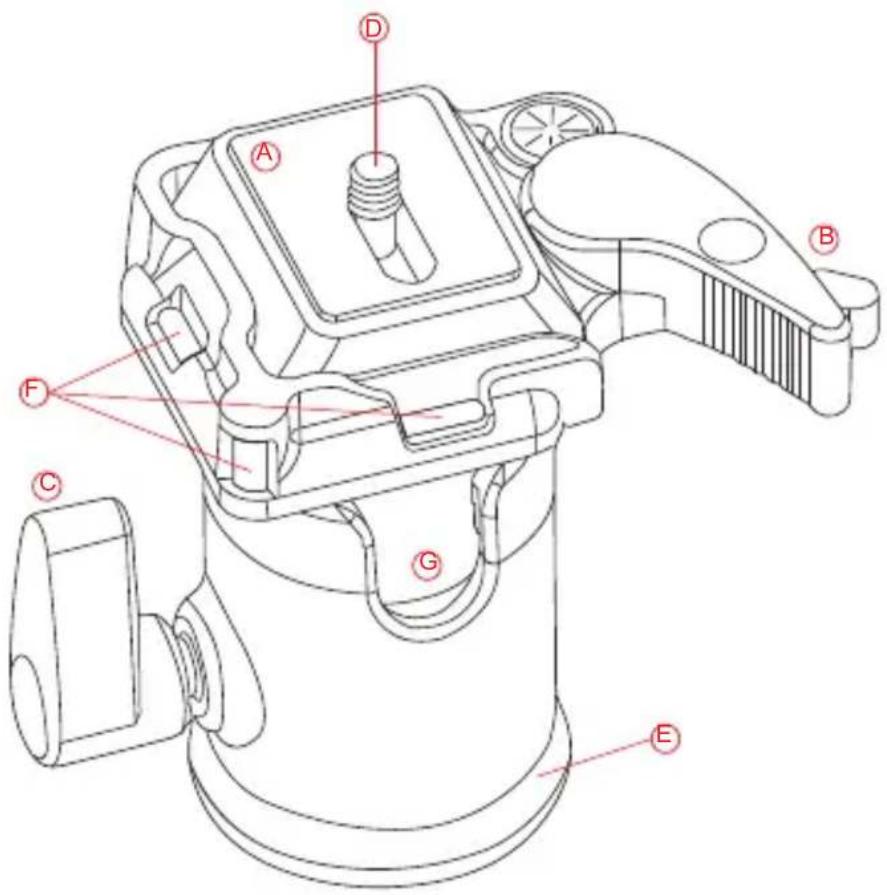
Technical diagram of a mechanical device with labeled parts A through F, showing internal components and assembly lines.(A) Quick-Release Plate
B Dual-Locking Quick-Release
© Single Lock
1/4"-20 UNC Mounting Screw
E Base With 360° Markings
⑤ Bubble levels
G 90° Groove
natural_image
Technical line drawing of a mechanical device with a red curved arrow indicating rotation or adjustment (no text or symbols)1. Mount Ballhead To Tripod
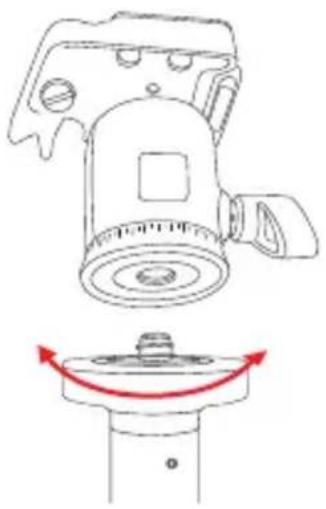
To mount the ballhead on the tripod, first tighten the locking knob on the head. Then, being careful to properly align the tripod stud and the ballhead hole to avoid damaging them, rotate the ballhead clockwise onto the tripod, and tighten it by hand.
2. Converting Mounting Thread
natural_image
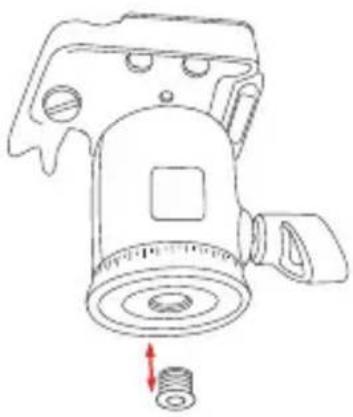
Technical line drawing of a mechanical device with a spring and housing (no text or symbols)For tripods with a 1/4" threaded mounting stud: insert the supplied Reducer Bushing into the threaded mounting hole of the head to enable a proper fit.
3. Main Locking Knob Operation
natural_image
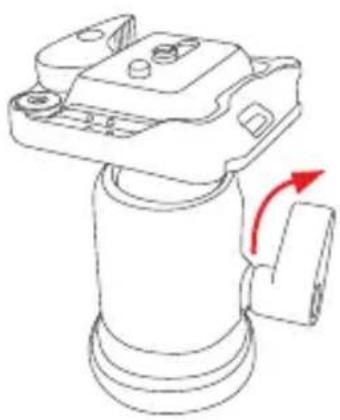
Technical line drawing of a mechanical component with a red arrow indicating rotation (no text or symbols)The single Locking Knob locks and unlocks the ballhead, which allows you to change the position of the camera. When changing camera position using the Locking Knob, always keep one hand on the camera. Turn the knob counterclockwise to unlock the head and clockwise to lock it. Ensure that the knob is firmly tightened before letting go of the camera.
4. Calibrated Base
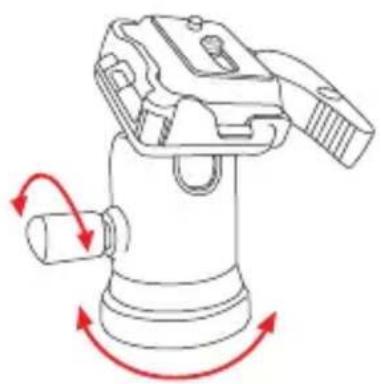
The base of the ballhead can be rotated a full 360° and is controlled by the single locking knob on the side of the ballhead. Twist the knob counterclockwise to unlock the base. Rotate the base to the desired position, and lock the base by turning the knob clockwise. Calibrated degree markings on the base of the ballhead mark the position of the camera precisely.
natural_image
Technical line drawing of a mechanical clamp or holder with red motion arrows indicating rotational movement (no text or symbols)5. Dual-Locking Quick-Release
The BA series is designed with a dual-locking quick-release latch to keep the camera securely in place on the head. To unlock the quick-release, press the small latch while pulling outward on the main latch at the same time.

natural_image
Line drawing of a handheld device with red arrows indicating motion or force (no text or symbols)6. Mount Quick-Release Plate
Mount the Quick-Release Plate to the threaded hole on the base of your camera. The plate utilizes a 1/4"-20 screw that will fit most cameras. After tightening the screw, fold the thumbscrew flat against the bottom of the quick-release plate.

natural_image
Technical line drawing of a DSLR camera with a circular button and adjustment knob (no text or symbols)
natural_image
Technical line drawing of a DSLR camera with a red arrow pointing to the component (no text or symbols present)7. Mount Camera
After mounting the quick-release plate to your camera, ensure that the locking knob on the ballhead is securely tightened. To mount the camera to the ballhead, first insert the side of the Quick-Release Plate that is opposite the quick-release latch. Then, press down on the side of the quick-release plate nearest the quick-release latch. The quick-release latch will automatically lock into place when the plate is pushed into the groove.
Warning: Always use one hand to secure the camera while adjusting the ballhead, and ensure that the lock is engaged before letting go of the camera.

Warnings:
- Do not exceed the ballhead's maximum load capacity (see packaging for details).
- Ensure that all appropriate locks are engaged when necessary.
- Ballhead should only be used in temperatures ranging between -22^ and 140^ (-30° and 60°C). Do not operate in saltwater. Dry ballhead if it becomes wet.
- Remove the camera from the ballhead during setup or transport.
- Keep out of reach of children.
Visit our website at ObenSupports.com for more Oben products.
© Copyright 2014 The Gradus Group All other trademarks are the property of their respective owners