MBH-11 - Tripod Oben - Free user manual and instructions
Find the device manual for free MBH-11 Oben in PDF.


User questions about MBH-11 Oben
0 question about this device. Answer the ones you know or ask your own.
Ask a new question about this device
Download the instructions for your Tripod in PDF format for free! Find your manual MBH-11 - Oben and take your electronic device back in hand. On this page are published all the documents necessary for the use of your device. MBH-11 by Oben.
USER MANUAL MBH-11 Oben
natural_image
Exterior view of a black Oben camera head mount (no text or symbols visible on the device body)You're on steady ground®
Thank you for choosing Oben
The Oben Dual Action Mini Ballhead is an ideal accessory for most tabletop and mini tripods.
Lightweight yet strong and durable, this all-metal ballhead boasts professional features that are more often found in full-sized ballheads.
The MBH-11 is outfitted with an Arca-compatible quick-release plate for rapid camera mounting and swapping. Independent locking knobs offer 360° panning and 90° tilt, making camera positioning effortless and providing a secure platform for cameras and lenses weighing up to 11 pounds.
| Maximum Load 11 lb. (5 kg) | |
| Base Diameter 1.2 in. (30 mm) | |
| Height 2.9 in. (7.4 cm) | |
| Weight 5.35 oz. (152 g) |

Warnings:
- Do not exceed the ballhead's maximum load capacity (see Specifications).
- Ensure that all appropriate locks are engaged when necessary.
- This ballhead should be used only in temperatures between -22^ and 140^ ( -30^ and 60^ ).
- Remove the camera from the ballhead during transport.
- To avoid damage, always support your device or camera with one hand while adjusting tilt and pan settings.
- All images are for illustrative purposes only.
Visit our website at ObenSupports.com
for more Oben products.

natural_image
Solid red semicircular shape on white background (no text or symbols)
text_image
A B C D E J Oben I H G F(A) Quick-release plate
⑧ 1/4-20 mounting screw
© Quick-release knob
(D) Vertical bubble level
E Main locking knob
⑤ Reducer bushing
G 3/8-16 threaded socket
H Panoramic base with 360° markings
① Pan locking knob
J 90° notch
Mounting the Ballhead
Screw the ballhead onto the tripod's mounting post.
Note: If the tripod has a 3/8-16 mounting post, remove the reducer bushing from the ballhead's mounting socket.

text_image
OpenMounting the Quick-Release Plate
The quick-release plate has a 1/4-20 screw that fits most cameras.
- Loosen the quick-release knob by turning it counterclockwise, and remove the quick-release plate from the ballhead.
- Screw the plate onto the bottom of the camera.
- Use the D-ring, a slotted screwdriver, or a coin to tighten the screw into the camera's socket.
Warning: Some manufacturers' plates do not meet our specifications and may not lock your equipment securely in the Oben quick-release clamp. Test any camera and lens plates made by manufacturers other than Oben to ensure compatibility before use.

natural_image
Diagram showing a car interior with ventilation grilles and a mounted fan cover (no text or symbols)Mounting the Camera
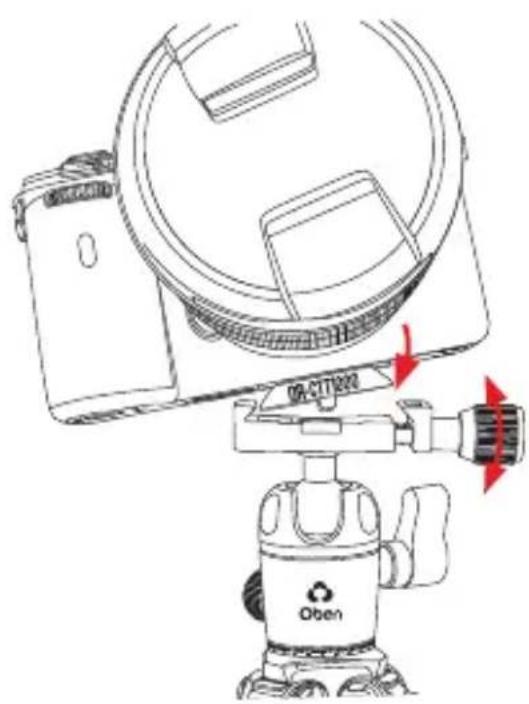
Make sure all knobs on the ballhead are tightened, except for the quick-release knob.
- Turn the quick-release knob counterclockwise until it stops.
- Mount the camera to the ballhead by sliding one edge of the quick-release plate into the clamp. Then lower the other side until the quick-release plate is lying flat in the quick-release clamp.
Note: Make sure the mounting screw's D-ring is flush with the bottom of the plate.
- Turn the quick-release knob clockwise to lock the plate.
text_image
ON-CIT202 ObenMain Locking Knob Operation
The main locking knob locks and unlocks the ballhead, which allows you to change the position of the camera.
Always use one hand to secure the camera while adjusting the ballhead, and make sure the lock is engaged before letting go of the camera.
Note: To adjust the tension in a tight space, or if something is blocking you from turning the knob, pull the knob out, reposition it so it can turn without interference, and release it. The knob will engage and can be turned.
Use the 90° notch to quickly switch between landscape and portrait orientations.

natural_image
Illustration of a person in an astronaut gear operating a device with a red circular graphic at the bottom (no text or symbols)Panoramic Base
The base of the ballhead can be independently rotated 360°. Use the degree markings on the base of the ballhead to accurately set up panoramic shots.
-
Twist the pan knob counterclockwise to unlock the base.
-
Rotate the base to the desired position, and then lock the base by turning the knob clockwise.

natural_image
Technical line drawing of a camera setup with no visible text or symbolsOben is a registered trademark of the Gradus Group. © 2020 Gradus Group LLC. All Rights Reserved.