BC-139 - Tripod Oben - Free user manual and instructions
Find the device manual for free BC-139 Oben in PDF.


| Product Type | Camera Tripod |
| Brand | Oben |
| Model | BC-139 |
| Material | Aluminum Alloy |
| Maximum Height | 150 cm (59 in) |
| Minimum Height | 40 cm (15.7 in) |
| Folded Length | 50 cm (19.7 in) |
| Weight | 1.5 kg (3.3 lbs) |
| Load Capacity | 5 kg (11 lbs) |
| Number of Leg Sections | 3 |
| Leg Lock Type | Flip Locks |
| Head Type | 3-Way Pan/Tilt Head |
| Quick Release Plate | Included (Standard Arca-Swiss compatible) |
| Bubble Level | Yes |
| Center Column | Geared or Sliding (depending on version) |
| Spike Feet | Retractable |
| Power Supply | Not applicable (manual operation) |
| Cleaning | Wipe with dry cloth; avoid solvents |
| Storage | Keep in dry place, avoid extreme temperatures |
| Included Accessories | Carrying bag, tools for maintenance |
Frequently Asked Questions - BC-139 Oben
User questions about BC-139 Oben
0 question about this device. Answer the ones you know or ask your own.
Ask a new question about this device
Download the instructions for your Tripod in PDF format for free! Find your manual BC-139 - Oben and take your electronic device back in hand. On this page are published all the documents necessary for the use of your device. BC-139 by Oben.
USER MANUAL BC-139 Oben
natural_image
Black headboard camera with red 'Oben' logo and blue adjustment knob, mounted on a red surface (no text or symbols on body)You're on steady ground™
Thank You for choosing Oben!
This sturdy Oben BC Series Dual-Action ballhead provides smooth, precise operation. Two locks provide independent adjustment and locking of the ball and panoramic base. A separate tension thumbscrew integrated into the main locking knob allows you to set a specific degree of friction for your camera setup. A snap-in quick-release plate is included, for effortless mounting and dismounting of the camera.
An integrated bubble level ensures accurate alignment of the camera with the horizon. The panoramic base of the ballhead allows for full 360° panning—ideal for shooting panoramic photos.
Please read through this entire manual before using the BC series ballhead.
Note: Images are for illustrative purposes only. Actual product may vary.
Key Features
Mount Ballhead To Tripod 6
Converting Mounting Thread 6
Main Locking Knob Operation 6
Mount Quick-Release Plate 7
Mount Camera
Tension Thumbscrew 8
Adjusting Friction
Panoramic Base
Warnings 11
text_image
Technical diagram of a mechanical device with labeled parts (A–H) and a scale ruler for measurement.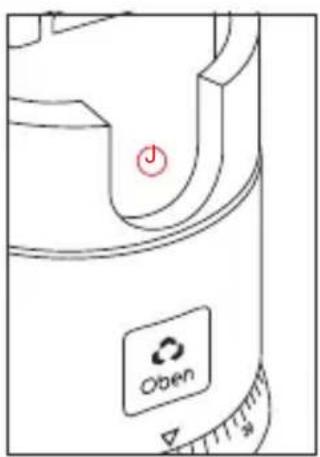
text_image
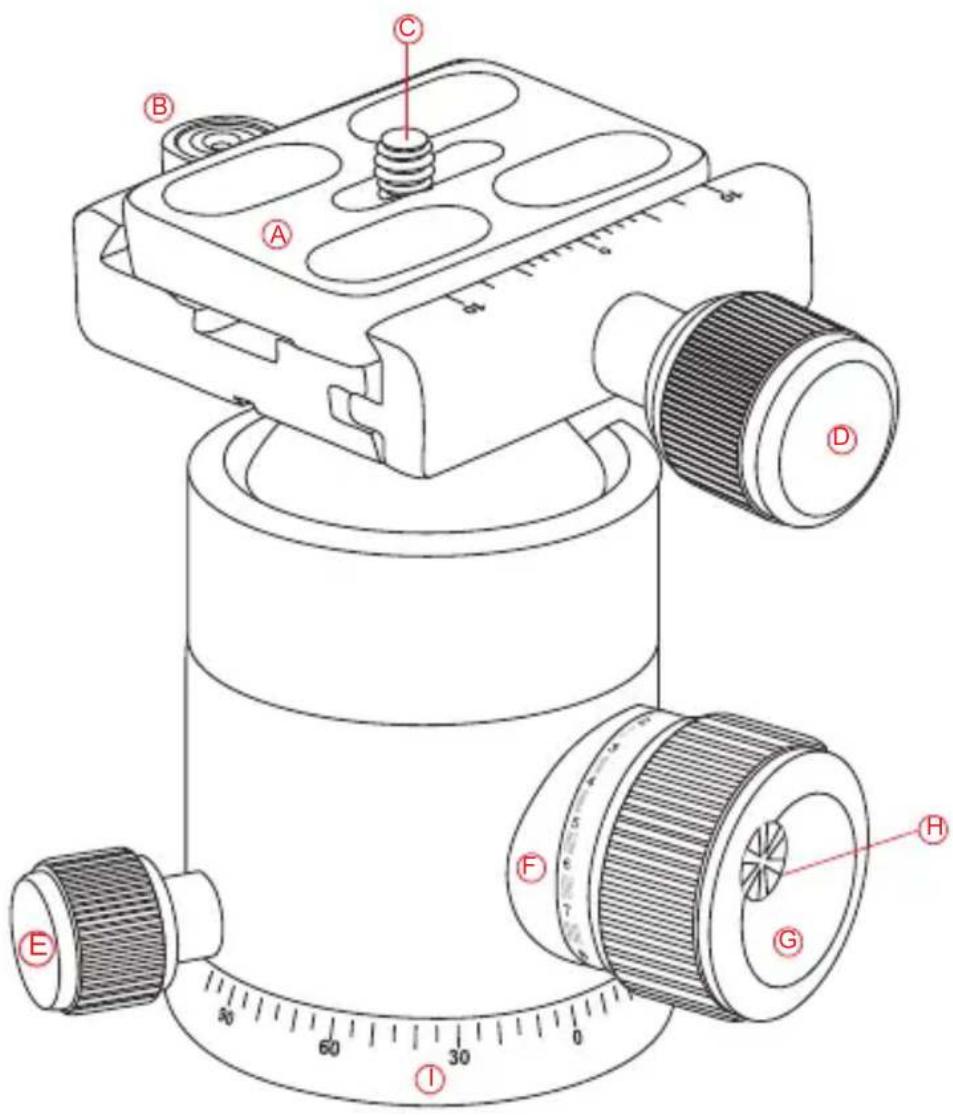
Open(A) Quick-Release Plate
B Bubble Level
© 1/4"-20 UNC Mounting Screw
Quick-Release Knob
E Pan Knob
⑤ Tension Guide Scale
G Main Locking Knob
H Tension Thumbscrew
① Panoramic Base With 360° Markings
90° Groove
1. Mount Ballhead To Tripod
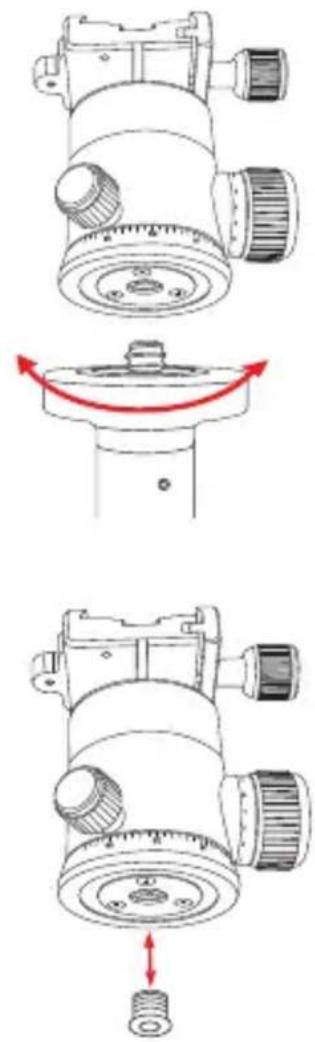
To mount the ballhead on the tripod, first tighten all of the knobs on the head. Then, being careful to properly align the tripod stud and the ballhead hole to avoid damaging them, rotate the ballhead clockwise onto the tripod, and tighten it by hand.
2. Converting Mounting Thread
For tripods with a 1/4" threaded mounting stud: insert the supplied reducer bushing into the threaded mounting hole of the head to enable a proper fit.
3. Main Locking Knob Operation
The main locking knob locks and unlocks the ballhead, which allows you to change the position of the camera. When changing camera position using the main locking knob, always keep one hand on the camera. Turn the knob counterclockwise to unlock the head and clockwise to lock it. Ensure that the main knob is firmly tightened before letting go of the camera.

natural_image
Technical line drawing of a mechanical component with no visible text or symbols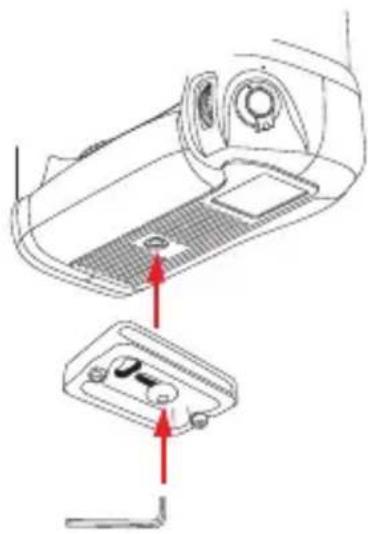
natural_image
Technical diagram showing a device's internal structure with red arrows indicating assembly or connection points (no text or symbols present)4. Mount Quick-Release Plate
Remove the quick-release plate from the ballhead by turning the quick-release knob counterclockwise. This loosens the quick-release clamp, allowing you to remove the quick-release plate. Mount the quick-release plate to the threaded hole on the base of your camera. Use the supplied hex key to tighten the screw. The plate utilizes a 1/4"-20 screw that will fit most cameras.
Warning: Some manufacturer's plates do not meet our specifications and may not lock your equipment securely in the Oben quick-release clamp. Please test all camera and lens plates made by manufacturers other than Oben to ensure compatibility.
5. Mount Camera
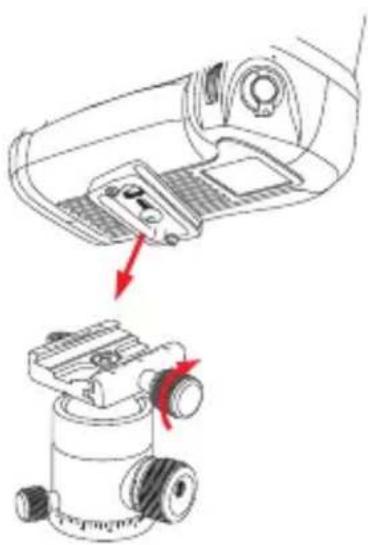
After mounting the quick-release plate to your camera, ensure that all knobs on the ballhead are tightened, except for the quick-release knob. Loosen the quick-release knob by turning it counterclockwise until it stops. Mount the camera to the ballhead by sliding one edge of the quick-release plate into the ballhead then lower the other side until the quick-release plate is lying flat in the quick-release clamp. Turn the quick-release knob clockwise to lock the plate.
natural_image
Diagram showing a mechanical device with a handle and directional arrows indicating movement or force (no text or symbols present)5. Mount Camera (continued)
Warning: Always use one hand to secure the camera while adjusting the ballhead, and ensure that the lock is engaged before letting go of the camera.
6. Tension Thumbscrew
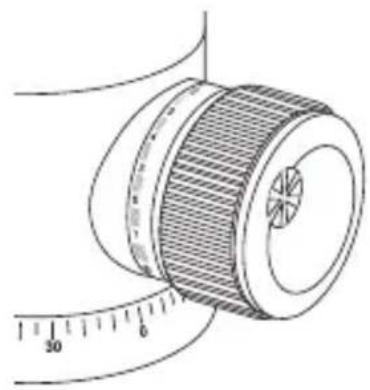
The tension thumbscrew is integrated into the main locking knob. It's used to control the amount of friction on the ball in order to maintain strict control when positioning it.
natural_image
Technical line drawing of a mechanical component with a ruler for scale (no text or symbols)7. Adjusting Friction
To adjust the friction accurately, follow these steps:
A. Tighten the head and mount the lightest combination of camera and lens that you will regularly use. Turn the tension thumbscrew (located on the main locking knob) counterclockwise until it stops.
B. Turn the main locking knob counterclockwise until you reach the desired minimum degree of friction. You can set the friction so that the ball moves freely or so that it is immobilized or anywhere in-between.

natural_image
Illustration of a measuring tape measure with a red arrow indicating clockwise motion (no text or symbols)
text_image
Diagram illustrating a measurement process with a red arrow indicating clockwise motion, showing a circular object rolling down a ring.
text_image
Diagram illustrating a measurement device with a ruler and a circular dial, showing a red rotation arrow indicating clockwise motion.C. Turn the tension thumbscrew clockwise until it stops. You have now set your minimal friction limit for this particular camera and lens combination. The main locking knob will not turn beyond this minimal friction limit.
If you want to mount a heavier camera and lens combination, you will need to repeat this process, increasing the tension on the ball by following the same steps with the new camera/lens combination.
Important: to lower your minimal friction limit, turn the main locking knob clockwise until it stops, turn the tension thumbscrew counterclockwise until it stops, then turn the main locking knob counterclockwise until the ball moves freely enough for you to make adjustments.
Warning! Do not force the main locking knob to turn beyond its stopping point. This leads to “locking up” or “freezing up” of the main locking knob—you will be unable to move it. In this condition, the knob is locked, but the head is loose. To correct this, increase tension on the ball by rotating the main locking knob clockwise until the desired degree of tension is achieved. Release the friction by turning the tension thumbscrew counterclockwise until it stops. Release tension on the ball by rotating the main locking knob counterclockwise until the ball is free.
8. Panoramic Base
The base of the ballhead can be independently rotated 360°. The base is controlled by loosening the pan knob. This is the smallest knob, at the base of the head. Twist the knob counterclockwise to unlock the base, rotate the base to the desired position, and lock the base by turning the knob clockwise. Degree markings on the base of the ballhead can be used to accurately set up panoramic shots.

natural_image
Technical line drawing of a mechanical component with rotating arms and adjustment knobs (no text or symbols)
Warnings:
- Do not exceed the ballhead's maximum load capacity (see packaging for details).
- Ensure that all appropriate locks are engaged when necessary.
- Ballhead should only be used in temperatures ranging between -22^ and 140^ . Do not operate in saltwater. Dry ballhead if it becomes wet.
- Remove the camera from the ballhead during setup or transport.
- Keep out of reach of children.
Visit our website at ObenSupports.com for more Oben products.
© Copyright 2014 The Gradus Group All other trademarks are the property of their respective owners