ST-CC0213 - Heating Saturn - Free user manual and instructions
Find the device manual for free ST-CC0213 Saturn in PDF.


User questions about ST-CC0213 Saturn
0 question about this device. Answer the ones you know or ask your own.
Ask a new question about this device
Download the instructions for your Heating in PDF format for free! Find your manual ST-CC0213 - Saturn and take your electronic device back in hand. On this page are published all the documents necessary for the use of your device. ST-CC0213 by Saturn.
USER MANUAL ST-CC0213 Saturn
natural_image
Saturn iron with purple and white body, no visible text or symbols on the device itself
IRON
Dear Buyer!
We congratulate you on having bought the device under trade name «Saturn». We are sure that our devices will become safe and reliable assistance in your housekeeping.
Avoid extreme temperature changes. Rapid temperature change (e.g. when the unit is moved from freezing temperature to a warm room) may cause condensation inside the unit and a malfunction when it is switched on. In this case leave the unit at room temperature for at least 1.5 hours before switching it on. If the unit has been in transit, leave it indoors for at least 1.5 hours before starting operation.
-
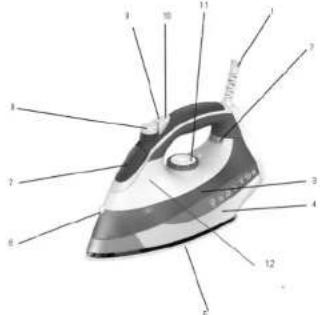
Power cord
-
Pilot light
-
Transparent water tank
-
Housing
-
Soleplate
-
Spray nozzle
-
Water inlet cover
-
Steam dial
-
Spray button
-
Burst of steam button
-
Temperature knob
-
Self-Clean button
IMPORTANT SAFEGUARDS
- Please read all instructions carefully
before using the appliance for the first time.
-
Before connecting the appliance, check if the voltage indicated on the rating plate corresponds with the mains voltage in your home.
-
Do not use appliance for other than intended use.
-
The iron should always be switched off before connecting or disconnecting from the power supply. Do not pull on the cord to disconnect the plug from the wall socket.
-
Do not use the iron when it is damaged in any way. Do not operate the iron with a damaged cord or plug. Do not replace the power cord or any other parts by yourself-contact Customer Support for Assistance.
- The iron must not be left
unattended while it's connected to the supply mains.
-
The iron must be removed from the socket outlet before the water reservoir is filled with water (for steam irons incorporating means for spraying water).
-
The iron must be used and rested on stable surface.
-
When placing the iron on it's stand, ensure that the surface on which the stand is placed is stable.
-
The iron is not to be used if it has been dropped, if there are visible signs of damage or if it's leaking.
-
This appliance is not intended for use by persons (including children) with reduces physical, sensory or mental capabilities or lack of experience and knowledge, unless they have been given supervision or instruction. It is not advised to use this appliance by children under 14.
-
Children should be supervised to ensure that they do not play with the appliance.
SPRAYING
This function can be used any time and it does not affect the ironing
temperature.
• Fill water into the iron.
- Aim the nozzle towards the garment.
- Press the spray button.
STEAM IRONING
This function can be used only at higher ironing temperature
• • for moderate steam
• • or MAX for maximum steam
- Fill water into the iron.
- Stand the iron upright.
- Connect he iron to a suitable mains supply outlet
- Turn the temperature control button to the "• • ", or "• • •" "MAX" setting
- The pilot light turns on when the required temperature is reached. The iron is ready for use.
- Turn the steam knob to the required position, steam starts coming out from the holes in the sole plate.
- Notice: With conventional steam ironing, water may leak from the sole plate if too low temperature has been select. If this happens turn the temperature control to the advised position. Steam will recommence as soon as die appropriate temperature has been reached.
BURST OF STEAM
This function provides an extra amount of steam to remove stubborn wrinkles.
• Fill the iron with water.
- Turn the temperature control to the position 'MAX".
• The iron is ready for use.
- Press the burst of steam knob once - Steam will penetrate into the garment removing the wrinkles.
- Wait a few seconds before pressing the steam control knob wrinkles again when there are stubborn wrinkles. - Usually all wrinkles can be removed within three pressings.
DRY IRONING
- Connect the iron to a suitable mains supply outlet.
- Ensure that the steam control knob is in position "0". - Select the setting on the temperature control.
- When the pilot light turns off, the required temperature is reached. The iron is ready to use.
TO LET THE IRON HEAT UP AGAIN
Pick up the iron or move it slightly. The red shot-off pilot goes out. If the temperature of the soleplate drops below the set ironing temperature, the temperature pilot goes on. If the pilot light goes on after you have move the iron, wait for it to go out before you start ironing. If the pilot light does not go on after you move the iron, the soleplate still has right temperature and iron is ready for use.
SELF CLEAN FUNCTION
The Self Clean function can remove any scale or impurities. Use the self-clean function once every two weeks. If the water in your area is
very hard, the self-clean function should used more frequently.
- Make sure the appliance is unplugged. - Set the Variable steam control knob
• Fill the water tank to the maximum level
- Select the maximum ironing temperature.
- Put the plug in the wall socket. - Unplug the iron when the temperature pilot light has gone out.
- Hold the iron over the silk, press and hold die self-clean button and gently shake the iron.
• (Steam and boiling water will come out of the soleplate. Impurities and flakes (if any) will be flushed out.)
- Release the self-clean button as soon as all water in the tank has been used up.
- Repeat the self-clean process if the iron still contains a lot of impurities.
CARE AND CLEANING
-
Turn the Temperature Control Dial to OFF, then disconnect the iron from the wall outlet and cool it down completely.
-
Deposits and other residues on the sole plate can be removed with a cloth soaked in a vinegar/water solution.
-
The casing may the wiped with a damp cloth and then polished with a dry one.
-
Never use any abrasives to clean the sole plate.
-
Keep the sole plate smooth, avoid contact with metal objects.
-
When you have finished ironing or you are leaving iron unattended: - turn the steam control knob to position "0".
- stand the iron upright - disconnect the iron from the wall outlet.
Do not allow children to touch the iron or the power cord whom ironing. 7. Do not immerse die iron or the cord into water or any other liquid.
-
Do not touch hot metal parts, hot water or steam. These parts become hot and may cause burns. Take care if you turn die iron upside downs: there may be not hot water in the tank. The plug and cord should not be allowed to touch the hot sole plate. Let the iron cool down completely before taking it away. Roll the power cord around the iron for storage.
-
Disconnect die iron from the wall outlet for filling in water or when you remove the water after use.
-
The Iron Is for household use only
-
Save the instruction manual for future reference
Notes:
- Some parts of the iron have been slightly greased and as result the iron may smoke slightly when switched on for the first time. It will not happen again after a few uses.
- Before using for the first time, remove any protective films or stickers from the sole plate and the cabinet. Then clean the sole place with a soft cloth.
- When using the iron for the first time, test it on an old piece of fabric to ensure that the sole plate and water tank are completely clean.
CHOICE OF WATER
• This iron can be used with normal tap water.
- If the water in your area is particularly hard, it is advisable to use distilled or demineralized water.
- Do not use chemically descaled water or any other liquids for refilling.
HOW TO FILL IN WATER
- Set the Steam Control Knob "0" and the temperature Control Dial to OFF. - Unplug the iron from the wall outlet.
- Pour water into the water inlet. - Fill up to the maximum level "MAX" of the water tank.
| LABEL KIND | DF TEXTILE | FIBRE MATERIAL |
| Synthetic Acrylic Modacryc Polypropylene Polyurethane | ||
| Synthetic Acetate Triacetate | ||
| Synthetic Cupro Polyamide (Nylon) Polyester Vlscose (Rayon) | ||
| Silk Silk | ||
| Wool Wool | ||
| Cotton Cotton | ||
| Linen Linen |
SETTING THE TEMPERATURE
- Insert the plug in the wall socket and stand the iron upright. - Turn the temperature control knob to the desired temperature setting.
- The desired temperature has been reached when the pilot light has turned off.
- The pilot light will turn on and off from time after time, indicating that the selected temperature is being maintained.
Specification
Power: 2200 W Working voltage: 220-230 V Working frequency: 50 Hz Rated current 10 A
Set
Iron 1pc Instruction manual with warranty book Package
1pc 1pc

ENVIRONMENT FRIENDLY DISPOSAL
You can help protect the environment! Please remember to respect the local regulations: hand in the non-working electrical equipments to an
appropriate waste disposal centre. The manufacturer reserves the right to change the specification and design of goods.
RU
УТЮГ
The Warranty is provided for the period of 2 years or more if the Law on User Right of the country where the appliance was bought provides for a greater minimum warranty period.
All terms of warranty comply with to the Law on Protection of the Consumer Rights and are governed by the legislation of the country where the product was bought. The warranty and free of charge repair are provided in any country where the product is delivered to by Saturn Home Appliances or authorized representative thereof, and where no restriction of import or other legal provisions interfere with rendering of warranty services and free of charge repair.
Cases uncovered by the warranty and free of charge repair:
-
Guarantee coupon is filled in improperly.
-
The product has become inoperable because of the Buyer's nonobservance of the service regulations indicated in the instruction.
-
The product was used for professional, commercial or industrial purposes (except for the models, specially intended for this purpose that is indicated in the instruction).
-
The product has external mechanical damage or damage caused by penetration of the liquid inside, dust, insects and other foreign objects.
-
The product has damages caused by non-observance of the rules of power supply from batteries, mains or accumulators.
-
The product was exposed to opening, repair or modification of design by the persons, unauthorized to repair; independent cleaning of internal mechanisms etc. was made.
-
The product has natural wear of parts with limited service life, expendables etc.
-
The product has deposits of scale inside or outside of fire-bar elements, irrespective of used water quality.
-
The product has damages caused by effect of high (low) temperatures or fire on non-heat resistant parts of the product.
-
The product has damages of accessories and nozzles which are included into the complete set of product shipment (filters, grids, bags, flasks, cups, covers, knives, scaling rings, graters, disks, plates, tubes, hoses, brushes, and also power cords, headphone cords etc.).
On the warranty service and repair, please contact the authorized service centers of Saturn Home Appliances.
CZ
MEZINÁRODNÍ ZÁRUKA
When purchasing the product,
please require its checking before you;
BE SURE
that the goods sold to you, are functional and complete
and that the warranty coupon is filled in correctly.
This warranty coupon confirms the absence of any defects in the product you purchased and provides for free of charge repair of the product failed through the fault of the manufacturer throughout the period of warranty service and free of charge repair.
Failing the presentation of this coupon, in case of its improper filling in, infringement of factory seals (if any), and also in cases indicated in the warranty obligations, the claims are not accepted, and no warranty service and free of charge repair is made! The warranty coupon is valid only in the original copy with the stamp of trading organization, signature of the seller, date of sale and signature of the buyer.
CZ
ZÁRUČNÍ LIST
Při koupi výrobku
Buyer's Signature confirming the acquaintance and consent with conditions of free of charge maintenance service of the product, and absence of the complaints on appearance and color of the product.