ST-CC7141 - Heating Saturn - Free user manual and instructions
Find the device manual for free ST-CC7141 Saturn in PDF.


| Product Type | Electric Steam/Dry Iron |
| Brand | Saturn |
| Model | ST-CC7141 |
| Power | 2000 W |
| Rated Voltage | 220-230 V |
| Rated Frequency | 50 Hz |
| Rated Current | 9 A |
| Soleplate | Non-stick coated |
| Water Tank | Transparent, with max level mark |
| Steam Control | Variable knob with 0, moderate, maximum settings |
| Spray Function | Yes, spray button |
| Burst of Steam | Yes, burst button (max 5 sec continuous) |
| Temperature Settings | Dial with positions for Synthetics/Silk, Wool, Cotton/Linen |
| Indicator Light | Yes, for heating status |
| Self-Cleaning | Yes, recommended every 2 weeks |
| Dry Ironing | Possible by setting steam to 0 |
| Safety Features | Auto shut-off not specified; rest on heel, unplug when not in use |
| Warranty | 2 years (subject to country laws) |
| Included Accessories | Iron, instruction manual, warranty book, package |
Frequently Asked Questions - ST-CC7141 Saturn
User questions about ST-CC7141 Saturn
0 question about this device. Answer the ones you know or ask your own.
Ask a new question about this device
Download the instructions for your Heating in PDF format for free! Find your manual ST-CC7141 - Saturn and take your electronic device back in hand. On this page are published all the documents necessary for the use of your device. ST-CC7141 by Saturn.
USER MANUAL ST-CC7141 Saturn
natural_image
Electric iron with Saturn brand logo, no visible text or symbols on bodyGB
IRON
Dear Buyer!
We congratulate you on having bought the device under trade name "Saturn". We are sure that our devices will become faithful and reliable assistance in your housekeeping.
Avoid extreme temperature
changes. Rapid temperature change (e.g. when the unit is moved from freezing temperature to a warm room) may cause condensation inside the unit and a malfunction when it is switched on. In this case leave the unit at room temperature for at least 1.5 hours before switching it on. If the unit has been in transit, leave it indoors for at least 1.5 hours before starting operation.
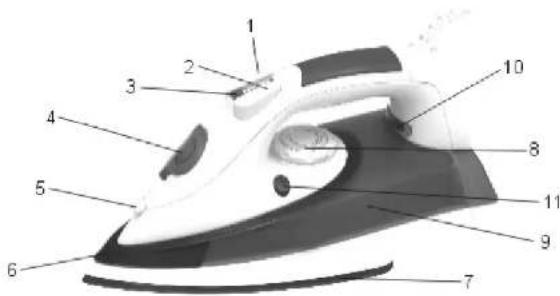
Description:
- Spray button
- Burst of steam button
- Steam control
- Water filling inlet
- Spray nozzle
- Decoration
- Soleplate
- Temperature control dial
- Transparent water tank
- Indicator light
PLEASE READ CAREFULLY- ALWAYS MAINTAIN SAFETY WHEN WORKING WITH ANY APPLIANCE
- Check that the mains voltage corresponds with the rating of the appliance before operating.
- Do not touch hot surfaces - Use handles or knobs.
• To protect against electric shock, do not immerse cords, plugs or appliances in water or any other liquid.
• Do not leave any appliance unattended while it is operating.
- Close supervision is necessary when any appliance is used by or near children or infirm persons. It is not advised to use this appliance by children under 14.
- Unplug from outlet when not in use or before cleaning. Allow to cool before putting on or taking off any parts.
- Do not operate the appliance with a damaged cord or plug, or after the appliance has been damaged in any manner. If the supply cord or appliance is damaged, it must be replaced by the manufacturer or it's service agent or a similarly qualified person in order to avoid a hazard.
- Do not let the cord hang over the edge of a table or counter or let it come into contact with any hot surfaces
- Do not use this product for anything other than its intended use. This appliance is for household use only.
- No liability can be accepted for any damage caused by noncompliance with these instructions or any other improper use or mishandling.
- The iron should always be turned to "min" before plugging or unplugging from the mains outlet. Never pull the cord to disconnect from the mains: instead, grasp plug and pull to disconnect.
- Burns can occur from touching hot metal parts, hot water or steam, use caution when you turn a steam iron upside down-there may be hot water in the reservoir.
- If the iron is not operating normally, disconnect from the power supply and contact the nearest authorized service agent.
- Your iron is designed to rest on the heel. Do not leave the iron unattended when switched on. Do not place the iron on an unprotected surface even if it is on its heel rest.
FILLING WITH WATER
- Ensure the iron is disconnected
from the power supply
• Turn the steam control knob to
position "0".
• Fill with water through water filling
inlet. (Do not exceed main level mark on the water tank.)
SETTING THE TEMPERATURE
\* Synthetics-Silk
\*\* Wool
\*\*\* Cotton- Linen
- Stand the iron upright.
- Set temperature control to ironing
temperature.
- Inset the mains plug into the main
supply
• After the indicator light has gone out and come on again, you may start ironing.
• The indicator light will go out from
time to time during ironing
STEAM-IRONNING
- Set the temperature control to position** for moderate steam and to *** for maximum steam. With conventional steam irons, water may leak from the soleplate if a too low temperature has been selected.
- Ensure that there is enough water in the water reservoir.
- Stand the iron on its heel.
- Insert the mains plug into the wall
socket. - Wait a little while for the indicator light to go out and come on again.
• See the variable steam knob to adjust the steam.
BURST OF STEAM
- By pressing button an intense "Burst" of steam is emitted from the soleplate.
• To prevent water leaking from the sole plate, do not keep the steam control button depressed for more than 5 seconds.
SPRAY SETTING
- At any temperature by pressing the spray button a couple of time the laundry can be damped down. - Ensure that there is enough water in the water reservoir.
DRY IRONING
- Turn the variable steam knob to the position "O" (=no steam).
STORAGE
- Remove the mains plug from the wall socket.
- Pour and remaining water out of the
water reservoir. - Set the steam knob to no steam
position. - Stand the iron upright and let it coot down sufficiently.
CLEANING
• Before cleaning the iron ensure it is disconnected from the power supply and has completely cooled down.
- Deposits on the soleplate may be removed with a rough cloth soaked in a vinegar/water solution.
• The casting may be wiped with a damp cloth and then polished with a dry one.
- Do not use abrasives on the soleplate.
- Keep the sole plate smooth. Avoid hard contact with metal objects.
SELF CLEANING
It is important to apply "self-cleaning" at least every two weeks to remove impurities etc.
• The harder the water the more the iron should be self-cleaned.
- Open the filling funnel and fill the water reservoir up to the MAX position, then close the filling funnel.
- Set the temperature control to MAX.
- Insert the mains plug into the wall socket.
- Allow the iron to heat up until the temperature pilot light goes out.
• Then set temperature control dial to position MIN.
- Hold the iron horizontally over the sink, then remove the variable steam control knob from the body enabling the
iron to self clean.
- Boiling water and steam will now be ejected from the holes in soleplate. Impurities are washed away with it. Move the iron forwards and backwards while this happened.
- Set the steam control to "O" position, when the water reservoir has become empty.
- Repeat self-cleaning if you notice that much impurity or other has been washed out.
- Move the iron over a (preferably) old piece of cloth. This is to ensure that
the soleplate will be dry during storage - Unplug and allow the iron to cool clown before storing it.
Specification
| Power: | 2000 W |
| Rated Voltage: | 220-230 V |
| Rated Frequency: | 50 Hz |
| Rated Current: | 9 A |
Set
| Iron | 1pc |
| Instruction Manual | 1pc |
| Warranty Book | 1pc |
| Package | 1pc |
ENVIRONMENT FRIENDLY
DISPOSAL

You can help protect the environment! Please remember to respect the local regulations: hand in the non-working electrical equipments to an appropriate waste disposa
centre.
The manufacturer reserves the right to change the specification and design of goods.
RU
УТЮГ
Опис:
The Warranty is provided for the period of 2 years or more if the Law on User Right of the country where the appliance was bought provides for a greater minimum warranty period.
All terms of warranty comply with to the Law on Protection of the Consumer Rights and are governed by the legislation of the country where the product was bought.
The warranty and free of charge repair are provided in any country where the product is delivered to by Saturn Home Appliances or authorized representative thereof, and where no restriction of import or other legal provisions interfere with rendering of warranty services and free of charge repair.
Cases uncovered by the warranty and free of charge repair:
-
Guarantee coupon is filled in improperly.
-
The product has become inoperable because of the Buyer's non-observance of the service regulations indicated in the instruction.
-
The product was used for professional, commercial or industrial purposes (except for the models, specially intended for this purpose that is indicated in the instruction).
-
The product has external mechanical damage or damage caused by penetration of the liquid inside, dust, insects and other foreign objects.
-
The product has damages caused by non-observance of the rules of power supply from batteries, mains or accumulators.
-
The product was exposed to opening, repair or modification of design by the persons, unauthorized to repair; independent cleaning of internal mechanisms etc. was made.
-
The product has natural wear of parts with limited service life, expendables etc.
-
The product has deposits of scale inside or outside of fire-bar elements, irrespective of used water quality.
-
The product has damages caused by effect of high (low) temperatures or fire on non-heat resistant parts of the product.
-
The product has damages of accessories and nozzles which are included into the complete set of product shipment (filters, grids, bags, flasks, cups, covers, knives, sealing rings, graters, disks, plates, tubes, hoses, brushes, and also power cords, headphone cords, etc.).
On the warranty service and repair, please contact the authorized service centers of Saturn Home Appliances.
CZ
MEZINÁRODNÍ ZÁRUKA
When purchasing the product,
please require its checking before you;
BE SURE
that the goods sold to you, are functional and complete and that the warranty coupon is filled in correctly.
This warranty coupon confirms the absence of any defects in the product you purchased and provides for free of charge repair of the product failed through the fault of the manufacturer throughout the period of warranty service and free of charge repair.
Falling the presentation of this coupon, in case of its improper filling in, infringement of factory seals (if any), and also in cases indicated in the warranty obligations, the claims are not accepted, and no warranty service and free of charge repair is made! The warranty coupon is valid only in the original copy with the stamp of trading organization, signature of the seller, date of sale and signature of the buyer.

ZÁRUČNÍ LIST
Při koupi výrobku
Buyer's Signature confirming the acquaintance and consent with conditions of free of charge maintenance service of the product, and absence of the complaints on appearance and color of the product.
- IRON
- Dear Buyer!
- Avoid extreme temperature
- Description:
- PLEASE READ CAREFULLY- ALWAYS MAINTAIN SAFETY WHEN WORKING WITH ANY APPLIANCE
- FILLING WITH WATER
- SETTING THE TEMPERATURE
- \* Synthetics-Silk
- \*\* Wool
- \*\*\* Cotton- Linen
- STEAM-IRONNING
- BURST OF STEAM
- SPRAY SETTING
- DRY IRONING
- STORAGE
- CLEANING
- SELF CLEANING
- ENVIRONMENT FRIENDLY
- DISPOSAL
- RU
- УТЮГ
- Опис:
- Cases uncovered by the warranty and free of charge repair:
- On the warranty service and repair, please contact the authorized service centers of Saturn Home Appliances.
- MEZINÁRODNÍ ZÁRUKA
Brand : Saturn
Model : ST-CC7141
Category : Heating