WAHD2LBV - Security Camera Genie - Free user manual and instructions
Find the device manual for free WAHD2LBV Genie in PDF.


User questions about WAHD2LBV Genie
0 question about this device. Answer the ones you know or ask your own.
Ask a new question about this device
Download the instructions for your Security Camera in PDF format for free! Find your manual WAHD2LBV - Genie and take your electronic device back in hand. On this page are published all the documents necessary for the use of your device. WAHD2LBV by Genie.
USER MANUAL WAHD2LBV Genie
Thank you for purchasing our Genie Product.
Warning and Cautions
Before using this product, please read this manual carefully to ensure you can use the product correctly to avoid danger or property loss. Please store this instruction manual in a safe place for future reference.
Input voltage should meet both the SELV (Safety Extra Low Voltage) and the Limited Power Source with DC 12V.
If the product does not work properly, please contact your Distributor Never attempt to disassemble the camera yourself. (Genie CCTV will not be responsible for any problems caused by unauthorized repair or maintenance.)
- Keep away from any form of liquid while in use.
■ Whilst using the product, you must comply with the electrical safety regulations of the country of use.
When the product is mounted on a wall or ceiling, the device shall be firmly fixed.
■ Make sure the power supply voltage is correct before using the camera.
■ Do not drop the camera or subject it to physical shock.
If cleaning is necessary, please use a clean cloth to wipe it gently. If the device is not being used for a long time, please cover the lens cap to protect the device from dirt.
■ Do not aim the camera at the sun or extra bright place. A blooming or smear may occur otherwise (which is not a malfunction however), and the endurance of the device will be affected at the same time.
■ The device may be burned out by a laser beam, so when any laser equipment is in use, make sure that the surface of the device is not be exposed to the laser beam.
- Do not place the camera in extremely hot, cold (the operating temperature shall be -20^ 50^ ), dusty or damp locations, and do not expose it to high electromagnetism radiation.
■ To avoid heat accumulation, good ventilation is required.
■ While on a delivery, the camera shall be packed in its original packing, or packing of the same texture.
A few parts of the device shall be replaced regularly according to their average enduring time. Regular checking is recommended for all users.
Table of Contents
1 Introduction ...... 1
2 Menu Setup 3
2.1 Lens Setup 5
2.2 Exposure.... 5
2.3 Backlight Setup....7
2.4 White Balance Setup 8
2.5 Day & Night Setup....9
2.6 Noise Reduction 11
2.7 Special....11
2.7.1 Camera Title 11
2.7.2 D-Effect.... 12
2.7.3 Motion.... 12
2.7.4 Privacy.... 13
2.7.5 Language Setup 14
2.7.6 Defect.... 14
2.7.7 RS 485....16
2.8 Image Adjustment 16
2.9 Exit.... 17
3.0 Product Specification....18
1 Introduction
This series of the camera adopts the latest AHD technology, advanced circuit design, feature high definition and sensitivity, low noise and distortion and supports HD video transmission with the common coaxial cable, ensuring HD monitoring in the traditional surveillance system.
● High Resolution and Sensitivity
720P/1080P real-time image with high definition and good color reproduction. The sensitivity is up to 0.01 LUX due to the installation of the high quality of the built-in removable optical filter.
● High Transmission Performance
Real-time transmission with high speed and long distance.
● High Light Compensate (HLC)
Masks and compensates the highlighted areas enhance a clear image.
- ICR Auto Switch
The filter will filter infrared light during the day and will auto change to normal at night to ensure a high sensitivity and clear image.
• DNR
Under low illumination conditions, you can reduce the noise from brightness and color signal to maximise on storage room.
- OSD
The setup menu clearly displays the functions and features of the camera and other languages can be selected. It is easy for the user to set the corresponding items.
- Privacy Masking
When not necessary, some areas of display can be masked
● Backlight Compensation ( BLC )
When the back of the captured object is bright, you can set a BLC for the captured object, to make it clearer.
- Motion Detection
When the camera captures the moving object in the detection area, it will send a signal. This is to help users monitor live.
◆ Cable Connections
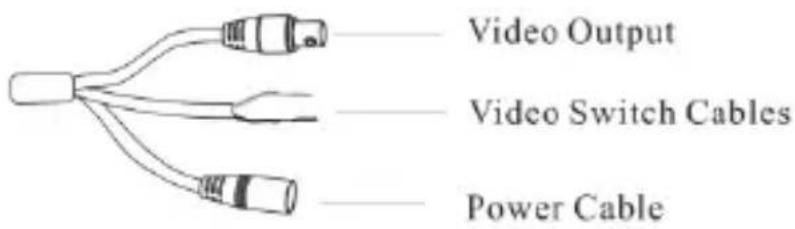
- Connecting to monitor

* The default video output is AHD video signal. The video output can be changed to CVBS video output by jointing the two video switch cables. Untie the two cables to restore the video output to AHD video.
- Connecting to power
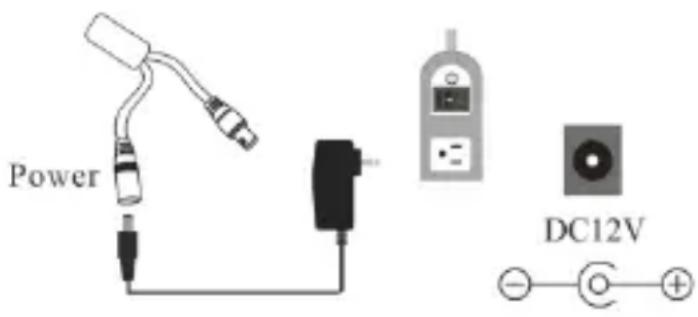
2 Menu Setup
Before starting, connect the power cables and video cables. Please make sure all the connection are correct. Plug out the power cable and then the camera will shut down immediately.
This camera must be connected to the DVR which supports AHD video input. The DVR must also support the set menu of the camera, or the function of menu. Different DVRs manufactured by different companies could have different modes of menu operation.
Here we take 16 CH DVR for example. After starting the DVR, the following menu tool bar will pop up by right-clicking the mouse.

You will see the following interface by clicking button.
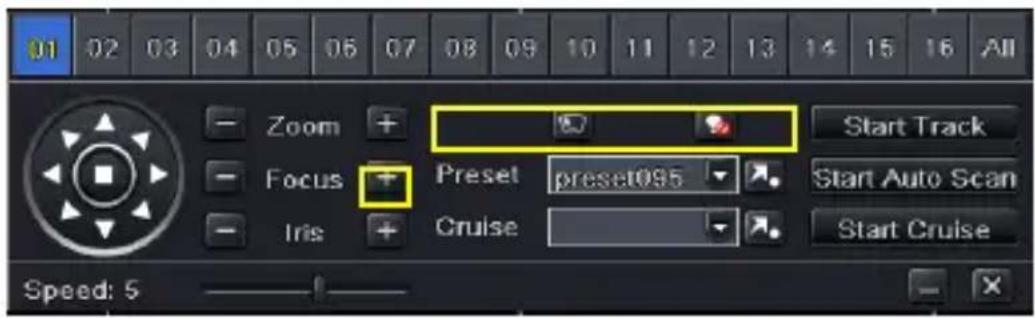
Directly click “Iris +” to go to the following main menu. You can also select preset NO. 95 and then click ➕ button (call preset NO.95) to go to the following main menu.
| MAIN MENU | |
| 1. LENS | MANUAL |
| 2. EXPOSURE | |
| 3. BACKLIGHT | OFF |
| 4. WHITE BAL | AWB |
| 5. DAY&NIGHT | EXT ↻ |
| 6. NR | |
| 7. SPECIAL | |
| 8. ADJUST | |
| 9. EXIT | SAVE&END ↻ |
You can select the menu by clicking △(U) or ▽(D) key on the direction key area. Click (L) or (R) key to select the menu on the left. The menu with arrow icon which means it has sub-menu. You can select the menu and click “Iris +” or call preset NO.95 to enter the sub-menu. To return to the previous menu or exit the main menu, please select “RET” or “Save & END” by clicking U or D key and then click “Iris
+” or call preset NO.95 ( We used “Iris +” for example ).
2.1 Lens Setup
Lens setup can be manual setup and DC lens setup. To select the lens mode, please click “L” or “R” key.
DC lens setup: Select DC and then click “Iris +”. This will take you to the following sub-menu.
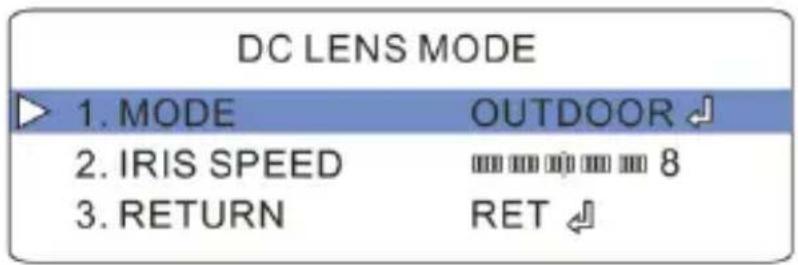
Mode: Indoor mode and outdoor mode are selectable.
Iris Speed: Click "L" or "R" key to adjust the iris speed.
Select RETURN and choose RET to return to the previous menu.
2.2 Exposure
Select “EXPOSURE” and then click “Iris +”. This will bring the following sub-menu.
| EXPOSURE | |
| 1. SHUTTER | AUTO |
| 2. AGC | 12 |
| 3. SENS-UP | OFF |
| 4. BRIGHTNESS | 33 |
| 5. D-WDR | ON ↻ |
| 6. DEFOG | AUTO ↻ |
| 7. RETURN | RET ↻ |
SHUTTER: Auto, 1/30 (NTSC)/ 1/25 (PAL), 1/60 (NTSC)/ 1/50(PAL), FLK, 1/240(NTSC)/ 1/200(PAL), 1/480(NTSC)/ 1/400(PAL), 1/1000, 1/2000, 1/5000, 1/10000, 1/50000, × 2 and so on are selectable.
AGC: When the light is insufficient, increase or decrease the level as required.
SENS-UP: Extend the exposure time of camera. The higher the time, the lower the frame is but the longer the shadow is in low illumination condition. Please select times as needed. OFF, ×2, ×4, ×6, ×8 and ×10 are selectable.
BRIGHTNESS: Click “L” or “R” key to increase or decrease the level of the brightness.
D-WDR: Lighten the dark area and control the highlighted area. There are three options: ON, OFF and AUTO. If ON is selected, the level of the D-WDR can be adjustable.
DEFOG: In mild foggy weather, you can set up this function to allow objects behind the fog to be clearer. You can select AUTO or OFF. When AUTO is selected, you can go to the sub-menu of the Defog and set up position, size and gradation.
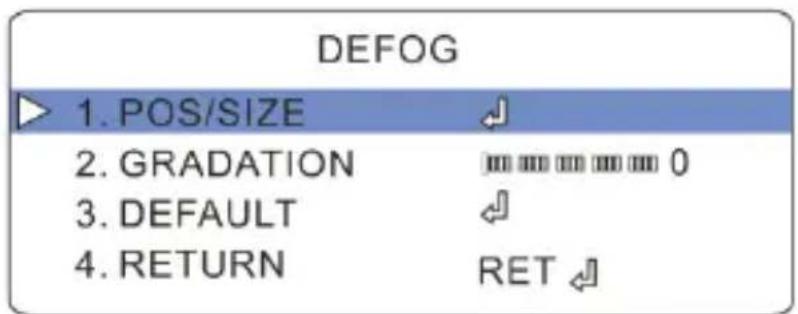
- POS/SIZE: Click direction key to set the position and size of BLC area. The position setting and size setting can be switched by clicking “Iris +”.
● GRADATION: Click "L" or "R" key to adjust it.
2.3 Backlight Setup
BACKLIGHT: OFF, BLC, or HSBLC can be selectable.
If OFF is selected, the system will not compensate the image.
If BLC is selected, it will enhance the brightness of the image. After entering the sub-menu of BLC, you can set LEVEL, AREA and DEFAULT.
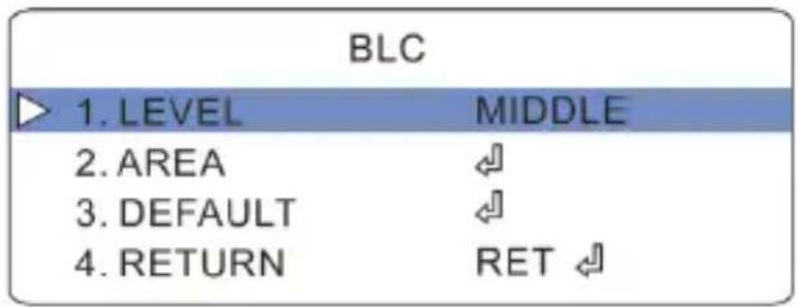
LEVEL: The higher the level is, the brighter the image is. There are three options: LOW, HIGH and MIDDLE.
AREA: Please set it through the direction keys and use the “Iris +” key to switch the position and size settings.
DEFAULT: If the parameters of BLC setup are out of order, please select DEFAULT to reset settings.
If HSBLC is selected, the high brightness will be suppressed and the low brightness will be enhanced at the same time. As a result, the image in certain areas will be exposed properly. (Please use the fixed IRIS Lens). This function can be used to shoot license plate numbers. Select HSBLC to go to its sub-menu.
| HSBLC | |
| 1. SELECT | AREA 1 |
| 2. DISPLAY | ON ↻ |
| 3. BLACK MASK | ON |
| 4. LEVEL | 20 |
| 5. MODE | NIGHT ↻ |
| 6. DEFAULT | ← |
| 7. RETURN | RET ↻ |
SELECT: There are four areas.
DISPLAY: Display the HSBLC areas. There are four areas.
BLACK MASK: Mask the highlight area.
LEVEL: You may increase or decrease the level.
MODE: There are two modes: ALL DAY and NIGHT.
DEFAULT: Reset the setup of HSBLC to the default setting.
2.4 White Balance Setup
Select "WHITE BAL" to choose the White Balance modes.
ATW: In this mode, the camera will constantly monitor color temperature among about 2500\~9500K and adjust white balance automatically. This mode is prior to other modes.
AWC→SET: Select it and click “Iris +” to go to the lock mode of white balance. Then the camera locks the reference value of red and blue under the current color temperature and stops monitoring color temperature. When the environment changes, please click “Iris+” again to unlock.
INDOOR: Select it to go to indoor mode.
OUTDOOR: Select it to go to outdoor mode.
MANUAL: When the camera is used in the environment with a certain unchangeable light source, you can use this mode. You can adjust the level of blue and red to reach the reasonable results of white balance.
AWB: Auto White Balance.
2.5 Day & Night Setup
There are four modes: EXT, AUTO, COLOR and B/W.
◆ EXT
If this mode is selected, the light resource and image will be changed synchronously as the change of the external environment. You may go into the sub-menu to set the delay time.
AUTO
When selecting AUTO, the camera will change into the color mode in the daytime or B/W mode at night so that you can get the best and clearest images. Select AUTO to enter sub-menu.
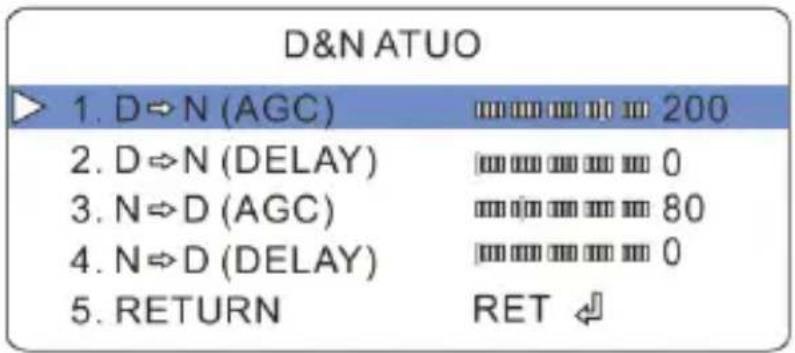
D→N (AGC): Set the range of the illumination from color to B/W.
D→N (DELAY): Set day to night switching delay time.
N→D (AGC): Set the range of the illumination from B/W to color.
N→D (DELAY): Set night to day switching delay time.
♦ COLOR
In this mode, the camera will not switch to B/W function in low illumination condition.
◆ B/W
Select this mode and go to the following sub-menu.
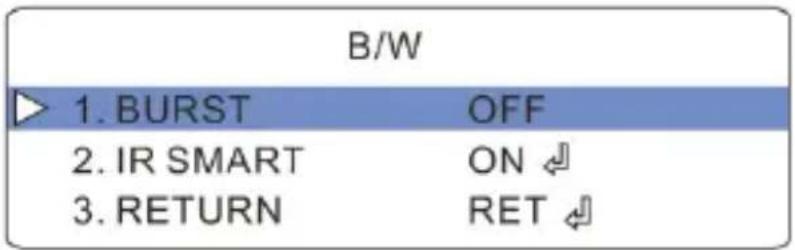
BURST: If you want to obtain the standard B/W signal, please select off. IR SMART: When the object with IR light is captured, please enable it and then go to sub-menu for IR level and area setup.
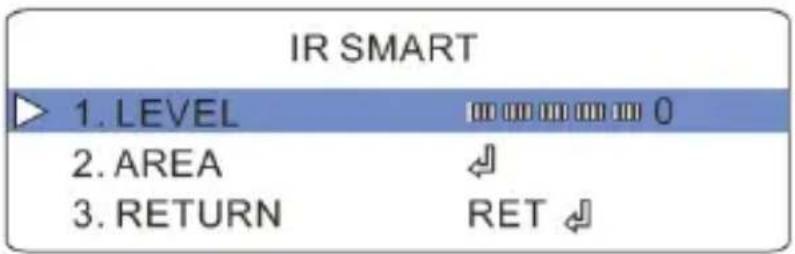
LEVEL: Compensate the light reduction caused by infrared abatement. Please increase or decrease the level as required.
AREA: Please set it through the direction keys and use the “Iris +” key to switch the position and size settings.
2.6 Noise Reduction
Select NR and click “Iris +” to go to the following sub-menu.
| NR | |
| 1.2 DNR | LOW |
| 2.3 DNR | LOW |
| 3. RETURN | RET ↙ |
2DNR and 3DNR can be set. Comparing with the 2DNR, the 3DNR function processes the noise between two frames besides processing the noise in one frame. You can select the level of the 2D/3D digital noise reduction as required.
2.7 Special
| SPECIAL | |
| 1. CAM TITLE | ON ↻ |
| 2. D-EFFECT | ↖ |
| 3. MOTION | ON ↻ |
| 4. PRIVACY | OFF |
| 5. LANGUAGE | ENG ↻ |
| 6. DEFECT | ↖ |
| 7. RS 485 | ↖ |
| 8. RETURN | RET ↻ |
2.7.1 Camera Title
Select CAMERA TITLE to select On/Off.
Select On. You can set the camera name by clicking direction key. After selecting the single letter, number or symbol, please click “Iris +” to confirm it. Select “CLR” and click “Iris +” to delete the selected letters,
numbers or symbols. Select “POS” and click “Iris +” to go to the ID Position setup interface.
2.7.2 D-Effect
Go to D-EFFECT menu as shown below.
| D-EFFECT | |
| 1. FREEZE | OFF |
| 2. MIRROR | OFF |
| 3. NEG.IMAGE | OFF |
| 4. RETURN | RET ↙ |
FREEZE: If selecting ON, MIRROR function will be unavailable.
MIRROR: Mirror the current image. There are four kinds of mirror: OFF, ROTATE, V-FLIP and MIRROR.
NEG. IMAGE: If ON is selected, you will see the negative image.
2.7.3 Motion
Select ON to set up motion detection alarm.
| MOTION | |
| 1. SELECT | AREA 1 |
| 2. DISPLAY | ON ↻ |
| 3. SENSITIVITY | mm mm mm mm 64 |
| 4. COLOR | GREEN |
| 5. TRANS | 0.00 |
| 6. ALARM | ↙ |
| 7. DEFAULT | ↙ |
| 8. RETURN | RET ↻ |
SELECT: There are four areas.
DISPLAY: If ON is selected, you can set its size and position.
SENSITIVITY: You may adjust the sensitivity of the detection area.
COLOR: Select the color of the motion detection area.
TRANS: Set the transparency of the color block of the motion detection area.
ALARM: Select it and click "Iris +" to go to the following menu.
| ALARM | |
| 1. VIEW TYPE | ALL |
| 2. OSD VIEW | ON |
| 3. ALARM OUT. | ON |
| 4. TIME | 3 |
| 5. RETURN | RET |
● VIEW TYPE: OFF, BLOCK, OUTLINE and ALL are optional.
- OSD VIEW: Select ON. The words “MOTION DETECTION” will be displayed on the live image when the motion alarm is triggered.
● ALARM OUT.: Select ON. The alarm output will be triggered when the motion detection alarm is triggered.
● TIME: Alarm hold time. (In Seconds).
DEFAULT: Reset all settings of Motion to the default value.
RETURN: Return to the previous interface.
2.7.4 Privacy
Select “PRIVACY” to select On/Off. If you want to mask some areas, please select “On” and go in the privacy setup interface.
| PRIVACY | |
| 1. SELECT | AREA 1 |
| 2. DISPLAY | COLOR ↻ |
| 3. COLOR | WHITE |
| 4. TRANS | 1.00 |
| 5. DEFAULT | ← |
| 6. RETURN | RET ← |
SELECT: There are four areas to select.
DISPLAY: There are four options: COLOR, OFF, INV, and MOSAIC.
COLOR: There are eight colors to select for the area.
TRANS: Set the transparency of the mask area.
DEFAULT: Reset all settings of privacy to the default value.
2.7.5 Language Setup
Supports many languages: simplified Chinese, Traditional Chinese, English, Polish, Portuguese, Spanish, Russian, French, Italian, German and more
2.7.6 Defect
The DEFECT includes LIVE DPC and Static DPC.
| DEFECT | |
| 1. LIVE DPC | OFF |
| 2. WHITE DPC | ON ↻ |
| 3. BLACK DPC | OFF |
| 4. RETURN | RET ↻ |
LIVE DPC: ON and OFF are optional. If ON is selected, the AGC level and level of live DPC can be adjustable.
White DPC: If ON is selected, you can enter the following sub-menu.
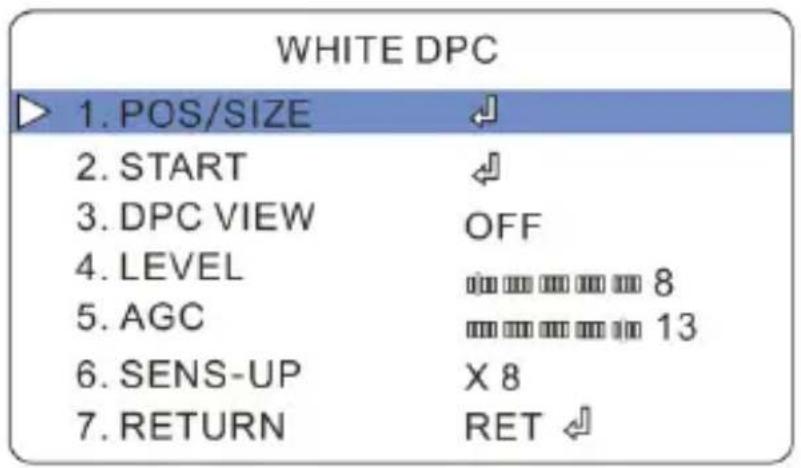
- POS/SIZE: Click “Iris+” to switch the position and size settings.
- START: Close the iris or cover the lens before starting white DPC.
● LEVEL: You may set the level of white DPC.
● AGC: Please increase and decrease the value as required.
● SENS-UP: Extend the exposure time of camera. The higher the time is, the lower the frame is.
BLACK DCP: If ON is selected, you will see the following menu.
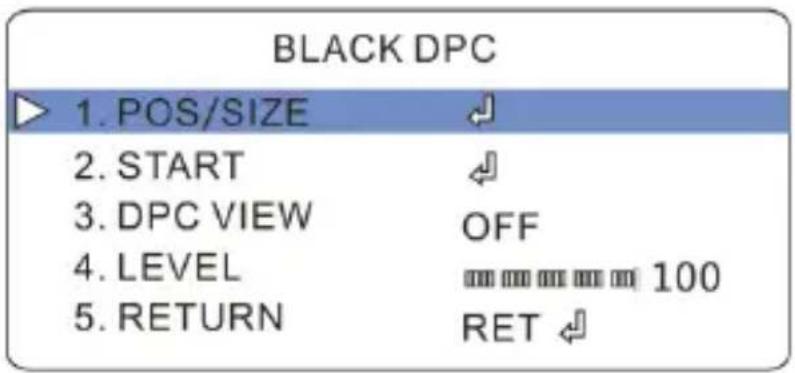
The POS/SIZE settings are the same as that of white DPC. Please directly click “Iris+” to start black DPC.
2.7.7 RS 485
If you want to set the menu remotely, you have to set the RS485 parameters of the camera the same as those of the keyboard.
Go to Main Menu→ Special→ RS 485 menu as shown below.
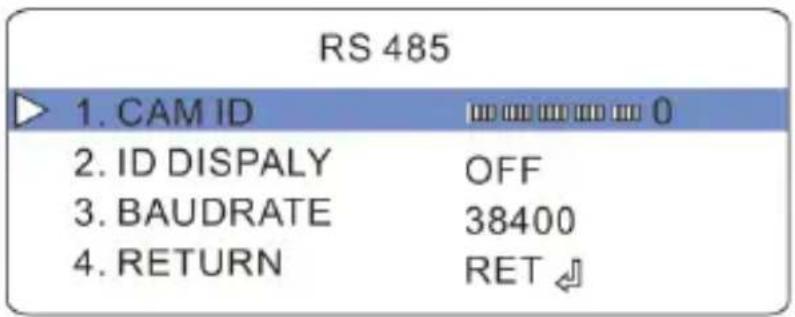
The camera ID ranges from 0 to 254. The default protocol is PELCOD. The baudrate includes 2400, 4800, 9600, 19200 and 38400.
* The models must support RS 485 function, or the settings here will be invalid.
2.8 Image Adjustment
Select ADJUST to go to the image adjustment menu.
| ADJUST | |
| 1. SHARPNESS | AUTO ↘ |
| 2. MONITOR | LCD ↘ |
| 3. LSC | OFF |
| 4. VIDEO.OUT | PAL |
| 5. RETURN | RET ↘ |
SHARPNESS: Select AUTO to enter sharpness setup menu. Please set the level, start AGC and end AGC of the sharpness.
| SHARPNESS | |
| 1. LEVEL | 5 |
| 2. START AGC | 70 |
| 3. END AGC | 150 |
| 4. RETURN | RET |
The higher the level of the sharpness is, the clearer the outline of the image is, but the more the noises are. Please select the level as required.
MONITOR: LCD and CRT are selectable. Choose one type of the monitor and click “Iris+” to set the value of GAMMA (only available for LCD monitor), blue gain and red gain.
● GAMMA: Set the value of GAMMA. USER, 0.45, 0.50, 0.50, 0.60, 0.65, 0.70, 0.75, 0.80, 0.85, 0.90, 0.95 and 1.00 are selectable.
- BLUE GAIN: Increase or decrease the value of blue.
● RED GAIN: Increase or decrease the value of red.
LSC: If ON is selected, the brightness of the edge of the image will be compensated.
VIDEO. OUT: PAL and NTSC are selectable.
2.9 Exit
This function includes SAVE&END, RESET and NOT SAVE. If the parameters of the camera are out of order and the camera cannot display images, you may choose RESET and click “Iris +” to reset all setups. Select SAVE&END to save and exit the menu setup. The settings will not be saved by selecting NOT SAVE.
Note: If you shut down your device but don't exit the menu setup interface, all settings set above will not be saved.
natural_image
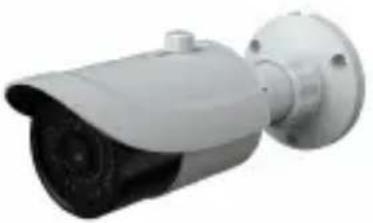
Exterior view of a modern security camera (no visible text or symbols)| Model Specifications | WAHD13BV |
| Camera | |
| Image Sensor | 1/4 °CMOS |
| Resolution | 1280 x 720 |
| Image System | PAL / NTSC |
| Min. Illumination | 0 Lux (LED ON) |
| Lens | 2.8 ~ 12 mm optional ) |
| IR Distance | 20 ~ 30 m |
| Water-proof | IP 66 |
| Video Output | BNC x 1 |
| Image Size | 720P (1280 x 720) |
| Frame Rate | 30 fps (60 Hz), 25 fps (50 Hz) |
| Functions | |
| Day & Night | Yes ( ICR ) |
| S/N Ratio | >52 dB ( AGC off ) |
| Electronic Shutter | 1 / 50s ~ 1 / 500 00s ( PAL );1 / 60s ~ 1 / 500 00s ( NTSC ) |
| AGC | Yes |
| White Balance | Auto White Balance |
| Others | |
| Power Supply | DC 12V ( ±10 % ) |
| Working Environment | -20 °C ~ 50 °C, 10 % ~ 90 % humidity |
| Dimensions ( mm ) | Φ 87 x 219 |
natural_image
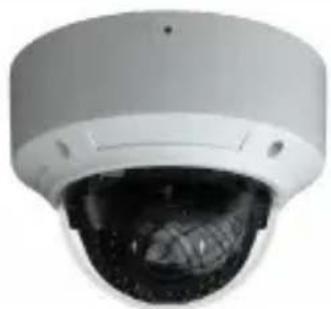
Close-up of a white surveillance camera with a dark lens and metallic grille (no visible text or symbols)| Model Specifications | WAHD13D |
| Camera | |
| Image Sensor | 1/4 °CMOS |
| Resolution | 1280 x 720 |
| Image System | PAL / NTSC |
| Min. Illumination | 0 Lux (LED ON) |
| Lens | 3.6 mm |
| IR Distance | 10 - 20m optional |
| Water-proof | IP 66 |
| Video Output | BNC x 1 |
| Image Size | 720P (1280 x 720) |
| Frame Rate | 30 fps (60 Hz), 25 fps (50 Hz) |
| Functions | |
| Day & Night | Yes (ICR) |
| S/N Ratio | >52 dB (AGC off) |
| Electronic Shutter | 1 / 50s ~ 1 / 50000s (PAL);1 / 60s ~ 1 / 50000s (NTSC) |
| AGC | Yes |
| White Balance | Auto White Balance |
| Others | |
| Power Supply | DC 12V (±10%) |
| Working Environment | -20 °C - 50 °C, 10 % - 90 % humidity |
| Dimensions (mm) | Φ 116 x 91 |
natural_image
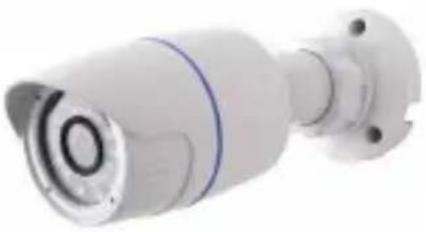
Exterior view of a white surveillance camera with no visible text or symbols| Specifications\Model | WAHD13B |
| Camera | |
| Image Sensor | 1/4 °CMOS |
| Resolution | 1280 x 720 |
| Image System | PAL/NTSC |
| Min. Illumination | 0 Lux (LED ON) |
| Lens | 3.6 mm (2.8 mm, 6 mm optional) |
| IR Distance | 10 - 20 m |
| Water-proof | IP 66 |
| Video Output | BNC x 1 |
| Image Size | 720P (1280 x 720) |
| Frame Rate | 30 fps (60 Hz), 25 fps (50 Hz) |
| Functions | |
| Day & Night | Yes (ICR) |
| S/N Ratio | >52 dB (AGC off) |
| Electronic Shutter | 1 / 50s - 1 / 50000s (PAL);1 / 60s - 1 / 50000s (NTSC) |
| AGC | Yes |
| White Balance | Auto White Balance |
| Others | |
| Power Supply | DC 12V (±10%) |
| Working Environment | -20°C - 50°C, 10% ~ 90% humidity |
| Dimensions (mm) | Φ 64 x 183 |
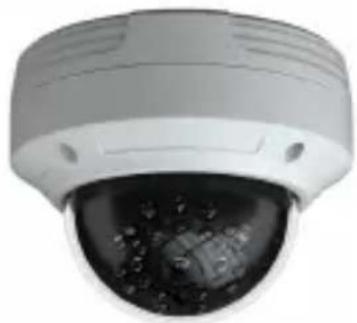
natural_image
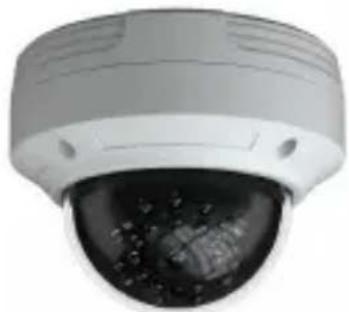
Close-up of a white surveillance camera with a black dome lens and visible sensor array (no text or symbols)| Specifications\Model | WAHD2DV |
| Camera | |
| Image Sensor | 1/3 °CMOS |
| Resolution | 1920 x 1080 |
| Image System | PAL/NTSC |
| Min. Illumination | 0 Lux (LED ON) |
| Lens | 2.8 ~ 12 mm |
| IR Distance | 20 ~ 30m optional |
| Water-proof | IP66 |
| Video Output | BNC x 1 |
| Image Size | 1080P (1920 x 1080) |
| Frame Rate | 30 fps (60 Hz), 25 fps (50 Hz) |
| Functions | |
| Screen Display | 12 languages supported |
| Function Control | OSD |
| Day&Night | Yes (ICR) |
| BLC & HLC | Yes |
| Defog | Yes |
| WDR | Yes |
| 3D NR | Yes |
| Motion Detection | Up to 4 areas |
| Privacy Mask | Up to 8 areas |
| Defect Correction | Yes (support live and static defective pixel correction) |
| S/N Ratio | >52 dB (AGC off) |
| Electronic Shutter | 1/50s ~ 1/50000s (PAL);1/60s ~ 1/50000s (NTSC) |
| AGC | Yes |
| White Balance | ATW, AWC→SET, Indoor, Outdoor, Manual |
| Advanced Image | Sharpness, saturation, brightness, etc.are adjustable |
| Mirror | Yes |
| Smart IR | Yes |
| Others | |
| Power Supply | DC 12V (±10%) |
| Working Environment | -20°C - 50°C, 10% - 90% humidity |
| Dimensions (mm) | Φ150 x 114 |
| Weight (net) | 907g |
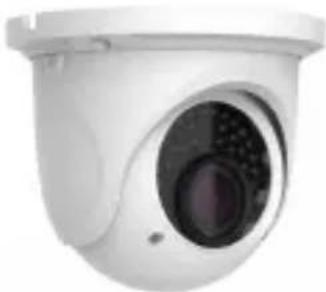
natural_image
Close-up of a white surveillance camera with a circular lens and mounted head (no visible text or symbols)| Specifications\Model | WAHD2EBV |
| Camera | |
| Image Sensor | 1/3 °CMOS |
| Resolution | 1920 x 1080 |
| Image System | PAL/NTSC |
| Min. Illumination | 0 Lux (LED ON) |
| Lens | 2.8~12 mm |
| IR Distance | 20-30 m |
| Water-proof | IP66 |
| Video Output | BNC x 1 |
| Image Size | 1080P (1920 x 1080) |
| Frame Rate | 30 fps (60 Hz), 25 fps (50 Hz) |
| Functions | |
| Screen Display | 12 languages supported |
| Function Control | OSD |
| Day & Night | Yes (ICR) |
| BLC & HLC | Yes |
| Defog | Yes |
| WDR | Yes |
| 3D NR | Yes |
| Motion Detection | Up to 4 areas |
| Privacy Mask | Up to 8 areas |
| Defect Correction | Yes (support live and static defective pixel correction) |
| S/N Ratio | >52 dB (AGC off) |
| Electronic Shutter | 1/50s - 1/50000s (PAL);1/60s - 1/50000s (NTSC) |
| AGC | Yes |
| White Balance | ATW, AWC=SET, Indoor, Outdoor, Manual |
| Advanced Image | Sharpness, saturation, brightness, etc.are adjustable |
| Mirror | Yes |
| Smart IR | Yes |
| Others | |
| Power Supply | DC 12V (±10%) |
| Working Environment | -20°C ~ 50°C, 10% ~ 90% humidity |
| Dimensions (mm) | Φ 109 x 130 |
| Weight (net) | 663g |
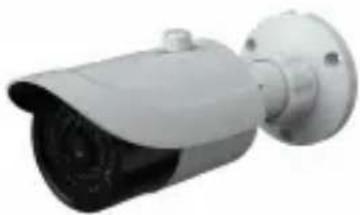
natural_image
Exterior view of a security camera (no visible text or symbols)| Specifications\Model | WAHD2BV |
| Camera | |
| Image Sensor | 1/3 °CMOS |
| Resolution | 1920 x 1080 |
| Image System | PAL / NTSC |
| Min. Illumination | 0 Lux (LED ON) |
| Lens | 2.8~12 mm |
| IR Distance | 20~30 m |
| Water-proof | IP66 |
| Video Output | BNC x 1 |
| Image Size | 1080P (1920 x 1080) |
| Frame Rate | 30 fps (60 Hz), 25 fps (50 Hz) |
| Functions | |
| Screen Display | 12 languages supported |
| Function Control | OSD |
| Day & Night | Yes (ICR) |
| BLC & HLC | Yes |
| Defog | Yes |
| WDR | Yes |
| 3D NR | Yes |
| Motion Detection | Up to 4 areas |
| Privacy Mask | Up to 8 areas |
| Defect Correction | Yes (support live and static defective pixel correction) |
| S/N Ratio | >52 dB (AGC off) |
| Electronic Shutter | 1/50s - 1/50000s (PAL);1/60s - 1/50000s (NTSC) |
| AGC | Yes |
| White Balance | ATW, AWC-SET, Indoor, Outdoor, Manual |
| Advanced Image | Sharpness, saturation, brightness, etc.are adjustable |
| Mirror | Yes |
| Smart IR | Yes |
| Others | |
| Power Supply | DC 12V (±10%) |
| Working Environment | -20°C ~ 50°C, 10% ~ 90% humidity |
| Dimensions (mm) | Φ87 x 219 |
| Weight (net) | 554g |
natural_image
Close-up of a white security camera with a spherical lens showing internal components (no text or symbols visible)| Specifications\Model | WAHD2D |
| Camera | |
| Image Sensor | 1/3 °CMOS |
| Resolution | 1920 x 1080 |
| Image System | PAL / NTSC |
| Min. Illumination | 0 Lux (LED ON) |
| Lens | 3.6 mm |
| IR Distance | 10 - 20m optional |
| Water-proof | IP66 |
| Video Output | BNC x 1 |
| Image Size | 1080P (1920 x 1080) |
| Frame Rate | 30 fps (60 Hz), 25 fps (50 Hz) |
| Functions | |
| Screen Display | 12 languages supported |
| Function Control | OSD |
| Day&Night | Yes (ICR) |
| BLC & HLC | Yes |
| Defog | Yes |
| WDR | Yes |
| 3D NR | Yes |
| Motion Detection | Up to 4 areas |
| Privacy Mask | Up to 8 areas |
| Defect Correction | Yes (support live and static defective pixel correction) |
| S / N Ratio | >52 dB (AGC off) |
| Electronic Shutter | 1/50s ~ 1/50000s (PAL);1/60s ~ 1/50000s (NTSC) |
| AGC | Yes |
| White Balance | ATW, AWC→SET, Indoor, Outdoor, Manual |
| Advanced Image | Sharpness, saturation, brightness, etc.are adjustable |
| Mirror | Yes |
| Smart IR | Yes |
| Others | |
| Power Supply | DC 12V (±10%) |
| Working Environment | -20°C ~ 50°C, 10% ~ 90% humidity |
| Dimensions (mm) | Φ 116 x 91 |
| Weight (net) | 515g |
natural_image
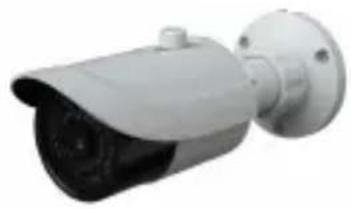
Exterior view of a security camera (no visible text or symbols)| Specifications\Model | WAHD2LBV |
| Camera | |
| Image Sensor | 1/3 °CMOS |
| Resolution | 1920 x 1080 |
| Image System | PAL/NTSC |
| Min. Illumination | 0 Lux (LED ON) |
| Lens | 2.8 - 12 mm |
| IR Distance | 30 - 50 m |
| Water-proof | IP66 |
| Video Output | BNC x 1 |
| Image Size | 1080P (1920 x 1080) |
| Frame Rate | 30 fps (60 Hz), 25 fps (50 Hz) |
| Functions | |
| Screen Display | 12 languages supported |
| Function Control | OSD |
| Day & Night | Yes (ICR) |
| BLC & HLC | Yes |
| Defog | Yes |
| WDR | Yes |
| 3D NR | Yes |
| Motion Detection | Up to 4 areas |
| Privacy Mask | Up to 8 areas |
| Defect Correction | Yes (support live and static defective pixel correction) |
| S/N Ratio | >52 dB (AGC off) |
| Electronic Shutter | 1/50s ~ 1/50000s (PAL):1/60s ~ 1/50000s (NTSC) |
| AGC | Yes |
| White Balance | ATW, AWC→SET, Indoor, Outdoor, Manual |
| Advanced Image | Sharpness, saturation, brightness, etc.are adjustable |
| Mirror | Yes |
| Smart IR | Yes |
| Others | |
| Power Supply | DC 12V (±10%) |
| Working Environment | -20°C ~ 50°C, 10% ~ 90% humidity |
| Dimensions (mm) | Φ 109 x 284 |
| Weight (net) | 1010g |
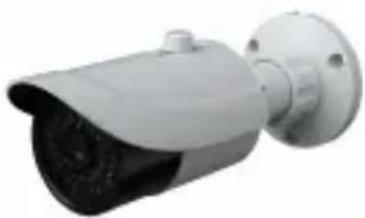
natural_image
Exterior view of a security camera (no visible text or symbols)| Specifications\Model | WAHD2B |
| Camera | |
| Image Sensor | 1/3 °CMOS |
| Resolution | 1920 x 1080 |
| Image System | PAL / NTSC |
| Min. Illumination | 0 Lux (LED ON) |
| Lens | 3.6 mm) |
| IR Distance | 20~30 m |
| Water-proof | IP66 |
| Video Output | BNC x 1 |
| Image Size | 1080P (1920 x 1080) |
| Frame Rate | 30 fps (60 Hz), 25 fps (50 Hz) |
| Functions | |
| Screen Display | 12 languages supported |
| Function Control | OSD |
| Day & Night | Yes (ICR) |
| BLC & HLC | Yes |
| Defog | Yes |
| WDR | Yes |
| 3D NR | Yes |
| Motion Detection | Up to 4 areas |
| Privacy Mask | Up to 8 areas |
| Defect Correction | Yes (support live and static defective pixel correction) |
| S/N Ratio | >52 dB (AGC off) |
| Electronic Shutter | 1/50s ~ 1/50000s (PAL);1/60s ~ 1/50000s (NTSC) |
| AGC | Yes |
| White Balance | ATW, AWC→SET, Indoor, Outdoor, Manual |
| Advanced Image | Sharpness, saturation, brightness, etc.are adjustable |
| Mirror | Yes |
| Smart IR | Yes |
| Others | |
| Power Supply | DC 12V (±10%) |
| Working Environment | -20°C ~ 50°C, 10% ~ 90% humidity |
| Dimensions (mm) | Φ87 x 219 |
| Weight (net) | 554g |

GENIE CCTV LTD.
CCTV House, City Park, Watchmead, Welwyn Garden City, Hertfordshire, AL7 ILT
Tel: +44 (0) 1707 330541 Fax: +44 (0) 1707 330543
www.geniecctv.com
Edition Aug 2015