GCB01HD - Unspecified Genie - Free user manual and instructions
Find the device manual for free GCB01HD Genie in PDF.


| Product Type | Garage Door Opener |
| Model | GCB01HD |
| Drive Type | Belt drive |
| Motor Power | 1/2 HP or equivalent |
| Door Compatibility | Residential sectional or one-piece doors up to 7 ft high |
| Max Door Weight | Up to 150 lbs (68 kg) |
| Voltage | 120 V AC, 60 Hz |
| Security Features | Intellicode rolling code technology, safety sensors |
| Smart Home Compatibility | Optional, via Genie Aladdin Connect module |
| Noise Level | Low (belt drive) |
| Emergency Release | Manual disconnect cord |
| Lighting | Integrated dual LED bulbs, automatic on/off |
| Programming | Remote and keypad programmable via learn button |
| Battery Backup | Optional (sold separately) |
| Dimensions (Opener Unit) | Approx. 12 x 8 x 10 inches |
| Weight (Opener Unit) | Approx. 15 lbs |
| Included Accessories | Two remote controls, wall console, safety sensors, hardware kit |
| Warranty | Limited lifetime motor warranty, 1 year on accessories |
| Maintenance | Lubricate moving parts annually, test safety system monthly |
| Repairability | User-replaceable parts: remote, sensors, light bulbs, battery backup |
Frequently Asked Questions - GCB01HD Genie
User questions about GCB01HD Genie
0 question about this device. Answer the ones you know or ask your own.
Ask a new question about this device
Download the instructions for your Unspecified in PDF format for free! Find your manual GCB01HD - Genie and take your electronic device back in hand. On this page are published all the documents necessary for the use of your device. GCB01HD by Genie.
USER MANUAL GCB01HD Genie
HD Ground Loop Isolator
User Manual
1. Introduction
The GCB01HD is a passive high efficient and reliable ground loop isolator for HDCVI / HDTV I / AHD / Analogue Video Signal over Coaxial Cable. It's magnetic isolation technology adoption can effectively solve the interference issues caused by different ground potential during the signal transmission, which improves the video anti-interference capability and effectively eliminate tearing and scrolling pictures. The devices embedded lightning protection system improves the stability.
2. Key Features
• Passive, No Power Required
- Eliminate Video Distortion caused by Ground Loops Circuit
- Eliminate issues such as Image Tearing, Cross-Talk, Rolling etc.
- Fully Compatible with HDCVI, HDTV1, AHD, Analogue Video Signals
• Built-In 800v Insulated Voltage
• Excellent Anti-interference Capability, Superior Lighting-Protection, ESD and EFT Capability
• Support Unibody, with Small Volume
2. Technical Specification
| Model Number GCB01HD | |
| Insertion Loss 0.5dB | |
| Frequency Response 5Hz-70MHz | |
| Input Impedance 75Ω | |
| Output Impedance 75Ω | |
| Isolation Voltage 800V (Minimum) | |
| Isolation Resistance 100M Ω | |
| Surge Protection Level3 Per IEC61000-4-5 | |
| ESD Protection Contact Discharge: 6KV, | Air Discharge: 8KV, Per IEC61000-4-2 |
| Operation Temperature -10°C ~ 55°C | |
| Storage Temperature -40°C ~ 85°C | |
| Humidity 0~95% (Non-Condensing) | |
| Dimensions (L × W × H) 41 x 24.5 x 21.6 | mm |
| Weight | 51g |
*Design and Specifications are subject to change without notice.
3. Board Diagram

4. Application Diagram
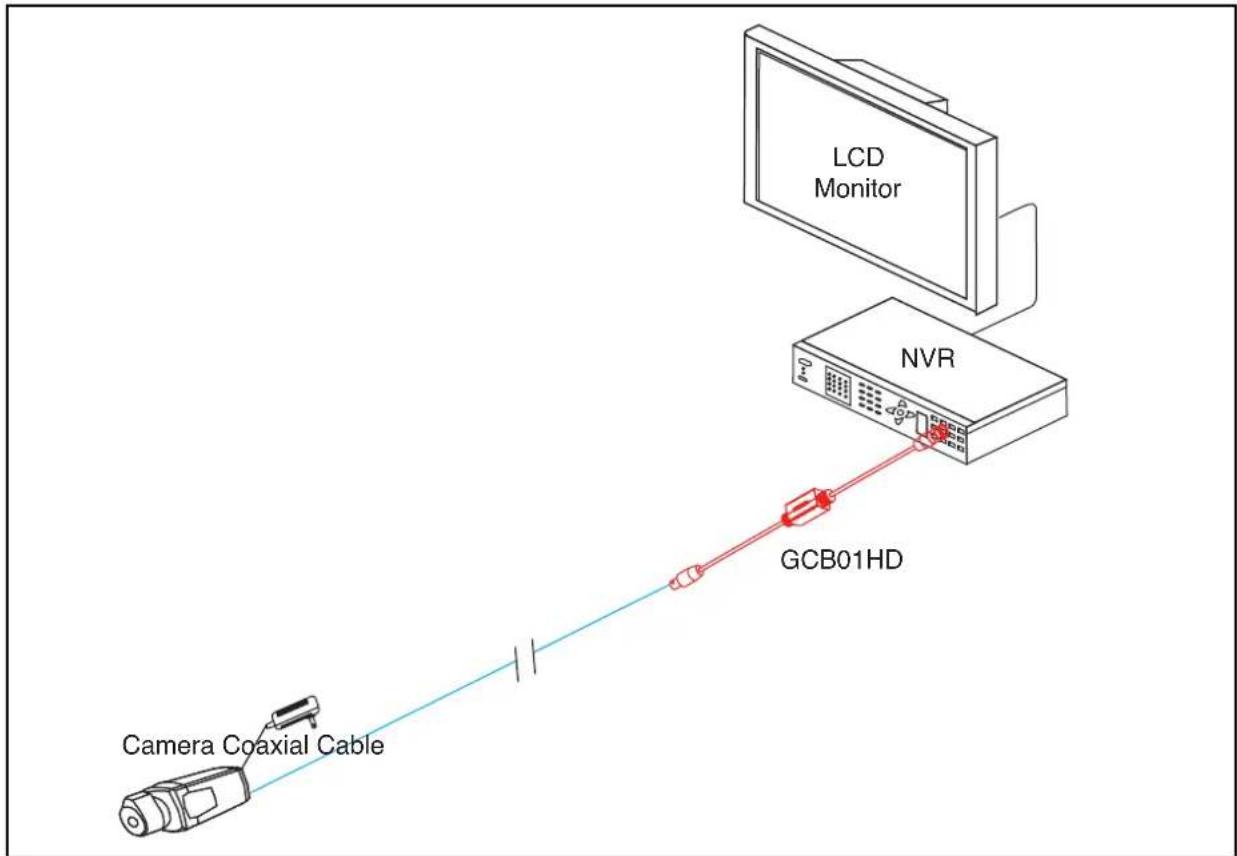
NOTE
Please use RG59 or above Coaxial Cable or CAT5e/6 Cable to reach the longest transmission distance.
5. Installation Steps
- Turn off the power supply of all the related devices before the installation to prevent damage to the product.
- Check if the coaxial cable and other transmission lines are occupied by other devices.
- Connect the Male BNC of the device to the NVR.
- Connect the Female BNC of the device to the camera with coaxial cable.
- Check if the device is working and that the installation is correct. Make sure all connections are reliable.
- Power on the system.
- Make sure the system can work regularly.
6. Troubleshooting
Please follow below if the device doesn't work:
- Please make sure you have followed the instruction to install the device.
- The transmission distance depends on the signal source and cable quality, please do not exceed the maximum transmission distance.
- Please replace a failure device with a proper one to check if the device is damaged.
- If the problem still exists, please contact the dealer.

GENIE CCTV LTD.
CCTV House, City Park, Watchmead, Welwyn Garden City, Hertfordshire, AL7 ILT
Tel: +44 (0) 1707 330541 Fax: +44 (0) 1707 330543
www.geniecctv.com